change wheel NISSAN QASHQAI 2016 Owner´s Manual
[x] Cancel search | Manufacturer: NISSAN, Model Year: 2016, Model line: QASHQAI, Model: NISSAN QASHQAI 2016Pages: 338, PDF Size: 4.87 MB
Page 181 of 338
be able to detect or signal low tyre pressure as
intended. TPMS malfunctions may occur for a vari-
ety of reasons including the installation of replace-
ment or alternate tyres or wheels on the vehicle that
prevent the TPMS from functioning properly. Always
check the TPMS indicator light after replacing one
or more tyres or wheels on your vehicle to ensure
that the replacement or alternate tyres and wheels
allow the TPMS to continue to function properly.
•The TPMS does not monitor the tyre pressure of
the spare tyre.
•The TPMS will activate only when the vehicle is
driven at speeds above 25 km/h (16 MPH). Also,
this system may not detect a sudden drop in tyre
pressure (for example a flat tyre while driving).
•The TPMS indicator light may not automatically
turn off when the tyre pressure is adjusted.After
the tyre is inflated to the recommended COLD
tyre pressure, drive the vehicle at speeds above
25 km/h (16 MPH) to activate the TPMS. See
“TPMS sensor ID and position recognition” later
in this section
•Following a change in the outside temperature,
the TPMS indicator light may illuminate even if
the tyre pressure has been adjusted properly.
Adjust the tyre pressure to the recommended
COLD tyre pressure again when the tyres are
cold, and reset the TPMS.
For additional information, see “[Check cold tyre]
message” later in this section.
WARNING
•If the TPMS indicator light illuminates while
driving:
– avoid sudden steering manoeuvres
– avoid abrupt braking
– reduce vehicle speed
– pull off the road to a safe location
– stop the vehicle as soon as possible
•Driving with under-inflated tyres may perma-
nently damage the tyres and increase the like-
lihood of tyre failure. Serious vehicle damage
could occur which may lead to an accident
and could result in serious personal injury.
•Check the tyre pressure for all four tyres. Ad-
just the tyre pressure to the recommended
COLD tyre pressure shown on the tyre plac-
ard to turn the TPMS indicator light “OFF”. In
case of a flat tyre, replace it with a spare tyre
as soon as possible. (See “Flat tyre” in the
“6. In case of emergency” section for chang-
ing a flat tyre.)
•When a spare tyre is mounted or a wheel is
replaced, the TPMS will not function and the
TPMS indicator light will flash for approxi-
mately 1 minute. The light will remain on after
1 minute. Be sure to follow all instructions for
wheel replacement and mount the TPMS sys-
tem correctly.
•Replacing tyres with those not originally speci-
fied by NISSAN could affect the proper opera-
tion of the TPMS.
•The Genuine NISSAN Emergency Tyre Repair
Sealant or equivalent can be used for tempo-
rarily repairing a tyre. Do not inject any other
tyre liquid or aerosol tyre sealant into the
tyres, as this may cause a malfunction of the
tyre pressure sensors.
•NISSAN recommends using only Genuine
NISSAN Emergency Tyre Sealant provided
with your vehicle. Other tyre sealants may
damage the valve stem seal which can cause
the tyre to lose air pressure. Visit a NISSAN
dealer or qualified workshop as soon as pos-
sible after using tyre repair sealant (for mod-
els equipped with the emergency tyre punc-
ture repair kit).
CAUTION
•The TPMS may not function properly when the
wheels are equipped with tyre chains or the
wheels are buried in snow.
•Do not place metalised film or any metal parts
(antenna, etc.) on the windows. This may
cause poor reception of the signals from the
tyre pressure sensors, and the TPMS will not
function properly.
Starting and driving5-5
Page 182 of 338
Some devices and transmitters may tempo-
rarily interfere with the operation of the TPMS
and cause the TPMS indicator light to illumi-
nate. Some examples are:
– Facilities or electric devices using similar
radio frequencies are near the vehicle.
– If a transmitter set to similar frequencies is
being used in or near the vehicle.
– If a computer (or similar equipment) or a
DC/AC converter is being used in or near
the vehicle.
– If devices which transmit electrical noise
are connected to the vehicle’s 12V power
supply.
•When inflating the tyres and checking the tyre
pressure, never bend the valves.
•Special aluminium valves are fitted to mount
the TPMS sensors on the wheels. The TPMS
sensor is fixed at the wheels by a nut. The nut
needs to be correctly fitted at a torque setting
of 7.5 ± 0.5 N•m. If the TPMS sensor is tight-
ened exceeding the limit, there is a possibility
the sensor grommet will be damaged. If the
sensor is tightened under the limit, there is a
possibility of causing an air leak.
•Use Genuine NISSAN valve caps that comply
with the factory-fitted valve cap specifications.
•Do not use metal valve caps.
•Fit the valve caps properly. Without the valve
caps the valve and tyre pressure monitor sen-
sors could be damaged.
•Do not damage the valves and sensors when
storing the wheels or fitting different tyres.
•Replace the sensor grommet and washer dur-
ing a tyre change. Once they have been re-
moved, the sensor grommet and washer can-
not be reused and must be replaced. The
TPMS sensors can be used again.
•Use caution when using tyre inflation equip-
ment with a rigid air supply tube, as leverage
applied by the long nozzle can damage the
valve stem.
5-6Starting and driving
Page 183 of 338
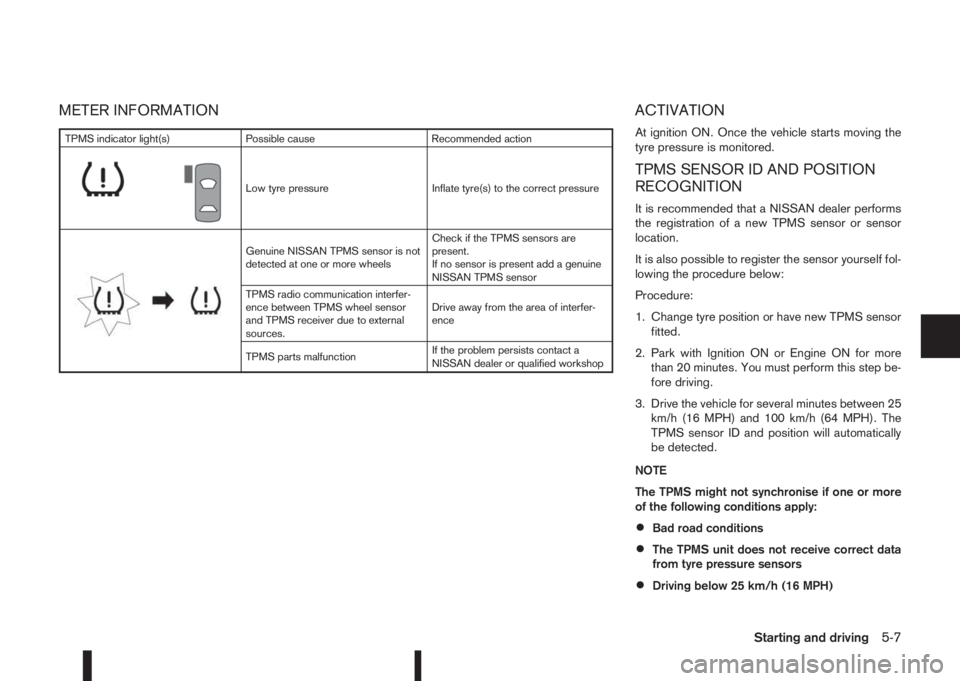
METER INFORMATION ACTIVATION
At ignition ON. Once the vehicle starts moving the
tyre pressure is monitored.
TPMS SENSOR ID AND POSITION
RECOGNITION
It is recommended that a NISSAN dealer performs
the registration of a new TPMS sensor or sensor
location.
It is also possible to register the sensor yourself fol-
lowing the procedure below:
Procedure:
1. Change tyre position or have new TPMS sensor
fitted.
2. Park with Ignition ON or Engine ON for more
than 20 minutes. You must perform this step be-
fore driving.
3. Drive the vehicle for several minutes between 25
km/h (16 MPH) and 100 km/h (64 MPH). The
TPMS sensor ID and position will automatically
be detected.
NOTE
The TPMS might not synchronise if one or more
of the following conditions apply:
•Bad road conditions
•The TPMS unit does not receive correct data
from tyre pressure sensors
•Driving below 25 km/h (16 MPH)
TPMS indicator light(s) Possible cause Recommended action
m
Low tyre pressure Inflate tyre(s) to the correct pressure
m
Genuine NISSAN TPMS sensor is not
detected at one or more wheelsCheck if the TPMS sensors are
present.
If no sensor is present add a genuine
NISSAN TPMS sensor
TPMS radio communication interfer-
ence between TPMS wheel sensor
and TPMS receiver due to external
sources.Drive away from the area of interfer-
ence
TPMS parts malfunctionIf the problem persists contact a
NISSAN dealer or qualified workshop
Starting and driving5-7
Page 190 of 338
If the battery of the vehicle is discharged, the push-
button ignition switch cannot be moved from the
LOCK position.
OFF position
The ignition switch is in the OFF position when the
engine is turned off using the ignition switch. No
lights will illuminate on the ignition switch.
ACC position
With the vehicle in the P (Park) position, the Intelli-
gent key with you and the ignition placed from ON
to OFF, the radio can still be used for a period of
time, or until the driver’s door is opened.
After a period of time, functions such as radio, navi-
gation, and Bluetooth® Hands-Free Phone System
may be restarted by pressing the “POWER button/
VOLUME control knob” (See “Monitor, climate, au-
dio, phone and voice recognition systems” in this
manual) or the keyfob unlock button up to a total of
30 minutes.
EMERGENCY ENGINE SHUT OFF
To shut off the engine in an emergency situation
while driving, perform the following procedure:
•Rapidly push the push-button ignition switch 3
consecutive times in less than 1.5 seconds, or
•Push and hold the push-button ignition switch
for more than 2 seconds.
STEERING LOCK
The ignition switch is equipped with an anti-theft
steering lock device.
To lock steering wheel
1. Push the ignition switch to the “OFF” position
where the ignition switch position indicator will
not illuminate.
2. Open or close the door. The ignition switch turns
to the “LOCK” position.
3. Turn the steering wheel 1/6 of a turn to the right
or left from the straight up position.
To unlock steering wheel
Push the ignition switch to “ACC”, and the steering
wheel will be automatically unlocked.
CAUTION
•If the battery of the vehicle is discharged, the
push-button ignition switch cannot be
switched from the “LOCK” position.
•If the ignition switch position does not change
from the “LOCK” position, push the ignition
switch again while rotating the steering wheel
slightly to the right and left.
INTELLIGENT KEY BATTERY
DISCHARGE
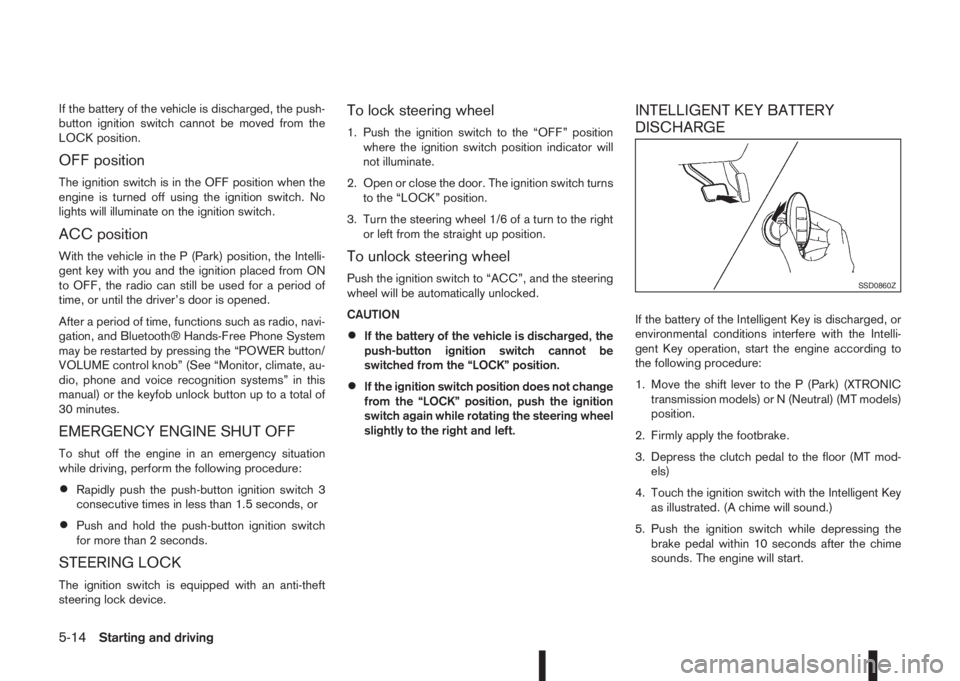
If the battery of the Intelligent Key is discharged, or
environmental conditions interfere with the Intelli-
gent Key operation, start the engine according to
the following procedure:
1. Move the shift lever to the P (Park) (XTRONIC
transmission models) or N (Neutral) (MT models)
position.
2. Firmly apply the footbrake.
3. Depress the clutch pedal to the floor (MT mod-
els)
4. Touch the ignition switch with the Intelligent Key
as illustrated. (A chime will sound.)
5. Push the ignition switch while depressing the
brake pedal within 10 seconds after the chime
sounds. The engine will start.
SSD0860Z
5-14Starting and driving
Page 193 of 338
•If it becomes necessary to start the engine
with a booster battery and jumper cables,
the instructions and cautions contained in
the “6. In case of emergency” section
should be carefully followed.
7. After starting, allow the engine to idle for at least
30 seconds to warm-up. Drive at moderate
speeds for a short distance first, especially in
cold weather.
CAUTION
Do not leave the vehicle unattended while the
engine is warming up.
8. To stop the engine:
– Manual transmission models: apply the park-
ing brake and push or turn the ignition switch
to the “OFF” position.
– XTRONIC transmission models: move the
shift lever to the P (Park) position, apply the
parking brake and push or turn the ignition
switch to the “OFF” position.
9. Rotate the steering wheel left to lock the steering
wheel.DRIVING WITH MANUAL
TRANSMISSION
CAUTION
•Do not rest your foot on the clutch pedal while
driving. This may cause clutch damage.
•Stop your vehicle completely before shifting
into the R (Reverse) position.
•When you are shifting from one gear to an-
other, be certain to depress the clutch pedal
all the way to the floor to avoid clashing or
chipping the gears.
•Avoid abrupt starts and acceleration for your
safety.
•When quick acceleration is required for some
reason, shift to a lower gear and accelerate
until the vehicle reaches the maximum speed
in each gear. Do not exceed the speed limit of
any gear. Pay special attention when acceler-
ating or when shifting into a lower gear on
slippery surfaces. Sudden acceleration or
down shifting could cause the wheels to skid
and result in loss of control.
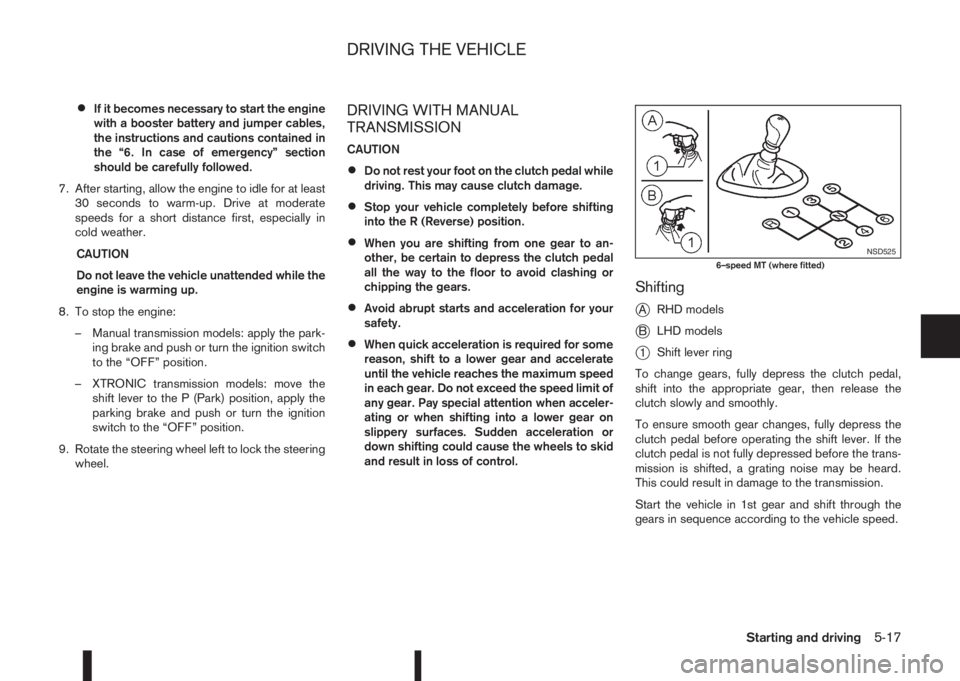
Shifting
j
ARHD models
jBLHD models
j1Shift lever ring
To change gears, fully depress the clutch pedal,
shift into the appropriate gear, then release the
clutch slowly and smoothly.
To ensure smooth gear changes, fully depress the
clutch pedal before operating the shift lever. If the
clutch pedal is not fully depressed before the trans-
mission is shifted, a grating noise may be heard.
This could result in damage to the transmission.
Start the vehicle in 1st gear and shift through the
gears in sequence according to the vehicle speed.
NSD5256–speed MT (where fitted)
DRIVING THE VEHICLE
Starting and driving5-17
Page 203 of 338
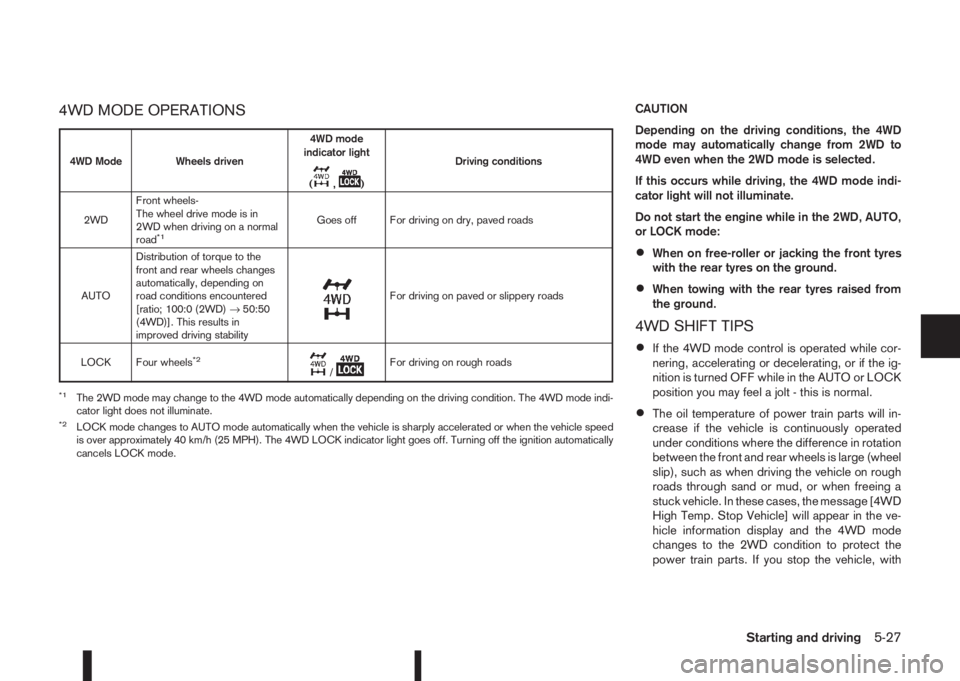
4WD MODE OPERATIONSCAUTION
Depending on the driving conditions, the 4WD
mode may automatically change from 2WD to
4WD even when the 2WD mode is selected.
If this occurs while driving, the 4WD mode indi-
cator light will not illuminate.
Do not start the engine while in the 2WD, AUTO,
or LOCK mode:
•When on free-roller or jacking the front tyres
with the rear tyres on the ground.
•When towing with the rear tyres raised from
the ground.
4WD SHIFT TIPS
•If the 4WD mode control is operated while cor-
nering, accelerating or decelerating, or if the ig-
nition is turned OFF while in the AUTO or LOCK
position you may feel a jolt - this is normal.
•The oil temperature of power train parts will in-
crease if the vehicle is continuously operated
under conditions where the difference in rotation
between the front and rear wheels is large (wheel
slip), such as when driving the vehicle on rough
roads through sand or mud, or when freeing a
stuck vehicle. In these cases, the message [4WD
High Temp. Stop Vehicle] will appear in the ve-
hicle information display and the 4WD mode
changes to the 2WD condition to protect the
power train parts. If you stop the vehicle, with
4WD Mode Wheels driven4WD mode
indicator light
(
m,m)Driving conditions
2WDFront wheels-
The wheel drive mode is in
2WD when driving on a normal
road
*1Goes off For driving on dry, paved roads
AUTODistribution of torque to the
front and rear wheels changes
automatically, depending on
road conditions encountered
[ratio; 100:0 (2WD)→50:50
(4WD)]. This results in
improved driving stability
m
For driving on paved or slippery roads
LOCK Four wheels
*2m/mFor driving on rough roads
*1The 2WD mode may change to the 4WD mode automatically depending on the driving condition. The 4WD mode indi-
cator light does not illuminate.
*2LOCK mode changes to AUTO mode automatically when the vehicle is sharply accelerated or when the vehicle speed
is over approximately 40 km/h (25 MPH). The 4WD LOCK indicator light goes off. Turning off the ignition automatically
cancels LOCK mode.
Starting and driving5-27
Page 204 of 338
the engine idling, and wait until the warning mes-
sage is no longer displayed, the 4WD mode re-
turns to the AUTO mode.
•Braking distance in 4WD mode is the same as in
2WD mode.
•Even if the mode automatically changes to AUTO
mode, when driving in the LOCK mode, the indi-
cator light stays in the LOCK mode.
CAUTION
•Only use the 4WD mode control when driving
in a straight direction (to select 2WD, AUTO or
LOCK).
•Do not use the 4WD mode control when turn-
ing or reversing.
•Do not use the 4WD mode control with the
front wheels spinning (to select 2WD, AUTO,
or LOCK).
•Be especially careful when starting or driving
on slippery surfaces with the 4WD mode set
to AUTO.
•Never drive on dry hard surface roads in the
LOCK position as this will overload the power
train and may cause serious malfunctions.
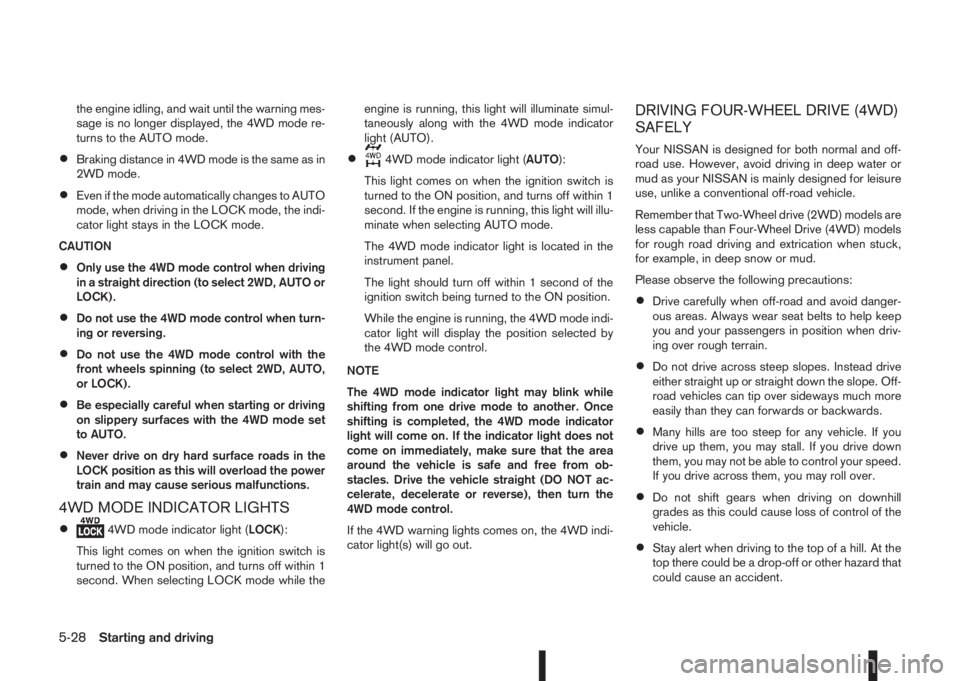
4WD MODE INDICATOR LIGHTS
•4WD mode indicator light (LOCK):
This light comes on when the ignition switch is
turned to the ON position, and turns off within 1
second. When selecting LOCK mode while theengine is running, this light will illuminate simul-
taneously along with the 4WD mode indicator
light (AUTO).
•4WD mode indicator light (AUTO):
This light comes on when the ignition switch is
turned to the ON position, and turns off within 1
second. If the engine is running, this light will illu-
minate when selecting AUTO mode.
The 4WD mode indicator light is located in the
instrument panel.
The light should turn off within 1 second of the
ignition switch being turned to the ON position.
While the engine is running, the 4WD mode indi-
cator light will display the position selected by
the 4WD mode control.
NOTE
The 4WD mode indicator light may blink while
shifting from one drive mode to another. Once
shifting is completed, the 4WD mode indicator
light will come on. If the indicator light does not
come on immediately, make sure that the area
around the vehicle is safe and free from ob-
stacles. Drive the vehicle straight (DO NOT ac-
celerate, decelerate or reverse), then turn the
4WD mode control.
If the 4WD warning lights comes on, the 4WD indi-
cator light(s) will go out.
DRIVING FOUR-WHEEL DRIVE (4WD)
SAFELY
Your NISSAN is designed for both normal and off-
road use. However, avoid driving in deep water or
mud as your NISSAN is mainly designed for leisure
use, unlike a conventional off-road vehicle.
Remember that Two-Wheel drive (2WD) models are
less capable than Four-Wheel Drive (4WD) models
for rough road driving and extrication when stuck,
for example, in deep snow or mud.
Please observe the following precautions:
•Drive carefully when off-road and avoid danger-
ous areas. Always wear seat belts to help keep
you and your passengers in position when driv-
ing over rough terrain.
•Do not drive across steep slopes. Instead drive
either straight up or straight down the slope. Off-
road vehicles can tip over sideways much more
easily than they can forwards or backwards.
•Many hills are too steep for any vehicle. If you
drive up them, you may stall. If you drive down
them, you may not be able to control your speed.
If you drive across them, you may roll over.
•Do not shift gears when driving on downhill
grades as this could cause loss of control of the
vehicle.
•Stay alert when driving to the top of a hill. At the
top there could be a drop-off or other hazard that
could cause an accident.
5-28Starting and driving
Page 207 of 338
mirrors) will illuminate. If the turn signal is then acti-
vated, the system chimes (twice) and the Blind spot
indicator light will start flashing bright orange to alert
you to the presence of vehicle(s) in the adjacent
lane.
The Blind spot indicator light continues to flash until
the detected vehicle(s) leave the detection zone.
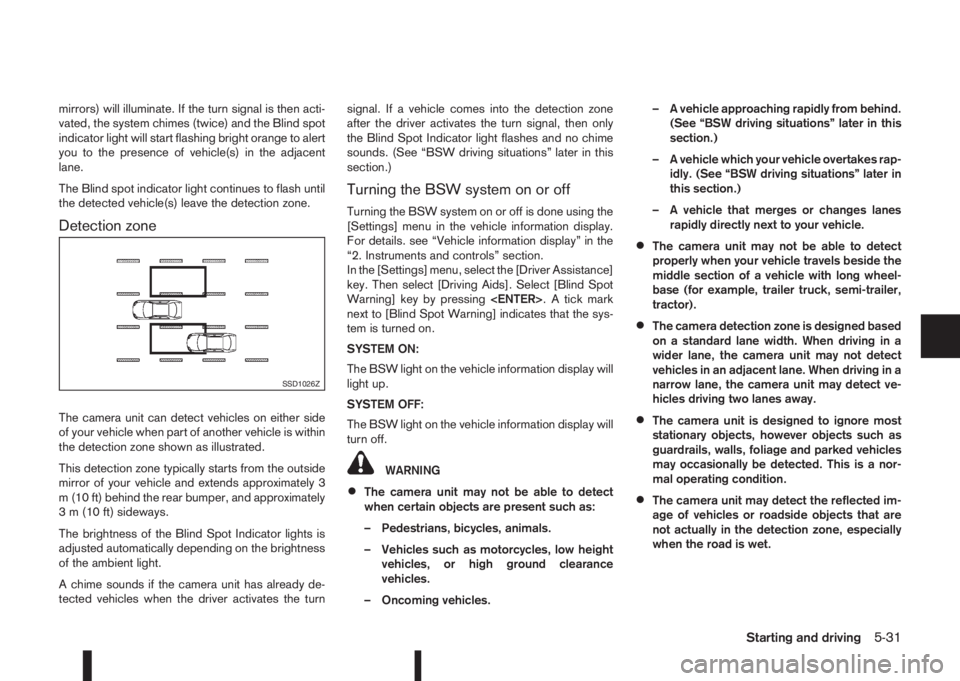
Detection zone
The camera unit can detect vehicles on either side
of your vehicle when part of another vehicle is within
the detection zone shown as illustrated.
This detection zone typically starts from the outside
mirror of your vehicle and extends approximately 3
m (10 ft) behind the rear bumper, and approximately
3 m (10 ft) sideways.
The brightness of the Blind Spot Indicator lights is
adjusted automatically depending on the brightness
of the ambient light.
A chime sounds if the camera unit has already de-
tected vehicles when the driver activates the turnsignal. If a vehicle comes into the detection zone
after the driver activates the turn signal, then only
the Blind Spot Indicator light flashes and no chime
sounds. (See “BSW driving situations” later in this
section.)
Turning the BSW system on or off
Turning the BSW system on or off is done using the
[Settings] menu in the vehicle information display.
For details. see “Vehicle information display” in the
“2. Instruments and controls” section.
In the [Settings] menu, select the [Driver Assistance]
key. Then select [Driving Aids]. Select [Blind Spot
Warning] key by pressing
next to [Blind Spot Warning] indicates that the sys-
tem is turned on.
SYSTEM ON:
The BSW light on the vehicle information display will
light up.
SYSTEM OFF:
The BSW light on the vehicle information display will
turn off.
WARNING
•The camera unit may not be able to detect
when certain objects are present such as:
– Pedestrians, bicycles, animals.
– Vehicles such as motorcycles, low height
vehicles, or high ground clearance
vehicles.
– Oncoming vehicles.– A vehicle approaching rapidly from behind.
(See “BSW driving situations” later in this
section.)
– A vehicle which your vehicle overtakes rap-
idly. (See “BSW driving situations” later in
this section.)
– A vehicle that merges or changes lanes
rapidly directly next to your vehicle.
•The camera unit may not be able to detect
properly when your vehicle travels beside the
middle section of a vehicle with long wheel-
base (for example, trailer truck, semi-trailer,
tractor).
•The camera detection zone is designed based
on a standard lane width. When driving in a
wider lane, the camera unit may not detect
vehicles in an adjacent lane. When driving in a
narrow lane, the camera unit may detect ve-
hicles driving two lanes away.
•The camera unit is designed to ignore most
stationary objects, however objects such as
guardrails, walls, foliage and parked vehicles
may occasionally be detected. This is a nor-
mal operating condition.
•The camera unit may detect the reflected im-
age of vehicles or roadside objects that are
not actually in the detection zone, especially
when the road is wet.
SSD1026Z
Starting and driving5-31
Page 215 of 338
•When additional floor mats are used, be sure
that they are correctly secured and that they
cannot interfere with the accelerator pedal.
Mats not adapted to the vehicle may prevent
proper operation of the speed limiter.
The speed limiter operation switches are located on
the steering wheel (right hand side).
The speed limiter operating condition is shown on
the top of vehicle information display. For details,
see “Vehicle information display” in the “2. Instru-
ments and controls” section.
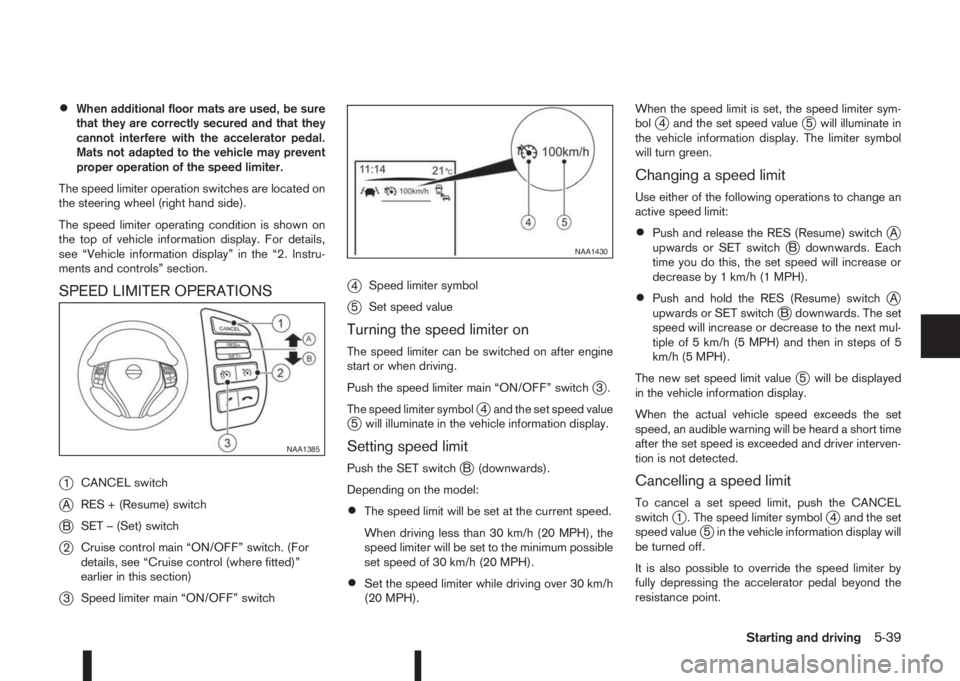
SPEED LIMITER OPERATIONS
j
1CANCEL switch
jARES + (Resume) switch
jBSET – (Set) switch
j2Cruise control main “ON/OFF” switch. (For
details, see “Cruise control (where fitted)”
earlier in this section)
j3Speed limiter main “ON/OFF” switch
j4Speed limiter symbol
j5Set speed value
Turning the speed limiter on
The speed limiter can be switched on after engine
start or when driving.
Push the speed limiter main “ON/OFF” switch
j3.
The speed limiter symbol
j4 and the set speed valuej5 will illuminate in the vehicle information display.
Setting speed limit
Push the SET switchjB (downwards).
Depending on the model:
•The speed limit will be set at the current speed.
When driving less than 30 km/h (20 MPH), the
speed limiter will be set to the minimum possible
set speed of 30 km/h (20 MPH).
•Set the speed limiter while driving over 30 km/h
(20 MPH).When the speed limit is set, the speed limiter sym-
bol
j4 and the set speed valuej5 will illuminate in
the vehicle information display. The limiter symbol
will turn green.
Changing a speed limit
Use either of the following operations to change an
active speed limit:
•Push and release the RES (Resume) switchjA
upwards or SET switchjB downwards. Each
time you do this, the set speed will increase or
decrease by 1 km/h (1 MPH).
•Push and hold the RES (Resume) switchjA
upwards or SET switchjB downwards. The set
speed will increase or decrease to the next mul-
tiple of 5 km/h (5 MPH) and then in steps of 5
km/h (5 MPH).
The new set speed limit value
j5 will be displayed
in the vehicle information display.
When the actual vehicle speed exceeds the set
speed, an audible warning will be heard a short time
after the set speed is exceeded and driver interven-
tion is not detected.
Cancelling a speed limit
To cancel a set speed limit, push the CANCEL
switchj1 . The speed limiter symbolj4 and the set
speed valuej5 in the vehicle information display will
be turned off.
It is also possible to override the speed limiter by
fully depressing the accelerator pedal beyond the
resistance point.
NAA1385
NAA1430
Starting and driving5-39
Page 222 of 338
![NISSAN QASHQAI 2016 Owner´s Manual Using the settings menu
The settings of the parking sensor system can be
changed.
At ignition on (the [Settings] menu is shown in the
display), select
[Driver Assistance] —> [Parking Aids]
or when t](/img/5/40324/w960_40324-221.png "NISSAN QASHQAI 2016 Owner´s Manual Using the settings menu
The settings of the parking sensor system can be
changed.
At ignition on (the [Settings] menu is shown in the
display), select
[Driver Assistance] —> [Parking Aids]
or when t")
Using the settings menu
The settings of the parking sensor system can be
changed.
At ignition on (the [Settings] menu is shown in the
display), select
[Driver Assistance] —> [Parking Aids]
or when the parking sensor screen is displayed,
press the
jB on the steering
wheel. Press the BACK switchjA to return to the
previous item.
The settings menu is shown
Set the following items on or off by selecting (high-
lighted) and pressing the
jB switch on
the steering wheel. When selected a green marker
is shown.
– [Front sensor]:
Switch the front sensors on or off
– [Rear sensor]:
Switch the rear sensors on or off– [Display]:
Switch the parking sensor system automatically
on or off when selecting R (Reverse) gear.
By highlighting the colour of the to be set item:
– Set the volume of the parking sensor system
Select [Volume] and press
•High
•Med.
•Low
– Set the range sensitivity
Select [Range] and press
•Far
•Mid.
•Near
WARNING
Intelligent Parking Assist (IPA) is a guidance sys-
tem for parking procedures. It does not prevent
collisions with objects. Always look through the
windows and check to be sure that it is safe to
move.
The Intelligent Parking Assist (IPA) system controls
steering, guiding the vehicle when parking:
– In a bay
– Parallel to the road
NOTE
The IPA system instructs you to stop, drive for-
wards or drive backwards. Follow the instructions
given by the system.
The IPA system is not able to support parking when
the vehicle speed during the parking manoeuvre is
more than 7 km/h (4 MPH).
CAUTION
Do not use the IPA system under the following
conditions:
•On unpaved roads.
•On snow-covered or frozen roads.
•On uneven roads with slants, bumps, kerb-
stones, wheel tracks, etc.
•At mechanical parking facilities.
•When tyre chains or a spare tyre are installed.
NIC2204
INTELLIGENT PARKING ASSIST
(IPA) (where fitted)
5-46Starting and driving