display NISSAN QASHQAI 2016 Owner´s Manual
[x] Cancel search | Manufacturer: NISSAN, Model Year: 2016, Model line: QASHQAI, Model: NISSAN QASHQAI 2016Pages: 338, PDF Size: 4.87 MB
Page 61 of 338
ENGINE COOLANT TEMPERATURE
GAUGE
The gauge indicates the engine coolant tempera-
ture. The engine coolant temperature should remain
within the normal range
j2.
The engine coolant temperature varies with the out-
side air temperature and driving conditions.
CAUTION
If the gauge exceeds the normal range, stop as
soon as it is safely possible. If the engine has
overheated, continued operation of the vehicle
may seriously damage the engine. See “Engine
overheat” in the “6. In case of emergency” sec-
tion for immediate action.
WARNING
Allow the engine to cool down before removing
the radiator cap to avoid the danger of being
scalded.
INSTRUMENT PANEL BRIGHTNESS
CONTROL
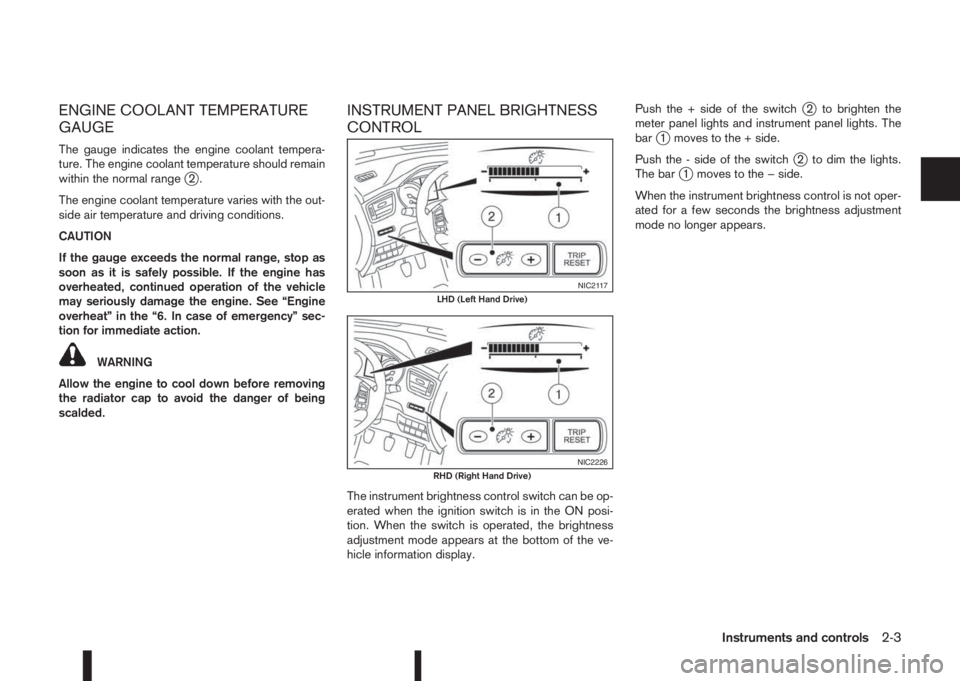
The instrument brightness control switch can be op-
erated when the ignition switch is in the ON posi-
tion. When the switch is operated, the brightness
adjustment mode appears at the bottom of the ve-
hicle information display.Push the + side of the switch
j2 to brighten the
meter panel lights and instrument panel lights. The
bar
j1 moves to the + side.
Push the - side of the switch
j2 to dim the lights.
The barj1 moves to the − side.
When the instrument brightness control is not oper-
ated for a few seconds the brightness adjustment
mode no longer appears.
NIC2117LHD (Left Hand Drive)
NIC2226RHD (Right Hand Drive)
Instruments and controls2-3
Page 62 of 338
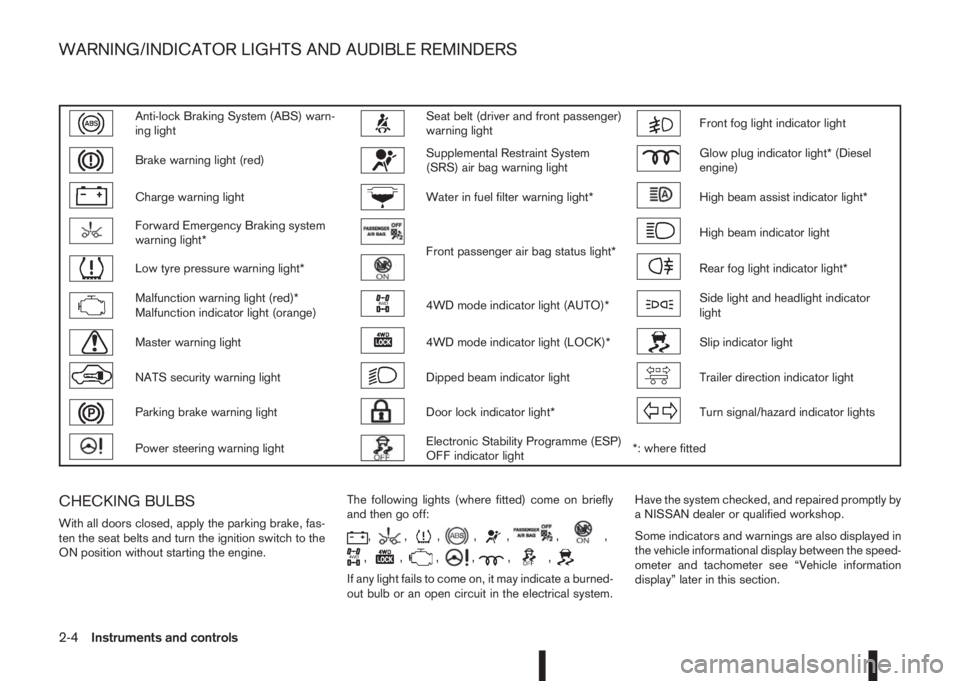
Anti-lock Braking System (ABS) warn-
ing lightSeat belt (driver and front passenger)
warning lightFront fog light indicator light
Brake warning light (red)Supplemental Restraint System
(SRS) air bag warning lightGlow plug indicator light* (Diesel
engine)
Charge warning lightWater in fuel filter warning light*High beam assist indicator light*
Forward Emergency Braking system
warning light*
Front passenger air bag status light*
High beam indicator light
Low tyre pressure warning light*Rear fog light indicator light*
Malfunction warning light (red)*
Malfunction indicator light (orange)4WD mode indicator light (AUTO)*Side light and headlight indicator
light
Master warning light4WD mode indicator light (LOCK)*Slip indicator light
NATS security warning lightDipped beam indicator lightTrailer direction indicator light
Parking brake warning lightDoor lock indicator light*Turn signal/hazard indicator lights
Power steering warning lightElectronic Stability Programme (ESP)
OFF indicator light*: where fitted
CHECKING BULBS
With all doors closed, apply the parking brake, fas-
ten the seat belts and turn the ignition switch to the
ON position without starting the engine.The following lights (where fitted) come on briefly
and then go off:,,,,,,,
,,,,,,
If any light fails to come on, it may indicate a burned-
out bulb or an open circuit in the electrical system.Have the system checked, and repaired promptly by
a NISSAN dealer or qualified workshop.
Some indicators and warnings are also displayed in
the vehicle informational display between the speed-
ometer and tachometer see “Vehicle information
display” later in this section.
WARNING/INDICATOR LIGHTS AND AUDIBLE REMINDERS
2-4Instruments and controls
Page 63 of 338
WARNING LIGHTS
Also see “Vehicle information display” later in this
section.
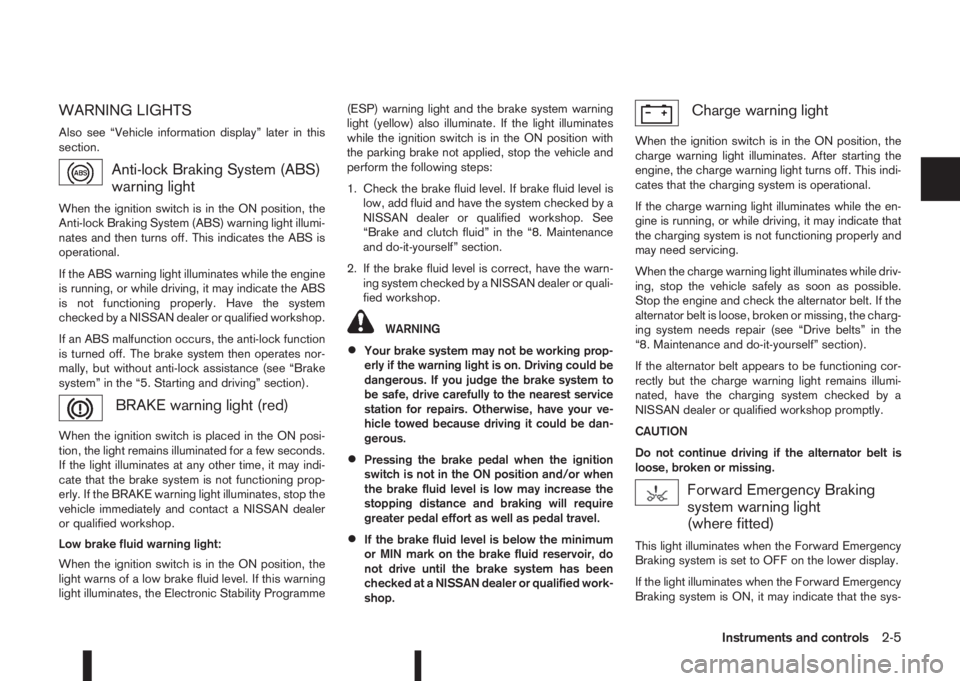
Anti-lock Braking System (ABS)
warning light
When the ignition switch is in the ON position, the
Anti-lock Braking System (ABS) warning light illumi-
nates and then turns off. This indicates the ABS is
operational.
If the ABS warning light illuminates while the engine
is running, or while driving, it may indicate the ABS
is not functioning properly. Have the system
checked by a NISSAN dealer or qualified workshop.
If an ABS malfunction occurs, the anti-lock function
is turned off. The brake system then operates nor-
mally, but without anti-lock assistance (see “Brake
system” in the “5. Starting and driving” section).
BRAKE warning light (red)
When the ignition switch is placed in the ON posi-
tion, the light remains illuminated for a few seconds.
If the light illuminates at any other time, it may indi-
cate that the brake system is not functioning prop-
erly. If the BRAKE warning light illuminates, stop the
vehicle immediately and contact a NISSAN dealer
or qualified workshop.
Low brake fluid warning light:
When the ignition switch is in the ON position, the
light warns of a low brake fluid level. If this warning
light illuminates, the Electronic Stability Programme(ESP) warning light and the brake system warning
light (yellow) also illuminate. If the light illuminates
while the ignition switch is in the ON position with
the parking brake not applied, stop the vehicle and
perform the following steps:
1. Check the brake fluid level. If brake fluid level is
low, add fluid and have the system checked by a
NISSAN dealer or qualified workshop. See
“Brake and clutch fluid” in the “8. Maintenance
and do-it-yourself” section.
2. If the brake fluid level is correct, have the warn-
ing system checked by a NISSAN dealer or quali-
fied workshop.
WARNING
•Your brake system may not be working prop-
erly if the warning light is on. Driving could be
dangerous. If you judge the brake system to
be safe, drive carefully to the nearest service
station for repairs. Otherwise, have your ve-
hicle towed because driving it could be dan-
gerous.
•Pressing the brake pedal when the ignition
switch is not in the ON position and/or when
the brake fluid level is low may increase the
stopping distance and braking will require
greater pedal effort as well as pedal travel.
•If the brake fluid level is below the minimum
or MIN mark on the brake fluid reservoir, do
not drive until the brake system has been
checked at a NISSAN dealer or qualified work-
shop.
Charge warning light
When the ignition switch is in the ON position, the
charge warning light illuminates. After starting the
engine, the charge warning light turns off. This indi-
cates that the charging system is operational.
If the charge warning light illuminates while the en-
gine is running, or while driving, it may indicate that
the charging system is not functioning properly and
may need servicing.
When the charge warning light illuminates while driv-
ing, stop the vehicle safely as soon as possible.
Stop the engine and check the alternator belt. If the
alternator belt is loose, broken or missing, the charg-
ing system needs repair (see “Drive belts” in the
“8. Maintenance and do-it-yourself” section).
If the alternator belt appears to be functioning cor-
rectly but the charge warning light remains illumi-
nated, have the charging system checked by a
NISSAN dealer or qualified workshop promptly.
CAUTION
Do not continue driving if the alternator belt is
loose, broken or missing.
Forward Emergency Braking
system warning light
(where fitted)
This light illuminates when the Forward Emergency
Braking system is set to OFF on the lower display.
If the light illuminates when the Forward Emergency
Braking system is ON, it may indicate that the sys-
Instruments and controls2-5
Page 64 of 338
tem is unavailable. See “Forward emergency brak-
ing system (where fitted)” in the “5. Starting and
driving” section for more details.
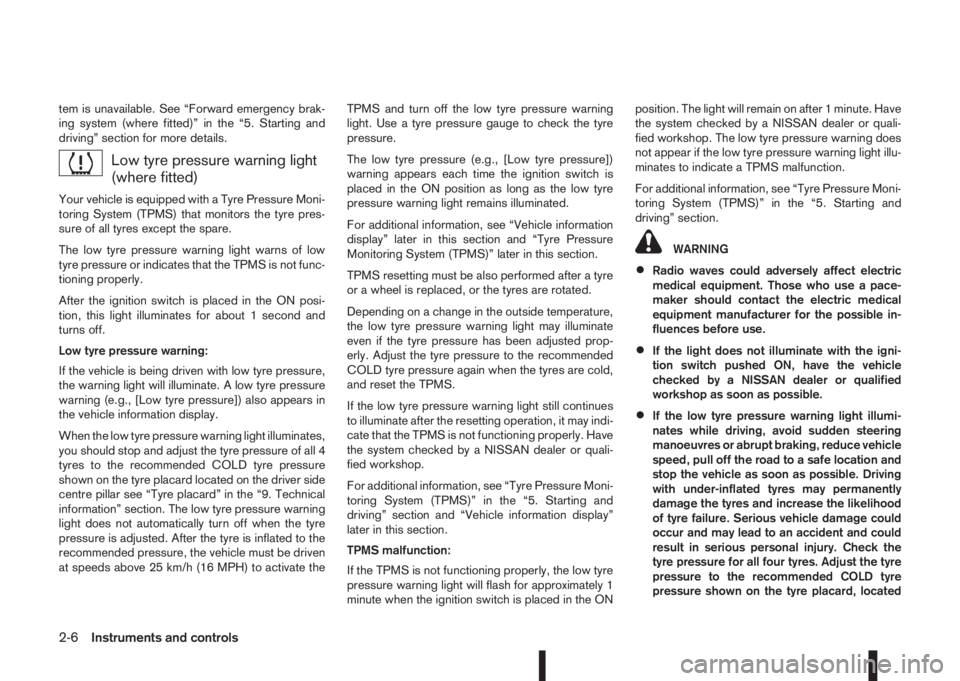
Low tyre pressure warning light
(where fitted)
Your vehicle is equipped with a Tyre Pressure Moni-
toring System (TPMS) that monitors the tyre pres-
sure of all tyres except the spare.
The low tyre pressure warning light warns of low
tyre pressure or indicates that the TPMS is not func-
tioning properly.
After the ignition switch is placed in the ON posi-
tion, this light illuminates for about 1 second and
turns off.
Low tyre pressure warning:
If the vehicle is being driven with low tyre pressure,
the warning light will illuminate. A low tyre pressure
warning (e.g., [Low tyre pressure]) also appears in
the vehicle information display.
When the low tyre pressure warning light illuminates,
you should stop and adjust the tyre pressure of all 4
tyres to the recommended COLD tyre pressure
shown on the tyre placard located on the driver side
centre pillar see “Tyre placard” in the “9. Technical
information” section. The low tyre pressure warning
light does not automatically turn off when the tyre
pressure is adjusted. After the tyre is inflated to the
recommended pressure, the vehicle must be driven
at speeds above 25 km/h (16 MPH) to activate theTPMS and turn off the low tyre pressure warning
light. Use a tyre pressure gauge to check the tyre
pressure.
The low tyre pressure (e.g., [Low tyre pressure])
warning appears each time the ignition switch is
placed in the ON position as long as the low tyre
pressure warning light remains illuminated.
For additional information, see “Vehicle information
display” later in this section and “Tyre Pressure
Monitoring System (TPMS)” later in this section.
TPMS resetting must be also performed after a tyre
or a wheel is replaced, or the tyres are rotated.
Depending on a change in the outside temperature,
the low tyre pressure warning light may illuminate
even if the tyre pressure has been adjusted prop-
erly. Adjust the tyre pressure to the recommended
COLD tyre pressure again when the tyres are cold,
and reset the TPMS.
If the low tyre pressure warning light still continues
to illuminate after the resetting operation, it may indi-
cate that the TPMS is not functioning properly. Have
the system checked by a NISSAN dealer or quali-
fied workshop.
For additional information, see “Tyre Pressure Moni-
toring System (TPMS)” in the “5. Starting and
driving” section and “Vehicle information display”
later in this section.
TPMS malfunction:
If the TPMS is not functioning properly, the low tyre
pressure warning light will flash for approximately 1
minute when the ignition switch is placed in the ONposition. The light will remain on after 1 minute. Have
the system checked by a NISSAN dealer or quali-
fied workshop. The low tyre pressure warning does
not appear if the low tyre pressure warning light illu-
minates to indicate a TPMS malfunction.
For additional information, see “Tyre Pressure Moni-
toring System (TPMS)” in the “5. Starting and
driving” section.
WARNING
•Radio waves could adversely affect electric
medical equipment. Those who use a pace-
maker should contact the electric medical
equipment manufacturer for the possible in-
fluences before use.
•If the light does not illuminate with the igni-
tion switch pushed ON, have the vehicle
checked by a NISSAN dealer or qualified
workshop as soon as possible.
•If the low tyre pressure warning light illumi-
nates while driving, avoid sudden steering
manoeuvres or abrupt braking, reduce vehicle
speed, pull off the road to a safe location and
stop the vehicle as soon as possible. Driving
with under-inflated tyres may permanently
damage the tyres and increase the likelihood
of tyre failure. Serious vehicle damage could
occur and may lead to an accident and could
result in serious personal injury. Check the
tyre pressure for all four tyres. Adjust the tyre
pressure to the recommended COLD tyre
pressure shown on the tyre placard, located
2-6Instruments and controls
Page 65 of 338
on the driver side centre pillar, to turn the low
tyre pressure warning light off. If the light still
illuminates while driving after adjusting the
tyre pressure, a tyre may be flat. If you have a
flat tyre, repair it with the emergency tyre
puncture repair kit (where fitted) or replace it
with a spare tyre (where fitted) as soon as
possible.
•After adjusting the tyre pressure, be sure to
reset the TPMS. Unless the resetting is per-
formed, the TPMS will not warn of the low tyre
pressure correctly.
•When a spare tyre is mounted or a wheel is
replaced, the TPMS will not function and the
low tyre pressure warning light will flash for
approximately 1 minute. The light will remain
on after 1 minute. Contact a NISSAN dealer or
qualified workshop as soon as possible for
tyre replacement and/or system resetting.
•Replacing tyres with those not originally speci-
fied by NISSAN could affect the proper opera-
tion of the TPMS.
CAUTION
•The TPMS is not a substitute for the regular
tyre pressure check. Be sure to check the tyre
pressure regularly.
•If the vehicle is being driven at speeds of less
than 25 km/h (16 MPH), the TPMS may not
operate correctly.
•Be sure to install the specified size of tyres to
all four wheels correctly.
Malfunction warning light (red)
(where fitted)
When the ignition switch is turned to the ON posi-
tion, the malfunction warning light illuminates. This
means the system is operational.
See “Malfunction Indicator light (orange)” later in
this section for details of the orange Malfunction
Indicator light.
If the red malfunction warning light comes on steady
while the engine is running, it may indicate an en-
gine control system malfunction.
Have your vehicle inspected by a NISSAN dealer or
qualified workshop. You do not need to have your
vehicle towed to the dealer.
CAUTION
Continued vehicle operation without having the
engine control system checked and repaired as
necessary could lead to poor driveability,
reduced fuel economy and possible damage to
the engine control system, which may affect your
warranty coverage.
Incorrect setting of the engine control system may
lead to non-compliance of local and national emis-
sion laws and regulations.
Master warning light
When the ignition switch is in the ON position, the
master warning light illuminates if any of the follow-
ing are displayed in the vehicle information display
(see “Vehicle information display” later in this sec-
tion):
•No key warning
•Key ID incorrect warning
•Low windscreen washer fluid warning
•Parking brake release warning
•Door/boot open warning
•Low tyre pressure warning
•Four-Wheel Drive (4WD) warning (where fitted)
•Intelligent Key system warning
If the driver assist system warnings (where fitted)
appear in the vehicle information display, the master
warning light also illuminates. See “Blind Spot Warn-
ing (BSW) system (where fitted)” in the “5. Starting
and driving” section, “Lane Departure Warning
(LDW) system (where fitted)” in the “5. Starting and
driving” section, and/or “Forward emergency brak-
ing system (where fitted)” in the “5. Starting and
driving” section.
Instruments and controls2-7
Page 66 of 338
NATS security warning light
This light blinks when the ignition switch is in the
LOCK, “OFF” or Acc position. This function indi-
cates that your vehicle is equipped with the NISSAN
Anti-Theft System (NATS)*.
If NATS is malfunctioning, this light will remain on
while the ignition switch is in the ON position.
For additional information, see “Security system”
later in this section.
* Immobilizer
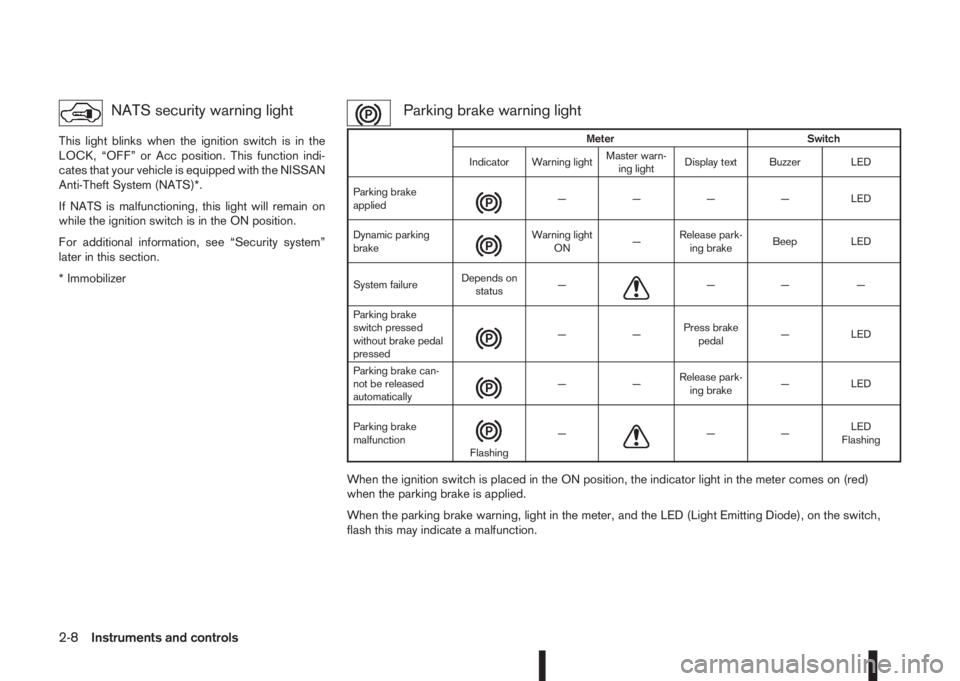
Parking brake warning light
When the ignition switch is placed in the ON position, the indicator light in the meter comes on (red)
when the parking brake is applied.
When the parking brake warning, light in the meter, and the LED (Light Emitting Diode), on the switch,
flash this may indicate a malfunction.
Meter Switch
Indicator Warning lightMaster warn-
ing lightDisplay text Buzzer LED
Parking brake
applied
m— — — — LED
Dynamic parking
brake
m
Warning light
ON—Release park-
ing brakeBeep LED
System failureDepends on
status—
m—— —
Parking brake
switch pressed
without brake pedal
pressed
m——Press brake
pedal— LED
Parking brake can-
not be released
automatically
m——Release park-
ing brake— LED
Parking brake
malfunction
mFlashing—m——LED
Flashing
2-8Instruments and controls
Page 71 of 338
Seat belt reminder chime
A chime will sound for approximately 90 seconds if
the vehicle’s speed exceeds 15 km/h (9 MPH) and
the driver’s seat belt or front passenger’s seat belt,
if occupied (where fitted) is not securely fastened.
See “Seat belt warnings” in the “1. Safety — Seats,
Seat belts and Supplemental Restraint System” sec-
tion.
Key reminder buzzer (Intelligent Key
models)
The external buzzer will beep 3 times if:
•The Intelligent Key is removed from the vehicle
while the ignition is not in the LOCK position.
•The vehicle is being locked remotely or using an
outside door lock switch and the Intelligent Key
has been left inside the vehicle.
Park reminder chime (where fitted)
A chime will sound if the ignition switch is placed in
the LOCK position and the shift lever is not in the P
(Park) position.
Stop/Start System reminder buzzer
(where fitted)
The engine will shift to the normal stopped state if
any of the following operations is made during Stop/
Start System activation, and the Stop/Start System
buzzer will sound if:
– The driver’s seat belt is unfastened and the driv-
er’s door is open (MT models)– The vehicle engine bonnet is open.
When any of the above conditions continues for
over 3 minutes the Stop/Start System buzzer will
sound in 5-minute intervals as a reminder to prevent
the possibility of a dead battery. Use the ignition
switch to turn off the engine.
Close the bonnet or the driver’s door, or fasten the
seat belt then restart the engine using the ignition
switch.
For more information, see “[Stop/Start]” in the “5. In-
struments and controls” section and “Stop/Start
System (where fitted)” in the “5. Starting and driving”
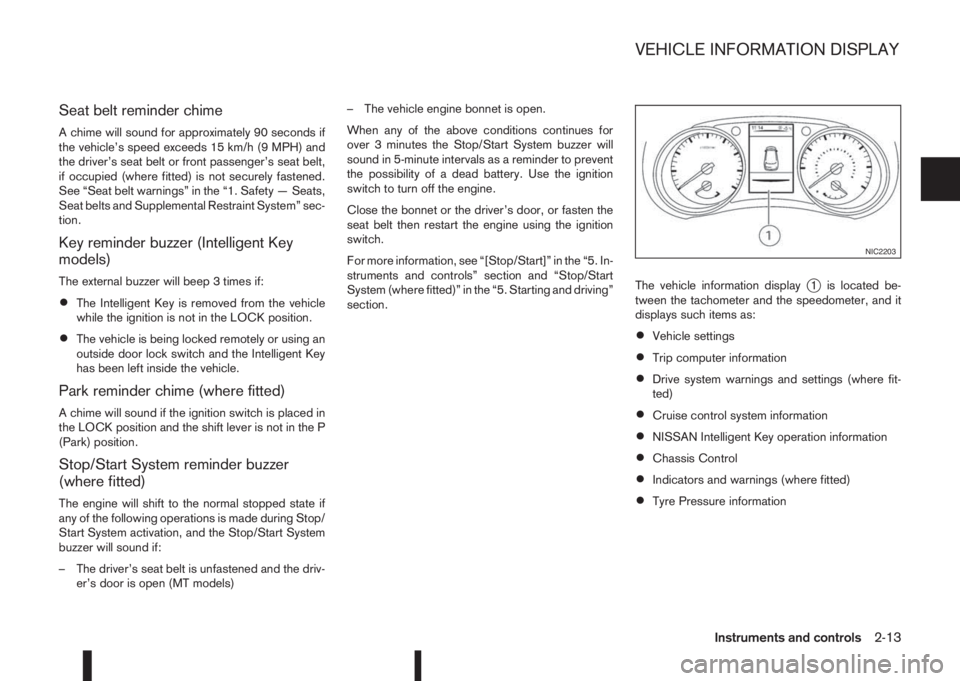
section.The vehicle information display
j1 is located be-
tween the tachometer and the speedometer, and it
displays such items as:
•Vehicle settings
•Trip computer information
•Drive system warnings and settings (where fit-
ted)
•Cruise control system information
•NISSAN Intelligent Key operation information
•Chassis Control
•Indicators and warnings (where fitted)
•Tyre Pressure information
NIC2203
VEHICLE INFORMATION DISPLAY
Instruments and controls2-13
Page 72 of 338
HOW TO USE THE VEHICLE
INFORMATION DISPLAY
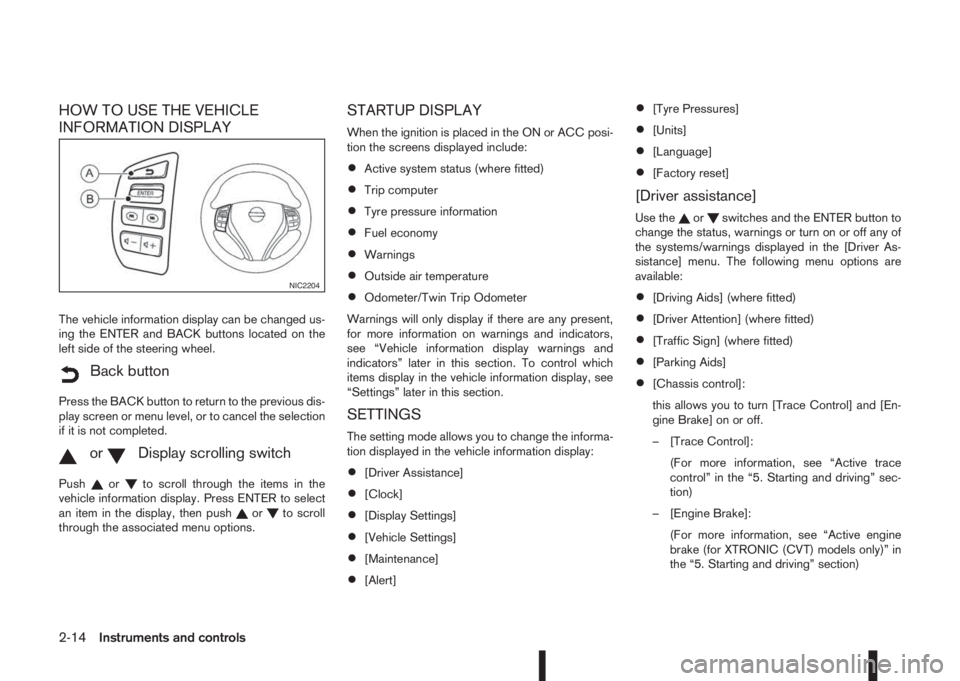
The vehicle information display can be changed us-
ing the ENTER and BACK buttons located on the
left side of the steering wheel.
mBack button
Press the BACK button to return to the previous dis-
play screen or menu level, or to cancel the selection
if it is not completed.
mormDisplay scrolling switch
Pushorto scroll through the items in the
vehicle information display. Press ENTER to select
an item in the display, then push
orto scroll
through the associated menu options.
STARTUP DISPLAY
When the ignition is placed in the ON or ACC posi-
tion the screens displayed include:
•Active system status (where fitted)
•Trip computer
•Tyre pressure information
•Fuel economy
•Warnings
•Outside air temperature
•Odometer/Twin Trip Odometer
Warnings will only display if there are any present,
for more information on warnings and indicators,
see “Vehicle information display warnings and
indicators” later in this section. To control which
items display in the vehicle information display, see
“Settings” later in this section.
SETTINGS
The setting mode allows you to change the informa-
tion displayed in the vehicle information display:
•[Driver Assistance]
•[Clock]
•[Display Settings]
•[Vehicle Settings]
•[Maintenance]
•[Alert]
•[Tyre Pressures]
•[Units]
•[Language]
•[Factory reset]
[Driver assistance]
Use theorswitches and the ENTER button to
change the status, warnings or turn on or off any of
the systems/warnings displayed in the [Driver As-
sistance] menu. The following menu options are
available:
•[Driving Aids] (where fitted)
•[Driver Attention] (where fitted)
•[Traffic Sign] (where fitted)
•[Parking Aids]
•[Chassis control]:
this allows you to turn [Trace Control] and [En-
gine Brake] on or off.
– [Trace Control]:
(For more information, see “Active trace
control” in the “5. Starting and driving” sec-
tion)
– [Engine Brake]:
(For more information, see “Active engine
brake (for XTRONIC (CVT) models only)” in
the “5. Starting and driving” section)
NIC2204
2-14Instruments and controls
Page 73 of 338
![NISSAN QASHQAI 2016 Owner´s Manual •[Steering effort]: this can be set to [Normal] or
[Sport].
The [Driving Aids] option has a sub-menu, from
which you can choose whether or not to have fur-
ther items displayed. These items are:
•](/img/5/40324/w960_40324-72.png "NISSAN QASHQAI 2016 Owner´s Manual •[Steering effort]: this can be set to [Normal] or
[Sport].
The [Driving Aids] option has a sub-menu, from
which you can choose whether or not to have fur-
ther items displayed. These items are:
•")
•[Steering effort]: this can be set to [Normal] or
[Sport].
The [Driving Aids] option has a sub-menu, from
which you can choose whether or not to have fur-
ther items displayed. These items are:
•[Lane] (Lane Departure Warning system)
•[Blind Spot] Blind Spot Warning system)
•[Emergency Brake] (Forward Emergency Brake
system)
The [Driver Attention] option can be used to activate
or deactivate the Driver Attention Support feature
(where fitted). This system is able to detect whether
the driver is displaying a lack of attention, or is dis-
tracted. It does this by monitoring driving style, and
steering behaviour, and it notes deviations from the
normal pattern. If the system detects that driver at-
tention is decreasing, the system uses an audible
and visual warning to suggest that the driver takes a
break.
[Clock]
For details of how to set the clock, see “Setting the
clock” in the “4. Display screen, heater and air con-
ditioner, and audio system” section or the separate
NissanConnect Owner’s manual.
[Display settings]
Use theorswitches to scroll and the ENTER
button to change the status, warnings or turn on or
off any of the systems/warnings displayed in the
[Display Settings] menu. The following menu op-
tions are available:
•[Contents selection]
•[Body Colour]
•[ECO Mode Settings] (where fitted)
•[Stop/Start]
•[ECO Drive Report]
•[Welcome Effect]
[Contents selection]:
The items that display when the ignition switch is
placed in the ON position can be enabled/disabled.
To change the items that are displayed, use the
orbuttons to scroll and the ENTER button to
select a menu item: The following items (where fit-
ted) are available in the [Meter Settings] menu:
•[Home]
•[Average speed]
•[Trip]
•[Fuel economy]
•[Navigation] (where fitted)
•[Traffic Sign] (where fitted)
•[Audio]
•[Driving aids] (where fitted)
•[Tyre pressures]
•[Driver Attention] (where fitted)
•[Chassis control]
The [Driving Aids] option has a sub-menu, from
which you can choose whether or not to have fur-
ther items displayed. These items are:
•[Lane] (Lane Departure Warning system)
•[Blind Spot] Blind Spot Warning system)
•[Emergency Brake] (Forward Emergency Brak-
ing system)
[Body Colour]:
The colour of the vehicle that displays in the vehicle
information display when the ignition switch is
placed in the ON position can be changed.
[ECO mode settings] (where fitted):
You can choose which of the ECO mode features
you wish to see displayed. These include the ECO
indicator ([ECO glow]), and from the Display sub-
menu, the [Pedal Guide] and Instant fuel economy
([Fuel econ.]) display.
[Stop/Start]:
The [Stop/Start] system mode shows the CO2 sav-
ings and the engine stop time. (See “Stop/Start Sys-
tem (where fitted)” in the “5. Starting and driving”
section.)
Instruments and controls2-15
Page 74 of 338
![NISSAN QASHQAI 2016 Owner´s Manual The following options are available in the [Stop/
Start] menu:
•[Display]:
You can choose whether on not to display stop/
start information.
•[Trip CO2 saving]:
The [Trip CO2 saving] and engine st](/img/5/40324/w960_40324-73.png "NISSAN QASHQAI 2016 Owner´s Manual The following options are available in the [Stop/
Start] menu:
•[Display]:
You can choose whether on not to display stop/
start information.
•[Trip CO2 saving]:
The [Trip CO2 saving] and engine st")
The following options are available in the [Stop/
Start] menu:
•[Display]:
You can choose whether on not to display stop/
start information.
•[Trip CO2 saving]:
The [Trip CO2 saving] and engine stop time
mode shows the CO2 saving and engine stop
time since the last reset. The CO2 saving and
engine stop time can be reset by pushing ENTER
for longer than 1 second.
•[Total CO2 saving]:
The [Total CO2 saving] and engine stop time
mode shows:
– The estimated CO2 exhaust emissions pre-
vented.
– The engine stop time that the engine has been
stopped by the [Stop/Start] System
NOTE
The [Total CO2 saving] and engine stop
time values cannot be reset and show ac-
cumulated [Stop/Start] System informa-
tion since the vehicle was built.
[ECO Drive Report]:
You can choose whether or not to display ECO
information in the vehicle information display when
the ignition switch is placed in the ON position.From the Main Menu Selection select [ECO Drive
Report] to display the information when the ignition
switch is placed in the ON position.
Select [Display] then On or Off to display the infor-
mation when the ignition switch is placed in the ON
position. The ECO Drive Report is displayed when
the ignition switch is in the OFF position.
You can also view the ECO drive report history.
[Welcome Effect]:
You can choose whether or not to display the wel-
come screen when the ignition switch is placed in
the ACC (where fitted) or ON position. You can
also choose the following items to define how the
welcome screen looks:
•[Dial and pointer]
•[Display effect]
To enable/disable the welcome screen, and set how
it appears:
1. Use the
orbuttons to select [Settings], and
press ENTER.
2. Select [Welcome Effects] using the
orbut-
tons and press ENTER to select this menu. Use
the
orbuttons to navigate between the
menu options and press ENTER to turn each
function ON or OFF.
[Vehicle settings]
Use theorswitches and the ENTER button to
change the status, warnings or turn on or off any of
the systems/warnings displayed in the [Vehicle set-tings] menu. The following menu options, each lead-
ing to a further sub-menu, are available:
•[Lighting]
•[Turn indicator]
•[Unlocking]
•[Wipers]
[Lighting]:
The [Lighting] menu has the following options:
•[Welcome light]:
The welcome lighting can be set to be ON or
OFF. From the [Lighting] menu, select [Wel-
come Light]. Use the ENTER button to turn this
feature ON or OFF. When set to ON, front and
rear lamps will stay on for 30 seconds after un-
locking. They will also stay on for 10 seconds
after locking.
•[Int. Lamp timer]:
The internal light timer can be set to be ON or
OFF. From the [Lighting] menu, select [Int. Lamp
timer]. Use the ENTER button to turn this feature
ON or OFF.
•[Mood lighting]:
The mood lighting can be dimmed or brightened.
From the [Lighting] menu, select [Mood light-
ing]. Use the ENTER button and the
orswitches to adjust the brightness.
2-16Instruments and controls