display settings NISSAN QASHQAI 2016 Owner´s Manual
[x] Cancel search | Manufacturer: NISSAN, Model Year: 2016, Model line: QASHQAI, Model: NISSAN QASHQAI 2016Pages: 338, PDF Size: 4.87 MB
Page 131 of 338
4Display screen, heater and air conditioner,
and audio systemDisplay screen, heater and air conditioner,
and audio system
Safety precautions ................................................... 4-2
Rear-view monitor (where fitted)............................... 4-2
How to read the displayed lines .......................... 4-3
Rear-view monitor setting.................................... 4-3
Operating tips..................................................... 4-3
Around View Monitor (where fitted) .......................... 4-4
Operation ........................................................... 4-7
Guide lines ......................................................... 4-7
Difference between predictive and actual
distances ............................................................ 4-9
Moving object detection (MOD) .......................... 4-12
How to adjust the screen view ............................ 4-13
Around View Monitor settings ............................. 4-13
Operating tips..................................................... 4-13
Vents ....................................................................... 4-14
Side and centre vents ......................................... 4-14
Heater and air conditioner operation ........................ 4-15
Manual air conditioner......................................... 4-16
Automatic dual zone air conditioner (where
fitted).................................................................. 4-20
Audio system ........................................................... 4-23Audio operation precautions ............................... 4-23
Antenna .............................................................. 4-23
FM AM radio with CD player (where fitted) .............. 4-24
Audio main operation .......................................... 4-25
Radio operation .................................................. 4-25
SETUP button .................................................... 4-26
Compact Disc (CD) operation ............................ 4-28
AUX socket ........................................................ 4-30
USB Memory operation (where fitted) ................. 4-30
iPod® player operation (where fitted) .................. 4-31
Bluetooth® operation.......................................... 4-32
NissanConnect (where fitted)................................... 4-38
Steering wheel switch for audio control (where
fitted) ....................................................................... 4-38
Main operation .................................................... 4-38
Mobile phone integration for FM AM radio with
CD player (where fitted)........................................... 4-39
Bluetooth® mobile phone feature ........................ 4-39
Hands-free telephone control .............................. 4-42
Steering wheel switches (where fitted)................ 4-44
Car phone or CB radio ............................................ 4-45
Page 143 of 338
•The MOD system might detect flowing water
droplets on the camera lens, white smoke
from the exhaust, moving shadows, etc.
•The MOD system may not function properly
depending on the speed, direction, distance
or shape of the moving objects.
•If your vehicle sustains damage to the parts
where the camera is installed, leaving it mis-
aligned or bent, the sensing zone may be al-
tered and the MOD system may not detect
objects properly.
•When the temperature is extremely high or
low, the screen may not display objects
clearly. This is not a malfunction.
Camera maintenance
If dirt, rain or snow accumulates on the camera, the
MOD system may not operate properly. Clean the
camera.
HOW TO ADJUST THE SCREEN
VIEW
To adjust the display brightness of the Around View
Monitor, use the settings described in the sepa-
rately provided NissanConnect owner’s manual.
Do not adjust the settings while the vehicle is mov-
ing. Make sure the parking brake is firmly applied.
AROUND VIEW MONITOR SETTINGS
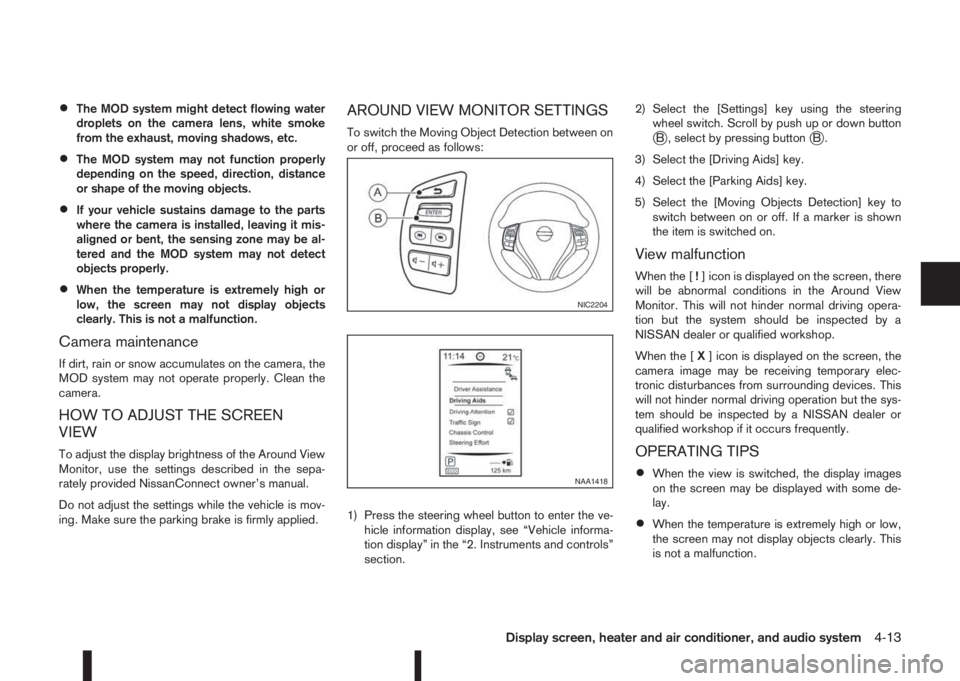
To switch the Moving Object Detection between on
or off, proceed as follows:
1) Press the steering wheel button to enter the ve-
hicle information display, see “Vehicle informa-
tion display” in the “2. Instruments and controls”
section.2) Select the [Settings] key using the steering
wheel switch. Scroll by push up or down buttonjB , select by pressing buttonjB.
3) Select the [Driving Aids] key.
4) Select the [Parking Aids] key.
5) Select the [Moving Objects Detection] key to
switch between on or off. If a marker is shown
the item is switched on.
View malfunction
When the [!] icon is displayed on the screen, there
will be abnormal conditions in the Around View
Monitor. This will not hinder normal driving opera-
tion but the system should be inspected by a
NISSAN dealer or qualified workshop.
When the [X] icon is displayed on the screen, the
camera image may be receiving temporary elec-
tronic disturbances from surrounding devices. This
will not hinder normal driving operation but the sys-
tem should be inspected by a NISSAN dealer or
qualified workshop if it occurs frequently.
OPERATING TIPS
•When the view is switched, the display images
on the screen may be displayed with some de-
lay.
•When the temperature is extremely high or low,
the screen may not display objects clearly. This
is not a malfunction.
NIC2204
NAA1418
Display screen, heater and air conditioner, and audio system4-13
Page 148 of 338
Operating tips
•In order to improve the heater operation, clear
any snow and ice from the wiper blade and air
inlet in front of the windscreen.
•After parking in the sun, drive for two or three
minutes with the windows open to vent hot air
from the passenger compartment. Then close
the windows to allow the acceleration of the air
conditioner’s cooling operation.
•Keep the windows closed while the air condi-
tioner is operating.
•The air conditioning system should be operated
for about 10 minutes, at least once a month. This
helps prevent damage to the system due to lack
of lubrication.
•If the coolant temperature gauge exceeds the
“HOT” position, turn the air conditioner off. For
additional information, see “Engine overheat” in
the “6. In case of emergency” section.
•If the engine coolant reaches an extremely high
temperature, the air conditioning system will au-
tomatically turn off. This may happen for example
if the engine runs at idle speed for a long time on
a hot day.
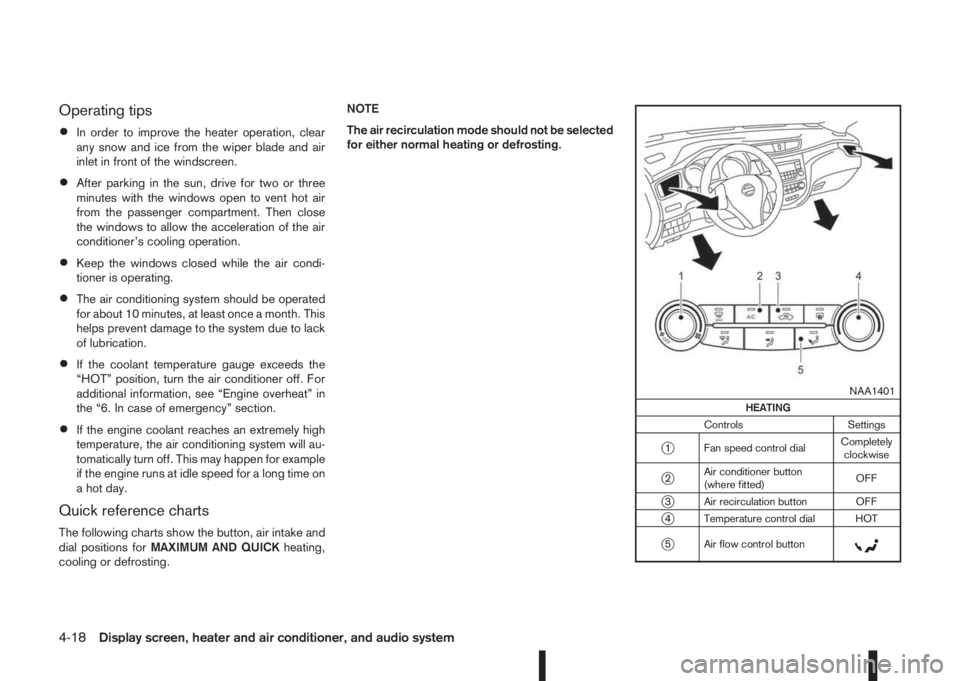
Quick reference charts
The following charts show the button, air intake and
dial positions forMAXIMUM AND QUICKheating,
cooling or defrosting.NOTE
The air recirculation mode should not be selected
for either normal heating or defrosting.
m
NAA1401
HEATING
Controls Settings
j1 Fan speed control dialCompletely
clockwise
j2Air conditioner button
(where fitted)OFF
j3 Air recirculation button OFF
j4 Temperature control dial HOT
j5 Air flow control buttonm
4-18Display screen, heater and air conditioner, and audio system
Page 149 of 338
m
NAA1403
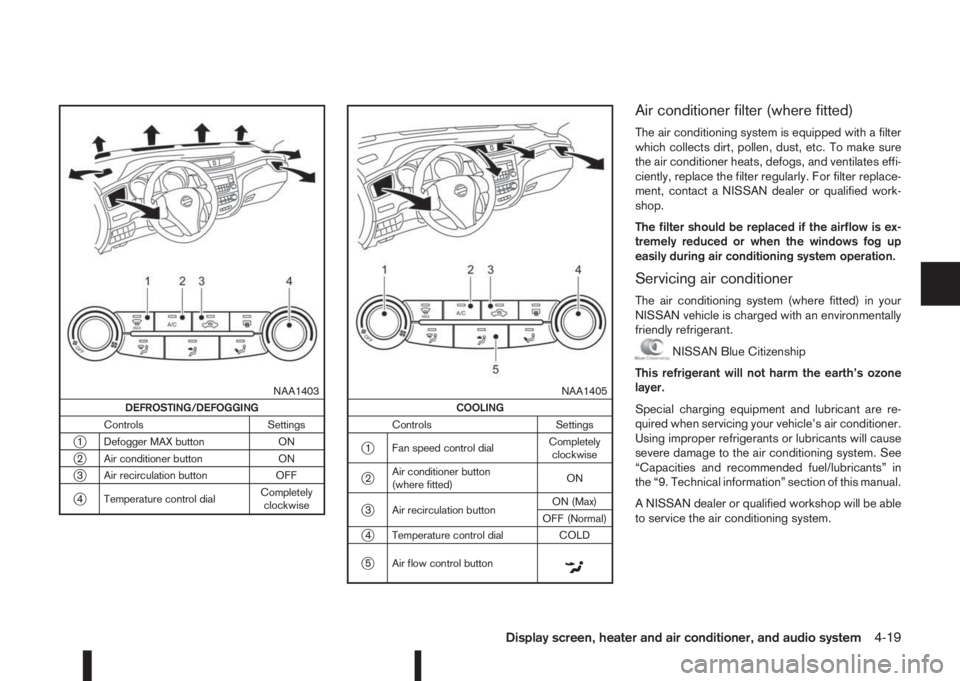
DEFROSTING/DEFOGGING
Controls Settings
j1 Defogger MAX button ON
j2 Air conditioner button ON
j3 Air recirculation button OFF
j4 Temperature control dialCompletely
clockwise
m
NAA1405
COOLING
Controls Settings
j1 Fan speed control dialCompletely
clockwise
j2Air conditioner button
(where fitted)ON
j3 Air recirculation buttonON (Max)
OFF (Normal)
j4 Temperature control dial COLD
j5 Air flow control buttonm
Air conditioner filter (where fitted)
The air conditioning system is equipped with a filter
which collects dirt, pollen, dust, etc. To make sure
the air conditioner heats, defogs, and ventilates effi-
ciently, replace the filter regularly. For filter replace-
ment, contact a NISSAN dealer or qualified work-
shop.
The filter should be replaced if the airflow is ex-
tremely reduced or when the windows fog up
easily during air conditioning system operation.
Servicing air conditioner
The air conditioning system (where fitted) in your
NISSAN vehicle is charged with an environmentally
friendly refrigerant.
NISSAN Blue Citizenship
This refrigerant will not harm the earth’s ozone
layer.
Special charging equipment and lubricant are re-
quired when servicing your vehicle’s air conditioner.
Using improper refrigerants or lubricants will cause
severe damage to the air conditioning system. See
“Capacities and recommended fuel/lubricants” in
the “9. Technical information” section of this manual.
A NISSAN dealer or qualified workshop will be able
to service the air conditioning system.
Display screen, heater and air conditioner, and audio system4-19
Page 156 of 338
![NISSAN QASHQAI 2016 Owner´s Manual Pressing a preset button for more than 2 seconds
while in the [FM list] or radio main screen will cause
the station currently being received to be stored
against that preset button.
•Twelve stations](/img/5/40324/w960_40324-155.png "NISSAN QASHQAI 2016 Owner´s Manual Pressing a preset button for more than 2 seconds
while in the [FM list] or radio main screen will cause
the station currently being received to be stored
against that preset button.
•Twelve stations")
Pressing a preset button for more than 2 seconds
while in the [FM list] or radio main screen will cause
the station currently being received to be stored
against that preset button.
•Twelve stations (if available) can be stored in the
FM bands. (Six each for FM1 and FM2)
•Six stations (if available) can be set for the AM
band.
If the battery is disconnected, or if the fuse blows,
the radio memory will be erased. In that case, reset
the desired stations after battery connection or fuse
replacement.
Radio Data System (RDS) operation
(where fitted)
The RDS is a system through which encoded digital
information is transmitted by FM radio stations in
addition to the normal FM radio broadcasting. The
RDS provides information services such as station
name, traffic information, or news.
NOTE
•In some countries or regions, some of these
services may not be available.
Alternative Frequency (AF) mode:
The AF mode operates in the FM (radio) mode.
•The AF mode operates in the FM (radio), AUX or
CD mode (if FM was previously selected in the
radio mode).
•The AF function compares signal strengths and
selects the station with the optimum reception
conditions for the currently tuned-in station.
RDS functions
Programme Service (PS) function (station name
display function):
– FM:
When an RDS station is tuned in with seek or
manual tuning, the RDS data is received and the
PS name is displayed.
TA Traffic announcement
This function operates in FM (Radio) mode. This
function will still operate in the background if any
media source is selected (CD, USB or MEDIA
mode).
•Pressing the
The TA indicator is displayed while TA mode is
on.
•When
switched off and the TA indicator will disappear
from the display.
Traffic announcement interrupt function:
When a traffic announcement is received, the an-
nouncement is tuned in and the display shows a
notification message with the radio station name e.g.
[TA: Radio 1].
Once the traffic announcement has finished, the unit
returns to the source that was active before the traf-
fic announcement started.If
the traffic announcement interrupt mode is can-
celled. The TA mode returns to the standby mode
and the audio unit returns to the previous source.
SETUP BUTTON
To configure [Audio], [Clock], [Radio], and [Lan-
guage] settings, perform the following procedure:
1. Press the
2. Turn the
Page 157 of 338
![NISSAN QASHQAI 2016 Owner´s Manual [Sound] menu:
Submenus in the sound menu:
[Bass] Use this control to enhance or
attenuate bass response sound.
Turn the<MENU>dial clockwise
or anticlockwise to adjust the bass
settings then press<ENTE](/img/5/40324/w960_40324-156.png "NISSAN QASHQAI 2016 Owner´s Manual [Sound] menu:
Submenus in the sound menu:
[Bass] Use this control to enhance or
attenuate bass response sound.
Turn the<MENU>dial clockwise
or anticlockwise to adjust the bass
settings then press<ENTE")
[Sound] menu:
Submenus in the sound menu:
[Bass] Use this control to enhance or
attenuate bass response sound.
Turn the
Page 158 of 338
![NISSAN QASHQAI 2016 Owner´s Manual [Format]:
Set the clock display between 24-hour mode and
12-hour clock mode.
[Radio] menu
For activation or deactivation details, see “SETUP
button” later in this section.
Language settings
Select](/img/5/40324/w960_40324-157.png "NISSAN QASHQAI 2016 Owner´s Manual [Format]:
Set the clock display between 24-hour mode and
12-hour clock mode.
[Radio] menu
For activation or deactivation details, see “SETUP
button” later in this section.
Language settings
Select")
[Format]:
Set the clock display between 24-hour mode and
12-hour clock mode.
[Radio] menu
For activation or deactivation details, see “SETUP
button” later in this section.
Language settings
Select the appropriate language and press the
automatically adapt the language setting.
•[AUTO]
(Factory preset language connected with the
meter language)
•[Chinese]
•[Chinese Simplified]
•[Deutsch]
•[Español]
•[Français]
•[Italiano]
•[Nederlands]
•[Polski]
•[Português]
•[Türkçe]
•[UK English]
•[русский]
COMPACT DISC (CD) OPERATION
The CD player can play a music CD or an encoded
MP3/WMA CD and while listening to those CD’s
music information tags (track and artist information)
can be displayed (when CD encoded with text is
being used).
Press the
will start to play.
When
source mode is already operating, it will automati-
cally turn off the playing source and the CD play
mode will start.
CAUTION
•Do not force the CD into the slot. This could
damage the player.
•Do not use 8 cm (3.1 in) discs.
CD insert (CD player)
Insert the CD disc into the slot with the label side
facing up. The disc will be guided automatically into
the slot and will start playing. After loading the disc,
track information will be displayed.
NOTE
•The CD player accepts normal audio CD or
CD recorded with MP3/WMA files.
•Inserting a CD recorded with MP3/WMA files,
the audio unit will automatically detect and
[MP3CD] will be indicated.
•An error notification message will be
displayed when inserting a wrong disc type
(e.g. DVD), or the player cannot read the CD
disc. Eject the disc and insert another disc.
MEDIA button
Load a CD disc. After a short loading period the CD
starts playing.
If the disc was already loaded:
Press the
connected audio sources if necessary multiple
times) to select CD. Playing starts from the track
that was being played when the CD play mode was
switched off.
Audio main operation
List view:
While the track is being played, either press the
the available tracks in a listed view mode. To select
a track from the list, or a track to start listening from,
turn the
Page 162 of 338
![NISSAN QASHQAI 2016 Owner´s Manual •[Composers]
•[Genre]
•[Podcasts]
For further information about each item, see the
iPod® owner’s manual.
The following operations are identical to the audio
main operation of the Compact Disc](/img/5/40324/w960_40324-161.png "NISSAN QASHQAI 2016 Owner´s Manual •[Composers]
•[Genre]
•[Podcasts]
For further information about each item, see the
iPod® owner’s manual.
The following operations are identical to the audio
main operation of the Compact Disc")
•[Composers]
•[Genre]
•[Podcasts]
For further information about each item, see the
iPod® owner’s manual.
The following operations are identical to the audio
main operation of the Compact Disc (CD) opera-
tion. For details, see “Audio main operation” earlier
in this section.
•List view
•,
•MIX (Random play)
•RPT (Repeat track)
•Folder browsing
mbuttonj5
While a track with recorded music information tags
(ID3–tags) is being played, the title of the played
track is displayed. If the tags are not provided then
a notification message is displayed.
When the
j5 button is pressed repeatedly,
further information about the track can be displayed
along with the track title as follows:
Track time→Artist name→Album title→Track
timeTrack details:
A long press on the
j5 button, the screen
displays the song title, artist name, and album title.
After a few seconds it returns to the main display or
press
j5 briefly.
BLUETOOTH® OPERATION
Regulatory information
m
Bluetooth® is a trademark
owned by Bluetooth SIG, Inc.
CE statement
Hereby Yanfeng Visteon Automotive Electronics
Co., Ltd. declares that this system is in compliance
with the essential requirements and other relevant
provisions of Directive 1999/5/EC.
m
NOTE
The audio system only supports Bluetooth® de-
vices with AVRCP (Audio Video Remote Control
Profile) version 1.4 or earlier.
BLUETOOTH® settings
To pair a device, make sure the Bluetooth is
switched on and use the [Scan device] key or the
[Pair device] key For details, see “[Scan devices]”
later in this section.
Up to 5 different Bluetooth devices can be con-
nected. However, only one device can be used at a
time. If 5 different Bluetooth registered devices are
registered, a new device can only replace one of the
5 existing paired devices. Use [Del. device] key to
delete one of the existing paired devices. For de-
tails, see “[Del. device]” later in this section.
When successfully paired a notification message
will be displayed, then the audio system display will
return to the current audio source display. During
connection the following status icons will be dis-
played (top left of the display): Signal strength
(
), Battery status* () and Bluetooth “ON”
().
*: If the low battery message comes on, the Blue-
tooth® device must be recharged soon.
NAA1392*: a device with bluetooth capabilities
4-32Display screen, heater and air conditioner, and audio system
Page 164 of 338
![NISSAN QASHQAI 2016 Owner´s Manual 2) Select the audio unit shown as [My Car].
3) Follow the instructions in the owner’s manual
for the Bluetooth® enabled device to estab-
lish a connection with the audio unit.
4) Enter the PIN code](/img/5/40324/w960_40324-163.png "NISSAN QASHQAI 2016 Owner´s Manual 2) Select the audio unit shown as [My Car].
3) Follow the instructions in the owner’s manual
for the Bluetooth® enabled device to estab-
lish a connection with the audio unit.
4) Enter the PIN code")
2) Select the audio unit shown as [My Car].
3) Follow the instructions in the owner’s manual
for the Bluetooth® enabled device to estab-
lish a connection with the audio unit.
4) Enter the PIN code shown on the relevant
device with the device’s own keypad, and
press the confirmation key on the device it-
self.
Refer to the relevant Bluetooth® device own-
er’s manual for further details.
[Sel. device]:
The paired device list shows which Bluetooth® au-
dio or mobile phone devices have been paired or
registered with the Bluetooth® audio system. If the
list contains devices then select the appropriate de-
vice to connect to the Bluetooth® audio system.
The following symbols (where fitted) indicate the
capability of the registered device:
•: Mobile phone integration
•: Audio streaming (A2DP – Advanced Audio
Distribution Profile)
[Del. device]:
A registered device can be removed from the Blue-
tooth audio system. Select a registered device then
press
[Bluetooth]:
If Bluetooth® has been switched off a notification
message [ON/OFF] appears when you select [Blue-
tooth] from the phone menu (press
). To switchthe Bluetooth® signal on, press
follow up screen will appear. Then select [ON] and
press
menu screen.
Bluetooth®audio streaming main
operation
Turn the ignition switch to the Acc or ON position.
If the audio system was turned off while the Blue-
tooth® audio was playing, pressing the<
> but-
ton will start the Bluetooth® audio streaming.
MEDIA button:
To operate the Bluetooth® audio streaming use the
following method:
•Press
shown.
The type of display,
jAorjB , shown on the audio
system can vary depending on the Bluetooth® ver-
sion of the device.
Fast Forward (Cue), Fast
Reverse (Review) buttons:
When the
(Cue) or(Review) button is
pressed continuously, the track will be played at
high speed. When the button is released, the track
will be played at normal playing speed.
Track up/down buttons:
Pressing the
orbutton once, the track will
be skipped forward to the next track or backward to
the beginning of the current played track. Press the
orbutton more than once to skip through
the tracks.
mbutton
If the song contains music information tags (ID3–
tags), the title of the played song will be displayed.
If tags are not provided then the display will not
show any messages.
When the
button is pressed repeatedly fur-
ther information about the song can be displayed
along with the song title.
A long press on
will turn the display into a
detailed overview which after a few seconds returns
to the main display; or press
briefly.
NAA1203
4-34Display screen, heater and air conditioner, and audio system
Page 170 of 338
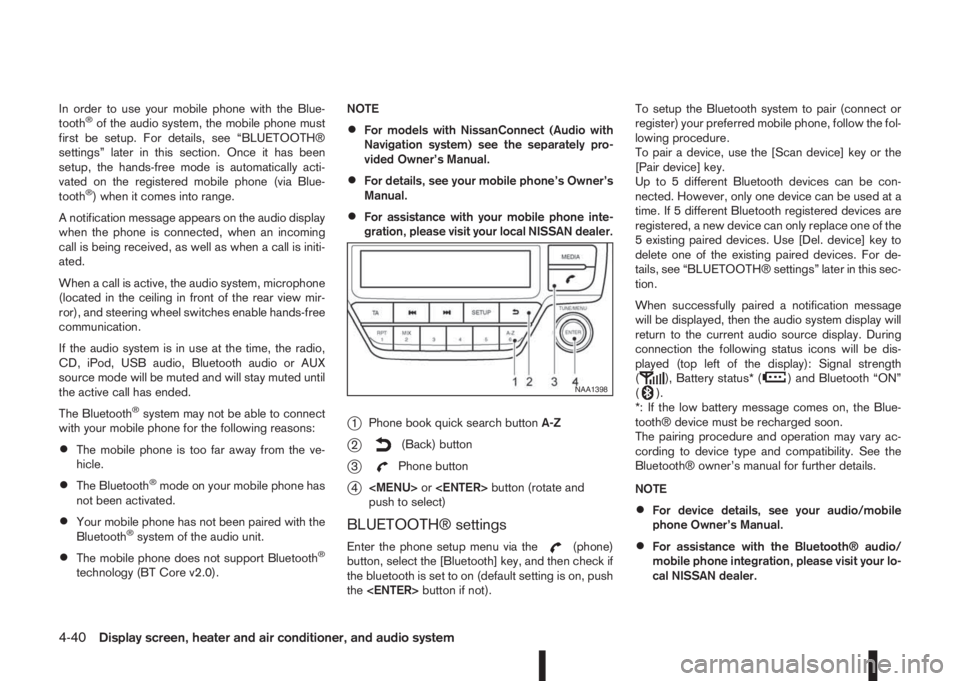
In order to use your mobile phone with the Blue-
tooth®of the audio system, the mobile phone must
first be setup. For details, see “BLUETOOTH®
settings” later in this section. Once it has been
setup, the hands-free mode is automatically acti-
vated on the registered mobile phone (via Blue-
tooth
®) when it comes into range.
A notification message appears on the audio display
when the phone is connected, when an incoming
call is being received, as well as when a call is initi-
ated.
When a call is active, the audio system, microphone
(located in the ceiling in front of the rear view mir-
ror), and steering wheel switches enable hands-free
communication.
If the audio system is in use at the time, the radio,
CD, iPod, USB audio, Bluetooth audio or AUX
source mode will be muted and will stay muted until
the active call has ended.
The Bluetooth
®system may not be able to connect
with your mobile phone for the following reasons:
•The mobile phone is too far away from the ve-
hicle.
•The Bluetooth®mode on your mobile phone has
not been activated.
•Your mobile phone has not been paired with the
Bluetooth®system of the audio unit.
•The mobile phone does not support Bluetooth®
technology (BT Core v2.0).NOTE
•For models with NissanConnect (Audio with
Navigation system) see the separately pro-
vided Owner’s Manual.
•For details, see your mobile phone’s Owner’s
Manual.
•For assistance with your mobile phone inte-
gration, please visit your local NISSAN dealer.
j1Phone book quick search buttonA-Z
j2(Back) button
j3Phone button
j4