fog light NISSAN QASHQAI 2016 Owner´s Manual
[x] Cancel search | Manufacturer: NISSAN, Model Year: 2016, Model line: QASHQAI, Model: NISSAN QASHQAI 2016Pages: 338, PDF Size: 4.87 MB
Page 100 of 338
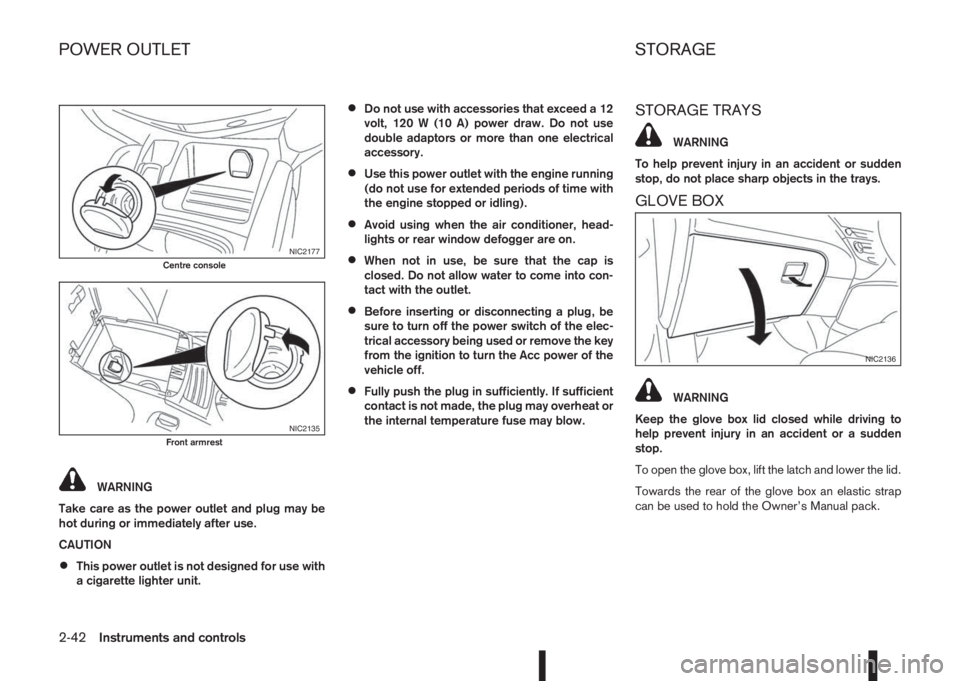
WARNING
Take care as the power outlet and plug may be
hot during or immediately after use.
CAUTION
•This power outlet is not designed for use with
a cigarette lighter unit.
•Do not use with accessories that exceed a 12
volt, 120 W (10 A) power draw. Do not use
double adaptors or more than one electrical
accessory.
•Use this power outlet with the engine running
(do not use for extended periods of time with
the engine stopped or idling).
•Avoid using when the air conditioner, head-
lights or rear window defogger are on.
•When not in use, be sure that the cap is
closed. Do not allow water to come into con-
tact with the outlet.
•Before inserting or disconnecting a plug, be
sure to turn off the power switch of the elec-
trical accessory being used or remove the key
from the ignition to turn the Acc power of the
vehicle off.
•Fully push the plug in sufficiently. If sufficient
contact is not made, the plug may overheat or
the internal temperature fuse may blow.
STORAGE TRAYS
WARNING
To help prevent injury in an accident or sudden
stop, do not place sharp objects in the trays.
GLOVE BOX
WARNING
Keep the glove box lid closed while driving to
help prevent injury in an accident or a sudden
stop.
To open the glove box, lift the latch and lower the lid.
Towards the rear of the glove box an elastic strap
can be used to hold the Owner’s Manual pack.
NIC2177Centre console
NIC2135Front armrest
NIC2136
POWER OUTLET STORAGE
2-42Instruments and controls
Page 146 of 338
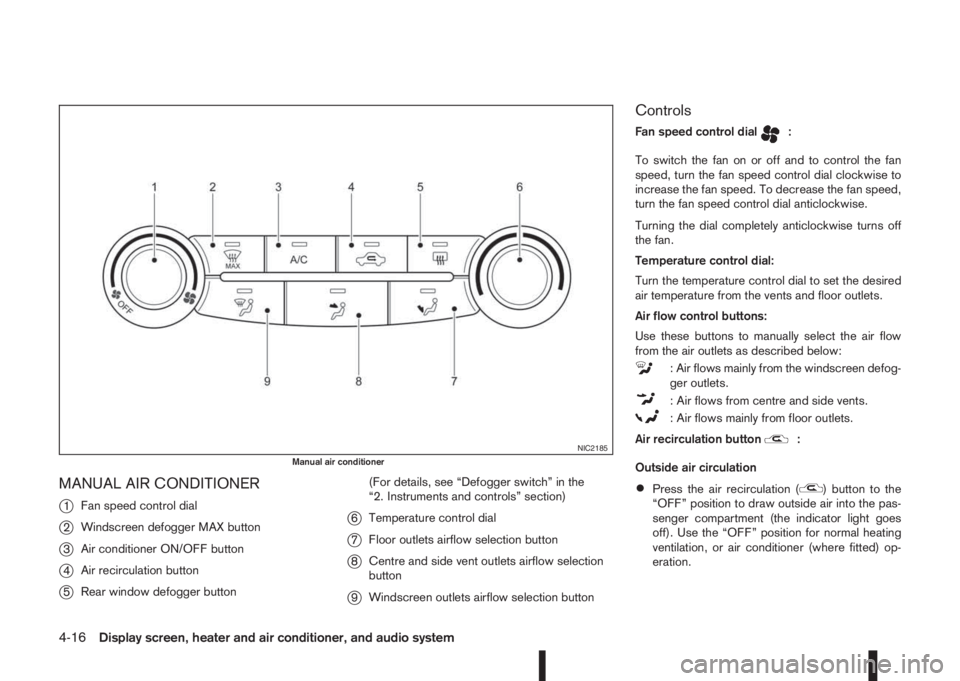
MANUAL AIR CONDITIONER
j
1Fan speed control dial
j2Windscreen defogger MAX button
j3Air conditioner ON/OFF button
j4Air recirculation button
j5Rear window defogger button(For details, see “Defogger switch” in the
“2. Instruments and controls” section)
j6Temperature control dial
j7Floor outlets airflow selection button
j8Centre and side vent outlets airflow selection
button
j9Windscreen outlets airflow selection button
Controls
Fan speed control dialm:
To switch the fan on or off and to control the fan
speed, turn the fan speed control dial clockwise to
increase the fan speed. To decrease the fan speed,
turn the fan speed control dial anticlockwise.
Turning the dial completely anticlockwise turns off
the fan.
Temperature control dial:
Turn the temperature control dial to set the desired
air temperature from the vents and floor outlets.
Air flow control buttons:
Use these buttons to manually select the air flow
from the air outlets as described below:
: Air flows mainly from the windscreen defog-
ger outlets.
: Air flows from centre and side vents.
: Air flows mainly from floor outlets.
Air recirculation button
m:
Outside air circulation
•Press the air recirculation () button to the
“OFF” position to draw outside air into the pas-
senger compartment (the indicator light goes
off). Use the “OFF” position for normal heating
ventilation, or air conditioner (where fitted) op-
eration.
NIC2185Manual air conditioner
4-16Display screen, heater and air conditioner, and audio system
Page 147 of 338
•Air recirculation
Press the air recirculation (
) button to the
“ON” position (the indicator light goes on). Use
the “ON” position in situations such as: driving
on a dust raised road, avoiding traffic fumes or
having maximum cooling from the air conditioner
(where fitted).
If the windows fog up, switch on the air condi-
tioning (where fitted).
A/C (Air Conditioner) button (where fitted):
Press the A/C button to turn the air conditioner on
or off. When the air conditioner is on, the A/C indi-
cator light illuminates.
Operation
The heater and air conditioner operate when the
engine is running. The air blower will operate even if
the engine is turned off and the ignition switch is in
the ON position.
NOTE
The air conditioner cooling function operates only
when the engine is running and the fan is acti-
vated.
1. Press the air recirculation (
) button to the
“OFF” position.
2. Use the airflow control buttons for:
–Cooling: select the
orsetting.
–Heating: select the
orsetting.–Heating and defogging: select the
set-
ting.
–Ventilation: select the
orsetting.
–Windscreen defogging: select the
set-
ting.
3. Set the fan speed to the desired position.
4. Turn the temperature control dial to the desired
position.
NOTE
When selecting the
orsetting, turn
the temperature control dial to the desired
position between the middle and the maxi-
mum “HOT” (right) position.
5. Press the A/C button (where fitted) to the “ON”
position and the indicator light will come on.
Switch this mode on for dehumidified heating or
cooling.
NOTE
•The air conditioner mode is used to cool and
dehumidify. For quick cooling when the out-
side temperature is high, select the air recir-
culation mode position (
). Be sure to re-
turn to the outside air mode to avoid windows
from fogging-up and interior air from becom-
ing stale.
A visible mist may be seen coming from the
vents in hot, humid conditions as the air is
cooled rapidly this is not a malfunction.
•For quick heating, press the air recirculation
() button to the “ON” position. Be sure to
return to the “OFF” position for normal heat-
ing (no indicator light) in order to avoid win-
dow fog and stale interior.
Windscreen defogger
m(manual mode):
Use this mode for defogging the windscreen as fol-
lows:
1. Press the
button.
The system will set the fan speed to maximum.
Air circulation is cancelled, the airflow mode
and the air conditioner is activated automatically.
Air flows mainly from the defogger outlets.
2. Set the temperature control dial to the maximum
(HOT) position.
3. To switch off, press the
button to return to
the previous mode.
NOTE
•To quickly defrost/defog the windscreen, set
the fan speed to the maximum position.
•As soon as possible after the windscreen has
been cleared of ice or fog, press the wind-
screen defogger button.
•When the windscreen defogging mode is acti-
vated, the air conditioner will automatically
switch on at outside temperatures above –2°C
(28°F) and the air recirculation mode will be
switched off.
Display screen, heater and air conditioner, and audio system4-17
Page 151 of 338
•Do not adjust the positioning of the heating/
ventilation or air conditioning controls while
driving.
NOTE
•The air conditioner cooling function operates
only when the engine is running, and the am-
bient temperature is above -2°C (28°F).
•The air conditioner can be used to dehumidify
when heating, or to reduce air temperature
and dehumidify when cooling. This is possible
in both auto or manual control mode as long
as the fan speed is at minimum (first bar) or
higher.
•When the AUTO mode is selected, the tem-
perature of the passenger compartment will
be maintained automatically. Air flow distribu-
tion and fan speed will also be controlled au-
tomatically.
Controls
NOTE
Before any selection or change is made, press
the AUTO button to activate the heater and air
conditioner system.
Cooling and/or dehumidified heating (AUTO
mode):
This mode may be used all year round. The system
works automatically to control the inside tempera-
ture, air flow distribution and fan speed after the
preferred temperature is set manually.1. Press the AUTO button (the indicator light will
illuminate).
2. Operate the driver’s side temperature control dial
to set the desired temperature.
Adjust the temperature to about 22°C (72°F) for
normal operation.
3. Driver’s side and passenger side temperatures
can be set independently using the individual
temperature control dial. When the passenger
side temperature control dial is turned, the DUAL
indicator light will come on. To turn off the pas-
senger side temperature control, press the DUAL
button.
NOTE
•A visible mist may be seen coming from the
vents in hot, humid conditions as the air is
cooled rapidly, this is not a malfunction.
Heating (AUTO mode):
Use this mode for heating purposes only.
1. Press the A/C button to turn off the air condi-
tioner cooling function (A/C indicator light goes
off).
2. Select the desired temperature with the tempera-
ture control dial.
•Do not set the temperature at a lower level than
the one of the outside air temperature. Other-
wise the system may not work properly.
•This mode is not recommended if the windscreen
fogs up.Airflow control buttons:
Use these buttons to manually select the air flow
form these outlets as described below:
: Air flows mainly from the windscreen defog-
ger outlets.
: Air flows from centre and side vents.
: Air flows mainly from floor outlets.
Windscreen defogger
m(manual mode):
Use this mode for defogging the windscreen as fol-
lows:
1. Press the
button.
The system will set the fan speed to maximum.
Air circulation is cancelled, the airflow mode
and the air conditioner is activated automatically.
Air flows mainly from the defogger outlets.
2. To switch off, press the
button to return to
the previous mode or the AUTO button for auto
climate control mode.
NOTE
•To quickly defrost/defog the windscreen, set
the fan speed to the maximum position.
•As soon as possible after the windscreen has
been cleared of ice or fog, press either the
windscreen defogger button or AUTO button.
•When the windscreen defogging mode is acti-
vated, the air conditioner will automatically
switch on at outside temperatures above –2°C
(28°F) and the air recirculation mode will be
switched off.
Display screen, heater and air conditioner, and audio system4-21
Page 152 of 338
Heating and defogging (Manual mode):
This mode heats the interior and defogs the wind-
screen.
Use the airflow control buttons to select the
button is pressed. Switch on the air-conditioning to
improve the defogging and adjust the preferred fan
speed and temperature.
Fan speed control
m(Manual mode):
Press the fan speed control buttons to adjust the fan
speed.
Press the AUTO button to change the fan speed to
automatic mode.
Air recirculation:
Use this mode to recirculate interior air inside the
passenger compartment in situations such as driv-
ing on a dust raised road, avoiding traffic fumes or
having maximum cooling from the air conditioner.
Press the<
>button to recirculate interior air.
The indicator light illuminates and the air conditioner
will automatically come on.
When the air recirculation mode is switched off, out-
side air is drawn into the passenger compartment.
Outside air circulation :
Use this mode to draw outside air into the passen-
ger compartment for normal heating, ventilation or
air conditioner operation.
Press the<
>button to change the air intake
from the air recirculation to the outside air mode.
The indicator light (
) turns off.To turn the system on/off:
Press the “ON/OFF” button to turn the system on or
off.
Operating tips
•In order to improve the heater operation, clear
the snow and ice from the wiper blade and air
inlet in front of the windscreen.
•When the engine coolant temperature and out-
side air temperature are low, the airflow from the
floor outlets may not operate for a maximum of
150 seconds. However, this is not a malfunction.
After the coolant temperature has warmed up,
the airflow from the floor outlets will operate nor-
mally.
•After parking in the sun, drive for two or three
minutes with the windows open to vent hot air
from the passenger compartment. Then, close
the windows. This will allow the acceleration of
the air conditioner’s cooling operation.
•Keep windows closed while the air conditioner is
operating.
•The air conditioning system should be operated
for about 10 minutes, at least once a month. This
helps prevent damage to the system due to lack
of lubrication.
•If the coolant temperature gauge exceeds the
“HOT” position, turn the air conditioner off. For
additional information, see “Engine overheat” in
the “6. In case of emergency” section.
•If the engine coolant reaches an extremely high
temperature, the air conditioning system will au-
tomatically turn off. This may happen for example
if the engine runs at idle speed for a long time on
a hot day.
Air conditioner filter
The air conditioning system is equipped with a filter
which collects dirt, pollen, dust, etc. To make sure
the air conditioner heats, defogs, and ventilates effi-
ciently, replace the filter regularly. To replace the fil-
ter, contact a NISSAN dealer or qualified workshop.
The filter should be replaced if the airflow is ex-
tremely reduced or when the windows fog up
easily while operating the heater or air condition-
ing system.
Servicing air conditioner
The air conditioning system in your NISSAN vehicle
is charged with an environmentally friendly refriger-
ant.
NISSAN Blue Citizenship
This refrigerant will not harm the earth’s ozone
layer.
Special charging equipment and lubricant are re-
quired when servicing the NISSAN air conditioner.
Using improper refrigerants or lubricants will cause
severe damage to the air conditioning system. See
“Capacities and recommended fuel/lubricants” in
the “9. Technical information” section.
A NISSAN dealer or qualified workshop will be able
to service the air conditioning system.
4-22Display screen, heater and air conditioner, and audio system
Page 199 of 338
•When the engine is turned on with the engine
bonnet open.
•When the driver’s seat belt is not fastened.
•When the driver’s door is open.
•When the steering wheel is operated.
•When the Stop/Start System indicator blinks at
a low speed.
•When the accelerator pedal is depressed
(XTRONIC transmission models).
•When the shift lever is in the R (Reverse) posi-
tion.
•When the fan speed control dial is in any posi-
tion other than “OFF” (0) while the air flow con-
trol dial is in the front defogger position (manual
air conditioner).
•When the front defogger switch is on (automatic
air conditioner).
•When the Stop/Start System OFF switch is
turned on.
•When the electric power steering warning light,
the Anti-lock Braking System (ABS) warning
light, or the Electronic Stability Programme
(ESP) warning light illuminates.
•When the brake pedal is not fully depressed
(XTRONIC transmission models).
•When stopping the vehicle on steep sloping
roads (XTRONIC transmission models).
•When the power consumption is large.
•When the vehicle is travelling at altitudes higher
than 2000 m (6562 ft) (MT models).
•When the vehicle is travelling at altitudes higher
than 1500m (4922 ft) (R9M engine in combina-
tion with XTRONIC transmission models).
NOTE
It may take some time until the Stop/Start Sys-
tem activates under the following conditions:
•When the battery is discharged.
•When the outside temperature is low.
•When the battery is replaced or the battery ter-
minal is disconnected for extended periods and
then reconnected.
NOTE
The engine will not restart even if the brake pedal
is released (XTRONIC transmission ) or clutch
pedal is pressed (MT) while the Stop/Start Sys-
tem is activated under the following condition:
•When the shift lever is in the P (Park) position
(XTRONIC transmission models).
•When the engine bonnet is opened.
•When the driver seat belt is unfastened and the
driver’s door is opened (MT models).
•When the gear shift lever is not in the Neutral
position. (MT models)
NOTE
The engine will restart without releasing thebrake pedal (XTRONIC transmission models) or
without depressing the clutch pedal (MT models)
while the Stop/Start System is activated under
the following conditions:
•When the Stop/Start System OFF switch is
pushed.
•When the fan speed control dial is in any posi-
tion other than “OFF” (0) while the air flow con-
trol dial is in the front defogger position (manual
air conditioner).
•When the front defogger switch is set to “ON”
(automatic air conditioner).
•When the accelerator pedal is depressed.
(XTRONIC transmission models)
•When the steering wheel is operated. (XTRONIC
transmission models)
•When the battery capacity is low.
•When the power consumption is large.
•When the brake pedal is released on sloping
roads and the vehicle is moved.
•When the force to the brake pedal is reduced
while the shift lever is in the D (Drive) or N (Neu-
tral) position. (XTRONIC transmission models)
•When the shift lever is placed in the L (Low), D
(Drive) or R (Reverse) position from the N or P
position. (XTRONIC transmission models)
•When the vacuum of the brake servo is insuffi-
cient as a result of depressing the brake pedal
several times.
Starting and driving5-23
Page 272 of 338
longer to stop, contact a NISSAN dealer or qualified
workshop immediately. Keep the floor mat away
from the pedal.
Parking brake*:
Confirm that your vehicle is held securely on a fairly
steep hill with only the parking brake applied.
Seats:
Check seat position controls such as seat adjust-
ers, seatback recliner, etc. to ensure they operate
smoothly and all latches lock securely in every posi-
tion. Check that the head restraints move up and
down smoothly and the locks hold securely in all
latched positions.
Seat belts:
Check that all parts of the seat belt system (e.g.
buckles, anchors, adjusters and retractors) operate
properly and smoothly, and are installed securely.
Check the belt webbing for cuts, fraying, wear or
damage. See “Seat belts” in the “1. Safety — Seats,
Seat belts and Supplemental Restraint System” sec-
tion for further details.
Steering wheel:
Check for any change in the steering conditions,
such as excessive free play, hard steering or strange
noises.
Warning lights and audible reminders:
Make sure that all warning/indicator lights and au-
dible reminders are operating properly.Windscreen defogger:
Check that the air comes out of the defogger outlets
properly when operating the heater or air condi-
tioner.
Windscreen wiper and washer*:
Check that the wipers and washer operate properly
and that the wipers do not streak.When performing any inspection or maintenance
work on your vehicle, always take care to prevent
serious accidental injury to yourself or damage to
the vehicle. The following are general precautions
which should be closely observed.
•Park the vehicle on a level surface, apply the
parking brake securely and block the wheels
to prevent the vehicle from moving. For
manual transmission models, move the shift
lever to N (Neutral) position.For continuously
variable transmission models: move the shift
lever to P (Park) position.
•Do not work under the engine bonnet while
the engine is hot. Turn off the engine and wait
until it cools down.
•Be sure to turn the ignition switch to the “OFF”
or LOCK position.
When the ignition switch is in the ON or Acc
position, the cooling fan may start to operate
suddenly even when the engine is not run-
ning. To avoid injury, always disconnect the
negative battery cable before working near
the engine.
•If you must work with the engine running,
keep your hands, clothing, hair and tools away
from moving fans, belts and any other moving
parts.
•It is advisable to remove ties and any jewel-
lery, such as rings, watches, etc. before work-
ing on your vehicle.
MAINTENANCE PRECAUTIONS
8-4Maintenance and do-it-yourself
Page 297 of 338
8. Where removed (step 3.), re-install the air duct,
bolt and clips in the reverse order of removal.
9. Reconnect the negative (—) battery cable and
close the bonnet.
NOTE
Fog may temporarily form inside the lens of the
exterior lights in the rain or in a car wash. The fog
is caused by a temperature difference between
the inside and the outside of the lens. This is not
a malfunction. If large droplets can be seen, then
contact a NISSAN dealer or qualified workshop.EXTERIOR LIGHTS
Item Wattage (W)
Front combination light
Headlight (Low beam: H11
type)55
Headlight (High beam: H7
type)60
Headlight (Low or high beam:
LED type, where fitted) *1LED
Front turn signal light 21
Front side light *1 LED
Front fog light (H8 type, where
fitted) *135
Side turn signal light *1 LED
Rear combination light
Turn signal light 21
Stop/Tail light *1 LED
Reverse light *1 16
High-mounted stop light *1 LED
Number plate light 5
Rear fog light 21
*1: If replacement is required, contact a NISSAN dealer
or qualified workshop.
INTERIOR LIGHTS
Item Wattage
(W)
Room light/Map lights (where fitted)
Foot well light (where fitted)5
3
Room light — rear (where fitted) 5
Reading lights — rear (where fitted) 8
Luggage compartment light 5
Maintenance and do-it-yourself8-29
Page 298 of 338
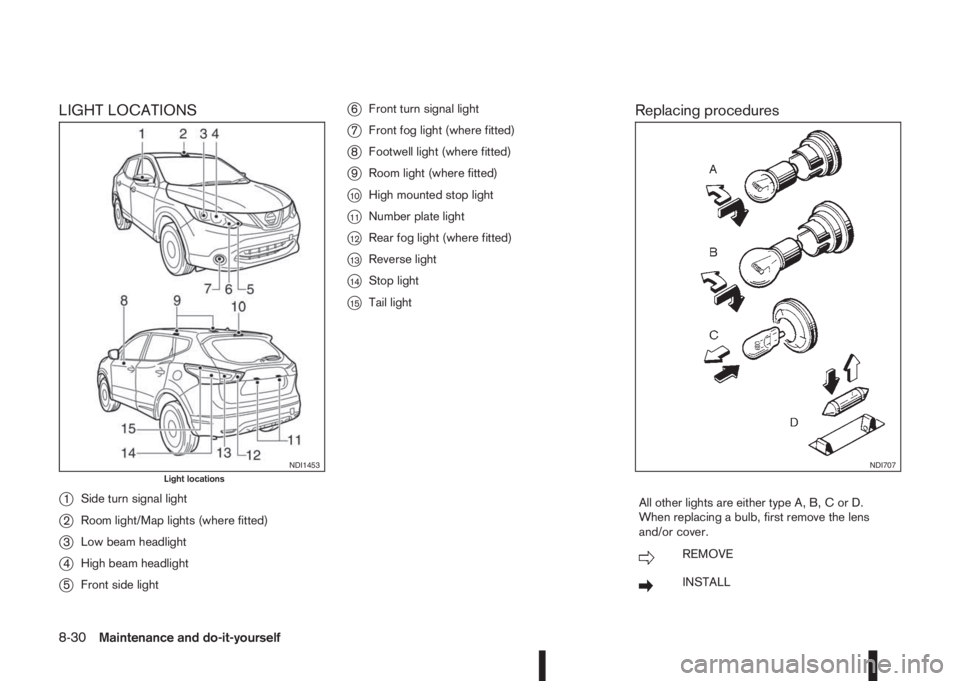
LIGHT LOCATIONS
j
1Side turn signal light
j2Room light/Map lights (where fitted)
j3Low beam headlight
j4High beam headlight
j5Front side light
j6Front turn signal light
j7Front fog light (where fitted)
j8Footwell light (where fitted)
j9Room light (where fitted)
j10High mounted stop light
j11Number plate light
j12Rear fog light (where fitted)
j13Reverse light
j14Stop light
j15Tail light
Replacing procedures
All other lights are either type A, B, C or D.
When replacing a bulb, first remove the lens
and/or cover.
mREMOVE
mINSTALL
NDI1453Light locationsNDI707
8-30Maintenance and do-it-yourself
Page 301 of 338
In case of a flat tyre, see “Flat tyre” in the “6. In case
of emergency” section.
TYRE INFLATION PRESSURE
Periodically check the tyre pressure (including the
spare tyre). An incorrect tyre pressure may ad-
versely affect tyre life and vehicle handling. After
adjusting the tyre pressure, perform a TPMS tem-
perature calibration (see “TPMS temperature
calibration” in the “5. Starting and driving” section).
NOTE
Incorrectly inflated tyres can also lead to poor
steering ability and make the driver suspect a
steering problem: keep the vehicle’s tyres in-
flated to the correct pressure at all times.
The tyre pressure should be checked when tyres
are COLD. Tyres are considered COLD after the
vehicle has been parked for three or more hours, or
driven less than 1.6 km (1 mile). COLD tyre pres-
sures are shown on the tyre placard affixed to the
driver’s side centre pillar.
Insufficient pressure can lead to an overheating of
the tyre and subsequent internal damage. At high
speeds, this could result in tread separation and
even bursting of the tyre.
TYPES OF TYRES
CAUTION
•When changing or replacing tyres, be sure all
four tyres are of the same type (i.e., summer,
all season or snow) and construction.
NDI1480Reverse light, and/or rear fog light (where fitted)
NDI1438Rear turn signal light
WHEELS AND TYRES
Maintenance and do-it-yourself8-33