brake light NISSAN QASHQAI 2016 Owner´s Manual
[x] Cancel search | Manufacturer: NISSAN, Model Year: 2016, Model line: QASHQAI, Model: NISSAN QASHQAI 2016Pages: 338, PDF Size: 4.87 MB
Page 191 of 338
After step 4 is performed, when the ignition switch
is pushed without depressing the brake pedal, the
ignition switch position will change to “ACC”.
NOTE
•When the ignition switch is pushed to the
“ACC” or “ON” position or the engine is started
by the above procedures, the Intelligent Key
system warning light may blink in yellow (on
the meter) even if the Intelligent Key is inside
the vehicle. This is not a malfunction. To stop
the warning light from blinking, touch the ig-
nition switch with the Intelligent Key again.
•If the Intelligent Key system warning light in
the meter is blinking in green, replace the bat-
tery as soon as possible. (See “Integrated
keyfob/Intelligent Key battery replacement” in
the “8. Maintenance and do-it-yourself” sec-
tion.)
MODELS WITH INTELLIGENT KEY
SYSTEM
1. Apply the parking brake. For additional informa-
tion, see “Parking brake switch” in the “3. Pre-
driving checks and adjustments” section.
2.Manual transmission models:
Move the shift lever to the N (Neutral) position,
and depress the clutch pedal to the floor while
starting the engine.
XTRONIC transmission (CVT) models:
Move the shift lever to the P (Park) or N (Neutral)
position. (P position is preferred).
The starter is designed to operate only when
the shift lever is in the proper position.
The Intelligent Key (where fitted) must be car-
ried while inside the vehicle when operating
the ignition switch.
3. To start the engine:
•MT models – keep the clutch pedal
depressed and/or depress the brake pedal
then push the ignition switch to the “ON” po-
sition.
•XTRONIC transmission models – depress the
brake pedal then push the ignition switch to
the “ON” position.
NOTE
•To start the engine immediately, push and
release the ignition switch while depress-ing the brake pedal or clutch pedal with
the ignition switch in any position.
•For diesel engine models: In cold condi-
tions there may be a delay for a few sec-
onds before the engine cranks. This is due
to the glow plugs heating to ensure ad-
equate engine starting conditions. The
glow indicator light (
) will illuminate
during this delay, then the engine will start.
4. Immediately release the ignition switch when the
engine starts. If the engine starts, but fails to run,
repeat the above procedures.
NOTE
Petrol engine models:
•If the engine is very hard to start in ex-
tremely cold weather or when restarting,
depress the accelerator pedal a little (ap-
proximately 1/3 of the way to the floor)
and hold it and then crank the engine. Re-
lease the ignition switch and the accelera-
tor pedal when the engine starts.
•If the engine is very hard to start because
it is flooded, depress the accelerator pedal
all the way to the floor and hold it. Crank
the engine for 5-6 seconds. After cranking
the engine, release the accelerator pedal.
Crank the engine with your foot off the ac-
celerator pedal by turning the ignition
switch to START. Release the switch when
the engine starts. If the engine starts, but
fails to run, repeat the above procedure.
STARTING ENGINE
Starting and driving5-15
Page 192 of 338
CAUTION
•As soon as the engine has started, release
the ignition switch immediately.
•Do not operate the starter for more than
15 seconds at a time. If the engine does
not start, turn the ignition switch to the
“OFF” position and wait 10 seconds (Petrol
engine models) or 20 seconds (Diesel en-
gine models) before cranking again, oth-
erwise the starter could be damaged.
•If it becomes necessary to start the engine
with a booster battery and jumper cables,
the instructions and cautions contained in
the “6. In case of emergency” section
should be carefully followed.
5. After starting, allow the engine to idle for at least
30 seconds to warm-up. Drive at moderate
speeds for a short distance first, especially in
cold weather.
CAUTION
Do not leave the vehicle unattended while the
engine is warming up.
6. To stop the engine:
– Manual transmission models: apply the park-
ing brake and push the ignition switch to the
“OFF” position.
– XTRONIC transmission models: move the
shift lever to the P (Park) position, apply the
parking brake and push the switch to the
“OFF” position.7. The steering wheel lock engages when ignition
is off and a door is opened or closed.
MODELS WITHOUT INTELLIGENT
KEY SYSTEM
1. Apply the parking brake. For additional informa-
tion, see “Parking brake switch” in the “3. Pre-
driving checks and adjustments” section.
2.Manual transmission models:
Move the shift lever to the N (Neutral) position,
and depress the clutch pedal to the floor while
starting the engine.
XTRONIC transmission (CVT) models:
Move the shift lever to the P (Park) or N (Neutral)
position. (P position is preferred).
The starter is designed to operate only when
the shift lever is in the proper position.
3. Rotate the steering wheel left to right to release
the ignition lock whilst turning the ignition switch
to the ON position.
4. For diesel engine models: Wait until the glow
indicator light (
) goes out.
5. With your foot on the brake pedal,not on the
accelerator pedal, crank the engine by turning
the ignition switch to START.
6. Immediately release the ignition switch when the
engine starts. If the engine starts, but fails to run,
repeat the above procedures.NOTE
Petrol engine models:
•If the engine is very hard to start in ex-
tremely cold weather or when restarting,
depress the accelerator pedal a little (ap-
proximately 1/3 of the way to the floor)
and hold it and then crank the engine. Re-
lease the ignition switch and the accelera-
tor pedal when the engine starts.
•If the engine is very hard to start because
it is flooded, depress the accelerator pedal
all the way to the floor and hold it. Crank
the engine for 5-6 seconds. After cranking
the engine, release the accelerator pedal.
Crank the engine with your foot off the ac-
celerator pedal by turning the ignition
switch to START. Release the switch when
the engine starts. If the engine starts, but
fails to run, repeat the above procedure.
CAUTION
•As soon as the engine has started, release
the ignition switch immediately.
•Do not operate the starter for more than
15 seconds at a time. If the engine does
not start, turn the ignition switch to the
“OFF” position and wait 10 seconds (Petrol
engine models) or 20 seconds (Diesel en-
gine models) before cranking again, oth-
erwise the starter could be damaged.
5-16Starting and driving
Page 197 of 338
•If the engine is revving up to a hazardous
speed in manual shift mode, the transmission
may shift up automatically. When the vehicle
speed decreases, the transmission automati-
cally shifts down and shifts to 1st gear before
the vehicle comes to a stop.
Accelerator downshift – In the D (Drive)
and Ds (Drive Sport) position
For rapid passing or driving uphill, fully depress the
accelerator pedal to the floor. This shifts the trans-
mission down into a lower gear, depending on the
vehicle speed.
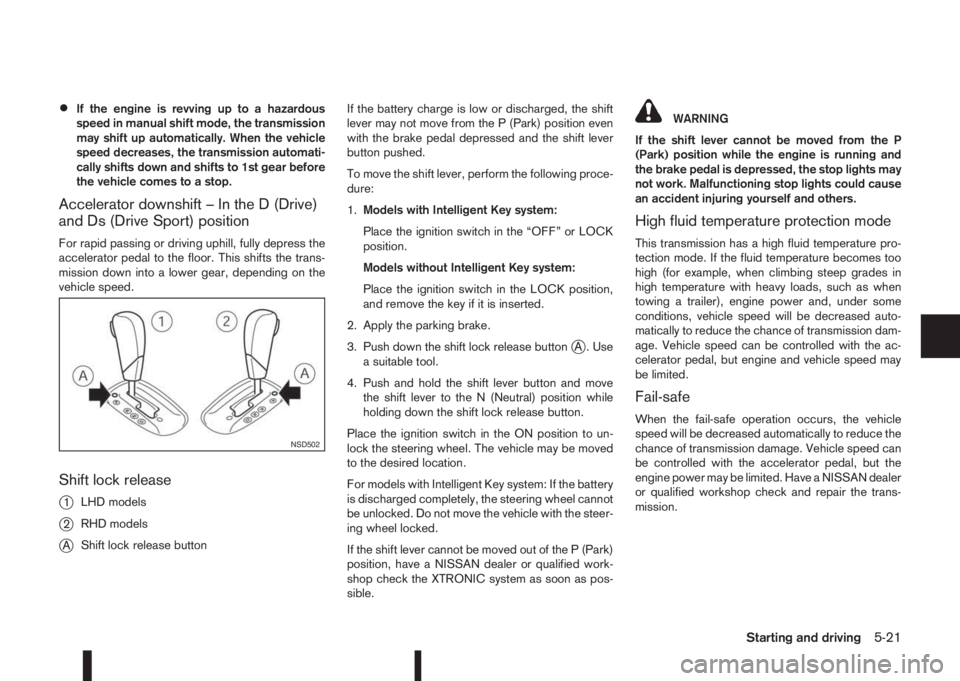
Shift lock release
j
1LHD models
j2RHD models
jAShift lock release buttonIf the battery charge is low or discharged, the shift
lever may not move from the P (Park) position even
with the brake pedal depressed and the shift lever
button pushed.
To move the shift lever, perform the following proce-
dure:
1.Models with Intelligent Key system:
Place the ignition switch in the “OFF” or LOCK
position.
Models without Intelligent Key system:
Place the ignition switch in the LOCK position,
and remove the key if it is inserted.
2. Apply the parking brake.
3. Push down the shift lock release button
jA . Use
a suitable tool.
4. Push and hold the shift lever button and move
the shift lever to the N (Neutral) position while
holding down the shift lock release button.
Place the ignition switch in the ON position to un-
lock the steering wheel. The vehicle may be moved
to the desired location.
For models with Intelligent Key system: If the battery
is discharged completely, the steering wheel cannot
be unlocked. Do not move the vehicle with the steer-
ing wheel locked.
If the shift lever cannot be moved out of the P (Park)
position, have a NISSAN dealer or qualified work-
shop check the XTRONIC system as soon as pos-
sible.
WARNING
If the shift lever cannot be moved from the P
(Park) position while the engine is running and
the brake pedal is depressed, the stop lights may
not work. Malfunctioning stop lights could cause
an accident injuring yourself and others.
High fluid temperature protection mode
This transmission has a high fluid temperature pro-
tection mode. If the fluid temperature becomes too
high (for example, when climbing steep grades in
high temperature with heavy loads, such as when
towing a trailer), engine power and, under some
conditions, vehicle speed will be decreased auto-
matically to reduce the chance of transmission dam-
age. Vehicle speed can be controlled with the ac-
celerator pedal, but engine and vehicle speed may
be limited.
Fail-safe
When the fail-safe operation occurs, the vehicle
speed will be decreased automatically to reduce the
chance of transmission damage. Vehicle speed can
be controlled with the accelerator pedal, but the
engine power may be limited. Have a NISSAN dealer
or qualified workshop check and repair the trans-
mission.
NSD502
Starting and driving5-21
Page 199 of 338
•When the engine is turned on with the engine
bonnet open.
•When the driver’s seat belt is not fastened.
•When the driver’s door is open.
•When the steering wheel is operated.
•When the Stop/Start System indicator blinks at
a low speed.
•When the accelerator pedal is depressed
(XTRONIC transmission models).
•When the shift lever is in the R (Reverse) posi-
tion.
•When the fan speed control dial is in any posi-
tion other than “OFF” (0) while the air flow con-
trol dial is in the front defogger position (manual
air conditioner).
•When the front defogger switch is on (automatic
air conditioner).
•When the Stop/Start System OFF switch is
turned on.
•When the electric power steering warning light,
the Anti-lock Braking System (ABS) warning
light, or the Electronic Stability Programme
(ESP) warning light illuminates.
•When the brake pedal is not fully depressed
(XTRONIC transmission models).
•When stopping the vehicle on steep sloping
roads (XTRONIC transmission models).
•When the power consumption is large.
•When the vehicle is travelling at altitudes higher
than 2000 m (6562 ft) (MT models).
•When the vehicle is travelling at altitudes higher
than 1500m (4922 ft) (R9M engine in combina-
tion with XTRONIC transmission models).
NOTE
It may take some time until the Stop/Start Sys-
tem activates under the following conditions:
•When the battery is discharged.
•When the outside temperature is low.
•When the battery is replaced or the battery ter-
minal is disconnected for extended periods and
then reconnected.
NOTE
The engine will not restart even if the brake pedal
is released (XTRONIC transmission ) or clutch
pedal is pressed (MT) while the Stop/Start Sys-
tem is activated under the following condition:
•When the shift lever is in the P (Park) position
(XTRONIC transmission models).
•When the engine bonnet is opened.
•When the driver seat belt is unfastened and the
driver’s door is opened (MT models).
•When the gear shift lever is not in the Neutral
position. (MT models)
NOTE
The engine will restart without releasing thebrake pedal (XTRONIC transmission models) or
without depressing the clutch pedal (MT models)
while the Stop/Start System is activated under
the following conditions:
•When the Stop/Start System OFF switch is
pushed.
•When the fan speed control dial is in any posi-
tion other than “OFF” (0) while the air flow con-
trol dial is in the front defogger position (manual
air conditioner).
•When the front defogger switch is set to “ON”
(automatic air conditioner).
•When the accelerator pedal is depressed.
(XTRONIC transmission models)
•When the steering wheel is operated. (XTRONIC
transmission models)
•When the battery capacity is low.
•When the power consumption is large.
•When the brake pedal is released on sloping
roads and the vehicle is moved.
•When the force to the brake pedal is reduced
while the shift lever is in the D (Drive) or N (Neu-
tral) position. (XTRONIC transmission models)
•When the shift lever is placed in the L (Low), D
(Drive) or R (Reverse) position from the N or P
position. (XTRONIC transmission models)
•When the vacuum of the brake servo is insuffi-
cient as a result of depressing the brake pedal
several times.
Starting and driving5-23
Page 205 of 338
•If the engine of the vehicle stalls or you cannot
make it to the top of a steep grade, never at-
tempt to turn around. Your vehicle could tip or
roll over. Always drive backwards and straight
down in R (reverse) gear.
Never drive backwards with the shift lever in N
(Neutral) and/or with the clutch depressed and
using the brake as this could result in loss of
control.
•Heavy braking down a hill could cause your
brakes to overheat and fade, resulting in loss of
control and an accident. Apply the brakes lightly
and use a low gear to control your vehicle speed.
•Unsecured cargo can be thrown around when
driving over rough terrain. Properly secure it so
that it will not be thrown forwards and cause
injury to you or your passengers.
•To avoid raising the centre of gravity excessively,
do not exceed the rated capacity of the roof rack/
gear bin (where fitted) and evenly distribute the
load. Secure heavy loads in the luggage area as
far forwards and as low as possible. Do not equip
the vehicle with tyres larger than specified. This
could cause your vehicle to roll over.
•Accelerating quickly, sharp steering manoeuvres
or sudden braking may cause loss of control.
•Do not drive beyond the performance of the
tyres, even with 4WD. Sudden acceleration,
steering or braking may result in loss of control
and could cause the vehicle to become stuck.
•If at all possible, avoid sharp turning manoeuvres,
particularly at high speeds. Your 4WD vehicle
has a higher centre of gravity than a 2WD ve-
hicle and can tip over more easily. The vehicle is
not designed for cornering at the same speeds
as conventional 2WD models any more than low
sports cars are designed to perform satisfacto-
rily under off-road conditions. Failure to operate
this vehicle correctly could result in loss of con-
trol and/or a rollover accident.
•Do not grip the inside or spokes of the steering
wheel when driving off-road. The steering wheel
could jerk and injure your hands. Instead, drive
with your fingers and thumbs on the outside of
the rim.
•Before operating the vehicle, ensure that the
driver and all passengers have their seat belts
fastened.
•Always drive with the floor mats in place as the
floor may become very hot. Particular care
should be taken if you are barefoot.
•Lower your speed when encountering strong
crosswinds. With its higher centre of gravity your
NISSAN is more affected by gusty side winds.
Slower speeds ensure better vehicle control.
•Be sure to check the brakes immediately after
driving in mud or water as specified in “Wet
brakes” later in this section.
•Whenever you drive off-road through sand, mud
or water as deep as the wheel hub, more fre-quent maintenance may be required. For details,
refer to the separately provided Warranty Infor-
mation and Maintenance Booklet.
•Rinse the underside of the vehicle with fresh
water after driving through mud or sand. Re-
move any brush or sticks that are trapped.
•Install the same size of winter tyres on all four (4)
wheels (such as studless tyres) or install snow
chains to the front wheels when driving on slip-
pery roads (e.g. after a snowfall) and drive care-
fully using 4WD.
•Avoid parking your vehicle on steep hills. If you
get out of the vehicle and it rolls forwards, back-
wards or sideways, you could be injured.
Starting and driving5-29
Page 217 of 338
SYSTEM OPERATION
The forward emergency braking system will func-
tion when your vehicle is driven at speeds above
approximately 5 km/h (3 MPH).
If a risk of a forward collision is detected, the for-
ward emergency braking system will provide the
first warning to the driver by flashing the forward
collision warning light (orange) and providing an au-
dible warning.
If the driver applies the brakes quickly and forcefully
after the warning, and the forward emergency brak-
ing system detects that there is still the possibility of
a forward collision, the system will automatically in-
crease the braking force.
If the driver does not take action, the forward emer-
gency braking system issues the second visual
warning (red) and audible warning. If the driver re-
leases the accelerator pedal, then the system ap-
plies partial braking
If the risk of a collision becomes imminent, the for-
ward emergency braking system applies harder
braking automatically.
NOTE
The vehicle’s brake lights come on when braking
is performed by the forward emergency braking
system.
Depending on vehicle speed and distance to the
vehicle ahead, as well as driving and roadway con-
ditions, the system may help the driver avoid a for-ward collision or may help mitigate the
consequences if a collision should one be unavoid-
able.
If the driver is handling the steering wheel, acceler-
ating or braking, the forward emergency braking
system will function later or will not function.
The automatic braking will cease under the follow-
ing conditions:
•When the steering wheel is turned as far as nec-
essary to avoid a collision.
•When the accelerator pedal is depressed.
•When there is no longer a vehicle detected
ahead.
If the forward emergency braking system has
stopped the vehicle, the vehicle will remain at a
standstill for approximately 2 seconds before the
brakes are released.
WARNING
•The radar sensor does not detect the follow-
ing objects:
– Pedestrians, animals or obstacles in the
roadway
– Oncoming vehicles
– Crossing vehicles
•The radar sensor has some performance limi-
tations. If a stationary vehicle is in the vehi-
cle’s path, the forward emergency brakingsystem will not function when the vehicle is
driven at speeds over approximately 45 MPH
(70 km/h).
•The radar sensor may not detect a vehicle
ahead in the following conditions:
– Dirt, ice, snow or other material covering
the radar sensor.
– Interference by other radar sources.
– Snow or road spray from travelling
vehicles.
– If the vehicle ahead is narrow (e.g. motor-
cycle).
– When driving on a steep downhill slope or
roads with sharp curves.
– When towing a trailer.
•In some road or traffic conditions, the forward
emergency braking system may unexpectedly
apply partial braking. When acceleration is
necessary, continue to depress the accelera-
tor pedal to override the system.
•Braking distances increase on slippery sur-
faces.
•Excessive noise will interfere with the warn-
ing chime sound, and the chime may not be
heard.
•The system is designed to automatically
check the sensor’s functionality, within cer-
tain limitations. The system may not detect
some forms of obstruction of the sensor area
Starting and driving5-41
Page 218 of 338
of the front bumper such as ice, snow, stick-
ers, for example. In these cases, the system
may not be able to warn the driver properly.
Be sure that you check, clean and clear the
sensor area of the front bumper regularly
Turning the forward emergency braking
system ON/OFF
Perform the following steps to turn the forward
emergency braking system ON or OFF.
1. Using the
orswitches and the ENTER but-
ton on the left side of the steering wheel, select
the Settings menu in the vehicle information dis-
play. (See “Settings” in the “2. Instruments and
controls” section
2. Using the
orswitches and the ENTER but-
ton, navigate to the [Driver Assistance] menu,
followed by the [Driving Aids] menu.
3. In the [Driving Aids] menu, highlight the [Emer-
gency Brake] item and use the ENTER button to
toggle between ON (enabled) or OFF (disabled).When the forward emergency braking system is
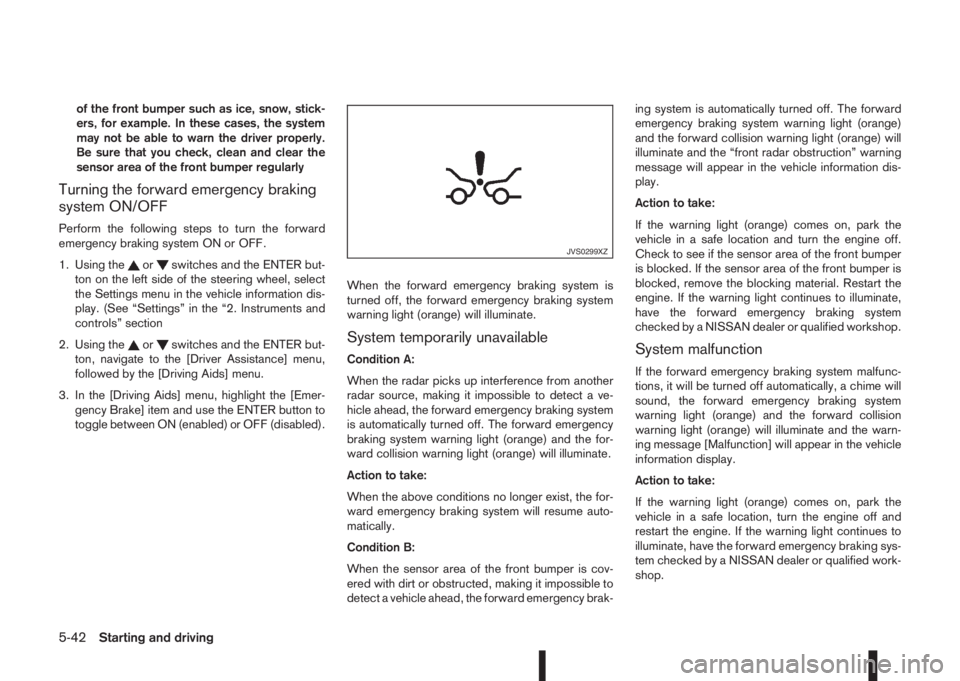
turned off, the forward emergency braking system
warning light (orange) will illuminate.System temporarily unavailable
Condition A:
When the radar picks up interference from another
radar source, making it impossible to detect a ve-
hicle ahead, the forward emergency braking system
is automatically turned off. The forward emergency
braking system warning light (orange) and the for-
ward collision warning light (orange) will illuminate.
Action to take:
When the above conditions no longer exist, the for-
ward emergency braking system will resume auto-
matically.
Condition B:
When the sensor area of the front bumper is cov-
ered with dirt or obstructed, making it impossible to
detect a vehicle ahead, the forward emergency brak-ing system is automatically turned off. The forward
emergency braking system warning light (orange)
and the forward collision warning light (orange) will
illuminate and the “front radar obstruction” warning
message will appear in the vehicle information dis-
play.
Action to take:
If the warning light (orange) comes on, park the
vehicle in a safe location and turn the engine off.
Check to see if the sensor area of the front bumper
is blocked. If the sensor area of the front bumper is
blocked, remove the blocking material. Restart the
engine. If the warning light continues to illuminate,
have the forward emergency braking system
checked by a NISSAN dealer or qualified workshop.System malfunction
If the forward emergency braking system malfunc-
tions, it will be turned off automatically, a chime will
sound, the forward emergency braking system
warning light (orange) and the forward collision
warning light (orange) will illuminate and the warn-
ing message [Malfunction] will appear in the vehicle
information display.
Action to take:
If the warning light (orange) comes on, park the
vehicle in a safe location, turn the engine off and
restart the engine. If the warning light continues to
illuminate, have the forward emergency braking sys-
tem checked by a NISSAN dealer or qualified work-
shop.
JVS0299XZ
5-42Starting and driving
Page 230 of 338
Your new vehicle was designed to be used primarily
to carry passengers and luggage.
Remember that towing a trailer will place additional
loads on your vehicle’s engine, drive-train, steering,
braking and other systems. Towing a trailer will also
exaggerate other conditions, such as sway caused
by crosswinds, rough road surfaces or passing
trucks. Driving style and speed must be adjusted
according to the circumstances. Before towing a
trailer, see a NISSAN dealer or qualified workshop
for an explanation of towing equipment and its
proper use.
OPERATING PRECAUTIONS
•Avoid towing a trailer during the running-in
schedule.
•Choose proper coupling devices (trailer hitch,
safety chain, roof carrier, etc.) for your vehicle
and trailer. These devices are available from a
NISSAN dealer or qualified workshop where you
can also obtain more detailed information about
trailer towing.
Heavy-duty kits are available at a NISSAN dealer
or qualified workshop.
•It is advisable to contact a NISSAN dealer or
qualified workshop for towing details, before
towing a trailer up steep slopes for long dis-
tances.
•Never allow the total trailer load (trailer weight
plus its cargo weight) to exceed the maximum
set for the coupling device.Contact a NISSAN dealer or qualified workshop
for more information on this matter.
•The trailer must be loaded so that heavy goods
are distributed over the axle and as low in the
trailer as possible. Poor load distribution can se-
riously affect the stability of the trailer and tow
vehicle.
•Do not exceed the maximum permitted vertical
load on the trailer hitch.
•Before driving, make sure that the lighting sys-
tem of the trailer works properly.
•When towing with 4WD models, the 4WD mode
switch should be in the AUTO position. Using
the vehicle in AUTO mode gives better traction,
particularly when moving off from stationary and/
or on an incline, as the vehicle is less likely to
wheel spin.
•Avoid abrupt starts, accelerations and stops.
•Avoid sharp turns and lane changes.
•Always drive your vehicle at a moderate speed.
•Always block the wheels on both vehicle and
trailer when parking. Apply the handbrake (where
fitted) on the trailer. Parking on a steep slope is
not recommended.
If parking on a steep slope is unavoidable it is
also advisable to put the vehicle into gear, or
select P (Park (XTRONIC models)), and turn the
front wheels into the kerb (in addition to the other
precautions described). Before parking on asteep slope consider the incline (the towing
weights quoted are for a 12% slope).
•Follow the trailer manufacturer’s instructions.
•Have your vehicle serviced more often than at
the intervals specified in the separately provided
Warranty Information and Maintenance booklet.
•Trailer towing requires more fuel than under nor-
mal circumstances because of a considerable
increase in traction power required and resis-
tance.
•When towing a trailer, observe the following re-
stricted towing speed:
Speed: below 100 km/h (62 MPH)
•Observe the legal maximum speeds for trailer
operation.
CAUTION
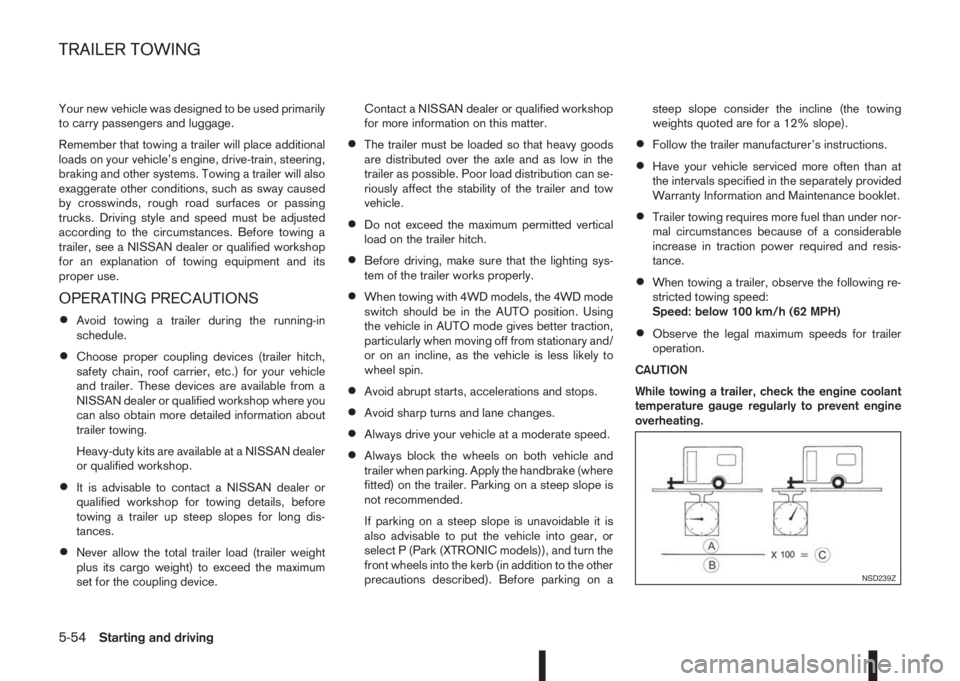
While towing a trailer, check the engine coolant
temperature gauge regularly to prevent engine
overheating.
NSD239Z
TRAILER TOWING
5-54Starting and driving
Page 234 of 338
You may hear a sound when the steering wheel
is operated quickly. However, this is not a mal-
function.
If the electric power steering warning light
illu-
minates while the engine is running, it may indicate
the electric power steering system is not functioning
properly and may need servicing. Have the electric
power steering system checked by a NISSAN dealer
or qualified workshop. (See “ Power steering warn-
ing light” in the “2. Instruments and controls” sec-
tion.)
When the electric power steering warning light illu-
minates with the engine running, the power assis-
tance for the steering will cease operation. You will
still have control of the vehicle. However, greater
steering effort is needed, especially in sharp turns
and at low speeds.The brake system has two separate hydraulic cir-
cuits. If one circuit malfunctions, two wheels will still
have braking ability.BRAKE PRECAUTIONS
Vacuum assisted brake
The brake booster aids braking by using engine
vacuum or vacuum from an engine-driven pump. If
the engine stops or the drive belt is broken, you can
stop the vehicle by depressing the brake pedal.
However, greater foot pressure on the brake pedal
will be required to stop the vehicle and the stopping
distance will be longer.
Wet brakes
When the vehicle is washed or driven through wa-
ter, the brakes may get wet. As a result, your brak-
ing distance will be longer and the vehicle may pull
to one side during braking.
To dry brakes, drive the vehicle at a safe speed
while lightly pressing the brake pedal to heat up the
brakes. Do this until the brakes return to normal.
Avoid driving the vehicle at high speeds until the
brakes function correctly.
Using the brakes
Avoid resting your foot on the brake pedal while
driving. This will overheat the brakes, wear out the
brake linings and pads faster and reduce fuel
economy performance.
To help reduce brake wear and to prevent the brakes
from overheating, reduce speed and shift to a lower
gear before going down a slope or long downhillgradient. Overheated brakes may reduce braking
performance and could result in loss of vehicle con-
trol.
CAUTION
While driving on a slippery surface, be careful
when braking, accelerating or downshifting.
Abrupt braking actions or sudden acceleration
could cause the wheels to skid and result in an
accident.
Be aware that brakes will fade if repeated heavy
brake applications are made.
Driving uphill
When starting on a steep gradient, it is sometimes
difficult to operate the brake or both the brake and
clutch (MT models). Use the parking brake to hold
the vehicle. Do not slip the clutch (MT models).
When ready to start, make sure that the shift lever is
in an appropriate forward or reverse driving posi-
tion, slowly release the parking brake while depress-
ing the accelerator pedal and releasing the clutch
(MT models) or depressing the accelerator pedal
(XTRONIC transmission models). If your vehicle has
an electric parking brake, this will automatically re-
lease when you depress the accelerator pedal and
release the clutch (MT models) or depress the ac-
celerator pedal (XTRONIC transmission models).
BRAKE SYSTEM
5-58Starting and driving
Page 235 of 338
Driving downhill
The engine braking action is effective for controlling
the vehicle while descending hills.
The shift lever (MT models) should be placed in a
gear position low enough to obtain sufficient engine
braking.
For XTRONIC transmission models, a low gear po-
sition in the manual shift mode, low enough to obtain
sufficient engine braking, should be selected.WARNING
•The Anti-lock Braking System (ABS) is a so-
phisticated device, but it cannot prevent acci-
dents resulting from careless or dangerous
driving techniques. It can help maintain ve-
hicle control during braking on slippery sur-
faces. Remember that stopping distances on
slippery surfaces will be longer than on nor-
mal surfaces even with ABS. Stopping dis-
tances may also be longer on rough, gravel or
snow covered roads, or if you are using snow
chains. Always maintain a safe distance from
the vehicle in front of you. Ultimately, the
driver is responsible for safety.
•Tyre type and condition may also affect brak-
ing effectiveness.
– When replacing tyres, install the specified
size of tyres on all four wheels.
– When installing a spare tyre, make sure
that it is the proper size and type as speci-
fied on the tyre placard. (See “Vehicle
identification” in the “9. Technical
information” section.)
– For detailed information, see “Wheels and
tyres” in the “8. Maintenance and
do-it-yourself” section.
The Anti-lock Braking System (ABS) controls the
brakes so the wheels do not lock during hard brak-
ing or when braking on slippery surfaces. The sys-
tem detects the rotation speed at each wheel and
varies the brake fluid pressure to prevent each wheelfrom locking and sliding. By preventing each wheel
from locking, the system helps the driver maintain
steering control and helps to minimise swerving and
spinning on slippery surfaces.
USING SYSTEM
Depress the brake pedal and hold it down. Depress
the brake pedal with firm steady pressure, but do
not pump the brakes. The ABS will operate to pre-
vent the wheels from locking up. Steer the vehicle to
avoid obstacles.
WARNING
Do not pump the brake pedal. Doing so may re-
sult in increased stopping distances.
SELF-TEST FEATURE
The ABS includes electronic sensors, electric
pumps, hydraulic solenoids and a computer. The
computer has a built-in diagnostic feature that tests
the system each time you start the engine and move
the vehicle at a low speed in forward or reverse.
When the self-test occurs, you may hear a “clunk”
noise and/or feel a pulsation in the brake pedal. This
is normal and does not indicate a malfunction. If the
computer senses a malfunction, it switches the ABS
off and illuminates the ABS warning light on the
instrument panel. The brake system then operates
normally, but without anti-lock assistance.
If the ABS warning light illuminates during the self-
test or while driving, have the vehicle checked by a
NISSAN dealer or qualified workshop.
ANTI-LOCK BRAKING SYSTEM
(ABS)
Starting and driving5-59