tyre pressure NISSAN QASHQAI 2016 Owner´s Manual
[x] Cancel search | Manufacturer: NISSAN, Model Year: 2016, Model line: QASHQAI, Model: NISSAN QASHQAI 2016Pages: 338, PDF Size: 4.87 MB
Page 183 of 338
METER INFORMATION ACTIVATION
At ignition ON. Once the vehicle starts moving the
tyre pressure is monitored.
TPMS SENSOR ID AND POSITION
RECOGNITION
It is recommended that a NISSAN dealer performs
the registration of a new TPMS sensor or sensor
location.
It is also possible to register the sensor yourself fol-
lowing the procedure below:
Procedure:
1. Change tyre position or have new TPMS sensor
fitted.
2. Park with Ignition ON or Engine ON for more
than 20 minutes. You must perform this step be-
fore driving.
3. Drive the vehicle for several minutes between 25
km/h (16 MPH) and 100 km/h (64 MPH). The
TPMS sensor ID and position will automatically
be detected.
NOTE
The TPMS might not synchronise if one or more
of the following conditions apply:
•Bad road conditions
•The TPMS unit does not receive correct data
from tyre pressure sensors
•Driving below 25 km/h (16 MPH)
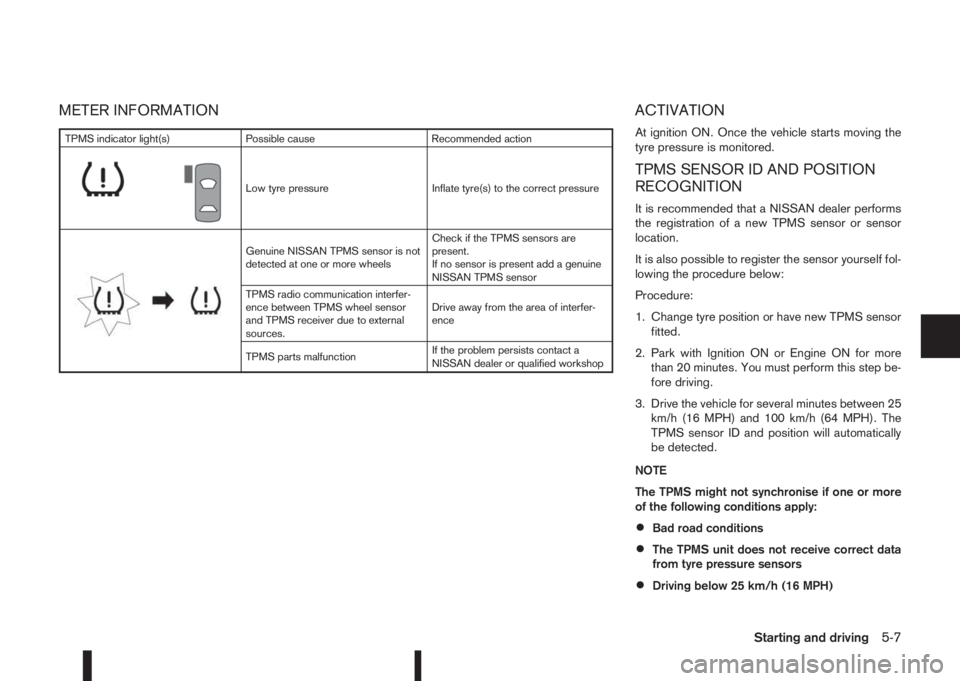
TPMS indicator light(s) Possible cause Recommended action
m
Low tyre pressure Inflate tyre(s) to the correct pressure
m
Genuine NISSAN TPMS sensor is not
detected at one or more wheelsCheck if the TPMS sensors are
present.
If no sensor is present add a genuine
NISSAN TPMS sensor
TPMS radio communication interfer-
ence between TPMS wheel sensor
and TPMS receiver due to external
sources.Drive away from the area of interfer-
ence
TPMS parts malfunctionIf the problem persists contact a
NISSAN dealer or qualified workshop
Starting and driving5-7
Page 184 of 338
•Driving above 100 km/h (64 MPH)
•High acceleration
•High deceleration
•In stop and go traffic or traffic waves
ADJUSTING TPMS TARGET
PRESSURE
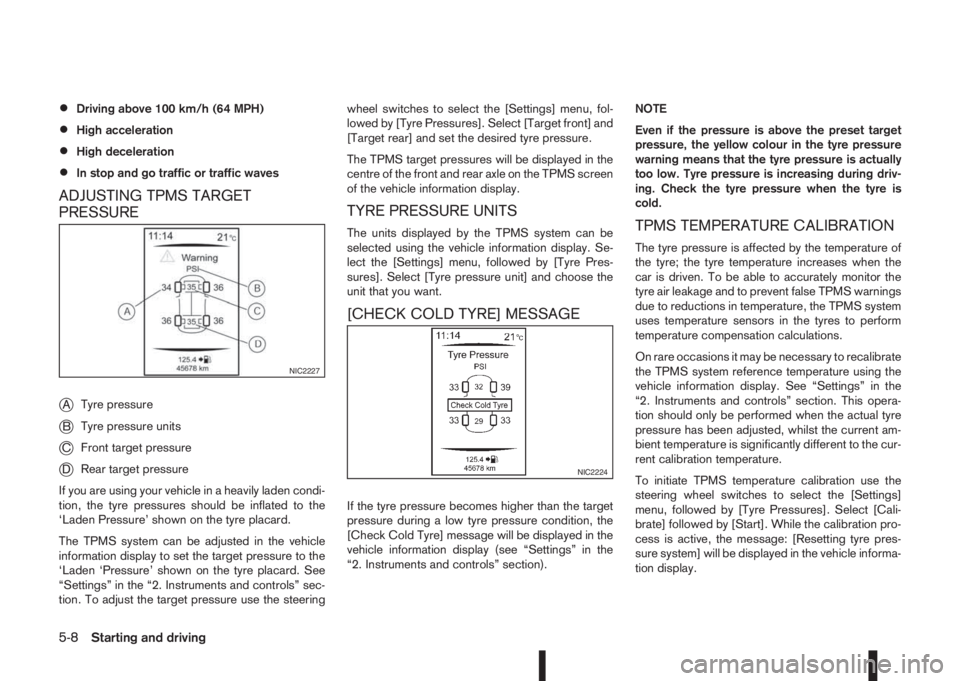
j
ATyre pressure
jBTyre pressure units
jCFront target pressure
jDRear target pressure
If you are using your vehicle in a heavily laden condi-
tion, the tyre pressures should be inflated to the
‘Laden Pressure’ shown on the tyre placard.
The TPMS system can be adjusted in the vehicle
information display to set the target pressure to the
‘Laden ‘Pressure’ shown on the tyre placard. See
“Settings” in the “2. Instruments and controls” sec-
tion. To adjust the target pressure use the steeringwheel switches to select the [Settings] menu, fol-
lowed by [Tyre Pressures]. Select [Target front] and
[Target rear] and set the desired tyre pressure.
The TPMS target pressures will be displayed in the
centre of the front and rear axle on the TPMS screen
of the vehicle information display.
TYRE PRESSURE UNITS
The units displayed by the TPMS system can be
selected using the vehicle information display. Se-
lect the [Settings] menu, followed by [Tyre Pres-
sures]. Select [Tyre pressure unit] and choose the
unit that you want.
[CHECK COLD TYRE] MESSAGE
If the tyre pressure becomes higher than the target
pressure during a low tyre pressure condition, the
[Check Cold Tyre] message will be displayed in the
vehicle information display (see “Settings” in the
“2. Instruments and controls” section).NOTE
Even if the pressure is above the preset target
pressure, the yellow colour in the tyre pressure
warning means that the tyre pressure is actually
too low. Tyre pressure is increasing during driv-
ing. Check the tyre pressure when the tyre is
cold.
TPMS TEMPERATURE CALIBRATION
The tyre pressure is affected by the temperature of
the tyre; the tyre temperature increases when the
car is driven. To be able to accurately monitor the
tyre air leakage and to prevent false TPMS warnings
due to reductions in temperature, the TPMS system
uses temperature sensors in the tyres to perform
temperature compensation calculations.
On rare occasions it may be necessary to recalibrate
the TPMS system reference temperature using the
vehicle information display. See “Settings” in the
“2. Instruments and controls” section. This opera-
tion should only be performed when the actual tyre
pressure has been adjusted, whilst the current am-
bient temperature is significantly different to the cur-
rent calibration temperature.
To initiate TPMS temperature calibration use the
steering wheel switches to select the [Settings]
menu, followed by [Tyre Pressures]. Select [Cali-
brate] followed by [Start]. While the calibration pro-
cess is active, the message: [Resetting tyre pres-
sure system] will be displayed in the vehicle informa-
tion display.
NIC2227
NIC2224
5-8Starting and driving
Page 223 of 338
•When the vehicle is being towed
•When the doors (including the back door) are
not closed.
The following conditions may reduce the ability
of the system to detect other vehicles:
•Severe weather.
•Road spray.
•Ice build up on the vehicle.
•Frost on the vehicle.
•Dirt on the vehicle.
Do not attach stickers (including transparent ma-
terial), install accessories or apply additional
paint near the sonar sensors. These conditions
may reduce the ability of the system to detect
other vehicles.
The sonar sensors detect stationary objects be-
hind the vehicle. The sonar sensors may not de-
tect:
•Small or moving objects.
•Wedge-shaped objects.
•Objects close to the bumper.
•Thin objects such as rope, wire, or chain.
NOTE
Under the following conditions, the IPA may not
be able to predict precise courses and function
properly. There may be instances where sur-rounding objects and vehicles are displayed in-
side the clearance guidelines (red), or where the
vehicle cannot be parked in the correct spot fol-
lowing the IPA operation.
•When the shift lever is operated while driving.
•When sudden start, sudden stop or sudden
operation of the shift lever occurs.
•When tyre pressure is too low or a tyre is worn
out.
•When tyres are installed that are of a different
size from the tyres that were equipped at the
time of factory shipment.
•When the vehicle is heavily laden.
DEACTIVATION OF THE IPA SYSTEM
The IPA will deactivate under the following condi-
tions:
•When the steering wheel is operated manually.
•When 5 seconds have passed since the shift
lever was placed and kept in the Neutral (N)
position.
•When reversing operations are conducted more
than 10 times for steering corrections.
•When the system judges that conditions (such
as worn out or low pressure tyres, road condi-
tions for example) are not suitable for correct
course predictions.
•When the vehicle reverses to a position behind
the position where the IPA operation started.
•When the vehicle passes the reverse starting
position by more than 2 m (6.5 ft).
•When the vehicle speed exceeds approximately
7 km/h (4 MPH).
•When the driver does not follow the IPA guid-
ance.
Starting and driving5-47
Page 231 of 338
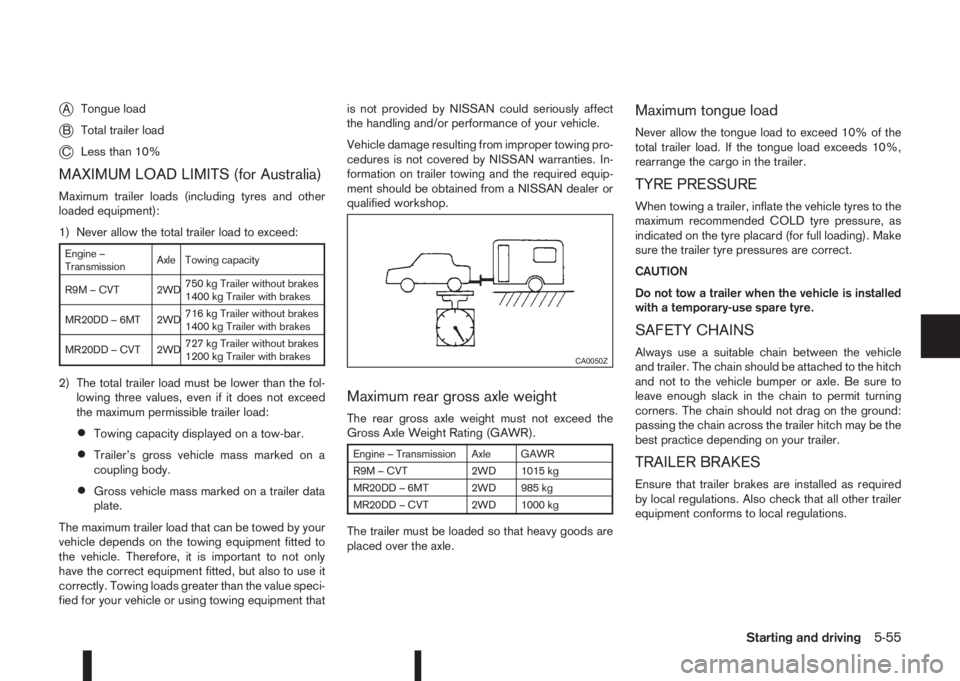
jATongue load
jBTotal trailer load
jCLess than 10%
MAXIMUM LOAD LIMITS (for Australia)
Maximum trailer loads (including tyres and other
loaded equipment):
1) Never allow the total trailer load to exceed:
Engine –
TransmissionAxle Towing capacity
R9M – CVT 2WD750 kg Trailer without brakes
1400 kg Trailer with brakes
MR20DD – 6MT 2WD716 kg Trailer without brakes
1400 kg Trailer with brakes
MR20DD – CVT 2WD727 kg Trailer without brakes
1200 kg Trailer with brakes
2) The total trailer load must be lower than the fol-
lowing three values, even if it does not exceed
the maximum permissible trailer load:
•Towing capacity displayed on a tow-bar.
•Trailer’s gross vehicle mass marked on a
coupling body.
•Gross vehicle mass marked on a trailer data
plate.
The maximum trailer load that can be towed by your
vehicle depends on the towing equipment fitted to
the vehicle. Therefore, it is important to not only
have the correct equipment fitted, but also to use it
correctly. Towing loads greater than the value speci-
fied for your vehicle or using towing equipment thatis not provided by NISSAN could seriously affect
the handling and/or performance of your vehicle.
Vehicle damage resulting from improper towing pro-
cedures is not covered by NISSAN warranties. In-
formation on trailer towing and the required equip-
ment should be obtained from a NISSAN dealer or
qualified workshop.
Maximum rear gross axle weight
The rear gross axle weight must not exceed the
Gross Axle Weight Rating (GAWR).
Engine – Transmission Axle GAWR
R9M – CVT 2WD 1015 kg
MR20DD – 6MT 2WD 985 kg
MR20DD – CVT 2WD 1000 kg
The trailer must be loaded so that heavy goods are
placed over the axle.
Maximum tongue load
Never allow the tongue load to exceed 10% of the
total trailer load. If the tongue load exceeds 10%,
rearrange the cargo in the trailer.
TYRE PRESSURE
When towing a trailer, inflate the vehicle tyres to the
maximum recommended COLD tyre pressure, as
indicated on the tyre placard (for full loading). Make
sure the trailer tyre pressures are correct.
CAUTION
Do not tow a trailer when the vehicle is installed
with a temporary-use spare tyre.
SAFETY CHAINS
Always use a suitable chain between the vehicle
and trailer. The chain should be attached to the hitch
and not to the vehicle bumper or axle. Be sure to
leave enough slack in the chain to permit turning
corners. The chain should not drag on the ground:
passing the chain across the trailer hitch may be the
best practice depending on your trailer.
TRAILER BRAKES
Ensure that trailer brakes are installed as required
by local regulations. Also check that all other trailer
equipment conforms to local regulations.
CA0050Z
Starting and driving5-55
Page 235 of 338
Driving downhill
The engine braking action is effective for controlling
the vehicle while descending hills.
The shift lever (MT models) should be placed in a
gear position low enough to obtain sufficient engine
braking.
For XTRONIC transmission models, a low gear po-
sition in the manual shift mode, low enough to obtain
sufficient engine braking, should be selected.WARNING
•The Anti-lock Braking System (ABS) is a so-
phisticated device, but it cannot prevent acci-
dents resulting from careless or dangerous
driving techniques. It can help maintain ve-
hicle control during braking on slippery sur-
faces. Remember that stopping distances on
slippery surfaces will be longer than on nor-
mal surfaces even with ABS. Stopping dis-
tances may also be longer on rough, gravel or
snow covered roads, or if you are using snow
chains. Always maintain a safe distance from
the vehicle in front of you. Ultimately, the
driver is responsible for safety.
•Tyre type and condition may also affect brak-
ing effectiveness.
– When replacing tyres, install the specified
size of tyres on all four wheels.
– When installing a spare tyre, make sure
that it is the proper size and type as speci-
fied on the tyre placard. (See “Vehicle
identification” in the “9. Technical
information” section.)
– For detailed information, see “Wheels and
tyres” in the “8. Maintenance and
do-it-yourself” section.
The Anti-lock Braking System (ABS) controls the
brakes so the wheels do not lock during hard brak-
ing or when braking on slippery surfaces. The sys-
tem detects the rotation speed at each wheel and
varies the brake fluid pressure to prevent each wheelfrom locking and sliding. By preventing each wheel
from locking, the system helps the driver maintain
steering control and helps to minimise swerving and
spinning on slippery surfaces.
USING SYSTEM
Depress the brake pedal and hold it down. Depress
the brake pedal with firm steady pressure, but do
not pump the brakes. The ABS will operate to pre-
vent the wheels from locking up. Steer the vehicle to
avoid obstacles.
WARNING
Do not pump the brake pedal. Doing so may re-
sult in increased stopping distances.
SELF-TEST FEATURE
The ABS includes electronic sensors, electric
pumps, hydraulic solenoids and a computer. The
computer has a built-in diagnostic feature that tests
the system each time you start the engine and move
the vehicle at a low speed in forward or reverse.
When the self-test occurs, you may hear a “clunk”
noise and/or feel a pulsation in the brake pedal. This
is normal and does not indicate a malfunction. If the
computer senses a malfunction, it switches the ABS
off and illuminates the ABS warning light on the
instrument panel. The brake system then operates
normally, but without anti-lock assistance.
If the ABS warning light illuminates during the self-
test or while driving, have the vehicle checked by a
NISSAN dealer or qualified workshop.
ANTI-LOCK BRAKING SYSTEM
(ABS)
Starting and driving5-59
Page 245 of 338
6In case of emergencyIn case of emergency
Hazard warning flasher switch ................................. 6-2
Spare tyre................................................................ 6-2
Temporary-use spare tyre (where fitted) .............. 6-2
Conventional spare tyre (where fitted) ................. 6-2
Flat tyre ................................................................... 6-3
Stopping the vehicle ........................................... 6-3
Changing flat tyre (Models with spare wheel,
where fitted) ....................................................... 6-3
Tyre Pressure Monitoring System (TPMS)
(where fitted) ...................................................... 6-7
Repairing flat tyre (Models with emergency
tyre puncture repair kit) ....................................... 6-8Jump-starting ........................................................... 6-11
Push-starting ........................................................... 6-13
Engine overheat ....................................................... 6-13
Tow truck towing ..................................................... 6-14
Towing precautions ............................................ 6-14
Recommended towing for two-wheel drive
(2WD) models .................................................... 6-15
Recommended towing for four-wheel drive
(4WD) models .................................................... 6-15
Towing eye ......................................................... 6-16
Freeing the vehicle from sand, snow or mud ....... 6-16
Page 246 of 338
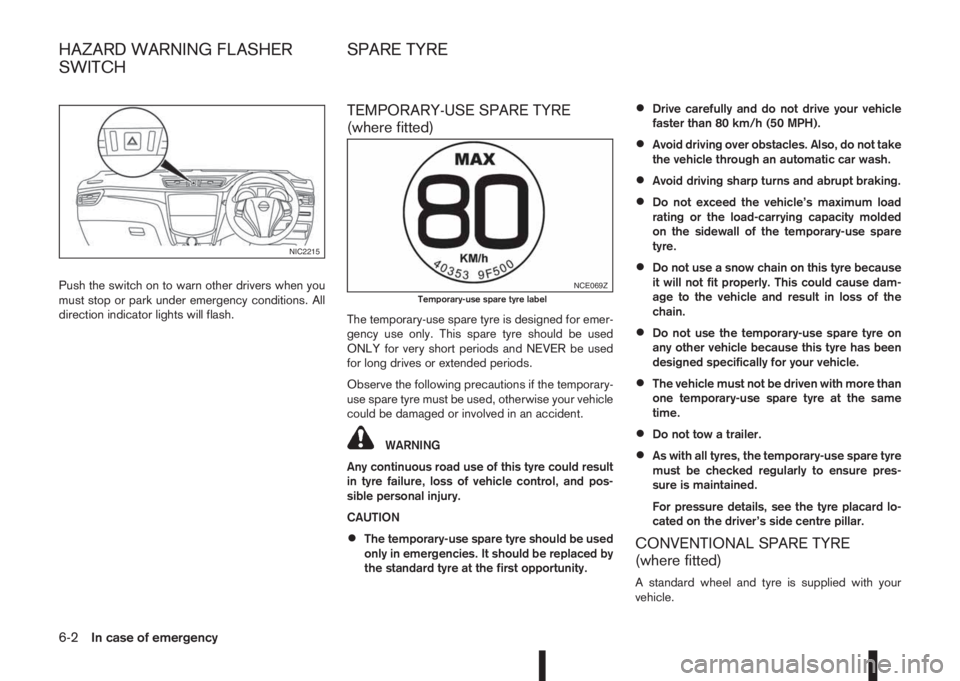
Push the switch on to warn other drivers when you
must stop or park under emergency conditions. All
direction indicator lights will flash.
TEMPORARY-USE SPARE TYRE
(where fitted)
The temporary-use spare tyre is designed for emer-
gency use only. This spare tyre should be used
ONLY for very short periods and NEVER be used
for long drives or extended periods.
Observe the following precautions if the temporary-
use spare tyre must be used, otherwise your vehicle
could be damaged or involved in an accident.
WARNING
Any continuous road use of this tyre could result
in tyre failure, loss of vehicle control, and pos-
sible personal injury.
CAUTION
•The temporary-use spare tyre should be used
only in emergencies. It should be replaced by
the standard tyre at the first opportunity.
•Drive carefully and do not drive your vehicle
faster than 80 km/h (50 MPH).
•Avoid driving over obstacles. Also, do not take
the vehicle through an automatic car wash.
•Avoid driving sharp turns and abrupt braking.
•Do not exceed the vehicle’s maximum load
rating or the load-carrying capacity molded
on the sidewall of the temporary-use spare
tyre.
•Do not use a snow chain on this tyre because
it will not fit properly. This could cause dam-
age to the vehicle and result in loss of the
chain.
•Do not use the temporary-use spare tyre on
any other vehicle because this tyre has been
designed specifically for your vehicle.
•The vehicle must not be driven with more than
one temporary-use spare tyre at the same
time.
•Do not tow a trailer.
•As with all tyres, the temporary-use spare tyre
must be checked regularly to ensure pres-
sure is maintained.
For pressure details, see the tyre placard lo-
cated on the driver’s side centre pillar.
CONVENTIONAL SPARE TYRE
(where fitted)
A standard wheel and tyre is supplied with your
vehicle.
NIC2215
NCE069ZTemporary-use spare tyre label
HAZARD WARNING FLASHER
SWITCHSPARE TYRE
6-2In case of emergency
Page 250 of 338
3. With the wheel wrench, tighten the wheel bolts
alternately and evenly in the sequence as illus-
trated (
j1-j5 ) until they are tight.
4. Lower the vehicle slowly until the tyre touches
the ground.
5. Tighten the wheel bolts securely using the wheel
wrench in the sequence as illustrated.
6. Lower the vehicle completely.
7. Install the wheel cover (where fitted).
NOTE
Before installation, align NISSAN logo (centre
cap) with the wheel bolts/or perpendicular to
valve hole (where fitted), to correctly align to
the centre.
Wheel bolt tightening torque:
113 N•m (12 kg-m, 83 ft-lb)
As soon as possible, tighten the wheel bolts to
the specified torque with a torque wrench.
WARNING
Retighten the wheel bolts after the vehicle has
been driven for 1,000 km (600 miles) (also in
cases of a flat tyre, etc.).
The wheel bolts must be kept tightened to specifi-
cation at all times. It is recommended that the wheel
bolts be tightened to specification at each mainte-
nance interval.
Adjust the tyre pressure to the COLD pressure.COLD pressure is the tyre pressure as measured
after the vehicle has been parked for three hours or
more or driven for less than 1.6 km (1 mile).
COLD tyre pressures are shown on the tyre placard
affixed to the driver’s side centre pillar.
Stowing the wheel and tools
Securely store the wheel with the flat tyre, the jack
and the tools in the specified storage areas.
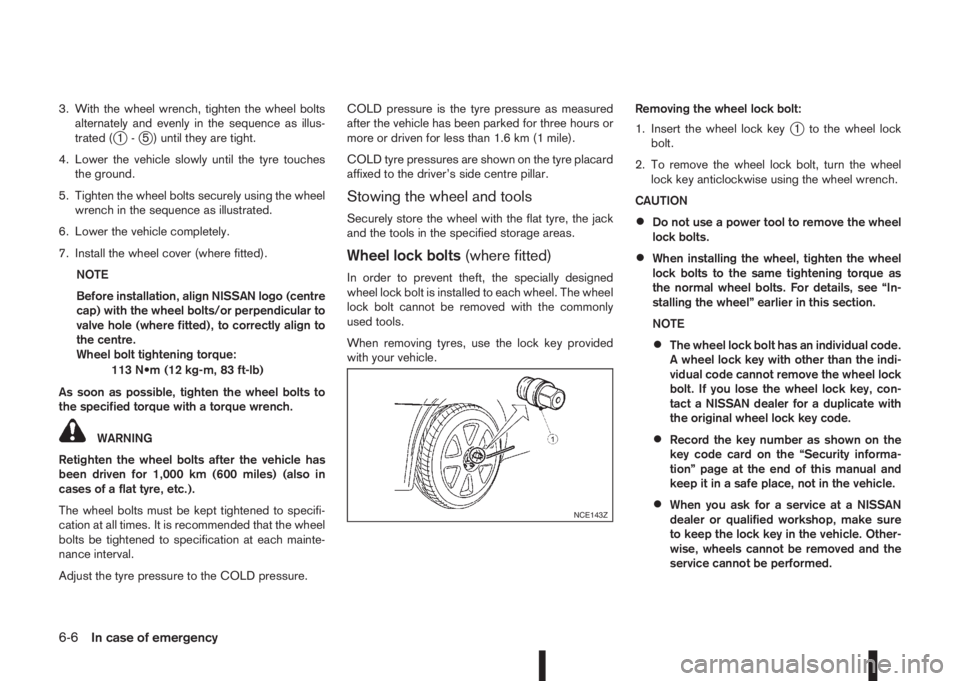
Wheel lock bolts(where fitted)
In order to prevent theft, the specially designed
wheel lock bolt is installed to each wheel. The wheel
lock bolt cannot be removed with the commonly
used tools.
When removing tyres, use the lock key provided
with your vehicle.Removing the wheel lock bolt:
1. Insert the wheel lock key
j1 to the wheel lock
bolt.
2. To remove the wheel lock bolt, turn the wheel
lock key anticlockwise using the wheel wrench.
CAUTION
•Do not use a power tool to remove the wheel
lock bolts.
•When installing the wheel, tighten the wheel
lock bolts to the same tightening torque as
the normal wheel bolts. For details, see “In-
stalling the wheel” earlier in this section.
NOTE
•The wheel lock bolt has an individual code.
A wheel lock key with other than the indi-
vidual code cannot remove the wheel lock
bolt. If you lose the wheel lock key, con-
tact a NISSAN dealer for a duplicate with
the original wheel lock key code.
•Record the key number as shown on the
key code card on the “Security informa-
tion” page at the end of this manual and
keep it in a safe place, not in the vehicle.
•When you ask for a service at a NISSAN
dealer or qualified workshop, make sure
to keep the lock key in the vehicle. Other-
wise, wheels cannot be removed and the
service cannot be performed.NCE143Z
6-6In case of emergency
Page 251 of 338
TYRE PRESSURE MONITORING
SYSTEM (TPMS) (where fitted)
j
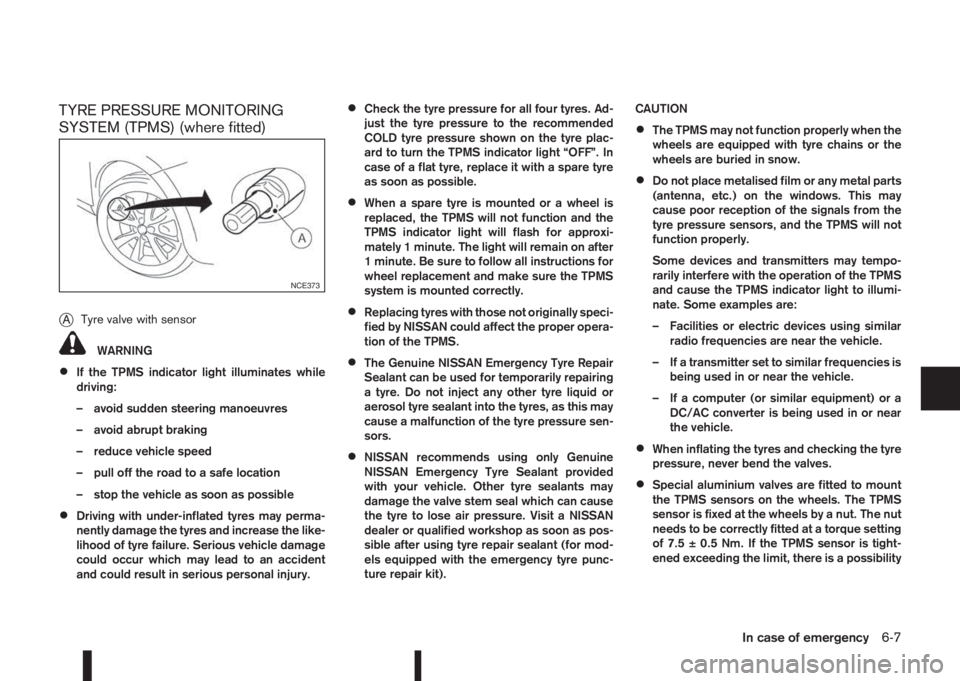
ATyre valve with sensor
WARNING
•If the TPMS indicator light illuminates while
driving:
– avoid sudden steering manoeuvres
– avoid abrupt braking
– reduce vehicle speed
– pull off the road to a safe location
– stop the vehicle as soon as possible
•Driving with under-inflated tyres may perma-
nently damage the tyres and increase the like-
lihood of tyre failure. Serious vehicle damage
could occur which may lead to an accident
and could result in serious personal injury.
•Check the tyre pressure for all four tyres. Ad-
just the tyre pressure to the recommended
COLD tyre pressure shown on the tyre plac-
ard to turn the TPMS indicator light “OFF”. In
case of a flat tyre, replace it with a spare tyre
as soon as possible.
•When a spare tyre is mounted or a wheel is
replaced, the TPMS will not function and the
TPMS indicator light will flash for approxi-
mately 1 minute. The light will remain on after
1 minute. Be sure to follow all instructions for
wheel replacement and make sure the TPMS
system is mounted correctly.
•Replacing tyres with those not originally speci-
fied by NISSAN could affect the proper opera-
tion of the TPMS.
•The Genuine NISSAN Emergency Tyre Repair
Sealant can be used for temporarily repairing
a tyre. Do not inject any other tyre liquid or
aerosol tyre sealant into the tyres, as this may
cause a malfunction of the tyre pressure sen-
sors.
•NISSAN recommends using only Genuine
NISSAN Emergency Tyre Sealant provided
with your vehicle. Other tyre sealants may
damage the valve stem seal which can cause
the tyre to lose air pressure. Visit a NISSAN
dealer or qualified workshop as soon as pos-
sible after using tyre repair sealant (for mod-
els equipped with the emergency tyre punc-
ture repair kit).CAUTION
•The TPMS may not function properly when the
wheels are equipped with tyre chains or the
wheels are buried in snow.
•Do not place metalised film or any metal parts
(antenna, etc.) on the windows. This may
cause poor reception of the signals from the
tyre pressure sensors, and the TPMS will not
function properly.
Some devices and transmitters may tempo-
rarily interfere with the operation of the TPMS
and cause the TPMS indicator light to illumi-
nate. Some examples are:
– Facilities or electric devices using similar
radio frequencies are near the vehicle.
– If a transmitter set to similar frequencies is
being used in or near the vehicle.
– If a computer (or similar equipment) or a
DC/AC converter is being used in or near
the vehicle.
•When inflating the tyres and checking the tyre
pressure, never bend the valves.
•Special aluminium valves are fitted to mount
the TPMS sensors on the wheels. The TPMS
sensor is fixed at the wheels by a nut. The nut
needs to be correctly fitted at a torque setting
of 7.5 ± 0.5 Nm. If the TPMS sensor is tight-
ened exceeding the limit, there is a possibility
NCE373
In case of emergency6-7
Page 252 of 338
the sensor grommet will be damaged. If the
sensor is tightened under the limit, there is a
possibility to cause an air leak.
•Use Genuine NISSAN valve caps that comply
with the factory-fitted valve cap specifications.
•Do not use metal valve caps.
•Fit the valve caps properly. Without the valve
caps the valve and tyre pressure monitor sen-
sors could be damaged.
•Do not damage the valves and sensors when
storing the wheels or fitting different tyres.
•Replace the sensor grommet and washer dur-
ing a tyre change. Once they have been re-
moved, the sensor grommet and washer can-
not be reused and must be replaced. The
TPMS sensors can be used again.
The Tyre Pressure Monitoring System (TPMS) moni-
tors the tyre pressure of the four wheels except the
spare wheel. When the TPMS indicator light comes
on together with the TPMS tyre location indicator
light (in the meter panel), one or more of the tyres is
significantly under-inflated. If the vehicle is being
driven with low tyre pressure, the TPMS will activate
and TPMS indicator light together with the TPMS
tyre location indicator light remains on. This system
will deactivate only when tyre pressure is corrected
and the vehicle is driven at speeds above 25 km/h
(16 MPH).
For more details about the TPMS, see “Tyre Pres-
sure Monitoring System (TPMS)” in the “5. Starting
and driving” section.
REPAIRING FLAT TYRE (Models with
emergency tyre puncture repair kit)
The emergency tyre puncture repair kit is supplied
with the vehicle instead of a spare tyre. This repair
kit must be used for temporarily fixing a minor tyre
puncture. After using the repair kit, see a NISSAN
dealer or qualified workshop as soon as possible for
tyre inspection and repair/replacement.
CAUTION
Do not use the emergency tyre puncture repair
kit under the following conditions. Contact a
NISSAN dealer or qualified workshop or profes-
sional road assistance.
•when the sealant has passed its expiration
date (shown on the label attached to the
bottle)
•when the cut or the puncture is approximately
4 mm (0.16 in) or longer
•when the side of the tyre is damaged
•when the vehicle has been driven with a con-
siderable loss of air from the tyre
•when the tyre is completely displaced inside
or outside the rim
•when the tyre rim is damaged
•when two or more tyres are flat
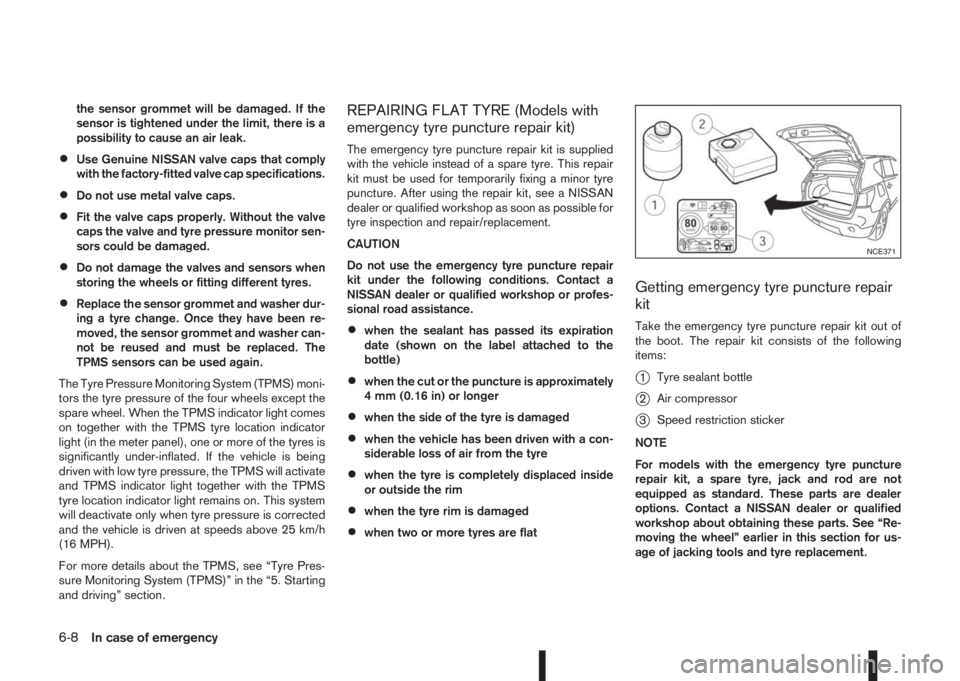
Getting emergency tyre puncture repair
kit
Take the emergency tyre puncture repair kit out of
the boot. The repair kit consists of the following
items:
j1Tyre sealant bottle
j2Air compressor
j3Speed restriction sticker
NOTE
For models with the emergency tyre puncture
repair kit, a spare tyre, jack and rod are not
equipped as standard. These parts are dealer
options. Contact a NISSAN dealer or qualified
workshop about obtaining these parts. See “Re-
moving the wheel” earlier in this section for us-
age of jacking tools and tyre replacement.
NCE371
6-8In case of emergency