warning light NISSAN QASHQAI 2016 Owner´s Manual
[x] Cancel search | Manufacturer: NISSAN, Model Year: 2016, Model line: QASHQAI, Model: NISSAN QASHQAI 2016Pages: 338, PDF Size: 4.87 MB
Page 176 of 338
5Starting and drivingStarting and driving
Running-in schedule ................................................ 5-2
Before starting the engine ........................................ 5-2
Precautions when starting and driving ...................... 5-3
Exhaust gas (Carbon Monoxide) ......................... 5-3
Tyre Pressure Monitoring System (TPMS)................ 5-4
Meter information................................................ 5-7
Activation............................................................ 5-7
TPMS sensor ID and position recognition ........... 5-7
Adjusting TPMS target pressure ......................... 5-8
Tyre pressure units ............................................. 5-8
[Check cold tyre] message ................................. 5-8
TPMS temperature calibration............................. 5-8
On-pavement and off-road driving precautions ......... 5-9
Three-way catalyst (Petrol engine models)................ 5-9
To help prevent damage ..................................... 5-9
Turbocharger system (Diesel engine models) ........... 5-10
Care when driving ................................................... 5-10
Engine cold start period ...................................... 5-10
Loading luggage ................................................. 5-10
Driving on wet roads ........................................... 5-10
Driving under winter conditions ........................... 5-10
Ignition switch (where fitted) .................................... 5-11
Manual transmission ........................................... 5-11
XTRONIC transmission (CVT) ............................ 5-11
Steering lock ...................................................... 5-11
Key positions ...................................................... 5-11
NISSAN Anti-Theft System (NATS) (where
fitted).................................................................. 5-12
Push-button ignition switch (where fitted) ................. 5-12Precautions on push-button ignition switch
operation ............................................................ 5-12
Intelligent Key system ......................................... 5-12
Ignition switch positions ...................................... 5-13
Emergency engine shut off.................................. 5-14
Steering lock ...................................................... 5-14
Intelligent Key battery discharge.......................... 5-14
Starting engine ........................................................ 5-15
Models with Intelligent Key system ...................... 5-15
Models without Intelligent Key system ................. 5-16
Driving the vehicle.................................................... 5-17
Driving with manual transmission......................... 5-17
Driving with XTRONIC Transmission (CVT) ........ 5-18
Stop/Start System (where fitted) .............................. 5-22
Normal operation ................................................ 5-22
Precautions ........................................................ 5-24
Stop/Start System OFF switch ........................... 5-25
Environmental savings ........................................ 5-25
Four-wheel Drive (4WD) (where fitted)..................... 5-26
4WD mode operations........................................ 5-27
4WD shift tips .................................................... 5-27
4WD Mode indicator lights ................................. 5-28
Driving four-wheel drive (4WD) safely ................. 5-28
Blind Spot Warning (BSW) system (where fitted)..... 5-30
BSW system operation ....................................... 5-30
BSW driving situations ....................................... 5-32
BSW temporary disabled status.......................... 5-32
BSW automatic deactivation ............................... 5-33
BSW malfunction ............................................... 5-33
BSW camera unit maintenance ........................... 5-33
Page 178 of 338
During the first 1,600 km (1,000 miles), follow these
recommendations for the future reliability and
economy of your new vehicle. Failure to follow the
recommendations may result in shortened engine
life and reduced engine performance.
•Avoid driving for long periods at a constant
speed, either fast or slow.
•Do not accelerate at full throttle in any gear.
•Avoid quick starts.
•Avoid hard braking as much as possible.
•Do not tow a trailer during the first 800 km (500
miles).
NOTE
Models with K9K diesel engine will achieve top
performance only after approximately 5,000 km
(3,000 miles).
WARNING
The driving characteristics of your vehicle can be
changed remarkably by any additional load and
its distribution as well as by adding optional
equipment (trailer couplings, roof racks, etc.).
Your driving style and speed have to be adjusted
accordingly. Especially when carrying heavy
loads, your speed must be reduced adequately.
•Make sure the area around the vehicle is free of
obstacles.
•Check fluid levels such as engine oil, coolant,
brake and clutch fluid, and window washer fluid
as frequently as possible, at least whenever you
refuel.
•Visually inspect tyres for their appearance and
condition. Also check the tyre pressure for
proper inflation.
•Maintenance items in the “8. Maintenance and
do-it-yourself” section should be checked peri-
odically.
•Check that all windows and light lenses are
clean.
•Check that all doors are closed.
•Position the seat and adjust the head restraints.
•Adjust the inside and outside mirrors.
•Fasten your seat belt and ask all passengers to
do likewise.
•Check the operation of the warning/indicator
lights when the ignition switch is turned to the
ON position.
•Do not place hard or heavy objects on the dash-
board or rear parcel shelf in order to prevent
injury in the event of a sudden stop.
RUNNING-IN SCHEDULE BEFORE STARTING THE ENGINE
5-2Starting and driving
Page 180 of 338
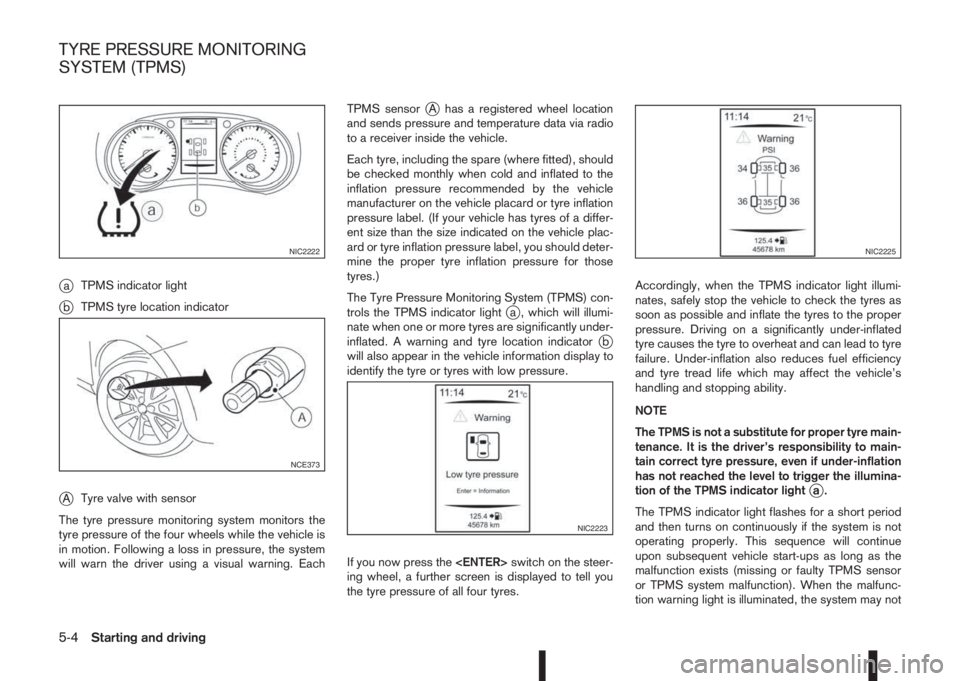
jaTPMS indicator light
jbTPMS tyre location indicator
jATyre valve with sensor
The tyre pressure monitoring system monitors the
tyre pressure of the four wheels while the vehicle is
in motion. Following a loss in pressure, the system
will warn the driver using a visual warning. EachTPMS sensor
jA has a registered wheel location
and sends pressure and temperature data via radio
to a receiver inside the vehicle.
Each tyre, including the spare (where fitted), should
be checked monthly when cold and inflated to the
inflation pressure recommended by the vehicle
manufacturer on the vehicle placard or tyre inflation
pressure label. (If your vehicle has tyres of a differ-
ent size than the size indicated on the vehicle plac-
ard or tyre inflation pressure label, you should deter-
mine the proper tyre inflation pressure for those
tyres.)
The Tyre Pressure Monitoring System (TPMS) con-
trols the TPMS indicator light
ja , which will illumi-
nate when one or more tyres are significantly under-
inflated. A warning and tyre location indicator
jb
will also appear in the vehicle information display to
identify the tyre or tyres with low pressure.
If you now press the
ing wheel, a further screen is displayed to tell you
the tyre pressure of all four tyres.Accordingly, when the TPMS indicator light illumi-
nates, safely stop the vehicle to check the tyres as
soon as possible and inflate the tyres to the proper
pressure. Driving on a significantly under-inflated
tyre causes the tyre to overheat and can lead to tyre
failure. Under-inflation also reduces fuel efficiency
and tyre tread life which may affect the vehicle’s
handling and stopping ability.
NOTE
The TPMS is not a substitute for proper tyre main-
tenance. It is the driver’s responsibility to main-
tain correct tyre pressure, even if under-inflation
has not reached the level to trigger the illumina-
tion of the TPMS indicator light
ja.
The TPMS indicator light flashes for a short period
and then turns on continuously if the system is not
operating properly. This sequence will continue
upon subsequent vehicle start-ups as long as the
malfunction exists (missing or faulty TPMS sensor
or TPMS system malfunction). When the malfunc-
tion warning light is illuminated, the system may not
NIC2222
NCE373
NIC2223
NIC2225
TYRE PRESSURE MONITORING
SYSTEM (TPMS)
5-4Starting and driving
Page 181 of 338
be able to detect or signal low tyre pressure as
intended. TPMS malfunctions may occur for a vari-
ety of reasons including the installation of replace-
ment or alternate tyres or wheels on the vehicle that
prevent the TPMS from functioning properly. Always
check the TPMS indicator light after replacing one
or more tyres or wheels on your vehicle to ensure
that the replacement or alternate tyres and wheels
allow the TPMS to continue to function properly.
•The TPMS does not monitor the tyre pressure of
the spare tyre.
•The TPMS will activate only when the vehicle is
driven at speeds above 25 km/h (16 MPH). Also,
this system may not detect a sudden drop in tyre
pressure (for example a flat tyre while driving).
•The TPMS indicator light may not automatically
turn off when the tyre pressure is adjusted.After
the tyre is inflated to the recommended COLD
tyre pressure, drive the vehicle at speeds above
25 km/h (16 MPH) to activate the TPMS. See
“TPMS sensor ID and position recognition” later
in this section
•Following a change in the outside temperature,
the TPMS indicator light may illuminate even if
the tyre pressure has been adjusted properly.
Adjust the tyre pressure to the recommended
COLD tyre pressure again when the tyres are
cold, and reset the TPMS.
For additional information, see “[Check cold tyre]
message” later in this section.
WARNING
•If the TPMS indicator light illuminates while
driving:
– avoid sudden steering manoeuvres
– avoid abrupt braking
– reduce vehicle speed
– pull off the road to a safe location
– stop the vehicle as soon as possible
•Driving with under-inflated tyres may perma-
nently damage the tyres and increase the like-
lihood of tyre failure. Serious vehicle damage
could occur which may lead to an accident
and could result in serious personal injury.
•Check the tyre pressure for all four tyres. Ad-
just the tyre pressure to the recommended
COLD tyre pressure shown on the tyre plac-
ard to turn the TPMS indicator light “OFF”. In
case of a flat tyre, replace it with a spare tyre
as soon as possible. (See “Flat tyre” in the
“6. In case of emergency” section for chang-
ing a flat tyre.)
•When a spare tyre is mounted or a wheel is
replaced, the TPMS will not function and the
TPMS indicator light will flash for approxi-
mately 1 minute. The light will remain on after
1 minute. Be sure to follow all instructions for
wheel replacement and mount the TPMS sys-
tem correctly.
•Replacing tyres with those not originally speci-
fied by NISSAN could affect the proper opera-
tion of the TPMS.
•The Genuine NISSAN Emergency Tyre Repair
Sealant or equivalent can be used for tempo-
rarily repairing a tyre. Do not inject any other
tyre liquid or aerosol tyre sealant into the
tyres, as this may cause a malfunction of the
tyre pressure sensors.
•NISSAN recommends using only Genuine
NISSAN Emergency Tyre Sealant provided
with your vehicle. Other tyre sealants may
damage the valve stem seal which can cause
the tyre to lose air pressure. Visit a NISSAN
dealer or qualified workshop as soon as pos-
sible after using tyre repair sealant (for mod-
els equipped with the emergency tyre punc-
ture repair kit).
CAUTION
•The TPMS may not function properly when the
wheels are equipped with tyre chains or the
wheels are buried in snow.
•Do not place metalised film or any metal parts
(antenna, etc.) on the windows. This may
cause poor reception of the signals from the
tyre pressure sensors, and the TPMS will not
function properly.
Starting and driving5-5
Page 187 of 338
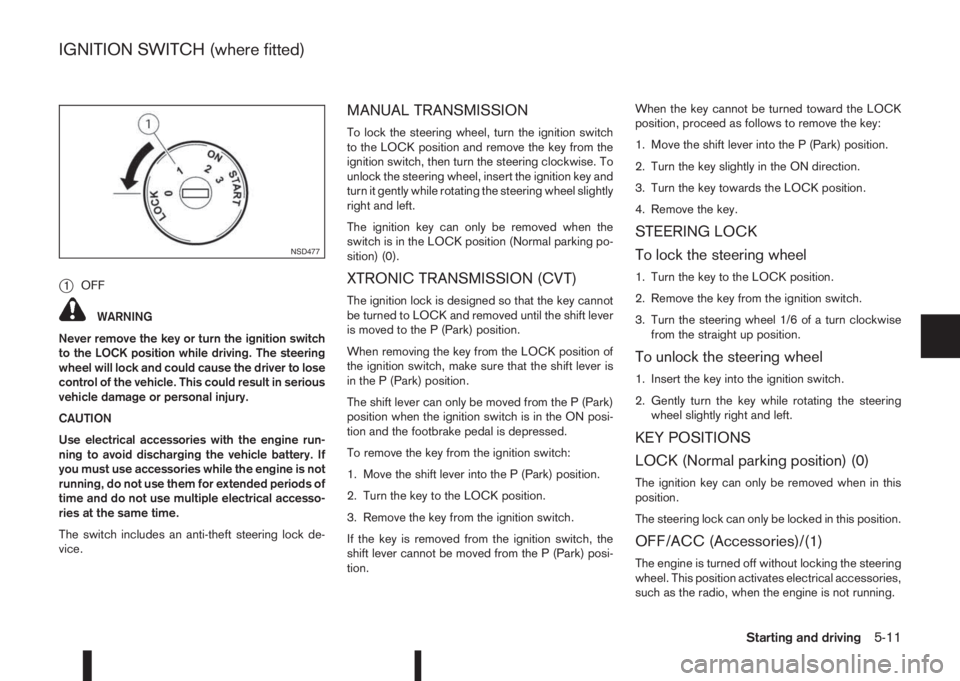
j1OFF
WARNING
Never remove the key or turn the ignition switch
to the LOCK position while driving. The steering
wheel will lock and could cause the driver to lose
control of the vehicle. This could result in serious
vehicle damage or personal injury.
CAUTION
Use electrical accessories with the engine run-
ning to avoid discharging the vehicle battery. If
you must use accessories while the engine is not
running, do not use them for extended periods of
time and do not use multiple electrical accesso-
ries at the same time.
The switch includes an anti-theft steering lock de-
vice.
MANUAL TRANSMISSION
To lock the steering wheel, turn the ignition switch
to the LOCK position and remove the key from the
ignition switch, then turn the steering clockwise. To
unlock the steering wheel, insert the ignition key and
turn it gently while rotating the steering wheel slightly
right and left.
The ignition key can only be removed when the
switch is in the LOCK position (Normal parking po-
sition) (0).
XTRONIC TRANSMISSION (CVT)
The ignition lock is designed so that the key cannot
be turned to LOCK and removed until the shift lever
is moved to the P (Park) position.
When removing the key from the LOCK position of
the ignition switch, make sure that the shift lever is
in the P (Park) position.
The shift lever can only be moved from the P (Park)
position when the ignition switch is in the ON posi-
tion and the footbrake pedal is depressed.
To remove the key from the ignition switch:
1. Move the shift lever into the P (Park) position.
2. Turn the key to the LOCK position.
3. Remove the key from the ignition switch.
If the key is removed from the ignition switch, the
shift lever cannot be moved from the P (Park) posi-
tion.When the key cannot be turned toward the LOCK
position, proceed as follows to remove the key:
1. Move the shift lever into the P (Park) position.
2. Turn the key slightly in the ON direction.
3. Turn the key towards the LOCK position.
4. Remove the key.
STEERING LOCK
To lock the steering wheel
1. Turn the key to the LOCK position.
2. Remove the key from the ignition switch.
3. Turn the steering wheel 1/6 of a turn clockwise
from the straight up position.
To unlock the steering wheel
1. Insert the key into the ignition switch.
2. Gently turn the key while rotating the steering
wheel slightly right and left.
KEY POSITIONS
LOCK (Normal parking position) (0)
The ignition key can only be removed when in this
position.
The steering lock can only be locked in this position.
OFF/ACC (Accessories)/(1)
The engine is turned off without locking the steering
wheel. This position activates electrical accessories,
such as the radio, when the engine is not running.
NSD477
IGNITION SWITCH (where fitted)
Starting and driving5-11
Page 191 of 338
After step 4 is performed, when the ignition switch
is pushed without depressing the brake pedal, the
ignition switch position will change to “ACC”.
NOTE
•When the ignition switch is pushed to the
“ACC” or “ON” position or the engine is started
by the above procedures, the Intelligent Key
system warning light may blink in yellow (on
the meter) even if the Intelligent Key is inside
the vehicle. This is not a malfunction. To stop
the warning light from blinking, touch the ig-
nition switch with the Intelligent Key again.
•If the Intelligent Key system warning light in
the meter is blinking in green, replace the bat-
tery as soon as possible. (See “Integrated
keyfob/Intelligent Key battery replacement” in
the “8. Maintenance and do-it-yourself” sec-
tion.)
MODELS WITH INTELLIGENT KEY
SYSTEM
1. Apply the parking brake. For additional informa-
tion, see “Parking brake switch” in the “3. Pre-
driving checks and adjustments” section.
2.Manual transmission models:
Move the shift lever to the N (Neutral) position,
and depress the clutch pedal to the floor while
starting the engine.
XTRONIC transmission (CVT) models:
Move the shift lever to the P (Park) or N (Neutral)
position. (P position is preferred).
The starter is designed to operate only when
the shift lever is in the proper position.
The Intelligent Key (where fitted) must be car-
ried while inside the vehicle when operating
the ignition switch.
3. To start the engine:
•MT models – keep the clutch pedal
depressed and/or depress the brake pedal
then push the ignition switch to the “ON” po-
sition.
•XTRONIC transmission models – depress the
brake pedal then push the ignition switch to
the “ON” position.
NOTE
•To start the engine immediately, push and
release the ignition switch while depress-ing the brake pedal or clutch pedal with
the ignition switch in any position.
•For diesel engine models: In cold condi-
tions there may be a delay for a few sec-
onds before the engine cranks. This is due
to the glow plugs heating to ensure ad-
equate engine starting conditions. The
glow indicator light (
) will illuminate
during this delay, then the engine will start.
4. Immediately release the ignition switch when the
engine starts. If the engine starts, but fails to run,
repeat the above procedures.
NOTE
Petrol engine models:
•If the engine is very hard to start in ex-
tremely cold weather or when restarting,
depress the accelerator pedal a little (ap-
proximately 1/3 of the way to the floor)
and hold it and then crank the engine. Re-
lease the ignition switch and the accelera-
tor pedal when the engine starts.
•If the engine is very hard to start because
it is flooded, depress the accelerator pedal
all the way to the floor and hold it. Crank
the engine for 5-6 seconds. After cranking
the engine, release the accelerator pedal.
Crank the engine with your foot off the ac-
celerator pedal by turning the ignition
switch to START. Release the switch when
the engine starts. If the engine starts, but
fails to run, repeat the above procedure.
STARTING ENGINE
Starting and driving5-15
Page 197 of 338
•If the engine is revving up to a hazardous
speed in manual shift mode, the transmission
may shift up automatically. When the vehicle
speed decreases, the transmission automati-
cally shifts down and shifts to 1st gear before
the vehicle comes to a stop.
Accelerator downshift – In the D (Drive)
and Ds (Drive Sport) position
For rapid passing or driving uphill, fully depress the
accelerator pedal to the floor. This shifts the trans-
mission down into a lower gear, depending on the
vehicle speed.
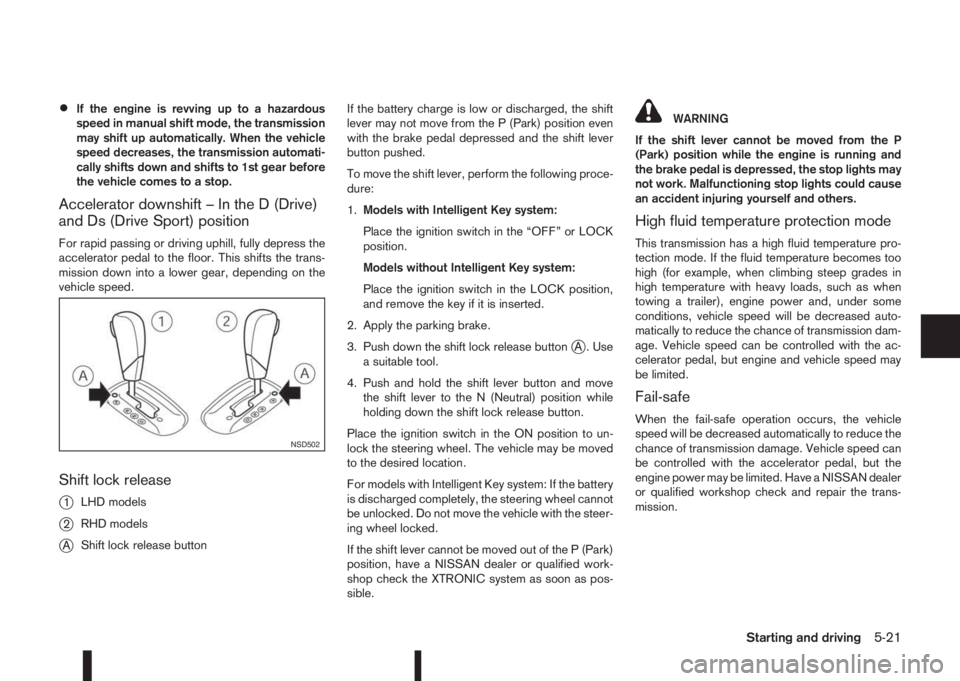
Shift lock release
j
1LHD models
j2RHD models
jAShift lock release buttonIf the battery charge is low or discharged, the shift
lever may not move from the P (Park) position even
with the brake pedal depressed and the shift lever
button pushed.
To move the shift lever, perform the following proce-
dure:
1.Models with Intelligent Key system:
Place the ignition switch in the “OFF” or LOCK
position.
Models without Intelligent Key system:
Place the ignition switch in the LOCK position,
and remove the key if it is inserted.
2. Apply the parking brake.
3. Push down the shift lock release button
jA . Use
a suitable tool.
4. Push and hold the shift lever button and move
the shift lever to the N (Neutral) position while
holding down the shift lock release button.
Place the ignition switch in the ON position to un-
lock the steering wheel. The vehicle may be moved
to the desired location.
For models with Intelligent Key system: If the battery
is discharged completely, the steering wheel cannot
be unlocked. Do not move the vehicle with the steer-
ing wheel locked.
If the shift lever cannot be moved out of the P (Park)
position, have a NISSAN dealer or qualified work-
shop check the XTRONIC system as soon as pos-
sible.
WARNING
If the shift lever cannot be moved from the P
(Park) position while the engine is running and
the brake pedal is depressed, the stop lights may
not work. Malfunctioning stop lights could cause
an accident injuring yourself and others.
High fluid temperature protection mode
This transmission has a high fluid temperature pro-
tection mode. If the fluid temperature becomes too
high (for example, when climbing steep grades in
high temperature with heavy loads, such as when
towing a trailer), engine power and, under some
conditions, vehicle speed will be decreased auto-
matically to reduce the chance of transmission dam-
age. Vehicle speed can be controlled with the ac-
celerator pedal, but engine and vehicle speed may
be limited.
Fail-safe
When the fail-safe operation occurs, the vehicle
speed will be decreased automatically to reduce the
chance of transmission damage. Vehicle speed can
be controlled with the accelerator pedal, but the
engine power may be limited. Have a NISSAN dealer
or qualified workshop check and repair the trans-
mission.
NSD502
Starting and driving5-21
Page 199 of 338
•When the engine is turned on with the engine
bonnet open.
•When the driver’s seat belt is not fastened.
•When the driver’s door is open.
•When the steering wheel is operated.
•When the Stop/Start System indicator blinks at
a low speed.
•When the accelerator pedal is depressed
(XTRONIC transmission models).
•When the shift lever is in the R (Reverse) posi-
tion.
•When the fan speed control dial is in any posi-
tion other than “OFF” (0) while the air flow con-
trol dial is in the front defogger position (manual
air conditioner).
•When the front defogger switch is on (automatic
air conditioner).
•When the Stop/Start System OFF switch is
turned on.
•When the electric power steering warning light,
the Anti-lock Braking System (ABS) warning
light, or the Electronic Stability Programme
(ESP) warning light illuminates.
•When the brake pedal is not fully depressed
(XTRONIC transmission models).
•When stopping the vehicle on steep sloping
roads (XTRONIC transmission models).
•When the power consumption is large.
•When the vehicle is travelling at altitudes higher
than 2000 m (6562 ft) (MT models).
•When the vehicle is travelling at altitudes higher
than 1500m (4922 ft) (R9M engine in combina-
tion with XTRONIC transmission models).
NOTE
It may take some time until the Stop/Start Sys-
tem activates under the following conditions:
•When the battery is discharged.
•When the outside temperature is low.
•When the battery is replaced or the battery ter-
minal is disconnected for extended periods and
then reconnected.
NOTE
The engine will not restart even if the brake pedal
is released (XTRONIC transmission ) or clutch
pedal is pressed (MT) while the Stop/Start Sys-
tem is activated under the following condition:
•When the shift lever is in the P (Park) position
(XTRONIC transmission models).
•When the engine bonnet is opened.
•When the driver seat belt is unfastened and the
driver’s door is opened (MT models).
•When the gear shift lever is not in the Neutral
position. (MT models)
NOTE
The engine will restart without releasing thebrake pedal (XTRONIC transmission models) or
without depressing the clutch pedal (MT models)
while the Stop/Start System is activated under
the following conditions:
•When the Stop/Start System OFF switch is
pushed.
•When the fan speed control dial is in any posi-
tion other than “OFF” (0) while the air flow con-
trol dial is in the front defogger position (manual
air conditioner).
•When the front defogger switch is set to “ON”
(automatic air conditioner).
•When the accelerator pedal is depressed.
(XTRONIC transmission models)
•When the steering wheel is operated. (XTRONIC
transmission models)
•When the battery capacity is low.
•When the power consumption is large.
•When the brake pedal is released on sloping
roads and the vehicle is moved.
•When the force to the brake pedal is reduced
while the shift lever is in the D (Drive) or N (Neu-
tral) position. (XTRONIC transmission models)
•When the shift lever is placed in the L (Low), D
(Drive) or R (Reverse) position from the N or P
position. (XTRONIC transmission models)
•When the vacuum of the brake servo is insuffi-
cient as a result of depressing the brake pedal
several times.
Starting and driving5-23
Page 204 of 338
the engine idling, and wait until the warning mes-
sage is no longer displayed, the 4WD mode re-
turns to the AUTO mode.
•Braking distance in 4WD mode is the same as in
2WD mode.
•Even if the mode automatically changes to AUTO
mode, when driving in the LOCK mode, the indi-
cator light stays in the LOCK mode.
CAUTION
•Only use the 4WD mode control when driving
in a straight direction (to select 2WD, AUTO or
LOCK).
•Do not use the 4WD mode control when turn-
ing or reversing.
•Do not use the 4WD mode control with the
front wheels spinning (to select 2WD, AUTO,
or LOCK).
•Be especially careful when starting or driving
on slippery surfaces with the 4WD mode set
to AUTO.
•Never drive on dry hard surface roads in the
LOCK position as this will overload the power
train and may cause serious malfunctions.
4WD MODE INDICATOR LIGHTS
•4WD mode indicator light (LOCK):
This light comes on when the ignition switch is
turned to the ON position, and turns off within 1
second. When selecting LOCK mode while theengine is running, this light will illuminate simul-
taneously along with the 4WD mode indicator
light (AUTO).
•4WD mode indicator light (AUTO):
This light comes on when the ignition switch is
turned to the ON position, and turns off within 1
second. If the engine is running, this light will illu-
minate when selecting AUTO mode.
The 4WD mode indicator light is located in the
instrument panel.
The light should turn off within 1 second of the
ignition switch being turned to the ON position.
While the engine is running, the 4WD mode indi-
cator light will display the position selected by
the 4WD mode control.
NOTE
The 4WD mode indicator light may blink while
shifting from one drive mode to another. Once
shifting is completed, the 4WD mode indicator
light will come on. If the indicator light does not
come on immediately, make sure that the area
around the vehicle is safe and free from ob-
stacles. Drive the vehicle straight (DO NOT ac-
celerate, decelerate or reverse), then turn the
4WD mode control.
If the 4WD warning lights comes on, the 4WD indi-
cator light(s) will go out.
DRIVING FOUR-WHEEL DRIVE (4WD)
SAFELY
Your NISSAN is designed for both normal and off-
road use. However, avoid driving in deep water or
mud as your NISSAN is mainly designed for leisure
use, unlike a conventional off-road vehicle.
Remember that Two-Wheel drive (2WD) models are
less capable than Four-Wheel Drive (4WD) models
for rough road driving and extrication when stuck,
for example, in deep snow or mud.
Please observe the following precautions:
•Drive carefully when off-road and avoid danger-
ous areas. Always wear seat belts to help keep
you and your passengers in position when driv-
ing over rough terrain.
•Do not drive across steep slopes. Instead drive
either straight up or straight down the slope. Off-
road vehicles can tip over sideways much more
easily than they can forwards or backwards.
•Many hills are too steep for any vehicle. If you
drive up them, you may stall. If you drive down
them, you may not be able to control your speed.
If you drive across them, you may roll over.
•Do not shift gears when driving on downhill
grades as this could cause loss of control of the
vehicle.
•Stay alert when driving to the top of a hill. At the
top there could be a drop-off or other hazard that
could cause an accident.
5-28Starting and driving
Page 206 of 338
While driving, the Blind Spot Warning (BSW) sys-
tem helps alert the driver to the presence of other
vehicles in adjacent lanes.
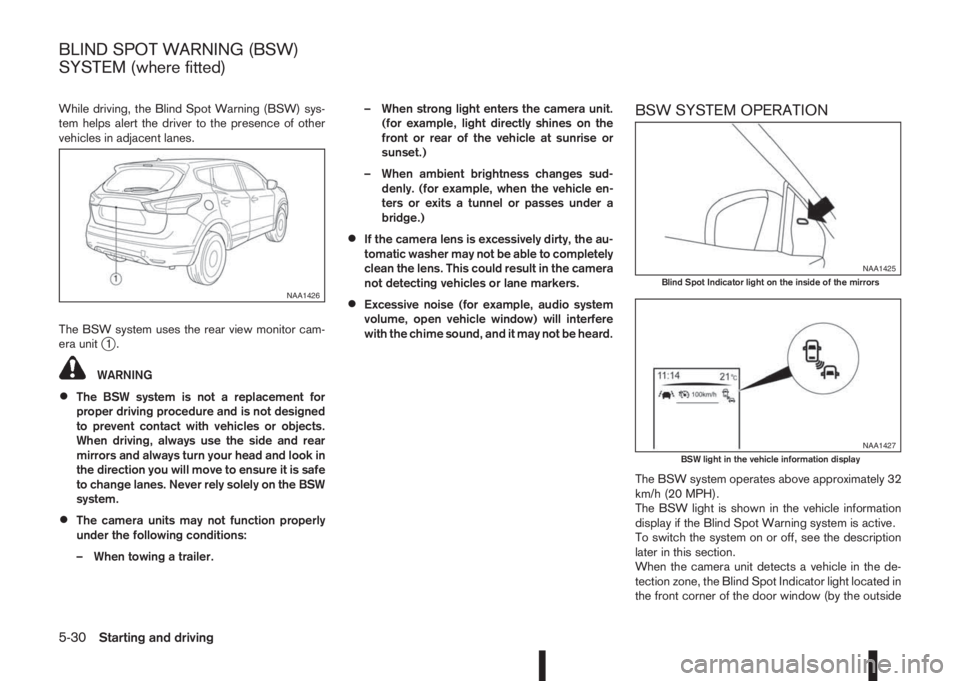
The BSW system uses the rear view monitor cam-
era unit
j1.
WARNING
•The BSW system is not a replacement for
proper driving procedure and is not designed
to prevent contact with vehicles or objects.
When driving, always use the side and rear
mirrors and always turn your head and look in
the direction you will move to ensure it is safe
to change lanes. Never rely solely on the BSW
system.
•The camera units may not function properly
under the following conditions:
– When towing a trailer.– When strong light enters the camera unit.
(for example, light directly shines on the
front or rear of the vehicle at sunrise or
sunset.)
– When ambient brightness changes sud-
denly. (for example, when the vehicle en-
ters or exits a tunnel or passes under a
bridge.)
•If the camera lens is excessively dirty, the au-
tomatic washer may not be able to completely
clean the lens. This could result in the camera
not detecting vehicles or lane markers.
•Excessive noise (for example, audio system
volume, open vehicle window) will interfere
with the chime sound, and it may not be heard.
BSW SYSTEM OPERATION
The BSW system operates above approximately 32
km/h (20 MPH).
The BSW light is shown in the vehicle information
display if the Blind Spot Warning system is active.
To switch the system on or off, see the description
later in this section.
When the camera unit detects a vehicle in the de-
tection zone, the Blind Spot Indicator light located in
the front corner of the door window (by the outside
NAA1426
NAA1425Blind Spot Indicator light on the inside of the mirrors
NAA1427BSW light in the vehicle information display
BLIND SPOT WARNING (BSW)
SYSTEM (where fitted)
5-30Starting and driving