air filter NISSAN QASHQAI 2016 Owner´s Manual
[x] Cancel search | Manufacturer: NISSAN, Model Year: 2016, Model line: QASHQAI, Model: NISSAN QASHQAI 2016Pages: 338, PDF Size: 4.87 MB
Page 17 of 338
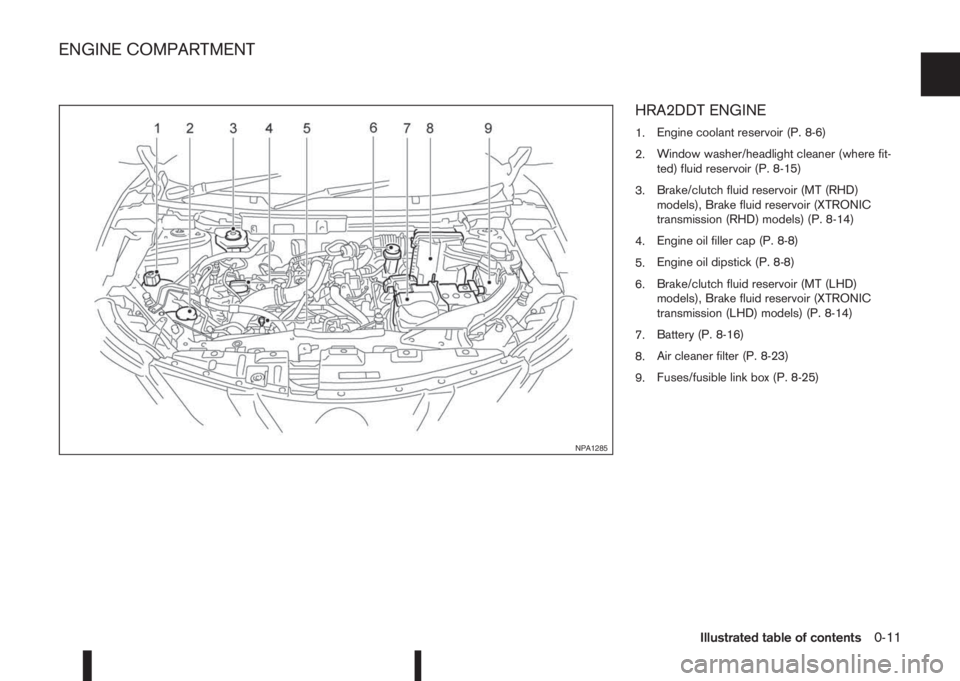
HRA2DDT ENGINE
1.Engine coolant reservoir (P. 8-6)
2.Window washer/headlight cleaner (where fit-
ted) fluid reservoir (P. 8-15)
3.Brake/clutch fluid reservoir (MT (RHD)
models), Brake fluid reservoir (XTRONIC
transmission (RHD) models) (P. 8-14)
4.Engine oil filler cap (P. 8-8)
5.Engine oil dipstick (P. 8-8)
6.Brake/clutch fluid reservoir (MT (LHD)
models), Brake fluid reservoir (XTRONIC
transmission (LHD) models) (P. 8-14)
7.Battery (P. 8-16)
8.Air cleaner filter (P. 8-23)
9.Fuses/fusible link box (P. 8-25)
NPA1285
ENGINE COMPARTMENT
Illustrated table of contents0-11
Page 18 of 338
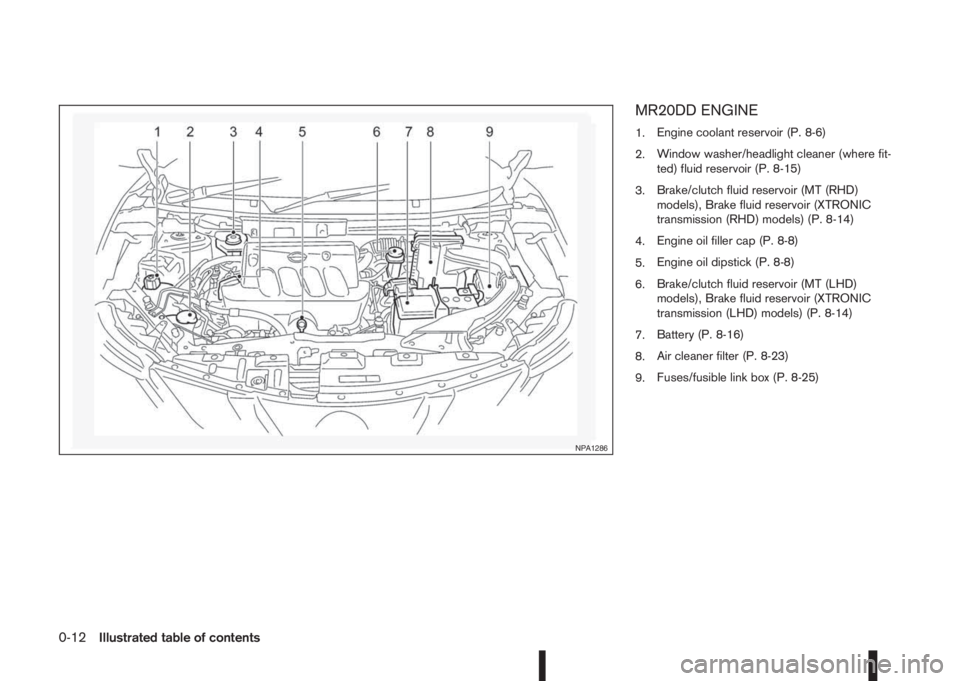
MR20DD ENGINE
1.Engine coolant reservoir (P. 8-6)
2.Window washer/headlight cleaner (where fit-
ted) fluid reservoir (P. 8-15)
3.Brake/clutch fluid reservoir (MT (RHD)
models), Brake fluid reservoir (XTRONIC
transmission (RHD) models) (P. 8-14)
4.Engine oil filler cap (P. 8-8)
5.Engine oil dipstick (P. 8-8)
6.Brake/clutch fluid reservoir (MT (LHD)
models), Brake fluid reservoir (XTRONIC
transmission (LHD) models) (P. 8-14)
7.Battery (P. 8-16)
8.Air cleaner filter (P. 8-23)
9.Fuses/fusible link box (P. 8-25)
NPA1286
0-12Illustrated table of contents
Page 19 of 338
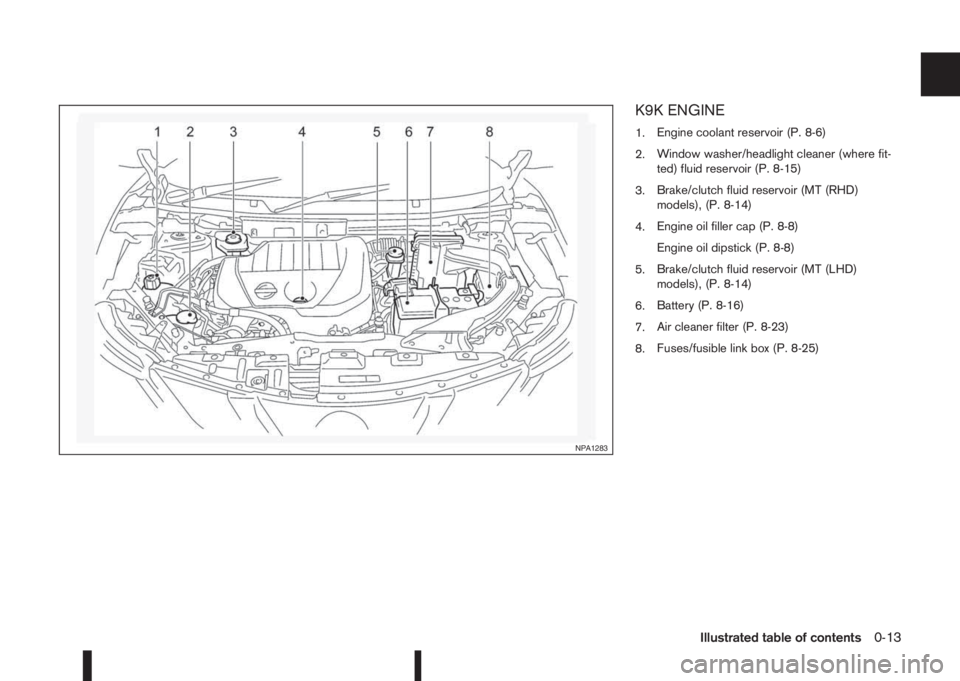
K9K ENGINE
1.Engine coolant reservoir (P. 8-6)
2.Window washer/headlight cleaner (where fit-
ted) fluid reservoir (P. 8-15)
3.Brake/clutch fluid reservoir (MT (RHD)
models), (P. 8-14)
4.Engine oil filler cap (P. 8-8)
Engine oil dipstick (P. 8-8)
5.Brake/clutch fluid reservoir (MT (LHD)
models), (P. 8-14)
6.Battery (P. 8-16)
7.Air cleaner filter (P. 8-23)
8.Fuses/fusible link box (P. 8-25)
NPA1283
Illustrated table of contents0-13
Page 20 of 338
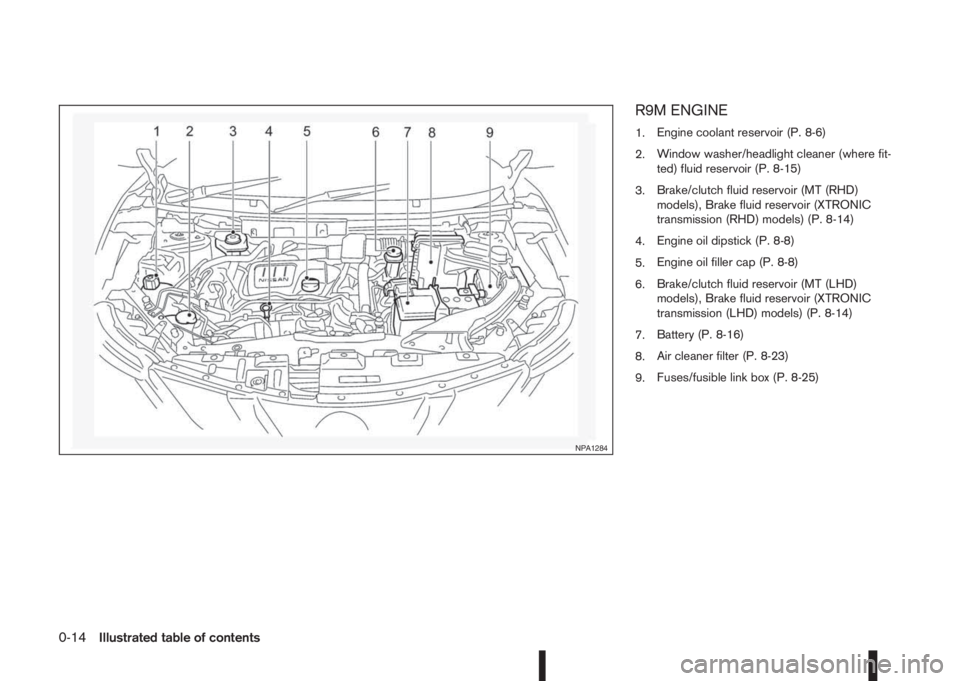
R9M ENGINE
1.Engine coolant reservoir (P. 8-6)
2.Window washer/headlight cleaner (where fit-
ted) fluid reservoir (P. 8-15)
3.Brake/clutch fluid reservoir (MT (RHD)
models), Brake fluid reservoir (XTRONIC
transmission (RHD) models) (P. 8-14)
4.Engine oil dipstick (P. 8-8)
5.Engine oil filler cap (P. 8-8)
6.Brake/clutch fluid reservoir (MT (LHD)
models), Brake fluid reservoir (XTRONIC
transmission (LHD) models) (P. 8-14)
7.Battery (P. 8-16)
8.Air cleaner filter (P. 8-23)
9.Fuses/fusible link box (P. 8-25)
NPA1284
0-14Illustrated table of contents
Page 62 of 338
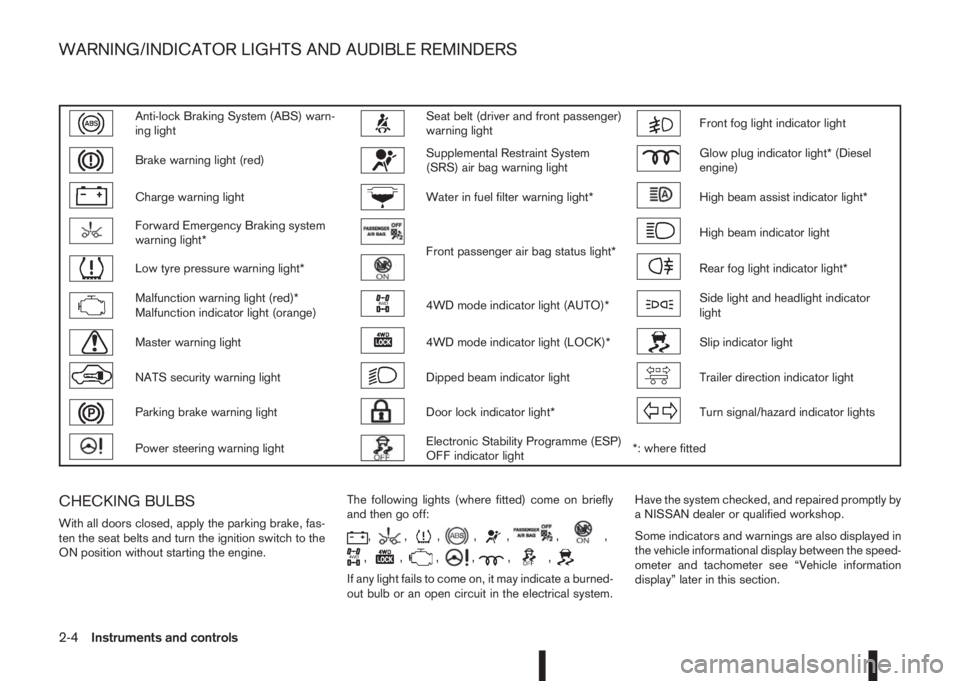
Anti-lock Braking System (ABS) warn-
ing lightSeat belt (driver and front passenger)
warning lightFront fog light indicator light
Brake warning light (red)Supplemental Restraint System
(SRS) air bag warning lightGlow plug indicator light* (Diesel
engine)
Charge warning lightWater in fuel filter warning light*High beam assist indicator light*
Forward Emergency Braking system
warning light*
Front passenger air bag status light*
High beam indicator light
Low tyre pressure warning light*Rear fog light indicator light*
Malfunction warning light (red)*
Malfunction indicator light (orange)4WD mode indicator light (AUTO)*Side light and headlight indicator
light
Master warning light4WD mode indicator light (LOCK)*Slip indicator light
NATS security warning lightDipped beam indicator lightTrailer direction indicator light
Parking brake warning lightDoor lock indicator light*Turn signal/hazard indicator lights
Power steering warning lightElectronic Stability Programme (ESP)
OFF indicator light*: where fitted
CHECKING BULBS
With all doors closed, apply the parking brake, fas-
ten the seat belts and turn the ignition switch to the
ON position without starting the engine.The following lights (where fitted) come on briefly
and then go off:,,,,,,,
,,,,,,
If any light fails to come on, it may indicate a burned-
out bulb or an open circuit in the electrical system.Have the system checked, and repaired promptly by
a NISSAN dealer or qualified workshop.
Some indicators and warnings are also displayed in
the vehicle informational display between the speed-
ometer and tachometer see “Vehicle information
display” later in this section.
WARNING/INDICATOR LIGHTS AND AUDIBLE REMINDERS
2-4Instruments and controls
Page 68 of 338
accident. To help avoid injury to yourself or oth-
ers, have your vehicle checked by a NISSAN
dealer or qualified workshop as soon as pos-
sible.
When the ignition switch is in the ON or START
position, the Supplemental Restraint System (SRS)
air bag warning light illuminates for approximately 7
seconds and then turns off this indicates the system
is operational.
If any of the following conditions occur, the air bag
systems and pre-tensioner systems need servicing
and the vehicle must be taken to a NISSAN dealer
or qualified workshop:
•The supplemental air bag warning light remains
on after approximately 7 seconds.
•The supplemental air bag warning light flashes
intermittently.
•The supplemental air bag warning light does not
come on at all.
Unless checked and repaired, the SRS air bag sys-
tem and/or the pre-tensioner seat belt system may
not function properly.
For additional details see “SRS air bag warning
light” in the “1. Safety — Seats, Seat belts and
Supplemental Restraint System” section.
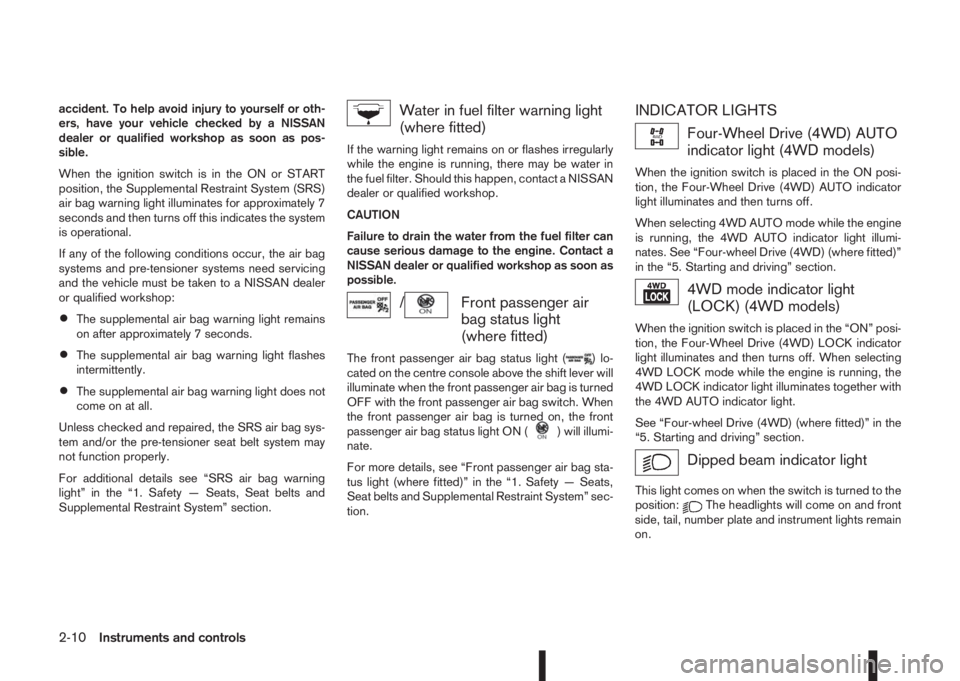
Water in fuel filter warning light
(where fitted)
If the warning light remains on or flashes irregularly
while the engine is running, there may be water in
the fuel filter. Should this happen, contact a NISSAN
dealer or qualified workshop.
CAUTION
Failure to drain the water from the fuel filter can
cause serious damage to the engine. Contact a
NISSAN dealer or qualified workshop as soon as
possible.
/Front passenger air
bag status light
(where fitted)
The front passenger air bag status light () lo-
cated on the centre console above the shift lever will
illuminate when the front passenger air bag is turned
OFF with the front passenger air bag switch. When
the front passenger air bag is turned on, the front
passenger air bag status light ON (
) will illumi-
nate.
For more details, see “Front passenger air bag sta-
tus light (where fitted)” in the “1. Safety — Seats,
Seat belts and Supplemental Restraint System” sec-
tion.
INDICATOR LIGHTS
Four-Wheel Drive (4WD) AUTO
indicator light (4WD models)
When the ignition switch is placed in the ON posi-
tion, the Four-Wheel Drive (4WD) AUTO indicator
light illuminates and then turns off.
When selecting 4WD AUTO mode while the engine
is running, the 4WD AUTO indicator light illumi-
nates. See “Four-wheel Drive (4WD) (where fitted)”
in the “5. Starting and driving” section.
4WD mode indicator light
(LOCK) (4WD models)
When the ignition switch is placed in the “ON” posi-
tion, the Four-Wheel Drive (4WD) LOCK indicator
light illuminates and then turns off. When selecting
4WD LOCK mode while the engine is running, the
4WD LOCK indicator light illuminates together with
the 4WD AUTO indicator light.
See “Four-wheel Drive (4WD) (where fitted)” in the
“5. Starting and driving” section.
Dipped beam indicator light
This light comes on when the switch is turned to the
position:The headlights will come on and front
side, tail, number plate and instrument lights remain
on.
2-10Instruments and controls
Page 149 of 338
m
NAA1403
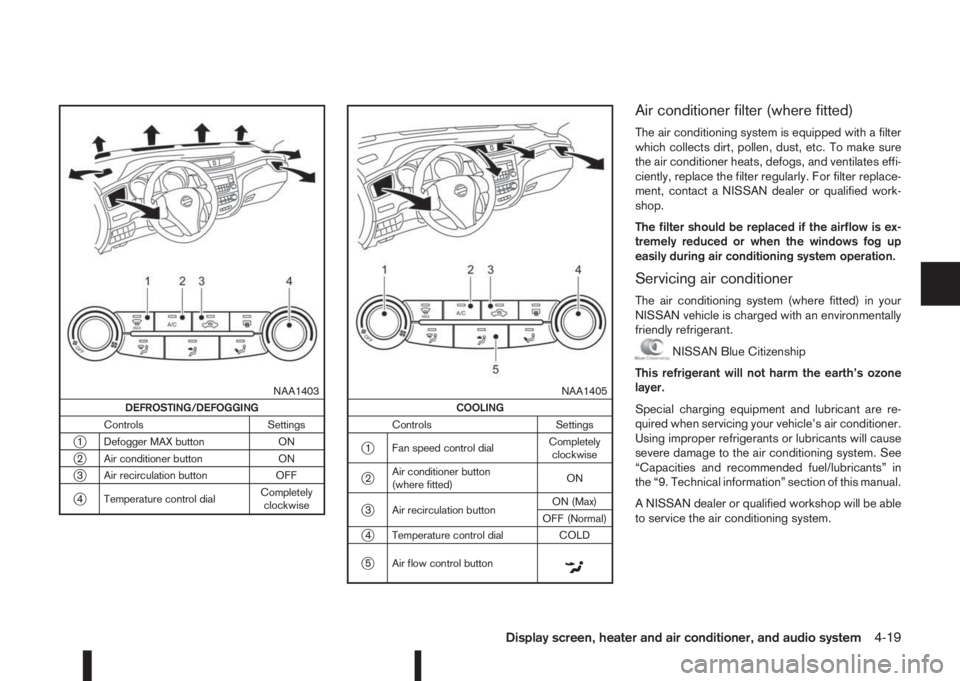
DEFROSTING/DEFOGGING
Controls Settings
j1 Defogger MAX button ON
j2 Air conditioner button ON
j3 Air recirculation button OFF
j4 Temperature control dialCompletely
clockwise
m
NAA1405
COOLING
Controls Settings
j1 Fan speed control dialCompletely
clockwise
j2Air conditioner button
(where fitted)ON
j3 Air recirculation buttonON (Max)
OFF (Normal)
j4 Temperature control dial COLD
j5 Air flow control buttonm
Air conditioner filter (where fitted)
The air conditioning system is equipped with a filter
which collects dirt, pollen, dust, etc. To make sure
the air conditioner heats, defogs, and ventilates effi-
ciently, replace the filter regularly. For filter replace-
ment, contact a NISSAN dealer or qualified work-
shop.
The filter should be replaced if the airflow is ex-
tremely reduced or when the windows fog up
easily during air conditioning system operation.
Servicing air conditioner
The air conditioning system (where fitted) in your
NISSAN vehicle is charged with an environmentally
friendly refrigerant.
NISSAN Blue Citizenship
This refrigerant will not harm the earth’s ozone
layer.
Special charging equipment and lubricant are re-
quired when servicing your vehicle’s air conditioner.
Using improper refrigerants or lubricants will cause
severe damage to the air conditioning system. See
“Capacities and recommended fuel/lubricants” in
the “9. Technical information” section of this manual.
A NISSAN dealer or qualified workshop will be able
to service the air conditioning system.
Display screen, heater and air conditioner, and audio system4-19
Page 152 of 338
Heating and defogging (Manual mode):
This mode heats the interior and defogs the wind-
screen.
Use the airflow control buttons to select the
button is pressed. Switch on the air-conditioning to
improve the defogging and adjust the preferred fan
speed and temperature.
Fan speed control
m(Manual mode):
Press the fan speed control buttons to adjust the fan
speed.
Press the AUTO button to change the fan speed to
automatic mode.
Air recirculation:
Use this mode to recirculate interior air inside the
passenger compartment in situations such as driv-
ing on a dust raised road, avoiding traffic fumes or
having maximum cooling from the air conditioner.
Press the<
>button to recirculate interior air.
The indicator light illuminates and the air conditioner
will automatically come on.
When the air recirculation mode is switched off, out-
side air is drawn into the passenger compartment.
Outside air circulation :
Use this mode to draw outside air into the passen-
ger compartment for normal heating, ventilation or
air conditioner operation.
Press the<
>button to change the air intake
from the air recirculation to the outside air mode.
The indicator light (
) turns off.To turn the system on/off:
Press the “ON/OFF” button to turn the system on or
off.
Operating tips
•In order to improve the heater operation, clear
the snow and ice from the wiper blade and air
inlet in front of the windscreen.
•When the engine coolant temperature and out-
side air temperature are low, the airflow from the
floor outlets may not operate for a maximum of
150 seconds. However, this is not a malfunction.
After the coolant temperature has warmed up,
the airflow from the floor outlets will operate nor-
mally.
•After parking in the sun, drive for two or three
minutes with the windows open to vent hot air
from the passenger compartment. Then, close
the windows. This will allow the acceleration of
the air conditioner’s cooling operation.
•Keep windows closed while the air conditioner is
operating.
•The air conditioning system should be operated
for about 10 minutes, at least once a month. This
helps prevent damage to the system due to lack
of lubrication.
•If the coolant temperature gauge exceeds the
“HOT” position, turn the air conditioner off. For
additional information, see “Engine overheat” in
the “6. In case of emergency” section.
•If the engine coolant reaches an extremely high
temperature, the air conditioning system will au-
tomatically turn off. This may happen for example
if the engine runs at idle speed for a long time on
a hot day.
Air conditioner filter
The air conditioning system is equipped with a filter
which collects dirt, pollen, dust, etc. To make sure
the air conditioner heats, defogs, and ventilates effi-
ciently, replace the filter regularly. To replace the fil-
ter, contact a NISSAN dealer or qualified workshop.
The filter should be replaced if the airflow is ex-
tremely reduced or when the windows fog up
easily while operating the heater or air condition-
ing system.
Servicing air conditioner
The air conditioning system in your NISSAN vehicle
is charged with an environmentally friendly refriger-
ant.
NISSAN Blue Citizenship
This refrigerant will not harm the earth’s ozone
layer.
Special charging equipment and lubricant are re-
quired when servicing the NISSAN air conditioner.
Using improper refrigerants or lubricants will cause
severe damage to the air conditioning system. See
“Capacities and recommended fuel/lubricants” in
the “9. Technical information” section.
A NISSAN dealer or qualified workshop will be able
to service the air conditioning system.
4-22Display screen, heater and air conditioner, and audio system
Page 268 of 338
8Maintenance and do-it-yourselfMaintenance and do-it-yourself
Maintenance requirements ....................................... 8-2
Scheduled maintenance...................................... 8-2
General maintenance .......................................... 8-2
Where to go for service ...................................... 8-2
General maintenance ............................................... 8-2
Explanation of general maintenance items ........... 8-2
Maintenance precautions ......................................... 8-4
Engine compartment ................................................ 8-5
Engine cooling system ............................................. 8-6
Checking engine coolant level............................. 8-6
Changing engine coolant .................................... 8-6
Engine oil................................................................. 8-8
Checking engine oil level .................................... 8-8
Changing engine oil ............................................ 8-9
Changing engine oil filter .................................... 8-10
Protect the environment ...................................... 8-12
Fuel filter (Diesel engine models) ............................. 8-13
Draining water .................................................... 8-13
Bleeding the fuel system ..................................... 8-13
XTRONIC Continuously variable transmission
(CVT) fluid ............................................................... 8-13
Brakes ..................................................................... 8-13
Checking parking brake ...................................... 8-13
Checking brake pedal......................................... 8-13
Brake booster ..................................................... 8-14
Brake and clutch fluid .............................................. 8-14
Window washer fluid/headlight cleaner fluid
(where fitted) ........................................................... 8-15
Battery..................................................................... 8-16
Vehicle battery .................................................... 8-16Jump-starting ...................................................... 8-18
Integrated keyfob/Intelligent Key battery
replacement........................................................ 8-18
Drive belts ............................................................... 8-20
Spark plugs (Petrol engine models).......................... 8-21
Air duct removal....................................................... 8-21
Air cleaner filter........................................................ 8-23
Viscous paper type ............................................. 8-23
Dry paper type (where fitted) .............................. 8-23
Wiper blades ........................................................... 8-24
Cleaning ............................................................. 8-24
Front window wiper replacement ........................ 8-24
Back door window wiper replacement ................ 8-24
Windscreen washer nozzle ................................. 8-25
Fuses ...................................................................... 8-25
Passenger compartment ..................................... 8-25
Engine compartment ........................................... 8-26
Lights ...................................................................... 8-27
Headlights .......................................................... 8-28
Exterior lights ...................................................... 8-29
Interior lights....................................................... 8-29
Light locations .................................................... 8-30
Wheels and tyres ..................................................... 8-33
Tyre inflation pressure......................................... 8-33
Types of tyres ..................................................... 8-33
Snow chains....................................................... 8-34
Tyre rotation ....................................................... 8-34
Tyre wear and damage ....................................... 8-35
Tyre age ............................................................. 8-35
Changing tyres and wheels................................. 8-35
Page 281 of 338
DRAINING WATER
Drain the water from the fuel filter. Contact a
NISSAN dealer or qualified workshop.:
BLEEDING THE FUEL SYSTEM
There is no need to perform any special operation to
bleed air from the system.
NISSAN Blue Citizenship
Fuel bled from the fuel filter must not be poured into
the ground, canals, rivers, etc. It should be disposed
of at a rubbish tip having proper facilities. Check
your local regulations.When checking or replacement is required, NISSAN
recommends contacting a NISSAN dealer or quali-
fied workshop for servicing.
CAUTION
•Use only Genuine NISSAN CVT Fluid NS3*. Do
not mix with other fluids.
•Using transmission fluid other than Genuine
NISSAN CVT Fluid NS3* will damage the
XTRONIC transmission, which is not covered
by the warranty.
*: For details, contact a NISSAN dealer or quali-
fied workshop.
CHECKING PARKING BRAKE
Periodically check the holding ability of the parking
brake by parking on a steep hill and restraining the
vehicle by using only the parking brake. If it does not
hold satisfactorily, see a NISSAN dealer or qualified
workshop.
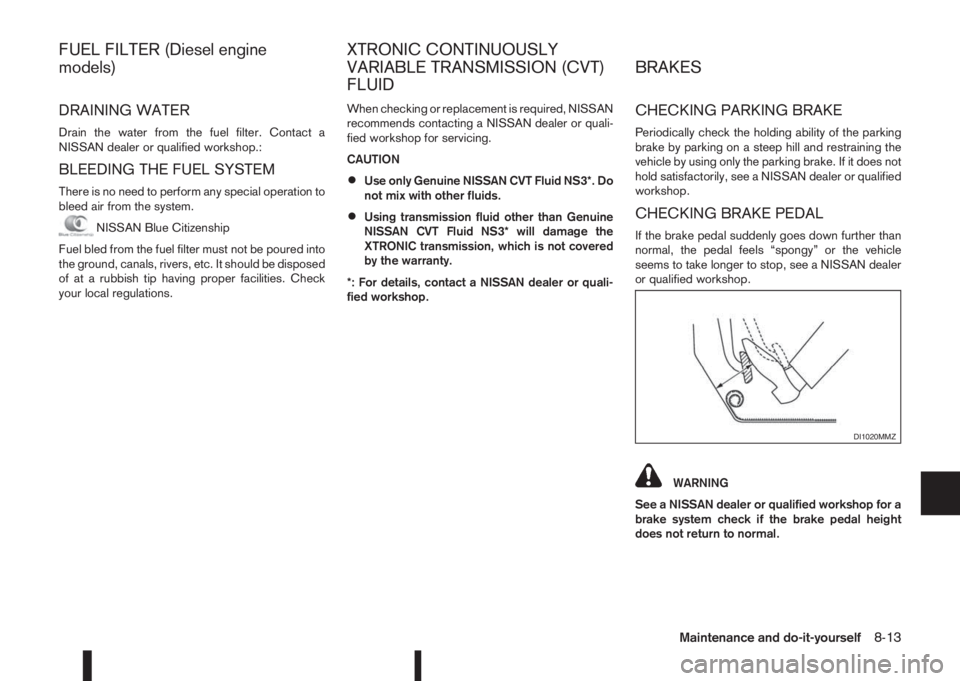
CHECKING BRAKE PEDAL
If the brake pedal suddenly goes down further than
normal, the pedal feels “spongy” or the vehicle
seems to take longer to stop, see a NISSAN dealer
or qualified workshop.
WARNING
See a NISSAN dealer or qualified workshop for a
brake system check if the brake pedal height
does not return to normal.
DI1020MMZ
FUEL FILTER (Diesel engine
models)XTRONIC CONTINUOUSLY
VARIABLE TRANSMISSION (CVT)
FLUIDBRAKES
Maintenance and do-it-yourself8-13