USB NISSAN QASHQAI 2017 Owner´s Manual
[x] Cancel search | Manufacturer: NISSAN, Model Year: 2017, Model line: QASHQAI, Model: NISSAN QASHQAI 2017Pages: 508, PDF Size: 2.68 MB
Page 233 of 508
4-52Heater, air conditioner, audio and phone systems
memory was playing, pushing the Power/VOL
dial will start the USB memory.
PLAY:
To change to the USB memory mode, push the
button with a USB memory connected until
the USB memory mode is selected.
Next/Previous File and Fast
Forward/Rewind:
When the
orbutton is pushed and hold
while a USB memory is being played, the USB
memory will play while forwarding or rewinding.
When the button is released, the USB memory
will return to normal play speed.
When the
orbutton is pushed while
the USB memory is being played, the next track
or the beginning of the current track on the USB
memory will be played. Push the
button
again to select the previous track.
Folder selection:
To change to another folder in the USB memory,
choose a folder displayed on the screen using
the ENTER SETTING/TUNE·FOLDER dial.
REPEAT (RPT):
When the
button is pushed while the USB
memory is played, the play pattern can bechange as follows.
(Normal)?1 Folder Repeat?1 Track Repeat
?(Normal)
RANDOM (RDM):
When the
button is pushed while a USB
memory is being played, the play pattern can be
changed as follows.
(Normal)?All Random?1 Folder Random?
(Normal)
BACK button:
When the BACK button is pushed, it returns to
the previous display.
iPodŠplayer operation
Connecting iPodŠ:
The USB connection port is located on the
lower part of the instrument panel. (See “USB
(Universal Serial Bus) connection port” (P.4-
72) .) Connect the iPod
Šcable to the USB
connection port. When the audio system oper-
ates, the system will switch to the iPod
Šmode
automatically. The battery of the iPodŠis
charged while the cable is connected to the
vehicle.
Depending on the version of the iPod
Š, the
display on the iPodŠshows a NISSAN orAccessory Attached screen when the connec-
tion is completed. When the iPod
Šis connected
to the vehicle, the iPodŠmusic library can only
be operated by the vehicle audio controls.
Compatibility:
The following models are compatible:
.iPod nano
Š1G (Firmware version 1.3.1 -)
.iPod nanoŠ2G (Firmware version 1.1.3 -)
.iPod nanoŠ3G (Firmware version 1.0.0 -)
.iPod nanoŠ4G (Firmware version 1.0.2 -)
.iPod nanoŠ5G (Firmware version 1.0.1 -)
.iPod nanoŠ6G (Firmware version 1.0 -)
.iPod nanoŠ7G (Firmware version 1.0.0 -)
.iPodŠ5G (Firmware version 1.2.1 -)
.iPod classicŠ(Firmware version 1.0.0 -)
.iPod TouchŠ(iOS 1.1 -)
.iPod TouchŠ2G (iOS 2.1.1 -)
.iPod TouchŠ3G (iOS 3.1 -)
.iPod TouchŠ4G (iOS 4.1 -)
.iPod TouchŠ5G (iOS 6.0.0 -)
.iPhoneŠ(iOS 1.0.0 - 2.2.1)
.iPhoneŠ3G (iOS 2.1 -)
.iPhoneŠ3GS (iOS 3.0 -)
.iPhoneŠ4/4S (iOS 4.0 -)
.iPhoneŠ5 (iOS 6.0.0 -)
Operations attributable to firmware update by
Apple are not guaranteed.
Page 238 of 508
ENTER SETTING/TUNE·SCROLL dial and
then push the ENTER SETTING/TUNE·SC-
ROLL dial. To change the Speed Sensitive
Volume (Speed Sensitive Vol.) level from off
(0) to 5, turn the ENTER SETTING/TU-
NE·SCROLL dial. Push the ENTER
SETTING/TUNE·SCROLL dial to apply the
setting.
.AUX Vol.
Controls the volume level of incoming sound
when an auxiliary device is connected to the
system. Select the “AUX Vol.” using the
ENTER SETTING/TUNE·SCROLL dial and
then push the ENTER SETTING/TUNE·SC-
ROLL dial. Choose a setting between +1
and +3 or choose 0 to disable the feature
entirely. Push the ENTER SETTING/TU-
NE·SCROLL dial to apply the setting.
.Language Select
The language settings can be changed.
Select “Language Select” using the ENTER
SETTING/TUNE·SCROLL dial and then
push the ENTER SETTING/TUNE·SCROLL
dial. Use the ENTER SETTING/TUNE·SC-
ROLL dial to select the preferred language.
Push the ENTER SETTING/TUNE·SCROLL
dial to apply the setting.DISP button:
Display of the screen can be canceled by
pushing the
button. You can still listen to
music that is being played back even while the
screen display is turned off. If you want to
display the screen again, push the
button
once more. Pushing some of the audio source
buttons will also turn the screen back on and
display the screens of the corresponding
sources.
MEDIA button:
Pushing the
button will switch the audio
source as follows:
CD?USB/iPod?Bluetooth Audio?AUX?
CD
FM-AM-SAT Radio operation
radio (FM·AM) band select:
Pushing the
button will change the band as
follows:
AM?FM1?FM2?AM
The FM stereo indicator (STEREO) is shown on
the screen during FM stereo reception. When
the stereo broadcast signal is weak, the radio
automatically changes from stereo to monaural
reception.
radio (SAT) band select:
Pushing the XM button will change the band as
follows:
XM1?XM2?XM3?XM1 (satellite, if so
equipped)
When the XM button is pushed while the ignition
switch is placed in the ACC or ON position, the
radio will come on at the channel last played.
The last channel played will also come on when
the Power/VOL dial is pushed to turn the audio
system power on.
The satellite radio is not available in Alaska,
Hawaii and Guam.
If another audio source is playing when the XM
button is pushed, the audio source will auto-
matically be turned off and the last radio channel
played will come on.
When the stereo broadcast signal is weak, the
radio will automatically change from stereo to
monaural reception.
TUNE (Tuning):
.For AM and FM radio
Turn the radio ENTER SETTING/TUNE·SC-
ROLL dial for manual tuning.
.For SiriusXM Satellite Radio (if so equipped)
Turn the radio ENTER SETTING/TUNE·SC-
ROLL dial to seek channels from all of the
Heater, air conditioner, audio and phone systems4-57
Page 240 of 508
SEEK/TRACK:
When the
orbutton is pushed and hold
while the CD is being played, the CD will play
while fast forwarding or rewinding. When the
button is released, the CD will return to normal
play speed.
When the
orbutton is pushed while
the CD is being played, the next track or the
beginning of the current track on the CD will be
played. Push the
button again to select the
previous track.
REPEAT (RPT):
When the
button is pushed while the CD is
played, the play pattern can be changed as
follows:
(CD)
(Normal)œ1 Track Repeat
(CD with compressed audio files)
(Normal)?1 Folder Repeat?1 Track Repeat
?(Normal)
RANDOM (RDM):
When the
button is pushed while a CD is
being played, the play pattern can be changed
as follows:
(CD)
(Normal)œ1 Disc Random
(CD with compressed audio files)
(Normal)?1 Disc Random?1 Folder
Random?(Normal)
CD eject:
When the
button is pushed with the CD
loaded, the CD will be ejected.
If the CD comes out and is not removed, it
will be pulled back into the slot to protect
it.
USB memory player operation
USB memory main operation:
The USB connection port is located on the
lower part of the instrument panel. (See “USB
(Universal Serial Bus) connection port” (P.4-
72) .) Connect a USB memory into the port.
When the audio system operates, the system
will switch to the USB memory mode auto-
matically.
If the system has been turned off while the USBmemory was playing, pushing the Power/VOL
dial will start the USB memory.
PLAY:
To change to the USB memory mode, push the
button with a USB memory connected until
the USB memory mode is selected.
Next/Previous File and Fast
Forward/Rewind:
When the
orbutton is pushed and held
while a USB memory is being played, the USB
memory will play while forwarding or rewinding.
When the button is released, the USB memory
will return to normal play speed.
When the
orbutton is pushed while
the USB memory is being played, the next track
or the beginning of the current track on the USB
memory will be played. Push the
button
again to select the previous track.
Folder selection:
To change to another folder in the USB memory,
choose a folder displayed on the screen using
the ENTER SETTING/TUNE·SCROLL dial.
REPEAT (RPT):
When the
button is pushed while the USB
memory is played, the play pattern can be
Heater, air conditioner, audio and phone systems4-59
Page 241 of 508
4-60Heater, air conditioner, audio and phone systems
change as follows.
(Normal)?1 Folder Repeat?1 Track Repeat
?(Normal)
RANDOM (RDM):
When the
button is pushed while a USB
memory is being played, the play pattern can be
changed as follows.
(Normal)?All Random?1 Folder Random?
(Normal)
BACK button:
When the BACK button is pushed, it returns to
the previous display.
iPodŠplayer operation
Connecting iPodŠ:
The USB connection port is located on the
lower part of the instrument panel. (See “USB
(Universal Serial Bus) connection port” (P.4-
72) .) Connect the iPod
Šcable to the USB
connection port. When the audio system oper-
ates, the system will switch to the iPod
Šmode
automatically. The battery of the iPodŠis
charged while the cable is connected to the
vehicle.
Depending on the version of the iPod
Š, the
display on the iPodŠshows a NISSAN orAccessory Attached screen when the connec-
tion is completed. When the iPod
Šis connected
to the vehicle, the iPodŠmusic library can only
be operated by the vehicle audio controls.
Compatibility:
The following models are compatible:
.iPod nano
Š1G (Firmware version 1.3.1 -)
.iPod nanoŠ2G (Firmware version 1.1.3 -)
.iPod nanoŠ3G (Firmware version 1.0.0 -)
.iPod nanoŠ4G (Firmware version 1.0.2 -)
.iPod nanoŠ5G (Firmware version 1.0.1 -)
.iPod nanoŠ6G (Firmware version 1.0 -)
.iPod nanoŠ7G (Firmware version 1.0.0 -)
.iPodŠ5G (Firmware version 1.2.1 -)
.iPod classicŠ(Firmware version 1.0.0 -)
.iPod TouchŠ(iOS 1.1 -)
.iPod TouchŠ2G (iOS 2.1.1 -)
.iPod TouchŠ3G (iOS 3.1 -)
.iPod TouchŠ4G (iOS 4.1 -)
.iPod TouchŠ5G (iOS 6.0.0 -)
.iPhoneŠ(iOS 1.0.0 - 2.2.1)
.iPhoneŠ3G (iOS 2.1 -)
.iPhoneŠ3GS (iOS 3.0 -)
.iPhoneŠ4/4S (iOS 4.0 -)
.iPhoneŠ5 (iOS 6.0.0 -)
Operations attributable to firmware update by
Apple are not guaranteed.iPod
Šmain operation:
The system operates when the ignition switch is
placed in the ACC or ON position. Push the
button repeatedly or push thebutton to
switch to the iPodŠmode.
If the system was turned off while the iPodŠwas
playing, pushing the Power/VOL dial will start
the iPod
Š.
If another audio source is playing and the iPodŠ
is connected, push thebutton repeatedly or
push thebutton to switch to the iPodŠ
mode.
When the
button is pushed while the iPodŠ
is connected, the interface for iPodŠoperation is
shown on the display. The items on the menu list
can be scrolled by turning the ENTER
SETTING/TUNE·SCROLL dial while the iPod
Š
is operating. To select an item, push ENTER
SETTING/TUNE·SCROLL dial. Items in the
iPod
Šmenu appear on the display in the
following order.
.Now Playing
.Playlists
.Artists
.Albums
.Songs
.Podcasts
Page 248 of 508
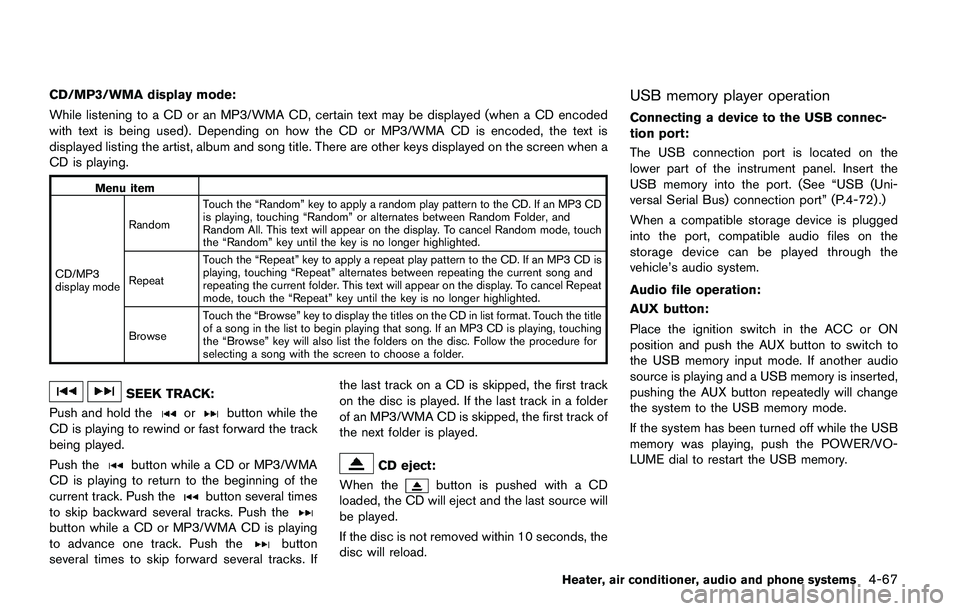
CD/MP3/WMA display mode:
While listening to a CD or an MP3/WMA CD, certain text may be displayed (when a CD encoded
with text is being used) . Depending on how the CD or MP3/WMA CD is encoded, the text is
displayed listing the artist, album and song title. There are other keys displayed on the screen when a
CD is playing.
Menu item
CD/MP3
display modeRandomTouch the “Random” key to apply a random play pattern to the CD. If an MP3 CD
is playing, touching “Random” or alternates between Random Folder, and
Random All. This text will appear on the display. To cancel Random mode, touch
the “Random” key until the key is no longer highlighted.
RepeatTouch the “Repeat” key to apply a repeat play pattern to the CD. If an MP3 CD is
playing, touching “Repeat” alternates between repeating the current song and
repeating the current folder. This text will appear on the display. To cancel Repeat
mode, touch the “Repeat” key until the key is no longer highlighted.
BrowseTouch the “Browse” key to display the titles on the CD in list format. Touch the title
of a song in the list to begin playing that song. If an MP3 CD is playing, touching
the “Browse” key will also list the folders on the disc. Follow the procedure for
selecting a song with the screen to choose a folder.
SEEK TRACK:
Push and hold the
orbutton while the
CD is playing to rewind or fast forward the track
being played.
Push the
button while a CD or MP3/WMA
CD is playing to return to the beginning of the
current track. Push the
button several times
to skip backward several tracks. Push the
button while a CD or MP3/WMA CD is playing
to advance one track. Push thebutton
several times to skip forward several tracks. Ifthe last track on a CD is skipped, the first track
on the disc is played. If the last track in a folder
of an MP3/WMA CD is skipped, the first track of
the next folder is played.
CD eject:
When the
button is pushed with a CD
loaded, the CD will eject and the last source will
be played.
If the disc is not removed within 10 seconds, the
disc will reload.
USB memory player operation
Connecting a device to the USB connec-
tion port:
The USB connection port is located on the
lower part of the instrument panel. Insert the
USB memory into the port. (See “USB (Uni-
versal Serial Bus) connection port” (P.4-72) .)
When a compatible storage device is plugged
into the port, compatible audio files on the
storage device can be played through the
vehicle’s audio system.
Audio file operation:
AUX button:
Place the ignition switch in the ACC or ON
position and push the AUX button to switch to
the USB memory input mode. If another audio
source is playing and a USB memory is inserted,
pushing the AUX button repeatedly will change
the system to the USB memory mode.
If the system has been turned off while the USB
memory was playing, push the POWER/VO-
LUME dial to restart the USB memory.
Heater, air conditioner, audio and phone systems4-67
Page 249 of 508
4-68Heater, air conditioner, audio and phone systems
JVH1685X
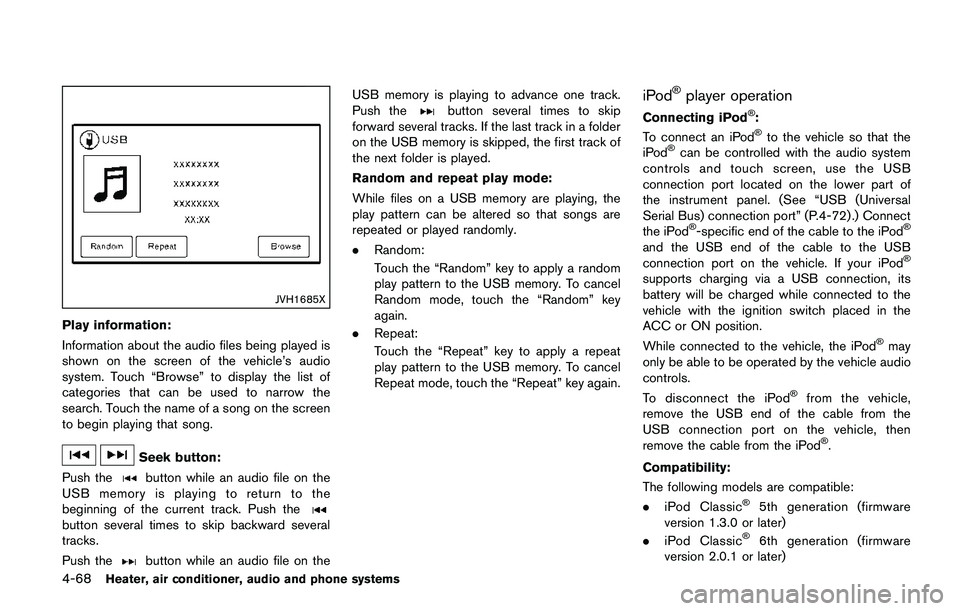
Play information:
Information about the audio files being played is
shown on the screen of the vehicle’s audio
system. Touch “Browse” to display the list of
categories that can be used to narrow the
search. Touch the name of a song on the screen
to begin playing that song.
Seek button:
Push the
button while an audio file on the
USB memory is playing to return to the
beginning of the current track. Push the
button several times to skip backward several
tracks.
Push the
button while an audio file on theUSB memory is playing to advance one track.
Push the
button several times to skip
forward several tracks. If the last track in a folder
on the USB memory is skipped, the first track of
the next folder is played.
Random and repeat play mode:
While files on a USB memory are playing, the
play pattern can be altered so that songs are
repeated or played randomly.
.Random:
Touch the “Random” key to apply a random
play pattern to the USB memory. To cancel
Random mode, touch the “Random” key
again.
.Repeat:
Touch the “Repeat” key to apply a repeat
play pattern to the USB memory. To cancel
Repeat mode, touch the “Repeat” key again.iPodŠplayer operation
Connecting iPodŠ:
To connect an iPodŠto the vehicle so that the
iPodŠcan be controlled with the audio system
controls and touch screen, use the USB
connection port located on the lower part of
the instrument panel. (See “USB (Universal
Serial Bus) connection port” (P.4-72).) Connect
the iPod
Š-specific end of the cable to the iPodŠ
and the USB end of the cable to the USB
connection port on the vehicle. If your iPodŠ
supports charging via a USB connection, its
battery will be charged while connected to the
vehicle with the ignition switch placed in the
ACC or ON position.
While connected to the vehicle, the iPod
Šmay
only be able to be operated by the vehicle audio
controls.
To disconnect the iPod
Šfrom the vehicle,
remove the USB end of the cable from the
USB connection port on the vehicle, then
remove the cable from the iPod
Š.
Compatibility:
The following models are compatible:
.iPod Classic
Š5th generation (firmware
version 1.3.0 or later)
.iPod Classic
Š6th generation (firmware
version 2.0.1 or later)
Page 253 of 508
4-72Heater, air conditioner, audio and phone systems
JVH1583X
Example
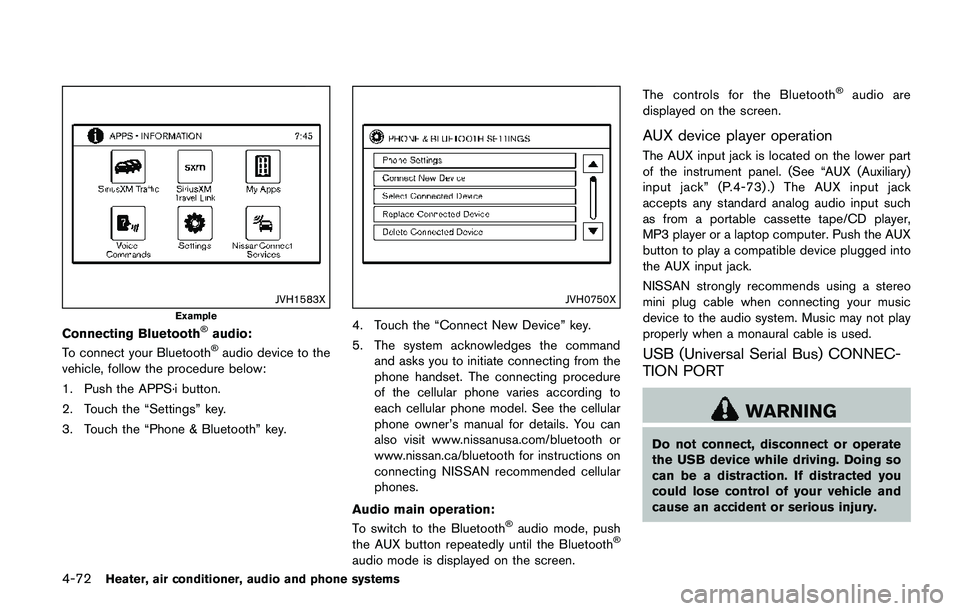
Connecting BluetoothŠaudio:
To connect your BluetoothŠaudio device to the
vehicle, follow the procedure below:
1. Push the APPS·i button.
2. Touch the “Settings” key.
3. Touch the “Phone & Bluetooth” key.
JVH0750X
4. Touch the “Connect New Device” key.
5. The system acknowledges the command
and asks you to initiate connecting from the
phone handset. The connecting procedure
of the cellular phone varies according to
each cellular phone model. See the cellular
phone owner’s manual for details. You can
also visit www.nissanusa.com/bluetooth or
www.nissan.ca/bluetooth for instructions on
connecting NISSAN recommended cellular
phones.
Audio main operation:
To switch to the Bluetooth
Šaudio mode, push
the AUX button repeatedly until the BluetoothŠ
audio mode is displayed on the screen.The controls for the Bluetooth
Šaudio are
displayed on the screen.
AUX device player operation
The AUX input jack is located on the lower part
of the instrument panel. (See “AUX (Auxiliary)
input jack” (P.4-73) .) The AUX input jack
accepts any standard analog audio input such
as from a portable cassette tape/CD player,
MP3 player or a laptop computer. Push the AUX
button to play a compatible device plugged into
the AUX input jack.
NISSAN strongly recommends using a stereo
mini plug cable when connecting your music
device to the audio system. Music may not play
properly when a monaural cable is used.
USB (Universal Serial Bus) CONNEC-
TION PORT
WARNING
Do not connect, disconnect or operate
the USB device while driving. Doing so
can be a distraction. If distracted you
could lose control of your vehicle and
cause an accident or serious injury.
Page 254 of 508
CAUTION
.Do not force the USB device into the
USB connection port. Inserting a
USB device tilted or upside-down
into the port may damage the port.
Make sure that the USB device is
connected correctly to the USB
connection port.
.Do not grab the USB connection
port cover (if so equipped) when
pulling a USB device out of the port.
This could damage the port and the
cover.
.Do not leave a USB cable in a place
where it can be pulled unintention-
ally. Pulling the cable may damage
the port.
Refer to your device manufacturer’s owner
information regarding the proper use and care
of the device.
JVH0683X
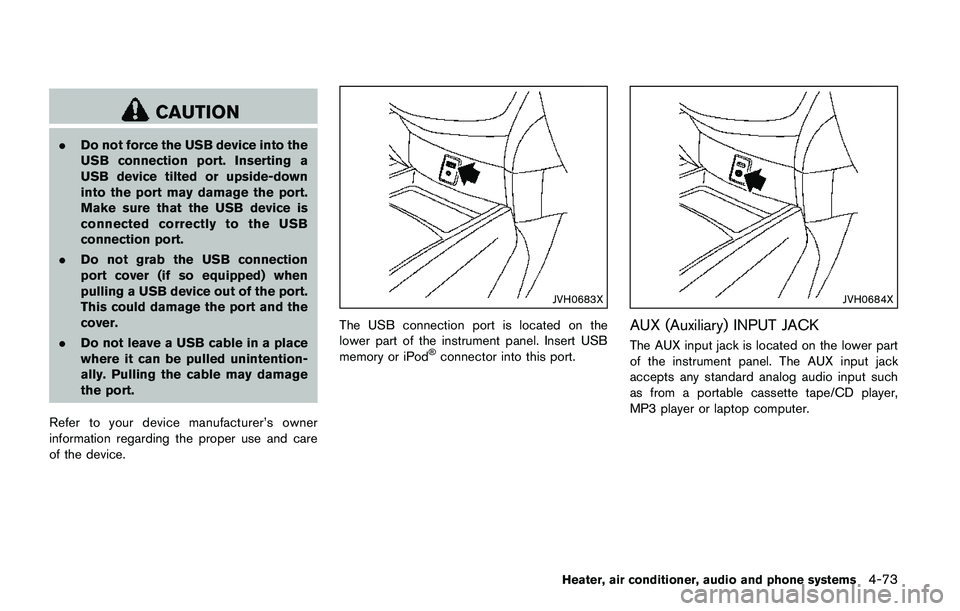
The USB connection port is located on the
lower part of the instrument panel. Insert USB
memory or iPod
Šconnector into this port.
JVH0684X
AUX (Auxiliary) INPUT JACK
The AUX input jack is located on the lower part
of the instrument panel. The AUX input jack
accepts any standard analog audio input such
as from a portable cassette tape/CD player,
MP3 player or laptop computer.
Heater, air conditioner, audio and phone systems4-73
Page 255 of 508
4-74Heater, air conditioner, audio and phone systems
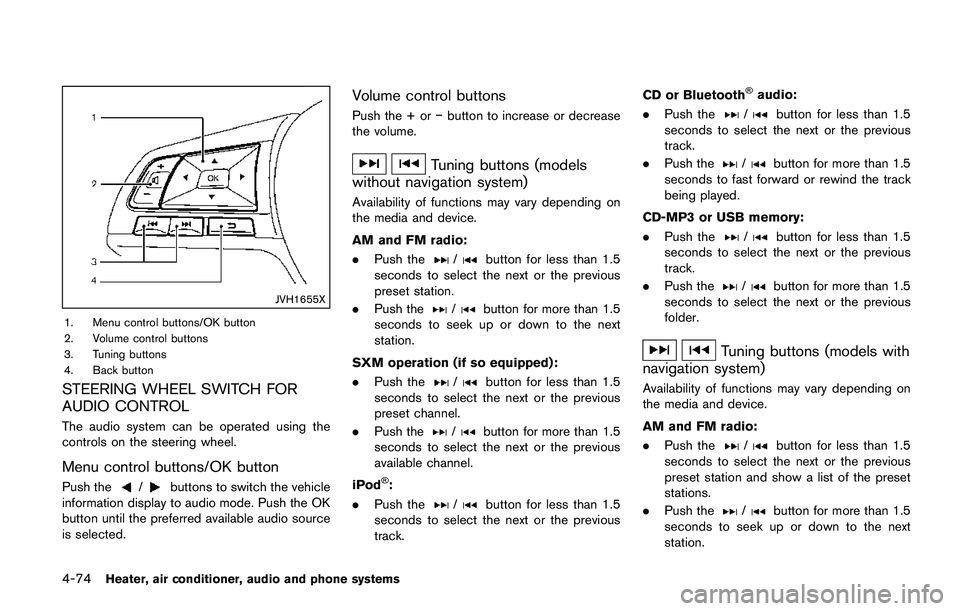
JVH1655X
1. Menu control buttons/OK button
2. Volume control buttons
3. Tuning buttons
4. Back button
STEERING WHEEL SWITCH FOR
AUDIO CONTROL
The audio system can be operated using the
controls on the steering wheel.
Menu control buttons/OK button
Push the/buttons to switch the vehicle
information display to audio mode. Push the OK
button until the preferred available audio source
is selected.
Volume control buttons
Push the + oríbutton to increase or decrease
the volume.
Tuning buttons (models
without navigation system)
Availability of functions may vary depending on
the media and device.
AM and FM radio:
.Push the
/button for less than 1.5
seconds to select the next or the previous
preset station.
.Push the
/button for more than 1.5
seconds to seek up or down to the next
station.
SXM operation (if so equipped) :
.Push the
/button for less than 1.5
seconds to select the next or the previous
preset channel.
.Push the
/button for more than 1.5
seconds to select the next or the previous
available channel.
iPod
Š:
.Push the
/button for less than 1.5
seconds to select the next or the previous
track.CD or Bluetooth
Šaudio:
.Push the
/button for less than 1.5
seconds to select the next or the previous
track.
.Push the
/button for more than 1.5
seconds to fast forward or rewind the track
being played.
CD-MP3 or USB memory:
.Push the
/button for less than 1.5
seconds to select the next or the previous
track.
.Push the
/button for more than 1.5
seconds to select the next or the previous
folder.
Tuning buttons (models with
navigation system)
Availability of functions may vary depending on
the media and device.
AM and FM radio:
.Push the
/button for less than 1.5
seconds to select the next or the previous
preset station and show a list of the preset
stations.
.Push the
/button for more than 1.5
seconds to seek up or down to the next
station.
Page 256 of 508
SXM operation (if so equipped) :
.Push the
/button for less than 1.5
seconds to select the next or the previous
preset channel.
.Push the
/button for more than 1.5
seconds to go to the next or previous
category.
CD, iPod
Š, USB memory or BluetoothŠ
audio:
.Push the
/button for less than 1.5
seconds to select the next or the previous
track.
.Push the
/button for more than 1.5
seconds to fast forward or rewind the track
being played.
Back button (models with navigation
system)
Push the back button to return to previous
screen or cancel the current selection.
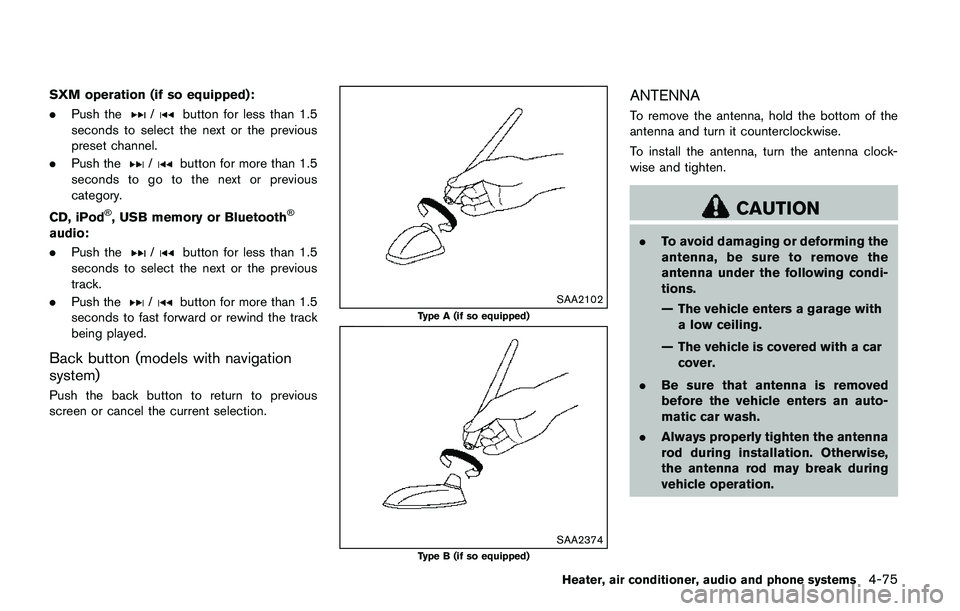
SAA2102
Type A (if so equipped)
SAA2374Type B (if so equipped)
ANTENNA
To remove the antenna, hold the bottom of the
antenna and turn it counterclockwise.
To install the antenna, turn the antenna clock-
wise and tighten.
CAUTION
.To avoid damaging or deforming the
antenna, be sure to remove the
antenna under the following condi-
tions.
— The vehicle enters a garage with
a low ceiling.
— The vehicle is covered with a car
cover.
.Be sure that antenna is removed
before the vehicle enters an auto-
matic car wash.
.Always properly tighten the antenna
rod during installation. Otherwise,
the antenna rod may break during
vehicle operation.
Heater, air conditioner, audio and phone systems4-75