warning lights NISSAN QASHQAI 2017 Owner´s Manual
[x] Cancel search | Manufacturer: NISSAN, Model Year: 2017, Model line: QASHQAI, Model: NISSAN QASHQAI 2017Pages: 508, PDF Size: 2.68 MB
Page 126 of 508
If the ambient image sensor is damaged due to
an accident, it is recommended you contact a
NISSAN dealer.
Battery saver system
.When the headlight switch is in theorposition while the ignition switch is in
the ON position, the lights will automatically
turn off within a period of time after the
ignition switch has been placed in the OFF
position.
.When the headlight switch remains in the
orposition after the lights auto-
matically turn off, the lights will turn on when
the ignition switch is placed in the ON
position.
CAUTION
.When you turn on the headlight
switch again after the lights auto-
matically turn off, the lights will not
turn off automatically. Be sure to
turn the light switch to the OFF
position when you leave the vehicle
for extended periods of time, other-
wise the battery will be discharged.
.Never leave the light switch on
when the engine is not running forextended periods of time even if the
headlights turn off automatically.
Daytime Running Light (DRL) system
The LED portion of the headlights automatically
illuminate at 100% intensity when the engine is
started and the parking brake released. The LED
Daytime Running Light (DRL) operate with the
headlight switch in the OFF position or in the
position. When you turn the headlight
switch to theposition for full illumination,
the LED lights switch from LED DRL to the park
function.
If the parking brake is applied before the engine
is started, the LED DRL do not illuminate. The
LED DRL illuminate when the parking brake is
released. The LED DRL will remain on until the
ignition switch is placed in the OFF position.
It is necessary at dusk to turn the headlight
switch ON for interior controls and switches to
illuminate, as those remain OFF while the switch
is in the OFF position.
WARNING
When the LED DRL system is active, tail
lights on your vehicle are not on. It is
necessary at dusk to turn on yourheadlights. Failure to do so could cause
an accident injuring yourself and
others.
Instruments and controls2-47
Page 148 of 508
3 Pre-driving checks and adjustments
Keys .............................................................................................. 3-2
NISSAN Vehicle Immobilizer System key (if
so equipped) ........................................................................ 3-2
Intelligent Key (if so equipped) ........................................ 3-3
Doors ............................................................................................ 3-5
Locking with key .................................................................. 3-5
Locking with inside lock knob .......................................... 3-6
Locking with power door lock switch ............................ 3-7
Automatic door locks ......................................................... 3-7
Child safety rear door lock ............................................... 3-7
Remote keyless entry system (if so equipped) ................. 3-8
How to use remote keyless entry system ..................... 3-9
Intelligent Key system (if so equipped) ............................ 3-11
Intelligent Key operating range ..................................... 3-13
Door locks/unlocks precaution ..................................... 3-13
Intelligent Key operation ................................................. 3-14
Battery saver system ....................................................... 3-16
Warning lights and audible reminders ........................ 3-16
Troubleshooting guide ..................................................... 3-17
How to use remote keyless entry function ................ 3-18Remote engine start (if so equipped) .............................. 3-22
Remote engine start operating range ....................... 3-22
Remote starting the engine ......................................... 3-22
Extending engine run time ........................................... 3-23
Canceling a remote start ............................................. 3-23
Conditions the remote engine start will
not work ............................................................................ 3-23
Hood ......................................................................................... 3-24
Liftgate ..................................................................................... 3-25
Liftgate release lever ..................................................... 3-26
Fuel-filler door ........................................................................ 3-27
Opening the fuel-filler door ......................................... 3-27
Fuel-filler cap .................................................................. 3-27
Tilt/telescopic steering ......................................................... 3-29
Tilt or telescopic operation .......................................... 3-30
Sun visors ................................................................................ 3-30
Mirrors ..................................................................................... 3-31
Inside mirror ..................................................................... 3-31
Outside mirrors ............................................................... 3-31
Vanity mirror ..................................................................... 3-33
Page 156 of 508
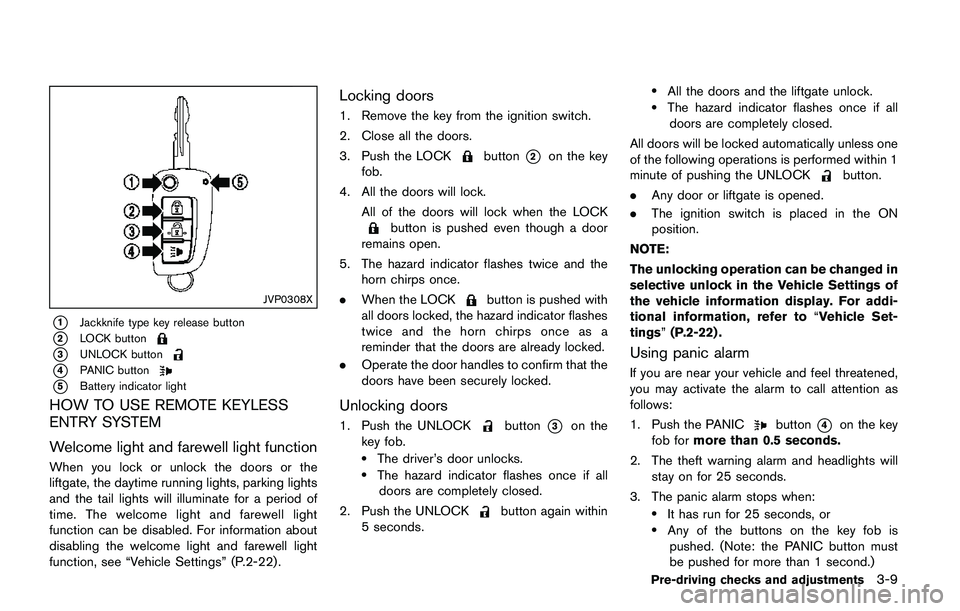
JVP0308X
*1Jackknife type key release button
*2LOCK button
*3UNLOCK button
*4PANIC button
*5Battery indicator light
HOW TO USE REMOTE KEYLESS
ENTRY SYSTEM
Welcome light and farewell light function
When you lock or unlock the doors or the
liftgate, the daytime running lights, parking lights
and the tail lights will illuminate for a period of
time. The welcome light and farewell light
function can be disabled. For information about
disabling the welcome light and farewell light
function, see “Vehicle Settings” (P.2-22).
Locking doors
1. Remove the key from the ignition switch.
2. Close all the doors.
3. Push the LOCK
button*2on the key
fob.
4. All the doors will lock.
All of the doors will lock when the LOCK
button is pushed even though a door
remains open.
5. The hazard indicator flashes twice and the
horn chirps once.
.When the LOCK
button is pushed with
all doors locked, the hazard indicator flashes
twice and the horn chirps once as a
reminder that the doors are already locked.
.Operate the door handles to confirm that the
doors have been securely locked.
Unlocking doors
1. Push the UNLOCKbutton*3on the
key fob.
.The driver’s door unlocks..The hazard indicator flashes once if all
doors are completely closed.
2. Push the UNLOCK
button again within
5 seconds.
.All the doors and the liftgate unlock..The hazard indicator flashes once if all
doors are completely closed.
All doors will be locked automatically unless one
of the following operations is performed within 1
minute of pushing the UNLOCK
button.
.Any door or liftgate is opened.
.The ignition switch is placed in the ON
position.
NOTE:
The unlocking operation can be changed in
selective unlock in the Vehicle Settings of
the vehicle information display. For addi-
tional information, refer to“Vehicle Set-
tings”(P.2-22) .
Using panic alarm
If you are near your vehicle and feel threatened,
you may activate the alarm to call attention as
follows:
1. Push the PANIC
button*4on the key
fob formore than 0.5 seconds.
2. The theft warning alarm and headlights will
stay on for 25 seconds.
3. The panic alarm stops when:
.It has run for 25 seconds, or.Any of the buttons on the key fob is
pushed. (Note: the PANIC button must
be pushed for more than 1 second.)
Pre-driving checks and adjustments3-9
Page 163 of 508
3-16Pre-driving checks and adjustments
1 minute.
NOTE:
The unlocking operation can be changed in
selective unlock in the Vehicle Settings of
the vehicle information display. For addi-
tional information, see“Vehicle Settings”
(P.2-22) .
Opening liftgate
1. Carry the Intelligent Key.
2. Push the liftgate opener switch
*C.
3. The liftgate will unlock.
BATTERY SAVER SYSTEM
When all the following conditions are met for a
period of time, the battery saver system will cut
off the power supply to prevent battery dis-
charge.
.The ignition switch is in the ON position.
(See “Push-button ignition switch positions”
(P.5-16) .)
.All doors are closed, and
.The shift lever is in the P (Park) position
(CVT model) or N (Neutral) position (MT
model) .
WARNING LIGHTS AND AUDIBLE
REMINDERS
To help prevent the vehicle from moving
unexpectedly by erroneous operation of the
Intelligent Key listed on the following chart or
to help prevent the vehicle from being stolen,
chime or beep sounds inside and outside the
vehicle and the warning display appears on the
vehicle information display.
When a chime or beep sounds or the warning
display appears, be sure to check the vehicle
and Intelligent Key.
See “Troubleshooting guide” (P.3-17) and
“Vehicle information display” (P.2-18) .
Page 167 of 508
3-20Pre-driving checks and adjustments
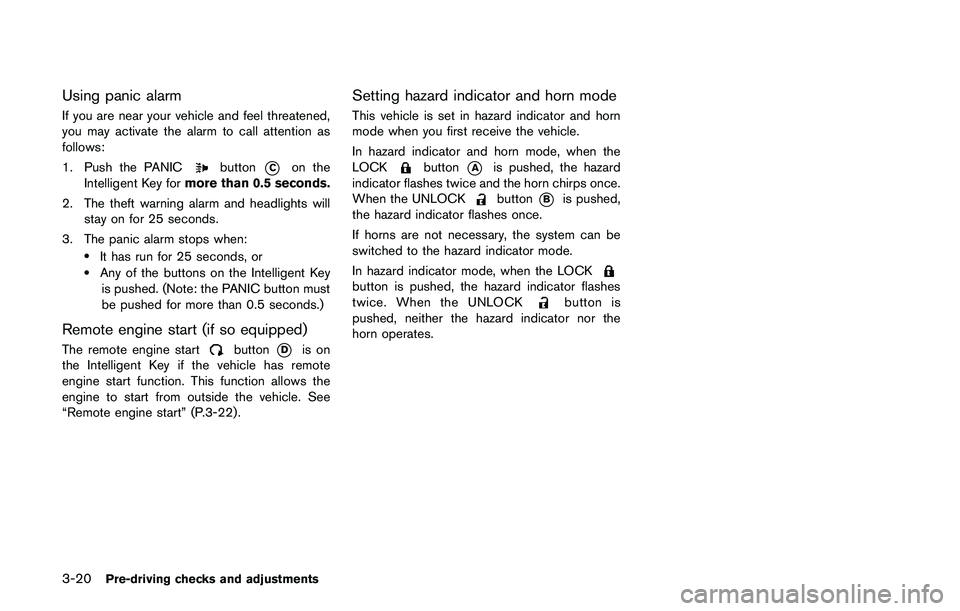
Using panic alarm
If you are near your vehicle and feel threatened,
you may activate the alarm to call attention as
follows:
1. Push the PANIC
button*Con the
Intelligent Key formore than 0.5 seconds.
2. The theft warning alarm and headlights will
stay on for 25 seconds.
3. The panic alarm stops when:
.It has run for 25 seconds, or.Any of the buttons on the Intelligent Key
is pushed. (Note: the PANIC button must
be pushed for more than 0.5 seconds.)
Remote engine start (if so equipped)
The remote engine startbutton*Dis on
the Intelligent Key if the vehicle has remote
engine start function. This function allows the
engine to start from outside the vehicle. See
“Remote engine start” (P.3-22) .
Setting hazard indicator and horn mode
This vehicle is set in hazard indicator and horn
mode when you first receive the vehicle.
In hazard indicator and horn mode, when the
LOCK
button*Ais pushed, the hazard
indicator flashes twice and the horn chirps once.
When the UNLOCK
button*Bis pushed,
the hazard indicator flashes once.
If horns are not necessary, the system can be
switched to the hazard indicator mode.
In hazard indicator mode, when the LOCK
button is pushed, the hazard indicator flashes
twice. When the UNLOCKbutton is
pushed, neither the hazard indicator nor the
horn operates.
Page 169 of 508
3-22Pre-driving checks and adjustments
WARNING
To avoid risk of injury or death, do not
use the remote engine start function
when the vehicle is in an enclosed area
such as a garage.
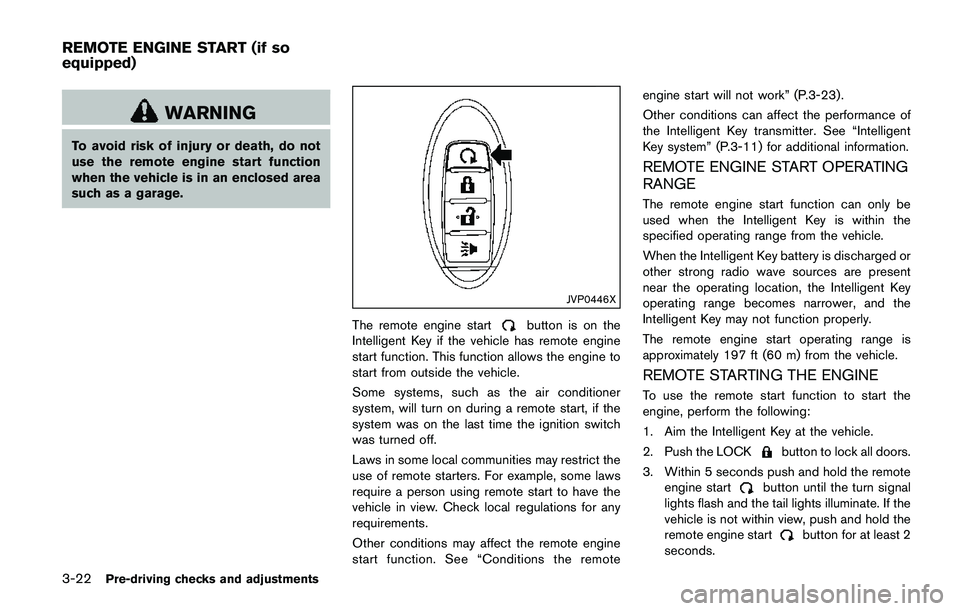
JVP0446X
The remote engine startbutton is on the
Intelligent Key if the vehicle has remote engine
start function. This function allows the engine to
start from outside the vehicle.
Some systems, such as the air conditioner
system, will turn on during a remote start, if the
system was on the last time the ignition switch
was turned off.
Laws in some local communities may restrict the
use of remote starters. For example, some laws
require a person using remote start to have the
vehicle in view. Check local regulations for any
requirements.
Other conditions may affect the remote engine
start function. See “Conditions the remoteengine start will not work” (P.3-23) .
Other conditions can affect the performance of
the Intelligent Key transmitter. See “Intelligent
Key system” (P.3-11) for additional information.
REMOTE ENGINE START OPERATING
RANGE
The remote engine start function can only be
used when the Intelligent Key is within the
specified operating range from the vehicle.
When the Intelligent Key battery is discharged or
other strong radio wave sources are present
near the operating location, the Intelligent Key
operating range becomes narrower, and the
Intelligent Key may not function properly.
The remote engine start operating range is
approximately 197 ft (60 m) from the vehicle.
REMOTE STARTING THE ENGINE
To use the remote start function to start the
engine, perform the following:
1. Aim the Intelligent Key at the vehicle.
2. Push the LOCK
button to lock all doors.
3. Within 5 seconds push and hold the remote
engine start
button until the turn signal
lights flash and the tail lights illuminate. If the
vehicle is not within view, push and hold the
remote engine start
button for at least 2
seconds.
REMOTE ENGINE START (if so
equipped)
Page 170 of 508
The following events will occur when the engine
starts:
.The front parking lights will turn on and
remain on as long as the engine is running.
.The doors will be locked and the air
conditioner system may turn on.
.The engine will continue to run for about 10
minutes. Repeat the steps to extend the time
for an additional 10 minutes. See “Extending
engine run time” (P.3-23) .
Depress and hold the brake pedal, then place
the ignition switch in the ON position before
driving. For further instructions, see “Driving the
vehicle” (P.5-20) .
EXTENDING ENGINE RUN TIME
The remote engine start function can be
extended one time by performing the steps
listed in “Remote starting the engine” (P.3-22) .
Run time will be calculated as follows:
.The first 10 minute run time will start when
the remote engine start function is per-
formed.
.The second 10 minutes will start immedi-
ately when the remote engine start function
is performed. For example, if the engine has
been running for 5 minutes, and 10 minutes
are added, the engine will run for a total of
15 minutes..Extending engine run time will count to-
wards the two remote start limit.
A maximum of two remote starts, or a single start
with an extension, are allowed between ignition
cycles.
The ignition switch must be cycled to the ON
position and then back to the OFF position
before the remote engine start procedure can be
used again.
CANCELING A REMOTE START
To cancel a remote start, perform one of the
following:
.Aim the Intelligent Key at the vehicle and
push and hold the remote engine start
button until the front parking lights turn off.
.Turn on the hazard indicator flashers.
.Cycle the ignition switch ON and then OFF.
.The extended engine run time has expired.
.The first 10 minute timer has expired.
.The engine hood has been opened.
.The shift lever is moved out of the P (Park)
position.
.The theft alarm sounds due to illegal entry
into the vehicle.
.The ignition switch is pushed without an
Intelligent Key in the vehicle..The ignition switch is pushed with an
Intelligent Key in the vehicle but the brake
pedal is not depressed.
CONDITIONS THE REMOTE ENGINE
START WILL NOT WORK
The remote engine start will not operate if any of
the following conditions are present:
.The ignition switch is placed in the ON
position.
.The hood is not securely closed.
.The hazard indicator flashers are on.
.The engine is still running. The engine must
be completely stopped. Wait at least 6
seconds if the engine goes from running to
off. This is not applicable when extending
engine run time.
.The remote engine start
button is not
pushed and held for at least 2 seconds.
.The remote engine start
button is not
pushed and held within 5 seconds of
pushing the LOCK
button.
.The brake pedal is depressed.
.The doors are not closed and locked.
.The liftgate is open.
.The Key System Error warning message
remains on in the vehicle information display.
.An Intelligent Key is left inside the vehicle.
Pre-driving checks and adjustments3-23
Page 178 of 508
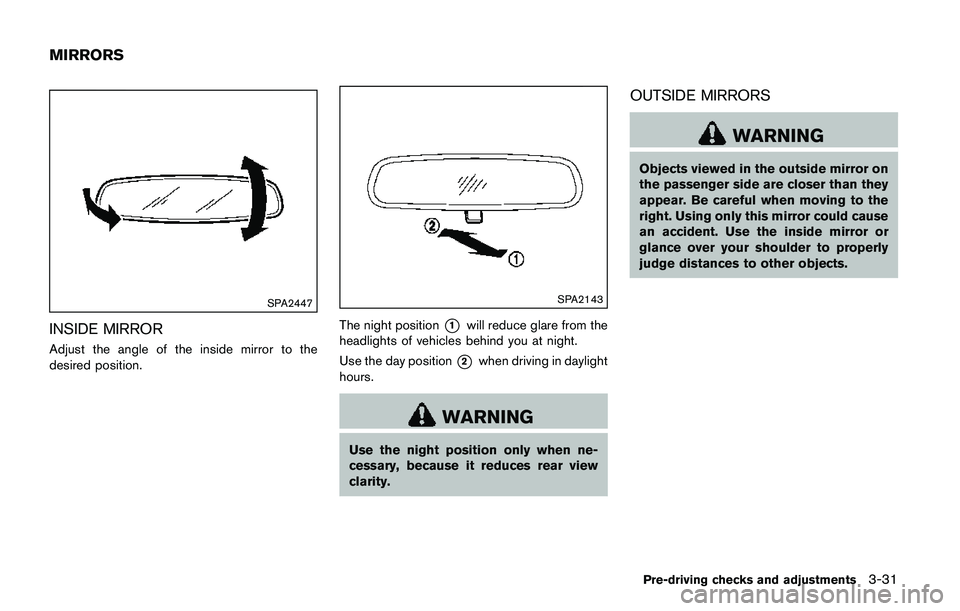
SPA2447
INSIDE MIRROR
Adjust the angle of the inside mirror to the
desired position.
SPA2143
The night position*1will reduce glare from the
headlights of vehicles behind you at night.
Use the day position
*2when driving in daylight
hours.
WARNING
Use the night position only when ne-
cessary, because it reduces rear view
clarity.
OUTSIDE MIRRORS
WARNING
Objects viewed in the outside mirror on
the passenger side are closer than they
appear. Be careful when moving to the
right. Using only this mirror could cause
an accident. Use the inside mirror or
glance over your shoulder to properly
judge distances to other objects.
Pre-driving checks and adjustments3-31
MIRRORS
Page 302 of 508
chime sounds. The engine will start.
After step 3 is performed, when the ignition
switch is pushed without depressing the brake
pedal, the ignition switch position will change to
ACC.
NOTE:
.When the ignition switch is pushed to
the ON position or the engine is started
by the above procedures, the“Key
Battery Low”warning appears (on the
Vehicle information display) even if the
Intelligent Key is inside the vehicle.
This is not a malfunction. To turn off the
warning, touch the ignition switch with
the Intelligent Key again.
.If the“Key Battery Low”warning ap-
pears (on the Vehicle information dis-
play) , replace the battery as soon as
possible. (See“Intelligent Key battery
replacement”(P.8-23) .).Make sure the area around the vehicle is
clear.
.Check fluid levels such as engine oil, cool-
ant, brake fluid, and window washer fluid as
frequently as possible, or at least whenever
you refuel.
.Check that all windows and lights are clean.
.Visually inspect tires for their appearance
and condition. Also check tires for proper
inflation.
.Lock all doors.
.Position seat and adjust head restraints.
.Adjust inside and outside mirrors.
.Fasten seat belts and ask all passengers to
do likewise.
.Check the operation of warning lights when
the ignition switch is placed in the ON
position. (See “Warning lights, indicator
lights and audible reminders” (P.2-10) .)1. Apply the parking brake.
2.Continuously Variable Transmission
(CVT) model:
Move the shift lever to the P (Park) or N
(Neutral) position. (P is recommended.)
The starter is designed so that it does not
operate unless the shift lever is in either of
the above positions.
Manual Transmission (MT) model:
Move the shift lever to the N (Neutral)
position, and depress the clutch pedal to
the floor while starting the engine.
3. Crank the enginewith your foot off the
accelerator pedalby turning the ignition
switch to START. Release the switch when
the engine starts. If the engine starts, but
fails to run, repeat the above procedure.
.If the engine is very hard to start in
extremely cold weather or when restart-
ing, depress the accelerator pedal a little
(approximately 1/3 to the floor) and hold
it and then crank the engine. Release the
accelerator pedal when the engine starts.
.If the engine is very hard to start because
it is flooded, depress the accelerator
pedal all the way to the floor and hold it.
Crank the engine for 5 - 6 seconds. After
cranking the engine, release the accel-
Starting and driving5-17
BEFORE STARTING THE ENGINESTARTING THE ENGINE (model
without Intelligent Key system)
Page 309 of 508
5-24Starting and driving
Shift Control is not operating. Engine
speed will be higher for a specific
vehicle speed while Adaptive Shift
Control is operating than when Adap-
tive Shift Control is not operating.
JVS0392X
Shift lock release
If the battery charge is low or discharged, the
shift lever may not be moved from the P (Park)
position even with the brake pedal depressed
and the shift lever button pushed.
To move the shift lever, perform the following
procedure:
1. Place the ignition switch in the OFF or
LOCK position.
2. Apply the parking brake.
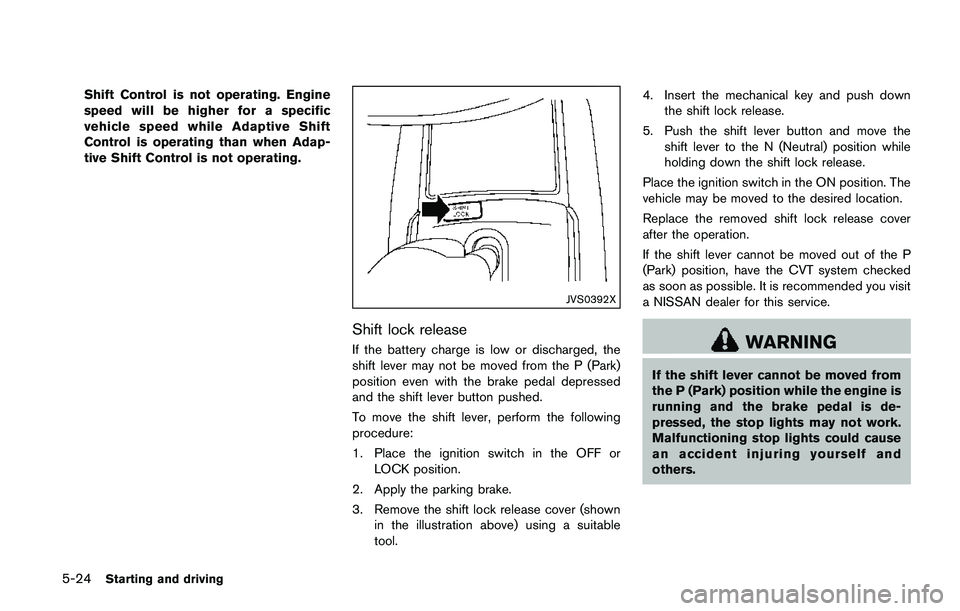
3. Remove the shift lock release cover (shown
in the illustration above) using a suitable
tool.4. Insert the mechanical key and push down
the shift lock release.
5. Push the shift lever button and move the
shift lever to the N (Neutral) position while
holding down the shift lock release.
Place the ignition switch in the ON position. The
vehicle may be moved to the desired location.
Replace the removed shift lock release cover
after the operation.
If the shift lever cannot be moved out of the P
(Park) position, have the CVT system checked
as soon as possible. It is recommended you visit
a NISSAN dealer for this service.WARNING
If the shift lever cannot be moved from
the P (Park) position while the engine is
running and the brake pedal is de-
pressed, the stop lights may not work.
Malfunctioning stop lights could cause
an accident injuring yourself and
others.