mirror NISSAN QASHQAI 2017 Owner´s Manual
[x] Cancel search | Manufacturer: NISSAN, Model Year: 2017, Model line: QASHQAI, Model: NISSAN QASHQAI 2017Pages: 508, PDF Size: 2.68 MB
Page 207 of 508
4-26Heater, air conditioner, audio and phone systems
MOD SYSTEM OPERATION
The MOD system will turn on automatically
under the following conditions:
.When the shift lever is in the R (Reverse)
position.
.When the CAMERA button is pushed to
switch to the camera view on the display.
.When vehicle speed decreases below
approximately 5 MPH (8 km/h) .
The MOD system operates in the following
conditions when the camera view is displayed:
.When the shift lever is in the P (Park) or N
(Neutral) position and the vehicle is
stopped, the MOD system detects the
moving objects in the bird’s-eye view. The
MOD system will not operate if either door is
opened. If outside mirrors are folded, MOD
may not operate properly.
.When the shift lever is in the D (Drive)
position, and the vehicle speed is below
approximately 5 MPH (8 km/h) , the MOD
system detects moving objects in the front
view.
.When the shift lever is in the R (Reverse)
position and the vehicle speed is below
approximately 5 MPH (8 km/h) , the MOD
system detects moving objects in the rear
view. The MOD system will not operate if the
liftgate is open.The MOD system does not detect moving
objects in the front-side view. The MOD icon
is not displayed on the screen when in this view.
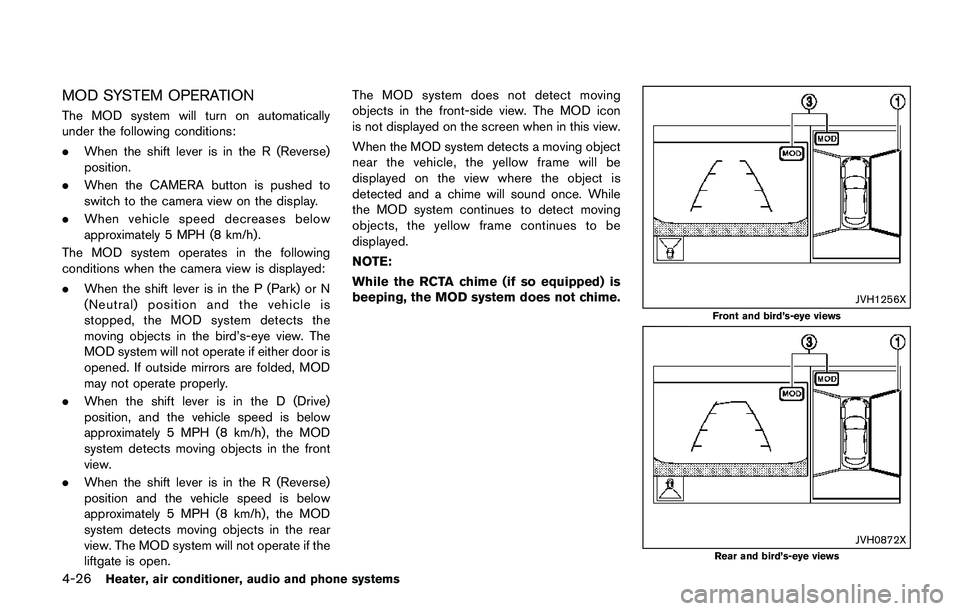
When the MOD system detects a moving object
near the vehicle, the yellow frame will be
displayed on the view where the object is
detected and a chime will sound once. While
the MOD system continues to detect moving
objects, the yellow frame continues to be
displayed.
NOTE:
While the RCTA chime (if so equipped) is
beeping, the MOD system does not chime.
JVH1256X
Front and bird’s-eye views
JVH0872XRear and bird’s-eye views
Page 208 of 508
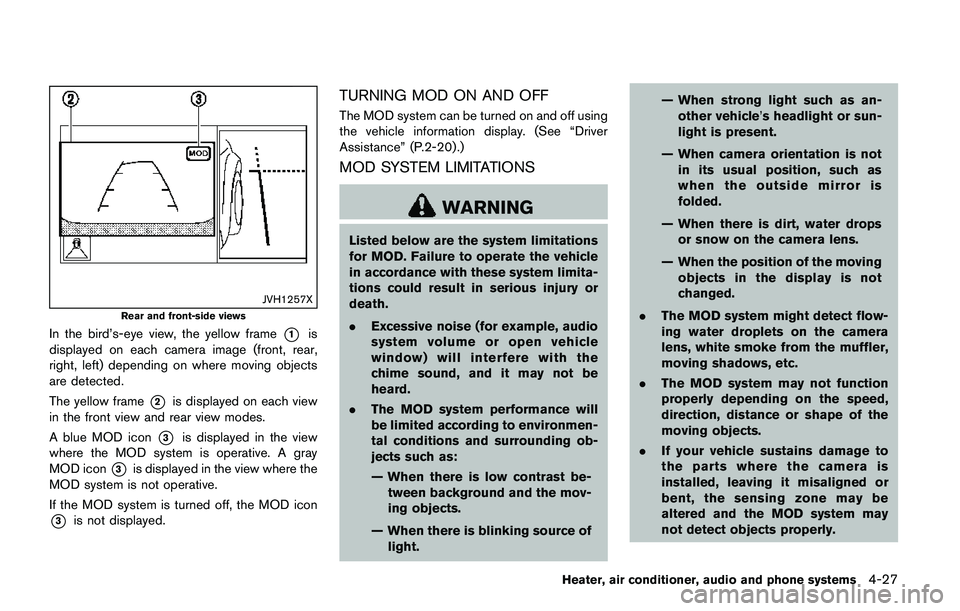
JVH1257X
Rear and front-side views
In the bird’s-eye view, the yellow frame*1is
displayed on each camera image (front, rear,
right, left) depending on where moving objects
are detected.
The yellow frame
*2is displayed on each view
in the front view and rear view modes.
A blue MOD icon
*3is displayed in the view
where the MOD system is operative. A gray
MOD icon
*3is displayed in the view where the
MOD system is not operative.
If the MOD system is turned off, the MOD icon
*3is not displayed.
TURNING MOD ON AND OFF
The MOD system can be turned on and off using
the vehicle information display. (See “Driver
Assistance” (P.2-20) .)
MOD SYSTEM LIMITATIONS
WARNING
Listed below are the system limitations
for MOD. Failure to operate the vehicle
in accordance with these system limita-
tions could result in serious injury or
death.
.Excessive noise (for example, audio
system volume or open vehicle
window) will interfere with the
chime sound, and it may not be
heard.
.The MOD system performance will
be limited according to environmen-
tal conditions and surrounding ob-
jects such as:
— When there is low contrast be-
tween background and the mov-
ing objects.
— When there is blinking source of
light.— When strong light such as an-
other vehicle’s headlight or sun-
light is present.
— When camera orientation is not
in its usual position, such as
when the outside mirror is
folded.
— When there is dirt, water drops
or snow on the camera lens.
— When the position of the moving
objects in the display is not
changed.
.The MOD system might detect flow-
ing water droplets on the camera
lens, white smoke from the muffler,
moving shadows, etc.
.The MOD system may not function
properly depending on the speed,
direction, distance or shape of the
moving objects.
.If your vehicle sustains damage to
the parts where the camera is
installed, leaving it misaligned or
bent, the sensing zone may be
altered and the MOD system may
not detect objects properly.
Heater, air conditioner, audio and phone systems4-27
Page 212 of 508
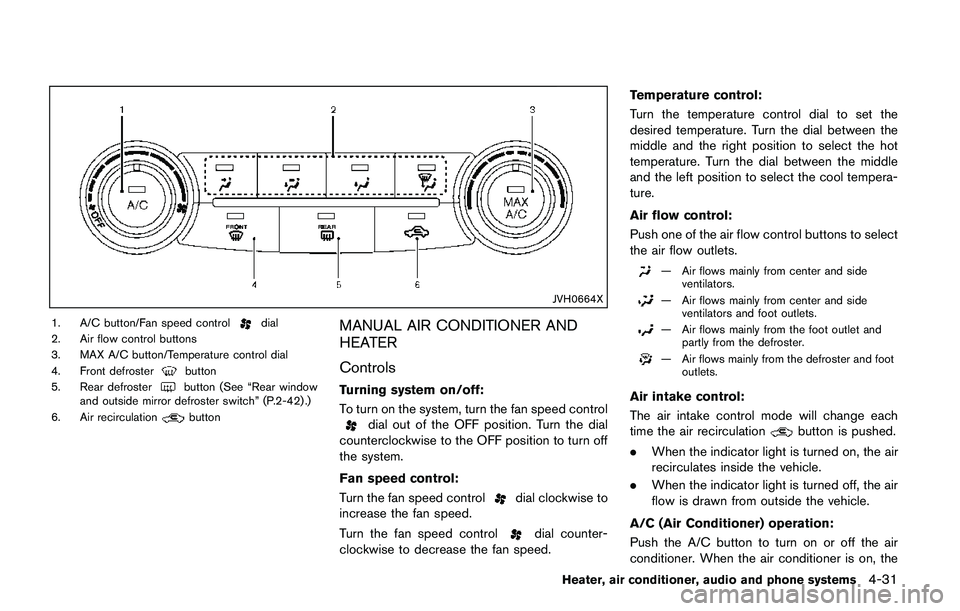
JVH0664X
1. A/C button/Fan speed controldial
2. Air flow control buttons
3. MAX A/C button/Temperature control dial
4. Front defroster
button
5. Rear defrosterbutton (See “Rear window
and outside mirror defroster switch” (P.2-42) .)
6. Air recirculation
button
MANUAL AIR CONDITIONER AND
HEATER
Controls
Turning system on/off:
To turn on the system, turn the fan speed control
dial out of the OFF position. Turn the dial
counterclockwise to the OFF position to turn off
the system.
Fan speed control:
Turn the fan speed control
dial clockwise to
increase the fan speed.
Turn the fan speed control
dial counter-
clockwise to decrease the fan speed.Temperature control:
Turn the temperature control dial to set the
desired temperature. Turn the dial between the
middle and the right position to select the hot
temperature. Turn the dial between the middle
and the left position to select the cool tempera-
ture.
Air flow control:
Push one of the air flow control buttons to select
the air flow outlets.
— Air flows mainly from center and side
ventilators.
— Air flows mainly from center and side
ventilators and foot outlets.
— Air flows mainly from the foot outlet and
partly from the defroster.
— Air flows mainly from the defroster and foot
outlets.
Air intake control:
The air intake control mode will change each
time the air recirculation
button is pushed.
.When the indicator light is turned on, the air
recirculates inside the vehicle.
.When the indicator light is turned off, the air
flow is drawn from outside the vehicle.
A/C (Air Conditioner) operation:
Push the A/C button to turn on or off the air
conditioner. When the air conditioner is on, the
Heater, air conditioner, audio and phone systems4-31
Page 215 of 508
4-34Heater, air conditioner, audio and phone systems
defog the windshield. The air recirculation mode
automatically turns off, allowing outside air to be
drawn into the passenger compartment to
further improve the defogging performance.
The air conditioner is always on in front defroster
or
mode, regardless of whether the
indicator light is on or off.
NOTE:
.The air conditioner system should be
operated for approximately 10 minutes
at least once a month. This helps
prevent damage to the air conditioner
system due to the lack of lubrication.
.A visible mist may be seen coming
from the ventilators in hot, humid
conditions as the air is cooled rapidly.
This does not indicate a malfunction.
.If the engine coolant temperature be-
comes too high, the air recirculation
mode will be activated and the indica-
tor light will come on automatically.
.If the engine coolant temperature
gauge indicates engine coolant tem-
perature over the normal range, turn
the air conditioner off. (See“If your
vehicle overheats”(P.6-11) .)
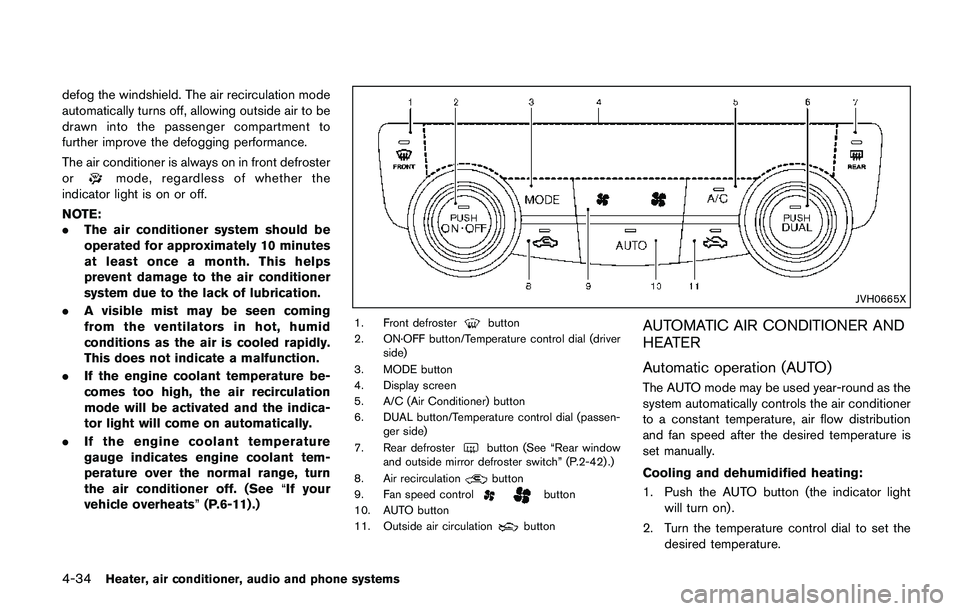
JVH0665X
1. Front defrosterbutton
2. ON·OFF button/Temperature control dial (driver
side)
3. MODE button
4. Display screen
5. A/C (Air Conditioner) button
6. DUAL button/Temperature control dial (passen-
ger side)
7. Rear defroster
button (See “Rear window
and outside mirror defroster switch” (P.2-42) .)
8. Air recirculation
button
9. Fan speed controlbutton
10. AUTO button
11. Outside air circulation
button
AUTOMATIC AIR CONDITIONER AND
HEATER
Automatic operation (AUTO)
The AUTO mode may be used year-round as the
system automatically controls the air conditioner
to a constant temperature, air flow distribution
and fan speed after the desired temperature is
set manually.
Cooling and dehumidified heating:
1. Push the AUTO button (the indicator light
will turn on) .
2. Turn the temperature control dial to set the
desired temperature.
Page 302 of 508
chime sounds. The engine will start.
After step 3 is performed, when the ignition
switch is pushed without depressing the brake
pedal, the ignition switch position will change to
ACC.
NOTE:
.When the ignition switch is pushed to
the ON position or the engine is started
by the above procedures, the“Key
Battery Low”warning appears (on the
Vehicle information display) even if the
Intelligent Key is inside the vehicle.
This is not a malfunction. To turn off the
warning, touch the ignition switch with
the Intelligent Key again.
.If the“Key Battery Low”warning ap-
pears (on the Vehicle information dis-
play) , replace the battery as soon as
possible. (See“Intelligent Key battery
replacement”(P.8-23) .).Make sure the area around the vehicle is
clear.
.Check fluid levels such as engine oil, cool-
ant, brake fluid, and window washer fluid as
frequently as possible, or at least whenever
you refuel.
.Check that all windows and lights are clean.
.Visually inspect tires for their appearance
and condition. Also check tires for proper
inflation.
.Lock all doors.
.Position seat and adjust head restraints.
.Adjust inside and outside mirrors.
.Fasten seat belts and ask all passengers to
do likewise.
.Check the operation of warning lights when
the ignition switch is placed in the ON
position. (See “Warning lights, indicator
lights and audible reminders” (P.2-10) .)1. Apply the parking brake.
2.Continuously Variable Transmission
(CVT) model:
Move the shift lever to the P (Park) or N
(Neutral) position. (P is recommended.)
The starter is designed so that it does not
operate unless the shift lever is in either of
the above positions.
Manual Transmission (MT) model:
Move the shift lever to the N (Neutral)
position, and depress the clutch pedal to
the floor while starting the engine.
3. Crank the enginewith your foot off the
accelerator pedalby turning the ignition
switch to START. Release the switch when
the engine starts. If the engine starts, but
fails to run, repeat the above procedure.
.If the engine is very hard to start in
extremely cold weather or when restart-
ing, depress the accelerator pedal a little
(approximately 1/3 to the floor) and hold
it and then crank the engine. Release the
accelerator pedal when the engine starts.
.If the engine is very hard to start because
it is flooded, depress the accelerator
pedal all the way to the floor and hold it.
Crank the engine for 5 - 6 seconds. After
cranking the engine, release the accel-
Starting and driving5-17
BEFORE STARTING THE ENGINESTARTING THE ENGINE (model
without Intelligent Key system)
Page 317 of 508
5-32Starting and driving
JVS1079X
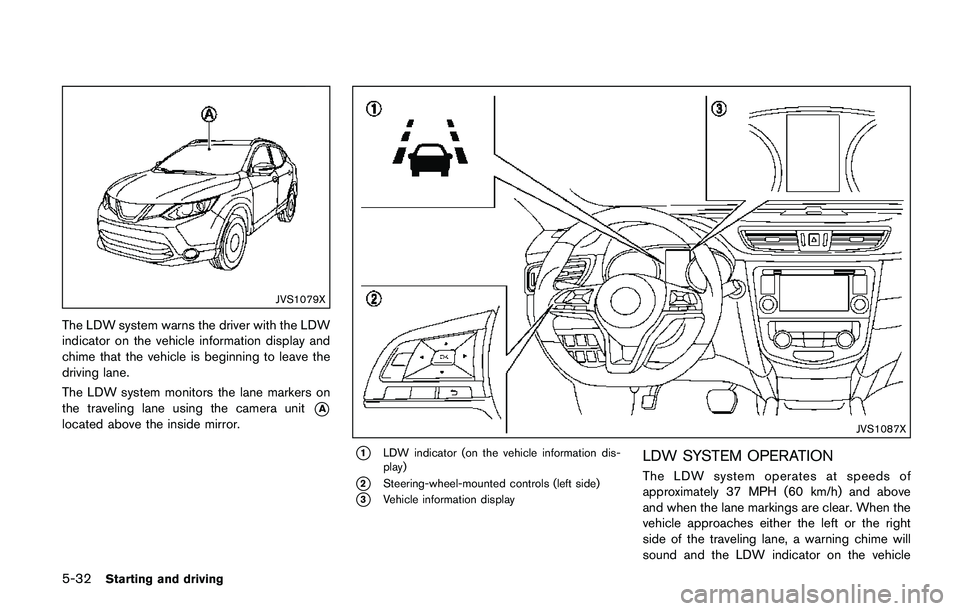
The LDW system warns the driver with the LDW
indicator on the vehicle information display and
chime that the vehicle is beginning to leave the
driving lane.
The LDW system monitors the lane markers on
the traveling lane using the camera unit
*A
located above the inside mirror.JVS1087X
*1LDW indicator (on the vehicle information dis-
play)
*2Steering-wheel-mounted controls (left side)
*3Vehicle information display
LDW SYSTEM OPERATION
The LDW system operates at speeds of
approximately 37 MPH (60 km/h) and above
and when the lane markings are clear. When the
vehicle approaches either the left or the right
side of the traveling lane, a warning chime will
sound and the LDW indicator on the vehicle
Page 321 of 508

5-36Starting and driving
JVS1079X
SYSTEM MAINTENANCE
The lane camera unit*Afor the LDW system is
located above the inside mirror.
To keep the proper operation of the LDW
system and prevent a system malfunction, be
sure to observe the following:
.Always keep the windshield clean.
.Do not attach a sticker (including transpar-
ent material) or install an accessory near the
camera unit.
.Do not place reflective materials, such as
white paper or a mirror, on the instrument
panel. The reflection of sunlight may ad-
versely affect the camera unit’s capability ofdetecting the lane markers.
.Do not strike or damage the areas around
the camera unit. Do not touch the camera
lens or remove the screw located on the
camera unit. If the camera unit is damaged
due to an accident, it is recommended that
you visit a NISSAN dealer.
WARNING
Failure to follow the warnings and
instructions for proper use of the LDP
system could result in serious injury or
death.
.The LDP system will not steer the
vehicle or prevent loss of control. It
is the driver’s responsibility to stay
alert, drive safely, keep the vehicle
in the traveling lane, and be in
control of the vehicle at all times.
.The LDP system is primarily in-
tended for use on well-developed
freeways or highways. It may not
detect the lane markers in certain
road, weather, or driving conditions.
LANE DEPARTURE PREVENTION
(LDP) (if so equipped)
Page 322 of 508
JVS1079X
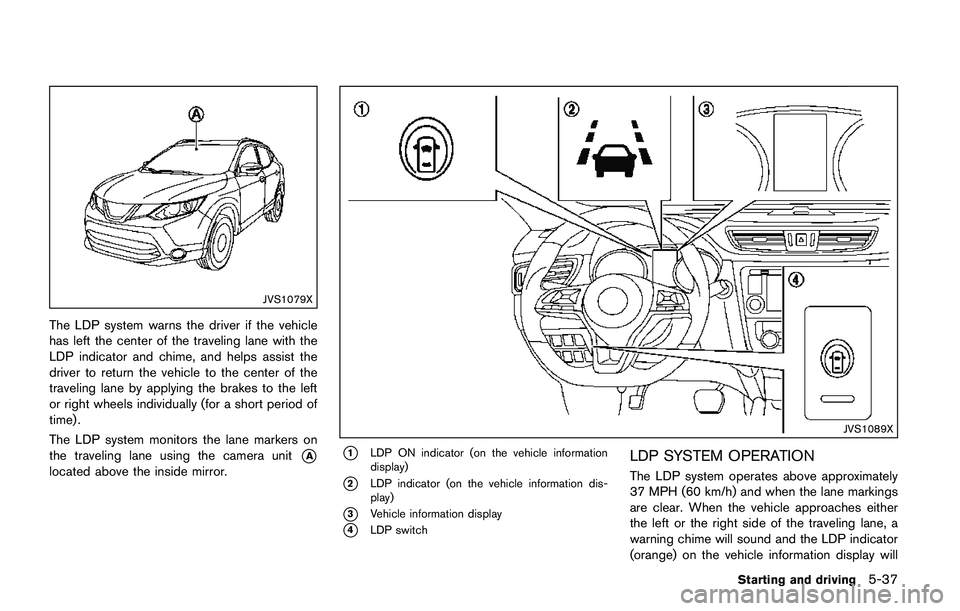
The LDP system warns the driver if the vehicle
has left the center of the traveling lane with the
LDP indicator and chime, and helps assist the
driver to return the vehicle to the center of the
traveling lane by applying the brakes to the left
or right wheels individually (for a short period of
time) .
The LDP system monitors the lane markers on
the traveling lane using the camera unit
*A
located above the inside mirror.
JVS1089X
*1LDP ON indicator (on the vehicle information
display)
*2LDP indicator (on the vehicle information dis-
play)
*3Vehicle information display
*4LDP switch
LDP SYSTEM OPERATION
The LDP system operates above approximately
37 MPH (60 km/h) and when the lane markings
are clear. When the vehicle approaches either
the left or the right side of the traveling lane, a
warning chime will sound and the LDP indicator
(orange) on the vehicle information display will
Starting and driving5-37
Page 326 of 508

Temporary disabled status at high tem-
perature:
If the vehicle is parked in direct sunlight under
high temperature conditions (over approximately
1048F (408C)) and then the LDP system is
turned on, the LDP system may be deactivated
automatically and the following message will
appear on the vehicle information display:
“Unavailable: High Cabin Temperature.” When
the interior temperature is reduced, the system
will resume operating automatically.
SYSTEM MALFUNCTION
If the LDP system malfunctions, it will cancel
automatically. The LDP indicator (orange) will
illuminate and the “Malfunction” warning mes-
sage appear in the display.
If the LDP indicator (orange) illuminates in the
display, pull off the road to a safe location. Turn
the engine off and restart the engine. If the LDP
indicator (orange) continues to illuminate, have
the LDP system checked. It is recommended
that you visit a NISSAN dealer for this service.JVS1079X
SYSTEM MAINTENANCE
The lane camera unit*Afor the LDP system is
located above the inside mirror. To keep the
proper operation of the LDP system and prevent
a system malfunction, be sure to observe the
following:
.Always keep the windshield clean.
.Do not attach a sticker (including transpar-
ent material) or install an accessory near the
camera unit.
.Do not place reflective materials, such as
white paper or a mirror, on the instrument
panel. The reflection of sunlight may ad-
versely affect the camera unit’s capability of
detecting the lane markers..Do not strike or damage the areas around
the camera unit. Do not touch the camera
lens or remove the screw located on the
camera unit. If the camera unit is damaged
due to an accident, it is recommended that
you visit a NISSAN dealer.
Starting and driving5-41
Page 327 of 508

5-42Starting and driving
WARNING
Failure to follow the warnings and
instructions for proper use of the BSW
system could result in serious injury or
death.
.The BSW system is not a replace-
ment for proper driving procedure
and is not designed to prevent
contact with vehicles or objects.
When changing lanes, always use
the side and rear mirrors and turn
and look in the direction your vehi-
cle will move to ensure it is safe to
change lanes. Never rely solely on
the BSW system.
The BSW system helps alert the driver of other
vehicles in adjacent lanes when changing lanes.
JVS0649X
The BSW system uses radar sensors*1
installed near the rear bumper to detect other
vehicles in an adjacent lane.
SSD1030
Detection zone
The radar sensors can detect vehicles on either
side of your vehicle within the detection zone
shown as illustrated. This detection zone starts
from the outside mirror of your vehicle and
extends approximately 10 ft (3.0 m) behind the
rear bumper, and approximately 10 ft (3.0 m)
sideways.
BLIND SPOT WARNING (BSW) (if so
equipped)