ad blue NISSAN QASHQAI 2017 Owner´s Manual
[x] Cancel search | Manufacturer: NISSAN, Model Year: 2017, Model line: QASHQAI, Model: NISSAN QASHQAI 2017Pages: 508, PDF Size: 2.68 MB
Page 277 of 508
4-96Heater, air conditioner, audio and phone systems
.Touch the phone end icon () on the
screen.
DURING A CALL
While a call is active, the following options are
available on the screen:
.“Handset”
Select this option to switch control of the
phone call over to the handset.
.“Mute Mic.”
Select this option to mute the microphone.
Select again to unmute the microphone.
.Phone end (
) icon
Select to end the phone call.
ENDING A CALL
To end a phone call, select the phone end ()
icon on the screen or push thebutton on
the steering wheel.
TEXT MESSAGING (if so equipped)
WARNING
.Laws in some jurisdictions may
restrict the use of some of the
applications and features, such as
social networking and texting.
.Laws in some jurisdictions may
restrict the use of“Text-to-Speech”.Check local regulations before
using this feature.
.Use the text messaging feature after
stopping your vehicle in a safe
location. If you have to use the
feature while driving, exercise ex-
treme caution at all times so full
attention may be given to vehicle
operation.
.If you are unable to devote full
attention to vehicle operation while
using the text messaging feature,
pull off the road to a safe location
and stop your vehicle.
NOTE:
Many phones may require special permis-
sion to enable text messaging. Check the
phone’s screen during Bluetooth
Špairing.
For some phones, you may need to enable
“Notifications”in the phone’s Bluetooth
Š
menu for text messages to appear on the
vehicle audio system. See the phone’s
owner’s manual for details. Text message
integration requires that the phone sup-
port MAP (Message Access Profile) for
both receiving and sending text messages.
Some phones may not support all text
messaging features. Refer to www.nissa-nusa.com/bluetooth or www.nissan.ca/
bluetooth for compatibility information,
as well as your device’s owner’s manual.
The system allows for the sending and receiving
of text messages through the vehicle interface.
Sending a text message
1. Push thebutton on the steering wheel.
2. Say “Phone” after the tone.
3. Say “Send Text” after the tone.
4. The system will provide a list of available
commands in order to determine the reci-
pient of the text message. Choose from the
following:
.To (a name).Enter Number.Missed Calls.Incoming Calls.Outgoing Calls
For more information about these options,
see “Phone voice commands” (P.4-101) .
5. Once a recipient is chosen, the system
prompts for which message to send. Several
predefined and custom messages are avail-
able. To choose one of the predefined
messages, speak one of the following after
the tone:
Page 278 of 508
.“Driving, can’t text”.“Call me”.“On my way”.“Running late”.“Okay”.“Yes”.“No”.“Where are you?”.“When?”.“Custom Messages”
To send one of the custom messages, say
“Custom Messages”. If more than one
custom message is stored, the system will
prompt for the number of the desired
custom message. For more information on
setting and managing custom text mes-
sages, see “Phone settings” (P.4-98) .
NOTE:
iPhone
Šcan only send text messages via
SiriŠEyes Free. (See“SiriŠEyes Free”(P.4-
78) .)
Reading a received text message
1. Push thebutton on the steering wheel.
2. Say “Phone” after the tone.
3. Say “Read Text” after the tone.
The text message, sender and delivery time are
shown on the screen. Use the menu control
buttons to scroll through all text messages ifmore than one are available. Push the
button to exit the text message screen. Push thebutton to access the following options for
replying to the text message:
.Call Back
Speak this command to call the sender of
the text message using the Bluetooth
Š
Hands-Free Phone System.
.Send Text
Speak this command to send a text mes-
sage response to the sender of the text
message.
.Read Text
Speak this command to read the text
message again.
.Previous Text
Speak this command to move to the
previous text message (if available) .
.Next Text
Speak this command to move to the next
text message (if available) .
NOTE:
Text messages are only displayed if the
vehicle speed is less than 5 MPH (8 km/h) .
Making custom messages with SiriŠ
Eyes Free
If a connected iPhoneŠis equipped with SiriŠ,it
can also be used to create custom messages.
(See “Siri
ŠEyes Free” (P.4-78).)
Heater, air conditioner, audio and phone systems4-97
Page 279 of 508
4-98Heater, air conditioner, audio and phone systems
JVH0750X
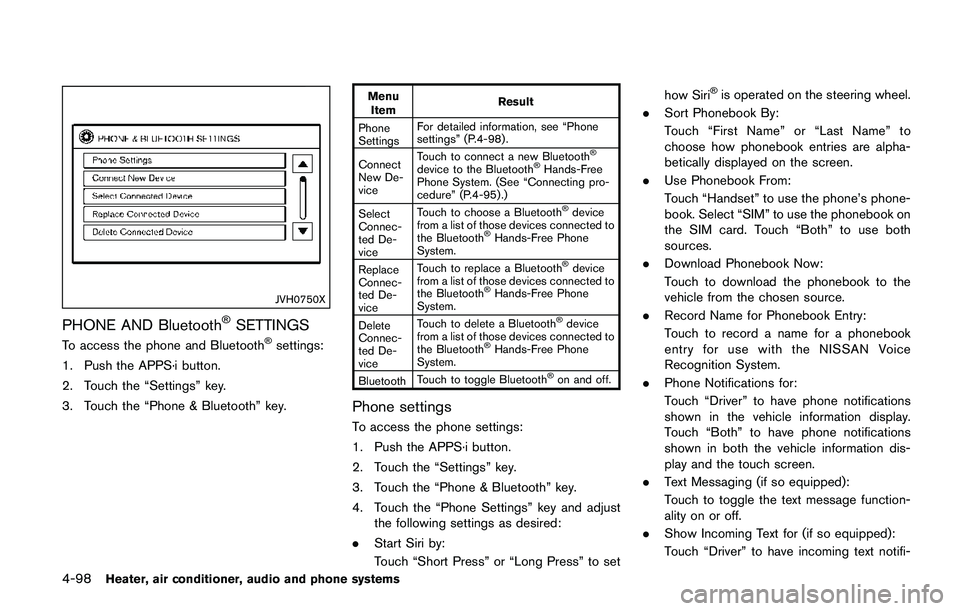
PHONE AND BluetoothŠSETTINGS
To access the phone and BluetoothŠsettings:
1. Push the APPS·i button.
2. Touch the “Settings” key.
3. Touch the “Phone & Bluetooth” key.
Menu
ItemResult
Phone
SettingsFor detailed information, see “Phone
settings” (P.4-98) .
Connect
New De-
viceTouch to connect a new Bluetooth
Š
device to the BluetoothŠHands-Free
Phone System. (See “Connecting pro-
cedure” (P.4-95) .)
Select
Connec-
ted De-
viceTouch to choose a Bluetooth
Šdevice
from a list of those devices connected to
the Bluetooth
ŠHands-Free Phone
System.
Replace
Connec-
ted De-
viceTouch to replace a Bluetooth
Šdevice
from a list of those devices connected to
the Bluetooth
ŠHands-Free Phone
System.
Delete
Connec-
ted De-
viceTouch to delete a Bluetooth
Šdevice
from a list of those devices connected to
the Bluetooth
ŠHands-Free Phone
System.
BluetoothTouch to toggle Bluetooth
Šon and off.
Phone settings
To access the phone settings:
1. Push the APPS·i button.
2. Touch the “Settings” key.
3. Touch the “Phone & Bluetooth” key.
4. Touch the “Phone Settings” key and adjust
the following settings as desired:
.Start Siri by:
Touch “Short Press” or “Long Press” to sethow Siri
Šis operated on the steering wheel.
.Sort Phonebook By:
Touch “First Name” or “Last Name” to
choose how phonebook entries are alpha-
betically displayed on the screen.
.Use Phonebook From:
Touch “Handset” to use the phone’s phone-
book. Select “SIM” to use the phonebook on
the SIM card. Touch “Both” to use both
sources.
.Download Phonebook Now:
Touch to download the phonebook to the
vehicle from the chosen source.
.Record Name for Phonebook Entry:
Touch to record a name for a phonebook
entry for use with the NISSAN Voice
Recognition System.
.Phone Notifications for:
Touch “Driver” to have phone notifications
shown in the vehicle information display.
Touch “Both” to have phone notifications
shown in both the vehicle information dis-
play and the touch screen.
.Text Messaging (if so equipped):
Touch to toggle the text message function-
ality on or off.
.Show Incoming Text for (if so equipped):
Touch “Driver” to have incoming text notifi-
Page 282 of 508
JVH1687X
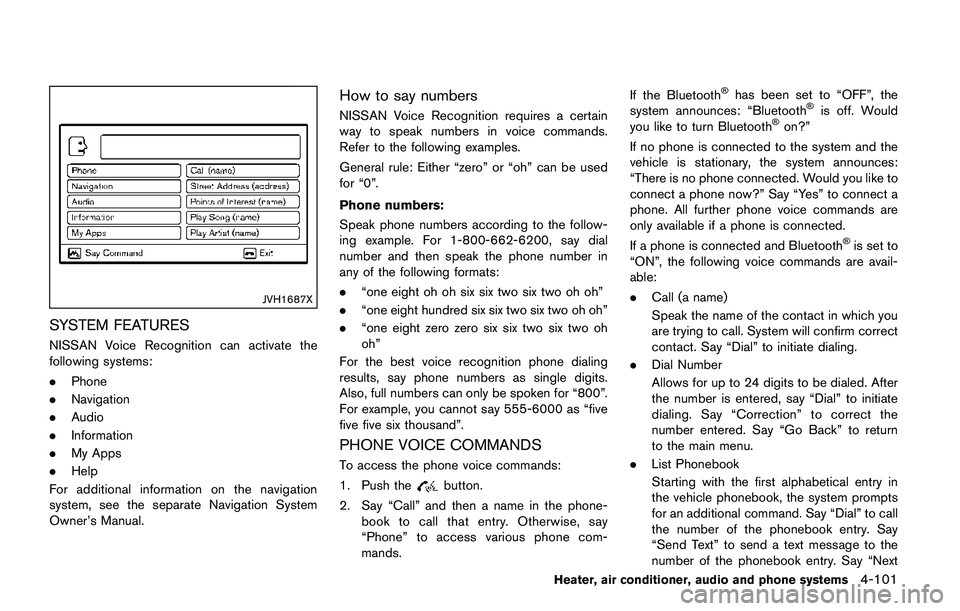
SYSTEM FEATURES
NISSAN Voice Recognition can activate the
following systems:
.Phone
.Navigation
.Audio
.Information
.My Apps
.Help
For additional information on the navigation
system, see the separate Navigation System
Owner’s Manual.
How to say numbers
NISSAN Voice Recognition requires a certain
way to speak numbers in voice commands.
Refer to the following examples.
General rule: Either “zero” or “oh” can be used
for “0”.
Phone numbers:
Speak phone numbers according to the follow-
ing example. For 1-800-662-6200, say dial
number and then speak the phone number in
any of the following formats:
.“one eight oh oh six six two six two oh oh”
.“one eight hundred six six two six two oh oh”
.“one eight zero zero six six two six two oh
oh”
For the best voice recognition phone dialing
results, say phone numbers as single digits.
Also, full numbers can only be spoken for “800”.
For example, you cannot say 555-6000 as “five
five five six thousand”.
PHONE VOICE COMMANDS
To access the phone voice commands:
1. Push the
button.
2. Say “Call” and then a name in the phone-
book to call that entry. Otherwise, say
“Phone” to access various phone com-
mands.If the Bluetooth
Šhas been set to “OFF”, the
system announces: “BluetoothŠis off. Would
you like to turn BluetoothŠon?”
If no phone is connected to the system and the
vehicle is stationary, the system announces:
“There is no phone connected. Would you like to
connect a phone now?” Say “Yes” to connect a
phone. All further phone voice commands are
only available if a phone is connected.
If a phone is connected and Bluetooth
Šis set to
“ON”, the following voice commands are avail-
able:
.Call (a name)
Speak the name of the contact in which you
are trying to call. System will confirm correct
contact. Say “Dial” to initiate dialing.
.Dial Number
Allows for up to 24 digits to be dialed. After
the number is entered, say “Dial” to initiate
dialing. Say “Correction” to correct the
number entered. Say “Go Back” to return
to the main menu.
.List Phonebook
Starting with the first alphabetical entry in
the vehicle phonebook, the system prompts
for an additional command. Say “Dial” to call
the number of the phonebook entry. Say
“Send Text” to send a text message to the
number of the phonebook entry. Say “Next
Heater, air conditioner, audio and phone systems4-101
Page 283 of 508
4-102Heater, air conditioner, audio and phone systems
Entry” to skip to the next alphabetical entry
in the vehicle phonebook, where the same
options will then be available.
.Recent Calls
The system prompts for an additional
command. Say “Missed Calls”, “Incoming
Calls” or “Outgoing Calls” to display a list of
such calls on the screen.
Speak the number of the entry displayed on
the screen to dial that number or say “Next
Page” to view entries on the next page (if
available) .
.Redial
Redials the last called number.
.Read Text (if so equipped)
Reads an incoming text message. For more
information about text messaging with the
Bluetooth
ŠHands-Free Phone System, see
“Text messaging” (P.4-96).
.Send Text (if so equipped)
Sends a text message. For more information
about text messaging with the Bluetooth
Š
Hands-Free Phone System, see “Text mes-
saging” (P.4-96) .
.Select Phone
The system replies “Please use manual
controls to continue”. Use manual controls
to change the active phone from among the
listed phones connected to the vehicle..Siri (if so equipped)
Siri
ŠEyes Free function can be activated.
See “SiriŠEyes Free” (P.4-78) for details.
For more information about the BluetoothŠ
Hands-Free Phone System, see “BluetoothŠ
Hands-Free Phone System (models with navi-
gation system)” (P.4-92) .
NAVIGATION SYSTEM VOICE COM-
MANDS
The following voice commands are available for
the Navigation System:
.Street Address (address)
.Points of Interest (name)
.POI by Category
.Home
.Address Book
.Previous Destinations
.Enter Address in Steps
.Cancel Route
For more information about these commands,
see the separate Navigation System Owner’s
Manual.
AUDIO SYSTEM VOICE COMMANDS
To access the audio system voice commands:
1. Push the
button.
2. Say “Audio”.
3. Speak a command from the following
available commands:
.Play (AM, FM, etc.)
Allows user to select radio band
.Tune AM (number)
Allows user to tune directly to a desired AM
frequency
.Tune FM (number)
Allows user to tune directly to a desired FM
frequency
.SXM Channel (number)
Allows user to tune directly to a desired
SXM channel (if so equipped)
.CD Track (number)
Allows user to select track to be played
.Play Song (name)
Allows user to select song name to be
played
.Play Artist (name)
Allows user to select artist to be played
.Play Album (name)
Allows user to select album name to be
played
Page 301 of 508
5-16Starting and driving
PUSH-BUTTON IGNITION SWITCH
POSITIONS
LOCK (Normal parking position)
The ignition switch can only be locked at this
position.
The ignition switch will lock when any door is
opened or closed with the ignition switched off.
ON (Normal operating position)
The ignition system and the electrical accessory
power activate at this position without the
engine turned on.
The ON position has a battery saver feature that
will place the ignition switch in the OFF position,
if the vehicle is not running, after some time
under the following conditions:
.all doors are closed.
.shift lever is in P (Park) position (CVT model)
or N (Neutral) position (MT model) .
The battery saver feature will be cancelled if any
of the following occur:
.any door is opened.
.shift lever is moved out of the P (Park)
position (CVT model) .
.ignition switch changes position.
OFF position
The engine is turned off in this position.
Auto ACC position
With the vehicle in the P (Park) position (CVT
models) or the N (Neutral) position (MT models) ,
the Intelligent Key with you and the ignition
placed from ON to OFF, the radio can still be
used for a period of time, or until the driver’s
door is opened. After a period of time, functions
such as radio, navigation (if so equipped) , and
Bluetooth
ŠHands-Free Phone System may be
restarted by turning on the audio system (See
“Audio system” (P.4-38) in this manual) , or by
the UNLOCK button on the Intelligent Key for up
to a total of 30 minutes.
EMERGENCY ENGINE SHUT OFF
To shut off the engine in an emergency situation
while driving, perform the following procedure:
.Rapidly push the push-button ignition switch
3 consecutive times in less than 1.5
seconds, or
.Push and hold the push-button ignition
switch for more than 2 seconds.
JVS0404X
INTELLIGENT KEY BATTERY DIS-
CHARGE
If the battery of the Intelligent Key is discharged,
or environmental conditions interfere with the
Intelligent Key operation, start the engine
according to the following procedure:
1. Move the shift lever to the P (Park) position
(for CVT models) or the shift lever to the N
(Neutral) position (for MT models) .
2. Firmly apply the foot brake.
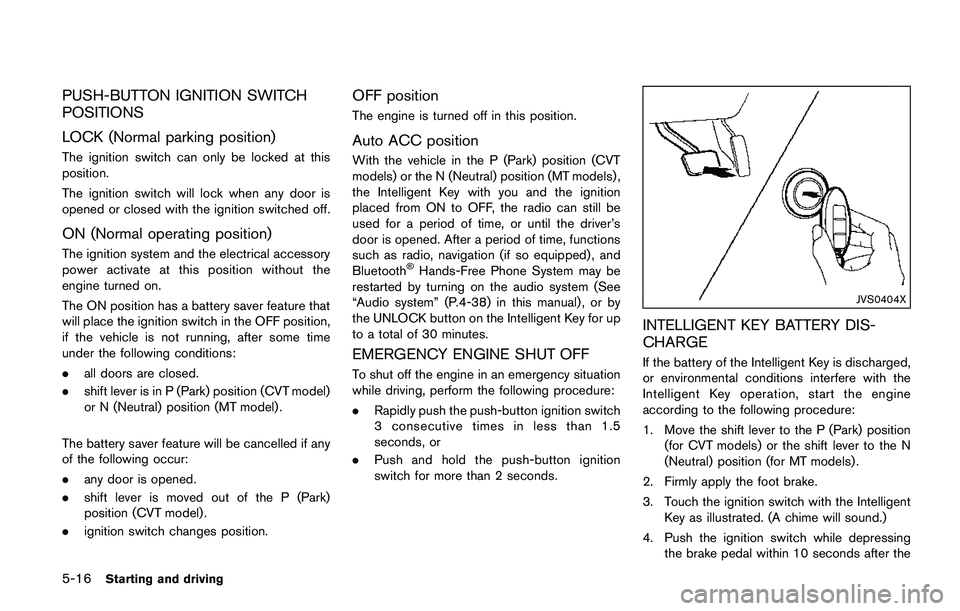
3. Touch the ignition switch with the Intelligent
Key as illustrated. (A chime will sound.)
4. Push the ignition switch while depressing
the brake pedal within 10 seconds after the
Page 427 of 508
8-4Do-it-yourself
JVC1070X
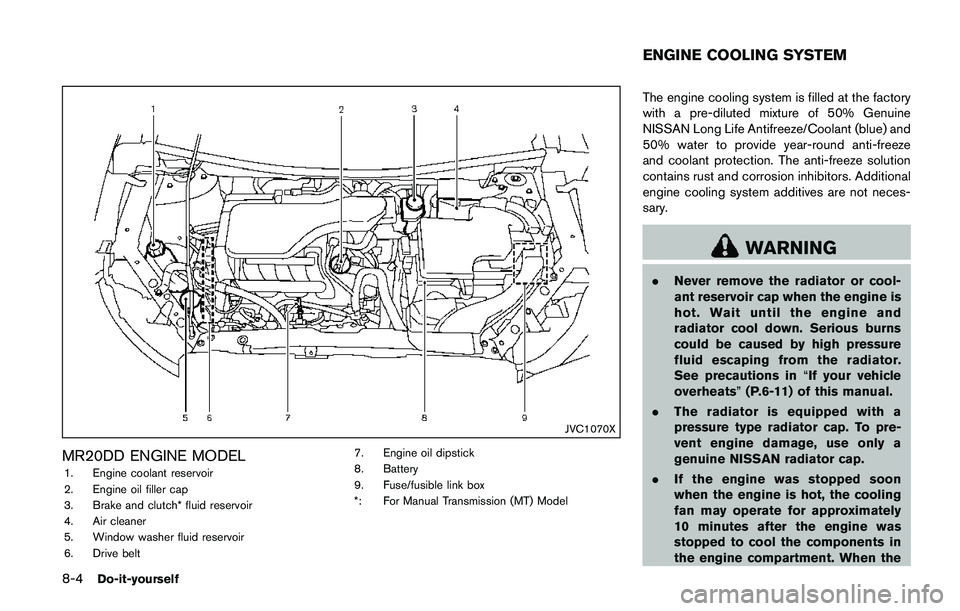
MR20DD ENGINE MODEL
1. Engine coolant reservoir
2. Engine oil filler cap
3. Brake and clutch* fluid reservoir
4. Air cleaner
5. Window washer fluid reservoir
6. Drive belt7. Engine oil dipstick
8. Battery
9. Fuse/fusible link box
*: For Manual Transmission (MT) Model
The engine cooling system is filled at the factory
with a pre-diluted mixture of 50% Genuine
NISSAN Long Life Antifreeze/Coolant (blue) and
50% water to provide year-round anti-freeze
and coolant protection. The anti-freeze solution
contains rust and corrosion inhibitors. Additional
engine cooling system additives are not neces-
sary.
WARNING
.Never remove the radiator or cool-
ant reservoir cap when the engine is
hot. Wait until the engine and
radiator cool down. Serious burns
could be caused by high pressure
fluid escaping from the radiator.
See precautions in“If your vehicle
overheats”(P.6-11) of this manual.
.The radiator is equipped with a
pressure type radiator cap. To pre-
vent engine damage, use only a
genuine NISSAN radiator cap.
.If the engine was stopped soon
when the engine is hot, the cooling
fan may operate for approximately
10 minutes after the engine was
stopped to cool the components in
the engine compartment. When the
ENGINE COOLING SYSTEM
Page 428 of 508
cooling fan is operating, be sure
that hands or other items do not get
caught in it.
CAUTION
.Never use any cooling system ad-
ditives such as radiator sealer. Ad-
ditives may clog the cooling system
and cause damage to the engine,
transmission and/or cooling sys-
tem.
.When adding or replacing coolant,
be sure to use only Genuine
NISSAN Long Life Antifreeze/Cool-
ant (blue) or equivalent. Genuine
NISSAN Long Life Antifreeze/Cool-
ant (blue) is pre-diluted to provide
antifreeze protection to -348F
(-378C) . If additional freeze protec-
tion is needed due to weather where
you operate your vehicle, add Gen-
uine NISSAN Long Life Antifreeze/
Coolant (blue) concentrate follow-
ing the directions on the container.
If an equivalent coolant other than
Genuine NISSAN Long Life Anti-
freeze/Coolant (blue) is used, fol-low the coolant manufacture’s
instructions to maintain minimum
antifreeze protection to -348F
(-378C) . The use of other types of
coolant solutions other than Genu-
ine NISSAN Long Life Antifreeze/
Coolant (blue) or equivalent may
damage the engine cooling system.
.The life expectancy of the factory-fill
coolant is 105,000 miles (168,000
km) or 7 years. Mixing any other
type of coolant other than Genuine
NISSAN Long Life Antifreeze/Cool-
ant (blue) , including Genuine
NISSAN Long Life Antifreeze/Cool-
ant (green) , or the use of non-
distilled water will reduce the life
expectancy of the factory-fill cool-
ant. Refer to the “9. Maintenance
and schedules” section of this man-
ual for more details.
JVM0438X
CHECKING ENGINE COOLANT LEVEL
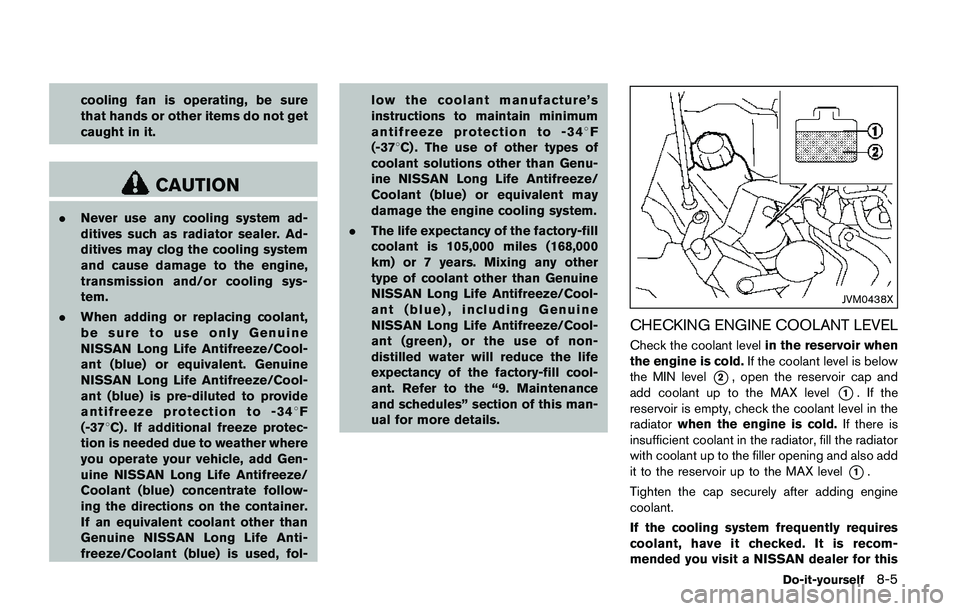
Check the coolant levelin the reservoir when
the engine is cold.If the coolant level is below
the MIN level
*2, open the reservoir cap and
add coolant up to the MAX level
*1. If the
reservoir is empty, check the coolant level in the
radiatorwhen the engine is cold.If there is
insufficient coolant in the radiator, fill the radiator
with coolant up to the filler opening and also add
it to the reservoir up to the MAX level
*1.
Tighten the cap securely after adding engine
coolant.
If the cooling system frequently requires
coolant, have it checked. It is recom-
mended you visit a NISSAN dealer for this
Do-it-yourself8-5
Page 468 of 508
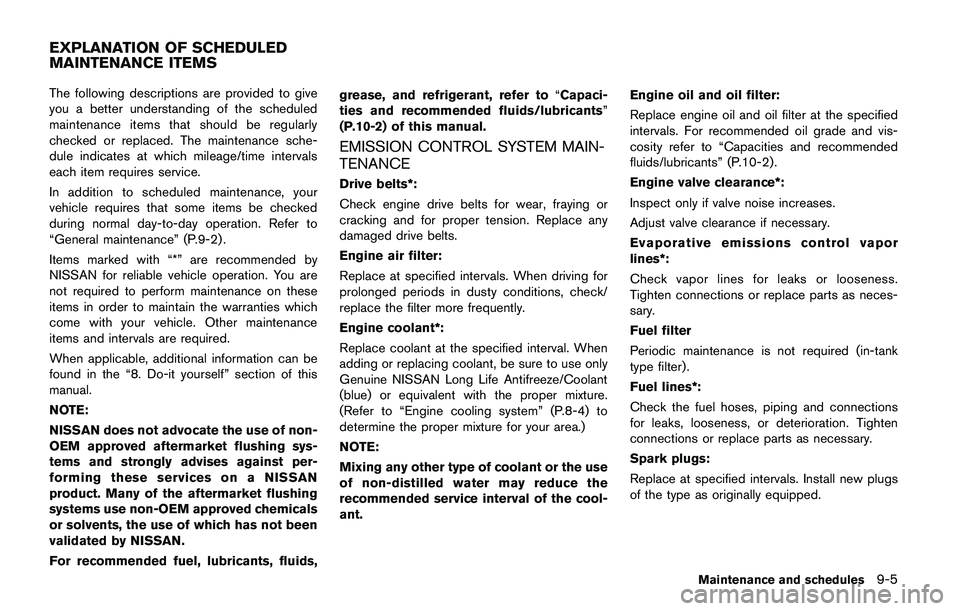
The following descriptions are provided to give
you a better understanding of the scheduled
maintenance items that should be regularly
checked or replaced. The maintenance sche-
dule indicates at which mileage/time intervals
each item requires service.
In addition to scheduled maintenance, your
vehicle requires that some items be checked
during normal day-to-day operation. Refer to
“General maintenance” (P.9-2) .
Items marked with “*” are recommended by
NISSAN for reliable vehicle operation. You are
not required to perform maintenance on these
items in order to maintain the warranties which
come with your vehicle. Other maintenance
items and intervals are required.
When applicable, additional information can be
found in the “8. Do-it yourself” section of this
manual.
NOTE:
NISSAN does not advocate the use of non-
OEM approved aftermarket flushing sys-
tems and strongly advises against per-
forming these services on a NISSAN
product. Many of the aftermarket flushing
systems use non-OEM approved chemicals
or solvents, the use of which has not been
validated by NISSAN.
For recommended fuel, lubricants, fluids,grease, and refrigerant, refer to“Capaci-
ties and recommended fluids/lubricants”
(P.10-2) of this manual.
EMISSION CONTROL SYSTEM MAIN-
TENANCE
Drive belts*:
Check engine drive belts for wear, fraying or
cracking and for proper tension. Replace any
damaged drive belts.
Engine air filter:
Replace at specified intervals. When driving for
prolonged periods in dusty conditions, check/
replace the filter more frequently.
Engine coolant*:
Replace coolant at the specified interval. When
adding or replacing coolant, be sure to use only
Genuine NISSAN Long Life Antifreeze/Coolant
(blue) or equivalent with the proper mixture.
(Refer to “Engine cooling system” (P.8-4) to
determine the proper mixture for your area.)
NOTE:
Mixing any other type of coolant or the use
of non-distilled water may reduce the
recommended service interval of the cool-
ant.Engine oil and oil filter:
Replace engine oil and oil filter at the specified
intervals. For recommended oil grade and vis-
cosity refer to “Capacities and recommended
fluids/lubricants” (P.10-2) .
Engine valve clearance*:
Inspect only if valve noise increases.
Adjust valve clearance if necessary.
Evaporative emissions control vapor
lines*:
Check vapor lines for leaks or looseness.
Tighten connections or replace parts as neces-
sary.
Fuel filter
Periodic maintenance is not required (in-tank
type filter) .
Fuel lines*:
Check the fuel hoses, piping and connections
for leaks, looseness, or deterioration. Tighten
connections or replace parts as necessary.
Spark plugs:
Replace at specified intervals. Install new plugs
of the type as originally equipped.
Maintenance and schedules9-5
EXPLANATION OF SCHEDULED
MAINTENANCE ITEMS
Page 472 of 508
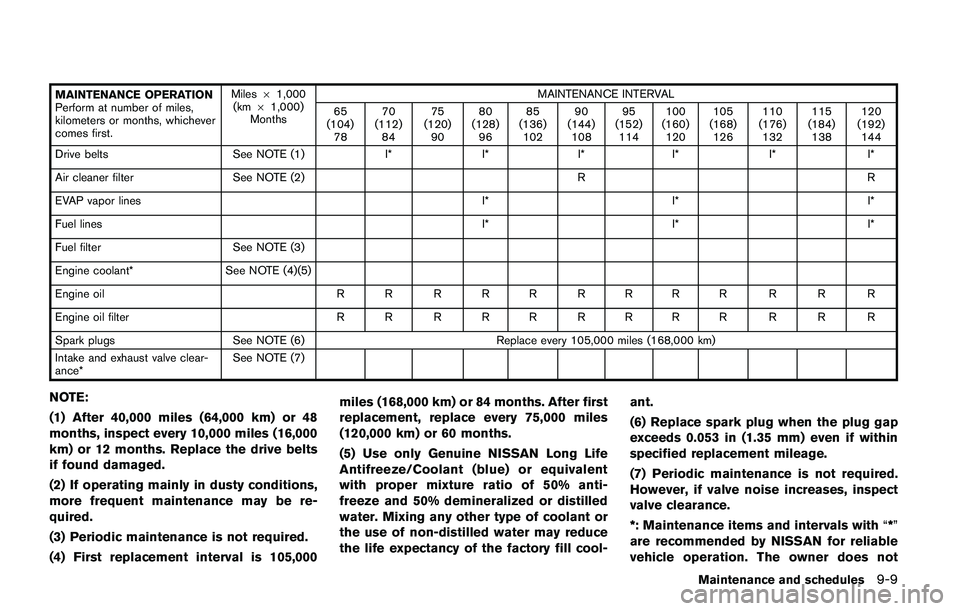
MAINTENANCE OPERATION
Perform at number of miles,
kilometers or months, whichever
comes first.Miles61,000
(km61,000)
MonthsMAINTENANCE INTERVAL
65
(104)
7870
(112)
8475
(120)
9080
(128)
9685
(136)
10290
(144)
10895
(152)
114100
(160)
120105
(168)
126110
(176)
132115
(184)
138120
(192)
144
Drive belts See NOTE (1) I* I* I* I* I* I*
Air cleaner filter See NOTE (2) R R
EVAP vapor lines I* I* I*
Fuel linesI* I* I*
Fuel filter See NOTE (3)
Engine coolant* See NOTE (4)(5)
Engine oil R R R R R R R R R R R R
Engine oil filter R R R R R R R R R R R R
Spark plugs See NOTE (6) Replace every 105,000 miles (168,000 km)
Intake and exhaust valve clear-
ance*See NOTE (7)
NOTE:
(1) After 40,000 miles (64,000 km) or 48
months, inspect every 10,000 miles (16,000
km) or 12 months. Replace the drive belts
if found damaged.
(2) If operating mainly in dusty conditions,
more frequent maintenance may be re-
quired.
(3) Periodic maintenance is not required.
(4) First replacement interval is 105,000miles (168,000 km) or 84 months. After first
replacement, replace every 75,000 miles
(120,000 km) or 60 months.
(5) Use only Genuine NISSAN Long Life
Antifreeze/Coolant (blue) or equivalent
with proper mixture ratio of 50% anti-
freeze and 50% demineralized or distilled
water. Mixing any other type of coolant or
the use of non-distilled water may reduce
the life expectancy of the factory fill cool-ant.
(6) Replace spark plug when the plug gap
exceeds 0.053 in (1.35 mm) even if within
specified replacement mileage.
(7) Periodic maintenance is not required.
However, if valve noise increases, inspect
valve clearance.
*: Maintenance items and intervals with“*”
are recommended by NISSAN for reliable
vehicle operation. The owner does not
Maintenance and schedules9-9