ABS NISSAN QASHQAI 2017 Owner´s Manual
[x] Cancel search | Manufacturer: NISSAN, Model Year: 2017, Model line: QASHQAI, Model: NISSAN QASHQAI 2017Pages: 508, PDF Size: 2.68 MB
Page 19 of 508
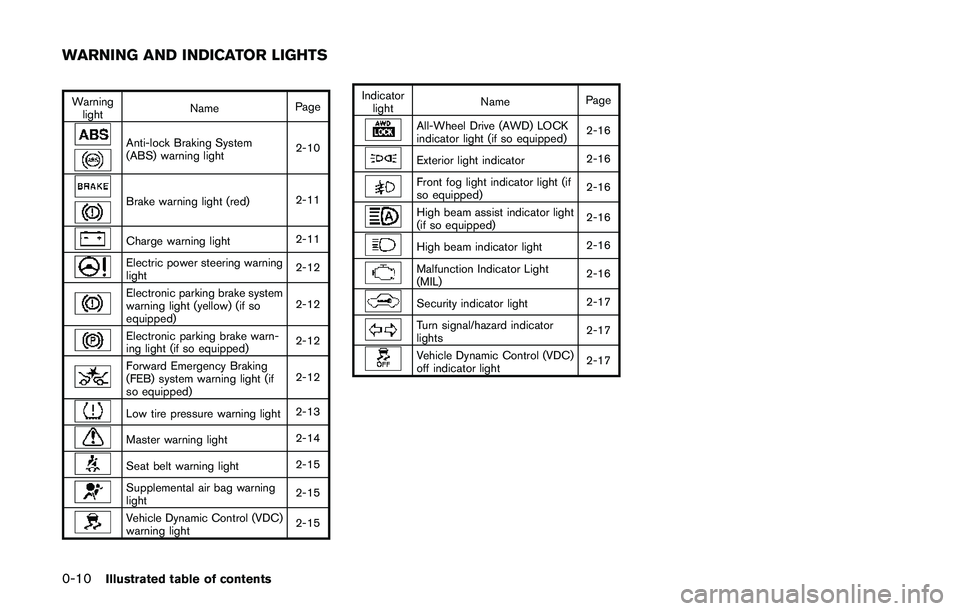
0-10Illustrated table of contents
Warning
lightNamePage
Anti-lock Braking System
(ABS) warning light2-10
Brake warning light (red)2-11
Charge warning light2-11
Electric power steering warning
light2-12
Electronic parking brake system
warning light (yellow) (if so
equipped)2-12
Electronic parking brake warn-
ing light (if so equipped)2-12
Forward Emergency Braking
(FEB) system warning light (if
so equipped)2-12
Low tire pressure warning light2-13
Master warning light2-14
Seat belt warning light2-15
Supplemental air bag warning
light2-15
Vehicle Dynamic Control (VDC)
warning light2-15Indicator
lightNamePage
All-Wheel Drive (AWD) LOCK
indicator light (if so equipped)2-16
Exterior light indicator2-16
Front fog light indicator light (if
so equipped)2-16
High beam assist indicator light
(if so equipped)2-16
High beam indicator light2-16
Malfunction Indicator Light
(MIL)2-16
Security indicator light2-17
Turn signal/hazard indicator
lights2-17
Vehicle Dynamic Control (VDC)
off indicator light2-17
WARNING AND INDICATOR LIGHTS
Page 89 of 508
2-10Instruments and controls
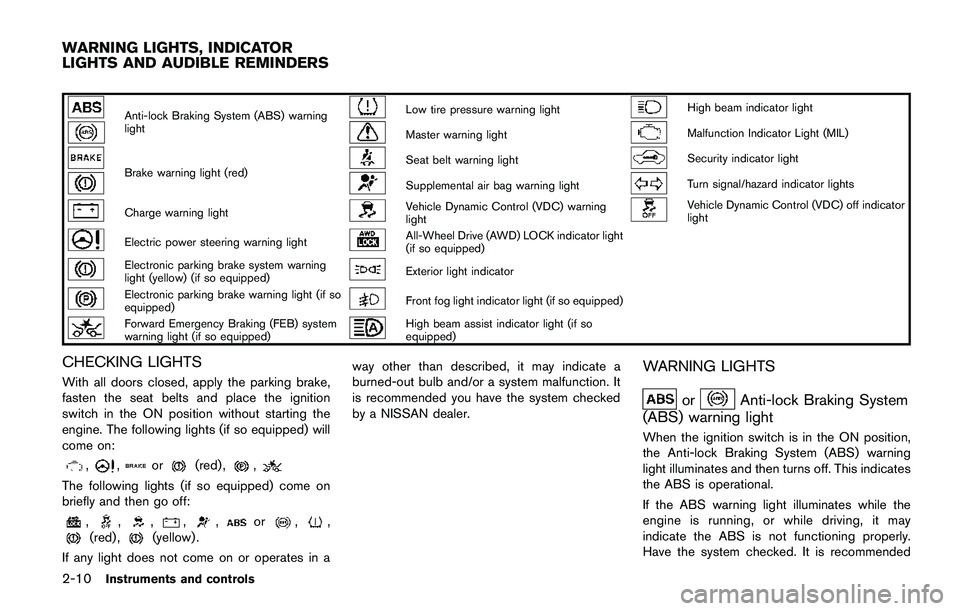
Anti-lock Braking System (ABS) warning
lightLow tire pressure warning lightHigh beam indicator light
Master warning lightMalfunction Indicator Light (MIL)
Brake warning light (red)Seat belt warning lightSecurity indicator light
Supplemental air bag warning lightTurn signal/hazard indicator lights
Charge warning lightVehicle Dynamic Control (VDC) warning
lightVehicle Dynamic Control (VDC) off indicator
light
Electric power steering warning lightAll-Wheel Drive (AWD) LOCK indicator light
(if so equipped)
Electronic parking brake system warning
light (yellow) (if so equipped)Exterior light indicator
Electronic parking brake warning light (if so
equipped)Front fog light indicator light (if so equipped)
Forward Emergency Braking (FEB) system
warning light (if so equipped)High beam assist indicator light (if so
equipped)
CHECKING LIGHTS
With all doors closed, apply the parking brake,
fasten the seat belts and place the ignition
switch in the ON position without starting the
engine. The following lights (if so equipped) will
come on:
,,or(red) ,,
The following lights (if so equipped) come on
briefly and then go off:
,,,,,or,,(red) ,(yellow) .
If any light does not come on or operates in away other than described, it may indicate a
burned-out bulb and/or a system malfunction. It
is recommended you have the system checked
by a NISSAN dealer.
WARNING LIGHTS
orAnti-lock Braking System
(ABS) warning light
When the ignition switch is in the ON position,
the Anti-lock Braking System (ABS) warning
light illuminates and then turns off. This indicates
the ABS is operational.
If the ABS warning light illuminates while the
engine is running, or while driving, it may
indicate the ABS is not functioning properly.
Have the system checked. It is recommended
WARNING LIGHTS, INDICATOR
LIGHTS AND AUDIBLE REMINDERS
Page 90 of 508
you visit a NISSAN dealer for this service.
If an ABS malfunction occurs, the anti-lock
function is turned off. The brake system then
operates normally, but without anti-lock assis-
tance. (See “Brake system” (P.5-102) .)
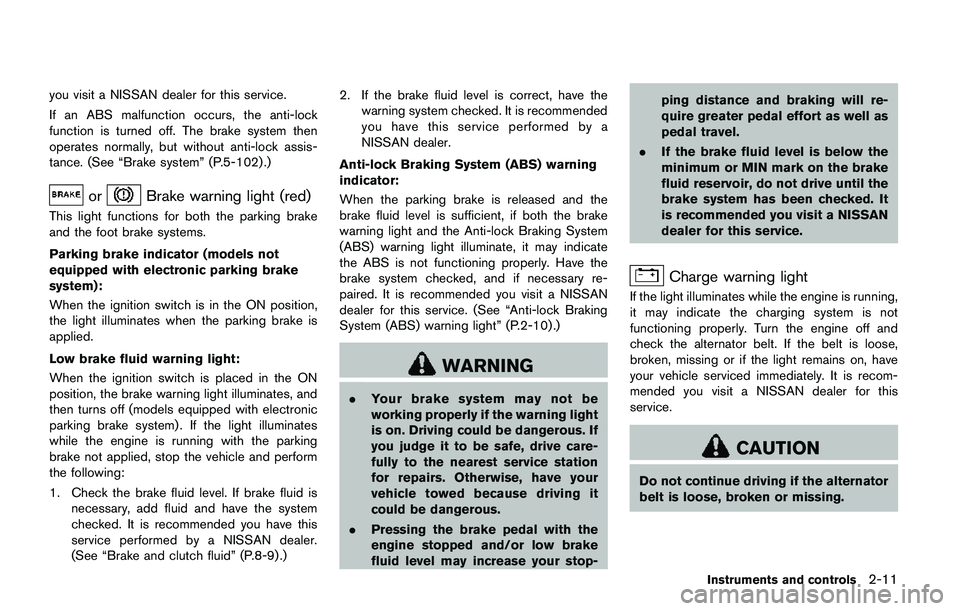
orBrake warning light (red)
This light functions for both the parking brake
and the foot brake systems.
Parking brake indicator (models not
equipped with electronic parking brake
system):
When the ignition switch is in the ON position,
the light illuminates when the parking brake is
applied.
Low brake fluid warning light:
When the ignition switch is placed in the ON
position, the brake warning light illuminates, and
then turns off (models equipped with electronic
parking brake system) . If the light illuminates
while the engine is running with the parking
brake not applied, stop the vehicle and perform
the following:
1. Check the brake fluid level. If brake fluid is
necessary, add fluid and have the system
checked. It is recommended you have this
service performed by a NISSAN dealer.
(See “Brake and clutch fluid” (P.8-9) .)2. If the brake fluid level is correct, have the
warning system checked. It is recommended
you have this service performed by a
NISSAN dealer.
Anti-lock Braking System (ABS) warning
indicator:
When the parking brake is released and the
brake fluid level is sufficient, if both the brake
warning light and the Anti-lock Braking System
(ABS) warning light illuminate, it may indicate
the ABS is not functioning properly. Have the
brake system checked, and if necessary re-
paired. It is recommended you visit a NISSAN
dealer for this service. (See “Anti-lock Braking
System (ABS) warning light” (P.2-10) .)
WARNING
.Your brake system may not be
working properly if the warning light
is on. Driving could be dangerous. If
you judge it to be safe, drive care-
fully to the nearest service station
for repairs. Otherwise, have your
vehicle towed because driving it
could be dangerous.
.Pressing the brake pedal with the
engine stopped and/or low brake
fluid level may increase your stop-ping distance and braking will re-
quire greater pedal effort as well as
pedal travel.
.If the brake fluid level is below the
minimum or MIN mark on the brake
fluid reservoir, do not drive until the
brake system has been checked. It
is recommended you visit a NISSAN
dealer for this service.
Charge warning light
If the light illuminates while the engine is running,
it may indicate the charging system is not
functioning properly. Turn the engine off and
check the alternator belt. If the belt is loose,
broken, missing or if the light remains on, have
your vehicle serviced immediately. It is recom-
mended you visit a NISSAN dealer for this
service.
CAUTION
Do not continue driving if the alternator
belt is loose, broken or missing.
Instruments and controls2-11
Page 287 of 508
System temporarily unavailable ..................................... 5-40
System malfunction .......................................................... 5-41
System maintenance ....................................................... 5-41
Blind Spot Warning (BSW) (if so equipped) ................. 5-42
BSW system operation .................................................. 5-43
How to enable/disable the BSW system .................. 5-44
BSW system limitations ................................................. 5-45
BSW driving situations ................................................... 5-46
System temporarily unavailable ..................................... 5-49
System malfunction .......................................................... 5-49
System maintenance ....................................................... 5-50
Rear Cross Traffic Alert (RCTA) (if so equipped) ......... 5-51
RCTA system operation .................................................. 5-51
How to enable/disable the RCTA system ................. 5-53
RCTA system limitations ................................................. 5-54
System temporarily unavailable ..................................... 5-56
System malfunction .......................................................... 5-56
System maintenance ....................................................... 5-57
Cruise control (if so equipped) .......................................... 5-58
Precautions on cruise control ....................................... 5-58
Cruise control operations ............................................... 5-58
Intelligent Cruise Control (ICC) (if so equipped) .......... 5-60
How to select the cruise control mode ...................... 5-62
Vehicle-to-vehicle distance control mode .................. 5-62
Conventional (fixed speed) cruise control mode ..... 5-76
Forward Emergency Braking (FEB) (if so equipped) ..... 5-80
FEB system operation ..................................................... 5-81
Turning the FEB system ON/OFF ................................ 5-82
FEB system limitations .................................................... 5-83System temporarily unavailable .................................. 5-84
System malfunction ....................................................... 5-85
System maintenance ..................................................... 5-85
Forward Emergency Braking (FEB) with pedestrian
detection system ................................................................... 5-86
FEB with pedestrian detection
system operation ............................................................ 5-87
Turning the FEB with pedestrian detection
system ON/OFF ............................................................. 5-89
FEB with pedestrian detection
system limitations ........................................................... 5-89
System temporarily unavailable .................................. 5-92
System malfunction ....................................................... 5-93
System maintenance ..................................................... 5-94
Break-in schedule ................................................................. 5-95
Fuel Efficient Driving Tips ................................................... 5-95
Increasing fuel economy ...................................................... 5-96
All-Wheel Drive (AWD) (if so equipped) ........................ 5-96
AWD LOCK switch operations .................................. 5-98
Parking/parking on hills ..................................................... 5-100
Electric power steering ..................................................... 5-101
Brake system ....................................................................... 5-102
Braking precautions ................................................... 5-102
Brake assist ......................................................................... 5-102
Brake assist .................................................................. 5-102
Anti-lock Braking System (ABS) ............................ 5-102
Vehicle Dynamic Control (VDC) system ...................... 5-104
Chassis control ................................................................... 5-106
Active Trace Control .................................................. 5-106
Page 325 of 508
5-40Starting and driving
detection range.
— When rain, snow or dirt adheres
to the windshield in front of the
lane camera unit.
— When the headlights are not
bright due to dirt on the lens or
if the aiming is not adjusted
properly.
— When strong light enters the
lane camera unit. (For example,
the light directly shines on the
front of the vehicle at sunrise or
sunset.)
— When a sudden change in
brightness occurs. (For example,
when the vehicle enters or exits
a tunnel or under a bridge.)
.Excessive noise will interfere with
the warning chime sound, and the
chime may not be heard.
While the LDP system is operating, you
may hear a sound of brake operation.
This is normal and indicates that the
LDP system is operating properly.SYSTEM TEMPORARILY UNAVAIL-
ABLE
Condition A:
The warning and assist functions of the LDP
system are not designed to work under the
following conditions:
.When you operate the lane change signal
and change the traveling lanes in the
direction of the signal. (The LDP system will
be deactivated for approximately 2 seconds
after the lane change signal is turned off.)
.When the vehicle speed lowers to less than
approximately 37 MPH (60 km/h) .
Action to take:
After the above conditions have finished and the
necessary operating conditions are satisfied, the
warning and assist functions will resume.
Condition B:
The assist function of the LDP system is not
designed to work under the following conditions
(warning is still functional):
.When the brake pedal is depressed.
.When the steering wheel is turned as far as
necessary for the vehicle to change lanes.
.When the vehicle is accelerated during the
LDP system operation..When the Intelligent Cruise Control (ICC)
approach warning occurs (if so equipped) .
.When the hazard warning flashers are
operated.
.When driving on a curve at high speed.
Action to take:
After the above conditions have finished and the
necessary operating conditions are satisfied, the
LDP system application of the brakes will
resume.
Condition C:
If the following messages appear in the vehicle
information display, a chime will sound and the
LDP system will be turned off automatically.
.“Not available: Poor Road Conditions”:
When the VDC system (except Traction
Control System (TCS) function) or ABS
operates.
.“Currently unavailable”:
When the VDC system is turned off.
Action to take:
When the above conditions no longer exist, turn
off the LDP system. Push the LDP switch again
to turn the LDP system back on.
Page 351 of 508
5-66Starting and driving
JVS1071X
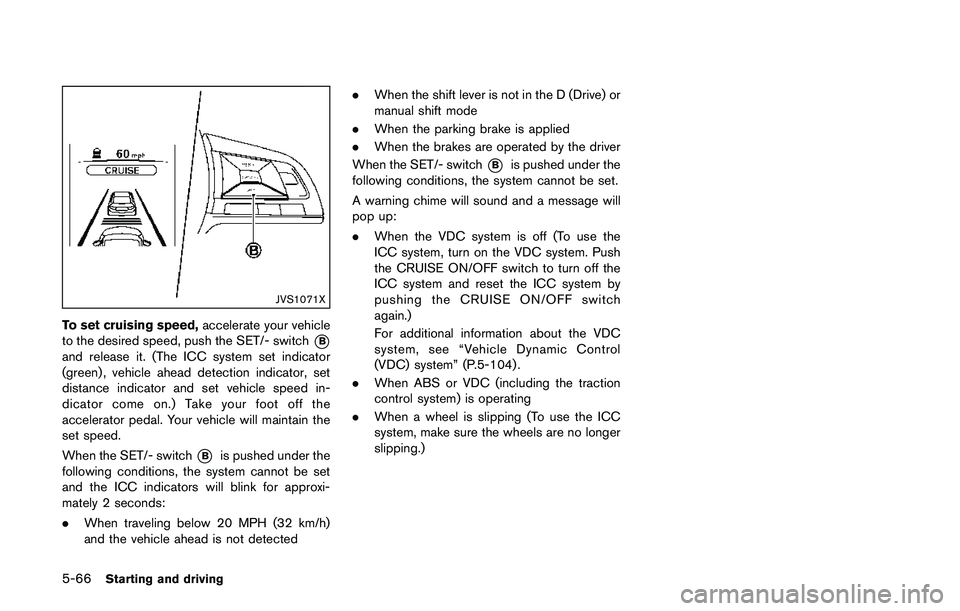
To set cruising speed,accelerate your vehicle
to the desired speed, push the SET/- switch
*B
and release it. (The ICC system set indicator
(green) , vehicle ahead detection indicator, set
distance indicator and set vehicle speed in-
dicator come on.) Take your foot off the
accelerator pedal. Your vehicle will maintain the
set speed.
When the SET/- switch
*Bis pushed under the
following conditions, the system cannot be set
and the ICC indicators will blink for approxi-
mately 2 seconds:
.When traveling below 20 MPH (32 km/h)
and the vehicle ahead is not detected.When the shift lever is not in the D (Drive) or
manual shift mode
.When the parking brake is applied
.When the brakes are operated by the driver
When the SET/- switch
*Bis pushed under the
following conditions, the system cannot be set.
A warning chime will sound and a message will
pop up:
.When the VDC system is off (To use the
ICC system, turn on the VDC system. Push
the CRUISE ON/OFF switch to turn off the
ICC system and reset the ICC system by
pushing the CRUISE ON/OFF switch
again.)
For additional information about the VDC
system, see “Vehicle Dynamic Control
(VDC) system” (P.5-104) .
.When ABS or VDC (including the traction
control system) is operating
.When a wheel is slipping (To use the ICC
system, make sure the wheels are no longer
slipping.)
Page 355 of 508
5-70Starting and driving
.The chime sounds.
.The vehicle ahead detection indicator blinks.
The warning chime may not sound in some
cases when there is a short distance between
vehicles. Some examples are:
.When the vehicles are traveling at the same
speed and the distance between vehicles is
not changing
.When the vehicle ahead is traveling faster
and the distance between vehicles is
increasing
.When a vehicle cuts in near your vehicle
The warning chime will not sound when:
.Your vehicle approaches other vehicles that
are parked or moving slowly.
.The accelerator pedal is depressed, over-
riding the system.
NOTE:
The approach warning chime may sound
and the system display may blink when the
radar sensor detects objects on the side of
the vehicle or on the side of the road. This
may cause the ICC system to decelerate or
accelerate the vehicle. The radar sensor
may detect these objects when the vehicle
is driven on winding roads, narrow roads,
hilly roads or when entering or exiting a
curve. In these cases you will have tomanually control the proper distance
ahead of your vehicle.
Also, the sensor sensitivity can be affected by
vehicle operation (steering maneuver or driving
position in the lane) or traffic or vehicle condition
(for example, if a vehicle is being driven with
some damage) .
Automatic cancellation
A chime sounds under the following conditions
and the control is automatically canceled.
.When the vehicle ahead is not detected and
your vehicle is traveling below the speed of
15 MPH (24 km/h)
.When the system judges the vehicle is at
standstill
.When the shift lever is not in the D (Drive)
position or manual shift mode
.When the parking brake is applied
.When the VDC system is turned off
.When VDC (including the traction control
system) operates
.When distance measurement becomes im-
paired due to adhesion of dirt or obstruction
to the sensor
.When a wheel slips
.When the radar signal is temporarily inter-
rupted
Vehicle-to-vehicle distance control mode
limitations
WARNING
Listed below are the system limitations
for the ICC system. Failure to operate
the vehicle in accordance with these
system limitations could result in ser-
ious injury or death.
.The system is primarily intended for
use on straight, dry, open roads with
light traffic. It is not advisable to use
the system in city traffic or con-
gested areas.
.This system will not adapt automa-
tically to road conditions. This sys-
tem should be used in evenly
flowing traffic. Do not use the
system on roads with sharp curves,
or on icy roads, in heavy rain or in
fog.
.As there is a performance limit to
the distance control function, never
rely solely on the ICC system. This
system does not correct careless,
inattentive or absent-minded driv-
ing, or overcome poor visibility in
Page 358 of 508
SSD0253
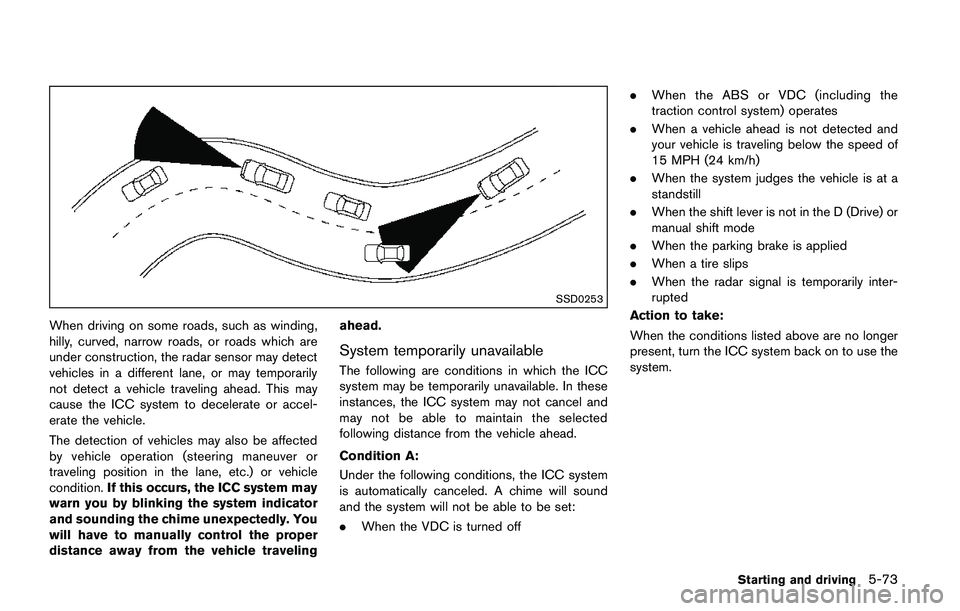
When driving on some roads, such as winding,
hilly, curved, narrow roads, or roads which are
under construction, the radar sensor may detect
vehicles in a different lane, or may temporarily
not detect a vehicle traveling ahead. This may
cause the ICC system to decelerate or accel-
erate the vehicle.
The detection of vehicles may also be affected
by vehicle operation (steering maneuver or
traveling position in the lane, etc.) or vehicle
condition.If this occurs, the ICC system may
warn you by blinking the system indicator
and sounding the chime unexpectedly. You
will have to manually control the proper
distance away from the vehicle travelingahead.
System temporarily unavailable
The following are conditions in which the ICC
system may be temporarily unavailable. In these
instances, the ICC system may not cancel and
may not be able to maintain the selected
following distance from the vehicle ahead.
Condition A:
Under the following conditions, the ICC system
is automatically canceled. A chime will sound
and the system will not be able to be set:
.When the VDC is turned off.When the ABS or VDC (including the
traction control system) operates
.When a vehicle ahead is not detected and
your vehicle is traveling below the speed of
15 MPH (24 km/h)
.When the system judges the vehicle is at a
standstill
.When the shift lever is not in the D (Drive) or
manual shift mode
.When the parking brake is applied
.When a tire slips
.When the radar signal is temporarily inter-
rupted
Action to take:
When the conditions listed above are no longer
present, turn the ICC system back on to use the
system.
Starting and driving5-73
Page 387 of 508
5-102Starting and driving
BRAKING PRECAUTIONS
The brake system has two separate hydraulic
circuits. If one circuit malfunctions, you will still
have braking at two wheels.
Vacuum assisted brakes
The brake booster aids braking by using engine
vacuum. If the engine stops, you can stop the
vehicle by depressing the brake pedal. However,
greater foot pressure on the brake pedal will be
required to stop the vehicle and the stopping
distance will be longer.
Using the brakes
Avoid resting your foot on the brake pedal while
driving. This will cause overheating of the
brakes, wearing out the brake pads faster and
reduce gas mileage.
To help reduce brake wear and to prevent the
brakes from overheating, reduce speed and
downshift to a lower gear before going down a
slope or long grade. Overheated brakes may
reduce braking performance and could result in
loss of vehicle control.
WARNING
.While driving on a slippery surface,
be careful when braking, accelerat-ing or downshifting. Abrupt braking
or accelerating could cause the
wheels to skid and result in an
accident.
.If the engine is not running or is
turned off while driving, the power
assist for the brakes will not work.
Braking will be harder.
Wet brakes
When the vehicle is washed or driven through
water, the brakes may get wet. As a result, your
braking distance will be longer and the vehicle
may pull to one side during braking.
To dry brakes, drive the vehicle at a safe speed
while lightly tapping the brake pedal to heat-up
the brakes. Do this until the brakes return to
normal. Avoid driving the vehicle at high speeds
until the brakes function correctly.
Parking brake break-in
Break in the parking brake shoes whenever the
stopping effect of the parking brake is weakened
or whenever the parking brake shoes and/or
drums/rotors are replaced, in order to assure the
best braking performance.
This procedure is described in the vehicle
service manual. It is recommended you visit a
NISSAN dealer for this service.
BRAKE ASSIST
When the force applied to the brake pedal
exceeds a certain level, the Brake Assist is
activated generating greater braking force than a
conventional brake booster even with light pedal
force.
WARNING
The Brake Assist is only an aid to assist
braking operation and is not a collision
warning or avoidance device. It is the
driver’s responsibility to stay alert, drive
safely and be in control of the vehicle at
all times.
ANTI-LOCK BRAKING SYSTEM (ABS)
WARNING
.The Anti-lock Braking System (ABS)
is a sophisticated device, but it
cannot prevent accidents resulting
from careless or dangerous driving
techniques. It can help maintain
vehicle control during braking on
slippery surfaces. Remember that
stopping distances on slippery sur-
faces will be longer than on normal
BRAKE SYSTEM BRAKE ASSIST
Page 388 of 508
surfaces even with ABS. Stopping
distances may also be longer on
rough, gravel or snow covered
roads, or if you are using tire chains.
Always maintain a safe distance
from the vehicle in front of you.
Ultimately, the driver is responsible
for safety.
.Tire type and condition may also
affect braking effectiveness.
— When replacing tires, install the
specified size of tires on all four
wheels.
— When installing a spare tire,
make sure that it is the proper
size and type as specified on the
Tire and Loading Information
label. See“Tire and Loading
Information label”(P.10-10) of
this manual.
— For detailed information, see
“Wheels and tires”(P.8-29) of
this manual.
The Anti-lock Braking System (ABS) controls
the brakes so the wheels do not lock during hard
braking or when braking on slippery surfaces.
The system detects the rotation speed at eachwheel and varies the brake fluid pressure to
prevent each wheel from locking and sliding. By
preventing each wheel from locking, the system
helps the driver maintain steering control and
helps to minimize swerving and spinning on
slippery surfaces.
Using the system
Depress the brake pedal and hold it down.
Depress the brake pedal with firm steady
pressure, but do not pump the brakes. The
ABS will operate to prevent the wheels from
locking up. Steer the vehicle to avoid obstacles.
WARNING
Do not pump the brake pedal. Doing so
may result in increased stopping dis-
tances.
Self-test feature
The ABS includes electronic sensors, electric
pumps, hydraulic solenoids and a computer. The
computer has a built-in diagnostic feature that
tests the system each time you start the engine
and move the vehicle at a low speed in forward
or reverse. When the self-test occurs, you may
hear a “clunk” noise and/or feel a pulsation in the
brake pedal. This is normal and does notindicate a malfunction. If the computer senses
a malfunction, it switches the ABS off and
illuminates the ABS warning light on the
instrument panel. The brake system then oper-
ates normally, but without anti-lock assistance.
If the ABS warning light illuminates during the
self-test or while driving, have the vehicle
checked. It is recommended you visit a NISSAN
dealer for this service.
Normal operation
The ABS operates at speeds above 3 to 6 MPH
(5 to 10 km/h) . The speed varies according to
road conditions.
When the ABS senses that one or more wheels
are close to locking up, the actuator rapidly
applies and releases hydraulic pressure. This
action is similar to pumping the brakes very
quickly. You may feel a pulsation in the brake
pedal and hear a noise from under the hood or
feel a vibration from the actuator when it is
operating. This is normal and indicates that the
ABS is operating properly. However, the pulsa-
tion may indicate that road conditions are
hazardous and extra care is required while
driving.
Starting and driving5-103