buttons NISSAN QASHQAI 2018 Owner´s Manual
[x] Cancel search | Manufacturer: NISSAN, Model Year: 2018, Model line: QASHQAI, Model: NISSAN QASHQAI 2018Pages: 512, PDF Size: 3.19 MB
Page 165 of 512

3-20Pre-driving checks and adjustments
Using panic alarm
If you are near your vehicle and feel
threatened, you may activate the alarm
to call attention as follows:
1. Push the PANIC
buttonon the
Intelligent Key for more than 0.5
seconds.
2. The theft warning alarm and head- lights will stay on for 25 seconds.
3. The panic alarm stops when:
.It has run for 25 seconds, or.Any of the buttons on the Intelligent Key is pushed. (Note: the PANIC
button must be pushed for more
than 0.5 seconds.)
Remote engine start (if so
equipped)
The remote engine startbuttonis
on the Intelligent Key if the vehicle has
remote engine start function. This func-
tion allows the engine to start from
outside the vehicle. See “Remote engine
start” (P.3-22).
Setting hazard indicator and horn
mode
This vehicle is set in hazard indicator and
horn mode when you first receive the
vehicle.
In hazard indicator and horn mode, when
the LOCK
buttonis pushed, the
hazard indicator flashes twice and the
horn chirps once. When the UNLOCK
buttonis pushed, the hazard indicator
flashes once.
If horns are not necessary, the system
can be switched to the hazard indicator
mode.
In hazard indicator mode, when the LOCK
button is pushed, the hazard indica-
tor flashes twice. When the UNLOCK
button is pushed, neither the hazard
indicator nor the horn operates.
Page 166 of 512

Hazard indicator and horn mode:
OperationDOOR LOCKDOOR UNLOCK
Pushing door handle request switch or liftgate request switch HAZARD -
twice
OUTSIDE CHIME - twiceHAZARD -
once
OUTSIDE CHIME - once
Pushing
orbutton HAZARD -
twice
HORN - once HAZARD -
once
HORN - none
Hazard indicator mode:
Operation DOOR LOCKDOOR UNLOCK
Pushing door handle request switch or liftgate request switch HAZARD -
twice
OUTSIDE CHIME - none HAZARD - none
OUTSIDE CHIME - none
Pushing
orbutton HAZARD -
twice
HORN - none HAZARD - none
HORN - none
Switching procedure:
To switch the hazard indicator and horn
(chime) operation, push the LOCK
and UNLOCKbuttons on the Intel-
ligent Key simultaneously for more than 2
seconds.
. When the hazard indicator mode is
set, the hazard indicator flashes 3
times.
. When the hazard indicator and horn
mode is set, the hazard indicator
flashes once and the horn chirps once.
The horn operation can also be turned on
or off in the vehicle information display.
See “Vehicle Settings” (P.2-22).
Pre-driving checks and adjustments3-21
Page 180 of 512

4 Heater, air conditioner, audio and phonesystems
Safety note ........................................................................\
................ 4-3
Control buttons and functions (models with
navigation system) ...................................................................... 4-3
How to use touch screen ................................................ 4-4
How to use the BACK button ...................................... 4-5
How to use the APPS·i button ..................................... 4-5
How to use brightness control button ................ 4-8
How to use the POWER/VOLUME dial ................... 4-8
How to use the ENTER
AUDIO/TUNE·SCROLL dial ................................................ 4-8
RearView Monitor (if so equipped) ................................. 4-8 RearView Monitor system operation ..................... 4-9
How to read the displayed lines ................................ 4-9
Difference between predictive and
actual distances ................................................................... 4-10
Adjusting the screen ........................................................ 4-12
RearView Monitor system limitations ................. 4-12
System maintenance ....................................................... 4-13
Intelligent Around View® Monitor (if
so equipped) ........................................................................\
.......... 4-14 Intelligent Around View® Monitor
system operation ................................................................ 4-15
Difference between predictive and
actual distances ................................................................... 4-18
How to park with predictive course lines ....... 4-20
How to switch the display ........................................... 4-21 Adjusting the screen ...................................................... 4-21
Intelligent Around View® Monitor
system limitations ............................................................ 4-22
System maintenance .................................................... 4-24
Moving Object Detection (MOD) (if
so equipped) ........................................................................\
......... 4-25
MOD system operation ................................................ 4-25
Turning MOD on and off ............................................ 4-27
MOD system limitations .............................................. 4-27
System maintenance .................................................... 4-28
Ventilators ........................................................................\
.............. 4-29 Center ventilators ............................................................ 4-29
Side ventilators .................................................................. 4-29
Rear ventilators (if so equipped) .......................... 4-29
Heater and air conditioner ................................................ 4-30 Manual air conditioner and heater .................... 4-31
Automatic air conditioner and heater ............ 4-35
Operating tips (for automatic
air conditioner) ................................................................... 4-37
Servicing air conditioner ............................................. 4-37
Audio system ........................................................................\
....... 4-38 Audio operation precautions .................................. 4-38
FM-AM radio with Compact Disc
(CD) player ........................................................................\
...... 4-48
FM-AM-SAT radio with Compact Disc (CD)
player (Type A) (if so equipped) ............................ 4-55
Page 181 of 512

FM-AM-SAT radio with Compact Disc (CD)
player (Type B) (if so equipped) ............................... 4-63
USB (Universal Serial Bus)
connection port ................................................................... 4-74
AUX (Auxiliary) input jack .............................................. 4-75
Steering wheel switch for audio control ......... 4-75
Antenna ........................................................................\
.............. 4-77
CD/USB memory care and cleaning ................... 4-77
NissanConnect
SMMobile Apps smartphone
integration (if so equipped) ............................................... 4-78
Registering with NissanConnect
SM
Mobile Apps ........................................................................\
..... 4-78
Connect phone ..................................................................... 4-78
Application download ..................................................... 4-78
NissanConnect
SMServices (if so equipped) .......... 4-79
Siri® Eyes Free ........................................................................\
...... 4-79 General Information .......................................................... 4-79
Requirements ........................................................................\
. 4-79
Siri® Eyes Free Activation ............................................. 4-80
Operating Siri® Eyes Free ............................................. 4-80
Changing Siri® Eyes Free Settings
(models with navigation system) ........................... 4-80
Changing Siri® Eyes Free Settings
(models without navigation system) .................. 4-81
Troubleshooting guide ................................................... 4-82
Car phone or CB radio .......................................................... 4-83 Bluetooth® Hands-Free Phone System
(models without navigation system) ........................ 4-83
Regulatory information ............................................... 4-84
Using the system .............................................................. 4-85
Bluetooth® Hands-Free Phone System
(models with navigation system) ................................. 4-93 Regulatory information ............................................... 4-94
Control buttons and microphone ....................... 4-95
Voice command ................................................................ 4-95
Connecting procedure ................................................. 4-96
Vehicle phonebook ......................................................... 4-96
Making a call ........................................................................\
4-97
Receiving a call ................................................................... 4-97
During a call ........................................................................\
.. 4-97
Ending a call ........................................................................\
. 4-97
Text messaging (if so equipped) .......................... 4-97
Phone and Bluetooth® settings ............................ 4-99
NISSAN Voice Recognition system
(models with navigation system) ............................. 4-100 Using the system .......................................................... 4-101
System features ............................................................ 4-102
Phone voice commands ......................................... 4-103
Navigation system voice commands ........... 4-103
Audio system voice commands ....................... 4-104
Information voice commands ............................ 4-104
My APPS voice commands ................................... 4-104
Help voice commands .............................................. 4-104
Troubleshooting guide ............................................ 4-104
Page 182 of 512
WARNING
.Do not disassemble or modify
this system. If you do, it may
result in accidents, fire, or electric
shock.
. Do not use this system if you
notice any abnormality, such as
a frozen screen or lack of sound.
Continued use of the system may
result in accident, fire or electric
shock.
. In case you notice any foreign
object in the system hardware,
spill liquid on it, or notice smoke
or smell coming from it, stop
using the system immediately. It
is recommended you visit a
NISSAN dealer for servicing.
Ignoring such conditions may
lead to accidents, fire, or electric
shock.
Do not attempt to operate the system in
extreme temperature conditions [below
−4°F (−20°C) and above 158°F (70°C)].
Operating this system under these con-
ditions may result in system malfunc-
tions.
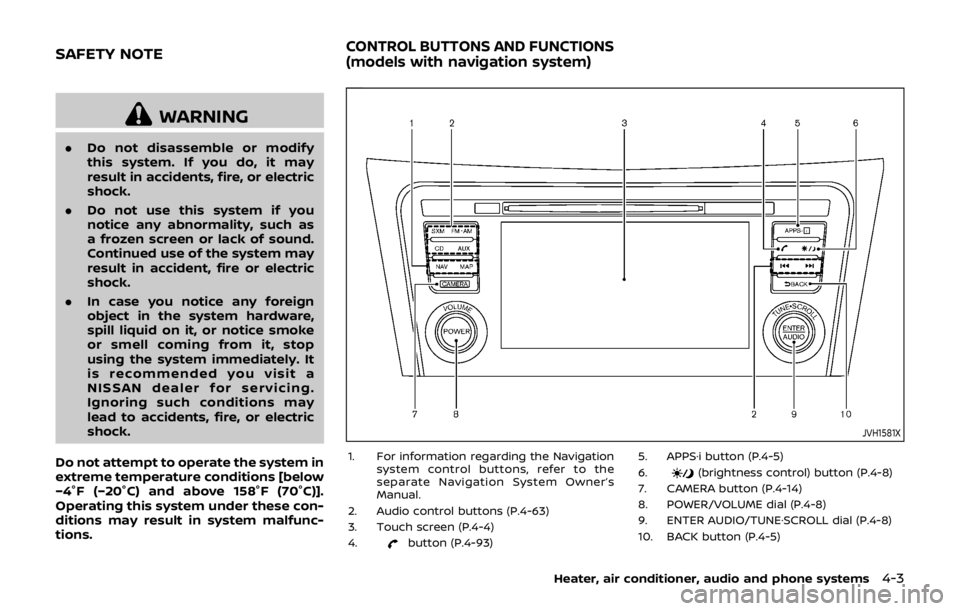
JVH1581X
1. For information regarding the Navigation system control buttons, refer to the
separate Navigation System Owner’s
Manual.
2. Audio control buttons (P.4-63)
3. Touch screen (P.4-4)
4.
button (P.4-93) 5. APPS·i button (P.4-5)
6.
(brightness control) button (P.4-8)
7. CAMERA button (P.4-14)
8. POWER/VOLUME dial (P.4-8)
9. ENTER AUDIO/TUNE·SCROLL dial (P.4-8)
10. BACK button (P.4-5)
Heater, air conditioner, audio and phone systems4-3
SAFETY NOTECONTROL BUTTONS AND FUNCTIONS
(models with navigation system)
Page 210 of 512

JVH0664X
1. A/C button/Fan speed controldial
2. Air flow control buttons
3. MAX A/C button/Temperature control dial
4. Front defroster
button
5. Rear defrosterbutton (See “Rear
window and outside mirror defroster
switch” (P.2-42).)
6. Air recirculation
button
MANUAL AIR CONDITIONER AND
HEATER
Controls
Turning system on/off:
To turn on the system, turn the fan speed
control
dial out of the OFF position.
Turn the dial counterclockwise to the OFF
position to turn off the system.
Fan speed control:
Turn the fan speed control
dial
clockwise to increase the fan speed.
Turn the fan speed control
dial
counterclockwise to decrease the fan
speed. Temperature control:
Turn the temperature control dial to set
the desired temperature. Turn the dial
between the middle and the right posi-
tion to select the hot temperature. Turn
the dial between the middle and the left
position to select the cool temperature.
Air flow control:
Push one of the air flow control buttons
to select the air flow outlets.
— Air flows mainly from center and side
ventilators.
— Air flows mainly from center and sideventilators and foot outlets.
— Air flows mainly from the foot outletand partly from the defroster.
— Air flows mainly from the defrosterand foot outlets.
Air intake control:
The air intake control mode will change
each time the air recirculation
button
is pushed.
. When the indicator light is turned on,
the air recirculates inside the vehicle.
. When the indicator light is turned off,
the air flow is drawn from outside the
vehicle.
Heater, air conditioner, audio and phone systems4-31
Page 215 of 512

4-36Heater, air conditioner, audio and phone systems
maximum levels.
. After the windshield is cleared, push
the AUTO button (the AUTO indicator
light will turn on).
. When the front defroster
button is
pushed, the air conditioner will turn on
when the outside air temperature is
above approximately 36°F (2°C) to
defog the windshield. The air recircu-
lation mode will automatically turn off.
The outside air circulation mode will
be selected to improve the defogging
performance.
Do not set the temperature too low when
the front defroster mode is on (the
indicator light is illuminated), because
doing so may fog up the windshield.
Manual operation
The manual mode can be used to control
the heater and air conditioner to your
desired settings.
Fan speed control:
Push the fan speed control button (
side orside) to manually control the
fan speed.
Push the AUTO button to change the fan
speed to the automatic mode.
Air flow control:
Push the MODE button to select the
desired mode:
— Air flows mainly from the center and
side ventilators.
— Air flows mainly from the center andside ventilators and foot outlets.
— Air flows mainly from the foot outletand partly from the defroster.
— Air flows mainly from the frontdefroster outlets and foot outlets.
Temperature control:
Turn the temperature control dial to set
the desired temperature.
.When the DUAL indicator light is not
illuminated, pushing the DUAL button
(the indicator light will turn on) allows
the user to independently change the
driver and passenger side tempera-
tures with the corresponding tem-
perature control dial.
Also turning the passenger’s side
temperature control dial changes only
the front passenger’s side tempera-
ture. (The DUAL indicator light will
illuminate and DUAL will appear on
the display.)
. To cancel the separate temperature
setting, push the DUAL button (the
indicator light will turn off) and the
driver’s side temperature setting will
be applied to both the driver and
passenger sides. Air intake control:
. Push the air recirculation
button
to recirculate interior air inside the
vehicle. The indicator light on the
button will come on.
The air recirculation cannot be acti-
vated when the air conditioner is in
the front defrosting mode.
. Push the outside air circulation
button to draw outside air into the
passenger compartment. The indica-
tor light on the button will come on.
. To control the air intake automatically,
push and hold either the air recircula-
tion
button or the outside air
circulationbutton (whichever but-
ton with the indicator light illumi-
nated). The indicator lights (both air
recirculation
and outside air cir-
culationbuttons) will flash twice,
and then the air intake will switch to
automatic control. When the auto-
matic control is set, the system auto-
matically alternates between the
outside air circulation and the air
recirculation modes. (The indicator
light of the active mode will turn on.)
NOTE:
Even if the system is manually set to the
air recirculation mode, when both out-
side temperature and coolant tempera-
ture are low, the system may
Page 216 of 512

automatically switch to the outside air
circulation mode.
To turn the system off:
To turn off the heater and air conditioner,
push the ON·OFF button.
Push the ON·OFF button again, the sys-
tem will turn on in the mode which was
used immediately before the system was
turned off.
Remote engine start logic (if so
equipped)
When the remote engine start function is
activated, the vehicles equipped with the
automatic air conditioner and heater may
go into automatic heating or cooling
mode depending on the outside and
cabin temperatures. During this period,
the display and the buttons will be
inoperable until the ignition switch is
placed in the ON position. When the
temperature is low, the rear defroster
and the heated steering wheel (if so
equipped) may also be activated auto-
matically with the activation of the re-
mote engine start function. (See “Remote
engine start” (P.3-22).)
JVH0727X
JVH0728X
OPERATING TIPS (for automatic air
conditioner)
When the engine coolant temperature
and outside air temperature are low, the
air flow from the foot outlets may not
operate for a maximum of 150 seconds.
However, this is not a malfunction. After
the coolant temperature warms up, air
flow from the foot outlets will operate
normally.
The sensors
and, located on the
instrument panel, help maintain a con-
stant temperature. Do not put anything
on or around the sensors.
SERVICING AIR CONDITIONER
WARNING
The air conditioner system contains
refrigerant under high pressure. To
avoid personal injury, any air condi-
tioner service should be done only by
an experienced technician with the
proper equipment.
The air conditioner system in your vehicle
is charged with a refrigerant designed
with the environment in mind.
This refrigerant will not harm the
earth’s ozone layer. However, it may
Heater, air conditioner, audio and phone systems4-37
Page 227 of 512

4-48Heater, air conditioner, audio and phone systems
JVH1658X
1. MEDIA button
2. FM·AM button
3.
(CD eject) button
4. CD button
5. DISP (display) button
6. Color display
7. iPod® MENU button 8.
(Backward seek) button
9. SCAN button
10.
(Forward seek) button
11. BACK button
12. Power/VOL (volume) dial
13. RPT (repeat) button
14. RDM (random) button 15. Radio station preset buttons
16. ENTER SETTING/TUNE·FOLDER dial
FM-AM RADIO WITH COMPACT DISC
(CD) PLAYER
For all operation precautions, see “Audio
operation precautions” (P.4-38).
Audio main operation
The audio system operates when the
ignition switch is placed in the ACC or
ON position.
Head unit:
The auto loudness circuit enhances the
low and high frequency ranges automa-
tically.
Power/VOL dial:
Push the Power/VOL dial to turn on and
off the audio system.
Turn the Power/VOL dial to adjust the
volume.
Audio settings:
The settings screen will appear when the
ENTER SETTING/TUNE·FOLDER dial is
pushed.
The following items are available in the
settings screen.
.
Bluetooth
It is possible to set the Bluetooth®
settings. For details of the Bluetooth®
Page 230 of 512

5. Other buttons can be set in the samemanner.
If the battery cable is disconnected, or if
the fuse opens, the station memory will
be erased. In that case, reset the desired
stations.
CD player operation
Place the ignition switch in the ACC or ON
position. Insert the Compact Disc (CD)
into the slot with the label side facing up.
The CD will be guided automatically into
the slot and start playing.
After loading the CD, the number of
tracks on the CD and the play time will
appear on the display.
If another audio source is already operat-
ing, it will automatically turn off and the
CD will play.
If the system has been turned off while
the CD was playing, pushing the Power/
VOL dial will start the CD.
PLAY:
When the CD button is pushed while a CD
is loaded, the CD will start playing.
CD/MP3 display mode:
While listening to an MP3/WMA CD, cer-
tain text may be displayed on the screen
if the CD has been encoded with text information. Depending on how the MP3/
WMA CD is encoded, information such as
Artist, Song and Folder will be displayed.
The track number and the total number
of tracks in the current folder or on the
current disc are displayed on the screen
as well.
SEEK/TRACK:
When the
orbutton is pushed
and hold while the CD is being played, the
CD will play while fast forwarding or
rewinding. When the button is released,
the CD will return to normal play speed.
When the
orbutton is pushed
while the CD is being played, the next
track or the beginning of the current
track on the CD will be played. Push the
button again to select the previous
track.
REPEAT (RPT):
When the
button is pushed while the
CD is played, the play pattern can be
changed as follows:
(CD)
(Normal) ⇔1 Track Repeat
(CD with compressed audio files)
(Normal) ?1 Folder Repeat ?1 Track
Repeat ?(Normal)
RANDOM (RDM):
When the
button is pushed while a CD
is being played, the play pattern can be
changed as follows:
(CD)
(Normal) ⇔1 Disc Random
(CD with compressed audio files)
(Normal) ?1 Disc Random ?1 Folder
Random ?(Normal)
CD eject:
When the
button is pushed with the
CD loaded, the CD will be ejected.
If the CD comes out and is not removed,
it will be pulled back into the slot to
protect it.
USB memory player operation
USB memory main operation:
The USB connection port is located on
the lower part of the instrument panel.
(See “USB (Universal Serial Bus) connec-
tion port” (P.4-74).) Connect a USB mem-
ory into the port. When the audio system
operates, the system will switch to the
USB memory mode automatically.
If the system has been turned off while
the USB memory was playing, pushing
the Power/VOL dial will start the USB
Heater, air conditioner, audio and phone systems4-51