fuel NISSAN QASHQAI 2018 Owner´s Manual
[x] Cancel search | Manufacturer: NISSAN, Model Year: 2018, Model line: QASHQAI, Model: NISSAN QASHQAI 2018Pages: 512, PDF Size: 3.19 MB
Page 174 of 512

JVP0503X
LOOSE FUEL CAP warning message
The LOOSE FUEL CAP warning messageis displayed on the vehicle information
display when the fuel-filler cap is not
tightened correctly after the vehicle has
been refueled. It may take a few driving
trips for the message to be displayed. To
turn off the warning message, do the
following procedure:
1. Remove and install the fuel-filler capas soon as possible. For additional
information, refer to “Fuel-filler cap”
(P.3-27).
2. Tighten the fuel-filler cap until it clicks. 3. Push the OK button
on the steering
wheel for about 1 second to turn off
the LOOSE FUEL CAP warning mes-
sage after tightening the fuel cap.
WARNING
Do not adjust the steering wheel
while driving. You could lose control
of your vehicle and cause an acci-
dent.
Pre-driving checks and adjustments3-29
TILT/TELESCOPIC STEERING
Page 191 of 512
4-12Heater, air conditioner, audio and phone systems
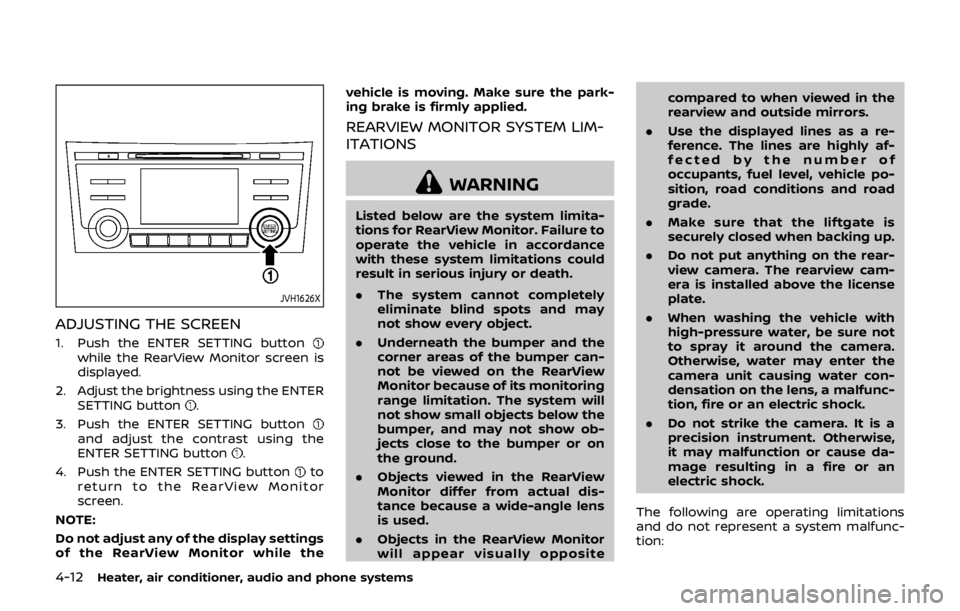
JVH1626X
ADJUSTING THE SCREEN
1. Push the ENTER SETTING buttonwhile the RearView Monitor screen is
displayed.
2. Adjust the brightness using the ENTER SETTING button
.
3. Push the ENTER SETTING button
and adjust the contrast using the
ENTER SETTING button.
4. Push the ENTER SETTING button
to
return to the RearView Monitor
screen.
NOTE:
Do not adjust any of the display settings
of the RearView Monitor while the vehicle is moving. Make sure the park-
ing brake is firmly applied.
REARVIEW MONITOR SYSTEM LIM-
ITATIONS
WARNING
Listed below are the system limita-
tions for RearView Monitor. Failure to
operate the vehicle in accordance
with these system limitations could
result in serious injury or death.
.
The system cannot completely
eliminate blind spots and may
not show every object.
. Underneath the bumper and the
corner areas of the bumper can-
not be viewed on the RearView
Monitor because of its monitoring
range limitation. The system will
not show small objects below the
bumper, and may not show ob-
jects close to the bumper or on
the ground.
. Objects viewed in the RearView
Monitor differ from actual dis-
tance because a wide-angle lens
is used.
. Objects in the RearView Monitor
will appear visually opposite compared to when viewed in the
rearview and outside mirrors.
. Use the displayed lines as a re-
ference. The lines are highly af-
fected by the number of
occupants, fuel level, vehicle po-
sition, road conditions and road
grade.
. Make sure that the liftgate is
securely closed when backing up.
. Do not put anything on the rear-
view camera. The rearview cam-
era is installed above the license
plate.
. When washing the vehicle with
high-pressure water, be sure not
to spray it around the camera.
Otherwise, water may enter the
camera unit causing water con-
densation on the lens, a malfunc-
tion, fire or an electric shock.
. Do not strike the camera. It is a
precision instrument. Otherwise,
it may malfunction or cause da-
mage resulting in a fire or an
electric shock.
The following are operating limitations
and do not represent a system malfunc-
tion:
Page 194 of 512

Available views:
.Front view
An approximately 150–degree view of
the front of the vehicle.
. Rear view
An approximately 150–degree view of
the rear of the vehicle.
. Bird’s-eye view
The surrounding views of the vehicle
from above.
. Front-side view
The view around and ahead of the
front passenger’s side wheel.
JVH1588X
To display the multiple views, the Intelli-
gent Around View® Monitor system uses
cameras
located in the front grille, on
the vehicle’s outside mirrors and one just
above the vehicle’s license plate.
INTELLIGENT AROUND VIEW®
MONITOR SYSTEM OPERATION
When the ignition switch is placed in the
ACC or ON position, push the CAMERA
button on the instrument panel or move
the shift lever to the R (Reverse) position
to operate the Intelligent Around View®
Monitor.
The screen displayed on the Intelligent
Around View® Monitor will automatically
return to the previous screen three min- utes after the CAMERA button has been
pushed with the shift lever in a position
other than the R (Reverse) position.
Available views
WARNING
.
The distance guide lines and the
vehicle width lines should be
used as a reference only when
the vehicle is on a paved, level
surface. The distance viewed on
the monitor is for reference only
and may be different than the
actual distance between the ve-
hicle and displayed objects.
. Use the displayed lines and the
bird’s-eye view as a reference.
The lines and the bird’s-eye view
are greatly affected by the num-
ber of occupants, fuel level, vehi-
cle position, road condition and
road grade.
. If the tires are replaced with
different sized tires, the predic-
tive course lines and the bird’s-
eye view may be displayed incor-
rectly.
. When driving the vehicle up a hill,
objects viewed in the monitor are
Heater, air conditioner, audio and phone systems4-15
Page 283 of 512

4-104Heater, air conditioner, audio and phone systems
.Previous Destinations
. Enter Address in Steps
. Cancel Route
For more information about these com-
mands, see the separate Navigation Sys-
tem Owner’s Manual.
AUDIO SYSTEM VOICE COMMANDS
To access the audio system voice com-
mands:
1. Push the
button.
2. Say “Audio”.
3. Speak a command from the following available commands:
. Play (AM, FM, etc.)
Allows user to select radio band
. Tune AM (number)
Allows user to tune directly to a
desired AM frequency
. Tune FM (number)
Allows user to tune directly to a
desired FM frequency
. SXM Channel (number)
Allows user to tune directly to a
desired SXM channel (if so equipped)
. CD Track (number)
Allows user to select track to be
played
. Play Song (name)
Allows user to select song name to be played
. Play Artist (name)
Allows user to select artist to be
played
. Play Album (name)
Allows user to select album name to
be played
For more information about the audio
system, see “FM-AM-SAT radio with Com-
pact Disc (CD) player (Type B)” (P.4-63).INFORMATION VOICE COMMANDS
The following voice commands are avail-
able for the information functions of the
Navigation System:
. Traffic
. Fuel Prices
. Sports
. Stocks
. Movie Listings
. Current Weather
. Weather Map
. 5-day Forecast
. 6-hour Forecast
. Connect To Voice Menu (if so
equipped)
For more information about these com-
mands, see the separate Navigation Sys-
tem Owner’s Manual.
MY APPS VOICE COMMANDS
Many Apps can be accessed using this
voice command. For information about
smartphone integration, “NissanCon-
nect
SMMobile Apps smartphone integra-
tion” (P.4-78).
HELP VOICE COMMANDS
The following voice commands can be
spoken to have the system provide in-
structions and tips for using the NISSAN
Voice Recognition system.
. List Commands
. What Can I Say?
. General Help
. Quit
. Exit
. Help
TROUBLESHOOTING GUIDE
The system should respond correctly to
all voice commands without difficulty. If
problems are encountered, follow the
solutions given in this guide for the
appropriate error. Where the solutions
are listed by number, try each solution in
turn, starting with number one, until the
problem is resolved.
Page 287 of 512
 (if
so equipped) ........................................................................\
.......... 5-37I-LI system operation ...................................")
Intelligent Lane Intervention (I-LI) (if
so equipped) ........................................................................\
.......... 5-37I-LI system operation ....................................................... 5-38
How to enable/disable the I-LI system ............. 5-39
I-LI system limitations ..................................................... 5-39
System temporarily unavailable ............................. 5-41
System malfunction .......................................................... 5-41
System maintenance ....................................................... 5-42
Blind Spot Warning (BSW) (if so equipped) ........... 5-42 BSW system operation ................................................... 5-44
How to enable/disable the BSW system .......... 5-45
BSW system limitations .................................................. 5-46
BSW driving situations .................................................... 5-47
System temporarily unavailable ............................. 5-50
System malfunction .......................................................... 5-51
System maintenance ....................................................... 5-51
Rear Cross Traffic Alert (RCTA) (if
so equipped) ........................................................................\
.......... 5-52
RCTA system operation ................................................. 5-53
How to enable/disable the RCTA system ....... 5-55
RCTA system limitations ............................................... 5-56
System temporarily unavailable ............................. 5-58
System malfunction .......................................................... 5-59
System maintenance ....................................................... 5-59
Cruise control (if so equipped) ....................................... 5-60 Precautions on cruise control .................................. 5-61
Cruise control operations ............................................ 5-61 Intelligent Cruise Control (ICC) (if
so equipped) ........................................................................\
......... 5-62
How to select the cruise control mode ......... 5-64
Vehicle-to-vehicle distance
control mode ....................................................................... 5-64
Conventional (fixed speed) cruise
control mode ....................................................................... 5-78
Automatic Emergency Braking (AEB) (if
so equipped) ........................................................................\
......... 5-82 AEB system operation .................................................. 5-83
Turning the AEB system ON/OFF ....................... 5-85
AEB system limitations ................................................ 5-86
System temporarily unavailable ........................... 5-87
System malfunction ....................................................... 5-88
System maintenance .................................................... 5-88
Automatic Emergency Braking (AEB) with
pedestrian detection system .......................................... 5-89 AEB with pedestrian detection
system operation ............................................................. 5-91
Turning the AEB with pedestrian detection
system ON/OFF ................................................................. 5-93
AEB with pedestrian detection
system limitations ............................................................ 5-94
System temporarily unavailable ........................... 5-96
System malfunction ....................................................... 5-97
System maintenance .................................................... 5-98
Break-in schedule ..................................................................... 5-99
Fuel Efficient Driving Tips ................................................... 5-99
Page 288 of 512

Increasing fuel economy ................................................. 5-100
Intelligent 4x4 (if so equipped) ................................... 5-100Intelligent 4x4 LOCK switch operations ...... 5-102
Parking/parking on hills ................................................... 5-104
Electric power steering ..................................................... 5-105
Brake system ........................................................................\
.... 5-106 Braking precautions ..................................................... 5-106
Brake assist ........................................................................\
........ 5-107
Brake assist ........................................................................\
. 5-107
Anti-lock Braking System (ABS) ........................... 5-107
Vehicle Dynamic Control (VDC) system ............... 5-108
Chassis control ........................................................................\
5-110 Intelligent Trace Control ........................................... 5-110 Intelligent Engine Brake (Continuously
Variable Transmission (CVT) models) .......... 5-111
Active Ride Control ..................................................... 5-112
Hill Start Assist system ..................................................... 5-113
Cold weather driving ......................................................... 5-113 Freeing a frozen door lock ................................... 5-113
Anti-freeze ........................................................................\
.. 5-113
Battery ........................................................................\
........... 5-113
Draining of coolant water ..................................... 5-113
Tire equipment ............................................................... 5-114
Special winter equipment ..................................... 5-114
Driving on snow or ice ............................................. 5-114
Page 290 of 512
away from the exhaust system
components.
. Do not stop or park the vehicle
over flammable materials such as
dry grass, wastepaper or rags.
They may ignite and cause a fire.
CAUTION
.Do not use leaded gasoline. De-
posits from leaded gasoline will
seriously reduce the three-way
catalyst’s ability to help reduce
exhaust pollutants.
. Keep your engine tuned up. Mal-
functions in the ignition, fuel in-
jection, or electrical systems can
cause overrich fuel flow into the
three-way catalyst, causing it to
overheat. Do not keep driving if
the engine misfires, or if notice-
able loss of performance or other
unusual operating conditions are
detected. Have the vehicle in-
spected. It is recommended you
visit a NISSAN dealer for this
service.
. Avoid driving with an extremely
low fuel level. Running out of fuel
could cause the engine to misfire, damaging the three-way catalyst.
. Do not race the engine while
warming it up.
. Do not push or tow your vehicle
to start the engine.
TIRE PRESSURE MONITORING SYS-
TEM (TPMS)
Each tire, including the spare (if provided),
should be checked monthly when cold
and inflated to the inflation pressure
recommended by the vehicle manufac-
turer on the vehicle placard or tire infla-
tion pressure label. (If your vehicle has
tires of a different size than the size
indicated on the vehicle placard or tire
inflation pressure label, you should deter-
mine the proper tire inflation pressure for
those tires.)
As an added safety feature, your vehicle
has been equipped with a Tire Pressure
Monitoring System (TPMS) that illumi-
nates a low tire pressure telltale when
one or more of your tires is significantly
under-inflated. Accordingly, when the low
tire pressure telltale illuminates, you
should stop and check your tires as soon
as possible, and inflate them to the
proper pressure. Driving on a significantly
under-inflated tire causes the tire to
overheat and can lead to tire failure. Under-inflation also reduces fuel effi-
ciency and tire tread life, and may affect
the vehicle’s handling and stopping abil-
ity.
Please note that the TPMS is not a
substitute for proper tire maintenance,
and it is the driver’s responsibility to
maintain correct tire pressure, even if
under-inflation has not reached the level
to trigger illumination of the TPMS low
tire pressure telltale.
Your vehicle has also been equipped with
a TPMS malfunction indicator to indicate
when the system is not operating prop-
erly. The TPMS malfunction indicator is
combined with the low tire pressure tell-
tale. When the system detects a malfunc-
tion, the telltale will flash for
approximately one minute and then re-
main continuously illuminated. This se-
quence will continue upon subsequent
vehicle start-ups as long as the malfunc-
tion exists. When the malfunction indica-
tor is illuminated, the system may not be
able to detect or signal low tire pressure
as intended. TPMS malfunctions may
occur for a variety of reasons, including
the installation of replacement or alter-
nate tires or wheels on the vehicle that
prevent the TPMS from functioning prop-
erly. Always check the TPMS malfunction
telltale after replacing one or more tires
Starting and driving5-5
Page 302 of 512

JVS0404X
INTELLIGENT KEY BATTERY DIS-
CHARGE
If the battery of the Intelligent Key is
discharged, or environmental conditions
interfere with the Intelligent Key opera-
tion, start the engine according to the
following procedure:
1. Move the shift lever to the P (Park)position (for CVT models) or the shift
lever to the N (Neutral) position (for MT
models).
2. Firmly apply the foot brake.
3. Touch the ignition switch with the Intelligent Key as illustrated. (A chime
will sound.) 4. Push the ignition switch while depres-
sing the brake pedal within 10 sec-
onds after the chime sounds. The
engine will start.
After step 3 is performed, when the
ignition switch is pushed without depres-
sing the brake pedal, the ignition switch
position will change to ACC.
NOTE:
. When the ignition switch is pushed
to the ON position or the engine is
started by the above procedures, the
“Key Battery Low” warning appears
(on the Vehicle information display)
even if the Intelligent Key is inside
the vehicle. This is not a malfunction.
To turn off the warning, touch the
ignition switch with the Intelligent
Key again.
. If the “Key Battery Low” warning
appears (on the Vehicle information
display), replace the battery as soon
as possible. (See “Intelligent Key
battery replacement” (P.8-23).) .
Make sure the area around the vehicle
is clear.
. Check fluid levels such as engine oil,
coolant, brake fluid, and window
washer fluid as frequently as possible,
or at least whenever you refuel.
. Check that all windows and lights are
clean.
. Visually inspect tires for their appear-
ance and condition. Also check tires
for proper inflation.
. Lock all doors.
. Position seat and adjust head re-
straints.
. Adjust inside and outside mirrors.
. Fasten seat belts and ask all passen-
gers to do likewise.
. Check the operation of warning lights
when the ignition switch is placed in
the ON position. (See “Warning lights,
indicator lights and audible remin-
ders” (P.2-10).)
Starting and driving5-17
BEFORE STARTING THE ENGINE
Page 304 of 512
1. Apply the parking brake.
2.Continuously Variable Transmission
(CVT) model:
Move the shift lever to the P (Park) or N
(Neutral) position. (P is recommended.)
The starter is designed not to operate
unless the shift lever is in either of the
above positions.
Manual Transmission (MT) model:
Move the shift lever to the N (Neutral)
position. Depress the clutch pedal fully
to the floor.
The starter is designed not to operate
unless the clutch pedal is fully de-
pressed.
The Intelligent Key must be carried
when operating the ignition switch.
3. Push the ignition switch to the ON position. Depress the brake pedal (CVT
models) or the clutch pedal (MT mod-
els) and push the ignition switch to
start the engine.
To start the engine immediately, push
and release the ignition switch while
depressing the brake pedal (CVT mod-
els) or the clutch pedal (MT models)
with the ignition switch in any posi-
tion.
.If the engine is very hard to start in
extremely cold weather or when restarting, depress the accelerator
pedal a little (approximately 1/3 to
the floor) and while holding, crank
the engine. Release the accelerator
pedal when the engine starts.
.If the engine is very hard to start
because it is flooded, depress the
accelerator pedal all the way to the
floor and hold it. Push the ignition
switch to the ON position to start
cranking the engine. After 5 or 6
seconds, stop cranking by pushing
the ignition switch to OFF. After
cranking the engine, release the
accelerator pedal. Crank the engine
with your foot off the accelerator
pedal by depressing the brake
pedal and pushing the push-button
ignition switch to start the engine.
If the engine starts, but fails to run,
repeat the above procedure.
CAUTION
Do not operate the starter for more
than 15 seconds at a time. If the
engine does not start, push the
ignition switch to OFF and wait 10
seconds before cranking again,
otherwise the starter could be da-
maged. 4.
Warm-up
Allow the engine to idle for at least 30
seconds after starting. Do not race the
engine while warming it up. Drive at
moderate speed for a short distance
first, especially in cold weather. In cold
weather, keep the engine running for
a minimum of 2 - 3 minutes before
shutting it off. Starting and stopping
the engine over a short period of time
may make the vehicle more difficult to
start.
When racing the engine up to 4,000
rpm or more under no load condition,
the engine will enter the fuel cut
mode.
5. To stop the engine, move the shift lever to the P (Park) position (CVT
models) or move the shift lever to
the N (Neutral) position (MT models),
and push the ignition switch to the
OFF position.
NOTE:
Care should be taken to avoid situations
that can lead to potential battery dis-
charge and potential no-start condi-
tions such as:
1. Installation or extended use of elec-
tronic accessories that consume
battery power when the engine is
not running (Phone chargers, GPS,
DVD players, etc.)
Starting and driving5-19
STARTING THE ENGINE (model
with Intelligent Key system)
Page 308 of 512

M4 (4th), M3 (3rd) and M2 (2nd) :
Use these positions for hill climbing or
engine braking on downhill grades.
M1 (1st):
Use this position when climbing steep
hills slowly or driving slowly through deep
snow, sand or mud, or for maximum
engine braking on steep downhill grades.
.Remember not to drive at high speeds
for extended periods of time in lower
than M7 range. This reduces fuel
economy.
. In the manual shift mode, the trans-
mission may not shift to the se-
lected range. This helps maintain
driving performance and reduces
the chance of vehicle damage or
loss of control.
. In the manual shift mode, the trans-
mission automatically shifts down
to 1st gear before the vehicle comes
to a stop. When accelerating again, it
is necessary to shift up to the
desired range.
. When the CVT fluid temperature is
extremely low, the manual shift mode
may not work and automatically shift
as a drive mode. This is not a mal-
function. In this case, return the shift
lever to the D (Drive) position and drive
for a while and then shift to the manual shift mode.
. When the CVT fluid temperature is
high, the shift range may upshift at a
lower engine speed than usual. This is
not a malfunction.
Accelerator downshift — In D posi-
tion —
For passing or hill climbing, fully depress
the accelerator pedal to the floor. This
shifts the transmission down into a lower
gear, depending on the vehicle speed.
High fluid temperature protection
mode
This transmission has a high fluid tem-
perature protection mode. If the fluid
temperature becomes too high (for ex-
ample, when climbing steep grades in
high temperature with heavy loads), en-
gine power and, under some conditions,
vehicle speed will be decreased automa-
tically to reduce the chance of transmis-
sion damage. Vehicle speed can be
controlled with the accelerator pedal,
but the engine and vehicle speed may
be limited.
Fail-safe
If the vehicle is driven under extreme
conditions, such as excessive wheel
spinning and subsequent hard braking,
the fail-safe system may be activated.
The MIL may illuminate to indicate the
fail-safe mode is activated. (See “Mal-
function Indicator Light (MIL)” (P.2-16).)
This will occur even if all electrical
circuits are functioning properly. In this
case, place the ignition switch in the
OFF position and wait for 10 seconds.
Then turn the switch back to the ON
position. The vehicle should return to its
normal operating condition. If it does
not return to its normal operating con-
dition, have the transmission checked
and repaired, if necessary. It is recom-
mended you visit a NISSAN dealer for
this service.
WARNING
When the high fluid temperature
protection mode or fail-safe opera-
tion occurs, vehicle speed may be
gradually reduced. The reduced
speed may be lower than other
traffic, which could increase the
chance of a collision. Be especially
careful when driving. If necessary,
pull to the side of the road at a safe
Starting and driving5-23