seat NISSAN QASHQAI 2018 Owner´s Manual
[x] Cancel search | Manufacturer: NISSAN, Model Year: 2018, Model line: QASHQAI, Model: NISSAN QASHQAI 2018Pages: 512, PDF Size: 3.19 MB
Page 296 of 512
.If your engine stalls or you cannot
make it to the top of a steep hill,
never attempt to turn around.
Your vehicle could tip or roll over.
Always back straight down in R
(Reverse) range. Never back down
in N (Neutral), using only the
brake, as this could cause loss of
control.
. Heavy braking going down a hill
could cause your brakes to over-
heat and fade, resulting in loss of
control and an accident. Apply
brakes lightly and use a low
range to control your speed.
. Unsecured cargo can be thrown
around when driving over rough
terrain. Properly secure all cargo
so it will not be thrown forward
and cause injury to you or your
passengers.
. To avoid raising the center of
gravity excessively, do not exceed
the rated capacity of the roof rack
(if so equipped) and evenly dis-
tribute the load. Secure heavy
loads in the cargo area as far
forward and as low as possible.
Do not equip the vehicle with tires
larger than specified in this man-
ual. This could cause your vehicle
to roll over. .
Do not grip the inside or spokes
of the steering wheel when driv-
ing off-road. The steering wheel
could move suddenly and injure
your hands. Instead drive with
your fingers and thumbs on the
outside of the rim.
. Before operating the vehicle, en-
sure that the driver and all pas-
sengers have their seat belts
fastened.
. Always drive with the floor mats
in place as the floor may became
hot.
. Lower your speed when encoun-
tering strong crosswinds. With a
higher center of gravity, your
vehicle is more affected by strong
side winds. Slower speeds ensure
better vehicle control.
. Do not drive beyond the perfor-
mance capability of the tires,
even with AWD engaged.
. For AWD equipped vehicles, do
not attempt to raise two wheels
off the ground and shift the
transmission to any drive or re-
verse position with the engine
running. Doing so may result in
drivetrain damage or unexpected
vehicle movement which could result in serious vehicle damage
or personal injury.
. Do not attempt to test an AWD
equipped vehicle on a 2-wheel
dynamometer (such as the dy-
namometers used by some
states for emissions testing), or
similar equipment even if the
other two wheels are raised off
the ground. Make sure you inform
test facility personnel that your
vehicle is equipped with AWD
before it is placed on a dynam-
ometer. Using the wrong test
equipment may result in drive-
train damage or unexpected ve-
hicle movement which could
result in serious vehicle damage
or personal injury.
. When a wheel is off the ground
due to an unlevel surface, do not
spin the wheel excessively (AWD
model).
. Accelerating quickly, sharp steer-
ing maneuvers or sudden braking
may cause loss of control.
. If at all possible, avoid sharp
turning maneuvers, particularly
at high speeds. Your vehicle has
a higher center of gravity than a
conventional passenger car. The
Starting and driving5-11
Page 302 of 512

JVS0404X
INTELLIGENT KEY BATTERY DIS-
CHARGE
If the battery of the Intelligent Key is
discharged, or environmental conditions
interfere with the Intelligent Key opera-
tion, start the engine according to the
following procedure:
1. Move the shift lever to the P (Park)position (for CVT models) or the shift
lever to the N (Neutral) position (for MT
models).
2. Firmly apply the foot brake.
3. Touch the ignition switch with the Intelligent Key as illustrated. (A chime
will sound.) 4. Push the ignition switch while depres-
sing the brake pedal within 10 sec-
onds after the chime sounds. The
engine will start.
After step 3 is performed, when the
ignition switch is pushed without depres-
sing the brake pedal, the ignition switch
position will change to ACC.
NOTE:
. When the ignition switch is pushed
to the ON position or the engine is
started by the above procedures, the
“Key Battery Low” warning appears
(on the Vehicle information display)
even if the Intelligent Key is inside
the vehicle. This is not a malfunction.
To turn off the warning, touch the
ignition switch with the Intelligent
Key again.
. If the “Key Battery Low” warning
appears (on the Vehicle information
display), replace the battery as soon
as possible. (See “Intelligent Key
battery replacement” (P.8-23).) .
Make sure the area around the vehicle
is clear.
. Check fluid levels such as engine oil,
coolant, brake fluid, and window
washer fluid as frequently as possible,
or at least whenever you refuel.
. Check that all windows and lights are
clean.
. Visually inspect tires for their appear-
ance and condition. Also check tires
for proper inflation.
. Lock all doors.
. Position seat and adjust head re-
straints.
. Adjust inside and outside mirrors.
. Fasten seat belts and ask all passen-
gers to do likewise.
. Check the operation of warning lights
when the ignition switch is placed in
the ON position. (See “Warning lights,
indicator lights and audible remin-
ders” (P.2-10).)
Starting and driving5-17
BEFORE STARTING THE ENGINE
Page 313 of 512
5-28Starting and driving
WARNING
.The electronic parking brake will
not be automatically applied
when the engine is stopped with-
out using the ignition switch (for
example, by engine stalling).
Without the vehicle stationary,
the electronic parking brake will
not be automatically applied
even if the engine is turned off
with the ignition switch.
. Before leaving the vehicle, move
the shift lever to the 1 (1st) or R
(Reverse) position and check that
the electronic parking brake
warning light is illuminated to
confirm that the electronic park-
ing brake is applied. The electro-
nic parking brake warning light
will remain on for a period of time
after the driver’s door is locked.
CAUTION
When parking in an area where the
outside temperature is below 32°F
(0°C), do not apply the parking brake
to prevent it from freezing. For safe parking, place the shift lever
in the 1 (1st) or R (Reverse) position
and securely block the wheels.
NOTE:
. To keep the electronic parking brake
released after the engine is turned
off, place the ignition switch in the
OFF position, depress the brake
pedal and push down the parking
brake switch before opening the
driver’s door.
. If a malfunction occurs in the electric
parking brake system (for example,
due to battery discharge), it is re-
commended to contact a NISSAN
dealer.
Manual operation
The electronic parking brake will not be
automatically applied if the engine is
stopped without using the ignition switch
(for example, by engine stalling). In such a
case, you have to apply the parking brake
manually.
To apply: Pull the switch up
. The
indicator lightwill illuminate.
To release: With the ignition switch in the
ON position, depress the brake pedal and
push the switch down
. The indicator
lightwill turn off. Before driving, check that the electronic
parking brake warning light
goes out.
For additional information, see “Warning
lights, indicator lights and audible remin-
ders” (P.2-10).
NOTE:
. A buzzer will sound if the vehicle is
driven without releasing the parking
brake. See “Audible reminders” (P.2-
17).
. While the electronic parking brake is
applied or released, an operating
sound is heard from the lower side
of the rear seat. This is normal and
does not indicate a malfunction.
. When the electronic parking brake is
frequently applied and released in a
short period of time, the parking
brake may not operate in order to
prevent the parking brake system
from overheating. If this occurs,
operate the electronic parking brake
switch again after waiting approxi-
mately 1 minute.
. If the electronic parking brake must
be applied while driving in an emer-
gency, pull up and hold the parking
brake switch. When you release the
parking brake switch, the parking
brake will be released.
. While pulling up the electronic park-
ing brake switch during driving, the
Page 358 of 512
poor visibility in rain, fog, or other
bad weather. Decelerate the ve-
hicle speed by depressing the
brake pedal, depending on the
distance to the vehicle ahead
and the surrounding circum-
stances in order to maintain a
safe distance between vehicles.
. If the vehicle ahead comes to a
stop, the vehicle decelerates to a
standstill within the limitations of
the system. The system will can-
cel once it judges that the vehicle
has come to a standstill and
sound a warning chime. To pre-
vent the vehicle from moving, the
driver must depress the brake
pedal.
. Always pay attention to the op-
eration of the vehicle and be
ready to manually control the
proper following distance. The
vehicle-to-vehicle distance con-
trol mode of the ICC system may
not be able to maintain the se-
lected distance between vehicles
(following distance) or selected
vehicle speed under some cir-
cumstances.
. The system may not detect the
vehicle in front of you in certain
road or weather conditions. To avoid accidents, never use the ICC
system under the following con-
ditions:
— On roads where the traffic is
heavy or there are sharp
curves
— On slippery road surfaces such as on ice or snow, etc.
— During bad weather (rain, fog, snow, etc.)
— When rain, snow or dirt adhere to the system sensor
— On steep downhill roads (the vehicle may go beyond the set
vehicle speed and frequent
braking may result in over-
heating the brakes)
— On repeated uphill and down- hill roads
— When traffic conditions make it difficult to keep a proper
distance between vehicles be-
cause of frequent accelera-
tion or deceleration
— Interference by other radar sources.
. In some road or traffic conditions,
a vehicle or object can unexpect-
edly come into the sensor detec- tion zone and cause automatic
braking. You may need to control
the distance from other vehicles
using the accelerator pedal. Al-
ways stay alert and avoid using
the ICC system when it is not
recommended in this section.
The radar sensor will not detect the
following objects:
. Stationary and slow moving vehicles
. Pedestrians or objects in the roadway
. Oncoming vehicles in the same lane
. Motorcycles traveling offset in the
travel lane
The sensor generally detects the signals
returned from the vehicle ahead. There-
fore, if the sensor cannot detect the
reflection from the vehicle ahead, the
ICC system may not maintain the se-
lected distance.
The following are some conditions in
which the sensor cannot detect the
signals:
. When the snow or road spray from
traveling vehicles reduces the sensor’s
visibility
. When excessively heavy baggage is
loaded in the rear seat or the cargo
area of your vehicle
The ICC system is designed to automati-
Starting and driving5-73
Page 379 of 512
5-94Starting and driving
AEB WITH PEDESTRIAN DETECTION
SYSTEM LIMITATIONS
WARNING
Listed below are the system limita-
tions for the AEB with pedestrian
detection system. Failure to operate
the vehicle in accordance with these
system limitations could result in
serious injury or death.
.The AEB with pedestrian detec-
tion system cannot detect all
vehicles or pedestrians under all
conditions.
. The AEB with pedestrian detec-
tion system does not detect the
following objects:
— Small pedestrians (including
small children), animals and
cyclists.
— Pedestrians in wheelchairs or using mobile transport such
as scooters, child-operated
toys, or skateboards.
— Pedestrians who are seated or otherwise not in a full upright
standing or walking position. — Obstacles on the roadway
— Oncoming vehicles
— Crossing vehicles
— Obstacles on the roadside
. The AEB with pedestrian detec-
tion system has some perfor-
mance limitations.
— If a stationary vehicle is in the
vehicle’s path, the AEB with
pedestrian detection system
will not function when the
vehicle is driven at speeds
over approximately 50 MPH
(80 km/h).
— For pedestrian detection, the AEB with pedestrian detection
system will not function when
the vehicle is driven at speeds
over approximately 37 MPH
(60 km/h) or below approxi-
mately 6 MPH (10 km/h).
. The AEB with pedestrian detec-
tion system may not function for
pedestrians in darkness or in
tunnels, even if there is street
lighting in the area.
. For pedestrians, the AEB with
pedestrian detection system will
not issue the first warning. .
The AEB with pedestrian detec-
tion system may not function if
the vehicle ahead is narrow (for
example a motorcycle).
. The AEB with pedestrian detec-
tion system may not function if
speed difference between the
two vehicles is too small.
. The radar sensor may not func-
tion properly or detect a vehicle
ahead in the following conditions:
— Poor visibility (conditions such
as rain, snow, fog, dust
storms, sandstorms, and road
spray from other vehicles)
— Driving on a steep downhill slope or roads with sharp
curves.
— Driving on a bumpy road sur- face, such as an uneven dirt
road.
— If dirt, ice, snow or other ma- terial is covering the radar
sensor area.
— Interference by other radar sources.
. The camera may not function
properly or detect a vehicle
ahead in the following conditions:
Page 380 of 512
— The camera area of wind-shield is fogged up, or covered
with dirt, water drops, ice,
snow, etc.
— Strong light (for example, sun- light or high beams from on-
coming vehicles) enters the
front camera. Strong light
causes the area around the
pedestrian to be cast in a
shadow, making it difficult to
see.
— A sudden change in bright- ness occurs. (For example,
when the vehicle enters or
exits a tunnel or a shaded
area or lightning flashes.)
— The poor contrast of a person to the background, such as
having clothing color or pat-
tern which is similar to the
background.
— The pedestrian’s profile is par- tially obscured or unidentifi-
able due to the pedestrian
transporting cargo, wearing
bulky or very loose-fitting
clothing or accessories.
. The system performance may
degrade in the following condi- tions:
— The vehicle is driven on a
slippery road.
— The vehicle is driven on a slope.
— Excessively heavy baggage is loaded in the rear seat or the
cargo area of your vehicle.
. The system is designed to auto-
matically check the sensor (radar
and camera)’s functionality, with-
in certain limitations. The system
may not detect blockage of sen-
sor areas covered by ice, snow or
stickers, for example. In these
cases, the system may not be
able to warn the driver properly.
Be sure that you check, clean and
clear sensor areas regularly.
. In some road and traffic condi-
tions, the AEB system may unex-
pectedly apply partial braking.
When acceleration is necessary,
depress the accelerator pedal to
override the system.
. The AEB system may react a
roadside object (traffic sign,
guard rail etc.)
. Braking distances increase on
slippery surfaces. .
Excessive noise will interfere with
the warning chime sound, and
the chime may not be heard.
Starting and driving5-95
Page 418 of 512

7 Appearance and care
Cleaning exterior ........................................................................\
... 7-2Washing ........................................................................\
................. 7-2
Waxing ........................................................................\
.................... 7-2
Removing spots ...................................................................... 7-3
Underbody ........................................................................\
........... 7-3
Glass ........................................................................\
......................... 7-3
Wheels ........................................................................\
..................... 7-3
Aluminum alloy wheels ..................................................... 7-3
Chrome parts ........................................................................\
.... 7-4
Tire dressing ........................................................................\
...... 7-4 Cleaning interior ........................................................................\
... 7-4
Air fresheners ........................................................................\
. 7-5
Floor mats ........................................................................\
......... 7-5
Seat belts ........................................................................\
........... 7-6
Cleaning the seat tracks ............................................... 7-6
Corrosion protection ................................................................ 7-7
Most common factors contributing to
vehicle corrosion .................................................................. 7-7
Environmental factors influence the rate
of corrosion ........................................................................\
...... 7-7
To protect your vehicle from corrosion ............ 7-7
Page 421 of 512
7-4Appearance and care
CHROME PARTS
Clean chrome parts regularly with a non-
abrasive chrome polish to maintain the
finish.
TIRE DRESSING
NISSAN does not recommend the use of
tire dressings. Tire manufacturers apply a
coating to the tires to help reduce dis-
coloration of the rubber. If a tire dressing
is applied to the tires, it may react with
the coating and form a compound. This
compound may come off the tire while
driving and stain the vehicle paint.
If you choose to use a tire dressing, take
the following precautions:
.Use a water-based tire dressing. The
coating on the tire dissolves more
easily with an oil-based tire dressing.
. Apply a light coat of tire dressing to
help prevent it from entering the tire
tread/grooves (where it would be
difficult to remove).
. Wipe off excess tire dressing using a
dry towel. Make sure the tire dressing
is completely removed from the tire
tread/grooves.
. Allow the tire dressing to dry as
recommended by tire dressing manu-
facturer. Occasionally remove loose dust from the
interior trim, plastic parts and seats using
a vacuum cleaner or soft bristled brush.
Wipe the vinyl and leather surfaces with a
clean, soft cloth dampened in mild soap
solution, then wipe clean with a dry soft
cloth.
Regular care and cleaning is required in
order to maintain the appearance of the
leather.
Before using any fabric protector, read
the manufacturer’s recommendations.
Some fabric protectors contain chemicals
that may stain or bleach the seat materi-
al.
Use a cloth dampened only with water, to
clean the meter and gauge lens.
WARNING
Do not use water or acidic cleaners
(hot steam cleaners) on the seat. This
can damage the seat or occupant
classification sensors. This can also
affect the operation of the air bag
system and result in serious perso-
nal injury.
CAUTION
.
Never use benzine, thinner, or any
similar material.
. For cleaning, use a soft cloth,
dampened with water. Never use
a rough cloth, alcohol, benzine,
thinner or any kind of solvent or
paper towel with a chemical
cleaning agent. They will scratch
or cause discoloration to the lens.
. Do not spray any liquid such as
water on the meter lens. Spraying
liquid may cause the system to
malfunction.
. Small dirt particles can be abra-
sive and damaging to the leather
surfaces and should be removed
promptly. Do not use saddle soap,
car waxes, polishes, oils, cleaning
fluids, solvents, detergents or
ammonia-based cleaners as they
may damage the leather’s natural
finish.
. Never use fabric protectors un-
less recommended by the manu-
facturer.
. Do not use glass or plastic cleaner
on meter or gauge lens covers. It
CLEANING INTERIOR
Page 422 of 512
may damage the lens cover.
AIR FRESHENERS
Most air fresheners use a solvent that
could affect the vehicle interior. If you use
an air freshener, take the following pre-
cautions:
.Hanging-type air fresheners can
cause permanent discoloration when
they contact vehicle interior surfaces.
Place the air freshener in a location
that allows it to hang free and not
contact an interior surface.
. Liquid-type air fresheners typically clip
on the vents. These products can
cause immediate damage and disco-
loration when spilled on interior sur-
faces.
Carefully read and follow the manufac-
turer’s instructions before using air fresh-
eners.
FLOOR MATS
WARNING
To avoid potential pedal interference
that may result in a collision, injury
or death: .
NEVER place a floor mat on top of
another floor mat in the driver
front position or install them up-
side down or backwards.
. It is recommended that you use
only genuine NISSAN floor mats
specifically designed for use in
your vehicle model and model
year.
. Properly position the mats in the
floorwell using the floor mat po-
sitioning hooks. See “Floor mat
installation” (P.7-5).
. Make sure the floor mat does not
interfere with pedal operation.
. Periodically check the floor mats
to make sure they are properly
installed.
. After cleaning the vehicle interior,
check the floor mats to make
sure they are properly installed.
The use of genuine NISSAN floor mats can
extend the life of your vehicle carpet and
make it easier to clean the interior. Mats
should be maintained with regular clean-
ing and replaced if they become exces-
sively worn.
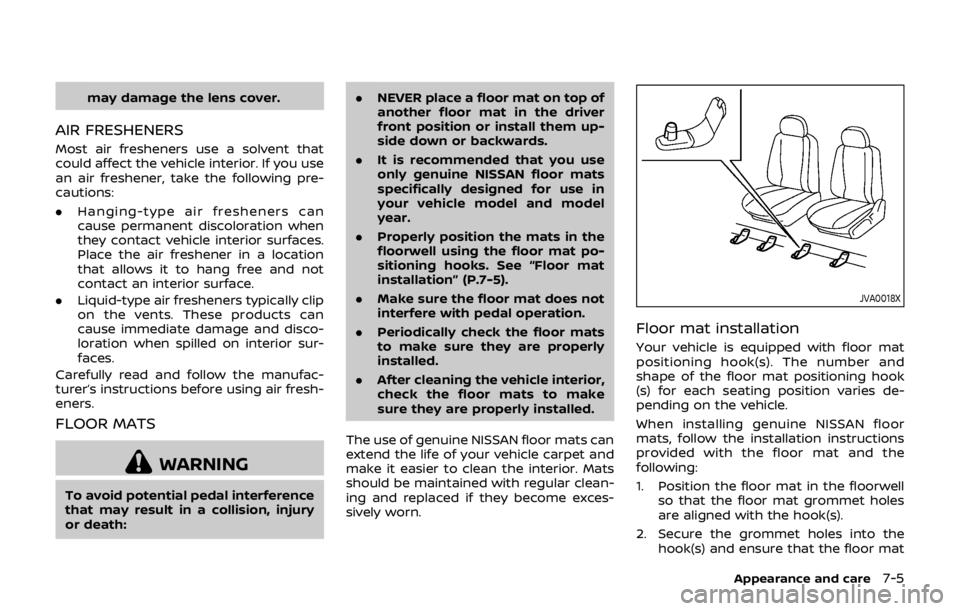
JVA0018X
Floor mat installation
Your vehicle is equipped with floor mat
positioning hook(s). The number and
shape of the floor mat positioning hook
(s) for each seating position varies de-
pending on the vehicle.
When installing genuine NISSAN floor
mats, follow the installation instructions
provided with the floor mat and the
following:
1. Position the floor mat in the floorwell so that the floor mat grommet holes
are aligned with the hook(s).
2. Secure the grommet holes into the hook(s) and ensure that the floor mat
Appearance and care7-5
Page 423 of 512

7-6Appearance and care
is properly positioned.
3. Make sure the floor mat does not interfere with pedal operation. With
the ignition in the OFF position and
the shift lever in the P (Park) position
(Continuously Variable Transmission
(CVT) models) or the shift lever in the
N (Neutral) position (Manual Transmis-
sion (MT) models), fully apply and
release all pedals. The floor mat must
not interfere with pedal operation or
prevent the pedal from returning to its
normal position. It is recommended
you see a NISSAN dealer for details
about installing the floor mats in your
vehicle.
JVA0031X
Positioning hook(s)
The illustration shows the location of the
floor mat positioning hook(s).
SEAT BELTS
The seat belts can be cleaned by wiping
them with a sponge dampened in a mild
soap solution. Allow the belts to dry
completely in the shade before using
them.
See “Seat belts” (P.1-10).
WARNING
Do not allow wet seat belts to roll up
in the retractor. NEVER use bleach, dye, or chemical solvents to clean
the seat belts, since these materials
may severely weaken the seat belt
webbing.
CLEANING THE SEAT TRACKS
CAUTION
Periodically clean the seat tracks to
prevent reduction of ability to move
the seats.
Clean periodically with a high-powered
vacuum cleaner. Dirt and debris may
reduce the ability to adjust the seat. A
wet cleansing agent may be used if
necessary.