display NISSAN QASHQAI 2019 Owner´s Manual
[x] Cancel search | Manufacturer: NISSAN, Model Year: 2019, Model line: QASHQAI, Model: NISSAN QASHQAI 2019Pages: 500, PDF Size: 2.38 MB
Page 378 of 500
5-150Starting and driving
scenes).
INTELLIGENT ENGINE BRAKE (Con-
tinuously Variable Transmission
(CVT) models)
The Intelligent Engine Brake function
adds subtle deceleration by controlling
CVT gear ratio, depending on the corner-
ing condition calculated from driver’s
steering input and plural sensors. This
benefit to easier traceability and less
workload of adjusting speed with braking
at corners.
The Intelligent Engine Brake also adds
subtle deceleration with gear ratio con-
trol according to driver’s brake pedal
operation.
The Intelligent Engine Brake can be set to
ON (enabled) or OFF (disabled) through
the Vehicle Information Display “Settings”
page. See “Vehicle information display”
(P.2-19) for more information.
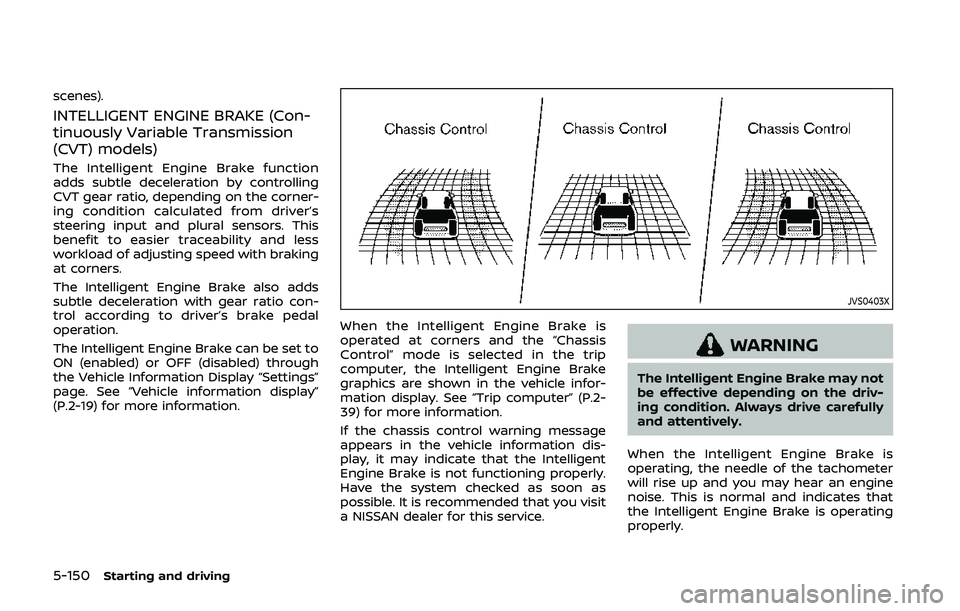
JVS0403X
When the Intelligent Engine Brake is
operated at corners and the “Chassis
Control” mode is selected in the trip
computer, the Intelligent Engine Brake
graphics are shown in the vehicle infor-
mation display. See “Trip computer” (P.2-
39) for more information.
If the chassis control warning message
appears in the vehicle information dis-
play, it may indicate that the Intelligent
Engine Brake is not functioning properly.
Have the system checked as soon as
possible. It is recommended that you visit
a NISSAN dealer for this service.
WARNING
The Intelligent Engine Brake may not
be effective depending on the driv-
ing condition. Always drive carefully
and attentively.
When the Intelligent Engine Brake is
operating, the needle of the tachometer
will rise up and you may hear an engine
noise. This is normal and indicates that
the Intelligent Engine Brake is operating
properly.
Page 379 of 500
ACTIVE RIDE CONTROL
This system senses upper body motion
based on wheel speed information and
controls engine torque and four wheel
brake pressure to enhance ride comfort
in effort to restrain uncomfortable upper
body movement. This system come into
effect above 25 MPH (40 km/h). When the
VDC OFF switch is used to turn off the
VDC system, the Active Ride Control is
also turned off.
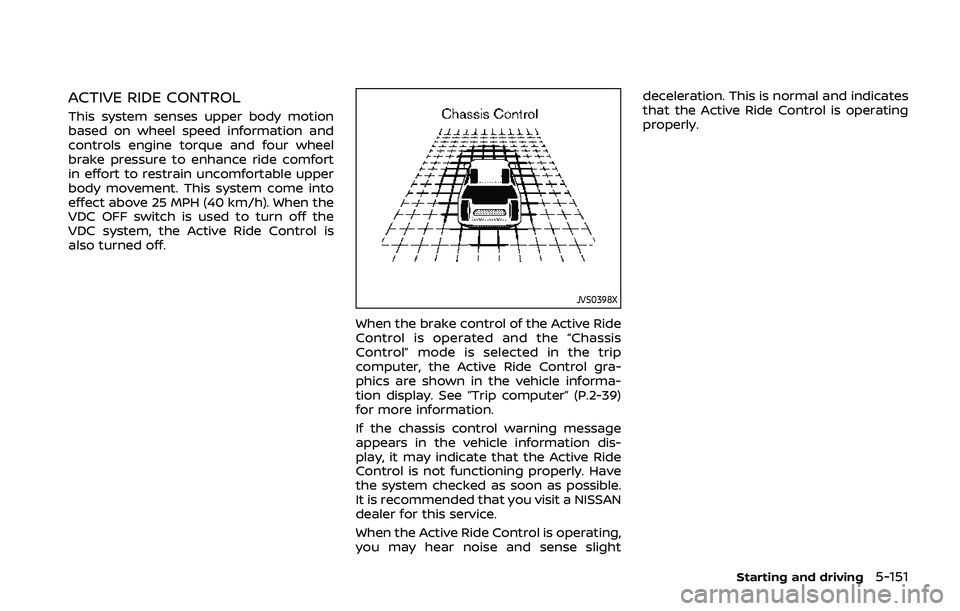
JVS0398X
When the brake control of the Active Ride
Control is operated and the “Chassis
Control” mode is selected in the trip
computer, the Active Ride Control gra-
phics are shown in the vehicle informa-
tion display. See “Trip computer” (P.2-39)
for more information.
If the chassis control warning message
appears in the vehicle information dis-
play, it may indicate that the Active Ride
Control is not functioning properly. Have
the system checked as soon as possible.
It is recommended that you visit a NISSAN
dealer for this service.
When the Active Ride Control is operating,
you may hear noise and sense slightdeceleration. This is normal and indicates
that the Active Ride Control is operating
properly.
Starting and driving5-151
Page 380 of 500
5-152Starting and driving
WARNING
.Never rely solely on the hill start
assist system to prevent the ve-
hicle from moving backward on a
hill. Always drive carefully and
attentively. Depress the brake
pedal when the vehicle is stopped
on a steep hill. Be especially care-
ful when stopped on a hill on
frozen or muddy roads. Failure
to prevent the vehicle from rolling
backwards may result in a loss of
control of the vehicle and possi-
ble serious injury or death.
. The hill start assist system is not
designed to hold the vehicle at a
standstill on a hill. Depress the
brake pedal when the vehicle is
stopped on a steep hill. Failure to
do so may cause the vehicle to
roll backwards and may result in
a collision or serious personal
injury.
. The hill start assist system may
not prevent the vehicle from roll-
ing backwards on a hill under all
load or road conditions. Always
be prepared to depress the brake
pedal to prevent the vehicle from
rolling backwards. Failure to do so may result in a collision or
serious personal injury.
The hill start assist system automatically
keeps the brakes applied to help prevent
the vehicle from rolling backwards in the
time it takes the driver to release the
brake pedal and apply the accelerator
when the vehicle is stopped on a hill.
The hill start assist system will operate
automatically under the following condi-
tions:
. The transmission is shifted to a for-
ward or reverse gear.
. The vehicle is stopped completely on a
hill by applying the brake.
The maximum holding time is 2 seconds.
After 2 seconds the vehicle will begin to
roll back and the hill start assist system
will stop operating completely.
The hill start assist system will not
operate when the transmission is shifted
to the N (Neutral) or P (Park) position (CVT
models) or on a flat and level road.
When the Vehicle Dynamic Control (VDC)
warning light illuminates in the meter, the
hill start assist system will not operate.
(See “Vehicle Dynamic Control (VDC)
warning light” (P.2-16).)
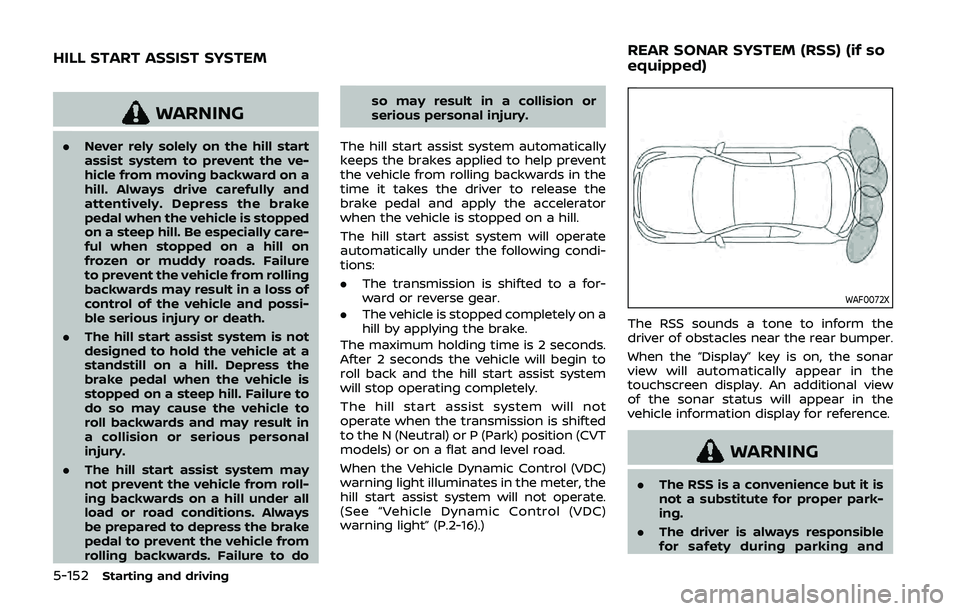
WAF0072X
The RSS sounds a tone to inform the
driver of obstacles near the rear bumper.
When the “Display” key is on, the sonar
view will automatically appear in the
touchscreen display. An additional view
of the sonar status will appear in the
vehicle information display for reference.
WARNING
. The RSS is a convenience but it is
not a substitute for proper park-
ing.
. The driver is always responsible
for safety during parking and
HILL START ASSIST SYSTEM REAR SONAR SYSTEM (RSS) (if so
equipped)
Page 381 of 500
other maneuvers. Always look
around and check that it is safe
to do so before parking.
. Read and understand the limita-
tions of the RSS as contained in
this section. The colors of the
sonar indicator and the distance
guide lines in the rear view in-
dicate different distances to the
object.
. Inclement weather or ultrasonic
sources such as an automatic car
wash, a truck’s compressed-air
brakes or a pneumatic drill may
affect the function of the system;
this may include reduced perfor-
mance or a false activation.
. The RSS is designed as an aid to
the driver in detecting large sta-
tionary objects to help avoid da-
maging the vehicle.
. The RSS is not designed to pre-
vent contact with small or mov-
ing objects. Always move slowly.
The system will not detect small
objects below the bumper, and
may not detect objects close to
the bumper or on the ground.
. The RSS may not detect the
following objects: fluffy objects
such as snow, cloth, cotton, glass, wool, etc.; thin objects such as
rope, wire and chain, etc.; or
wedge-shaped objects.
If your vehicle sustains damage to the
bumper fascia, leaving it misaligned or
bent, the sensing zone may be altered
causing inaccurate measurement of ob-
stacles or false alarms.
CAUTION
. Excessive noise (such as audio
system volume or an open vehi-
cle window) will interfere with the
tone and it may not be heard.
. Keep the sonar sensors (located
on the rear bumper fascia) free
from snow, ice and large accu-
mulations of dirt. Do not clean the
sensors with sharp objects. If the
sensors are covered, the accuracy
of the sonar function will be
diminished.
SYSTEM OPERATION
The system informs with a visual and
audible alert of rear obstacles when the
shift lever is in the R (Reverse) position.
Range Rear sonar
Sound Display
P (Park) B C
R (Reverse) O O
N (Neutral) B C
D (Drive) B C
O = Display / Beep when detect
C = Display on camera view
B = No display and beep
The system is deactivated at speeds
above 6 MPH (10 km/h). It is reactivated
at lower speeds.
The intermittent tone will stop after 3
seconds when an obstacle is detected by
only the corner sensor and the distance
does not change. The tone will stop when
the obstacle gets away from the vehicle.
When the object is detected, the indicator
(green) appears and blinks and the tone
sounds intermittently. When the vehicle
moves closer to the object, the color of
the indicator turns yellow and the rate of
the blinking increases. When the vehicle is
very close to the object, the indicator
stops blinking and turns red, and the tone
Starting and driving5-153
Page 383 of 500
WAF0076X
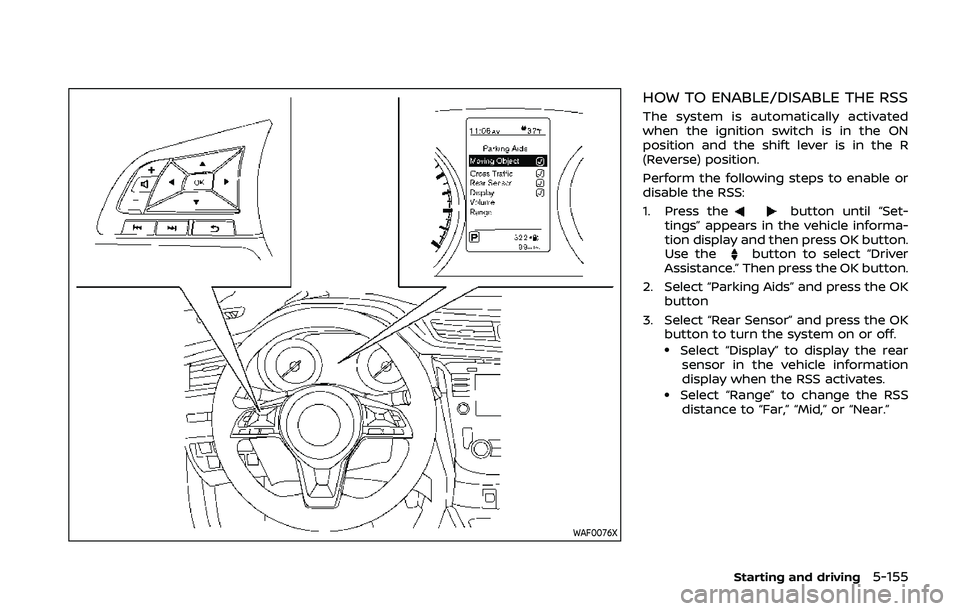
HOW TO ENABLE/DISABLE THE RSS
The system is automatically activated
when the ignition switch is in the ON
position and the shift lever is in the R
(Reverse) position.
Perform the following steps to enable or
disable the RSS:
1. Press the
button until “Set-
tings” appears in the vehicle informa-
tion display and then press OK button.
Use the
button to select “Driver
Assistance.” Then press the OK button.
2. Select “Parking Aids” and press the OK button
3. Select “Rear Sensor” and press the OK button to turn the system on or off.
.Select “Display” to display the rear
sensor in the vehicle information
display when the RSS activates.
.Select “Range” to change the RSSdistance to “Far,” “Mid,” or “Near.”
Starting and driving5-155
Page 389 of 500
To shut off the engine in an emergency
situation while driving, perform the fol-
lowing procedure:
.Rapidly push the push-button ignition
switch 3 consecutive times in less
than 1.5 seconds, or
. Push and hold the push-button igni-
tion switch for more than 2 seconds.TIRE PRESSURE MONITORING SYS-
TEM (TPMS)
This vehicle is equipped with the Tire
Pressure Monitoring System (TPMS). It
monitors tire pressure of all tires except
the spare. When the low tire pressure
warning light is lit, and the “Tire Pressure
Low - Add Air” warning message is
displayed in the vehicle information dis-
play, one or more of your tires is sig-
nificantly under-inflated. If the vehicle is
being driven with low tire pressure, the
TPMS will activate and warn you of it by
the low tire pressure warning light. This
system will activate only when the vehicle
is driven at speeds above 16 MPH (25
km/h). For more details, see “Warning
lights, indicator lights and audible remin-
ders” (P.2-10) and “Tire Pressure Monitor-
ing System (TPMS)” (P.5-5).
WARNING
.If the low tire pressure warning
light illuminates while driving,
avoid sudden steering maneu-
vers or abrupt braking, reduce
vehicle speed, pull off the road
to a safe location and stop the
vehicle as soon as possible. Driv-
ing with under-inflated tires may
permanently damage the tires and increase the likelihood of tire
failure. Serious vehicle damage
could occur and may lead to an
accident and could result in ser-
ious personal injury. Check the
tire pressure for all four tires.
Adjust the tire pressure to the
recommended COLD tire pressure
shown on the Tire and Loading
Information label to turn the low
tire pressure warning light OFF. If
the light still illuminates while
driving after adjusting the tire
pressure, a tire may be flat. If
you have a flat tire, replace it with
a spare tire as soon as possible.
. Since the spare tire is not
equipped with the TPMS, when a
spare tire is mounted or a wheel
is replaced, the TPMS will not
function and the low tire pressure
warning light will flash for ap-
proximately 1 minute. The light
will remain on after 1 minute.
Have your tires replaced and/or
TPMS system reset as soon as
possible. It is recommended you
visit a NISSAN dealer for these
services.
. Replacing tires with those not
originally specified by NISSAN
could affect the proper operation
In case of emergency6-3
EMERGENCY ENGINE SHUT OFF (models
with push-button ignition switch)FLAT TIRE
Page 433 of 500
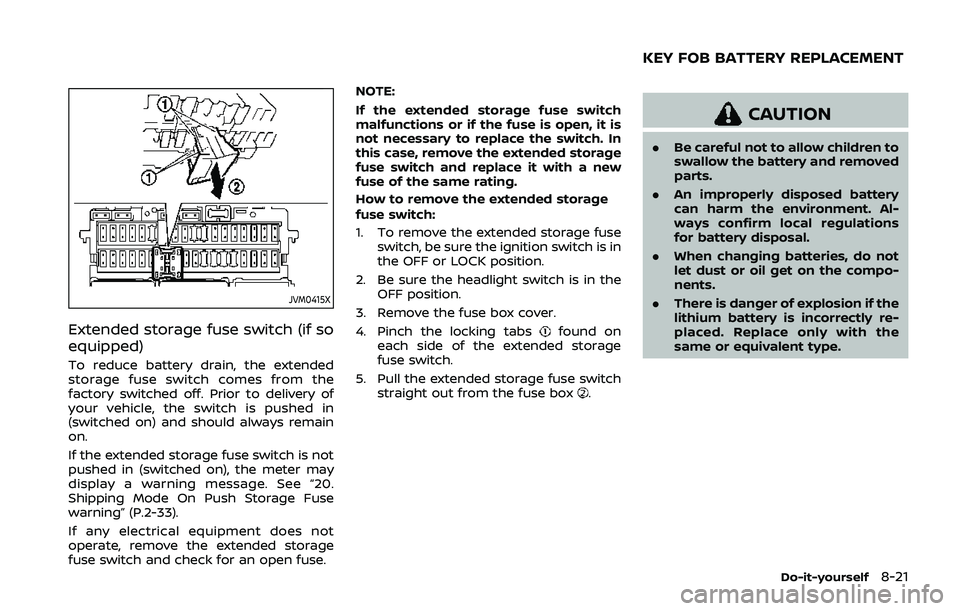
JVM0415X
Extended storage fuse switch (if so
equipped)
To reduce battery drain, the extended
storage fuse switch comes from the
factory switched off. Prior to delivery of
your vehicle, the switch is pushed in
(switched on) and should always remain
on.
If the extended storage fuse switch is not
pushed in (switched on), the meter may
display a warning message. See “20.
Shipping Mode On Push Storage Fuse
warning” (P.2-33).
If any electrical equipment does not
operate, remove the extended storage
fuse switch and check for an open fuse.NOTE:
If the extended storage fuse switch
malfunctions or if the fuse is open, it is
not necessary to replace the switch. In
this case, remove the extended storage
fuse switch and replace it with a new
fuse of the same rating.
How to remove the extended storage
fuse switch:
1. To remove the extended storage fuse switch, be sure the ignition switch is in
the OFF or LOCK position.
2. Be sure the headlight switch is in the OFF position.
3. Remove the fuse box cover.
4. Pinch the locking tabs
found on
each side of the extended storage
fuse switch.
5. Pull the extended storage fuse switch straight out from the fuse box
.
CAUTION
.Be careful not to allow children to
swallow the battery and removed
parts.
. An improperly disposed battery
can harm the environment. Al-
ways confirm local regulations
for battery disposal.
. When changing batteries, do not
let dust or oil get on the compo-
nents.
. There is danger of explosion if the
lithium battery is incorrectly re-
placed. Replace only with the
same or equivalent type.
Do-it-yourself8-21
KEY FOB BATTERY REPLACEMENT
Page 441 of 500
If you have a flat tire, see “Flat tire” (P.6-
3).
TIRE PRESSURE
Tire Pressure Monitoring System
(TPMS)
This vehicle is equipped with the Tire
Pressure Monitoring System (TPMS). It
monitors tire pressure of all tires except
the spare. When the low tire pressure
warning light is lit, and the “Tire Pressure
Low - Add Air” warning message is
displayed in the vehicle information dis-
play, one or more of your tires is sig-
nificantly under-inflated.
The TPMS will activate only when the
vehicle is driven at speeds above 16 MPH
(25 km/h). Also, this system may not
detect a sudden drop in tire pressure
(for example a flat tire while driving).
For more details, see “Low tire pressure
warning light” (P.2-13), “Tire Pressure Mon-
itoring System (TPMS)” (P.5-5) and “Tire
Pressure Monitoring System (TPMS)” (P.6-
3).
Tire inflation pressure
Check the pressure of the tires
(including the spare) often and al-
ways prior to long distance trips.
The recommended tire pressure
specifications are shown on the
Tire and Loading Information label
under the “Cold Tire Pressure”
heading. The Tire and Loading In-
formation label is affixed to the
driver side center pillar. Tire pres-
sures should be checked regularly
because:
.Most tires naturally lose air over
time.
.Tires can lose air suddenly when
driven over potholes or other
objects or if the vehicle strikes
a curb while parking.
The tire pressures should be
checked when the tires are cold.
The tires are considered COLD after
the vehicle has been parked for 3 or
more hours, or driven less than 1
mile (1.6 km) at moderate speeds.
TPMS with Easy Fill Tire Alert pro-
vides visual and audible signals outside the vehicle for inflating the
tires to the recommended COLD
tire pressure. (See “TPMS with Easy
Fill Tire Alert” (P.5-7).)
Incorrect tire pressure, including
under inflation, may adversely
affect tire life and vehicle hand-
ling.
WARNING
.Improperly inflated tires can
fail suddenly and cause an
accident.
.The Gross Vehicle Weight
rating (GVWR) is located on
the F.M.V.S.S./C.M.V.S.S. cer-
tification label. The vehicle
weight capacity is indicated
on the Tire and Loading In-
formation label. Do not load
your vehicle beyond this ca-
pacity. Overloading your ve-
hicle may result in reduced
tire life, unsafe operating
conditions due to premature
tire failure, or unfavorable
Do-it-yourself8-29
WHEELS AND TIRES
Page 492 of 500
11-2
Changing engine coolant ................................. 8-6
Checking engine coolant level...................... 8-5
Corrosion protection .................................................... 7-7
Cruise control ................................................................. 5-64 Fixed speed cruise control (on ICC
system)........................................................................\
.. 5-82
Intelligent Cruise Control (ICC) .................. 5-66
Cup holders...................................................................... 2-62
CVT, Driving with CVT (Continuously
Variable Transmission)............................. 5-13, 5-20
D
Daytime Running Lights (DRL) system....... 2-52
Defroster switch, Rear window and
outside mirror defroster switch....................... 2-47
Dimensions and weights....................................... 10-8
Display Vehicle information display.......................... 2-19
Drive belt ........................................................................\
.... 8-13
Driving Cold weather driving ..................................... 5-157
Driving with CVT (Continuously
Variable Transmission)..................................... 5-20
Driving with manual transmission.......... 5-25
Intelligent 4x4 ..................................................... 5-139
On-pavement and off-road driving .......... 5-8
Precautions when starting
and driving.................................................................... 5-4
Safety precautions .............................................. 5-10
Dynamic driver assistance switch
(models without ProPILOT assist) .................. 2-56
E
ECO mode switch........................................................ 2-59
ECO mode system ...................................................... 5-32 Ambient ECO............................................................ 5-33
ECO Drive Report.................................................. 5-34
ECO Pedal Guide function ............................. 5-33
Economy, Fuel............................................................. 5-139
Elapsed time.................................................................... 2-39
Elapsed time and trip odometer..................... 2-39
Electric power steering........................................ 5-144
Electric power steering warning light ........ 2-12
Emission control information label............ 10-10
Emission control system maintenance ......... 9-8
Emission control system warranty ............ 10-17
Engine Before starting the engine............................ 5-17
Break-in schedule ............................................ 5-137
Capacities and
recommended fluids/lubricants............... 10-2
Changing engine coolant ................................. 8-6
Changing engine oil and filter ...................... 8-6
Checking engine coolant level...................... 8-5
Checking engine oil level................................... 8-6
Coolant temperature gauge .......................... 2-7
Emergency engine shut off.............. 5-16, 6-3
Engine compartment
check locations ......................................................... 8-3
Engine cooling system ........................................ 8-4
Engine oil.....................................................................\
... 8-6
Engine oil and oil
filter recommendation ..................................... 10-5
Engine oil viscosity .............................................. 10-6
Engine serial number ........................................ 10-9
Engine specifications......................................... 10-7 Engine start operation indicator
(for Continuously Variable
Transmission (CVT) models) ........................ 2-31
Engine start operation indicator
(for Manual Transmission (MT)
models) ........................................................................\
. 2-31
If your vehicle overheats ................................ 6-11
Starting the engine.............................. 5-18, 5-19
Event Data Recorders (EDR)............................. 10-19
Exhaust gas (carbon monoxide) ......................... 5-4
Explanation of scheduled
maintenance items ........................................................ 9-5
F
F.M.V.S.S./C.M.V.S.S. certification label ......... 10-9
Filter Air cleaner housing filter ................................ 8-15
Changing engine oil and filter ...................... 8-6
Flashers (See hazard warning
flasher switch).................................................................... 6-2
Flat tire........................................................................\
............. 6-3
Flat towing..................................................................... 10-15
Floor mat cleaning ......................................................... 7-5
Fluid Brake and clutch fluid ......................................... 8-9
Capacities and
recommended fluids/lubricants............... 10-2
Continuously Variable Transmission
(CVT) fluid....................................................................... 8-9
Engine coolant........................................................... 8-4
Engine oil.....................................................................\
... 8-6
Window washer fluid ......................................... 8-10
Fog light switch ............................................................ 2-54
Front manual seat adjustment ............................ 1-3
Front passenger air bag and
status light........................................................................\
1-48
Page 493 of 500
Front seat, Front seat adjustment .................... 1-3
FuelCapacities and
recommended fluids/lubricants............... 10-2
Fuel economy...................................................... 5-139
Fuel information.................................................... 10-3
Fuel octane rating ............................................... 10-3
Fuel-filler cap............................................................ 3-28
Fuel-filler door......................................................... 3-28
Gauge........................................................................\
........ 2-8
Fuel Efficient Driving Tips................................... 5-138
Fuses........................................................................\
.............. 8-18
Fusible links...................................................................... 8-19
G
Garage door opener HomeLink® Universal Transceiver ........... 2-76
Gas cap........................................................................\
........ 3-28
Gauge........................................................................\
................ 2-5 Engine coolant temperature gauge......... 2-7
Fuel gauge .................................................................... 2-8
Odometer....................................................................... 2-6
Speedometer .............................................................. 2-6
Tachometer.................................................................. 2-7
General maintenance................................................... 9-2
Glove box ........................................................................\
... 2-64
H
Hazard warning flasher switch ............................ 6-2
Head restraints/headrests....................................... 1-7
Headlights Bulb replacement ................................................. 8-25
Headlight switch ................................................... 2-48
Heated seats ................................................................... 2-55
Heated steering wheel ............................................ 2-54 Heater
Heater and air
conditioner operation....................................... 4-26
High beam assist ......................................................... 2-50
Hill start assist system ......................................... 5-152
HomeLink® Universal Transceiver .................. 2-76
Hood release ................................................................... 3-25
Hook Luggage hook ......................................................... 2-65
Horn........................................................................\
................ 2-54
How to enable/disable the
steering assist ................................................................ 5-95
I
Ignition switch ............................................................... 5-14
Ignition switch (model without Intelligent
Key system) ...................................................................... 5-12
Ignition switch positions ....................................... 5-15
Immobilizer system.................................................... 2-43
Indicator Vehicle information display.......................... 2-19
indicator light Electronic parking brake
indicator light .......................................................... 2-16
Indicator lights............................................................... 2-16
Inside mirror .................................................................... 3-32
Inspection/maintenance (I/M) test ............ 10-18
Instrument brightness control ............................. 2-9
Instrument panel ............................................................. 2-4
Intelligent 4x4 ............................................................. 5-139
Intelligent Around View® Monitor................... 4-10
Intelligent Auto Headlight system ................. 2-48
Intelligent Cruise Control (ICC) ......................... 5-66
Intelligent Cruise Control (ICC)
(models with ProPILOT assist) .......................... 5-97 Intelligent Cruise Control
(ICC) indicator ................................................................. 2-34
Intelligent Engine Brake ...................................... 5-150
Intelligent Key system ............................................. 3-11
Key operating range .......................................... 3-13
Key operation .......................................................... 3-14
Remote keyless operation ............................ 3-19
Intelligent Lane Intervention (I-LI) .................. 5-40
Intelligent Trace Control..................................... 5-149
Interior light replacement..................................... 8-27
Interior light switch.................................................... 2-73
Interior lights................................................................... 2-73
ISOFIX child restraint ................................................ 1-22J
Jump starting ..................................................................... 6-9
K
Key Ignition switch (model without
Intelligent Key system) ..................................... 5-12
Ignition switch positions ................................ 5-15
Key positions................................................................... 5-14
Keyless entry
(See remote keyless entry system) ........... 3-8
With Intelligent Key system
(See Intelligent Key system) ......................... 3-19
Keys ........................................................................\
.................... 3-2 For Intelligent Key system............................. 3-11
L
LabelsAir bag warning labels ..................................... 1-58
Air conditioner specification label....... 10-10
11-3