maintenance NISSAN QASHQAI 2019 Owner´s Manual
[x] Cancel search | Manufacturer: NISSAN, Model Year: 2019, Model line: QASHQAI, Model: NISSAN QASHQAI 2019Pages: 500, PDF Size: 2.38 MB
Page 195 of 500
4 Monitor, heater, air conditioner, audioand phone systems
NissanConnect® Owner’s Manual .................................... 4-2
RearView Monitor (if so equipped) ................................. 4-2
RearView Monitor system operation ..................... 4-3
How to read the displayed lines ................................ 4-4
Difference between predictive and
actual distances ...................................................................... 4-4
How to park with predictive course lines .......... 4-6
Adjusting the screen ........................................................... 4-7
How to turn ON and OFF predictive course
lines ........................................................................\
......................... 4-8
RearView Monitor system limitations .................... 4-8
System maintenance .......................................................... 4-9
Intelligent Around View® Monitor (if
so equipped) ........................................................................\
.......... 4-10 Intelligent Around View® Monitor
system operation ................................................................ 4-11
Difference between predictive and
actual distances ................................................................... 4-14
How to park with predictive course lines ....... 4-16
How to switch the display ........................................... 4-17
Adjusting the screen ........................................................ 4-18 Intelligent Around View® Monitor
system limitations ............................................................ 4-18
System maintenance .................................................... 4-20
Moving Object Detection (MOD) (if
so equipped) ........................................................................\
......... 4-21 MOD system operation ................................................ 4-22
Turning MOD on and off ............................................ 4-23
MOD system limitations .............................................. 4-23
System maintenance .................................................... 4-24
Ventilators ........................................................................\
.............. 4-25
Center ventilators ............................................................ 4-25
Side ventilators .................................................................. 4-25
Rear ventilators (if so equipped) .......................... 4-25
Heater and air conditioner ................................................ 4-26 Manual air conditioner and heater .................... 4-27
Automatic air conditioner and heater ............ 4-30
Operating tips (for automatic
air conditioner) ................................................................... 4-33
Servicing air conditioner ............................................. 4-33
Antenna ........................................................................\
.................... 4-33
Car phone or CB radio ......................................................... 4-34
Page 203 of 500
.Objects on the monitor may not be
clear in a dark environment.
. There may be a delay when switching
between views.
. If dirt, rain or snow accumulates on
the camera, the RearView Monitor
may not display objects clearly. Clean
the camera.
. Do not use wax on the camera lens.
Wipe off any wax with a clean cloth
dampened with a diluted mild clean-
ing agent, then wipe with a dry cloth.
JVH1585X
SYSTEM MAINTENANCE
CAUTION
.Do not use alcohol, benzine or
thinner to clean the camera. This
will cause discoloration.
. Do not damage the camera as the
monitor screen may be adversely
affected.
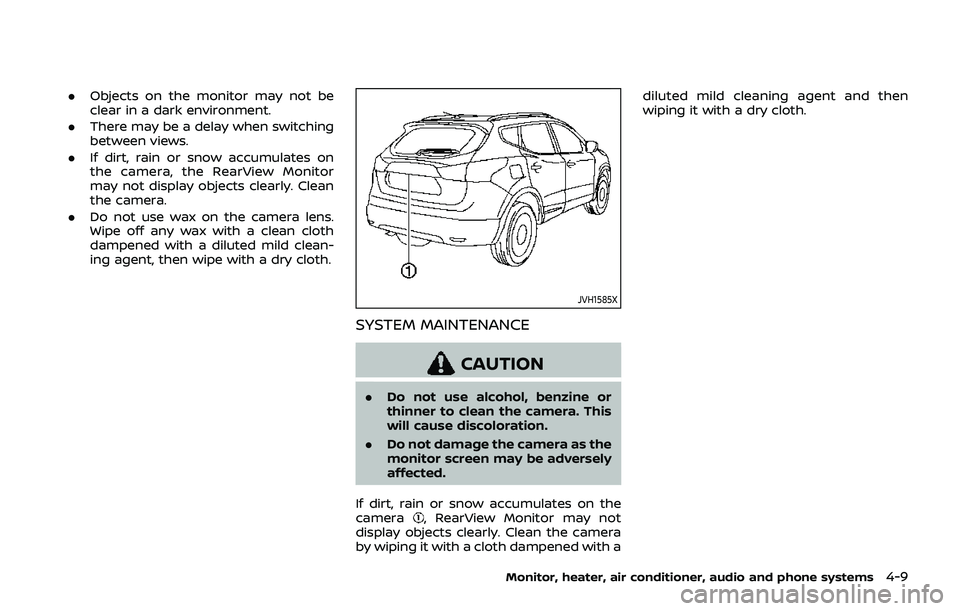
If dirt, rain or snow accumulates on the
camera
, RearView Monitor may not
display objects clearly. Clean the camera
by wiping it with a cloth dampened with a diluted mild cleaning agent and then
wiping it with a dry cloth.
Monitor, heater, air conditioner, audio and phone systems4-9
Page 214 of 500
4-20Monitor, heater, air conditioner, audio and phone systems
WAE0057X
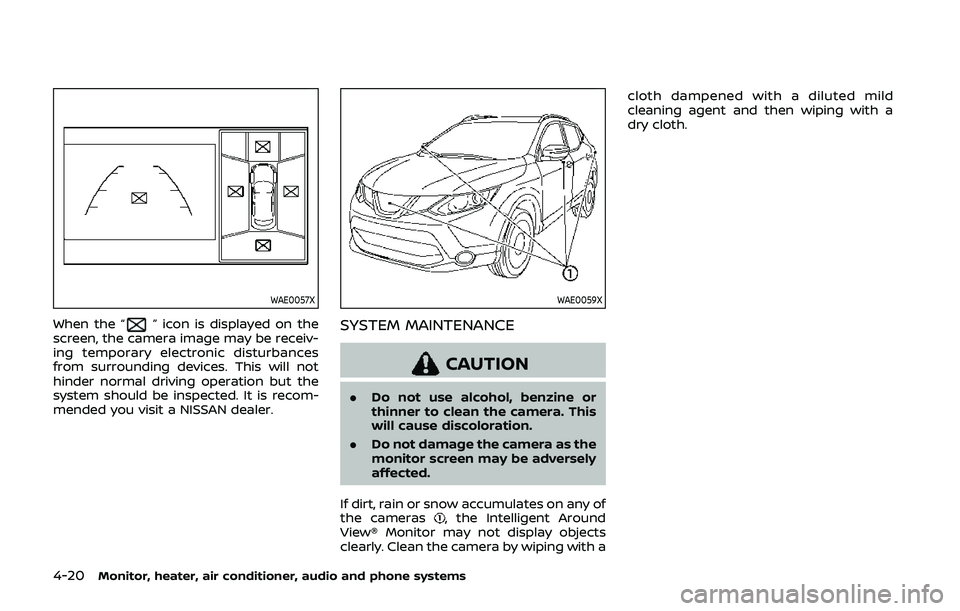
When the “” icon is displayed on the
screen, the camera image may be receiv-
ing temporary electronic disturbances
from surrounding devices. This will not
hinder normal driving operation but the
system should be inspected. It is recom-
mended you visit a NISSAN dealer.
WAE0059X
SYSTEM MAINTENANCE
CAUTION
. Do not use alcohol, benzine or
thinner to clean the camera. This
will cause discoloration.
. Do not damage the camera as the
monitor screen may be adversely
affected.
If dirt, rain or snow accumulates on any of
the cameras
, the Intelligent Around
View® Monitor may not display objects
clearly. Clean the camera by wiping with a cloth dampened with a diluted mild
cleaning agent and then wiping with a
dry cloth.
Page 218 of 500
4-24Monitor, heater, air conditioner, audio and phone systems
shape of the moving objects.
. If your vehicle sustains damage
to the parts where the camera is
installed, leaving it misaligned or
bent, the sensing zone may be
altered and the MOD system may
not detect objects properly.
. When the temperature is extre-
mely high or low, the screen may
not display objects clearly. This is
not a malfunction.
NOTE:
The blue MOD icon will change to
orange if one of the following has
occurred.
. When the system is malfunctioning.
. When the component temperature
reaches a high level (icon will blink).
. When the rear view camera has
detected a blockage (icon will blink).
If the icon light continues to illuminate
orange, have the MOD system checked.
It is recommended that you visit a
NISSAN dealer for this service.
WAE0059X
SYSTEM MAINTENANCE
CAUTION
. Do not use alcohol, benzine or
thinner to clean the camera. This
will cause discoloration.
. Do not damage the camera as the
monitor screen may be adversely
affected.
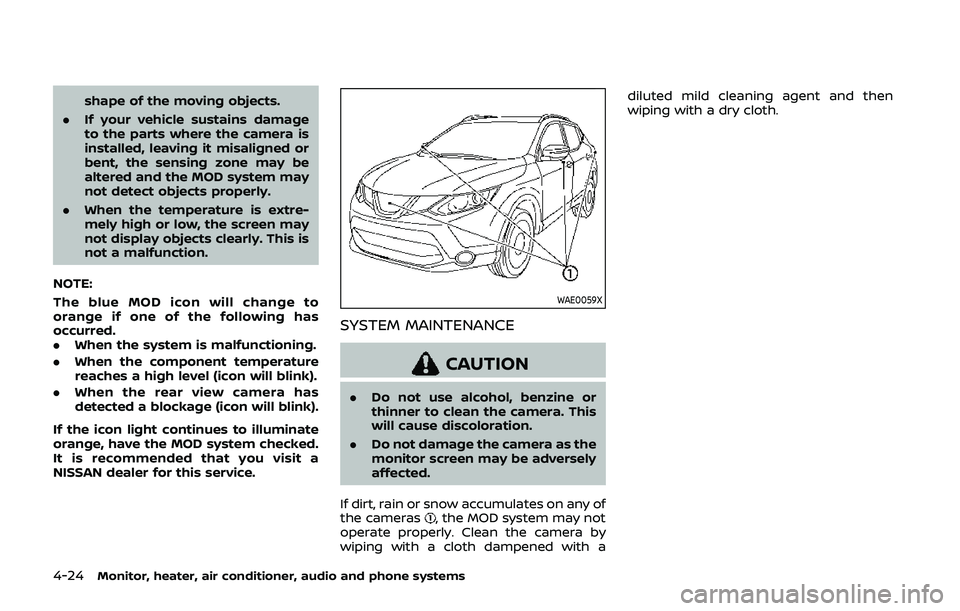
If dirt, rain or snow accumulates on any of
the cameras
, the MOD system may not
operate properly. Clean the camera by
wiping with a cloth dampened with a diluted mild cleaning agent and then
wiping with a dry cloth.
Page 227 of 500
OPERATING TIPS (for automatic air
conditioner)
When the engine coolant temperature
and outside air temperature are low, the
air flow from the foot outlets may not
operate for a maximum of 150 seconds.
However, this is not a malfunction. After
the coolant temperature warms up, air
flow from the foot outlets will operate
normally.
The sensors
and, located on the
instrument panel, help maintain a con-
stant temperature. Do not put anything
on or around the sensors.
SERVICING AIR CONDITIONER
WARNING
The air conditioner system contains
refrigerant under high pressure. To
avoid personal injury, any air condi-
tioner service should be done only by
an experienced technician with the
proper equipment.
The air conditioner system in your vehicle
is charged with a refrigerant designed
with the environment in mind.
This refrigerant will not harm the
earth’s ozone layer. However, it maycontribute in a small part to global
warming.
Special charging equipment and lubricant
are required when servicing your vehicle’s
air conditioner. Using improper refriger-
ants or lubricants will cause severe da-
mage to the air conditioner system. (See
“Air conditioning system refrigerant and
lubricant recommendations” (P.10-6).)
A NISSAN dealer will be able to service
your environmentally friendly air condi-
tioner system.
In-cabin microfilter
The air conditioner system is equipped
with an in-cabin microfilter. To make sure
the air conditioner heats, defogs, and
ventilates efficiently, replace the filter
according the specified maintenance in-
tervals listed in the "9. Maintenance and
schedules" section. It is recommended to
visit a NISSAN dealer to replace the filter.
The filter should be replaced if the air flow
decreases significantly or if windows fog
up easily when operating the heater or air
conditioner.SAA2374
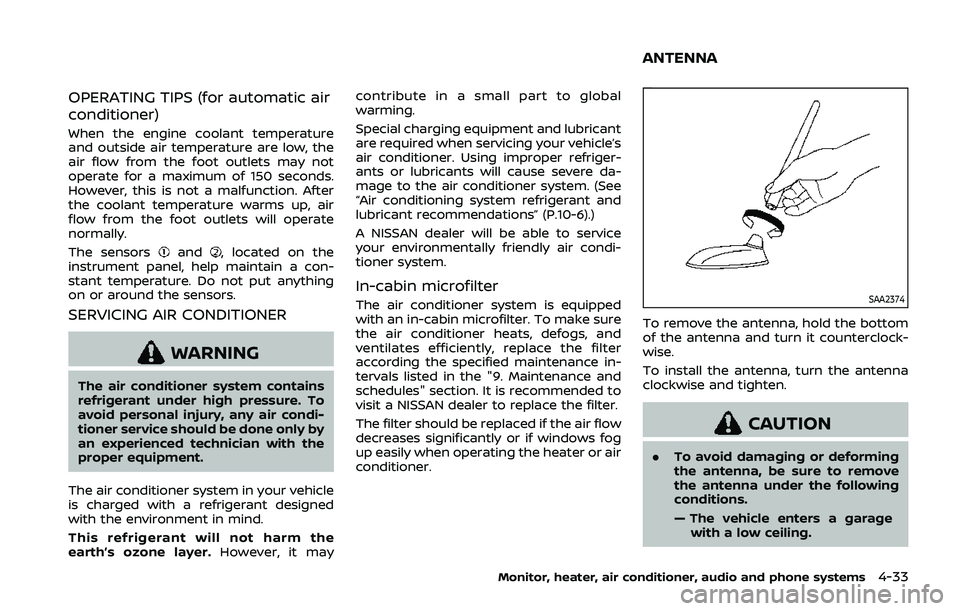
To remove the antenna, hold the bottom
of the antenna and turn it counterclock-
wise.
To install the antenna, turn the antenna
clockwise and tighten.
CAUTION
.
To avoid damaging or deforming
the antenna, be sure to remove
the antenna under the following
conditions.
— The vehicle enters a garage
with a low ceiling.
Monitor, heater, air conditioner, audio and phone systems4-33
ANTENNA
Page 230 of 500
LDW system limitations .................................................. 5-38
System temporarily unavailable ............................. 5-39
System malfunction .......................................................... 5-39
System maintenance ....................................................... 5-39
Intelligent Lane Intervention (I-LI) (if
so equipped) ........................................................................\
.......... 5-40 I-LI system operation ....................................................... 5-41
How to enable/disable the I-LI system ............. 5-42
I-LI system limitations ..................................................... 5-43
System temporarily unavailable ............................. 5-44
System malfunction .......................................................... 5-45
System maintenance ....................................................... 5-45
Blind Spot Warning (BSW) ................................................... 5-46 BSW system operation ................................................... 5-48
How to enable/disable the BSW system .......... 5-49
BSW system limitations .................................................. 5-50
BSW driving situations .................................................... 5-51
System temporarily unavailable ............................. 5-54
System malfunction .......................................................... 5-55
System maintenance ....................................................... 5-55
Rear Cross Traffic Alert (RCTA) ....................................... 5-56
RCTA system operation ................................................. 5-57
How to enable/disable the RCTA system ....... 5-59
RCTA system limitations ............................................... 5-60
System temporarily unavailable ............................. 5-63
System malfunction .......................................................... 5-63
System maintenance ....................................................... 5-63
Cruise control (if so equipped) ....................................... 5-64 Precautions on cruise control .................................. 5-65 Cruise control operations .......................................... 5-65
Intelligent Cruise Control (ICC) (models without
ProPILOT assist) (if so equipped) .................................. 5-66 How to select the cruise control mode ......... 5-68
Vehicle-to-vehicle distance
control mode ....................................................................... 5-68
Conventional (fixed speed) cruise
control mode ....................................................................... 5-82
ProPILOT assist (if so equipped) ................................... 5-86 ProPILOT assist system operation ..................... 5-88
ProPILOT assist switches ........................................... 5-89
ProPILOT assist system display
and indicators ..................................................................... 5-90
Turning the conventional (fixed speed)
cruise control mode ON ............................................. 5-91
Operating ProPILOT assist ........................................ 5-91
How to enable/disable the
steering assist ..................................................................... 5-95
How to cancel the ProPILOT
assist system ....................................................................... 5-97
Intelligent Cruise Control (ICC)
(models with ProPILOT assist) ............................... 5-97
Steering assist ................................................................ 5-106
Conventional (fixed speed) cruise
control mode ................................................................... 5-112
Automatic Emergency Braking (AEB) (if
so equipped) ........................................................................\
..... 5-115
AEB system operation .............................................. 5-116
Turning the AEB system ON/OFF ................... 5-118
AEB system limitations ............................................ 5-119
Page 231 of 500
System temporarily unavailable ......................... 5-120
System malfunction ...................................................... 5-121
System maintenance ................................................... 5-121
Automatic Emergency Braking (AEB) with
pedestrian detection system ....................................... 5-122 AEB with pedestrian detection
system operation ............................................................ 5-124
Turning the AEB with pedestrian detection
system ON/OFF ................................................................ 5-126
AEB with pedestrian detection
system limitations .......................................................... 5-127
System temporarily unavailable ......................... 5-129
System malfunction ...................................................... 5-130
System maintenance ................................................... 5-131
Rear Automatic Braking (RAB) (if
so equipped) ........................................................................\
...... 5-132 RAB system operation ................................................ 5-133
Turning the RAB system ON/OFF ...................... 5-133
RAB system limitations .............................................. 5-134
System malfunction ...................................................... 5-136
System maintenance ................................................... 5-137
Break-in schedule ................................................................. 5-137
Fuel Efficient Driving Tips ................................................ 5-138
Increasing fuel economy ................................................. 5-139
Intelligent 4x4 (if so equipped) ................................... 5-139 Intelligent 4x4 LOCK switch operations ...... 5-141
Parking/parking on hills ................................................... 5-143 Electric power steering .................................................... 5-144
Brake system ........................................................................\
... 5-145
Braking precautions ................................................... 5-145
Brake assist ........................................................................\
....... 5-146
Brake assist ....................................................................... 5-146
Anti-lock Braking System (ABS) ........................ 5-146
Vehicle Dynamic Control (VDC) system .............. 5-147
Chassis control ....................................................................... 5-149
Intelligent Trace Control ......................................... 5-149
Intelligent Engine Brake (Continuously
Variable Transmission (CVT) models) .......... 5-150
Active Ride Control ..................................................... 5-151
Hill Start Assist system ..................................................... 5-152
Rear sonar system (RSS) (if so equipped) ......... 5-152
System operation ......................................................... 5-153
How to enable/disable the RSS ........................ 5-155
RSS limitations ................................................................ 5-156
System temporarily unavailable ....................... 5-156
System maintenance ................................................ 5-156
Cold weather driving ......................................................... 5-157 Freeing a frozen door lock ................................... 5-157
Anti-freeze ........................................................................\
.. 5-157
Battery ........................................................................\
........... 5-157
Draining of coolant water ..................................... 5-157
Tire equipment ............................................................... 5-157
Special winter equipment ..................................... 5-158
Driving on snow or ice ............................................. 5-158
Page 233 of 500
away from the exhaust system
components.
. Do not stop or park the vehicle
over flammable materials such as
dry grass, wastepaper or rags.
They may ignite and cause a fire.
CAUTION
.Do not use leaded gasoline. De-
posits from leaded gasoline will
seriously reduce the three-way
catalyst’s ability to help reduce
exhaust pollutants.
. Keep your engine tuned up. Mal-
functions in the ignition, fuel in-
jection, or electrical systems can
cause overrich fuel flow into the
three-way catalyst, causing it to
overheat. Do not keep driving if
the engine misfires, or if notice-
able loss of performance or other
unusual operating conditions are
detected. Have the vehicle in-
spected. It is recommended you
visit a NISSAN dealer for this
service.
. Avoid driving with an extremely
low fuel level. Running out of fuel
could cause the engine to misfire, damaging the three-way catalyst.
. Do not race the engine while
warming it up.
. Do not push or tow your vehicle
to start the engine.
TIRE PRESSURE MONITORING SYS-
TEM (TPMS)
Each tire, including the spare (if provided),
should be checked monthly when cold
and inflated to the inflation pressure
recommended by the vehicle manufac-
turer on the vehicle placard or tire infla-
tion pressure label. (If your vehicle has
tires of a different size than the size
indicated on the vehicle placard or tire
inflation pressure label, you should deter-
mine the proper tire inflation pressure for
those tires.)
As an added safety feature, your vehicle
has been equipped with a Tire Pressure
Monitoring System (TPMS) that illumi-
nates a low tire pressure telltale when
one or more of your tires is significantly
under-inflated. Accordingly, when the low
tire pressure telltale illuminates, you
should stop and check your tires as soon
as possible, and inflate them to the
proper pressure. Driving on a significantly
under-inflated tire causes the tire to
overheat and can lead to tire failure. Under-inflation also reduces fuel effi-
ciency and tire tread life, and may affect
the vehicle’s handling and stopping abil-
ity.
Please note that the TPMS is not a
substitute for proper tire maintenance,
and it is the driver’s responsibility to
maintain correct tire pressure, even if
under-inflation has not reached the level
to trigger illumination of the TPMS low
tire pressure telltale.
Your vehicle has also been equipped with
a TPMS malfunction indicator to indicate
when the system is not operating prop-
erly. The TPMS malfunction indicator is
combined with the low tire pressure tell-
tale. When the system detects a malfunc-
tion, the telltale will flash for
approximately one minute and then re-
main continuously illuminated. This se-
quence will continue upon subsequent
vehicle start-ups as long as the malfunc-
tion exists. When the malfunction indica-
tor is illuminated, the system may not be
able to detect or signal low tire pressure
as intended. TPMS malfunctions may
occur for a variety of reasons, including
the installation of replacement or alter-
nate tires or wheels on the vehicle that
prevent the TPMS from functioning prop-
erly. Always check the TPMS malfunction
telltale after replacing one or more tires
Starting and driving5-5
Page 240 of 500
5-12Starting and driving
vehicle is not designed for cor-
nering at the same speeds as
conventional passenger cars.
Failure to operate this vehicle
correctly could result in loss of
control and/or a rollover acci-
dent.
. Always use tires of the same type,
size, brand, construction (bias,
bias-belted or radial), and tread
pattern on all four wheels. Install
traction devices on the front
wheels when driving on slippery
roads and drive carefully.
. Be sure to check the brakes im-
mediately after driving in mud or
water. See “Brake system” (P.5-
145) for wet brakes.
. Avoid parking your vehicle on
steep hills. If you get out of the
vehicle and it rolls forward, back-
ward or sideways, you could be
injured.
. Whenever you drive off-road
through sand, mud or water as
deep as the wheel hub, more
frequent maintenance may be
required. See the maintenance
schedule shown in the “9. Main-
tenance and schedules” section. .
Spinning the front wheels on
slippery surfaces may cause the
AWD warning message to display
and the AWD system to automa-
tically switch from the AWD mode
to the 2WD mode. This could
reduce traction. (AWD models)WARNING
Never remove the key or place the
ignition switch in the LOCK position
while driving. The steering wheel will
lock and could cause the driver to
lose control of the vehicle. This could
result in serious vehicle damage or
personal injury.
IGNITION SWITCH (models without
Intelligent Key system)
Page 267 of 500
— When a sudden change inbrightness occurs. (For exam-
ple, when the vehicle enters or
exits a tunnel or under a
bridge.)
SYSTEM TEMPORARILY UNAVAIL-
ABLE
Condition A:
If the vehicle is parked in direct sunlight
under high temperature conditions (over
approximately 104°F (40°C)) and then
started, the LDW system may be deacti-
vated automatically, the LDW indicator
will flash and the following message will
appear in the vehicle information display.
- “Unavailable: High Cabin Temperature”
When the interior temperature is reduced,
the LDW system will resume operating
automatically and the LDW indicator will
stop flashing.
Condition B:
The warning function of the LDW system
is not designed to work under the follow-
ing conditions:
. When you operate the lane change
signal and change traveling lanes in
the direction of the signal. (The LDW
system will become operable again
approximately 2 seconds after the lane change signal is turned off.)
. When the vehicle speed lowers to less
than approximately 37 MPH (60 km/h).
Action to take:
After the above conditions have finished
and the necessary operating conditions
are satisfied, the LDW system will resume.
SYSTEM MALFUNCTION
If the LDW system malfunctions, it will
cancel automatically and “Malfunction”
will appear in the vehicle information
display. If “Malfunction” appears in the
vehicle information display, pull off the
road to a safe location and stop the
vehicle. Place the ignition switch in the
OFF position and restart the engine. If
“Malfunction” continues to appear in the
vehicle information display, have the
system checked. It is recommended that
you visit a NISSAN dealer for this service.
JVS1079X
SYSTEM MAINTENANCE
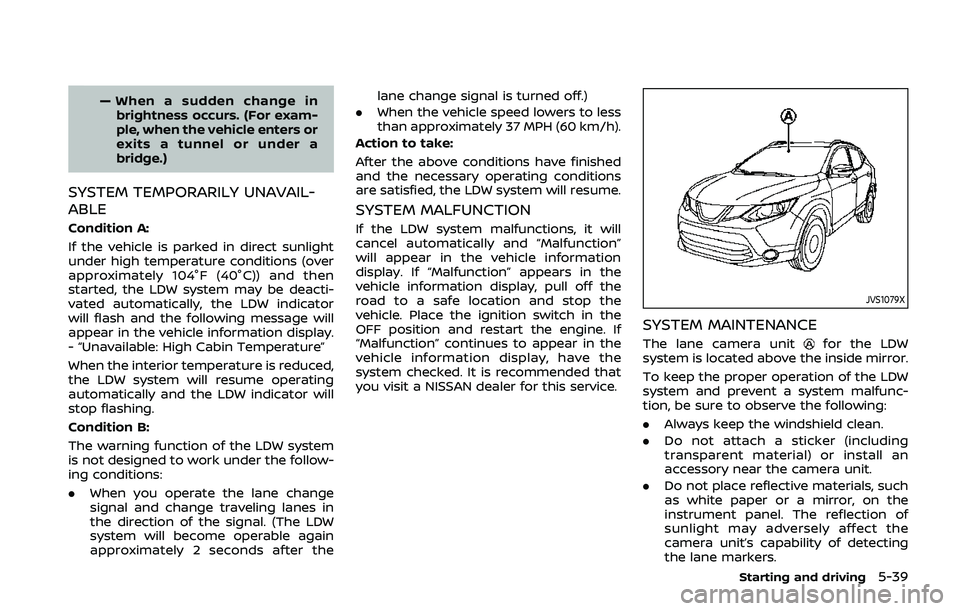
The lane camera unitfor the LDW
system is located above the inside mirror.
To keep the proper operation of the LDW
system and prevent a system malfunc-
tion, be sure to observe the following:
. Always keep the windshield clean.
. Do not attach a sticker (including
transparent material) or install an
accessory near the camera unit.
. Do not place reflective materials, such
as white paper or a mirror, on the
instrument panel. The reflection of
sunlight may adversely affect the
camera unit’s capability of detecting
the lane markers.
Starting and driving5-39