Speed display NISSAN QASHQAI 2019 Owner´s Manual
[x] Cancel search | Manufacturer: NISSAN, Model Year: 2019, Model line: QASHQAI, Model: NISSAN QASHQAI 2019Pages: 500, PDF Size: 2.38 MB
Page 326 of 500
5-98Starting and driving
ahead or if a vehicle traveling ahead
rapidly decelerates, the distance between
vehicles may become closer because the
ICC system cannot decelerate the vehicle
quickly enough. If this occurs, the ICC
system sounds a warning chime and
blinks the system display to notify the
driver to take necessary action.
The ICC system cancels and a warning
chime sounds if the speed is below
approximately 15 MPH (24 km/h) and a
vehicle is not detected ahead.
The ICC system operates as follows:
.When there are no vehicles traveling
ahead, the ICC system maintains the
speed set by the driver. The set speed
range is between approximately 20
and 90 MPH (32 and 144 km/h).
. When there is a vehicle traveling
ahead, the ICC system adjusts the
speed to maintain the distance, se-
lected by the driver, from the vehicle
ahead. If the vehicle ahead comes to a
stop, the vehicle decelerates to a
standstill. Once your vehicle stops,
the ICC system keeps the vehicle
stopped.
. When your vehicle is stopped for less
than 3 seconds and the vehicle ahead
begins to move, your vehicle will start
moving again automatically. .
When your vehicle is at a standstill for
more than 3 seconds and the vehicle
ahead begins to accelerate, push the
RES+ switch or lightly depress the
accelerator pedal. The ICC system
starts to follow the vehicle ahead.
. When the vehicle traveling ahead
moves to a different traveling lane,
the ICC system accelerates and main-
tains vehicle speed up to the set
speed.
The ICC system does not control vehicle
speed or warn you when you approach
stationary and slow moving vehicles. You
must pay attention to vehicle operation
to maintain proper distance from vehicles
ahead when approaching toll gates or
traffic congestion.
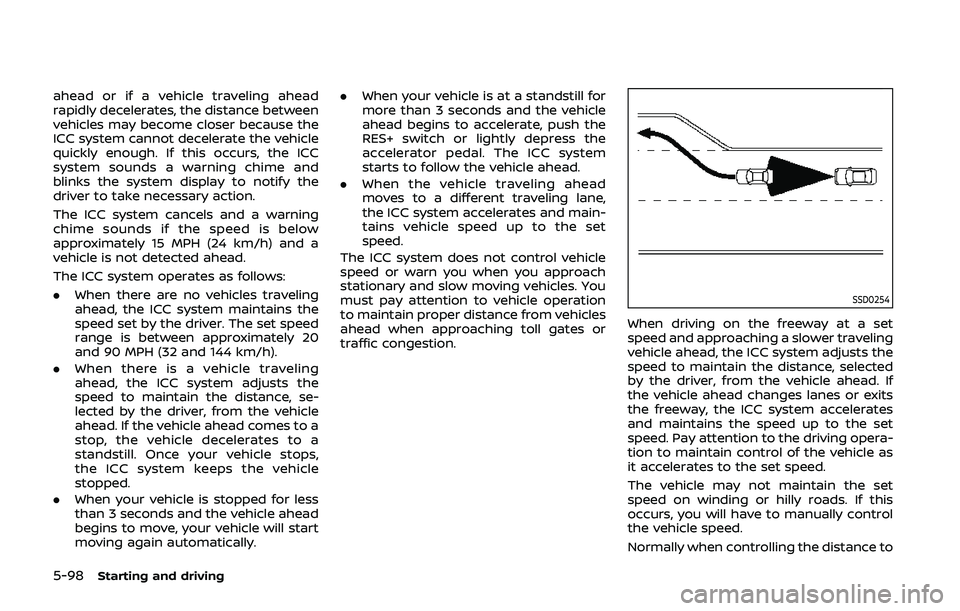
SSD0254
When driving on the freeway at a set
speed and approaching a slower traveling
vehicle ahead, the ICC system adjusts the
speed to maintain the distance, selected
by the driver, from the vehicle ahead. If
the vehicle ahead changes lanes or exits
the freeway, the ICC system accelerates
and maintains the speed up to the set
speed. Pay attention to the driving opera-
tion to maintain control of the vehicle as
it accelerates to the set speed.
The vehicle may not maintain the set
speed on winding or hilly roads. If this
occurs, you will have to manually control
the vehicle speed.
Normally when controlling the distance to
Page 327 of 500
a vehicle ahead, the system automatically
accelerates or decelerates your vehicle
according to the speed of the vehicle
ahead.
Depress the accelerator to properly ac-
celerate your vehicle when acceleration is
required for a lane change. Depress the
brake pedal when deceleration is required
to maintain a safe distance to the vehicle
ahead due to sudden braking or if a
vehicle cuts in. Always stay alert when
using the ICC system.
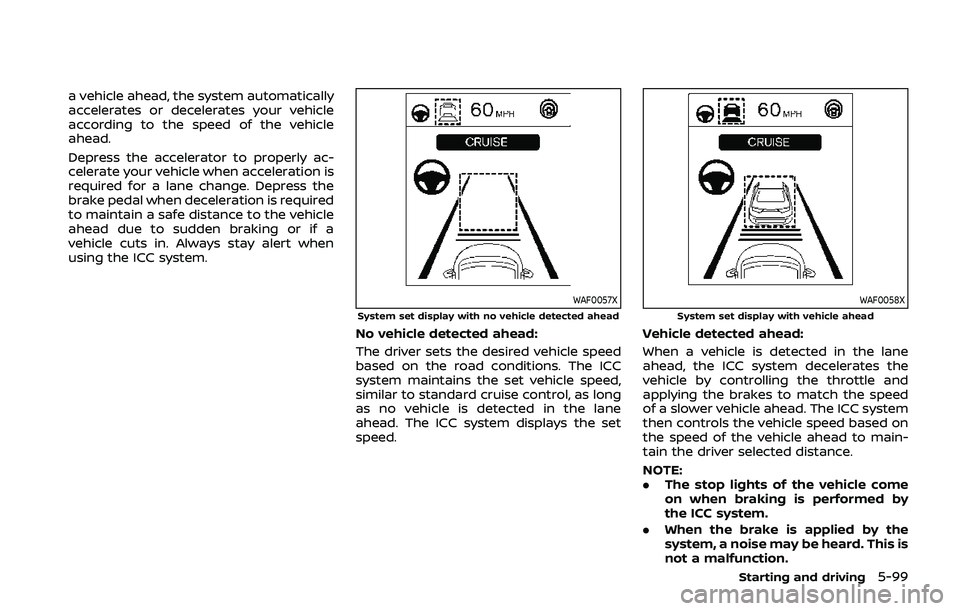
WAF0057XSystem set display with no vehicle detected ahead
No vehicle detected ahead:
The driver sets the desired vehicle speed
based on the road conditions. The ICC
system maintains the set vehicle speed,
similar to standard cruise control, as long
as no vehicle is detected in the lane
ahead. The ICC system displays the set
speed.
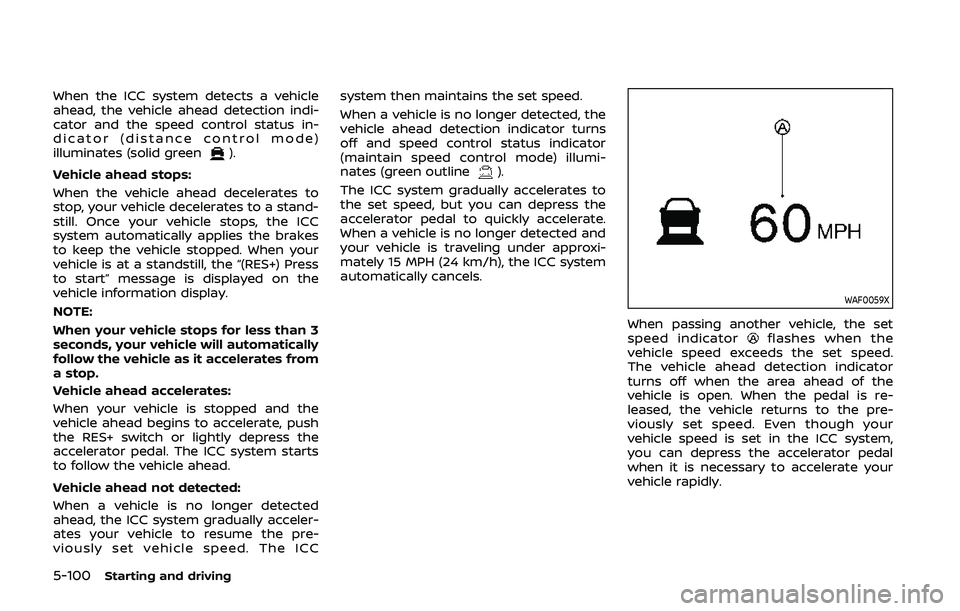
WAF0058XSystem set display with vehicle ahead
Vehicle detected ahead:
When a vehicle is detected in the lane
ahead, the ICC system decelerates the
vehicle by controlling the throttle and
applying the brakes to match the speed
of a slower vehicle ahead. The ICC system
then controls the vehicle speed based on
the speed of the vehicle ahead to main-
tain the driver selected distance.
NOTE:
.The stop lights of the vehicle come
on when braking is performed by
the ICC system.
. When the brake is applied by the
system, a noise may be heard. This is
not a malfunction.
Starting and driving5-99
Page 328 of 500
5-100Starting and driving
When the ICC system detects a vehicle
ahead, the vehicle ahead detection indi-
cator and the speed control status in-
dicator (distance control mode)
illuminates (solid green
).
Vehicle ahead stops:
When the vehicle ahead decelerates to
stop, your vehicle decelerates to a stand-
still. Once your vehicle stops, the ICC
system automatically applies the brakes
to keep the vehicle stopped. When your
vehicle is at a standstill, the “(RES+) Press
to start” message is displayed on the
vehicle information display.
NOTE:
When your vehicle stops for less than 3
seconds, your vehicle will automatically
follow the vehicle as it accelerates from
a stop.
Vehicle ahead accelerates:
When your vehicle is stopped and the
vehicle ahead begins to accelerate, push
the RES+ switch or lightly depress the
accelerator pedal. The ICC system starts
to follow the vehicle ahead.
Vehicle ahead not detected:
When a vehicle is no longer detected
ahead, the ICC system gradually acceler-
ates your vehicle to resume the pre-
viously set vehicle speed. The ICC system then maintains the set speed.
When a vehicle is no longer detected, the
vehicle ahead detection indicator turns
off and speed control status indicator
(maintain speed control mode) illumi-
nates (green outline
).
The ICC system gradually accelerates to
the set speed, but you can depress the
accelerator pedal to quickly accelerate.
When a vehicle is no longer detected and
your vehicle is traveling under approxi-
mately 15 MPH (24 km/h), the ICC system
automatically cancels.
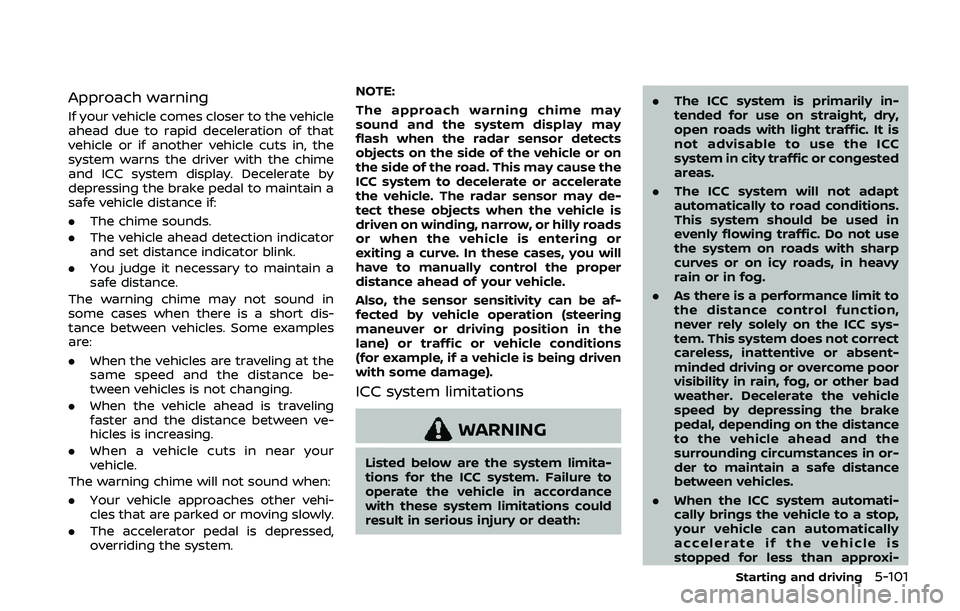
WAF0059X
When passing another vehicle, the set
speed indicatorflashes when the
vehicle speed exceeds the set speed.
The vehicle ahead detection indicator
turns off when the area ahead of the
vehicle is open. When the pedal is re-
leased, the vehicle returns to the pre-
viously set speed. Even though your
vehicle speed is set in the ICC system,
you can depress the accelerator pedal
when it is necessary to accelerate your
vehicle rapidly.
Page 329 of 500
Approach warning
If your vehicle comes closer to the vehicle
ahead due to rapid deceleration of that
vehicle or if another vehicle cuts in, the
system warns the driver with the chime
and ICC system display. Decelerate by
depressing the brake pedal to maintain a
safe vehicle distance if:
.The chime sounds.
. The vehicle ahead detection indicator
and set distance indicator blink.
. You judge it necessary to maintain a
safe distance.
The warning chime may not sound in
some cases when there is a short dis-
tance between vehicles. Some examples
are:
. When the vehicles are traveling at the
same speed and the distance be-
tween vehicles is not changing.
. When the vehicle ahead is traveling
faster and the distance between ve-
hicles is increasing.
. When a vehicle cuts in near your
vehicle.
The warning chime will not sound when:
. Your vehicle approaches other vehi-
cles that are parked or moving slowly.
. The accelerator pedal is depressed,
overriding the system. NOTE:
The approach warning chime may
sound and the system display may
flash when the radar sensor detects
objects on the side of the vehicle or on
the side of the road. This may cause the
ICC system to decelerate or accelerate
the vehicle. The radar sensor may de-
tect these objects when the vehicle is
driven on winding, narrow, or hilly roads
or when the vehicle is entering or
exiting a curve. In these cases, you will
have to manually control the proper
distance ahead of your vehicle.
Also, the sensor sensitivity can be af-
fected by vehicle operation (steering
maneuver or driving position in the
lane) or traffic or vehicle conditions
(for example, if a vehicle is being driven
with some damage).
ICC system limitations
WARNING
Listed below are the system limita-
tions for the ICC system. Failure to
operate the vehicle in accordance
with these system limitations could
result in serious injury or death:
.
The ICC system is primarily in-
tended for use on straight, dry,
open roads with light traffic. It is
not advisable to use the ICC
system in city traffic or congested
areas.
. The ICC system will not adapt
automatically to road conditions.
This system should be used in
evenly flowing traffic. Do not use
the system on roads with sharp
curves or on icy roads, in heavy
rain or in fog.
. As there is a performance limit to
the distance control function,
never rely solely on the ICC sys-
tem. This system does not correct
careless, inattentive or absent-
minded driving or overcome poor
visibility in rain, fog, or other bad
weather. Decelerate the vehicle
speed by depressing the brake
pedal, depending on the distance
to the vehicle ahead and the
surrounding circumstances in or-
der to maintain a safe distance
between vehicles.
. When the ICC system automati-
cally brings the vehicle to a stop,
your vehicle can automatically
accelerate if the vehicle is
stopped for less than approxi-
Starting and driving5-101
Page 333 of 500
able: Front Radar Obstruction” warning
message will appear in the vehicle infor-
mation display.
Action to take:
If the warning message appears, stop the
vehicle in a safe place, place the shift lever
in the P (Park) position, and turn the
engine off. When the radar signal is
temporarily interrupted, clean the sensor
area of the front bumper and restart the
engine. If the “Unavailable: Front Radar
Obstruction” warning message continues
to be displayed, have the system checked.
It is recommended that you visit a NISSAN
dealer for this service.
Condition C:
When driving on roads with limited road
structures or buildings (for example, long
bridges, deserts, snow fields, driving next
to long walls), the system may illuminate
the system warning light and display the
“Unavailable: Front Radar Obstruction”
message.
Action to take:
When the above driving conditions no
longer exist, turn the system back on.ICC system malfunction
If the ICC system malfunctions, it will be
turned off automatically, a chime will
sound, and the speed control status
warning (orange) will illuminate.
Action to take:
If the warning illuminates, stop the vehicle
in a safe place. Turn the engine off, restart
the engine and set the ICC system again.
If it is not possible to set the ICC system or
the warning stays on, it may be a
malfunction. Although the normal driving
can be continued, the ICC system should
be inspected. It is recommended that you
visit a NISSAN dealer for this service.
ICC sensor maintenance
The radar sensor is located on the front of
the vehicle.
To keep the ICC system operating prop-
erly, be sure to observe the following:
.Always keep the sensor area clean.
. Do not strike or damage the areas
around the sensor.
. Do not attach a sticker (including
transparent material) or install an
accessory near the sensor. This could
cause failure or malfunction.
. Do not attach metallic objects near
the sensor area (brush guard, etc.).
This could cause failure or malfunc- tion.
. Do not alter, remove, or paint the front
bumper.
Before customizing or restoring the front
bumper, it is recommended that you visit
a NISSAN dealer.
The camera sensor is located above the
inside mirror.
To keep the proper operation of the
systems and prevent a system malfunc-
tion, be sure to observe the following:
. Always keep the windshield clean.
. Do not attach a sticker (including
transparent material) or install an
accessory near the camera unit.
. Do not place reflective materials, such
as white paper or a mirror, on the
instrument panel. The reflection of
sunlight may adversely affect the
camera unit’s capability of detecting
the lane markers.
. Do not strike or damage the areas
around the camera unit. Do not touch
the camera lens or remove the screw
located on the camera unit.
If the camera unit is damaged due to an
accident, it is recommended that you visit
a NISSAN dealer.
Starting and driving5-105
Page 338 of 500
5-110Starting and driving
tions (for example, tire wear,
abnormal tire pressure, instal-
lation of a spare tire, tire
chains, non-standard wheels)
— When the vehicle is equipped with non-original brake or
suspension parts
— When an object such as a sticker or cargo obstructs the
camera
— When excessively heavy bag- gage is loaded in the rear seat
or luggage area of your vehi-
cle
— When the vehicle load capa- city is exceeded
. Excessive noise will interfere with
the warning chime sound, and
the beep may not be heard.
. For the ProPILOT assist system to
operate properly, the windshield
in front of the camera must be
clean. Replace worn wiper blades.
The correct size wiper blades
must be used to help make sure
the windshield is kept clean. Only
use Genuine NISSAN wiper blades,
or equivalent wiper blades, that
are specifically designed for use
on your vehicle model and model year. It is recommended that you
visit your NISSAN dealer for the
correct parts for your vehicle.
Steering Assist temporary standby
Automatic standby due to driving op-
eration:
When the driver activates the turn signal,
the Steering Assist is temporarily placed
in a standby mode. (The Steering Assist
restarts automatically when the operat-
ing conditions are met again.)
Automatic standby:
In the following cases, a warning mes-
sage is displayed along with the chime,
and the Steering Assist is placed in a
temporary standby mode. (The Steering
Assist restarts automatically when the
operating conditions are met again.)
.
When lane markers on both sides are
no longer detected
. When a vehicle ahead is no longer
detected under approximately 37 MPH
(60 km/h)
Steering assist cancel
Under the following conditions, the steer-
ing assist cancels, and the steering assist
status indicator and the steering assist
indicator turn off:
.When unusual lane markers appear in
the traveling lane or when the lane
marker cannot be correctly detected
for some time due to certain condi-
tions (for example, a snow rut, the
reflection of light on a rainy day, the
presence of several unclear lane mar-
kers)
. When the windshield wiper operates
in the low or high speed operation
(the steering assist is disabled when
the wiper operates for more than
approximately 10 seconds)
Action to take:
Turn the ICC system off using the CANCEL
switch. When the conditions listed above
are no longer present, turn the ICC
system on again.
Steering assist malfunction
When the system malfunctions, it turns
off automatically. The steering assist
status warning (orange) illuminates. A
chime may sound depending on the
situation.
Page 340 of 500
5-112Starting and driving
blies pour un environnement non con-
trole. Cet equipement doit etre installe et
utilise avec un minimum de 30 cm de
distance entre la source de rayonnement
et votre corps.
FCC Notice
Changes or modifications not expressly
approved by the party responsible for
compliance could void the user’s author-
ity to operate the equipment.
CONVENTIONAL (fixed speed)
CRUISE CONTROL MODE
NOTE:
ProPILOT assist provides no approach
warnings, automatic braking, or steer-
ing assist in the conventional (fixed
speed) cruise control mode.
This mode allows driving at a speed
between 25 to 90 MPH (40 to 144 km/h)
without keeping your foot on the accel-
erator pedal.
WARNING
.In the conventional (fixed speed)
cruise control mode, a warning
chime does not sound to warn
you if you are too close to the
vehicle ahead, as neither the pre-
sence of the vehicle ahead nor the vehicle-to-vehicle distance is
detected.
. Pay special attention to the dis-
tance between your vehicle and
the vehicle a head of you or a
collision could occur.
. Always confirm the setting in the
ICC system display.
. Do not use the conventional
(fixed speed) cruise control mode
when driving under the following
conditions:
— When it is not possible to keep
the vehicle at a set speed
— In heavy traffic or in traffic that varies in speed
— On winding or hilly roads
— On slippery roads (rain, snow, ice, etc.)
— In very windy areas
. Doing so could cause a loss of
vehicle control and result in an
accident.
WAF0063X
Conventional (fixed speed) cruise
control switches
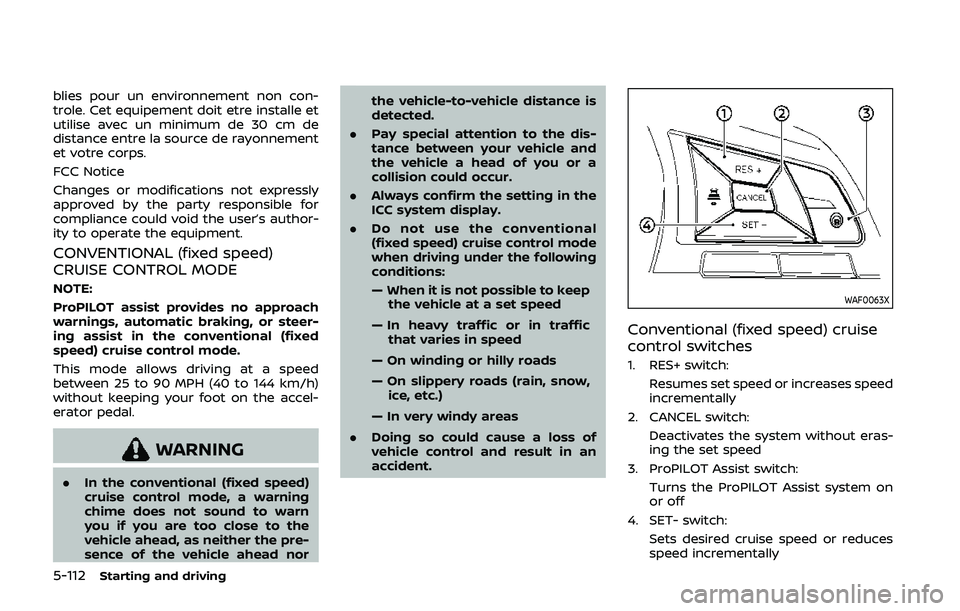
1. RES+ switch:
Resumes set speed or increases speed
incrementally
2. CANCEL switch: Deactivates the system without eras-
ing the set speed
3. ProPILOT Assist switch: Turns the ProPILOT Assist system on
or off
4. SET- switch: Sets desired cruise speed or reduces
speed incrementally
Page 341 of 500
WAF0064X
Conventional (fixed speed) cruise
control mode display and indica-
tors
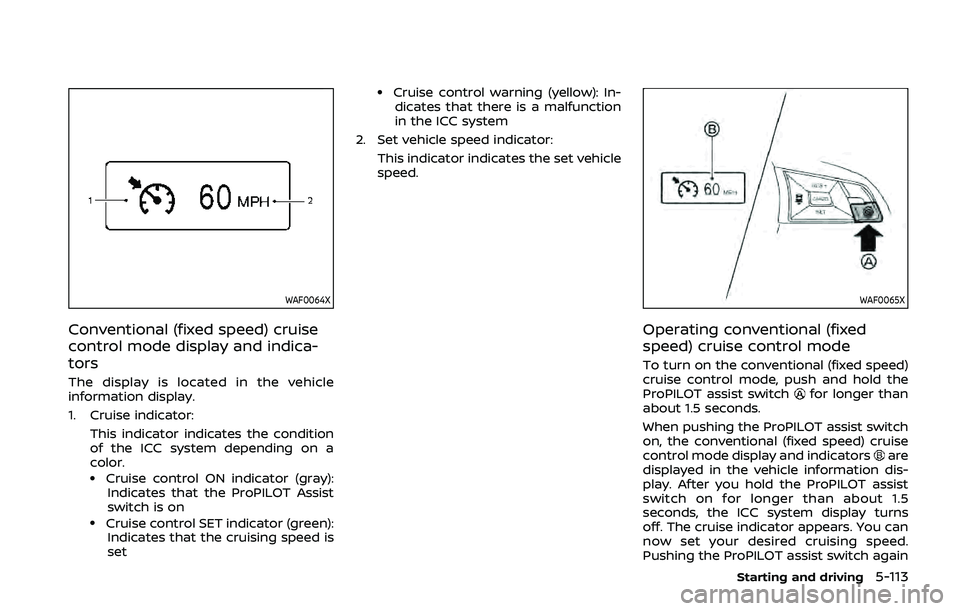
The display is located in the vehicle
information display.
1. Cruise indicator:This indicator indicates the condition
of the ICC system depending on a
color.
.Cruise control ON indicator (gray):Indicates that the ProPILOT Assist
switch is on
.Cruise control SET indicator (green):Indicates that the cruising speed is
set
.Cruise control warning (yellow): In-dicates that there is a malfunction
in the ICC system
2. Set vehicle speed indicator: This indicator indicates the set vehicle
speed.
WAF0065X
Operating conventional (fixed
speed) cruise control mode
To turn on the conventional (fixed speed)
cruise control mode, push and hold the
ProPILOT assist switch
for longer than
about 1.5 seconds.
When pushing the ProPILOT assist switch
on, the conventional (fixed speed) cruise
control mode display and indicators
are
displayed in the vehicle information dis-
play. After you hold the ProPILOT assist
switch on for longer than about 1.5
seconds, the ICC system display turns
off. The cruise indicator appears. You can
now set your desired cruising speed.
Pushing the ProPILOT assist switch again
Starting and driving5-113
Page 344 of 500
5-116Starting and driving
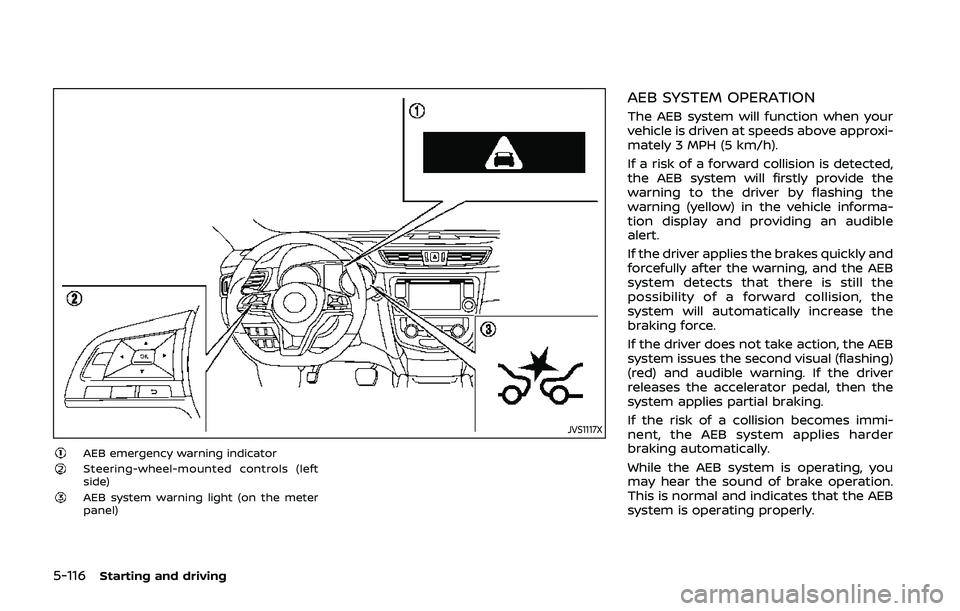
JVS1117X
AEB emergency warning indicatorSteering-wheel-mounted controls (left
side)
AEB system warning light (on the meter
panel)
AEB SYSTEM OPERATION
The AEB system will function when your
vehicle is driven at speeds above approxi-
mately 3 MPH (5 km/h).
If a risk of a forward collision is detected,
the AEB system will firstly provide the
warning to the driver by flashing the
warning (yellow) in the vehicle informa-
tion display and providing an audible
alert.
If the driver applies the brakes quickly and
forcefully after the warning, and the AEB
system detects that there is still the
possibility of a forward collision, the
system will automatically increase the
braking force.
If the driver does not take action, the AEB
system issues the second visual (flashing)
(red) and audible warning. If the driver
releases the accelerator pedal, then the
system applies partial braking.
If the risk of a collision becomes immi-
nent, the AEB system applies harder
braking automatically.
While the AEB system is operating, you
may hear the sound of brake operation.
This is normal and indicates that the AEB
system is operating properly.
Page 352 of 500
5-124Starting and driving
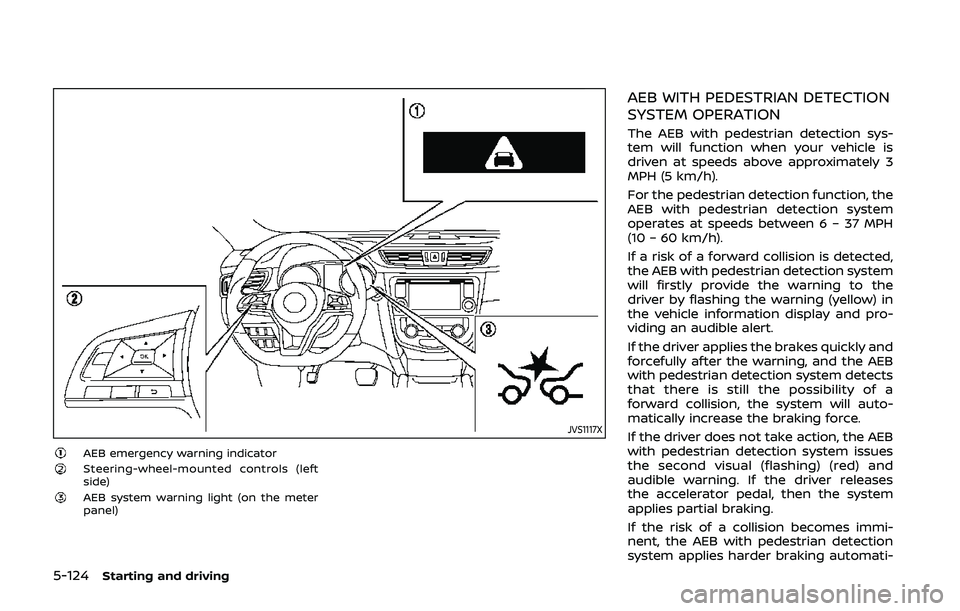
JVS1117X
AEB emergency warning indicatorSteering-wheel-mounted controls (left
side)
AEB system warning light (on the meter
panel)
AEB WITH PEDESTRIAN DETECTION
SYSTEM OPERATION
The AEB with pedestrian detection sys-
tem will function when your vehicle is
driven at speeds above approximately 3
MPH (5 km/h).
For the pedestrian detection function, the
AEB with pedestrian detection system
operates at speeds between 6 – 37 MPH
(10 – 60 km/h).
If a risk of a forward collision is detected,
the AEB with pedestrian detection system
will firstly provide the warning to the
driver by flashing the warning (yellow) in
the vehicle information display and pro-
viding an audible alert.
If the driver applies the brakes quickly and
forcefully after the warning, and the AEB
with pedestrian detection system detects
that there is still the possibility of a
forward collision, the system will auto-
matically increase the braking force.
If the driver does not take action, the AEB
with pedestrian detection system issues
the second visual (flashing) (red) and
audible warning. If the driver releases
the accelerator pedal, then the system
applies partial braking.
If the risk of a collision becomes immi-
nent, the AEB with pedestrian detection
system applies harder braking automati-