wheel NISSAN QASHQAI 2019 Owner´s Manual
[x] Cancel search | Manufacturer: NISSAN, Model Year: 2019, Model line: QASHQAI, Model: NISSAN QASHQAI 2019Pages: 500, PDF Size: 2.38 MB
Page 344 of 500
5-116Starting and driving
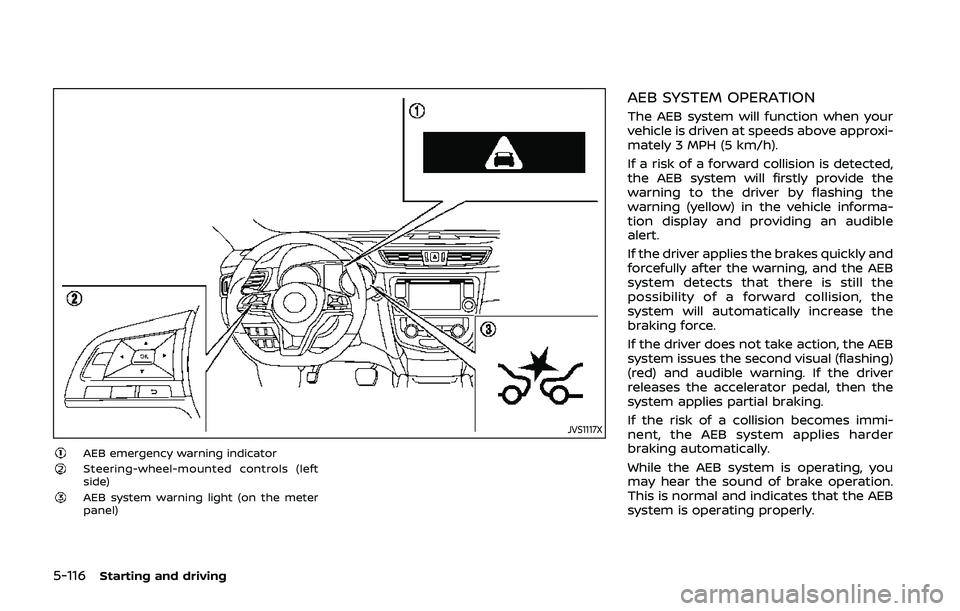
JVS1117X
AEB emergency warning indicatorSteering-wheel-mounted controls (left
side)
AEB system warning light (on the meter
panel)
AEB SYSTEM OPERATION
The AEB system will function when your
vehicle is driven at speeds above approxi-
mately 3 MPH (5 km/h).
If a risk of a forward collision is detected,
the AEB system will firstly provide the
warning to the driver by flashing the
warning (yellow) in the vehicle informa-
tion display and providing an audible
alert.
If the driver applies the brakes quickly and
forcefully after the warning, and the AEB
system detects that there is still the
possibility of a forward collision, the
system will automatically increase the
braking force.
If the driver does not take action, the AEB
system issues the second visual (flashing)
(red) and audible warning. If the driver
releases the accelerator pedal, then the
system applies partial braking.
If the risk of a collision becomes immi-
nent, the AEB system applies harder
braking automatically.
While the AEB system is operating, you
may hear the sound of brake operation.
This is normal and indicates that the AEB
system is operating properly.
Page 345 of 500
NOTE:
The vehicle’s stop lights come on when
braking is performed by the AEB sys-
tem.
Depending on vehicle speed and distance
to the vehicle ahead, as well as driving
and roadway conditions, the system may
help the driver avoid a forward collision or
may help mitigate the consequences of a
collision should one be unavoidable.
If the driver is handling the steering
wheel, accelerating or braking, the AEB
system will function later or will not
function.
The automatic braking will cease under
the following conditions:
.When the steering wheel is turned as
far as necessary to avoid a collision.
. When the accelerator pedal is de-
pressed.
. When there is no longer a vehicle
detected ahead.
If the AEB system has stopped the vehicle,
the vehicle will remain at a standstill for
approximately 2 seconds before the
brakes are released.
Starting and driving5-117
Page 346 of 500
5-118Starting and driving
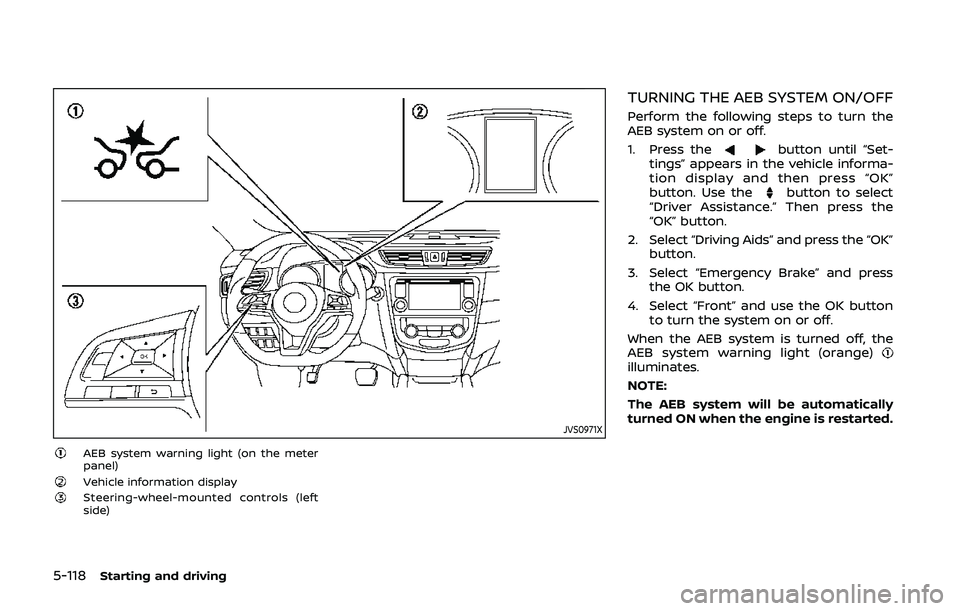
JVS0971X
AEB system warning light (on the meter
panel)
Vehicle information displaySteering-wheel-mounted controls (left
side)
TURNING THE AEB SYSTEM ON/OFF
Perform the following steps to turn the
AEB system on or off.
1. Press the
button until “Set-
tings” appears in the vehicle informa-
tion display and then press “OK”
button. Use the
button to select
“Driver Assistance.” Then press the
“OK” button.
2. Select “Driving Aids” and press the “OK” button.
3. Select “Emergency Brake” and press the OK button.
4. Select “Front” and use the OK button to turn the system on or off.
When the AEB system is turned off, the
AEB system warning light (orange)
illuminates.
NOTE:
The AEB system will be automatically
turned ON when the engine is restarted.
Page 352 of 500
5-124Starting and driving
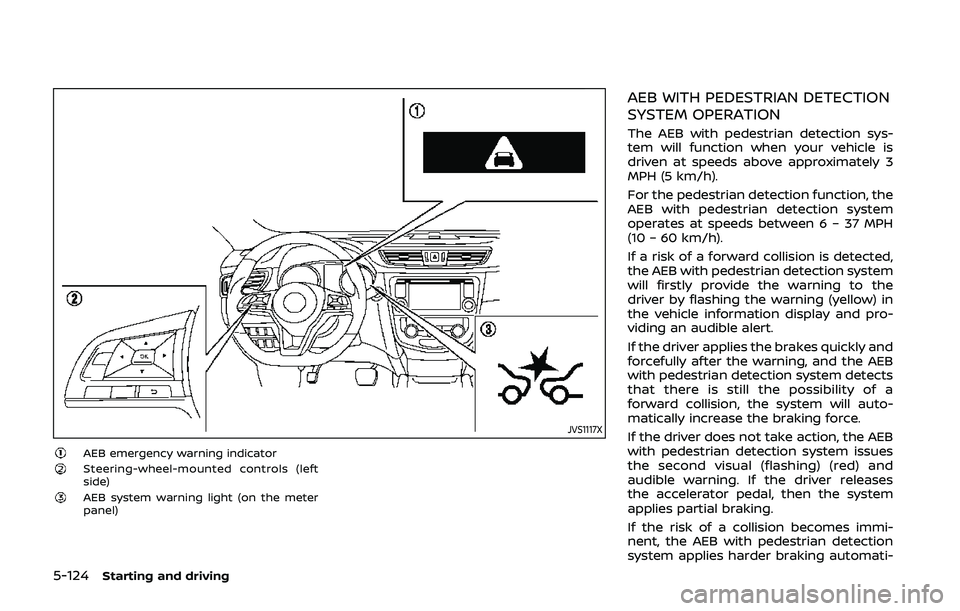
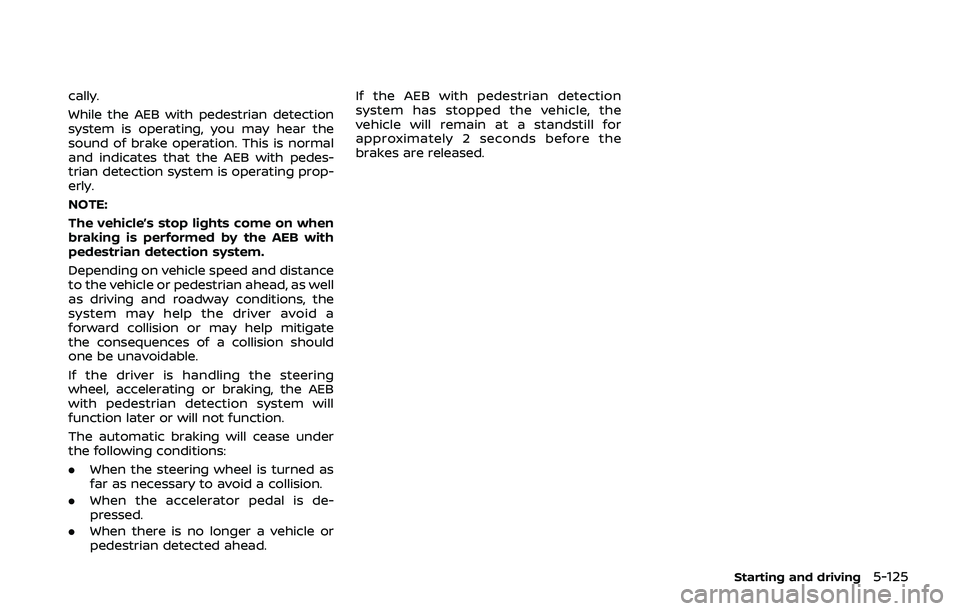
JVS1117X
AEB emergency warning indicatorSteering-wheel-mounted controls (left
side)
AEB system warning light (on the meter
panel)
AEB WITH PEDESTRIAN DETECTION
SYSTEM OPERATION
The AEB with pedestrian detection sys-
tem will function when your vehicle is
driven at speeds above approximately 3
MPH (5 km/h).
For the pedestrian detection function, the
AEB with pedestrian detection system
operates at speeds between 6 – 37 MPH
(10 – 60 km/h).
If a risk of a forward collision is detected,
the AEB with pedestrian detection system
will firstly provide the warning to the
driver by flashing the warning (yellow) in
the vehicle information display and pro-
viding an audible alert.
If the driver applies the brakes quickly and
forcefully after the warning, and the AEB
with pedestrian detection system detects
that there is still the possibility of a
forward collision, the system will auto-
matically increase the braking force.
If the driver does not take action, the AEB
with pedestrian detection system issues
the second visual (flashing) (red) and
audible warning. If the driver releases
the accelerator pedal, then the system
applies partial braking.
If the risk of a collision becomes immi-
nent, the AEB with pedestrian detection
system applies harder braking automati-
Page 353 of 500
cally.
While the AEB with pedestrian detection
system is operating, you may hear the
sound of brake operation. This is normal
and indicates that the AEB with pedes-
trian detection system is operating prop-
erly.
NOTE:
The vehicle’s stop lights come on when
braking is performed by the AEB with
pedestrian detection system.
Depending on vehicle speed and distance
to the vehicle or pedestrian ahead, as well
as driving and roadway conditions, the
system may help the driver avoid a
forward collision or may help mitigate
the consequences of a collision should
one be unavoidable.
If the driver is handling the steering
wheel, accelerating or braking, the AEB
with pedestrian detection system will
function later or will not function.
The automatic braking will cease under
the following conditions:
.When the steering wheel is turned as
far as necessary to avoid a collision.
. When the accelerator pedal is de-
pressed.
. When there is no longer a vehicle or
pedestrian detected ahead. If the AEB with pedestrian detection
system has stopped the vehicle, the
vehicle will remain at a standstill for
approximately 2 seconds before the
brakes are released.
Starting and driving5-125
Page 354 of 500
5-126Starting and driving
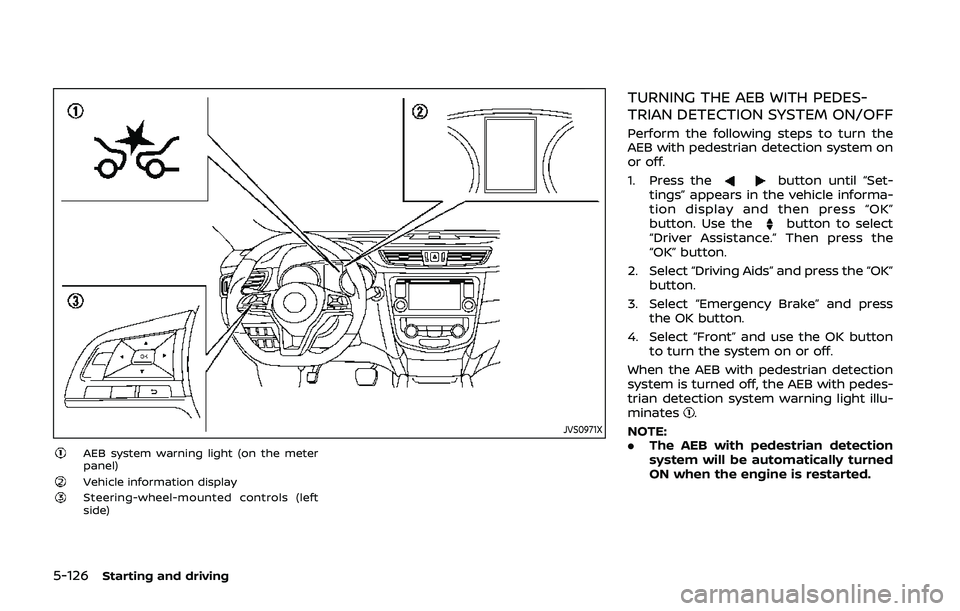
JVS0971X
AEB system warning light (on the meter
panel)
Vehicle information displaySteering-wheel-mounted controls (left
side)
TURNING THE AEB WITH PEDES-
TRIAN DETECTION SYSTEM ON/OFF
Perform the following steps to turn the
AEB with pedestrian detection system on
or off.
1. Press the
button until “Set-
tings” appears in the vehicle informa-
tion display and then press “OK”
button. Use the
button to select
“Driver Assistance.” Then press the
“OK” button.
2. Select “Driving Aids” and press the “OK” button.
3. Select “Emergency Brake” and press the OK button.
4. Select “Front” and use the OK button to turn the system on or off.
When the AEB with pedestrian detection
system is turned off, the AEB with pedes-
trian detection system warning light illu-
minates
.
NOTE:
. The AEB with pedestrian detection
system will be automatically turned
ON when the engine is restarted.
Page 355 of 500
AEB WITH PEDESTRIAN DETECTION
SYSTEM LIMITATIONS
WARNING
Listed below are the system limita-
tions for the AEB with pedestrian
detection system. Failure to operate
the vehicle in accordance with these
system limitations could result in
serious injury or death.
.The AEB with pedestrian detec-
tion system cannot detect all
vehicles or pedestrians under all
conditions.
. The AEB with pedestrian detec-
tion system does not detect the
following objects:
— Small pedestrians (including
small children), animals and
cyclists.
— Pedestrians in wheelchairs or using mobile transport such
as scooters, child-operated
toys, or skateboards.
— Pedestrians who are seated or otherwise not in a full upright
standing or walking position. — Obstacles on the roadway
— Oncoming vehicles
— Crossing vehicles
— Obstacles on the roadside
. The AEB with pedestrian detec-
tion system has some perfor-
mance limitations.
— If a stationary vehicle is in the
vehicle’s path, the AEB with
pedestrian detection system
will not function when the
vehicle is driven at speeds
over approximately 50 MPH
(80 km/h).
— For pedestrian detection, the AEB with pedestrian detection
system will not function when
the vehicle is driven at speeds
over approximately 37 MPH
(60 km/h) or below approxi-
mately 6 MPH (10 km/h).
. The AEB with pedestrian detec-
tion system may not function for
pedestrians in darkness or in
tunnels, even if there is street
lighting in the area.
. For pedestrians, the AEB with
pedestrian detection system will
not issue the first warning. .
The AEB with pedestrian detec-
tion system may not function if
the vehicle ahead is narrow (for
example a motorcycle).
. The AEB with pedestrian detec-
tion system may not function if
speed difference between the
two vehicles is too small.
. The radar sensor may not func-
tion properly or detect a vehicle
ahead in the following conditions:
— Poor visibility (conditions such
as rain, snow, fog, dust
storms, sandstorms, and road
spray from other vehicles)
— Driving on a steep downhill slope or roads with sharp
curves.
— Driving on a bumpy road sur- face, such as an uneven dirt
road.
— If dirt, ice, snow or other ma- terial is covering the radar
sensor area.
— Interference by other radar sources.
. The camera may not function
properly or detect a vehicle
ahead in the following conditions:
Starting and driving5-127
Page 361 of 500
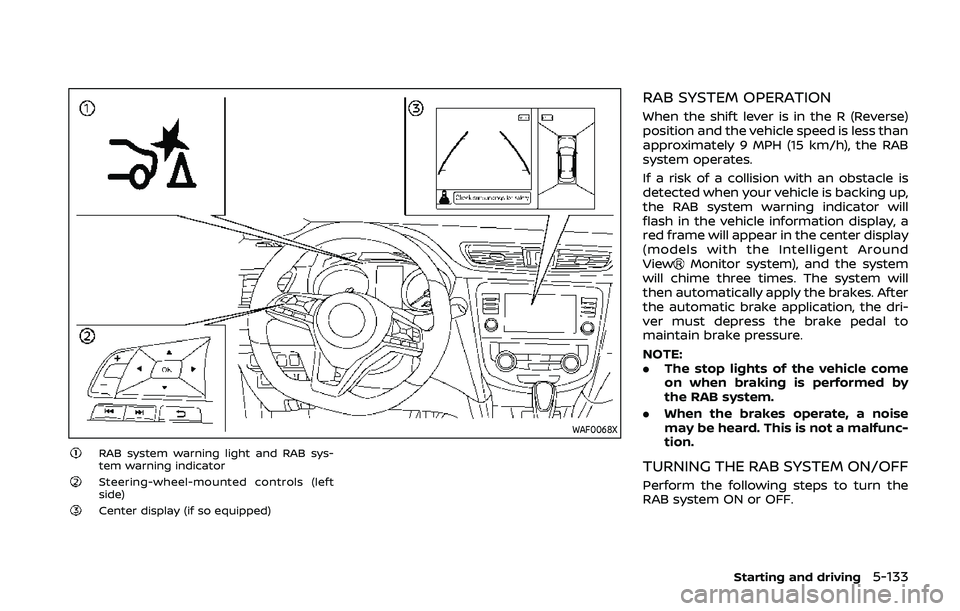
WAF0068X
RAB system warning light and RAB sys-
tem warning indicator
Steering-wheel-mounted controls (left
side)
Center display (if so equipped)
RAB SYSTEM OPERATION
When the shift lever is in the R (Reverse)
position and the vehicle speed is less than
approximately 9 MPH (15 km/h), the RAB
system operates.
If a risk of a collision with an obstacle is
detected when your vehicle is backing up,
the RAB system warning indicator will
flash in the vehicle information display, a
red frame will appear in the center display
(models with the Intelligent Around
View
Monitor system), and the system
will chime three times. The system will
then automatically apply the brakes. After
the automatic brake application, the dri-
ver must depress the brake pedal to
maintain brake pressure.
NOTE:
. The stop lights of the vehicle come
on when braking is performed by
the RAB system.
. When the brakes operate, a noise
may be heard. This is not a malfunc-
tion.
TURNING THE RAB SYSTEM ON/OFF
Perform the following steps to turn the
RAB system ON or OFF.
Starting and driving5-133
Page 364 of 500
5-136Starting and driving
— The vehicle is driven in badweather (rain, fog, snow, etc.).
— The vehicle is driven on a steep hill.
— The vehicle’s posture is chan- ged (e.g., when driving over a
bump).
— The vehicle is driven on a slippery road.
— The vehicle is turned sharply by turning the steering wheel
fully.
— Snow chains are used.
— Wheels or tires other than NISSAN recommended are
used.
— The brakes are cold at low ambient temperatures or im-
mediately after driving has
started.
— The braking force becomes poor due to wet brakes after
driving through a puddle or
washing the vehicle.
. Turn the RAB system off in the
following conditions to prevent
the occurrence of an unexpected
accident resulting from sudden
system operation: — The vehicle is towed.
— The vehicle is carried on a
flatbed truck.
— The vehicle is on the chassis dynamometer.
— The vehicle drives on an un- even road surface.
— Suspension parts other than those designated as genuine
parts are used. (If the vehicle
height or the vehicle body
inclination is changed, the
system may not detect an
obstacle correctly.)
. Excessive noise (e.g., audio sys-
tem volume, an open vehicle win-
dow) will interfere with the chime
sound, and it may not be heard.SYSTEM MALFUNCTION
If the RAB system malfunctions, it will be
turned off automatically, the RAB system
warning light will illuminate, and the
“Malfunction” warning message will ap-
pear in the vehicle information display.
Action to take
If the warning light illuminates, park the
vehicle in a safe location, turn the engine
off, and restart the engine. If the warning
light continues to illuminate, have the
RAB system checked. It is recommended
that you visit a NISSAN dealer for this
service.
NOTE:
If the RAB system cannot be operated
temporarily, the RAB system warning
light blinks.
Page 367 of 500
.Keep your engine tuned up.
. Follow the recommended scheduled
maintenance.
. Keep the tires inflated to the correct
pressure. Low tire pressure increases
tire wear and lowers fuel economy.
. Keep the wheels in correct alignment.
Improper alignment increases tire
wear and lowers fuel economy.
. Use the recommended viscosity en-
gine oil. (See “Engine oil and oil filter
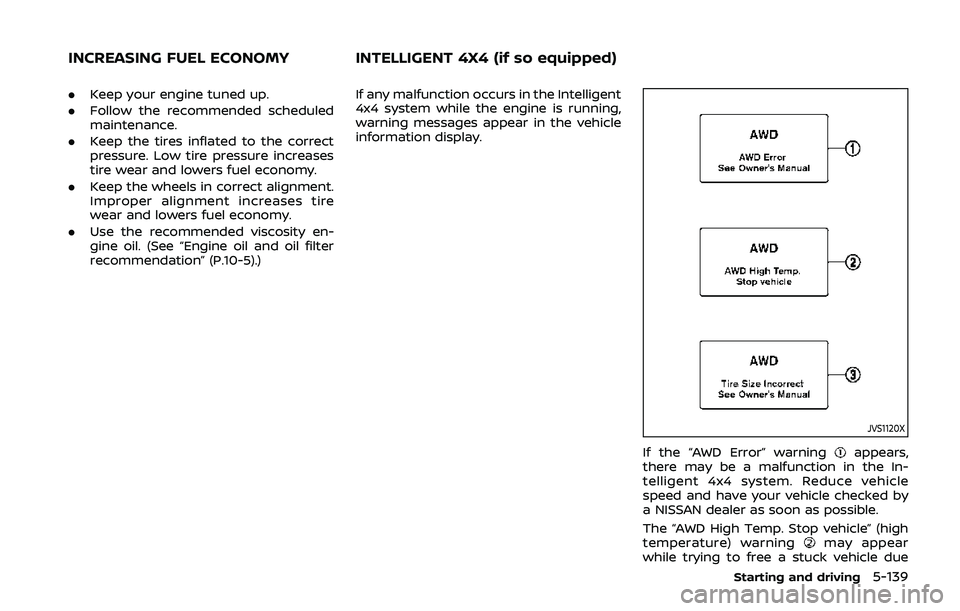
recommendation” (P.10-5).) If any malfunction occurs in the Intelligent
4x4 system while the engine is running,
warning messages appear in the vehicle
information display.
JVS1120X
If the “AWD Error” warningappears,
there may be a malfunction in the In-
telligent 4x4 system. Reduce vehicle
speed and have your vehicle checked by
a NISSAN dealer as soon as possible.
The “AWD High Temp. Stop vehicle” (high
temperature) warning
may appear
while trying to free a stuck vehicle due
Starting and driving5-139
INCREASING FUEL ECONOMY INTELLIGENT 4X4 (if so equipped)