ICC main switch NISSAN QASHQAI 2019 Owner´s Manual
[x] Cancel search | Manufacturer: NISSAN, Model Year: 2019, Model line: QASHQAI, Model: NISSAN QASHQAI 2019Pages: 500, PDF Size: 2.38 MB
Page 98 of 500
2-18Instruments and controls
3) Avoid steep uphill grades.
4) If possible, reduce the amount ofcargo being hauled or towed.
The malfunction indicator light may
stop blinking and remain on.
Have the vehicle inspected. It is re-
commended you visit a NISSAN dealer
for this service. You do not need to
have your vehicle towed to the dealer.
CAUTION
Continued vehicle operation without
having the emission control system
and/or CVT system checked and
repaired as necessary could lead to
poor driveability, reduced fuel econ-
omy, and possible damage to the
emission control system.
Security indicator light
The light blinks when the ignition switch
is in the OFF or LOCK position. This
function indicates the security system
equipped on the vehicle is operational.
If the security system is malfunctioning,
this light will remain on while the ignition
switch is in the ON position. For additional
information, see “Security systems” (P.2-
42).
Turn signal/hazard indicator
lights
The light flashes when the turn signal
switch lever or hazard switch is turned on.
Vehicle Dynamic Control (VDC)
off indicator light
When the ignition switch is in the ON
position, the Vehicle Dynamic Control
(VDC) off indicator light illuminates and
then turns off.
The light comes on when the Vehicle
Dynamic Control (VDC) off switch is
pushed to OFF. This indicates that the
VDC system and traction control system
are not operating.
AUDIBLE REMINDERS
Key reminder chime
Models with Intelligent Key:
A chime sounds if the driver’s door is
opened while the ignition switch is placed
in the OFF position with the Intelligent
Key left in the vehicle.
Make sure the ignition switch is placed in
the LOCK position, and carry it with you
when leaving the vehicle. Models without Intelligent Key:
A chime sounds if the driver’s side door is
opened while the key is left in the ignition
switch and the ignition switch is in the
OFF or LOCK position. Be sure to remove
the key and carry it with you when you
leave the vehicle.
Light reminder chime
The light reminder chime will sound when
the driver side door is opened with the
headlight switch in the
orposi-
tion, and the ignition switch is in the ACC,
OFF or LOCK position.
Turn the light switch off when you leave
the vehicle.
Driving aid chimes (if so equipped)
An audible alert/chime may be heard if
any of the following systems are active:
. Automatic Emergency Braking (AEB)
. Automatic Emergency Braking (AEB)
with Pedestrian Detection
. Blind Spot Warning (BSW)
. Rear Cross Traffic Alert (RCTA)
. Intelligent Cruise Control (ICC)
. Intelligent Lane Intervention (I-LI)
. Lane Departure Warning (LDW)
. ProPILOT Assist
Page 230 of 500
LDW system limitations .................................................. 5-38
System temporarily unavailable ............................. 5-39
System malfunction .......................................................... 5-39
System maintenance ....................................................... 5-39
Intelligent Lane Intervention (I-LI) (if
so equipped) ........................................................................\
.......... 5-40 I-LI system operation ....................................................... 5-41
How to enable/disable the I-LI system ............. 5-42
I-LI system limitations ..................................................... 5-43
System temporarily unavailable ............................. 5-44
System malfunction .......................................................... 5-45
System maintenance ....................................................... 5-45
Blind Spot Warning (BSW) ................................................... 5-46 BSW system operation ................................................... 5-48
How to enable/disable the BSW system .......... 5-49
BSW system limitations .................................................. 5-50
BSW driving situations .................................................... 5-51
System temporarily unavailable ............................. 5-54
System malfunction .......................................................... 5-55
System maintenance ....................................................... 5-55
Rear Cross Traffic Alert (RCTA) ....................................... 5-56
RCTA system operation ................................................. 5-57
How to enable/disable the RCTA system ....... 5-59
RCTA system limitations ............................................... 5-60
System temporarily unavailable ............................. 5-63
System malfunction .......................................................... 5-63
System maintenance ....................................................... 5-63
Cruise control (if so equipped) ....................................... 5-64 Precautions on cruise control .................................. 5-65 Cruise control operations .......................................... 5-65
Intelligent Cruise Control (ICC) (models without
ProPILOT assist) (if so equipped) .................................. 5-66 How to select the cruise control mode ......... 5-68
Vehicle-to-vehicle distance
control mode ....................................................................... 5-68
Conventional (fixed speed) cruise
control mode ....................................................................... 5-82
ProPILOT assist (if so equipped) ................................... 5-86 ProPILOT assist system operation ..................... 5-88
ProPILOT assist switches ........................................... 5-89
ProPILOT assist system display
and indicators ..................................................................... 5-90
Turning the conventional (fixed speed)
cruise control mode ON ............................................. 5-91
Operating ProPILOT assist ........................................ 5-91
How to enable/disable the
steering assist ..................................................................... 5-95
How to cancel the ProPILOT
assist system ....................................................................... 5-97
Intelligent Cruise Control (ICC)
(models with ProPILOT assist) ............................... 5-97
Steering assist ................................................................ 5-106
Conventional (fixed speed) cruise
control mode ................................................................... 5-112
Automatic Emergency Braking (AEB) (if
so equipped) ........................................................................\
..... 5-115
AEB system operation .............................................. 5-116
Turning the AEB system ON/OFF ................... 5-118
AEB system limitations ............................................ 5-119
Page 294 of 500
5-66Starting and driving
.Quickly push and release the SET/-
switch. This will reduce the vehicle
speed by about 1 MPH (1.6 km/h).
Resetting to faster speed:
Use any one of the following methods to
reset to a faster speed.
. Depress the accelerator pedal. When
the vehicle reaches the desired speed,
push and release the SET/- switch.
. Push and hold the RES/+switch. When
the vehicle reaches the desired speed,
release the RES/+ switch.
. Quickly push and release the RES/+
switch. This will increase the vehicle
speed by about 1 MPH (1.6 km/h).
Resuming at preset speed:
Push and release the RES/+ switch.
The vehicle will resume the last set
cruising speed when the vehicle speed is
over 25 MPH (40 km/h).
Cancelling cruising speed
Use any one of the following methods to
cancel the set speed.
. Push the CANCEL switch.
. Tap the foot brake pedal.
. Push the Cruise ON/OFF switch. The
CRUISE indicator will turn off.
WARNING
Failure to follow the warnings and
instructions for proper use of the ICC
system could result in serious injury
or death.
.ICC is not a collision avoidance or
warning device. For highway use
only and it is not intended for
congested areas or city driving.
Failure to apply the brakes could
result in an accident.
. The ICC system is only an aid to
assist the driver. It is the driver’s
responsibility to stay alert, drive
safely, and be in control of the
vehicle at all times.
. Always observe posted speed
limits and do not set the speed
over them.
. Always drive carefully and atten-
tively when using either cruise
control mode. Read and under-
stand the Owner’s Manual thor-
oughly before using the cruise
control. To avoid serious injury
or death, do not rely on the
system to prevent accidents or
to control the vehicle’s speed in
emergency situations. Do not use cruise control except in appropri-
ate road and traffic conditions.
. In the conventional (fixed speed)
cruise control mode, a warning
chime will not sound to warn you
if you are too close to the vehicle
ahead. Pay special attention to
the distance between your vehi-
cle and the vehicle ahead of you
or a collision could occur.
NOTE:
For vehicles equipped with ProPILOT
assist, refer to “ProPILOT assist” (P.5-
86).
The ICC system maintains a selected
distance from the vehicle in front of you
within the speed range of 0 to 90 MPH (0
to 144 km/h) up to the set speed.
The set speed can be selected by the
driver between 20 to 90 MPH (32 to 144
km/h).
The vehicle travels at a set speed when
the road ahead is clear.
The ICC system can be set to one of two
cruise control modes.
. Vehicle-to-vehicle distance control
mode:
For maintaining a selected distance
between your vehicle and the vehicle
INTELLIGENT CRUISE CONTROL
(ICC) (models without ProPILOT
assist) (if so equipped)
Page 296 of 500
5-68Starting and driving
Always confirm the setting in the ICC
system display.
For the vehicle-to-vehicle distance con-
trol mode, see “Vehicle-to-vehicle dis-
tance control mode” (P.5-68).
For the conventional (fixed speed) cruise
control mode, see “Conventional (fixed
speed) cruise control mode” (P.5-82).
WAF0145X
HOW TO SELECT THE CRUISE CON-
TROL MODE
Selecting the vehicle-to-vehicle
distance control mode
To choose the vehicle-to-vehicle distance
control mode, quickly push and release
the Cruise ON/OFF switch.
Selecting the conventional (fixed
speed) cruise control mode
To choose the conventional (fixed speed)
cruise control mode, push and hold the
Cruise ON/OFF switchfor longer than
approximately 1.5 seconds. See “Conven-
tional (fixed speed) cruise control mode” (P.5-82).
VEHICLE-TO-VEHICLE DISTANCE
CONTROL MODE
In the vehicle-to-vehicle distance control
mode, the ICC system automatically
maintains a selected distance from the
vehicle traveling in front of you according
to that vehicle’s speed (up to the set
speed), or at the set speed when the road
ahead is clear.
Page 298 of 500
5-70Starting and driving
SSD0254
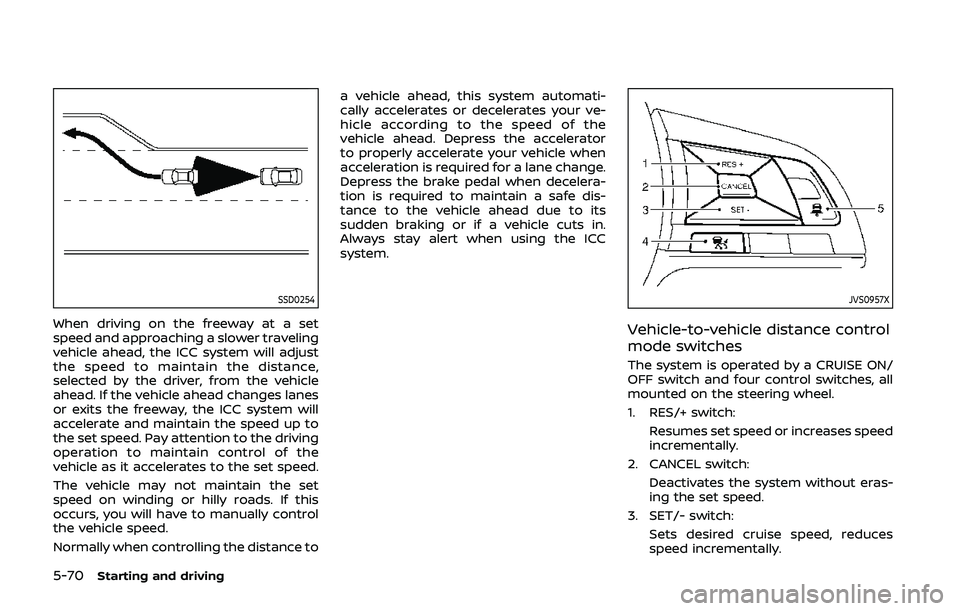
When driving on the freeway at a set
speed and approaching a slower traveling
vehicle ahead, the ICC system will adjust
the speed to maintain the distance,
selected by the driver, from the vehicle
ahead. If the vehicle ahead changes lanes
or exits the freeway, the ICC system will
accelerate and maintain the speed up to
the set speed. Pay attention to the driving
operation to maintain control of the
vehicle as it accelerates to the set speed.
The vehicle may not maintain the set
speed on winding or hilly roads. If this
occurs, you will have to manually control
the vehicle speed.
Normally when controlling the distance toa vehicle ahead, this system automati-
cally accelerates or decelerates your ve-
hicle according to the speed of the
vehicle ahead. Depress the accelerator
to properly accelerate your vehicle when
acceleration is required for a lane change.
Depress the brake pedal when decelera-
tion is required to maintain a safe dis-
tance to the vehicle ahead due to its
sudden braking or if a vehicle cuts in.
Always stay alert when using the ICC
system.
JVS0957X
Vehicle-to-vehicle distance control
mode switches
The system is operated by a CRUISE ON/
OFF switch and four control switches, all
mounted on the steering wheel.
1. RES/+ switch:
Resumes set speed or increases speed
incrementally.
2. CANCEL switch: Deactivates the system without eras-
ing the set speed.
3. SET/- switch:
Sets desired cruise speed, reduces
speed incrementally.
Page 300 of 500
5-72Starting and driving
WAF0147X
Operating vehicle-to-vehicle dis-
tance control mode
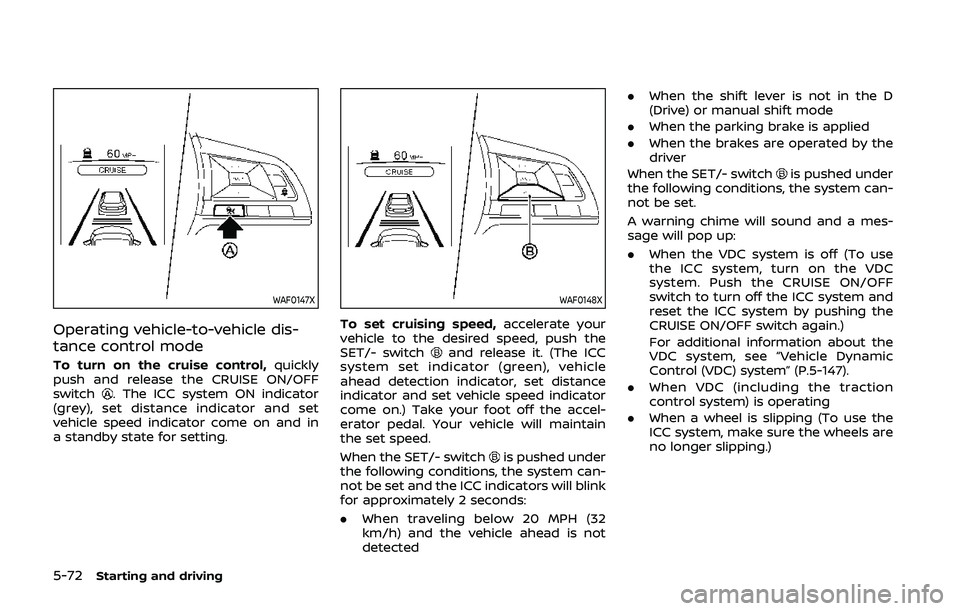
To turn on the cruise control,quickly
push and release the CRUISE ON/OFF
switch
. The ICC system ON indicator
(grey), set distance indicator and set
vehicle speed indicator come on and in
a standby state for setting.
WAF0148X
To set cruising speed, accelerate your
vehicle to the desired speed, push the
SET/- switch
and release it. (The ICC
system set indicator (green), vehicle
ahead detection indicator, set distance
indicator and set vehicle speed indicator
come on.) Take your foot off the accel-
erator pedal. Your vehicle will maintain
the set speed.
When the SET/- switch
is pushed under
the following conditions, the system can-
not be set and the ICC indicators will blink
for approximately 2 seconds:
. When traveling below 20 MPH (32
km/h) and the vehicle ahead is not
detected .
When the shift lever is not in the D
(Drive) or manual shift mode
. When the parking brake is applied
. When the brakes are operated by the
driver
When the SET/- switch
is pushed under
the following conditions, the system can-
not be set.
A warning chime will sound and a mes-
sage will pop up:
. When the VDC system is off (To use
the ICC system, turn on the VDC
system. Push the CRUISE ON/OFF
switch to turn off the ICC system and
reset the ICC system by pushing the
CRUISE ON/OFF switch again.)
For additional information about the
VDC system, see “Vehicle Dynamic
Control (VDC) system” (P.5-147).
. When VDC (including the traction
control system) is operating
. When a wheel is slipping (To use the
ICC system, make sure the wheels are
no longer slipping.)
Page 312 of 500
5-84Starting and driving
will turn the system completely off.
When the ignition switch is placed in the
OFF position, the system is also automa-
tically turned off.
To use the ICC system again, quickly push
and release the CRUISE ON/OFF switch
(vehicle-to-vehicle distance control
mode) or push and hold it (conventional
cruise control mode) again to turn it on.
CAUTION
To avoid accidentally engaging
cruise control, make sure to turn
the CRUISE ON/OFF switch off when
not using the ICC system.WAF0153X
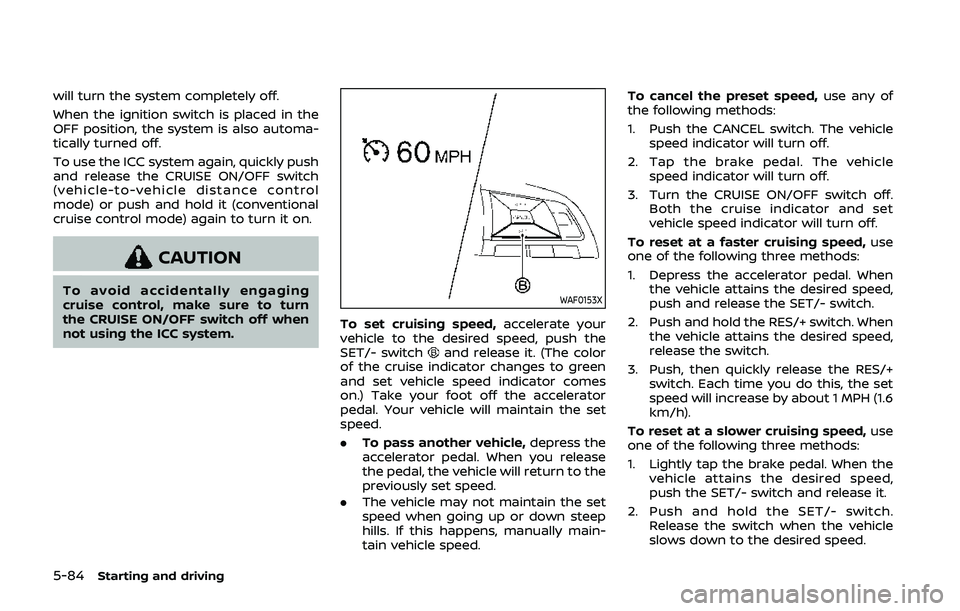
To set cruising speed,accelerate your
vehicle to the desired speed, push the
SET/- switch
and release it. (The color
of the cruise indicator changes to green
and set vehicle speed indicator comes
on.) Take your foot off the accelerator
pedal. Your vehicle will maintain the set
speed.
. To pass another vehicle, depress the
accelerator pedal. When you release
the pedal, the vehicle will return to the
previously set speed.
. The vehicle may not maintain the set
speed when going up or down steep
hills. If this happens, manually main-
tain vehicle speed. To cancel the preset speed,
use any of
the following methods:
1. Push the CANCEL switch. The vehicle speed indicator will turn off.
2. Tap the brake pedal. The vehicle speed indicator will turn off.
3. Turn the CRUISE ON/OFF switch off. Both the cruise indicator and set
vehicle speed indicator will turn off.
To reset at a faster cruising speed, use
one of the following three methods:
1. Depress the accelerator pedal. When the vehicle attains the desired speed,
push and release the SET/- switch.
2. Push and hold the RES/+ switch. When the vehicle attains the desired speed,
release the switch.
3. Push, then quickly release the RES/+ switch. Each time you do this, the set
speed will increase by about 1 MPH (1.6
km/h).
To reset at a slower cruising speed, use
one of the following three methods:
1. Lightly tap the brake pedal. When the
vehicle attains the desired speed,
push the SET/- switch and release it.
2. Push and hold the SET/- switch. Release the switch when the vehicle
slows down to the desired speed.
Page 316 of 500
5-88Starting and driving
WAF0046X
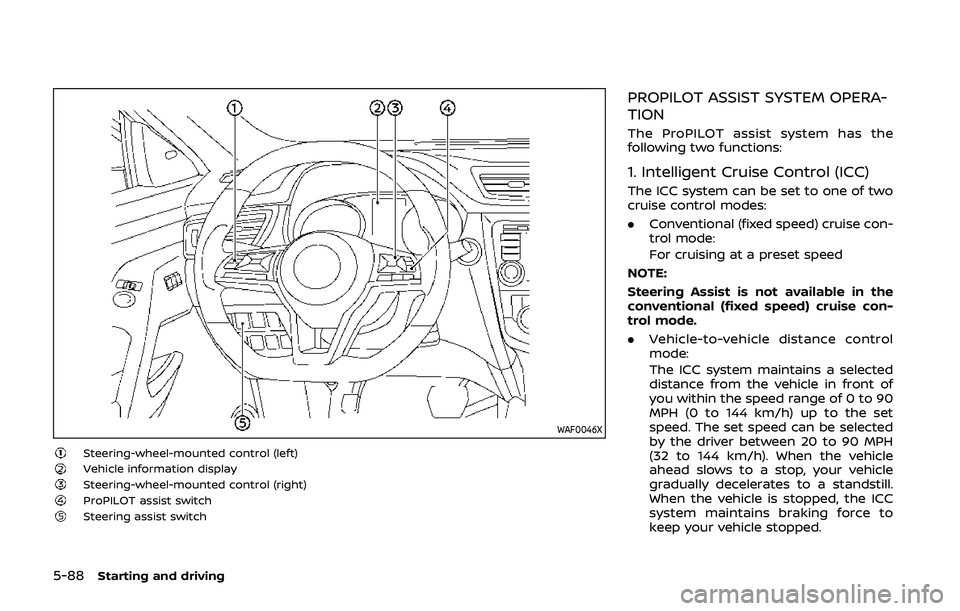
Steering-wheel-mounted control (left)Vehicle information displaySteering-wheel-mounted control (right)ProPILOT assist switchSteering assist switch
PROPILOT ASSIST SYSTEM OPERA-
TION
The ProPILOT assist system has the
following two functions:
1. Intelligent Cruise Control (ICC)
The ICC system can be set to one of two
cruise control modes:
.Conventional (fixed speed) cruise con-
trol mode:
For cruising at a preset speed
NOTE:
Steering Assist is not available in the
conventional (fixed speed) cruise con-
trol mode.
. Vehicle-to-vehicle distance control
mode:
The ICC system maintains a selected
distance from the vehicle in front of
you within the speed range of 0 to 90
MPH (0 to 144 km/h) up to the set
speed. The set speed can be selected
by the driver between 20 to 90 MPH
(32 to 144 km/h). When the vehicle
ahead slows to a stop, your vehicle
gradually decelerates to a standstill.
When the vehicle is stopped, the ICC
system maintains braking force to
keep your vehicle stopped.
Page 321 of 500
WAF0052X
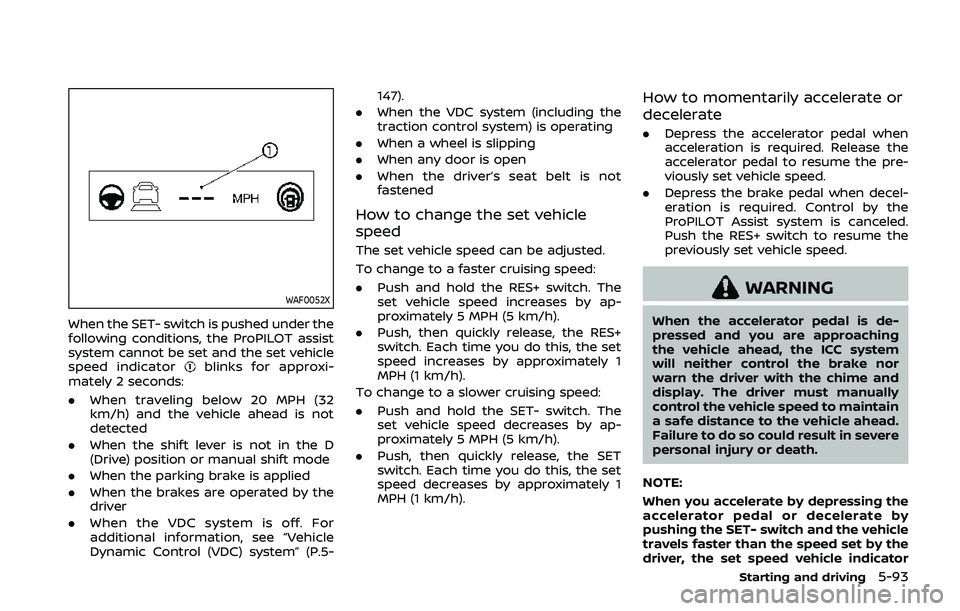
When the SET- switch is pushed under the
following conditions, the ProPILOT assist
system cannot be set and the set vehicle
speed indicator
blinks for approxi-
mately 2 seconds:
. When traveling below 20 MPH (32
km/h) and the vehicle ahead is not
detected
. When the shift lever is not in the D
(Drive) position or manual shift mode
. When the parking brake is applied
. When the brakes are operated by the
driver
. When the VDC system is off. For
additional information, see “Vehicle
Dynamic Control (VDC) system” (P.5- 147).
. When the VDC system (including the
traction control system) is operating
. When a wheel is slipping
. When any door is open
. When the driver’s seat belt is not
fastened
How to change the set vehicle
speed
The set vehicle speed can be adjusted.
To change to a faster cruising speed:
.Push and hold the RES+ switch. The
set vehicle speed increases by ap-
proximately 5 MPH (5 km/h).
. Push, then quickly release, the RES+
switch. Each time you do this, the set
speed increases by approximately 1
MPH (1 km/h).
To change to a slower cruising speed:
. Push and hold the SET- switch. The
set vehicle speed decreases by ap-
proximately 5 MPH (5 km/h).
. Push, then quickly release, the SET
switch. Each time you do this, the set
speed decreases by approximately 1
MPH (1 km/h).
How to momentarily accelerate or
decelerate
.Depress the accelerator pedal when
acceleration is required. Release the
accelerator pedal to resume the pre-
viously set vehicle speed.
. Depress the brake pedal when decel-
eration is required. Control by the
ProPILOT Assist system is canceled.
Push the RES+ switch to resume the
previously set vehicle speed.
WARNING
When the accelerator pedal is de-
pressed and you are approaching
the vehicle ahead, the ICC system
will neither control the brake nor
warn the driver with the chime and
display. The driver must manually
control the vehicle speed to maintain
a safe distance to the vehicle ahead.
Failure to do so could result in severe
personal injury or death.
NOTE:
When you accelerate by depressing the
accelerator pedal or decelerate by
pushing the SET- switch and the vehicle
travels faster than the speed set by the
driver, the set speed vehicle indicator
Starting and driving5-93
Page 325 of 500
HOW TO CANCEL THE PROPILOT
ASSIST SYSTEM
To cancel the ProPILOT assist system, use
one of the following methods:
.Push the CANCEL switch.
. Tap the brake pedal (except at a
standstill).
. Push the ProPILOT assist switch to
turn the system off. The ProPILOT
assist status indicator will turn off.
When the ProPILOT assist system is
canceled while the vehicle is stopped,
the electronic parking brake is automati-
cally activated.
WARNING
To prevent the vehicle from moving
or rolling unexpectedly, which could
result in serious personal injury or
property damage, before exiting the
vehicle make sure to push the Pro-
PILOT assist switch to turn the sys-
tem off, place the shift lever in the P
(Park) position, and turn the engine
off.
INTELLIGENT CRUISE CONTROL
(ICC) (models with ProPILOT assist)
WARNING
Failure to follow the warnings and
instructions for proper use of the ICC
system could result in serious injury
or death.
. The ICC system is only an aid to
assist the driver and is not a
collision warning or avoidance
device. It is recommended for
highway use only and it is not
intended for city driving. It is the
driver’s responsibility to stay
alert, drive safely, and be in con-
trol of the vehicle at all times.
. There are limitations to the ICC
system capability. The ICC system
does not function in all driving,
traffic, weather, and road condi-
tions. It is the driver’s responsi-
bility to stay alert, drive safely,
keep the vehicle in the traveling
lane, and be in control of the
vehicle at all times.
. Always observe posted speed
limits and do not set the speed
over them. .
The ICC system does not react to
stationary and slow moving vehi-
cles.
. Always drive carefully and atten-
tively when using the ICC system.
Read and understand the Owner’s
Manual thoroughly before using
the ICC system. To avoid serious
injury or death, do not rely on the
system to prevent accidents or to
control the vehicle’s speed in
emergency situations. Do not
use the ICC system except in
appropriate road and traffic con-
ditions.
ICC system operation
The ICC system is designed to maintain a
selected distance from the vehicle in front
of you and can reduce the speed to
match a slower vehicle ahead. The sys-
tem decelerates the vehicle as necessary
and if the vehicle ahead comes to a stop,
the vehicle decelerates to a standstill.
However, the ICC system can only apply
up to 40% of the vehicle’s total braking
power. This system should only be used
when traffic conditions allow vehicle
speeds to remain fairly constant or when
vehicle speeds change gradually. If a
vehicle moves into the traveling lane
Starting and driving5-97