intelligent 4x4 LOCK switch NISSAN QASHQAI 2019 Owner´s Manual
[x] Cancel search | Manufacturer: NISSAN, Model Year: 2019, Model line: QASHQAI, Model: NISSAN QASHQAI 2019Pages: 500, PDF Size: 2.38 MB
Page 14 of 500
0-6Illustrated table of contents
WAA0056X
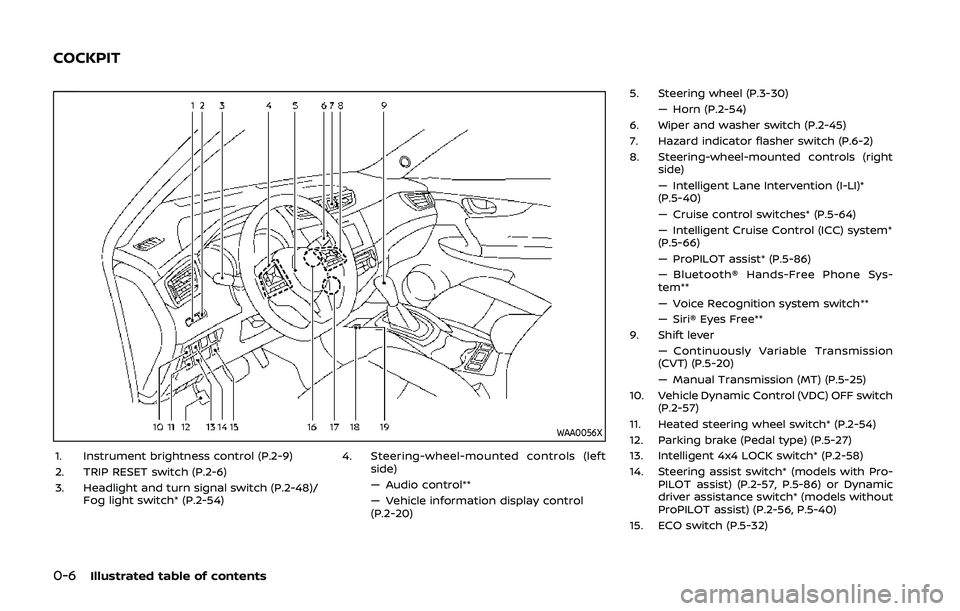
1. Instrument brightness control (P.2-9)
2. TRIP RESET switch (P.2-6)
3. Headlight and turn signal switch (P.2-48)/Fog light switch* (P.2-54) 4. Steering-wheel-mounted controls (left
side)
— Audio control**
— Vehicle information display control
(P.2-20) 5. Steering wheel (P.3-30)
— Horn (P.2-54)
6. Wiper and washer switch (P.2-45)
7. Hazard indicator flasher switch (P.6-2)
8. Steering-wheel-mounted controls (right side)
— Intelligent Lane Intervention (I-LI)*
(P.5-40)
— Cruise control switches* (P.5-64)
— Intelligent Cruise Control (ICC) system*
(P.5-66)
— ProPILOT assist* (P.5-86)
— Bluetooth® Hands-Free Phone Sys-
tem**
— Voice Recognition system switch**
— Siri® Eyes Free**
9. Shift lever
— Continuously Variable Transmission
(CVT) (P.5-20)
— Manual Transmission (MT) (P.5-25)
10. Vehicle Dynamic Control (VDC) OFF switch (P.2-57)
11. Heated steering wheel switch* (P.2-54)
12. Parking brake (Pedal type) (P.5-27)
13. Intelligent 4x4 LOCK switch* (P.2-58)
14. Steering assist switch* (models with Pro- PILOT assist) (P.2-57, P.5-86) or Dynamic
driver assistance switch* (models without
ProPILOT assist) (P.2-56, P.5-40)
15. ECO switch (P.5-32)
COCKPIT
Page 81 of 500

2 Instruments and controls
Cockpit ........................................................................\
.......................... 2-3
Instrument panel ........................................................................\
.. 2-4
Meters and gauges ..................................................................... 2-5Speedometer and odometer ........................................ 2-6
Tachometer ........................................................................\
........ 2-7
Engine coolant temperature gauge ....................... 2-7
Fuel gauge ........................................................................\
........... 2-8
Instrument brightness control .................................... 2-9
Continuously Variable Transmission (CVT)
position indicator (if so equipped) ........................... 2-9
Warning lights, indicator lights and
audible reminders ..................................................................... 2-10 Checking lights ..................................................................... 2-11
Warning lights ........................................................................\
2-11
Indicator lights ...................................................................... 2-16
Audible reminders .............................................................. 2-18
Vehicle information display ............................................... 2-19 How to use the vehicle
information display ........................................................... 2-20
Startup display ...................................................................... 2-20
Settings ........................................................................\
............... 2-21
Vehicle information display warnings
and indicators ........................................................................\
2-31
Trip computer ........................................................................\
2-39
Clock and outside air temperature ...................... 2-41 Security systems ....................................................................... 2-42
Vehicle Security System .............................................. 2-42
NISSAN Vehicle Immobilizer System ................. 2-43
Wiper and washer switch ................................................... 2-45 Windshield wiper and washer operation ...... 2-45
Rear window wiper and washer switch ................. 2-46
Rear window and outside mirror
defroster switch ........................................................................\
. 2-47
Headlight and turn signal switch ................................ 2-48 Headlight switch ............................................................... 2-48
Turn signal switch ........................................................... 2-53
Fog light switch (if so equipped) ......................... 2-54
Horn ........................................................................\
............................. 2-54
Heated steering wheel (if so equipped) .................. 2-54
Heated seats (if so equipped) ......................................... 2-55
Dynamic driver assistance switch (models
without ProPILOT assist) (if so equipped) ............. 2-56
Steering assist switch (models with ProPILOT
assist) (if so equipped) .......................................................... 2-57
Vehicle Dynamic Control (VDC) off switch ........... 2-57
Intelligent 4x4 LOCK switch (if so equipped) ...... 2-58
Rear door alert ........................................................................\
.... 2-58
ECO mode switch ..................................................................... 2-59
Power outlet ........................................................................\
......... 2-60 USB (Universal Serial Bus)
charging connector ........................................................ 2-61
Page 83 of 500
WAA0056X
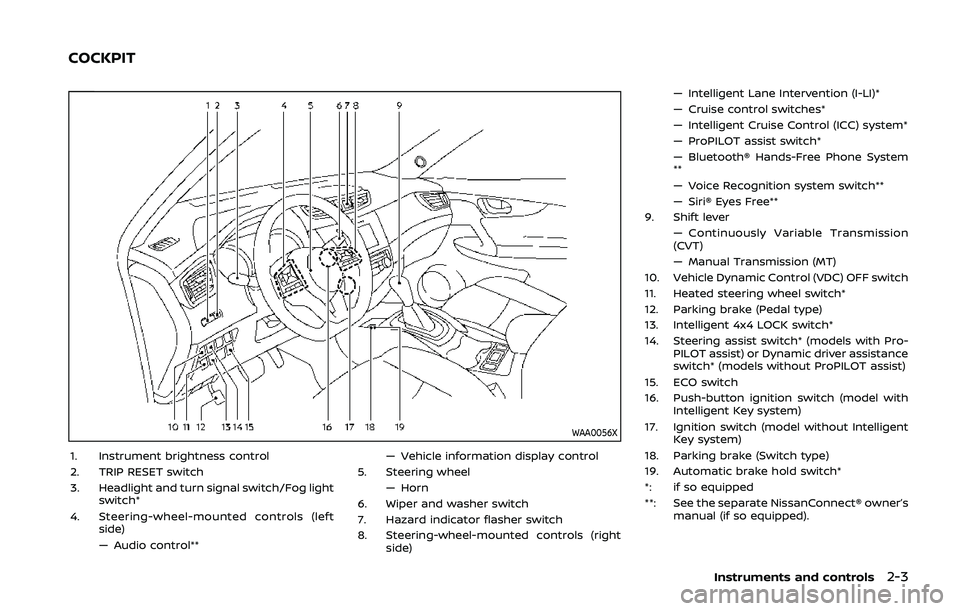
1. Instrument brightness control
2. TRIP RESET switch
3. Headlight and turn signal switch/Fog lightswitch*
4. Steering-wheel-mounted controls (left side)
— Audio control** — Vehicle information display control
5. Steering wheel — Horn
6. Wiper and washer switch
7. Hazard indicator flasher switch
8. Steering-wheel-mounted controls (right side) — Intelligent Lane Intervention (I-LI)*
— Cruise control switches*
— Intelligent Cruise Control (ICC) system*
— ProPILOT assist switch*
— Bluetooth® Hands-Free Phone System
**
— Voice Recognition system switch**
— Siri® Eyes Free**
9. Shift lever — Continuously Variable Transmission
(CVT)
— Manual Transmission (MT)
10. Vehicle Dynamic Control (VDC) OFF switch
11. Heated steering wheel switch*
12. Parking brake (Pedal type)
13. Intelligent 4x4 LOCK switch*
14. Steering assist switch* (models with Pro- PILOT assist) or Dynamic driver assistance
switch* (models without ProPILOT assist)
15. ECO switch
16. Push-button ignition switch (model with Intelligent Key system)
17. Ignition switch (model without Intelligent Key system)
18. Parking brake (Switch type)
19. Automatic brake hold switch*
*: if so equipped
**: See the separate NissanConnect® owner’s manual (if so equipped).
Instruments and controls2-3
COCKPIT
Page 96 of 500
2-16Instruments and controls
Vehicle Dynamic Control (VDC)
warning light
When the ignition switch is in the ON
position, the Vehicle Dynamic Control
(VDC) warning light illuminates and then
turns off.
The light will blink when the Vehicle
Dynamic Control (VDC) system or the
traction control system is operating, thus
alerting the driver that the vehicle is
nearing its traction limits. The road sur-
face may be slippery.
If the VDC warning light illuminates while
the VDC system is on, this light alerts the
driver to the fact that the VDC system’s
fail-safe mode is operating, for example
the VDC system may not be functioning
properly. Have the system checked. It is
recommended you visit a NISSAN dealer
for this service. If a malfunction occurs in
the system, the VDC system function will
be canceled but the vehicle is still drive-
able. For additional information, see “Ve-
hicle Dynamic Control (VDC) system” (P.5-
147) of this manual.
INDICATOR LIGHTS
All-Wheel Drive (AWD) LOCK
indicator light (if so equipped)
When the ignition switch is in the ON
position, the All-Wheel Drive (AWD) LOCK
indicator light illuminates and then turns
off.
When selecting LOCK mode while the
engine is running, the LOCK indicator
light illuminates. (See “Intelligent 4x4”
(P.5-139).)
CAUTION
Do not drive on dry hard surface
roads in the LOCK mode.
Automatic brake hold indica-
tor light (white) (if so equipped)
The automatic brake hold indicator light
(white) illuminates when the automatic
brake hold system is on standby. (See
“Automatic brake hold” (P.5-29).)
Automatic brake hold indica-
tor light (green) (if so equipped)
The automatic brake hold indicator light
(green) illuminates while the automatic
brake hold system is operating. (See
“Automatic brake hold” (P.5-29).)
orElectronic parking
brake indicator light (if so
equipped)
The electronic parking brake indicator
light indicates that the electronic parking
brake system is operating.
When the ignition switch is placed in the
ON position, the electronic parking brake
indicator light illuminates. When the en-
gine is started and the parking brake is
released, the warning light turns off.
If the parking brake is not fully released,
the electronic parking brake indicator
light remains on. Be sure that the electro-
nic parking brake indicator light has
turned off before driving. (See “Parking
brake” (P.5-27).)
If the electronic parking brake indicator
light illuminates or flashes while the
electronic parking brake warning light
(yellow) illuminates, it may indicate
that the electronic parking brake system
is not functioning properly. Have the
Page 113 of 500
17. AWD High Temp. Stop vehicle
warning (if so equipped)
This warning may appear while trying to
free a stuck vehicle due to increased oil
temperature. The driving mode may
change to Two-Wheel Drive (2WD). If this
warning is displayed, stop the vehicle with
the engine idling, as soon as it is safe to
do so. Then if the warning turns off, you
can continue driving. See “Intelligent 4x4”
(P.5-139).
18. Tire Size Incorrect: See Owner’s
Manual warning (if so equipped)
This warning may appear if there is a
large difference between the diameters of
the front and rear wheels and tires. Pull
off the road in a safe area, with the engine
idling. Check that all the tire sizes are the
same, that the tire pressure is correct and
that the tires are not excessively worn.
See “Intelligent 4x4” (P.5-139).
19. Battery Voltage Low Charge
Battery warning
This warning appears when the battery
voltage is low and the battery needs to be
charged.
20. Shipping Mode On Push Sto-
rage Fuse warning (if so equipped)
This warning may appear if the extended
storage fuse switch is not pushed in
(switched on). When this warning ap-
pears, push in (switch on) the extended
storage fuse switch to turn off the warn-
ing. For more information, see “Extended
storage fuse switch” (P.8-21).
21. Power will turn off to save the
battery warning
This warning appears after the ignition
switch is in the ON position for a certain
period of time.
22. Power turned off to save the
battery warning
This warning appears after the ignition
switch is automatically turned OFF to
save the battery.
23. Reminder: Turn OFF Headlights
warning
This warning appears when the driver
side door is opened with the headlight
switch is left ON and the ignition switch is
placed in the OFF or LOCK position. Place
the headlight switch in OFF or AUTO (if so
equipped) position. For additional infor-
mation, see “Headlight and turn signal
switch” (P.2-48).
24. Headlight System Error: See
Owner’s Manual warning (if so
equipped)
This warning appears if the LED head-
lights are malfunctioning. Have the sys-
tem checked. It is recommended that you
visit a NISSAN dealer for this service.
25. Timer Alert — Time for a driver
break? indicator
This indicator appears when the set “Time
for a driver break?” indicator activates.
You can set the time for up to 6 hours.
26. Chassis Control System Error:
See Owner’s Manual warning
This warning appears if the chassis con-
trol module detects an error in the
chassis control system. Have the system
checked. It is recommended that you visit
a NISSAN dealer for this service. (See
“Chassis control” (P.5-149).)
27. Cruise control indicator (if so
equipped)
This indicator shows the cruise control
system status. The status is shown by the
color.
See “Cruise control” (P.5-64) for details.
Instruments and controls2-33
Page 138 of 500
2-58Instruments and controls
(P.5-147).)
JVI1595X
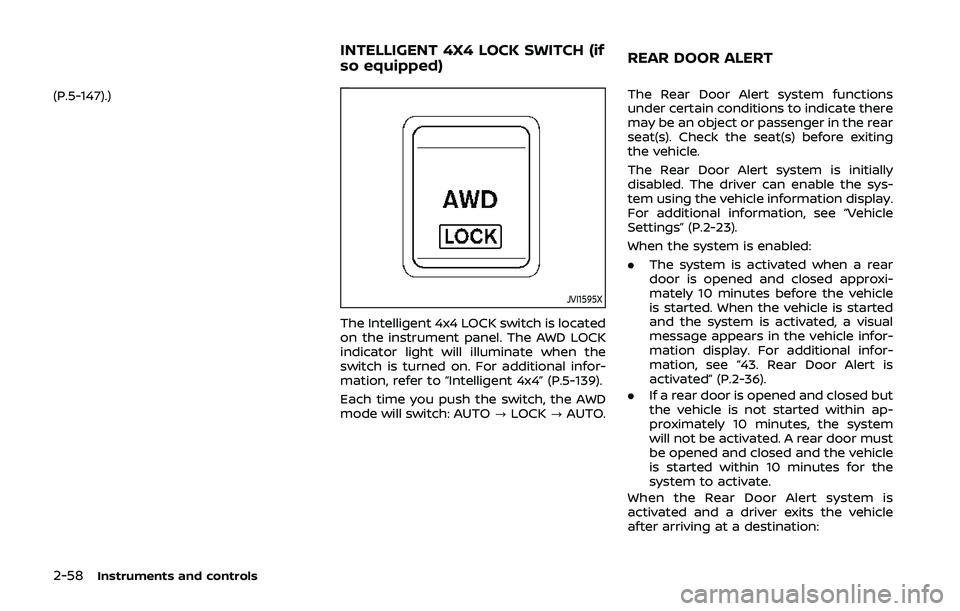
The Intelligent 4x4 LOCK switch is located
on the instrument panel. The AWD LOCK
indicator light will illuminate when the
switch is turned on. For additional infor-
mation, refer to “Intelligent 4x4” (P.5-139).
Each time you push the switch, the AWD
mode will switch: AUTO?LOCK ?AUTO. The Rear Door Alert system functions
under certain conditions to indicate there
may be an object or passenger in the rear
seat(s). Check the seat(s) before exiting
the vehicle.
The Rear Door Alert system is initially
disabled. The driver can enable the sys-
tem using the vehicle information display.
For additional information, see “Vehicle
Settings” (P.2-23).
When the system is enabled:
.
The system is activated when a rear
door is opened and closed approxi-
mately 10 minutes before the vehicle
is started. When the vehicle is started
and the system is activated, a visual
message appears in the vehicle infor-
mation display. For additional infor-
mation, see “43. Rear Door Alert is
activated” (P.2-36).
. If a rear door is opened and closed but
the vehicle is not started within ap-
proximately 10 minutes, the system
will not be activated. A rear door must
be opened and closed and the vehicle
is started within 10 minutes for the
system to activate.
When the Rear Door Alert system is
activated and a driver exits the vehicle
after arriving at a destination:
INTELLIGENT 4X4 LOCK SWITCH (if
so equipped) REAR DOOR ALERT
Page 231 of 500
System temporarily unavailable ......................... 5-120
System malfunction ...................................................... 5-121
System maintenance ................................................... 5-121
Automatic Emergency Braking (AEB) with
pedestrian detection system ....................................... 5-122 AEB with pedestrian detection
system operation ............................................................ 5-124
Turning the AEB with pedestrian detection
system ON/OFF ................................................................ 5-126
AEB with pedestrian detection
system limitations .......................................................... 5-127
System temporarily unavailable ......................... 5-129
System malfunction ...................................................... 5-130
System maintenance ................................................... 5-131
Rear Automatic Braking (RAB) (if
so equipped) ........................................................................\
...... 5-132 RAB system operation ................................................ 5-133
Turning the RAB system ON/OFF ...................... 5-133
RAB system limitations .............................................. 5-134
System malfunction ...................................................... 5-136
System maintenance ................................................... 5-137
Break-in schedule ................................................................. 5-137
Fuel Efficient Driving Tips ................................................ 5-138
Increasing fuel economy ................................................. 5-139
Intelligent 4x4 (if so equipped) ................................... 5-139 Intelligent 4x4 LOCK switch operations ...... 5-141
Parking/parking on hills ................................................... 5-143 Electric power steering .................................................... 5-144
Brake system ........................................................................\
... 5-145
Braking precautions ................................................... 5-145
Brake assist ........................................................................\
....... 5-146
Brake assist ....................................................................... 5-146
Anti-lock Braking System (ABS) ........................ 5-146
Vehicle Dynamic Control (VDC) system .............. 5-147
Chassis control ....................................................................... 5-149
Intelligent Trace Control ......................................... 5-149
Intelligent Engine Brake (Continuously
Variable Transmission (CVT) models) .......... 5-150
Active Ride Control ..................................................... 5-151
Hill Start Assist system ..................................................... 5-152
Rear sonar system (RSS) (if so equipped) ......... 5-152
System operation ......................................................... 5-153
How to enable/disable the RSS ........................ 5-155
RSS limitations ................................................................ 5-156
System temporarily unavailable ....................... 5-156
System maintenance ................................................ 5-156
Cold weather driving ......................................................... 5-157 Freeing a frozen door lock ................................... 5-157
Anti-freeze ........................................................................\
.. 5-157
Battery ........................................................................\
........... 5-157
Draining of coolant water ..................................... 5-157
Tire equipment ............................................................... 5-157
Special winter equipment ..................................... 5-158
Driving on snow or ice ............................................. 5-158
Page 368 of 500
5-140Starting and driving
to increased oil temperature. The driving
mode may change to Two-Wheel Drive
(2WD). If this warning is displayed, stop
the vehicle with the engine idling, as soon
as it is safe to do so. Then if the warning
turns off, you can continue driving.
The “Tire Size Incorrect” warning
may
appear if there is a large difference
between the diameters of front and rear
wheels. Pull off the road in a safe area,
with the engine idling. Check that all tire
sizes are the same, that the tire pressure
is correct and that the tires are not
excessively worn. Turn off the Intelligent
4x4 LOCK switch and do not drive fast.
If any warning message continues to be
displayed, have your vehicle checked by a
NISSAN dealer as soon as possible.
WARNING
. For AWD equipped vehicles, do
not attempt to raise two wheels
off the ground and shift the
transmission to any drive or re-
verse position with the engine
running. Doing so may result in
drivetrain damage or unexpected
vehicle movement which could
result in serious vehicle damage
or personal injury. .
Do not attempt to test an AWD
equipped vehicle on a 2–wheel
dynamometer (such as the dy-
namometers used by some
states for emissions testing) or
similar equipment even if the
other two wheels are raised off
the ground. Make sure that you
inform the test facility personnel
that your vehicle is equipped with
AWD before it is placed on a
dynamometer. Using the wrong
test equipment may result in
drive train damage or unex-
pected vehicle movement which
could result in serious vehicle
damage or personal injury.
CAUTION
.Do not operate the engine on a
free roller when any of the wheels
raised.
. The power train may be damaged
if you continue driving with the
“AWD Error” warning on.
. If the warning message remains
on after the above operation,
have your vehicle checked as
soon as possible. It is recom- mended that you visit a NISSAN
dealer for this service.
. If the “AWD Error” warning ap-
pears while driving, there may be
a malfunction in the AWD system.
Reduce the vehicle speed and
have your vehicle checked as
soon as possible. It is recom-
mended that you visit a NISSAN
dealer for this service.
. Never drive on dry, hard surface
roads in the LOCK mode, as this
will overload the powertrain and
may cause a serious malfunction.
Page 369 of 500
JVS1024X
INTELLIGENT 4X4 LOCK SWITCH
OPERATIONS
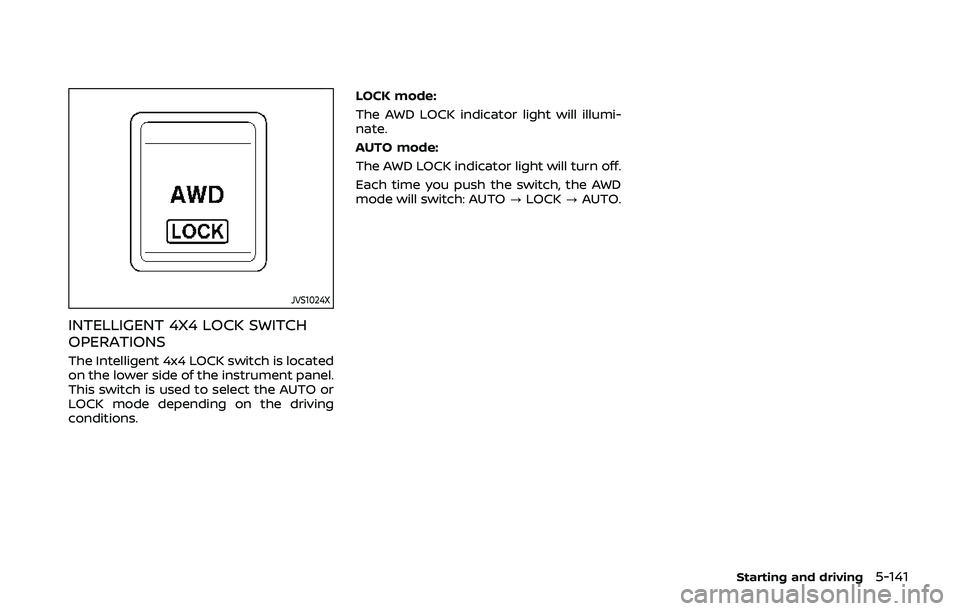
The Intelligent 4x4 LOCK switch is located
on the lower side of the instrument panel.
This switch is used to select the AUTO or
LOCK mode depending on the driving
conditions.LOCK mode:
The AWD LOCK indicator light will illumi-
nate.
AUTO mode:
The AWD LOCK indicator light will turn off.
Each time you push the switch, the AWD
mode will switch: AUTO
?LOCK ?AUTO.
Starting and driving5-141
Page 370 of 500
5-142Starting and driving
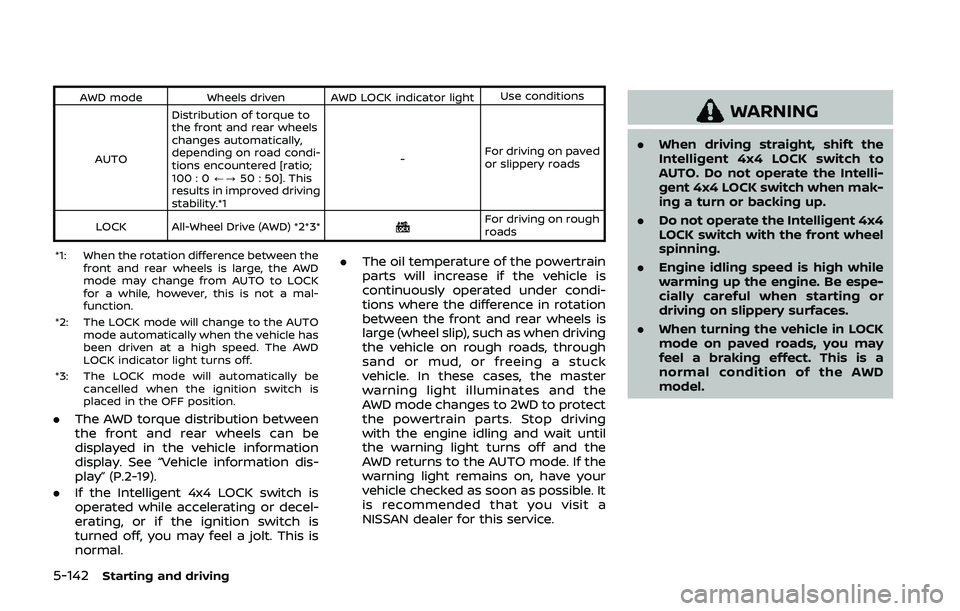
AWD modeWheels driven AWD LOCK indicator light Use conditions
AUTO Distribution of torque to
the front and rear wheels
changes automatically,
depending on road condi-
tions encountered [ratio;
100 : 0
/?50 : 50]. This
results in improved driving
stability.*1 -
For driving on paved
or slippery roads
LOCK All-Wheel Drive (AWD) *2*3*
For driving on rough
roads
*1: When the rotation difference between the front and rear wheels is large, the AWD
mode may change from AUTO to LOCK
for a while, however, this is not a mal-
function.
*2: The LOCK mode will change to the AUTO mode automatically when the vehicle has
been driven at a high speed. The AWD
LOCK indicator light turns off.
*3: The LOCK mode will automatically be cancelled when the ignition switch is
placed in the OFF position.
.The AWD torque distribution between
the front and rear wheels can be
displayed in the vehicle information
display. See “Vehicle information dis-
play” (P.2-19).
. If the Intelligent 4x4 LOCK switch is
operated while accelerating or decel-
erating, or if the ignition switch is
turned off, you may feel a jolt. This is
normal. .
The oil temperature of the powertrain
parts will increase if the vehicle is
continuously operated under condi-
tions where the difference in rotation
between the front and rear wheels is
large (wheel slip), such as when driving
the vehicle on rough roads, through
sand or mud, or freeing a stuck
vehicle. In these cases, the master
warning light illuminates and the
AWD mode changes to 2WD to protect
the powertrain parts. Stop driving
with the engine idling and wait until
the warning light turns off and the
AWD returns to the AUTO mode. If the
warning light remains on, have your
vehicle checked as soon as possible. It
is recommended that you visit a
NISSAN dealer for this service.
WARNING
.When driving straight, shift the
Intelligent 4x4 LOCK switch to
AUTO. Do not operate the Intelli-
gent 4x4 LOCK switch when mak-
ing a turn or backing up.
. Do not operate the Intelligent 4x4
LOCK switch with the front wheel
spinning.
. Engine idling speed is high while
warming up the engine. Be espe-
cially careful when starting or
driving on slippery surfaces.
. When turning the vehicle in LOCK
mode on paved roads, you may
feel a braking effect. This is a
normal condition of the AWD
model.