auto NISSAN QASHQAI 2020 Owner´s Manual
[x] Cancel search | Manufacturer: NISSAN, Model Year: 2020, Model line: QASHQAI, Model: NISSAN QASHQAI 2020Pages: 492, PDF Size: 2.02 MB
Page 48 of 492

1-30Safety — Seats, seat belts and supplemental restraint system
SSS0655
Rear-facing — step 3
3. Pull the shoulder belt until the belt isfully extended. At this time, the seat
belt retractor is in the Automatic
Locking Retractor (ALR) mode (child
restraint mode). It reverts to the
Emergency Locking Retractor (ELR)
mode when the seat belt is fully
retracted.
SSS0656
Rear-facing — step 4
4. Allow the seat belt to retract. Pull upon the shoulder belt to remove any
slack in the belt.
SSS0657
Rear-facing — step 5
5. Remove any additional slack from theseat belt; press downward and rear-
ward firmly in the center of the child
restraint to compress the vehicle seat
cushion and seatback while pulling up
on the seat belt.
Page 52 of 492
1-34Safety — Seats, seat belts and supplemental restraint system
collision.
The child restraint top tether strap must
be used when installing the child restraint
with the LATCH lower anchor attach-
ments.
First, secure the child restraint with the
LATCH lower anchors (rear outboard
seating positions only).
1. Remove the head restraint and store it in a secure place. Be sure to reinstall
the head restraint when the child
restraint is removed.
See “Head restraints/headrests” (P.1-8)
for head restraint adjustment, re-
moval and installation information.
2. Position the top tether strap as shown.
3. Secure the top tether strap to the tether anchor point as shown.
4. Refer to the appropriate child restraint installation procedure steps in this
section before tightening the tether
strap.
If you have any questions when instal-
ling a top tether strap, it is recom-
mended that you visit a NISSAN dealer
for this service.FORWARD-FACING CHILD RE-
STRAINT INSTALLATION USING THE
SEAT BELTS
WARNING
The three-point seat belt with Auto-
matic Locking Retractor (ALR) must
be used when installing a child re-
straint. Failure to use the ALR mode
will result in the child restraint not
being properly secured. The restraint
could tip over or be loose and cause
injury to a child in a sudden stop or
collision. Also, it can change the
operation of the front passenger air
bag. See “Front passenger air bag
and status light” (P.1-50).
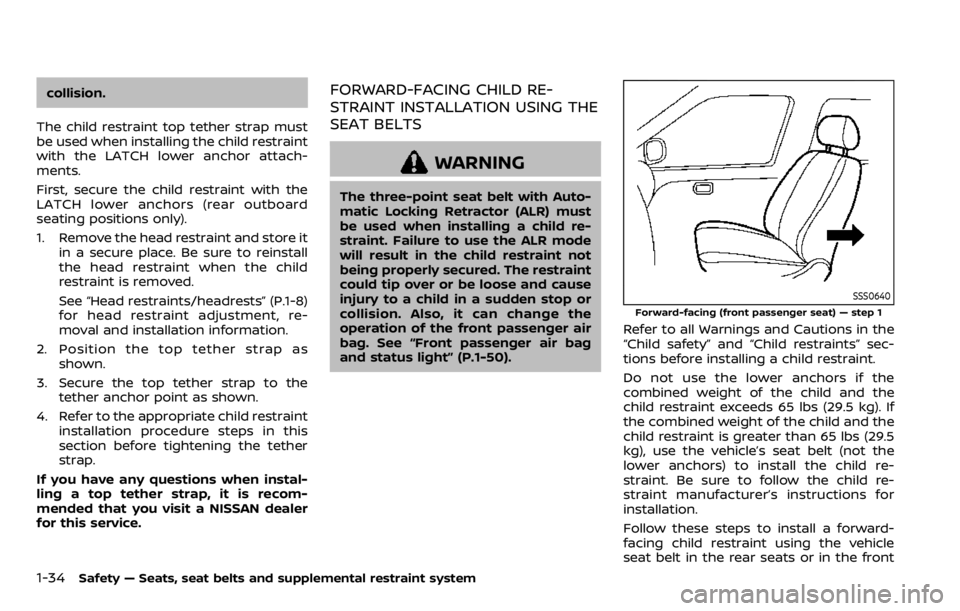
SSS0640
Forward-facing (front passenger seat) — step 1
Refer to all Warnings and Cautions in the
“Child safety” and “Child restraints” sec-
tions before installing a child restraint.
Do not use the lower anchors if the
combined weight of the child and the
child restraint exceeds 65 lbs (29.5 kg). If
the combined weight of the child and the
child restraint is greater than 65 lbs (29.5
kg), use the vehicle’s seat belt (not the
lower anchors) to install the child re-
straint. Be sure to follow the child re-
straint manufacturer’s instructions for
installation.
Follow these steps to install a forward-
facing child restraint using the vehicle
seat belt in the rear seats or in the front
Page 53 of 492

passenger seat:
1.If you must install a child restraint in
the front seat, it should be placed in
a forward-facing direction only.
Move the seat to the rearmost posi-
tion. Child restraints for infants must
be used in the rear-facing direction
and, therefore, must not be used in
the front seat.
2. Position the child restraint on the seat. Always follow the child restraint man-
ufacturer’s instructions.
The back of the child restraint should
be secured against the vehicle seat-
back.
If necessary, adjust or remove the
head restraint to obtain the correct
child restraint fit. If the head restraint
is removed, store it in a secure place.
Be sure to reinstall the head re-
straint when the child restraint is
removed. See “Head restraints/head-
rests” (P.1-8) for head restraint adjust-
ment, removal and installation
information.
If the seating position does not have
an adjustable head restraint and it is
interfering with the proper child re-
straint fit, try another seating position
or a different child restraint.
SSS0360B
Forward-facing — step 3
3. Route the seat belt tongue through
the child restraint and insert it into the
buckle until you hear and feel the
latch engage. Be sure to follow the
child restraint manufacturer’s instruc-
tions for belt routing.
If the child restraint is equipped with a
top tether strap, route the top tether
strap and secure the tether strap to
the tether anchor point (rear seat
installation only). See “Installing top
tether strap” (P.1-37). Do not install
child restraints that require the use
of a top tether strap in seating posi-
tions that do not have a top tether
anchor.
SSS0651
Forward-facing — step 4
4. Pull the shoulder belt until the belt isfully extended. At this time, the seat
belt retractor is in the Automatic
Locking Retractor (ALR) mode (child
restraint mode). It reverts to Emer-
gency Locking Retractor (ELR) mode
when the seat belt is fully retracted.
Safety — Seats, seat belts and supplemental restraint system1-35
Page 57 of 492

LRS0453
LRS0455
.Make sure the child’s head will be
properly supported by the booster
seat or vehicle seat. The seatback
must be at or above the center of
the child’s ears. For example, if a low
back booster seat
is chosen, the
vehicle seatback must be at or above
the center of the child’s ears. If the
seatback is lower than the center of
the child’s ears, a high back booster
seat
should be used.
. If the booster seat is compatible with
your vehicle, place your child in the
booster seat and check the various
adjustments to be sure the booster
seat is compatible with your child.
Always follow all recommended pro-
cedures.
LRS0464
All U.S. states and Canadian provinces
or territories require that infants and
small children be restrained in an ap-
proved child restraint at all times while
the vehicle is being operated.
The instructions in this section apply to
booster seat installation in the rear seats
or the front passenger seat.
Booster seat installation
WARNING
To avoid injury to child, do not use
the lap/shoulder belt Automatic
Locking Retractor (ALR) mode when
Safety — Seats, seat belts and supplemental restraint system1-39
Page 67 of 492
.Make sure that there is no object
placed under the front passenger
seat.
. Make sure that there is no object
placed between the seat cushion
and center console or between
the seat cushion and the door.
. Be sure that the front passenger
seat does not contact the rear
seat, instrument panel, etc., or the
head restraint does not contact
the roof.
. Do not position the front passen-
ger seat so it contacts the rear
seat. If the front seat does con-
tact the rear seat, the air bag
system may determine a sensor
malfunction has occurred and the
front passenger air bag status
light may illuminate and the sup-
plemental air bag warning light
may flash.
. If a forward facing child restraint
is installed in the front passenger
seat, do not position the front
passenger seat so the child re-
straint contacts the instrument
panel. If the child restraint does
contact the instrument panel, the
system may determine the seat is
occupied and the passenger air bag and passenger knee air bag
may deploy in a collision. Also the
front passenger air bag status
light may not illuminate. See
“Child restraints” (P.1-21) for in-
formation about installing and
using child restraints.
. Confirm the operating condition
with the front passenger air bag
status light.
. If you notice that the front pas-
senger air bag status light is not
operating as described in this
section, it is recommended you
visit a NISSAN dealer to check the
passenger seat Advanced Air Bag
System.
. Until you have confirmed with
your dealer that your passenger
seat Advanced Air Bag is working
properly, position the occupants
in the rear seating positions.
This vehicle is equipped with the NISSAN
Advanced Air Bag System for the driver
and front passenger seats. This system is
designed to meet certification require-
ments under U.S. regulations. It is also
permitted in Canada. All of the informa-
tion, cautions and warnings in this
manual apply and must be followed. The driver supplemental front-impact air
bag is located in the center of the
steering wheel. The passenger supple-
mental front-impact air bag is mounted in
the instrument panel above the glove
box. The front air bags are designed to
inflate in higher severity frontal collisions,
although they may inflate if the forces in
another type of collision are similar to
those of a higher severity frontal impact.
They may not inflate in certain frontal
collisions. Vehicle damage (or lack of it) is
not always an indication of proper front
air bag operation.
The NISSAN Advanced Air Bag System has
dual stage air bag inflators. The system
monitors information from the Air bag
Control Unit (ACU), seat belt buckle sen-
sors and the occupant classification sen-
sors (weight sensors). Inflator operation is
based on the severity of a collision and
seat belt usage for the driver. For the
front passenger, the occupant classifica-
tion sensors are also monitored. Based on
information from the sensors, only one
front air bag may inflate in a crash,
depending on the crash severity and
whether the front occupants are belted
or unbelted. Additionally, the front pas-
senger air bag and passenger knee air
bag may be automatically turned OFF
under some conditions, depending on the
information provided by the occupant
Safety — Seats, seat belts and supplemental restraint system1-49
Page 68 of 492

1-50Safety — Seats, seat belts and supplemental restraint system
classification sensors. If the front passen-
ger air bag and passenger knee air bag
are OFF, the front passenger air bag
status light will be illuminated. (See “Front
passenger air bag and status light” (P.1-
50) for further details.) One front air bag
inflating does not indicate improper per-
formance of the system.
If you have any questions about your air
bag system, it is recommended you visit a
NISSAN dealer to obtain information
about the system. If you are considering
modification of your vehicle due to a
disability, you may also contact NISSAN.
Contact information is contained in the
front of this Owner’s Manual.
When a front air bag inflates, a fairly loud
noise may be heard, followed by release
of smoke. This smoke is not harmful and
does not indicate a fire. Care should be
taken not to inhale it, as it may cause
irritation and choking. Those with a
history of a breathing condition should
get fresh air promptly.
Front air bags, along with the use of seat
belts, help to cushion the impact force on
the head and chest of the front occu-
pants. They can help save lives and
reduce serious injuries. However, an in-
flating front air bag may cause facial
abrasions or other injuries. Front air bags,
other than the driver’s and front passen-ger’s knee air bags, do not provide
restraint to the lower body.
Even with NISSAN Advanced Air Bags, seat
belts should be correctly worn and the
driver and passenger seated upright as
far as practical away from the steering
wheel or instrument panel. The front air
bags inflate quickly in order to help
protect the front occupants. Because of
this, the force of the front air bag inflating
can increase the risk of injury if the
occupant is too close to, or is against,
the air bag module during inflation.
The front air bags deflate quickly after a
collision.
The front air bags operate only when
the ignition switch is in the ON position.
After the ignition is placed in the ON
position, the supplemental air bag
warning light illuminates. The supple-
mental air bag warning light will turn
off after about 7 seconds if the system
is operational.
SSS0676
Front passenger air bag status light
Front passenger air bag and status
light
WARNING
The front passenger air bag and
passenger knee air bag are designed
to automatically turn OFF under
some conditions. Read this section
carefully to learn how it operates.
Proper use of the seat, seat belt and
child restraints is necessary for most
effective protection. Failure to follow
all instructions in this manual con-
cerning the use of seats, seat belts
Page 71 of 492

In addition to the above, certain objects
placed on the front passenger seat may
also cause the light to operate as de-
scribed above depending on their weight.
For additional information related to the
normal operation and troubleshooting of
this occupant classification sensor sys-
tem, please refer to “Normal operation”
(P.1-54) and “Troubleshooting” (P.1-55) in
this section.
Front passenger air bag:
The front passenger air bag is designed
to automatically turn OFF when the
vehicle is operated under some condi-
tions as described below as permitted by
U.S. regulations. If the front passenger air
bag is OFF, it will not inflate in a crash. The
driver air bag and other air bags in your
vehicle are not part of this system.
The purpose of the regulation is to help
reduce the risk of injury or death from an
inflating air bag to certain front passen-
ger seat occupants, such as children, by
requiring the air bag to be automatically
turned OFF.
The occupant classification sensors
(weight sensors) are on the seat cushion
frame under the front passenger seat and
are designed to detect an occupant and
objects on the seat. For example, if a child
is in the front passenger seat, the Ad-vanced Air Bag System is designed to turn
the passenger air bag OFF in accordance
with the regulations. Also, if a child
restraint of the type specified in the
regulations is on the seat, the occupant
classification sensors can detect it and
cause the air bag to turn OFF.
Front passenger seat adult occupants
who are properly seated and using the
seat belt as outlined in this manual
should not cause the passenger air bag
and passenger knee air bag to be auto-
matically turned OFF. For small adults it
may be turned OFF, however, if the
occupant does not sit in the seat properly
(for example, by not sitting upright, by
sitting on an edge of the seat, or by
otherwise being out of position), this
could cause the sensors to turn the air
bag OFF. Always be sure to be seated and
wearing the seat belt properly for the
most effective protection by the seat belt
and supplemental air bag.
NISSAN recommends that pre-teens and
children be properly restrained in a rear
seat. NISSAN also recommends that ap-
propriate child restraints and booster
seats be properly installed in a rear seat.
If this is not possible, the occupant
classification sensors are designed to
operate as described above to turn the
front passenger air bag and passenger
knee air bag OFF for specified child
restraints. Failing to properly secure child
restraints and to use the Automatic Lock-
ing Retractor (ALR) mode (child restraint
mode) may allow the restraint to tip or
move in an accident or sudden stop. This
can also result in the passenger air bag
and passenger knee air bag inflating in a
crash instead of being OFF. (See “Child
restraints” (P.1-21) for proper use and
installation.)
If the front passenger seat is not occu-
pied, the passenger air bag and passen-
ger knee air bag are designed not to
inflate in a crash. However, heavy objects
placed on the seat could result in air bag
inflation, because of the object being
detected by the occupant classification
sensors. Other conditions could also re-
sult in air bag inflation, such as if a child is
standing on the seat, or if two children
are on the seat, contrary to the instruc-
tions in this manual. Always be sure that
you and all vehicle occupants are seated
and restrained properly.
Using the front passenger air bag status
light, you can monitor when the front
passenger air bag and passenger knee air
bag are automatically turned OFF.
If an adult occupant is in the seat but the
front passenger air bag status light is
illuminated (indicating that the front pas-
Safety — Seats, seat belts and supplemental restraint system1-53
Page 85 of 492

WAA0118X
1. Instrument brightness control
2. TRIP RESET switch
3. Headlight and turn signal switch/Fog lightswitch*
4. Steering-wheel-mounted controls (left side)
— Audio control** — Vehicle information display control
5. Steering wheel — Horn
6. Wiper and washer switch
7. Hazard indicator flasher switch
8. Steering-wheel-mounted controls (right side) — Intelligent Lane Intervention (I-LI)
— Cruise control switches*
— ProPILOT assist*
— Bluetooth® Hands-Free Phone Sys-
tem**
— Voice Recognition system switch**
— Siri® Eyes Free**
9. Shift lever — Continuously Variable Transmission
(CVT)
— Manual Transmission (MT)
10. Vehicle Dynamic Control (VDC) OFF switch
11. Heated steering wheel switch*
12. Parking brake (Pedal type)
13. Intelligent 4x4 LOCK switch*
14. Steering assist switch* (models with Pro- PILOT assist) or Dynamic driver assistance
switch* (models without ProPILOT assist)
15. SPORT mode switch*
16. ECO switch
17. Push-button ignition switch (model with Intelligent Key system)
18. Ignition switch (model without Intelligent Key system)
19. Parking brake (Switch type)
20. Automatic brake hold switch*
*: if so equipped
**: See the separate NissanConnect® Own- er’s Manual (if so equipped).
Instruments and controls2-3
COCKPIT
Page 92 of 492

2-10Instruments and controls
Anti-lock Braking System (ABS) warn-
ing lightLow tire pressure warning lightExterior light indicator
Master warning lightFront fog light indicator light (if so
equipped)
Brake warning light (red)Seat belt warning light and chimeHigh beam assist indicator light
Supplemental air bag warning lightHigh beam indicator light
Charge warning lightVehicle Dynamic Control (VDC) warn-
ing lightMalfunction Indicator Light (MIL)
Electric power steering warning lightAll-Wheel Drive (AWD) LOCK indicator
light (if so equipped)Security indicator light
Electronic parking brake warning light
(yellow) (if so equipped)Automatic brake hold indicator light
(white) (if so equipped)Turn signal/hazard indicator lights
Automatic brake hold indicator light
(green) (if so equipped)Vehicle Dynamic Control (VDC) off
indicator light
Automatic Emergency Braking (AEB)
system warning lightElectronic parking brake indicator
light (if so equipped)Rear Automatic Braking (RAB) system
warning light
WARNING LIGHTS, INDICATOR
LIGHTS AND AUDIBLE REMINDERS
Page 95 of 492

orElectronic parking
brake warning light (yellow) (if so
equipped)
The electronic parking brake warning
light functions for the electronic parking
brake system. If the warning light illumi-
nates, it may indicate that the electronic
parking brake system is not functioning
properly. Have the brake system checked,
and, if necessary, repaired. It is recom-
mended that you visit a NISSAN dealer for
this service.
Automatic Emergency Braking
(AEB) system warning light
When the ignition switch is in the ON
position, the AEB system warning light
illuminates. After starting the engine, the
warning light turns off.
This light illuminates when the AEB with
pedestrian detection system is set to OFF
on the vehicle information display.
If the light illuminates when the AEB with
pedestrian detection system is ON, it may
indicate that the system is unavailable.
See “Automatic Emergency Braking (AEB)
with pedestrian detection system” (P.5-
96) or “Intelligent Forward Collision Warn-
ing (I-FCW)” (P.5-105).
Rear Automatic Braking (RAB)
system warning light
This light comes on when the ignition
switch is placed in the ON position. It
turns off after the engine is started.
This light illuminates when the RAB sys-
tem is turned off in the vehicle informa-
tion display.
If the light illuminates when the RAB
system is on, it may indicate that the
system is unavailable. For additional in-
formation, see “Rear Automatic Braking
(RAB)” (P.5-114).
Low tire pressure warning
light
Your vehicle is equipped with a Tire
Pressure Monitoring System (TPMS) that
monitors the tire pressure of all tires
except the spare tire (if so equipped).
The low tire pressure warning light warns
of low tire pressure or indicates that the
TPMS is not functioning properly.
After the ignition switch is placed in the
ON position, this light illuminates for
about 1 second and turns off.
Low tire pressure warning:
If the vehicle is being driven with low tire
pressure, the warning light will illuminate. The “Tire Pressure Low - Add Air” warning
also appears in the vehicle information
display.
When the low tire pressure warning light
illuminates, you should stop and adjust
the tire pressure to the recommended
COLD tire pressure shown on the Tire and
Loading Information label. The low tire
pressure warning light does not automa-
tically turn off when the tire pressure is
adjusted. After the tire is inflated to the
recommended pressure, the vehicle must
be driven at speeds above 16 MPH (25
km/h) to activate the TPMS and turn off
the low tire pressure warning light. Use a
tire pressure gauge to check the tire
pressure.
The “Tire Pressure Low - Add Air” warning
is active as long as the low tire pressure
warning light remains illuminated.
For additional information, see “Vehicle
information display” (P.2-19), “Tire Pres-
sure Monitoring System (TPMS)” (P.5-5)
and “Tire Pressure Monitoring System
(TPMS)” (P.6-3).
TPMS malfunction:
If the TPMS is not functioning properly,
the low tire pressure warning light will
flash for approximately 1 minute when the
ignition switch is placed in the ON posi-
tion. The light will remain on after the 1
Instruments and controls2-13