lights NISSAN QASHQAI 2020 Owner´s Manual
[x] Cancel search | Manufacturer: NISSAN, Model Year: 2020, Model line: QASHQAI, Model: NISSAN QASHQAI 2020Pages: 492, PDF Size: 2.02 MB
Page 92 of 492

2-10Instruments and controls
Anti-lock Braking System (ABS) warn-
ing lightLow tire pressure warning lightExterior light indicator
Master warning lightFront fog light indicator light (if so
equipped)
Brake warning light (red)Seat belt warning light and chimeHigh beam assist indicator light
Supplemental air bag warning lightHigh beam indicator light
Charge warning lightVehicle Dynamic Control (VDC) warn-
ing lightMalfunction Indicator Light (MIL)
Electric power steering warning lightAll-Wheel Drive (AWD) LOCK indicator
light (if so equipped)Security indicator light
Electronic parking brake warning light
(yellow) (if so equipped)Automatic brake hold indicator light
(white) (if so equipped)Turn signal/hazard indicator lights
Automatic brake hold indicator light
(green) (if so equipped)Vehicle Dynamic Control (VDC) off
indicator light
Automatic Emergency Braking (AEB)
system warning lightElectronic parking brake indicator
light (if so equipped)Rear Automatic Braking (RAB) system
warning light
WARNING LIGHTS, INDICATOR
LIGHTS AND AUDIBLE REMINDERS
Page 93 of 492

CHECKING LIGHTS
With all doors closed, apply the parking
brake, fasten the seat belts and place the
ignition switch in the ON position without
starting the engine. The following lights (if
so equipped) will come on:
,,or(red), PARK or,,
The following lights (if so equipped) come
on briefly and then go off:
,,,,,or,,or(red).
If any light does not come on or operates
in a way other than described, it may
indicate a burned-out bulb and/or a
system malfunction. It is recommended
you have the system checked by a
NISSAN dealer.
WARNING LIGHTS
orAnti-lock Braking Sys-
tem (ABS) warning light
When the ignition switch is in the ON
position, the Anti-lock Braking System
(ABS) warning light illuminates and then
turns off. This indicates the ABS is opera-
tional.
If the ABS warning light illuminates while
the engine is running, or while driving, it
may indicate the ABS is not functioning
properly. Have the system checked. It is
recommended you visit a NISSAN dealer
for this service.
If an ABS malfunction occurs, the anti-
lock function is turned off. The brake
system then operates normally, but with-
out anti-lock assistance. (See “Brake sys-
tem” (P.5-127).)
orBrake warning light
(red)
This light functions for both the parking
brake and the foot brake systems.
Parking brake indicator (models not
equipped with electronic parking brake
system):
When the ignition switch is in the ON
position, the light illuminates when the
parking brake is applied.
Low brake fluid warning light:
When the ignition switch is placed in the
ON position, the brake warning light
illuminates, and then turns off (models
equipped with electronic parking brake
system). If the light illuminates while the
engine is running with the parking brake
not applied, stop the vehicle and perform
the following:
1. Check the brake fluid level. If brake fluid is necessary, add fluid and have
the system checked. It is recom-
mended you have this service per-
formed by a NISSAN dealer. (See
“Brake and clutch fluid” (P.8-9).)
2. If the brake fluid level is correct, have the warning system checked. It is
recommended you have this service
performed by a NISSAN dealer.
Instruments and controls2-11
Page 98 of 492

2-16Instruments and controls
properly. Have the system checked. It is
recommended you visit a NISSAN dealer
for this service. If a malfunction occurs in
the system, the VDC system function will
be canceled but the vehicle is still drive-
able. For additional information, see “Ve-
hicle Dynamic Control (VDC) system” (P.5-
129) of this manual.
INDICATOR LIGHTS
All-Wheel Drive (AWD) LOCK
indicator light (if so equipped)
When the ignition switch is in the ON
position, the All-Wheel Drive (AWD) LOCK
indicator light illuminates and then turns
off.
When selecting LOCK mode while the
engine is running, the LOCK indicator
light illuminates. (See “Intelligent 4x4”
(P.5-121).)
CAUTION
Do not drive on dry hard surface
roads in the LOCK mode.
Automatic brake hold indica-
tor light (white) (if so equipped)
The automatic brake hold indicator light
(white) illuminates when the automatic
brake hold system is on standby. (See
“Automatic brake hold” (P.5-29).)
Automatic brake hold indica-
tor light (green) (if so equipped)
The automatic brake hold indicator light
(green) illuminates while the automatic
brake hold system is operating. (See
“Automatic brake hold” (P.5-29).)
orElectronic parking
brake indicator light (if so
equipped)
The electronic parking brake indicator
light indicates that the electronic parking
brake system is operating.
When the ignition switch is placed in the
ON position, the electronic parking brake
indicator light illuminates. When the en-
gine is started and the parking brake is
released, the warning light turns off.
If the parking brake is not fully released,
the electronic parking brake indicator
light remains on. Be sure that the electro-
nic parking brake indicator light has turned off before driving. (See “Parking
brake” (P.5-27).)
If the electronic parking brake indicator
light illuminates or flashes while the
electronic parking brake warning light
or(yellow) illuminates, it may
indicate that the electronic parking brake
system is not functioning properly. Have
the system checked, and if necessary
repaired. It is recommended you visit a
NISSAN dealer for this service.
Exterior light indicator
This indicator illuminates when the head-
light switch is turned to the AUTO,orposition and the front parking lights,
rear combination lights, license plate
lights or headlights are on. The indicator
turns off when these lights are turned off.
Front fog light indicator light
(if so equipped)
The front fog light indicator light illumi-
nates when the front fog lights are on.
(See “Fog light switch” (P.2-58).)
Page 99 of 492
High beam assist indicator
light
The indicator light illuminates when the
headlights come on while the headlight
switch is in the AUTO position with the
high beam selected. This indicates that
the high beam assist system is opera-
tional. (See “High beam assist” (P.2-55).)
High beam indicator light
This light illuminates when the headlight
high beam is on and goes out when the
low beam is selected.
Malfunction Indicator Light
(MIL)
If the malfunction indicator light comes
on steady or blinks while the engine is
running, it may indicate a potential emis-
sion control and/or Continuously Variable
Transmission (CVT) malfunction.
The malfunction indicator light may also
illuminate steady if the fuel-filler cap is
loose or missing, or if the vehicle runs out
of fuel. Check to make sure the fuel-filler
cap is installed and closed tightly, and
that the vehicle has at least 3 US gallons
(11.4 liters) of fuel in the fuel tank.
After a few driving trips, the
light
should turn off if no other potential emission control system malfunction ex-
ists.
If this indicator light remains on for 20
seconds and then blinks for 10 seconds
when the engine is not running, it indi-
cates that the vehicle is not ready for an
emission control system inspection/
maintenance test. (See “Readiness for
Inspection/Maintenance (I/M) test” (P.10-
18).)
Operation:
The malfunction indicator light will come
on in one of two ways:
.
Malfunction indicator light on steady
— An emission control system and/or
CVT malfunction has been detected.
Check the fuel-filler cap if the LOOSE
FUEL CAP warning appears in the
vehicle information display. If the
fuel-filler cap is loose or missing, tight-
en or install the cap and continue to
drive the vehicle. The
light should
turn off after a few driving trips. If the
light does not turn off after a few
driving trips, have the vehicle in-
spected. It is recommended you visit
a NISSAN dealer for this service. You
do not need to have your vehicle
towed to the dealer.
. Malfunction indicator light blinking —
An engine misfire has been detected which may damage the emission
control system.
To reduce or avoid emission control
system damage:
1) Do not drive at speeds above 45
MPH (72 km/h).
2) Avoid hard acceleration or decel- eration.
3) Avoid steep uphill grades.
4) If possible, reduce the amount of cargo being hauled or towed.
The malfunction indicator light may
stop blinking and remain on.
Have the vehicle inspected. It is re-
commended you visit a NISSAN dealer
for this service. You do not need to
have your vehicle towed to the dealer.
CAUTION
Continued vehicle operation without
having the emission control system
and/or CVT system checked and
repaired as necessary could lead to
poor driveability, reduced fuel econ-
omy, and possible damage to the
emission control system.
Instruments and controls2-17
Page 100 of 492

2-18Instruments and controls
Security indicator light
The light blinks when the ignition switch
is in the OFF or LOCK position. This
function indicates the security system
equipped on the vehicle is operational.
If the security system is malfunctioning,
this light will remain on while the ignition
switch is in the ON position. For additional
information, see “Security systems” (P.2-
46).
Turn signal/hazard indicator
lights
The light flashes when the turn signal
switch lever or hazard switch is turned on.
Vehicle Dynamic Control (VDC)
off indicator light
When the ignition switch is in the ON
position, the Vehicle Dynamic Control
(VDC) off indicator light illuminates and
then turns off.
The light comes on when the Vehicle
Dynamic Control (VDC) off switch is
pushed to OFF. This indicates that the
VDC system and traction control system
are not operating.
AUDIBLE REMINDERS
Key reminder chime
Models with Intelligent Key:
A chime sounds if the driver’s door is
opened while the ignition switch is placed
in the OFF position with the Intelligent
Key left in the vehicle.
Make sure the ignition switch is placed in
the LOCK position, and carry it with you
when leaving the vehicle.
Models without Intelligent Key:
A chime sounds if the driver’s side door is
opened while the key is left in the ignition
switch and the ignition switch is in the
OFF or LOCK position. Be sure to remove
the key and carry it with you when you
leave the vehicle.
Light reminder chime
The light reminder chime will sound when
the driver side door is opened with the
headlight switch in the
orposi-
tion, and the ignition switch is in the ACC,
OFF or LOCK position.
Turn the light switch off when you leave
the vehicle.
Driving aid chimes (if so equipped)
An audible alert/chime may be heard if
any of the following systems are active:
. Automatic Emergency Braking (AEB)
with Pedestrian Detection
. Intelligent Forward Collision Warning
(I-FCW)
. Blind Spot Warning (BSW)
. Rear Cross Traffic Alert (RCTA)
. Intelligent Lane Intervention (I-LI)
. Lane Departure Warning (LDW)
. ProPILOT Assist
. Rear Automatic Braking (RAB)
. Rear Sonar System (RSS)
For additional information, refer to the
“Starting and driving” section of this
manual.
NISSAN Intelligent Key® door buz-
zer (if so equipped)
The Intelligent Key door buzzer sounds if
any one of the following improper opera-
tions is found.
. The Intelligent Key is left inside the
vehicle when locking the doors.
. The Intelligent Key is left outside the
vehicle when operating the vehicle.
When the buzzer sounds, be sure to
check both the vehicle and the Intelligent
Key. For additional information, refer to
Page 105 of 492

1. Use thebuttonsto select “Dis-
play”.
2. Press the OK
to turn ON/OFF the
ECO management display in the vehi-
cle information display.
- View History
This setting allows the customer to reset
the past history of the fuel economy and
the best fuel economy.
Welcome Effect:
You can choose whether or not to display
the welcome screen when the ignition
switch is placed in the ON position. You
can also choose the following items to
define how the welcome screen looks:
. Dial Effect
. Display Effect
Select “Welcome Effect” using the
buttonsand press the OKto select
this menu. Use thebuttonsto
navigate between the menu options and
press the OK
to turn each function ON/
OFF.
Vehicle Settings
The vehicle settings allows the customer
to change settings for the following
settings.
. Lighting
. Turn indicator
. Locking
. Wipers
. Driving Position (if so equipped)
. Rear Door Alert
. Remote start (if so equipped)
The vehicle settings can be changed
using the
, and the OKbuttons.
Lighting:
The “Lighting” menu has the following
options:
. Welcome Light
The welcome lighting can be set to be
ON or OFF. From the “Lighting” menu,
select “Welcome Light”. Use the OK
to turn this feature ON or OFF.
. Auto Room Lamp
The interior light timer can be set to
be ON or OFF. From the “Lighting”
menu, select “Auto Room Lamp”. Use
the OK
to turn this feature ON or
OFF.
. Light Sensitivity
The sensitivity of the Intelligent Auto Headlight can be adjusted. From the
“Lighting” menu, select “Light Sensitiv-
ity”. Use the
buttonsand the OKto select the required sensitivity.
The following options are available:
— Turn on earliest
— Turn on earlier
— Turn on standard
— Turn on later
. Light Off Delay
The duration of the automatic head-
lights can be changed from 0 to 180
seconds. From the “Lighting” menu,
select “Light Off Delay”. Use the OK
to change the duration.
Turn indicator:
The “3 Flash Pass” overtaking feature can
be set to be ON or OFF. From the “Turn
indicator” menu, select “3 Flash Pass”. Use
the OK
to turn this feature ON or OFF.
Locking:
There are the following options in the
“Locking” menu:
. I–Key Door Lock (if so equipped)
When this item is turned on, the
request switch on the door is acti-
vated. From the “Locking” menu, select
“I-Key Door Lock”. Use the OK
to
activate or deactivate this function.
Instruments and controls2-23
Page 115 of 492
CAUTION
Running the engine with the engine
oil pressure warning displayed could
cause serious damage to the engine.
17. AWD Error: See Owner’s Manual
warning (if so equipped)
This warning appears when the All-Wheel
Drive (AWD) system is not functioning
properly while the engine is running.
Reduce vehicle speed and have the sys-
tem checked. It is recommended that you
visit a NISSAN dealer for this service. See
“Intelligent 4x4” (P.5-121).
18. AWD High Temp. Stop vehicle
warning (if so equipped)
This warning may appear while trying to
free a stuck vehicle due to increased oil
temperature. The driving mode may
change to Two-Wheel Drive (2WD). If this
warning is displayed, stop the vehicle with
the engine idling, as soon as it is safe to
do so. Then if the warning turns off, you
can continue driving. See “Intelligent 4x4”
(P.5-121).
19. Tire Size Incorrect: See Owner’s
Manual warning (if so equipped)
This warning may appear if there is a
large difference between the diameters of
the front and rear wheels and tires. Pull
off the road in a safe area, with the engine
idling. Check that all the tire sizes are the
same, that the tire pressure is correct and
that the tires are not excessively worn.
See “Intelligent 4x4” (P.5-121).
20. Battery Voltage Low Charge
Battery warning
This warning appears when the battery
voltage is low and the battery needs to be
charged.
21. Shipping Mode On Push Storage
Fuse warning (if so equipped)
This warning may appear if the extended
storage fuse switch is not pushed in
(switched on). When this warning ap-
pears, push in (switch on) the extended
storage fuse switch to turn off the warn-
ing. For more information, see “Extended
storage fuse switch” (P.8-21).
22. Power will turn off to save the
battery warning
This warning appears after the ignition
switch is in the ON position for a certain
period of time.
23. Power turned off to save the
battery warning
This warning appears after the ignition
switch is automatically turned OFF to
save the battery.
24. Reminder: Turn OFF Headlights
warning
This warning appears when the driver
side door is opened with the headlight
switch is left ON and the ignition switch is
placed in the OFF or LOCK position. Place
the headlight switch in OFF or AUTO
position. For additional information, see
“Headlight and turn signal switch” (P.2-53).
25. Headlight System Error: See
Owner’s Manual warning (if so
equipped)
This warning appears if the LED head-
lights are malfunctioning. Have the sys-
tem checked. It is recommended that you
visit a NISSAN dealer for this service.
Instruments and controls2-33
Page 127 of 492
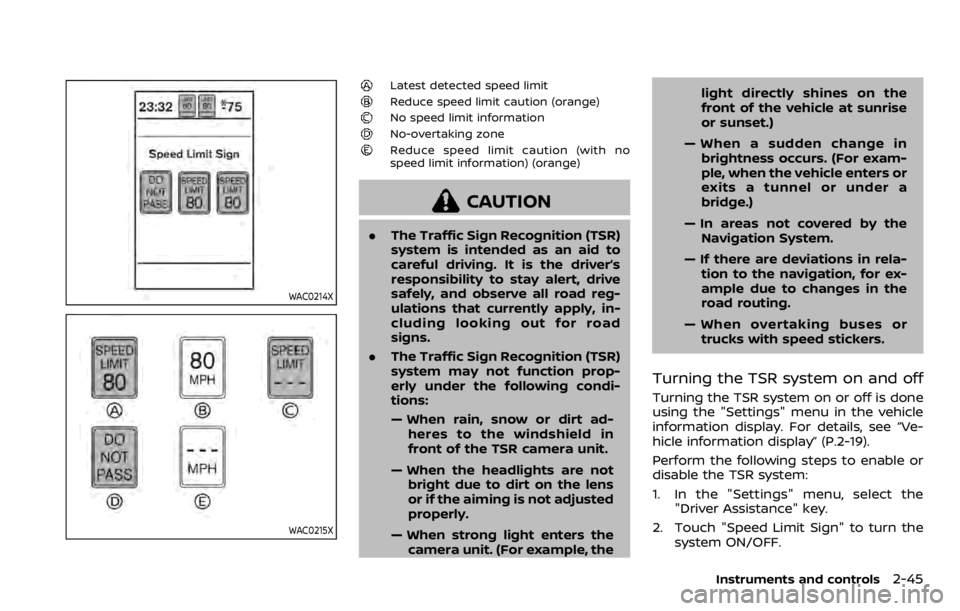
WAC0214X
WAC0215X
Latest detected speed limit
Reduce speed limit caution (orange)No speed limit information
No-overtaking zone
Reduce speed limit caution (with no
speed limit information) (orange)
CAUTION
.The Traffic Sign Recognition (TSR)
system is intended as an aid to
careful driving. It is the driver’s
responsibility to stay alert, drive
safely, and observe all road reg-
ulations that currently apply, in-
cluding looking out for road
signs.
. The Traffic Sign Recognition (TSR)
system may not function prop-
erly under the following condi-
tions:
— When rain, snow or dirt ad-
heres to the windshield in
front of the TSR camera unit.
— When the headlights are not bright due to dirt on the lens
or if the aiming is not adjusted
properly.
— When strong light enters the camera unit. (For example, the light directly shines on the
front of the vehicle at sunrise
or sunset.)
— When a sudden change in brightness occurs. (For exam-
ple, when the vehicle enters or
exits a tunnel or under a
bridge.)
— In areas not covered by the Navigation System.
— If there are deviations in rela- tion to the navigation, for ex-
ample due to changes in the
road routing.
— When overtaking buses or trucks with speed stickers.
Turning the TSR system on and off
Turning the TSR system on or off is done
using the "Settings" menu in the vehicle
information display. For details, see “Ve-
hicle information display” (P.2-19).
Perform the following steps to enable or
disable the TSR system:
1. In the "Settings" menu, select the "Driver Assistance" key.
2. Touch "Speed Limit Sign" to turn the system ON/OFF.
Instruments and controls2-45
Page 129 of 492

cannot prevent it, nor can it prevent the
theft of interior or exterior vehicle com-
ponents in all situations. Always secure
your vehicle even if parking for a brief
period. Never leave your keys in the
vehicle, and always lock it when unat-
tended. Be aware of your surroundings,
and park in secure, well-lit areas when-
ever possible.
Many devices offering additional protec-
tion, such as component locks, identifica-
tion markers, and tracking systems, are
available at auto supply stores and speci-
alty shops. Your NISSAN dealer may also
offer such equipment. Check with your
insurance company to see if you may be
eligible for discounts for various theft
protection features.
SIC2045
How to arm the vehicle security
system
1. Close all windows.The system can be
armed even if the windows are open.
2. Remove the keys from the vehicle.
3. Close all doors, hood (if so equipped) and liftgate. Lock all doors. The doors
can be locked with the key fob (if so
equipped), Intelligent Key (if so
equipped), door handle request switch
(if so equipped), power door lock
switch, or mechanical key.
4. Confirm that the security indicator light stays on for about 30 seconds.
The vehicle security system is now pre-armed. The vehicle security sys-
tem will automatically shift into the
armed phase. The security light begins
to flash once every three seconds. If
during the pre-armed phase one of
the following occurs, the system will
not arm:
.Any door is unlocked with the key
fob (if so equipped), the Intelligent
Key (if so equipped), mechanical
key, or door request switch.
.Ignition switch is placed in the ONposition.
Even when the driver and/or passen-
gers are in the vehicle, the system will
activate with all the doors, hood (if so
equipped) and liftgate locked with the
ignition switch placed in the LOCK posi-
tion. When placing the ignition switch in
the ON position, the system will be
released.
Vehicle security system activation
The vehicle security system will give the
following alarm:
. The headlights blink and the horn
sounds intermittently.
. The alarm automatically turns off
after approximately 50 seconds. How-
ever, the alarm reactivates if the
vehicle is tampered with again.
The alarm is activated by:
Instruments and controls2-47
Page 135 of 492

JVI1616X
HEADLIGHT SWITCH
Lighting
Rotate the switch to theposition, and
the front parking, tail, license plate, and
instrument panel lights will come on.
Rotate the switch to theposition, and
the headlights will come on and all the
other lights remain on.
JVI1624X
Intelligent Auto Headlight system
The Intelligent Auto Headlight system
allows the headlights to be set so they
turn on and off automatically.
To set the Intelligent Auto Headlight
system:
1. Make sure the headlight switch is in the AUTO position
.
2. Place the ignition switch in the ON position.
3. The Intelligent Auto Headlight system automatically turns the headlights on
and off.
To turn the Intelligent Auto Headlight
system off, turn the switch to the OFF,
orposition.
The Intelligent Auto Headlight system can
turn on the headlights automatically
when it is dark and turn off the headlights
when it is light.
The headlights will also be turned on
automatically at twilight or in rainy
weather (when the windshield wiper is
operated continuously).
If the ignition switch is placed in the OFF
position and one of the doors is opened
and this condition is continued, the head-
lights remain on for 5 minutes.
Instruments and controls2-53
HEADLIGHT AND TURN SIGNAL SWITCH