lock NISSAN QASHQAI 2021 User Guide
[x] Cancel search | Manufacturer: NISSAN, Model Year: 2021, Model line: QASHQAI, Model: NISSAN QASHQAI 2021Pages: 516, PDF Size: 2.12 MB
Page 230 of 516
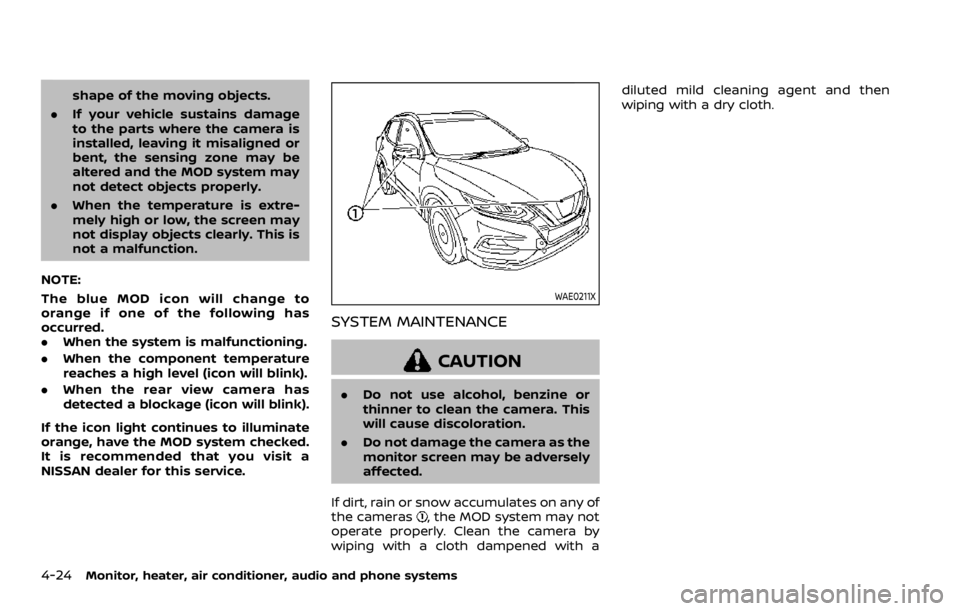
shape of the moving objects.
. If your vehicle sustains damage
to the parts where the camera is
installed, leaving it misaligned or
bent, the sensing zone may be
altered and the MOD system may
not detect objects properly.
. When the temperature is extre-
mely high or low, the screen may
not display objects clearly. This is
not a malfunction.
NOTE:
The blue MOD icon will change to
orange if one of the following has
occurred.
. When the system is malfunctioning.
. When the component temperature
reaches a high level (icon will blink).
. When the rear view camera has
detected a blockage (icon will blink).
If the icon light continues to illuminate
orange, have the MOD system checked.
It is recommended that you visit a
NISSAN dealer for this service.
Page 256 of 516
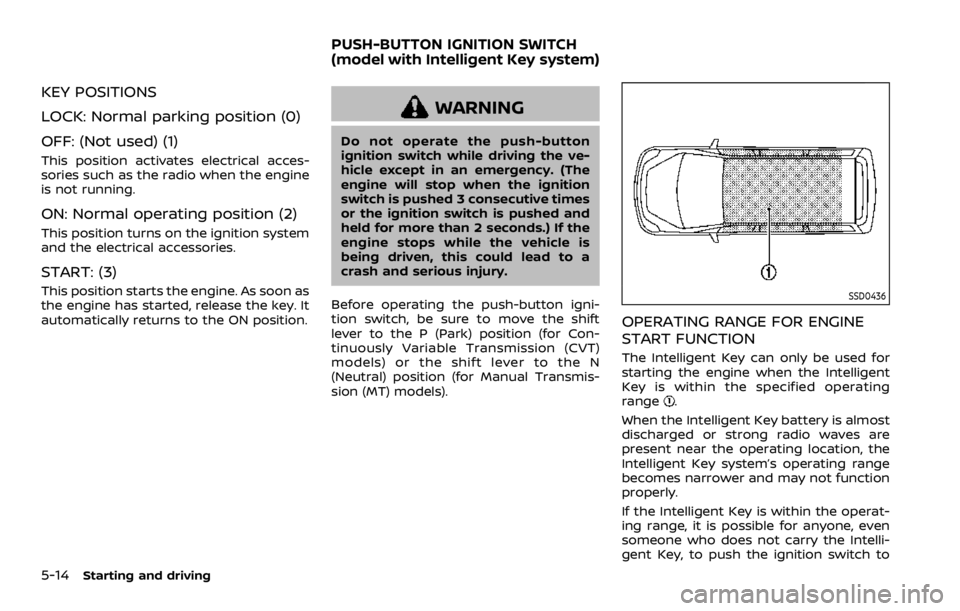
KEY POSITIONS
LOCK: Normal parking position (0)
OFF: (Not used) (1)
This position activates electrical acces-
sories such as the radio when the engine
is not running.
ON: Normal operating position (2)
This position turns on the ignition system
and the electrical accessories.
START: (3)
This position starts the engine. As soon as
the engine has started, release the key. It
automatically returns to the ON position.
Page 262 of 516

2.Vehicle is not driven regularly and/
or only driven short distances.
In these cases, the battery may need to
be charged to maintain battery health.
REMOTE ENGINE START (if so
equipped)
Vehicles started with the remote engine
start function require the ignition switch
to be placed in the ON position before the
shift lever can be moved from the P (Park)
position. To place the ignition switch in
the ON position, perform the following
steps:
1. Make sure that the Intelligent Key is carried with you.
2. Depress the brake pedal.
3. Push the ignition switch once to the ON position.
For additional information about the
remote engine start function, see “Re-
mote engine start” (P.3-23).
CONTINUOUSLY VARIABLE TRANS-
MISSION (CVT)
The Continuously Variable Transmission
(CVT) in your vehicle is electronically
controlled to produce maximum power
and smooth operation.
The recommended operating procedures
for this transmission are shown on the
following pages. Follow these procedures
for maximum vehicle performance and
driving enjoyment.
Engine power may be automatically
reduced to protect the CVT if the engine
speed increases quickly when driving
on slippery roads or while being tested
on some dynamometers.
Starting the vehicle
1. After starting the engine, fully depress the foot brake pedal before moving
the shift lever out of the P (Park)
position.
This CVT is designed so that the foot
brake pedal must be depressed
before shifting from P (Park) to any
driving position while the ignition
switch is in the ON position.
The shift lever cannot be moved out
of the P (Park) position and into any
of the other positions if the ignition
switch is placed in the LOCK or OFF position.
2. Keep the foot brake pedal depressed and move the shift lever to a driving
position.
3. Release the parking brake and foot brake pedal, and then gradually start
the vehicle in motion.
Page 264 of 516

brake pedal.
3. Move the shift lever to the P (Park) position.
4. Place the ignition switch in the LOCK position.
Page 267 of 516
4. Insert the mechanical key and pushdown the shift lock release.
5. Push the shift lever button and move the shift lever to the N (Neutral)
position while holding down the shift
lock release.
Place the ignition switch in the ON posi-
tion. The vehicle may be moved to the
desired location.
Replace the removed shift lock release
cover after the operation.
If the shift lever cannot be moved out of
the P (Park) position, have the CVT system
checked as soon as possible. It is recom-
mended you visit a NISSAN dealer for this
service.
Page 367 of 516
CAUTION
.Do not operate the engine on a
free roller when any of the wheels
raised.
. The power train may be damaged
if you continue driving with the
“AWD Error” warning on.
. If the warning message remains
on after the above operation,
have your vehicle checked as
soon as possible. It is recom-
mended that you visit a NISSAN
dealer for this service.
. If the “AWD Error” warning ap-
pears while driving, there may be
a malfunction in the AWD system.
Reduce the vehicle speed and
have your vehicle checked as
soon as possible. It is recom-
mended that you visit a NISSAN
dealer for this service.
. Never drive on dry, hard surface
roads in the LOCK mode, as this
will overload the powertrain and
may cause a serious malfunction.
Page 368 of 516
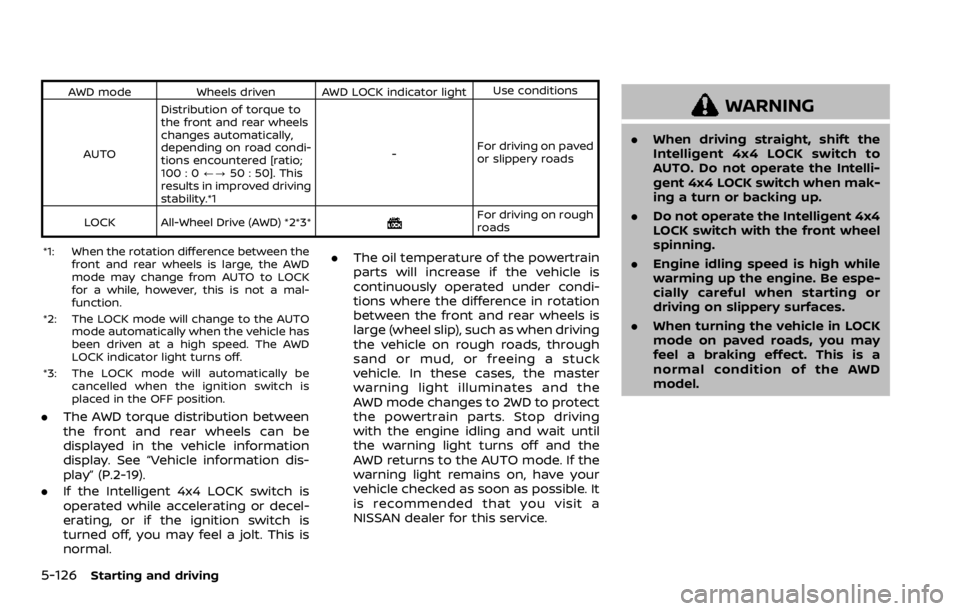
AWD modeWheels driven AWD LOCK indicator light Use conditions
AUTO Distribution of torque to
the front and rear wheels
changes automatically,
depending on road condi-
tions encountered [ratio;
100 : 0
/?50 : 50]. This
results in improved driving
stability.*1 -
For driving on paved
or slippery roads
LOCK All-Wheel Drive (AWD) *2*3*
Page 389 of 516

MCE0001A
Blocking wheels
Place suitable blocks
Page 435 of 516

JVM0415X
Extended storage fuse switch (if so
equipped)
To reduce battery drain, the extended
storage fuse switch comes from the
factory switched off. Prior to delivery of
your vehicle, the switch is pushed in
(switched on) and should always remain
on.
If the extended storage fuse switch is not
pushed in (switched on), the meter may
display a warning message. See “21. Ship-
ping Mode On Push Storage Fuse warn-
ing” (P.2-33).
If any electrical equipment does not
operate, remove the extended storage
fuse switch and check for an open fuse.NOTE:
If the extended storage fuse switch
malfunctions or if the fuse is open, it is
not necessary to replace the switch. In
this case, remove the extended storage
fuse switch and replace it with a new
fuse of the same rating.
How to remove the extended storage
fuse switch:
1. To remove the extended storage fuse
switch, be sure the ignition switch is in
the OFF or LOCK position.
2. Be sure the headlights are off. (See “Headlight switch” (P.2-52) or “Intelli-
gent Auto Headlight system” (P.2-52).)
3. Remove the fuse box cover.
4. Pinch the locking tabs
Page 506 of 516

Engine serial number ........................................ 10-9
F.M.V.S.S./C.M.V.S.S.
certification label .................................................. 10-9
Tire and Loading
information label................................ 8-31, 10-10
Vehicle identification number (VIN)........ 10-8
Lane Departure Warning (LDW) ........................ 5-35
LATCH system ................................................................ 1-24
License plate, Installing front
license plate.................................................................. 10-12
Liftgate Liftgate release lever ......................................... 3-27
Operating manual liftgate............................. 3-26
Light Air bag warning light......................................... 1-62
Bulb replacement ................................................. 8-25
Fog light switch ..................................................... 2-59
Headlight switch ................................................... 2-52
Headlights bulb replacement ..................... 8-25
Interior lights............................................................ 2-80
Map lights ................................................................... 2-81
Replacement ............................................................ 8-25
Room light.................................................................. 2-82
Vanity mirror lights ............................................. 2-82
Warning/indicator lights and
audible reminders ................................................ 2-10
Lights, Exterior and interior
light replacement ........................................................ 8-27
Loading information (See vehicle
loading information) .............................................. 10-12
Lock Automatic door locks........................................... 3-7
Door locks...................................................................... 3-5
Power door lock ....................................................... 3-5
Loose fuel cap warning.......................................... 3-30
Low tire pressure warning................................... 2-32 Low tire pressure warning (Low
tire pressure) ................................................................... 2-32
Low tire pressure warning light ...................... 2-14
Low tire pressure warning system
(See Tire Pressure Monitoring
System (TPMS)).................................................................. 5-5
Luggage hooks ............................................................. 2-73