fog light NISSAN QASHQAI 2023 User Guide
[x] Cancel search | Manufacturer: NISSAN, Model Year: 2023, Model line: QASHQAI, Model: NISSAN QASHQAI 2023Pages: 508, PDF Size: 2.47 MB
Page 141 of 508
JVI0980X
Example
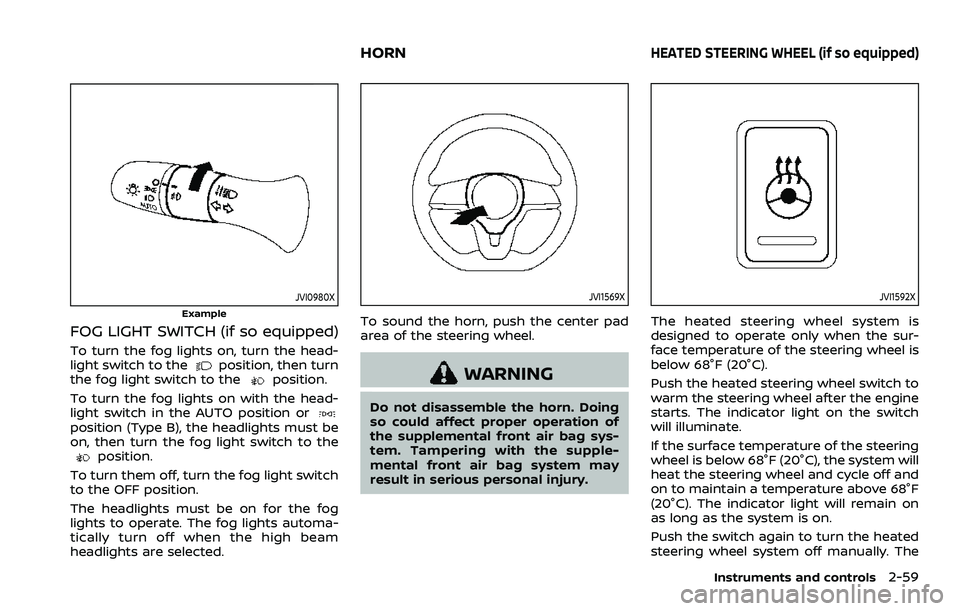
FOG LIGHT SWITCH (if so equipped)
To turn the fog lights on, turn the head-
light switch to theposition, then turn
the fog light switch to theposition.
To turn the fog lights on with the head-
light switch in the AUTO position or
position (Type B), the headlights must be
on, then turn the fog light switch to the
position.
To turn them off, turn the fog light switch
to the OFF position.
The headlights must be on for the fog
lights to operate. The fog lights automa-
tically turn off when the high beam
headlights are selected.
JVI1569X
To sound the horn, push the center pad
area of the steering wheel.
WARNING
Do not disassemble the horn. Doing
so could affect proper operation of
the supplemental front air bag sys-
tem. Tampering with the supple-
mental front air bag system may
result in serious personal injury.
JVI1592X
The heated steering wheel system is
designed to operate only when the sur-
face temperature of the steering wheel is
below 68°F (20°C).
Push the heated steering wheel switch to
warm the steering wheel after the engine
starts. The indicator light on the switch
will illuminate.
If the surface temperature of the steering
wheel is below 68°F (20°C), the system will
heat the steering wheel and cycle off and
on to maintain a temperature above 68°F
(20°C). The indicator light will remain on
as long as the system is on.
Push the switch again to turn the heated
steering wheel system off manually. The
Instruments and controls2-59
HORNHEATED STEERING WHEEL (if so equipped)
Page 234 of 508
4-28Monitor, heater, air conditioner, audio and phone systems
A/C (Air Conditioner) operation:
Push the A/C button to turn on or off the
air conditioner. When the air conditioner
is on, the A/C indicator light on the button
illuminates.
MAX A/C (Quick Air Conditioning) op-
eration:
Push the MAX A/C button for maximum
cooling and dehumidifying.
When the MAX A/C mode is turned on, the
air flow mode indicator will turn off with
the air flow mode fixed at
.
At the same time, the indicator light on
the A/C button and the air recirculation
mode will turn on.
Push the MAX A/C button again to turn
off the MAX A/C mode. When the MAX A/C
mode is turned off, most of the settings
will return to the previous state, while the
indicator light on the A/C button will stay
on.
Heater operation
Heating:
This mode is used to direct heated air
from the foot outlets. Some air also flows
from the defroster outlets and the side
ventilator outlets.
1. Push the air recirculation
button
for normal heating. (The indicator light
will turn off.)
2. Push the
button. (The indicator
light will turn on.)
3. Turn the fan speed control
dial to
the desired position.
4. Turn the temperature control dial to the desired position between the
middle and the hot (right) position.
Ventilation:
This mode directs outside air from the
side and center ventilators.
1. Push the air recirculation
button.
(The indicator light will turn off.)
2. Push the
button. (The indicator
light will turn on.)
3. Turn the fan speed control
dial to
the desired position.
4. Turn the temperature control dial to the desired position. Defrosting or defogging:
This mode directs the air to the defroster
outlets to defrost/defog the windows.
1. Push the front defroster
button.
(The indicator light will turn on.)
2. Turn the fan speed control
dial to
the desired position.
3. Turn the temperature control dial to the desired position between the
middle and the hot (right) position.
To remove frost from the windshield
quickly, turn the temperature control
dial to the maximum hot (right) posi-
tion and the fan speed control
dial
to the maximum position.
When the front defroster mode is
selected, the air conditioner automa-
tically turns on if the outside tempera-
ture is more than 36°F (2°C). This
dehumidifies the air which helps defog
the windshield. The air recirculation
indicator automatically turns off, al-
lowing outside air to be drawn into
the passenger compartment to
further improve the defogging perfor-
mance. The recirculation mode can-
not be activated in the front defroster
mode.
Bi-level heating:
The bi-level mode directs warmed air to
Page 235 of 508
the side and center ventilators and to the
front and rear floor outlets.
1. Push the air recirculation
button.
(The indicator light will turn off.)
2. Push the
button. (The indicator
light will turn on.)
3. Turn the fan speed control
dial to
the desired position.
4. Turn the temperature control dial to the desired position.
Heating and defogging:
This mode heats the interior and defogs
the windows.
1. Push the
button. (The indicator
light will turn on.)
2. Turn the fan speed control
dial to
the desired position.
3. Turn the temperature control dial to the maximum hot (right) position.
When the
button is pushed, the air
conditioner automatically turns on if the
outside temperature is more than 36°F
(2°C). This dehumidifies the air which
helps defog the windshield. The air re-
circulation indicator automatically turns
off, allowing outside air to be drawn into
the passenger compartment to further
improve the defogging performance. NOTE:
Clear snow and ice from the wiper
blades and air inlet in front of the
windshield. This improves heater op-
eration.
Air conditioner operation
Start the engine, turn the fan speed
controldial to the desired position,
and push the A/C button to activate the
air conditioner. When the air conditioner
is on, cooling and dehumidifying func-
tions are added to the heater operation.
The air conditioner cooling function op-
erates only when the engine is running.
Cooling:
This mode is used to cool and dehumidify
the air.
1. Push the
button. (The indicator
light will turn on.)
2. Turn the fan speed control
dial to
the desired position.
3. Push the A/C button. (The indicator light will turn on.)
4. Turn the temperature control dial to the desired position between the
middle and the cool (left) position.
For quick cooling, push the MAX A/C
button. When the MAX A/C button is
pushed, it will activate the air recirculation
mode. The amount of air coming through the ventilators is the highest it can go
when in MAX A/C mode regardless of the
position of the fan speed control
dial.
Dehumidified heating:
This mode is used to heat and dehumidify
the air.
1. Push the air recirculation
button.
(The indicator light will turn off.)
2. Push the
button. (The indicator
light will turn on.)
3. Turn the fan speed control
dial to
the desired position.
4. Push the A/C button on. (The indicator light will turn on.)
5. Turn the temperature control dial to the desired position between the
middle and the hot (right) position.
Dehumidified defogging:
This mode is used to defog the windows
and dehumidify the air.
1. Push the front defroster
button.
(The indicator light will turn on.)
2. Turn the fan speed control
dial to
the desired position.
3. Turn the temperature control dial to the desired position.
When the front defroster or
mode is
selected, the air conditioner automatically
turns on if the outside temperature is
Monitor, heater, air conditioner, audio and phone systems4-29
Page 236 of 508
4-30Monitor, heater, air conditioner, audio and phone systems
more than 36°F (2°C). This dehumidifies
the air which helps defog the windshield.
The air recirculation mode automatically
turns off, allowing outside air to be drawn
into the passenger compartment to
further improve the defogging perfor-
mance.
The air conditioner is always on in front
defroster or
mode, regardless of
whether the indicator light is on or off.
NOTE:
. The air conditioner system should
be operated for approximately 10
minutes at least once a month. This
helps prevent damage to the air
conditioner system due to the lack
of lubrication.
. A visible mist may be seen coming
from the ventilators in hot, humid
conditions as the air is cooled ra-
pidly. This does not indicate a mal-
function.
. If the engine coolant temperature
becomes too high, the air recircula-
tion mode will be activated and the
indicator light will come on automa-
tically.
. If the engine coolant temperature
gauge indicates engine coolant tem-
perature over the normal range, turn
the air conditioner off. (See “If your
vehicle overheats” (P.6-16).)
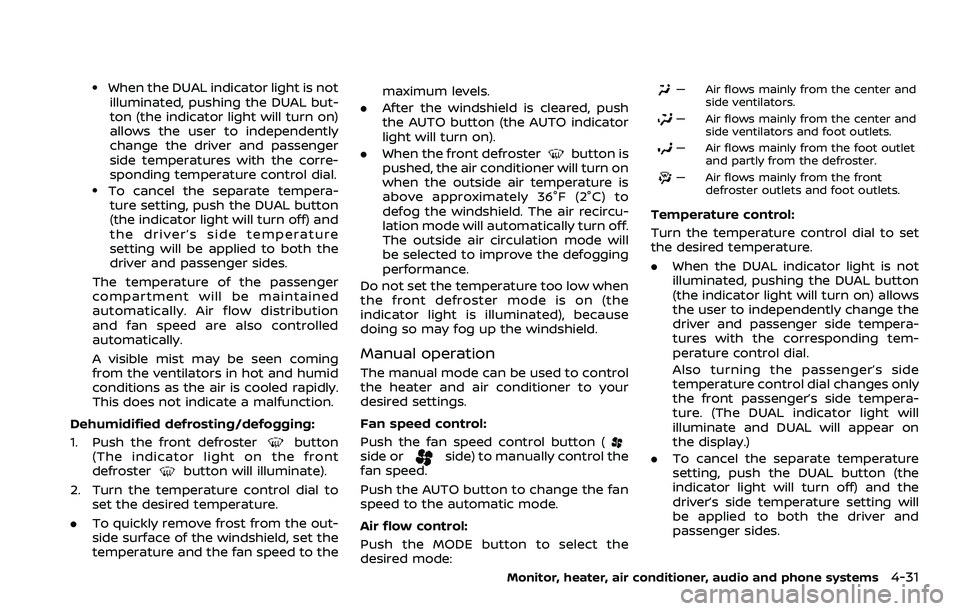
JVH0665X
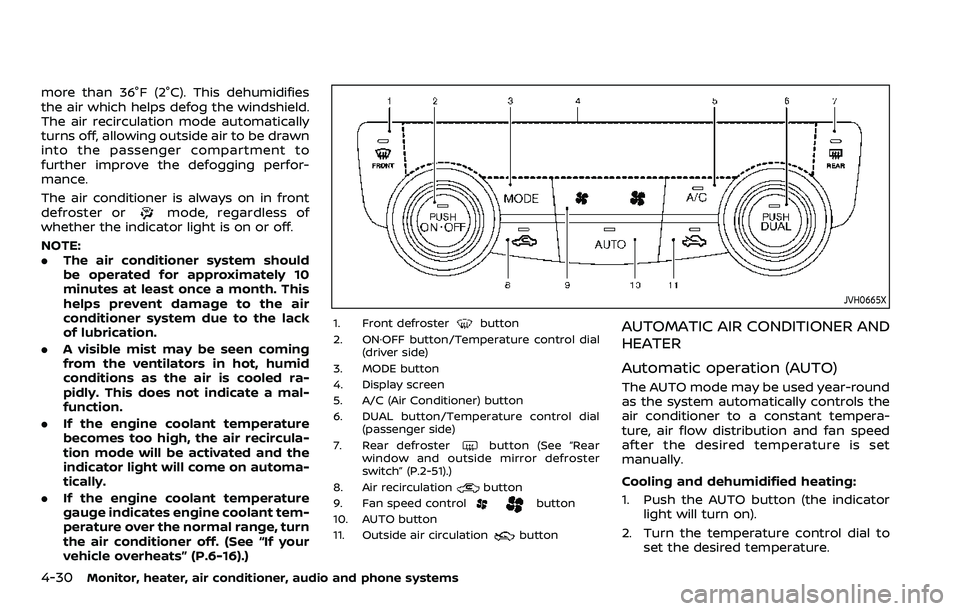
1. Front defrosterbutton
2. ON·OFF button/Temperature control dial (driver side)
3. MODE button
4. Display screen
5. A/C (Air Conditioner) button
6. DUAL button/Temperature control dial (passenger side)
7. Rear defroster
button (See “Rear
window and outside mirror defroster
switch” (P.2-51).)
8. Air recirculation
button
9. Fan speed controlbutton
10. AUTO button
11. Outside air circulation
button
AUTOMATIC AIR CONDITIONER AND
HEATER
Automatic operation (AUTO)
The AUTO mode may be used year-round
as the system automatically controls the
air conditioner to a constant tempera-
ture, air flow distribution and fan speed
after the desired temperature is set
manually.
Cooling and dehumidified heating:
1. Push the AUTO button (the indicator light will turn on).
2. Turn the temperature control dial to set the desired temperature.
Page 237 of 508
.When the DUAL indicator light is notilluminated, pushing the DUAL but-
ton (the indicator light will turn on)
allows the user to independently
change the driver and passenger
side temperatures with the corre-
sponding temperature control dial.
.To cancel the separate tempera-ture setting, push the DUAL button
(the indicator light will turn off) and
the driver’s side temperature
setting will be applied to both the
driver and passenger sides.
The temperature of the passenger
compartment will be maintained
automatically. Air flow distribution
and fan speed are also controlled
automatically.
A visible mist may be seen coming
from the ventilators in hot and humid
conditions as the air is cooled rapidly.
This does not indicate a malfunction.
Dehumidified defrosting/defogging:
1. Push the front defroster
button
(The indicator light on the front
defroster
button will illuminate).
2. Turn the temperature control dial to set the desired temperature.
. To quickly remove frost from the out-
side surface of the windshield, set the
temperature and the fan speed to the maximum levels.
. After the windshield is cleared, push
the AUTO button (the AUTO indicator
light will turn on).
. When the front defroster
button is
pushed, the air conditioner will turn on
when the outside air temperature is
above approximately 36°F (2°C) to
defog the windshield. The air recircu-
lation mode will automatically turn off.
The outside air circulation mode will
be selected to improve the defogging
performance.
Do not set the temperature too low when
the front defroster mode is on (the
indicator light is illuminated), because
doing so may fog up the windshield.
Manual operation
The manual mode can be used to control
the heater and air conditioner to your
desired settings.
Fan speed control:
Push the fan speed control button (
side orside) to manually control the
fan speed.
Push the AUTO button to change the fan
speed to the automatic mode.
Air flow control:
Push the MODE button to select the
desired mode:
— Air flows mainly from the center and
side ventilators.
— Air flows mainly from the center andside ventilators and foot outlets.
— Air flows mainly from the foot outletand partly from the defroster.
— Air flows mainly from the frontdefroster outlets and foot outlets.
Temperature control:
Turn the temperature control dial to set
the desired temperature.
.When the DUAL indicator light is not
illuminated, pushing the DUAL button
(the indicator light will turn on) allows
the user to independently change the
driver and passenger side tempera-
tures with the corresponding tem-
perature control dial.
Also turning the passenger’s side
temperature control dial changes only
the front passenger’s side tempera-
ture. (The DUAL indicator light will
illuminate and DUAL will appear on
the display.)
. To cancel the separate temperature
setting, push the DUAL button (the
indicator light will turn off) and the
driver’s side temperature setting will
be applied to both the driver and
passenger sides.
Monitor, heater, air conditioner, audio and phone systems4-31
Page 278 of 508

5-38Starting and driving
.Do not use the LDW system under
the following conditions as it may
not function properly:
— During bad weather (rain, fog,
snow, etc.).
— When driving on slippery roads, such as on ice or snow.
— When driving on winding or uneven roads.
— When there is a lane closure due to road repairs.
— When driving in a makeshift or temporary lane.
— When driving on roads where the lane width is too narrow.
— When driving without normal tire conditions (for example,
tire wear, low tire pressure,
installation of spare tire (if so
equipped), tire chains, non-
standard wheels).
— When the vehicle is equipped with non-original brake parts
or suspension parts.
. The system may not function
properly under the following con-
ditions: — On roads where there are
multiple parallel lane markers;
lane markers that are faded or
not painted clearly; yellow
painted lane markers; non-
standard lane markers; or
lane markers covered with
water, dirt, snow, etc.
— On roads where discontinued lane markers are still detect-
able.
— On roads where there are sharp curves.
— On roads where there are sharply contrasting objects,
such as shadows, snow,
water, wheel ruts, seams or
lines remaining after road re-
pairs. (The LDW system could
detect these items as lane
markers.)
— On roads where the traveling lane merges or separates.
— When the vehicle’s traveling direction does not align with
the lane marker.
— When traveling close to the vehicle in front of you, which
obstructs the lane camera
unit detection range. — When rain, snow, dirt or object
adheres to the windshield in
front of the lane camera unit.
— When the headlights are not bright due to dirt on the lens
or if the aiming is not adjusted
properly.
— When strong light enters the lane camera unit. (For exam-
ple, the light directly shines on
the front of the vehicle at
sunrise or sunset.)
— When a sudden change in brightness occurs. (For exam-
ple, when the vehicle enters or
exits a tunnel or under a
bridge.)
SYSTEM TEMPORARILY UNAVAIL-
ABLE
Condition A:
If the vehicle is parked in direct sunlight
under high temperature conditions (over
approximately 104°F (40°C)) and then
started, the LDW system may be deacti-
vated automatically, the LDW indicator
will flash and the following message will
appear in the vehicle information display.
- “Unavailable: High Cabin Temperature”
When the interior temperature is reduced,
Page 292 of 508
5-52Starting and driving
WAF0555X
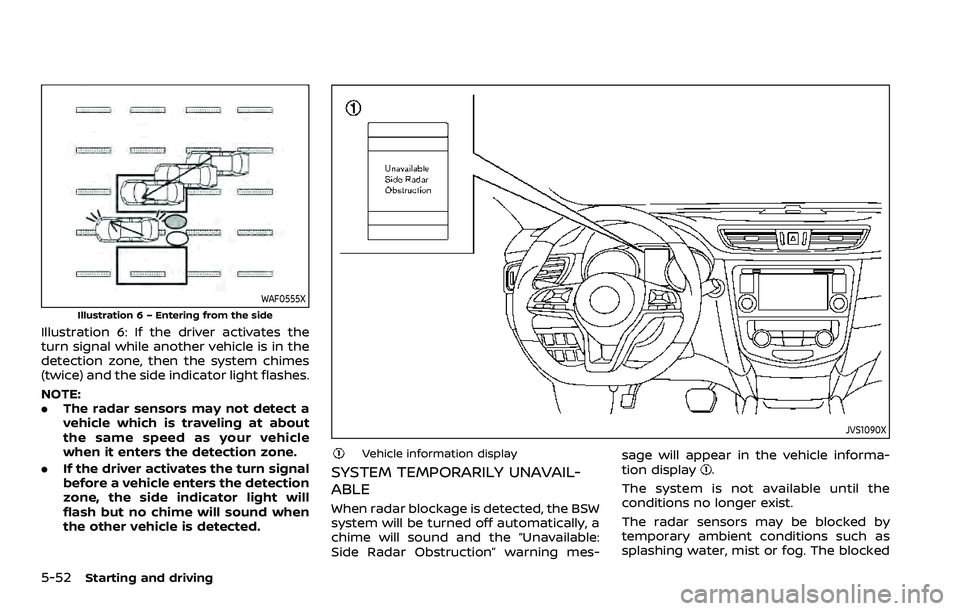
Illustration 6 – Entering from the side
Illustration 6: If the driver activates the
turn signal while another vehicle is in the
detection zone, then the system chimes
(twice) and the side indicator light flashes.
NOTE:
.The radar sensors may not detect a
vehicle which is traveling at about
the same speed as your vehicle
when it enters the detection zone.
. If the driver activates the turn signal
before a vehicle enters the detection
zone, the side indicator light will
flash but no chime will sound when
the other vehicle is detected.
JVS1090X
Vehicle information display
SYSTEM TEMPORARILY UNAVAIL-
ABLE
When radar blockage is detected, the BSW
system will be turned off automatically, a
chime will sound and the “Unavailable:
Side Radar Obstruction” warning mes- sage will appear in the vehicle informa-
tion display
.
The system is not available until the
conditions no longer exist.
The radar sensors may be blocked by
temporary ambient conditions such as
splashing water, mist or fog. The blocked
Page 320 of 508
5-80Starting and driving
with these system limitations could
result in serious injury or death:
.The ICC system is primarily in-
tended for use on straight, dry,
open roads with light traffic. It is
not advisable to use the ICC
system in city traffic or congested
areas.
. The ICC system will not adapt
automatically to road conditions.
This system should be used in
evenly flowing traffic. Do not use
the system on roads with sharp
curves or on icy roads, in heavy
rain or in fog.
. As there is a performance limit to
the distance control function,
never rely solely on the ICC sys-
tem. This system does not correct
careless, inattentive or absent-
minded driving or overcome poor
visibility in rain, fog, or other bad
weather. Decelerate the vehicle
speed by depressing the brake
pedal, depending on the distance
to the vehicle ahead and the
surrounding circumstances in or-
der to maintain a safe distance
between vehicles.
. When the ICC system automati-
cally brings the vehicle to a stop, your vehicle can automatically
accelerate if the vehicle is
stopped for less than approxi-
mately 3 seconds. Be prepared
to stop your vehicle if necessary.
. Always pay attention to the op-
eration of the vehicle and be
ready to manually control the
proper following distance. The
ICC system may not be able to
maintain the selected distance
between vehicles (following dis-
tance) or selected vehicle speed
under some circumstances.
. The system may not detect the
vehicle in front of you in certain
road or weather conditions. To
avoid accidents, never use the ICC
system under the following con-
ditions:
— On roads with heavy, high-
speed traffic or sharp curves
— On slippery road surfaces such as on ice or snow, etc.
— During bad weather (rain, fog, snow, etc.)
— When rain, snow or dirt adhere to the bumper around the
distance sensor — On steep downhill roads (the
vehicle may go beyond the set
vehicle speed and frequent
braking may result in over-
heating the brakes)
— On repeated uphill and down- hill roads
— When traffic conditions make it difficult to keep a proper
distance between vehicles be-
cause of frequent accelera-
tion or deceleration
— Interference by other radar sources.
. In some road or traffic conditions,
a vehicle or object can unexpect-
edly come into the sensor detec-
tion zone and cause automatic
braking. Always stay alert and
avoid using the ICC system where
not recommended in this warn-
ing section.
The ICC system will not detect the
following objects:
. Stationary or slow moving vehicles
. Pedestrians or objects in the roadway
. Oncoming vehicles in the same lane
Page 321 of 508
.Motorcycles traveling offset in the
travel lane
The following are some conditions in
which the radar sensor cannot properly
detect a vehicle ahead and the system
may not operate properly:
. When the sensor detection is reduced
(conditions such as rain, snow, fog,
dust storms, sandstorms, and road
spray from other vehicles)
. Driving on a steep downhill slope or
roads with sharp curves
. Driving on a bumpy road surface, such
as an uneven dirt road
. If dirt, ice, snow or other material is
covering the radar sensor area
. A complicated-shaped vehicle such as
a car carrier trailer or flatbed truck/
trailer is near the vehicle ahead.
. Interference by other radar sources
. When excessively heavy baggage is
loaded in the rear seat or cargo area
of your vehicle.
The ICC system is designed to automati-
cally check the radar sensor’s operation
within the limitations of the system
The detection zone of the radar sensor is
limited. A vehicle ahead must be in the
detection zone for the ICC system to
maintain the selected distance from the
vehicle ahead. A vehicle ahead may move outside of the detection zone due to its
position within the same lane of travel.
Motorcycles may not be detected in the
same lane ahead if they are traveling
offset from the center line of the lane. A
vehicle that is entering the lane ahead
may not be detected until the vehicle has
completely moved into the lane.
If this occurs, the ICC system may warn
you by blinking the system indicator and
sounding the chime. The driver may have
to manually control the proper distance
away from the vehicle traveling ahead.
The ICC system (with ProPILOT assist)
uses a multi-sensing front camera. The
following are some conditions in which
the camera may not properly detect a
vehicle and detection of a vehicle ahead
may be delayed:
.
Poor visibility (conditions such as rain,
snow, fog, dust storms, sandstorms,
and road spray from other vehicles)
. The camera area of the windshield is
fogged up or covered with dirt, water
drops, ice, snow, etc.
. Strong light (for example, sunlight or
high beams from oncoming vehicles)
enters the front camera
. A sudden change in brightness occurs
(for example, when the vehicle enters
or exits a tunnel or shaded area or lightning flashes)
Starting and driving5-81
Page 328 of 508
5-88Starting and driving
Steering assist limitations
WARNING
.In the following situations, the
camera may not detect lane mar-
kers correctly or may detect lane
markers incorrectly and the
steering assist may not operate
properly:
— When driving on roads where
there are multiple parallel
lane markers, lane markers
that are faded or not painted
clearly, non-standard lane
markers, or lane markers cov-
ered with water, dirt, snow,
etc.
— When driving on roads with discontinued lane markers
— When driving on roads with a widening or narrowing lane
width
— When driving on roads where there are multiple lanes or
unclear lane markers due to
road construction
— When driving on roads where there are sharply contrasting
objects, such as shadows, snow, water, wheel ruts,
seams, or lines remaining
after road repairs (the steer-
ing assist could detect these
items as lane markers)
— When driving on roads where the traveling lane merges or
separates
. Do not use the steering assist
under the following conditions
because the system may not
properly detect lane markers.
Doing so could cause a loss of
vehicle control and result in an
accident.
— During bad weather (rain, fog,
snow, dust, etc.)
— When rain, snow, sand, etc., is thrown up by the wheels of
other vehicles
— When dirt, oil, ice, snow, water, or another object adheres to
the camera unit
— When the lens of the camera unit is foggy
— When strong light (for exam- ple, sunlight or high beams
from oncoming vehicles)
shines on the camera — When the headlights are not
bright due to dirt on the lens
or the headlights are off in
tunnels or darkness
— When a sudden change in brightness occurs (for exam-
ple, when the vehicle enters or
exits a tunnel or is under a
bridge)
— When driving on roads where the traveling lane merges or
separates or where there are
temporary lane markers be-
cause of road construction
— When there is a lane closure due to road repairs
— When driving on a bumpy road surface, such as an uneven
dirt road
— When driving on sharp curves or winding roads
— When driving on repeated up- hill and downhill roads
. Do not use the steering assist
under the following conditions
because the system will not op-
erate properly:
— When driving with a tire that is
not within normal tire condi-