radio controls NISSAN QUEST 2000 V41 / 2.G Owners Manual
[x] Cancel search | Manufacturer: NISSAN, Model Year: 2000, Model line: QUEST, Model: NISSAN QUEST 2000 V41 / 2.GPages: 292, PDF Size: 2.48 MB
Page 105 of 292
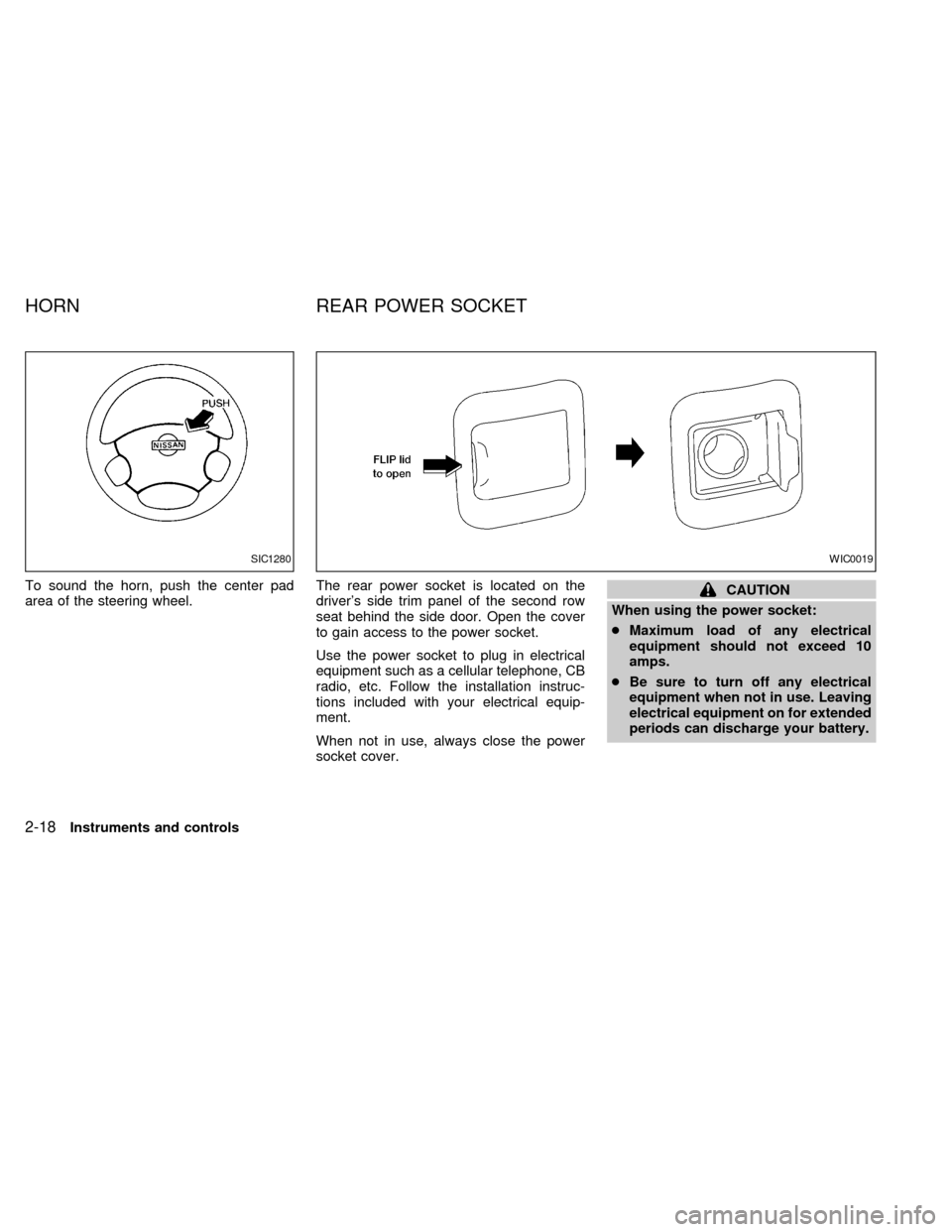
To sound the horn, push the center pad
area of the steering wheel.The rear power socket is located on the
driver's side trim panel of the second row
seat behind the side door. Open the cover
to gain access to the power socket.
Use the power socket to plug in electrical
equipment such as a cellular telephone, CB
radio, etc. Follow the installation instruc-
tions included with your electrical equip-
ment.
When not in use, always close the power
socket cover.CAUTION
When using the power socket:
cMaximum load of any electrical
equipment should not exceed 10
amps.
cBe sure to turn off any electrical
equipment when not in use. Leaving
electrical equipment on for extended
periods can discharge your battery.
SIC1280WIC0019
HORN REAR POWER SOCKET
2-18Instruments and controls
ZX
Page 142 of 292

4Heater, air conditioner and audio systems
Ventilators ..............................................................4-2
Center ventilators ...................................................4-2
Side ventilators .......................................................4-2
Heater and air conditioner (manual) ......................4-3
Controls ..................................................................4-3
Heater operation ....................................................4-4
Air conditioner operation ........................................4-5
Air flow charts.........................................................4-7
Heater and air conditioner (automatic)
(if so equipped) ....................................................4-11
Automatic operation .............................................4-12
Rear seat air conditioner (if so equipped) ...........4-14
Controls ................................................................4-14Servicing air conditioning .....................................4-15
Audio system ........................................................4-16
FM-AM radio with cassette player .......................4-16
FM-AM radio with cassette player and
compact disc (CD) player.....................................4-22
CD care and cleaning ..........................................4-29
Compact disc (CD) player (if so equipped) .........4-30
CD care and cleaning ..........................................4-31
Steering wheel switch for audio controls .............4-32
Rear audio controls (if so equipped)....................4-33
CD care and cleaning ..........................................4-35
Antenna ................................................................4-35
Car phone or CB radio .........................................4-35
ZX
Page 152 of 292
WARNING
cThe air conditioner cooling function
operates only when the engine is
running.
cDo not leave children, impaired
adults, or pets alone in your vehicle.
On hot, sunny days, temperatures in
a closed vehicle could quickly be-
come high enough to cause severe
or possibly fatal injuries to people or
animals.
cDo not use the recirculation mode
for long periods as it may cause theinterior air to become stale and the
windows to fog up.
cPositioning of the heater and air con-
ditioner controls should not be done
while driving so full attention may be
given to vehicle operation.
The cabin air filter (if so equipped) requires
periodic maintenance. See the ``Do it your-
self'' section for additional information.
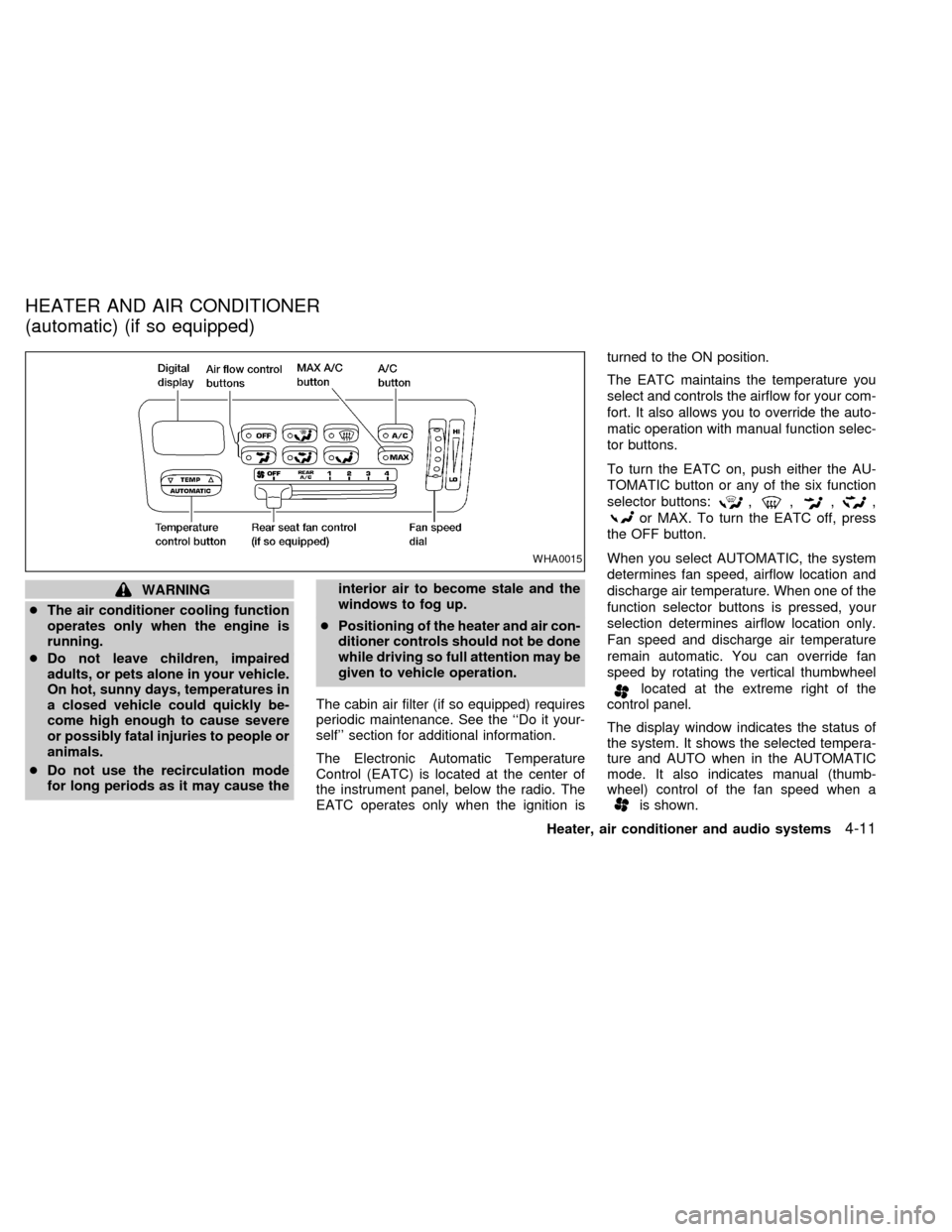
The Electronic Automatic Temperature
Control (EATC) is located at the center of
the instrument panel, below the radio. The
EATC operates only when the ignition isturned to the ON position.
The EATC maintains the temperature you
select and controls the airflow for your com-
fort. It also allows you to override the auto-
matic operation with manual function selec-
tor buttons.
To turn the EATC on, push either the AU-
TOMATIC button or any of the six function
selector buttons:
,,,,
or MAX. To turn the EATC off, press
the OFF button.
When you select AUTOMATIC, the system
determines fan speed, airflow location and
discharge air temperature. When one of the
function selector buttons is pressed, your
selection determines airflow location only.
Fan speed and discharge air temperature
remain automatic. You can override fan
speed by rotating the vertical thumbwheel
located at the extreme right of the
control panel.
The display window indicates the status of
the system. It shows the selected tempera-
ture and AUTO when in the AUTOMATIC
mode. It also indicates manual (thumb-
wheel) control of the fan speed when a
is shown.
WHA0015
HEATER AND AIR CONDITIONER
(automatic) (if so equipped)
Heater, air conditioner and audio systems4-11
ZX
Page 161 of 292

cMusic or programming type such as
``Classical'', ``Country'', or ``Rock''.
cTraffic reports about delays or construc-
tion.
Using RDS
To turn RDS on push the RDS/CLK button
until RDS OFF is displayed, then press the
SEL button until RDS ON is displayed.
To change display type turn RDS ON then
use the SEL button to choose between:
cSHOW TYPE - Music or program type.
cSHOW NAME - Station name or call-
sign.
cSHOW NONE - No text display.
To choose traffic reports press the
RDS/CLK button until TRAFFIC OFF is dis-
played, the use then SEL button to choose
TRAFFIC ON, then use the seek or scan
control to look for a station that may transmit
traffic reports, the radio will display a
``TRAF'' icon to show it is in traffic mode and
tuned to a station that may transmit traffic
reports. If the radio searches through the
whole band and then returns to the previous
station it was originally playing there are nostations in the area that are transmitting
traffic reports.
If a cassette or compact disc is being played
while the traffic option is on and the station
previously tuned into displays a traffic bul-
letin the radio will pause the cassette or
compact disc and broadcast the bulletin,
then resume playing the cassette or com-
pact disc.
Using RDS to search for programming type
Certain areas have a limited number of
stations that transmit RDS. Many stations
transmit call letters and frequencies only.
Searching or scanning by program type
may yield a limited number of selections.
Press the RDS/CLK button until FIND
CLASSIC is displayed, then use the SEL
button to choose between CLASSIC,
COUNTRY, INFO, JAZZ, OLDIES, R&B,
RELIGUS (Religious), ROCK, SOFT and
TOP40. When you have chosen a program
type, use the SEEK, SCAN, or AUTOSET
controls to look for a station transmitting that
kind of program. If the radio searches
through the whole band and then returns to
the previous station it was originally playing
there are no stations in the area that aretransmitting that type of programming.
Cassette tape player operation
Turn the ignition to ACC or ON, and care-
fully insert a cassette tape into the tape
door. The cassette tape automatically pulls
into the player and begins to play.
When a casssette is inserted into the audio
system, the word TAPE and a cassette side
symbol (either one or two) illuminates in the
display.
If the radio is already operating it automati-
cally turns off and the cassette tape begins
to play. The cassette tape automatically
changes direction to play the other side
when the first side is complete.
Precautions on cassette player opera-
tion
c
To maintain good quality sound, Nis-
san recommends using cassette tapes
of 60 minutes or shorter in length.
cCassette tapes should be removed
from the player when not in use. Store
cassettes in their protective cases and
away from direct sunlight, heat, dust,
moisture, and magnetic sources.
4-20Heater, air conditioner and audio systems
ZX
Page 163 of 292

FM-AM RADIO WITH CASSETTE
PLAYER AND COMPACT DISC
(CD) PLAYER
Audio main operationTo turn the radio on, turn the ignition key to
ACC or ON. If you listen to the radio with the
engine not running, turn the key to the ACC
position.
Radio reception is affected by station signal
strength, distance from radio transmitter,buildings, bridges, mountains, and other
external influences. Intermittent changes in
reception quality normally are caused by
external influences.
Using a cellular phone in or near the
vehicle may influence radio reception
quality.
Power/Volume control
Push the VOL knob to turn the radio on.
Push the VOL knob once more to turn the
radio OFF.
The control buttons are illuminated when
the parking lamps or headlamps are on.
Only the text for the active controls will
illuminate for each specific type of media.
No bulbs or lights have malfunctioned. For
example when a cassette tape is being
played, SHUFFLE will not illuminate.
Turn the knob to raise or lower volume. If
the knob is set above a certain volume level
and the ignition is turned off, the volume will
come back on at a nominal listening level
when the ignition is turned back on.
AHA1058
4-22Heater, air conditioner and audio systems
ZX
Page 167 of 292

cMusic or programming type such as
``Classical'', ``Country'', or ``Rock''.
cText Messages such as telephone num-
bers for dial in requests, advertisements
and other simple messages.
cTraffic reports about delays or construc-
tion.
Using RDS
To turn RDS on push the RDS/CLK button
until RDS OFF is displayed, then press the
SEL button until RDS ON is displayed.
To change display type turn RDS ON then
use the SEL button to choose between:
cSHOW TYPE - Music or program type.
cSHOW NAME - Station name or call-
sign.
cSHOW TEXT - Text Messages such as
telephone numbers for dial in requests,
advertisements and other simple mes-
sages.
cSHOW NONE - No text display.
To choose traffic reports press the
RDS/CLK button until TRAFFIC OFF is dis-
played, the use then SEL button to chooseTRAFFIC ON, then use the seek or scan
control to look for a station that may transmit
traffic reports, the radio will display a
``TRAF'' icon to show it is in traffic mode and
tuned to a station that may transmit traffic
reports. If the radio searches through the
whole band and then returns to the previous
station it was originally playing there are no
stations in the area that are transmitting
traffic reports.
If a cassette or compact disc is being played
while the traffic option is on and the station
previously tuned into displays a traffic bul-
letin the radio will pause the cassette or
compact disc and broadcast the bulletin,
then resume playing the cassette or com-
pact disc.
Using RDS to search for programming type
Certain areas have a limited number of
stations that transmit RDS. Many stations
transmit call letters and frequencies only.
Searching or scanning by program type
may yield a limited number of selections.
Press the RDS/CLK button until FIND
CLASSIC is displayed, then use the SEL
button to choose between CLASSIC,
COUNTRY, INFO, JAZZ, RELIGUS (Reli-gious), ROCK, SOFT and TOP40. When
you have chosen a program type, use the
SEEK, SCAN, or AUTOSET controls to look
for a station transmitting that kind of pro-
gram. If the radio searches through the
whole band and then returns to the previous
station it was originally playing there are no
stations in the area that are transmitting that
type of programming.
Cassette tape player operation
Turn the ignition to ACC or ON, and care-
fully insert a cassette tape into the tape
door. The cassette tape automatically pulls
into the player and begins to play.
When a casssette is inserted into the audio
system, the word TAPE illuminates in the
display to inform you that there is a tape in
the radio.
If the radio is already operating it automati-
cally turns off the CD or radio station and the
cassette tape begins to play and TAPE 1
PLAY is displayed. TAPE 1 PLAY indicates
side 1 is playing on the tape currenty. The
cassette tape automatically changes direc-
tion to play the other side when the first side
is complete and will display TAPE 2 PLAY.
4-26Heater, air conditioner and audio systems
ZX
Page 171 of 292

COMPACT DISC (CD) PLAYER
(if so equipped)
The compact disc player consists of two
main components; the 6 CD magazine and
the CD changer. Both components are lo-
cated on the center instrument panel con-
sole, below the ashtray.
How to load the CD magazine
To load the magazine with CDs, first push
the EJECT button on the CD changer to
eject the magazine, then remove the maga-
zine from the changer. The inside of the CD
magazine contains six shelves, one foreach CD to be loaded. Carefully slide a CD
(label side up) onto one of the shelves and
push it in. Repeat as desired, loading up to
six CDs.
CD magazine insert
Once the desired number of CDs are loaded
into the magazine, insert the magazine back
into the CD changer.
With the ignition switch OFF, the CD maga-
zine loads into the CD changer. Once the
ignition switch is turned to ACC or ON, the
audio system returns to its previous mode.
With the ignition switch in the ACC or ONposition, the CD magazine loads into the
CD changer and begins play with disc one,
track one.
CD button
Push this button to switch from radio or tape
mode to CD mode. CD play begins auto-
matically if at least one disc is loaded in the
magazine. The display window shows the
CD number for three seconds, then the track
number for three seconds, then displays
both together for the remainder of the track.
If the CD button is pushed while in the radio
or tape mode, and there are no CDs loaded
in the magazine, the display window flashes
a NO DISC message for 4 seconds.
CD Player controls
SEEK
Push
SEEK to select the previous
track number, or push SEEKto select
the next track number. After the last track on
a disc, pushing SEEK
selects the first
track of the same disc.
SELECT DISCS
Push
TUNE to select the previous CD
in the magazine. Push TUNEto select
AHA1064
4-30Heater, air conditioner and audio systems
ZX
Page 173 of 292
CAUTION
cDuring cold weather or rainy days,
the player may malfunction due to
the humidity. If this occurs, remove
the CD and dehumidify or ventilate
the player completely.
cThe player may skip while driving on
rough roads.
cThe CD player sometimes cannot
function when the passenger com-
partment temperature is extremely
high. Decrease the temperature be-
fore use.
cDo not expose the CD to direct sun-
light.
cDo not touch the playing surface of
the disc.
cDo not use 8cm discs. They may
cause player damage even if using
with the optional adapter.
cRecordable compact discs (CD-R)
may not function properly in the CD
player.
STEERING WHEEL SWITCH FOR
AUDIO CONTROLS
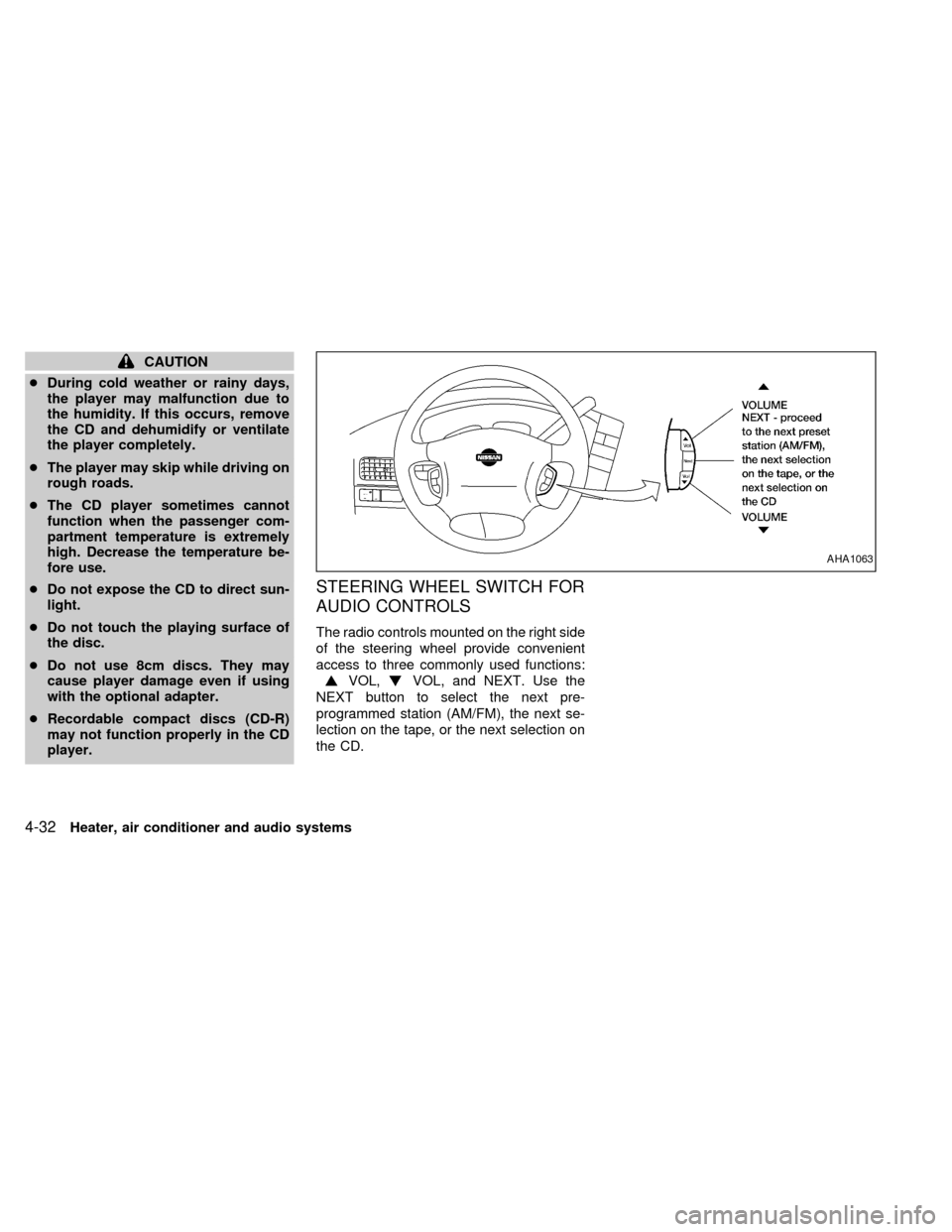
The radio controls mounted on the right side
of the steering wheel provide convenient
access to three commonly used functions:
VOL,VOL, and NEXT. Use the
NEXT button to select the next pre-
programmed station (AM/FM), the next se-
lection on the tape, or the next selection on
the CD.
AHA1063
4-32Heater, air conditioner and audio systems
ZX
Page 174 of 292

REAR AUDIO CONTROLS (if so
equipped)
Radio features controlled by the rear seat
remote control (if so equipped) are listed
below:cVolume: þ/+
cMedia select: AM/FM, tape, CD, or CD
changer.
cSpeakers ON/OFFcMem: proceed to the next preset station
(AM/FM).
cSeek:bc
Push the Memory three and Memory five
buttons on the front radio controls simulta-
neously to turn the rear controls on. Push
them again to turn the rear audio controls off.
The(headphones symbol) illuminates
in the front display when the rear audio
controls are on. Two headphone jacks are
provided so two rear seat passengers may
listen to the audio system privately.
The rear volume controls can only increase
the volume to the level at which the front
radio volume control is set.
Headphones are not included with the ve-
hicle. Most portable radio headphones work
with the rear audio controls.
For vehicles equipped with the premium
FM-AM radio with cassette player, compact
disc player and 6 disc CD player, if the rear
passengers turn off the rear speakers and
are using headphones they may choose to
listen to a different media than the front
passengers. The rear passengers can listen
to the radio while the front passengers can
listen to the same thing, a cassette tape,
AHA1060
Heater, air conditioner and audio systems4-33
ZX
Page 175 of 292

CD, or the CD changer. The radio will go
into DUAL PLAY mode and the rear pas-
sengers can use the rear controls to change
media.
VOLUME button
The VOLUME button allows the rear pas-
sengers to adjust the headphone volume
level.
MEDIA button
The MEDIA button allows the rear passen-
ger to change between AM, FM1, FM2,
TAPE, CD, & CD DJ.
MEM button
In AM, FM1, or FM2 mode the MEM button
allows the rear passenger to successively
access memory preset station 1 through 6.
In CD DJ mode the MEM button allows the
rear passengers to select other compact
discs in the CD changer.
SEEK button
In AM, FM1, or FM2 mode the SEEKandbutton allows the rear pas-
sengers to find the next radio station up or
down the station band frequency.In TAPE mode the SEEK
and
button allows the rear passengers use Au-
tomatic Music Search (AMS) to find the next
or previous song on the cassette.
In CD mode the SEEK
andbutton
allows the rear passengers to find the next
or previous selection on the CD.
In CD DJ mode the SEEK
andbutton allows the rear passengers to find
the next or previous selection on the CD.
For vehicles equipped with the FM-AM radio
with cassette player, when the rear seat
controls are on, push the SPKRS ON-OFF
button to turn all speakers off. Push again to
turn all speakers on.
For vehicles equipped with the premium
FM-AM radio with cassette player, compact
disc player and 6 disc CD player, when the
rear seat controls are on, push the SPKRS
ON-OFF button to turn the rear speakers
off. Push again to turn the rear speakers on.
If the rear audio system was on when the
ignition was turned OFF, the audio system
``remembers'' and the rear system is still on
when the engine is started again. The sys-
tem also ``remembers'' if the speakers were
ON or OFF. Therefore, the speakers mayhave to be turned on again by pressing the
SPKRS ON-OFF button or turning the rear
audio controls off.
4-34Heater, air conditioner and audio systems
ZX