Interior NISSAN QUEST 2008 V42 / 3.G User Guide
[x] Cancel search | Manufacturer: NISSAN, Model Year: 2008, Model line: QUEST, Model: NISSAN QUEST 2008 V42 / 3.GPages: 376, PDF Size: 5.21 MB
Page 203 of 376

cThe temperature of the passenger compart-
ment will be maintained automatically. Air
flow distribution, fan speed and A/C on/off
are also controlled automatically.
cA visible mist may be seen coming from the
ventilators in hot, humid conditions as the air
is cooled rapidly. This does not indicate a
malfunction.
Dehumidified defrosting or defogging
1. Push the defroster control buttonto
turn the system on. The display will show the
defrost icon.
2. Turn the temperature dial to the left or right
to set the desired temperature.
cTo quickly remove ice from the outside of the
windows, press and hold the
+but-
ton to set the fan speed to maximum.
cAs soon as possible after the windshield is
clean, push the AUTO button to return to the
auto mode.
cWhen the DEF control
is activated,
the air conditioner will automatically be
turned on at outside temperatures above
36°F (2°C) . If in defrost mode for more than
one minute, the air conditioning system will
continue to operate until the fan control is
turned OFF, the vehicle is shut off, or the A/Cbutton is used to turn off the compressor
even if an air flow MODE button other
than
is selected. This dehumidifies
the air which helps defog the windshield.
The air recirculation mode automatically
turns off, allowing outside air to be drawn
into the passenger compartment to further
improve the defogging performance.
MANUAL OPERATION
Fan speed control buttons
Press the fan speed control buttons+/–
to manually control the fan speed.
Press OFF to turn the system off.
Push the AUTO button to return to automatic
control of the fan speed.
Air recirculation
Themode automatically turns off, allowing
outside air to be drawn into the passenger com-
partment to prevent fogging.
Push the air recirculation button
to recir-
culate interior air inside the vehicle. Push the
AUTO button to return to automatic mode.
The air recirculation button will not be activated
when the air conditioner is in DEF mode.
Air flow control
Pushing the MODE button manually controls air
flow and selects the air outlet:
— Air flows from center and side
ventilators.
— Air flows from center and side
ventilators and foot outlets.
— Air flows mainly from foot outlets.
— Air flows from defroster and foot
outlets.
— Air flows from defroster outlets.
To turn system off
Press the OFF button.
OPERATING TIPS
cWhen the engine coolant temperature and
outside air temperature are low, the air flow
from the foot outlets may not operate for a
maximum of 150 seconds. However, this is
not a malfunction. After the coolant tempera-
ture warms up, air flow from the foot outlets
will operate normally.
Display screen, heater, air conditioner, audio and phone systems4-41
ZREVIEW COPYÐ2008 Quest(van)
Owners ManualÐUSA_English(nna)
06/29/07Ðdebbie
X
Page 239 of 376

– Your cellular phone is locked to prevent it
from being dialed.
cWhen the radio wave condition is not ideal
or ambient sound is too loud, it may be
difficult to hear the other person’s voice dur-
ing a call.
cDo not place the cellular phone in an area
surrounded by metal or far away from the
in-vehicle phone module to prevent tone
quality degradation and wireless connection
disruption.
cWhile a cellular phone is connected through
the BluetoothTwireless connection, the bat-
tery power of the cellular phone may dis-
charge quicker than usual. The BluetoothT
Hands-Free Phone System cannot charge
cellular phones.
cIf the hands-free phone system seems to be
malfunctioning, see “Troubleshooting guide”
later in this section. You can also visit
www.nissanusa.com/bluetooth for trouble-
shooting help.
cSome cellular phones or other devices may
cause interference or a buzzing noise to
come from the audio system speakers. Stor-
ing the device in a different location may
reduce or eliminate the noise.cRefer to the cellular phone Owner’s Manual
regarding the telephone charges, cellular
phone antenna and body, etc.
This device complies with Part 15 of the
FCC Rules. Operation is subject to the fol-
lowing two conditions: (1) this device may
not cause harmful interference, and (2) this
device must accept any interference re-
ceived, including interference that may
cause undesired operation.
FCC Radiation Exposure Statement:
This equipment complies with FCC radiation ex-
posure limits set forth for an uncontrolled envi-
ronment. This equipment should be installed and
operated with minimum distance of 8 inches (20
cm) between the radiator and your body. This
Transmitter must not be co-located or operating
in conjunction with any other antenna or transmit-
ter.
USING THE SYSTEM
The NISSAN Voice Recognition system allows
hands-free operation of the BluetoothTPhone
System.
If the vehicle is in motion, some commands may
not be available so full attention may be given to
vehicle operation.
Initialization
When the ignition switch is turned to the ON
position, NISSAN Voice Recognition is initialized,
which takes a few seconds. When completed,
the amber light on the overhead console illumi-
nates and the system is ready to accept voice
commands. If the
button is pressed before
the initialization completes, the system will an-
nounce “Hands-free phone system not ready”
and will not react to voice commands.
Operating tips
To get the best performance out of the NISSAN
Voice Recognition system, observe the following:
cKeep the interior of the vehicle as quiet as
possible. Close the windows to eliminate
surrounding noises (traffic noises, vibration
sounds, etc.) , which may prevent the system
from recognizing voice commands correctly.
cWait until the tone sounds before speaking a
command. Otherwise, the command will not
be received properly.
cStart speaking a command within 5 seconds
after the tone sounds.
cSpeak in a natural voice without pausing
between words.
Display screen, heater, air conditioner, audio and phone systems4-77
ZREVIEW COPYÐ2008 Quest(van)
Owners ManualÐUSA_English(nna)
06/29/07Ðdebbie
X
Page 289 of 376

7 Appearance and care
Cleaning exterior..................................7-2
Washing......................................7-2
Waxing........................................7-2
Removing spots................................7-3
Underbody....................................7-3
Glass.........................................7-3
Aluminum alloy wheels..........................7-3
Chrome parts..................................7-3
Tire dressings..................................7-3Cleaning interior...................................7-4
Floor mats.....................................7-4
Seat belts.....................................7-5
Corrosion protection...............................7-5
Most common factors contributing to vehicle
corrosion......................................7-5
Environmental factors influence the rate of
corrosion......................................7-5
To protect your vehicle from corrosion............7-5
ZREVIEW COPYÐ2008 Quest(van)
Owners ManualÐUSA_English(nna)
06/29/07Ðdebbie
X
Page 292 of 376
Occasionally remove loose dust from the interior
trim, plastic parts and seats using a vacuum
cleaner or soft bristled brush. Wipe the vinyl and
leather surfaces with a clean, soft cloth damp-
ened in mild soap solution, then wipe clean with a
dry, soft cloth.
Regular care and cleaning is required in order to
maintain the appearance of the leather.
Before using any fabric protector, read the manu-
facturer’s recommendations. Some fabric pro-
tectors contain chemicals that may stain or
bleach the seat material.
Use a cloth dampened only with water to clean
the meter and gauge lens.
CAUTION
cNever use benzine, thinner or any simi-
lar material.
cSmall dirt particles can be abrasive and
damaging to leather surfaces and
should be removed promptly. Do not
use saddle soap, car waxes, polishes,
oils, cleaning fluids, solvents, deter-
gents or ammonia-based cleaners as
they may damage the leather’s natural
finish.cNever use fabric protectors unless rec-
ommended by the manufacturer.
cDo not use glass or plastic cleaner on
meter or gauge lens covers. It may dam-
age the lens cover.
FLOOR MATS
The use of genuine NISSAN floor mats can ex-
tend the life of your vehicle carpet and make it
easier to clean the interior.No matter what
mats are used, be sure they are fitted for
your vehicle and are properly positioned in
the footwell to prevent interference with
pedal operation.Mats should be maintained
with regular cleaning and replaced if they be-
come excessively worn.
Floor mat positioning aid (driver’s side
only)
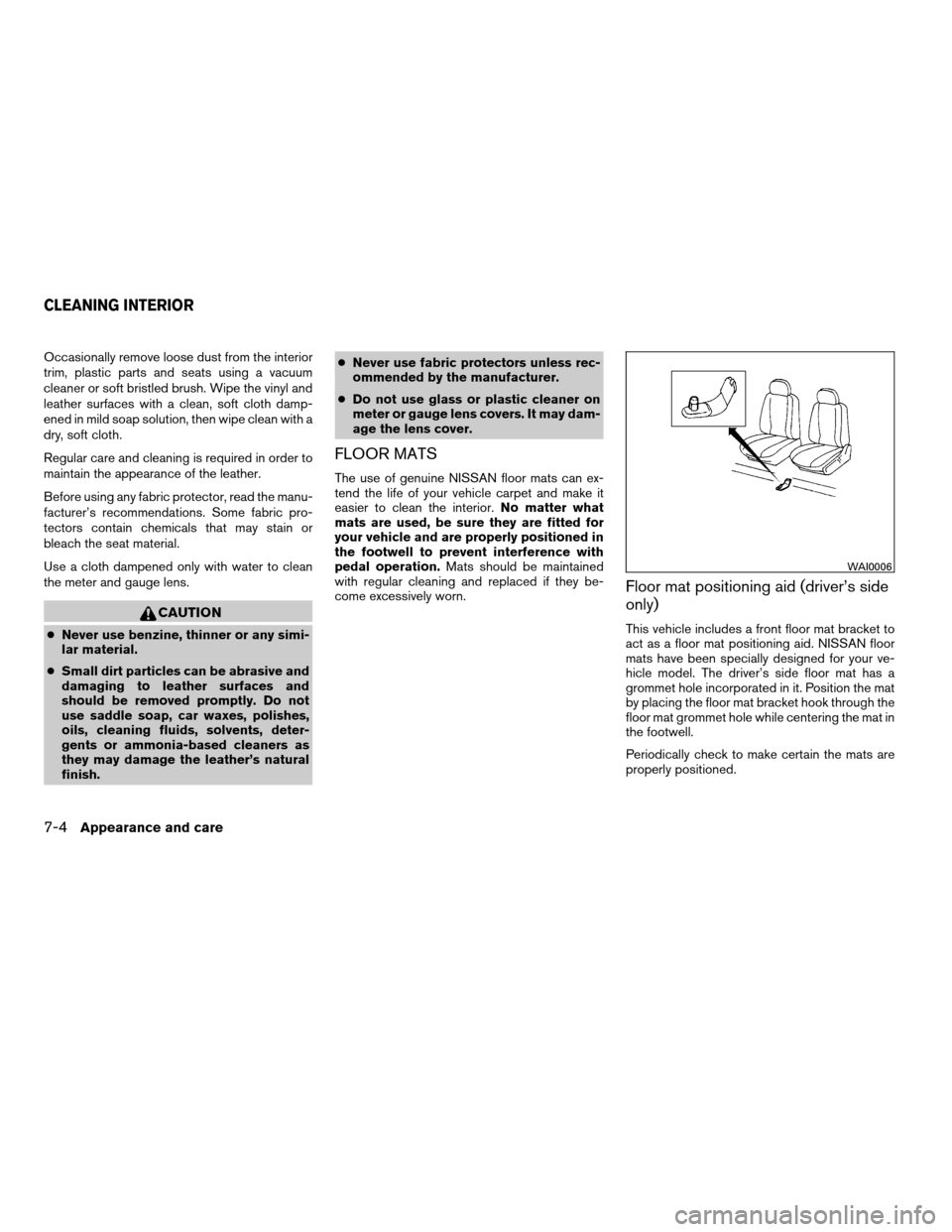
This vehicle includes a front floor mat bracket to
act as a floor mat positioning aid. NISSAN floor
mats have been specially designed for your ve-
hicle model. The driver’s side floor mat has a
grommet hole incorporated in it. Position the mat
by placing the floor mat bracket hook through the
floor mat grommet hole while centering the mat in
the footwell.
Periodically check to make certain the mats are
properly positioned.
WAI0006
CLEANING INTERIOR
7-4Appearance and care
ZREVIEW COPYÐ2008 Quest(van)
Owners ManualÐUSA_English(nna)
06/29/07Ðdebbie
X
Page 295 of 376

8 Maintenance and do-it-yourself
Maintenance requirements..........................8-2
General maintenance..............................8-2
Explanation of general maintenance items.........8-2
Maintenance precautions...........................8-5
Engine compartment check locations................8-6
Engine cooling system.............................8-7
Checking engine coolant level...................8-7
Changing engine coolant........................8-8
Engine oil.........................................8-8
Checking engine oil level........................8-8
Changing engine oil............................8-9
Changing engine oil filter.......................8-10
5-speed automatic transmission fluid...............8-11
Power steering fluid...............................8-11
Brake fluid.......................................8-11
Brake fluid....................................8-12
Window washer fluid.............................8-12
Window washer fluid reservoir..................8-12
Battery..........................................8-13
Jump starting.................................8-14
Drive belt........................................8-14
Spark plugs......................................8-15
Replacing spark plugs.........................8-15Air cleaner.......................................8-16
In-cabin microfilter.............................8-16
Windshield wiper blades..........................8-17
Cleaning.....................................8-17
Replacing....................................8-17
Brakes..........................................8-20
Self-adjusting brakes..........................8-20
Brake pad wear indicators......................8-20
Fuses...........................................8-20
Engine compartment...........................8-20
Passenger compartment.......................8-21
Battery replacement..............................8-23
Keyfob.......................................8-23
Lights...........................................8-24
Headlights....................................8-24
Fog lights (if so equipped)......................8-25
Exterior and interior lights.......................8-26
Wheels and tires.................................8-30
Tire pressure..................................8-30
Tire labeling...................................8-33
Types of tires..................................8-36
Tire chains....................................8-37
Changing wheels and tires.....................8-37
ZREVIEW COPYÐ2008 Quest(van)
Owners ManualÐUSA_English(nna)
06/29/07Ðdebbie
X
Page 320 of 376

4. Rotate the bulb counterclockwise and re-
move.
5. Remove by pulling it straight out of the fog
light assembly. Do not shake or rotate the
bulb when removing it. Do not touch the
glass envelope.
6. Install in the reverse order of removal.EXTERIOR AND INTERIOR LIGHTS
Item Wattage (W) Bulb No.
Headlight assembly
High 60 HB3/9005
Low* 51 HB4/9006
Park/Turn* 8/29 3457
Cornering* 27 3156
Front fog light 55 H11
Puddle lamp* 8 —
Room/map lights 8 PLW 578
Personal lights
Type A 8 2GL T2P
Type B 8 TS578
Footwell 3.4 158
Glove box light 3.4 158
Vanity mirror light* 1.32 —
Step light 3.8 194
Cargo light 7 N1J
High-mounted stop light* 13 912
Rear combination light
Tail/Stop 7/27 3157K
Backup (reversing) 18 921K
Turn 27 3156K
License plate light* 5 W5W
* See a NISSAN dealer for replacement.
Always check with the Parts Department at a NISSAN dealer for the latest parts information.
8-26Maintenance and do-it-yourself
ZREVIEW COPYÐ2008 Quest(van)
Owners ManualÐUSA_English(nna)
06/29/07Ðdebbie
X
Page 364 of 376

CD changer (See audio system)........4-59
CD player (See audio system).........4-53
Child restraint with top tether strap......1-30
Child restraints.......1-17, 1-18, 1-26, 1-28
Precautions on child
restraints............1-26, 1-41, 1-47
Top tether strap anchor point locations . .1-30
Child safety sliding door lock..........3-9
Chimes, audible reminders...........2-13
Cleaning exterior and interior..........7-2
Clock
(models with navigation system)......4-26
(models without navigation system). .4-5, 4-16
Clock set..............4-5, 4-16, 4-26
C.M.V.S.S. certification label..........9-10
Cold weather driving..............5-22
Compact disc (CD) player...........4-53
Console box...................2-28
Control panel buttons
Brightness/contrast button . .4-6, 4-16, 4-28
Back button..............4-7, 4-18
Enter button..............4-7, 4-17
Setting button.........4-5, 4-11, 4-22
Startup screen...............4-18
Trip button............4-3, 4-8, 4-18
With navigation system...........4-17
Without navigation system.......4-2, 4-7
Controls
Audio controls (steering wheel)......4-62
Heater and air conditioner
controls................4-31, 4-40
Rear audio controls.............4-64
Rear seat air conditioner..........4-42
Coolant
Capacities and recommended
fuel/lubricants.................9-2Changing engine coolant..........8-8
Checking engine coolant level........8-7
Engine coolant temperature gauge.....2-5
Cornering light.................2-23
Corrosion protection...............7-5
Cruise control..................5-13
Cup holders............2-32, 2-33, 2-34
Curtain side-impact air bag system
(See supplemental side air bag and curtain
side-impact air bag system)..........1-63
D
Daytime running light system
(Canada only)..................2-20
Defroster switch
Rear window and outside mirror defroster
switch....................2-18
Digital video disc DVD.............4-65
Dimensions and weights.............9-8
Dimmer switch for instrument panel......2-21
Display controls
(see control panel buttons).....4-2, 4-7, 4-17
Distance to empty..........4-3, 4-9, 4-19
Door locks....................3-3
Door open warning................4-6
Door open warning light.............2-8
Drive belt....................8-14
Drive positioner, Automatic...........3-25
Driving
Cold weather driving............5-22
Driving with automatic transmission.....5-8
Precautions when starting and driving . . .5-2
DVD entertainment system...........4-65E
Economy - fuel.................5-15
Emission control information label.......9-10
Emission control system warranty.......9-24
Engine
Before starting the engine..........5-7
Block heater.................5-24
Capacities and recommended
fuel/lubricants.................9-2
Changing engine coolant..........8-8
Changing engine oil.............8-9
Changing engine oil filter..........8-10
Checking engine coolant level........8-7
Checking engine oil level..........8-8
Engine compartment check locations. . . .8-6
Engine coolant temperature gauge.....2-5
Engine cooling system............8-7
Engine oil...................8-8
Engine oil and oil filter recommendation . .9-5
Engine oil pressure warning light......2-9
Engine oil viscosity..............9-5
Engine serial number............9-10
Engine specifications.............9-7
Starting the engine..............5-8
English/metric setting.......4-5, 4-15, 4-25
Enter button................4-7, 4-17
Event data recorders..............9-26
Exhaust gas (Carbon monoxide)........5-2
Eyeglass case..................2-27
10-2
ZREVIEW COPYÐ2008 Quest(van)
Owners ManualÐUSA_English(nna)
06/29/07Ðdebbie
X
Page 365 of 376

F
Flashers
(See hazard warning flasher switch)......2-23
Flat tire......................6-2
Floor mat positioning aid.............7-4
Fluid
Brake fluid..................8-11
Capacities and recommended
fuel/lubricants.................9-2
Engine coolant................8-7
Engine oil...................8-8
Power steering fluid.............8-11
Window washer fluid............8-12
F.M.V.S.S. certification label..........9-10
Fog light switch.................2-22
Front air bag system
(See supplemental restraint system).....1-59
Front seats....................1-2
Fuel
Capacities and recommended
fuel/lubricants.................9-2
Fuel economy................5-15
Fuel gauge..................2-6
Fuel octane rating..............9-4
Fuel recommendation............9-3
Fuel-filler door and cap...........3-19
Fuel-filler door lock opener lever......3-19
Fuel economy setting........4-4, 4-8, 4-19
Fuses......................8-20
Fusible links...................8-21G
Garage door opener, HomeLinkTUniversal
Transceiver...................2-44
Garment hook..................2-35
Gascap.....................3-19
Gauge
Engine coolant temperature gauge.....2-5
Fuel gauge..................2-6
Odometer...................2-4
Speedometer.................2-4
Tachometer..................2-5
Trip odometer.................2-4
General maintenance..............8-2
Glove box....................2-30
Glove box lock.................2-30
Grocery hooks.................2-31
H
Hands-free phone system, BluetoothT. . . .4-75
Hazard warning flasher switch.........2-23
Head restraints..................1-8
Active Head Restraint............1-7
Headlight and turn signal switch........2-18
Headlight control switch............2-18
Headlights....................8-24
Headphones
(See DVD entertainment system).......4-68
Heated seats..................2-24
Heater
Heater and air conditioner
controls................4-31, 4-40
Heater operation...........4-32, 4-41Rear seat air conditioner..........4-42
HomeLinkTUniversal Transceiver.......2-44
Hood release..................3-14
Horn.......................2-24
I
Ignition switch..................5-6
Immobilizer system..........2-15, 3-2, 5-7
Important vehicle information label.......9-10
In-cabin microfilter...............8-16
Increasing fuel economy............5-15
Indicator lights and audible reminders
(See warning/indicator lights and audible
reminders).....................2-7
Inside automatic anti-glare mirror.......3-23
Inside mirror...................3-23
Instrument brightness control.........2-21
Instrument panel..............0-6, 2-2
Instrument panel dimmer switch........2-21
Interior lights
(see Lights on demand switch)........2-41
ISOFIX child restraints.............1-28
J
Jump starting...................6-7
K
Key ........................3-2
Keyfob battery replacement..........8-23
10-3
ZREVIEW COPYÐ2008 Quest(van)
Owners ManualÐUSA_English(nna)
06/29/07Ðdebbie
X