odometer NISSAN QUEST 2017 RE52 / 4.G Owners Manual
[x] Cancel search | Manufacturer: NISSAN, Model Year: 2017, Model line: QUEST, Model: NISSAN QUEST 2017 RE52 / 4.GPages: 520, PDF Size: 2.5 MB
Page 6 of 520
NISSAN CARES ...
Both NISSAN and your NISSAN dealer are dedicated to serving all your automotive needs. Your satisfaction with your vehicle and your NISSAN dealer are
our primary concerns. Your NISSAN dealer is always available to assist you with all your automobile sales and service needs.
We appreciate your interest in NISSAN and thank you for buying a quality NISSAN vehicle.
However, if there is something that your
NISSAN dealer cannot assist you with or you
would like to provide NISSAN directly with
comments or questions, please contact the
NISSAN Consumer Affairs Department using
our toll-free number:For U.S. customers1-800-NISSAN-1
(1-800-647-7261)
For Canadian customers 1-800-387-0122
The Consumer Affairs Department will ask for
the following information:
. Your name, address, and telephone number
. Vehicle identification number (attached to
the top of the instrument panel on the
driver’s side)
. Date of purchase
. Current odometer reading
. Your NISSAN dealer’s name
. Your comments or questions
OR You can write to NISSAN with the information at:
For U.S. customersNissan North America, Inc.
Consumer Affairs Department
P.O. Box 685003
Franklin, TN 37068-5003
or via e-mail at:
[email protected]
For Canadian customers Nissan Canada Inc.
5290 Orbitor Drive
Mississauga, Ontario L4W 4Z5
or via e-mail at:
information.centre@nissancanada.
com If you prefer, visit us at:
www.nissanusa.com(for U.S. customers) or
www.nissan.ca(for Canadian customers)
We appreciate your interest in NISSAN and
thank you for buying a quality NISSAN vehicle.
NISSAN CUSTOMER CARE
PROGRAM
Page 15 of 520
0-6Illustrated table of contents
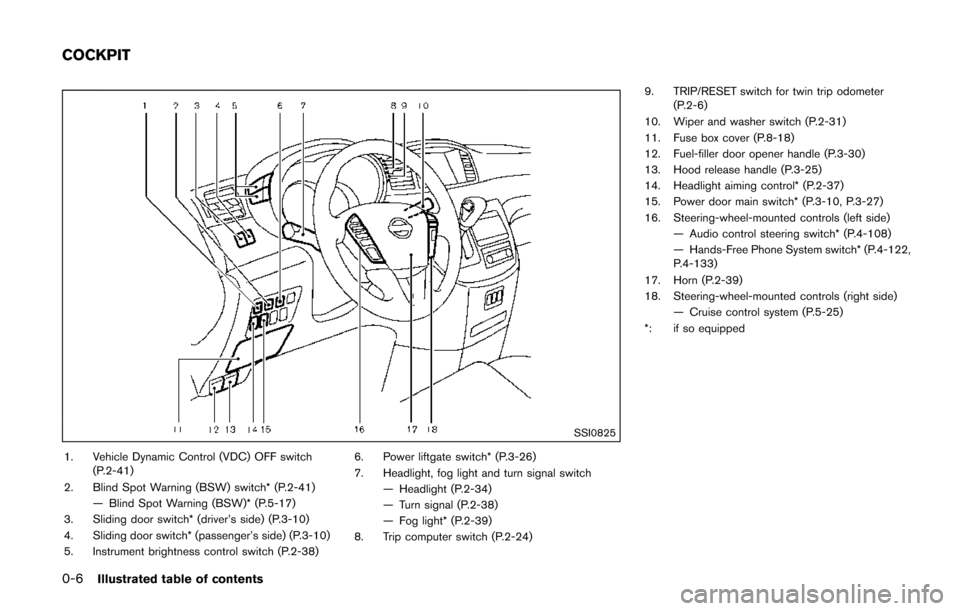
SSI0825
1. Vehicle Dynamic Control (VDC) OFF switch(P.2-41)
2. Blind Spot Warning (BSW) switch* (P.2-41) — Blind Spot Warning (BSW)* (P.5-17)
3. Sliding door switch* (driver’s side) (P.3-10)
4. Sliding door switch* (passenger’s side) (P.3-10)
5. Instrument brightness control switch (P.2-38) 6. Power liftgate switch* (P.3-26)
7. Headlight, fog light and turn signal switch
— Headlight (P.2-34)
— Turn signal (P.2-38)
— Fog light* (P.2-39)
8. Trip computer switch (P.2-24) 9. TRIP/RESET switch for twin trip odometer
(P.2-6)
10. Wiper and washer switch (P.2-31)
11. Fuse box cover (P.8-18)
12. Fuel-filler door opener handle (P.3-30)
13. Hood release handle (P.3-25)
14. Headlight aiming control* (P.2-37)
15. Power door main switch* (P.3-10, P.3-27)
16. Steering-wheel-mounted controls (left side) — Audio control steering switch* (P.4-108)
— Hands-Free Phone System switch* (P.4-122,
P.4-133)
17. Horn (P.2-39)
18. Steering-wheel-mounted controls (right side) — Cruise control system (P.5-25)
*: if so equipped
COCKPIT
Page 17 of 520
0-8Illustrated table of contents
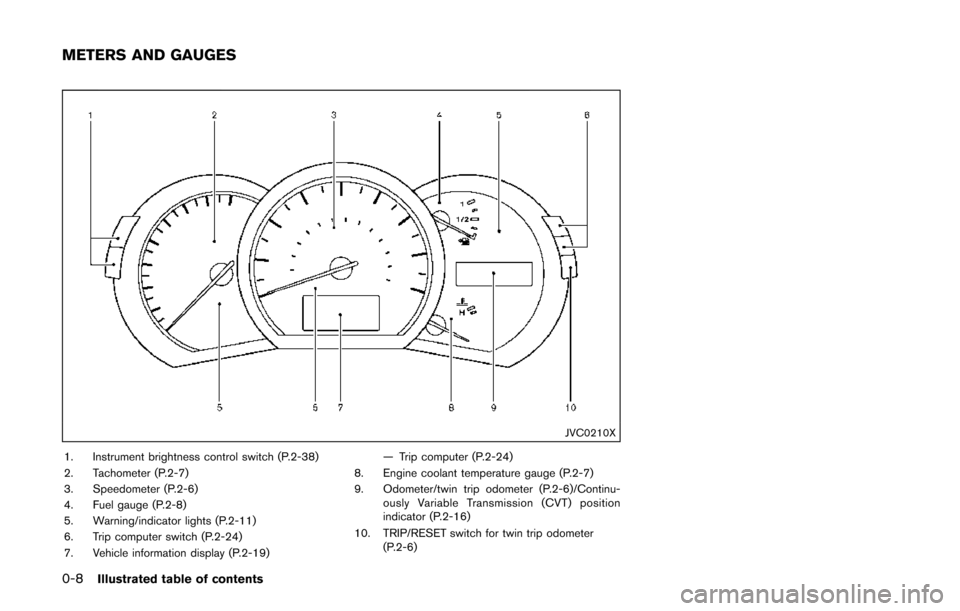
JVC0210X
1. Instrument brightness control switch (P.2-38)
2. Tachometer (P.2-7)
3. Speedometer (P.2-6)
4. Fuel gauge (P.2-8)
5. Warning/indicator lights (P.2-11)
6. Trip computer switch (P.2-24)
7. Vehicle information display (P.2-19)— Trip computer (P.2-24)
8. Engine coolant temperature gauge (P.2-7)
9. Odometer/twin trip odometer (P.2-6)/Continu- ously Variable Transmission (CVT) position
indicator (P.2-16)
10. TRIP/RESET switch for twin trip odometer (P.2-6)
METERS AND GAUGES
Page 88 of 520

2 Instruments and controls
Cockpit ........................................................................\
................ 2-3
Instrument panel ........................................................................\
2-4
Meters and gauges ................................................................... 2-5Meter/ring illumination and needle sweep .................... 2-5
Speedometer and odometer ............................................ 2-6
Tachometer ........................................................................\
... 2-7
Engine coolant temperature gauge ................................ 2-7
Fuel gauge ........................................................................\
.... 2-8
Compass (if so equipped) ...................................................... 2-8 Zone variation change procedure ................................ 2-10
Warning lights, indicator lights and
audible reminders ................................................................... 2-11 Checking lights ................................................................. 2-12
Warning lights ................................................................... 2-12
Indicator lights ................................................................... 2-16
Audible reminders ............................................................ 2-18
Vehicle information display .................................................. 2-19 Operational indicators ..................................................... 2-21
Maintenance indicators ................................................... 2-23
Trip computer .................................................................... 2-24
Security systems .................................................................... 2-28 Vehicle security system .................................................. 2-28
NISSAN vehicle immobilizer system ........................... 2-30
Wiper and washer switch .................................................... 2-31 Rear window wiper and washer switch ..................... 2-32 Rear window and outside mirror defroster switch ....... 2-33
Headlight and turn signal switch ....................................... 2-33
Xenon headlights (if so equipped) ............................ 2-33
Headlight switch ............................................................ 2-34
Turn signal switch .......................................................... 2-38
Fog light switch (if so equipped) .............................. 2-39
Horn ........................................................................\
.................. 2-39
Heated seats (if so equipped) ........................................... 2-39
Blind Spot Warning (BSW) switch (if so equipped) ..... 2-41
Vehicle Dynamic Control (VDC) OFF switch ................. 2-41
Power outlet ........................................................................\
.... 2-42
Storage ........................................................................\
............ 2-44 Cup holders ..................................................................... 2-44
Sunglasses holder ......................................................... 2-46
Glove box ........................................................................\
. 2-47
Instrument lower box (if so equipped) ..................... 2-47
Console box .................................................................... 2-47
Cargo floor box ............................................................... 2-48
Hooks ........................................................................\
........ 2-49
Roof rack (if so equipped) .......................................... 2-50
Coat hooks ...................................................................... 2-51
Sunshade (if so equipped) ................................................. 2-51
Windows ........................................................................\
......... 2-52
Power windows .............................................................. 2-52
Page 90 of 520
SSI0825
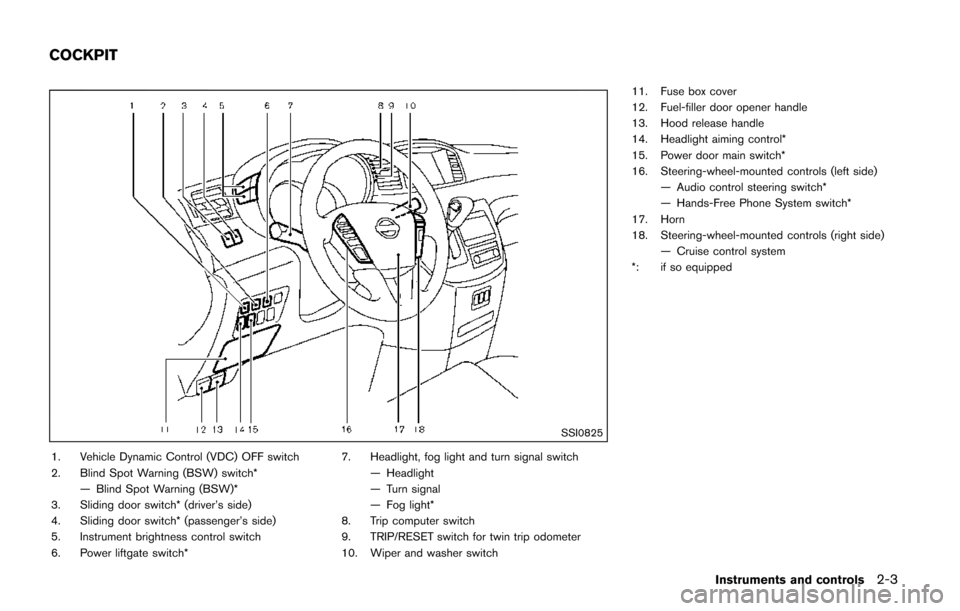
1. Vehicle Dynamic Control (VDC) OFF switch
2. Blind Spot Warning (BSW) switch*— Blind Spot Warning (BSW)*
3. Sliding door switch* (driver’s side)
4. Sliding door switch* (passenger’s side)
5. Instrument brightness control switch
6. Power liftgate switch* 7. Headlight, fog light and turn signal switch
— Headlight
— Turn signal
— Fog light*
8. Trip computer switch
9. TRIP/RESET switch for twin trip odometer
10. Wiper and washer switch 11. Fuse box cover
12. Fuel-filler door opener handle
13. Hood release handle
14. Headlight aiming control*
15. Power door main switch*
16. Steering-wheel-mounted controls (left side)
— Audio control steering switch*
— Hands-Free Phone System switch*
17. Horn
18. Steering-wheel-mounted controls (right side) — Cruise control system
*: if so equipped
Instruments and controls2-3
COCKPIT
Page 92 of 520
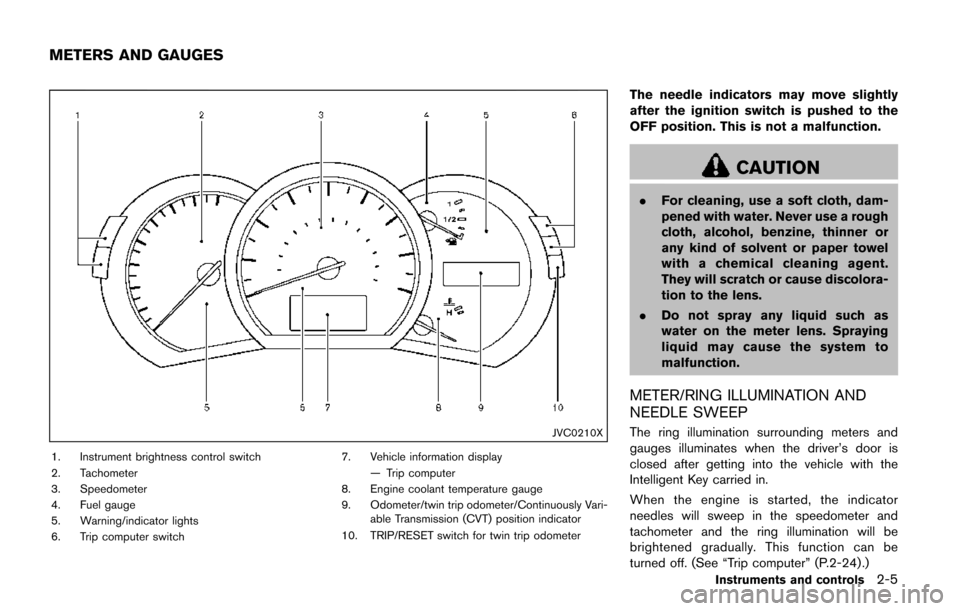
JVC0210X
1. Instrument brightness control switch
2. Tachometer
3. Speedometer
4. Fuel gauge
5. Warning/indicator lights
6. Trip computer switch7. Vehicle information display
— Trip computer
8. Engine coolant temperature gauge
9. Odometer/twin trip odometer/Continuously Vari- able Transmission (CVT) position indicator
10. TRIP/RESET switch for twin trip odometer
The needle indicators may move slightly
after the ignition switch is pushed to the
OFF position. This is not a malfunction.
CAUTION
. For cleaning, use a soft cloth, dam-
pened with water. Never use a rough
cloth, alcohol, benzine, thinner or
any kind of solvent or paper towel
with a chemical cleaning agent.
They will scratch or cause discolora-
tion to the lens.
. Do not spray any liquid such as
water on the meter lens. Spraying
liquid may cause the system to
malfunction.
METER/RING ILLUMINATION AND
NEEDLE SWEEP
The ring illumination surrounding meters and
gauges illuminates when the driver’s door is
closed after getting into the vehicle with the
Intelligent Key carried in.
When the engine is started, the indicator
needles will sweep in the speedometer and
tachometer and the ring illumination will be
brightened gradually. This function can be
turned off. (See “Trip computer” (P.2-24) .)
Instruments and controls2-5
METERS AND GAUGES
Page 93 of 520
2-6Instruments and controls
JVI0252X
Speedometer
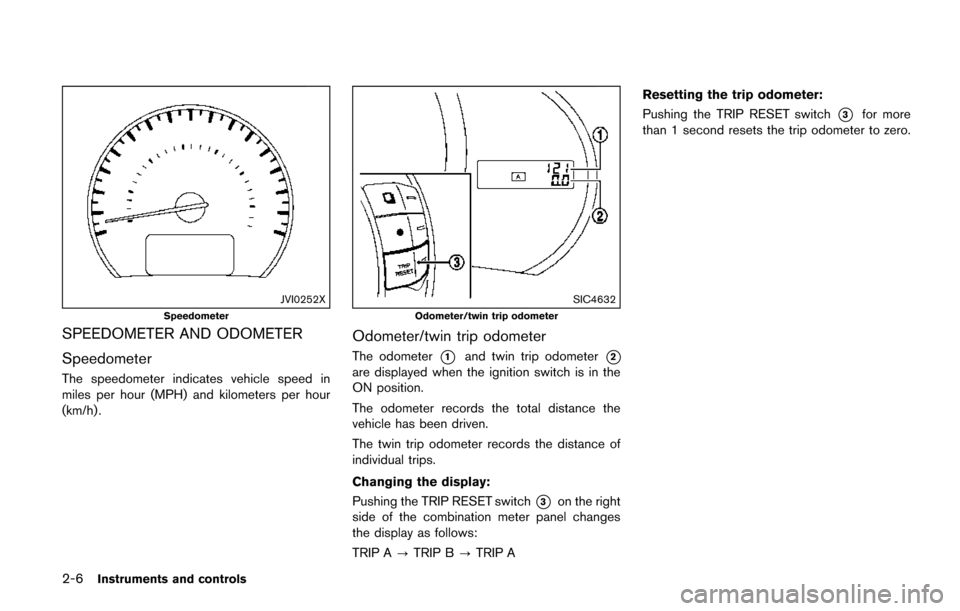
SPEEDOMETER AND ODOMETER
Speedometer
The speedometer indicates vehicle speed in
miles per hour (MPH) and kilometers per hour
(km/h) .
SIC4632
Odometer/twin trip odometer
Odometer/twin trip odometer
The odometer*1and twin trip odometer*2
are displayed when the ignition switch is in the
ON position.
The odometer records the total distance the
vehicle has been driven.
The twin trip odometer records the distance of
individual trips.
Changing the display:
Pushing the TRIP RESET switch
*3on the right
side of the combination meter panel changes
the display as follows:
TRIP A ?TRIP B ?TRIP A Resetting the trip odometer:
Pushing the TRIP RESET switch
*3for more
than 1 second resets the trip odometer to zero.
Page 111 of 520
2-24Instruments and controls
SIC3580
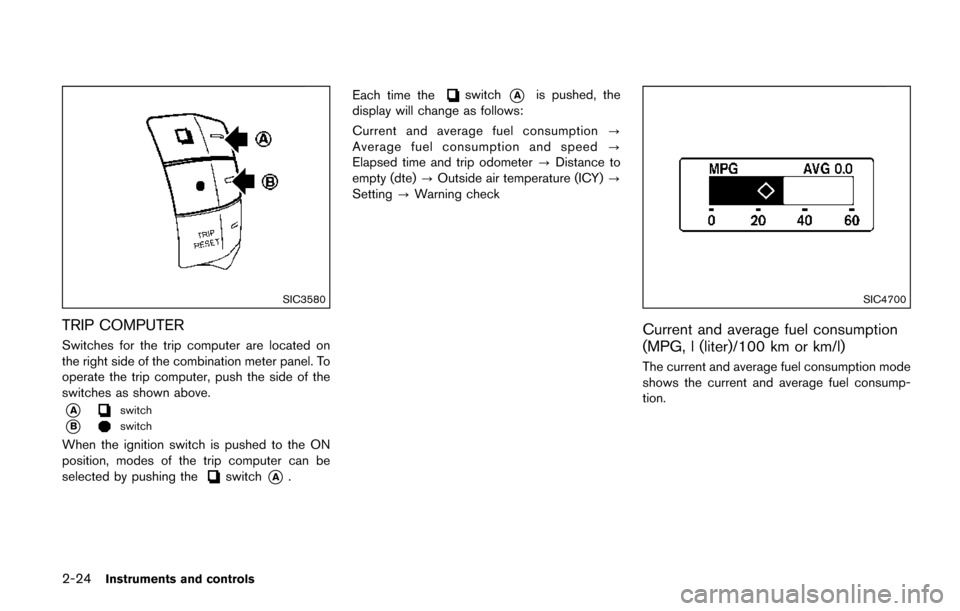
TRIP COMPUTER
Switches for the trip computer are located on
the right side of the combination meter panel. To
operate the trip computer, push the side of the
switches as shown above.
*Aswitch
*Bswitch
When the ignition switch is pushed to the ON
position, modes of the trip computer can be
selected by pushing the
switch*A.Each time the
switch*Ais pushed, the
display will change as follows:
Current and average fuel consumption ?
Average fuel consumption and speed ?
Elapsed time and trip odometer ?Distance to
empty (dte) ?Outside air temperature (ICY) ?
Setting ?Warning check
SIC4700
Current and average fuel consumption
(MPG, l (liter)/100 km or km/l)
The current and average fuel consumption mode
shows the current and average fuel consump-
tion.
Page 112 of 520
SIC3674
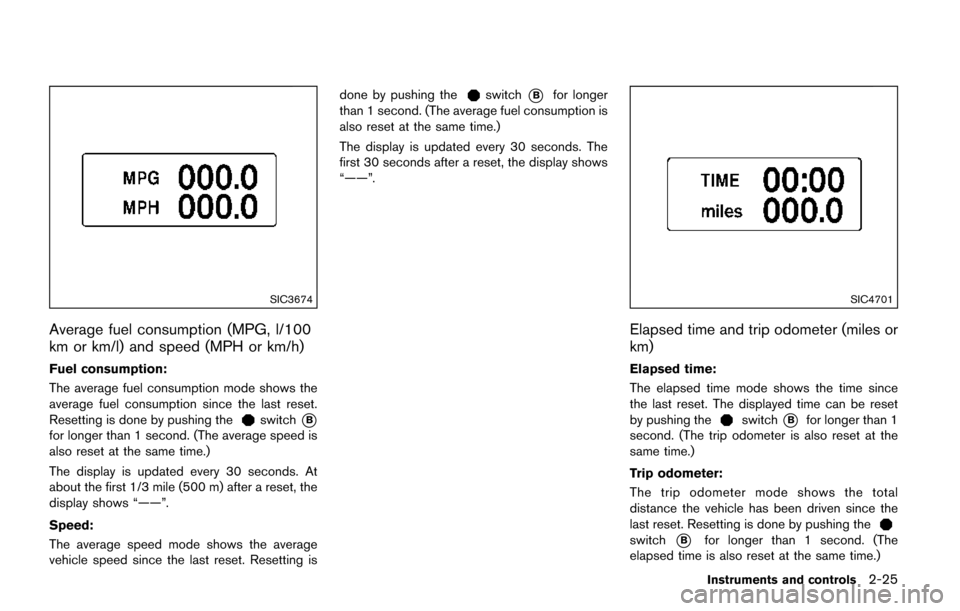
Average fuel consumption (MPG, l/100
km or km/l) and speed (MPH or km/h)
Fuel consumption:
The average fuel consumption mode shows the
average fuel consumption since the last reset.
Resetting is done by pushing the
switch*B
for longer than 1 second. (The average speed is
also reset at the same time.)
The display is updated every 30 seconds. At
about the first 1/3 mile (500 m) after a reset, the
display shows “——”.
Speed:
The average speed mode shows the average
vehicle speed since the last reset. Resetting isdone by pushing the
switch*Bfor longer
than 1 second. (The average fuel consumption is
also reset at the same time.)
The display is updated every 30 seconds. The
first 30 seconds after a reset, the display shows
“——”.
SIC4701
Elapsed time and trip odometer (miles or
km)
Elapsed time:
The elapsed time mode shows the time since
the last reset. The displayed time can be reset
by pushing the
switch*Bfor longer than 1
second. (The trip odometer is also reset at the
same time.)
Trip odometer:
The trip odometer mode shows the total
distance the vehicle has been driven since the
last reset. Resetting is done by pushing the
switch*Bfor longer than 1 second. (The
elapsed time is also reset at the same time.)
Instruments and controls2-25
Page 473 of 520
9-6Maintenance and schedules
CHASSIS AND BODY MAINTENANCE
Brake lines and cables:
Visually inspect for proper installation. Check for
chafing, cracks, deterioration, and signs of
leaking. Replace any deteriorated or damaged
parts immediately.
Brake pads and rotors:
Check for wear, deterioration and fluid leaks.
Replace any deteriorated or damaged parts
immediately.
Exhaust system:
Visually inspect the exhaust pipes, muffler and
hangers for leaks, cracks, deterioration, and
damage. Tighten connections or replace parts
as necessary.
In-cabin microfilter:
Replace at specified intervals. When driving for
prolonged periods in dusty conditions, replace
the filter more frequently.
Steering gear and linkage, axle and sus-
pension parts, drive shaft boots:
Check for damage, looseness, and leakage of oil
or grease. Under severe driving conditions,
inspect more frequently.Tire rotation:
Tires should be rotated every 5,000 miles
(8,000 km) according to the instructions under
“Explanation of general maintenance items”
(P.9-2) . When rotating tires, check for damage
and uneven wear. Replace if necessary.
Transmission fluid/oil:
Visually inspect for signs of leakage at specified
intervals.
If towing a trailer, using a camper or car-top
carrier, or driving on rough or muddy roads:
.
Replace the CVT fluid every 60,000 (96,000
km) miles or request the dealer to inspect
the fluid deterioration data using a CON-
SULT. If the deterioration data is more than
210000, replace the CVT fluid. To help ensure smooth, safe and economical
driving, NISSAN provides two maintenance
schedules that may be used, depending upon
the conditions in which you usually drive. These
schedules contain both distance and time
intervals, up to 120,000 miles (192,000 km)/
144 months. For most people, the odometer
reading will indicate when service is needed.
However, if you drive very little, your vehicle
should be serviced at the regular time intervals
shown in the schedule.
After 120,000 miles (192,000 km)/144
months, continue maintenance at the
same mileage/time intervals.
ADDITIONAL MAINTENANCE ITEMS
FOR SEVERE OPERATING CONDI-
TIONS
Additional maintenance items for severe
operating conditions;
should be performed
on vehicles that are driven under especially
demanding conditions. Additional maintenance
items should be performed if you primarily
operate your vehicle under the following condi-
tions:
. Repeated short trips of less than 5 miles (8
km) .
. Repeated short trips of less than 10 miles
(16 km) with outside temperatures remain-
ing below freezing.
MAINTENANCE SCHEDULES