reset NISSAN QUEST 2017 RE52 / 4.G Owners Manual
[x] Cancel search | Manufacturer: NISSAN, Model Year: 2017, Model line: QUEST, Model: NISSAN QUEST 2017 RE52 / 4.GPages: 520, PDF Size: 2.5 MB
Page 15 of 520
0-6Illustrated table of contents
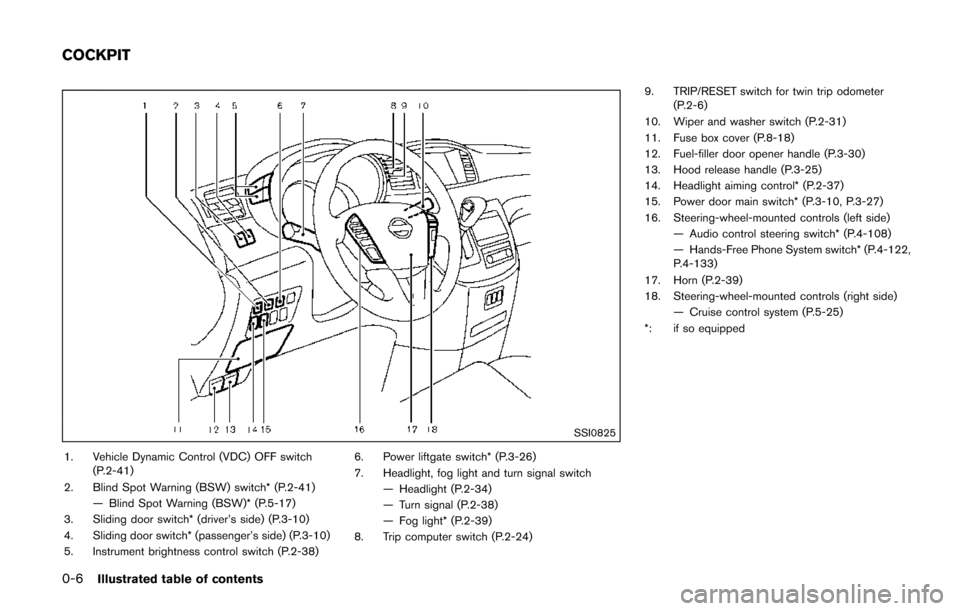
SSI0825
1. Vehicle Dynamic Control (VDC) OFF switch(P.2-41)
2. Blind Spot Warning (BSW) switch* (P.2-41) — Blind Spot Warning (BSW)* (P.5-17)
3. Sliding door switch* (driver’s side) (P.3-10)
4. Sliding door switch* (passenger’s side) (P.3-10)
5. Instrument brightness control switch (P.2-38) 6. Power liftgate switch* (P.3-26)
7. Headlight, fog light and turn signal switch
— Headlight (P.2-34)
— Turn signal (P.2-38)
— Fog light* (P.2-39)
8. Trip computer switch (P.2-24) 9. TRIP/RESET switch for twin trip odometer
(P.2-6)
10. Wiper and washer switch (P.2-31)
11. Fuse box cover (P.8-18)
12. Fuel-filler door opener handle (P.3-30)
13. Hood release handle (P.3-25)
14. Headlight aiming control* (P.2-37)
15. Power door main switch* (P.3-10, P.3-27)
16. Steering-wheel-mounted controls (left side) — Audio control steering switch* (P.4-108)
— Hands-Free Phone System switch* (P.4-122,
P.4-133)
17. Horn (P.2-39)
18. Steering-wheel-mounted controls (right side) — Cruise control system (P.5-25)
*: if so equipped
COCKPIT
Page 17 of 520
0-8Illustrated table of contents
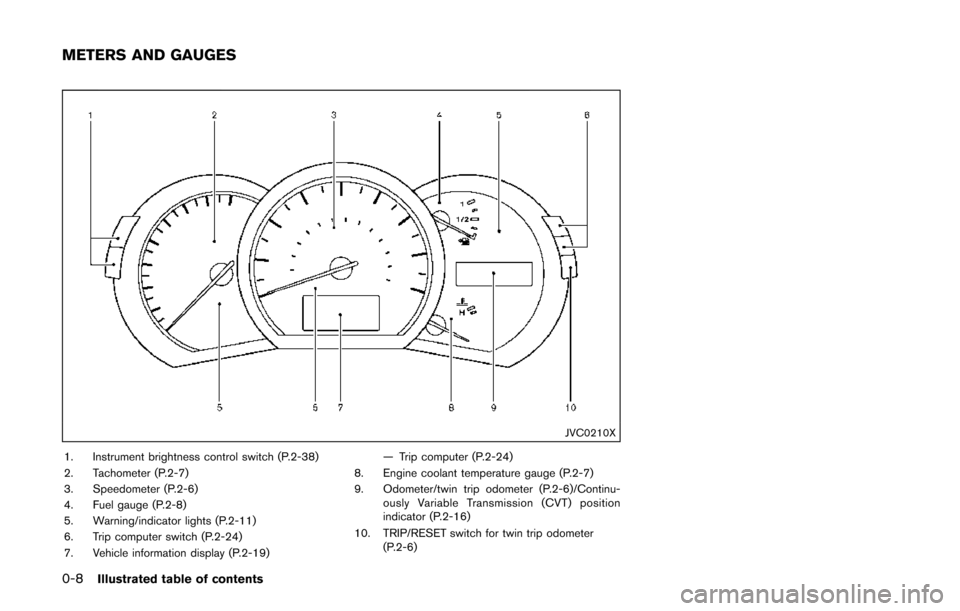
JVC0210X
1. Instrument brightness control switch (P.2-38)
2. Tachometer (P.2-7)
3. Speedometer (P.2-6)
4. Fuel gauge (P.2-8)
5. Warning/indicator lights (P.2-11)
6. Trip computer switch (P.2-24)
7. Vehicle information display (P.2-19)— Trip computer (P.2-24)
8. Engine coolant temperature gauge (P.2-7)
9. Odometer/twin trip odometer (P.2-6)/Continu- ously Variable Transmission (CVT) position
indicator (P.2-16)
10. TRIP/RESET switch for twin trip odometer (P.2-6)
METERS AND GAUGES
Page 23 of 520
1-4Safety — Seats, seat belts and supplemental restraint system
Front power seat adjustment
Operating tips:
.The power seat motor has an auto-reset
overload protection circuit. If the motor
stops during operation, wait 30 seconds,
then reactivate the switch.
. Do not operate the power seat switch for a
long period of time when the engine is off.
This will discharge the battery.
See “Automatic drive positioner” (P.3-36) for the
seat position memory function (if so equipped) .
CAUTION
When adjusting the seat positions, be
sure not to contact any moving parts to
avoid possible injuries and/or da-
mages.
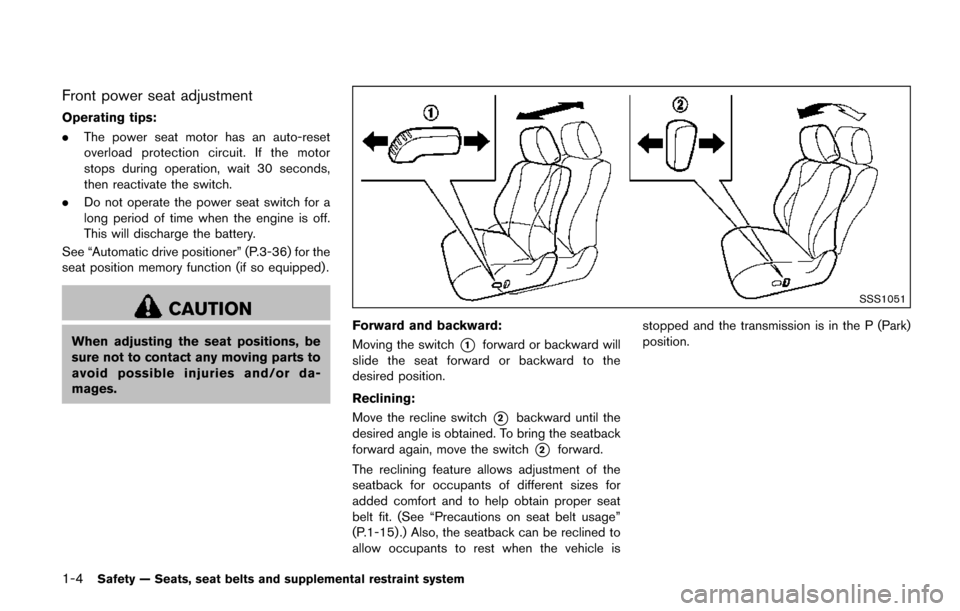
SSS1051
Forward and backward:
Moving the switch
*1forward or backward will
slide the seat forward or backward to the
desired position.
Reclining:
Move the recline switch
*2backward until the
desired angle is obtained. To bring the seatback
forward again, move the switch
*2forward.
The reclining feature allows adjustment of the
seatback for occupants of different sizes for
added comfort and to help obtain proper seat
belt fit. (See “Precautions on seat belt usage”
(P.1-15) .) Also, the seatback can be reclined to
allow occupants to rest when the vehicle is stopped and the transmission is in the P (Park)
position.
Page 90 of 520
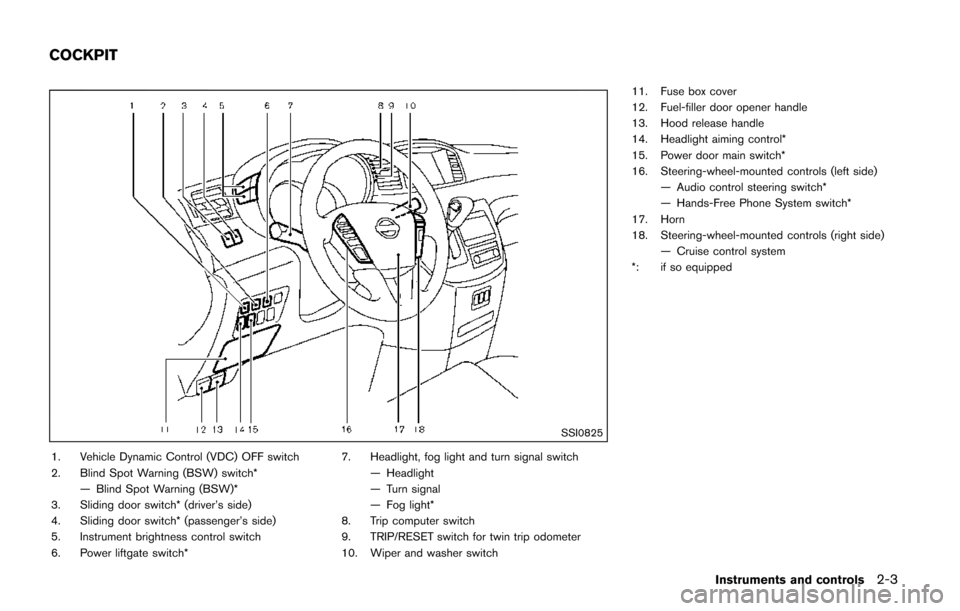
SSI0825
1. Vehicle Dynamic Control (VDC) OFF switch
2. Blind Spot Warning (BSW) switch*— Blind Spot Warning (BSW)*
3. Sliding door switch* (driver’s side)
4. Sliding door switch* (passenger’s side)
5. Instrument brightness control switch
6. Power liftgate switch* 7. Headlight, fog light and turn signal switch
— Headlight
— Turn signal
— Fog light*
8. Trip computer switch
9. TRIP/RESET switch for twin trip odometer
10. Wiper and washer switch 11. Fuse box cover
12. Fuel-filler door opener handle
13. Hood release handle
14. Headlight aiming control*
15. Power door main switch*
16. Steering-wheel-mounted controls (left side)
— Audio control steering switch*
— Hands-Free Phone System switch*
17. Horn
18. Steering-wheel-mounted controls (right side) — Cruise control system
*: if so equipped
Instruments and controls2-3
COCKPIT
Page 92 of 520
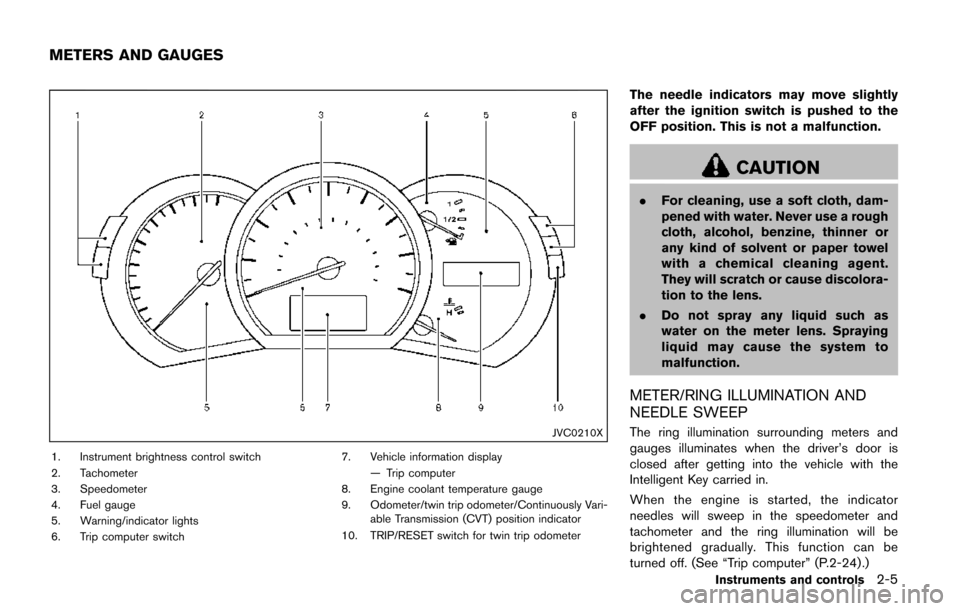
JVC0210X
1. Instrument brightness control switch
2. Tachometer
3. Speedometer
4. Fuel gauge
5. Warning/indicator lights
6. Trip computer switch7. Vehicle information display
— Trip computer
8. Engine coolant temperature gauge
9. Odometer/twin trip odometer/Continuously Vari- able Transmission (CVT) position indicator
10. TRIP/RESET switch for twin trip odometer
The needle indicators may move slightly
after the ignition switch is pushed to the
OFF position. This is not a malfunction.
CAUTION
. For cleaning, use a soft cloth, dam-
pened with water. Never use a rough
cloth, alcohol, benzine, thinner or
any kind of solvent or paper towel
with a chemical cleaning agent.
They will scratch or cause discolora-
tion to the lens.
. Do not spray any liquid such as
water on the meter lens. Spraying
liquid may cause the system to
malfunction.
METER/RING ILLUMINATION AND
NEEDLE SWEEP
The ring illumination surrounding meters and
gauges illuminates when the driver’s door is
closed after getting into the vehicle with the
Intelligent Key carried in.
When the engine is started, the indicator
needles will sweep in the speedometer and
tachometer and the ring illumination will be
brightened gradually. This function can be
turned off. (See “Trip computer” (P.2-24) .)
Instruments and controls2-5
METERS AND GAUGES
Page 93 of 520
2-6Instruments and controls
JVI0252X
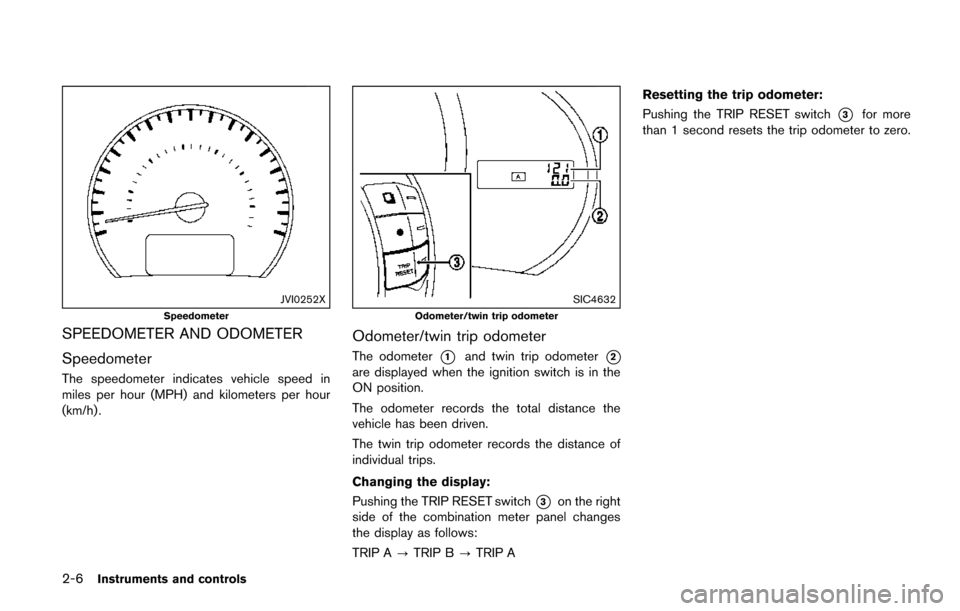
Speedometer
SPEEDOMETER AND ODOMETER
Speedometer
The speedometer indicates vehicle speed in
miles per hour (MPH) and kilometers per hour
(km/h) .
SIC4632
Odometer/twin trip odometer
Odometer/twin trip odometer
The odometer*1and twin trip odometer*2
are displayed when the ignition switch is in the
ON position.
The odometer records the total distance the
vehicle has been driven.
The twin trip odometer records the distance of
individual trips.
Changing the display:
Pushing the TRIP RESET switch
*3on the right
side of the combination meter panel changes
the display as follows:
TRIP A ?TRIP B ?TRIP A Resetting the trip odometer:
Pushing the TRIP RESET switch
*3for more
than 1 second resets the trip odometer to zero.
Page 102 of 520
shown on the Tire and Loading
Information label to turn the low
tire pressure warning light OFF. If
the light still illuminates while driv-
ing after adjusting the tire pressure,
a tire may be flat or the TPMS may
be malfunctioning. If you have a flat
tire, replace it with a spare tire as
soon as possible. If no tire is flat
and all tires are properly inflated, it
is recommended you consult a
NISSAN dealer.
. Since the spare tire is not equipped
with the TPMS, when a spare tire is
mounted or a wheel is replaced, the
TPMS will not function and the low
tire pressure warning light will flash
for approximately 1 minute. The
light will remain on after 1 minute.
Have your tires replaced and/or
TPMS system reset as soon as
possible. It is recommended you
visit a NISSAN dealer for these
services.
. Replacing tires with those not ori-
ginally specified by NISSAN could
affect the proper operation of the
TPMS.CAUTION
.The TPMS is not a substitute for the
regular tire pressure check. Be sure
to check the tire pressure regularly.
. If the vehicle is being driven at
speeds of less than 16 MPH (25
km/h) , the TPMS may not operate
correctly.
. Be sure to correctly install the
specified size of tires to the four
wheels.
Master warning light
When the ignition switch is in the ON position,
the master warning light illuminates if any of the
following are displayed on the vehicle informa-
tion display:
.No key warning
. Low fuel warning
. Low washer fluid warning
. Parking brake release warning
. Door/liftgate open warning
. Loose fuel cap warning
. Check tire pressure warning .
Extended storage fuse warning
See “Vehicle information display” (P.2-19) .
Seat belt warning light and chime
The light and chime remind you to fasten seat
belts. The light illuminates whenever the ignition
switch is pushed to the ON position, and will
remain illuminated until the driver’s seat belt is
fastened. At the same time, the chime will sound
for approximately 6 seconds unless the driver’s
seat belt is securely fastened.
The seat belt warning light for the front
passenger will illuminate if the seat belt is not
fastened when the front passenger’s seat is
occupied. For approximately 5 seconds after the
ignition switch is in the ON position, the system
does not activate the warning light for the front
passenger.
See “Seat belts” (P.1-15) for precautions on
seat belt usage.
Supplemental air bag warning light
After pushing the ignition switch to the ON
position, the supplemental air bag warning light
will illuminate. The supplemental air bag warning
light will turn off after about 7 seconds if the
supplemental front air bag and supplemental
side air bag, curtain air bag systems and/or
pretensioner seat belt are operational.
Instruments and controls2-15
Page 110 of 520
SIC4237
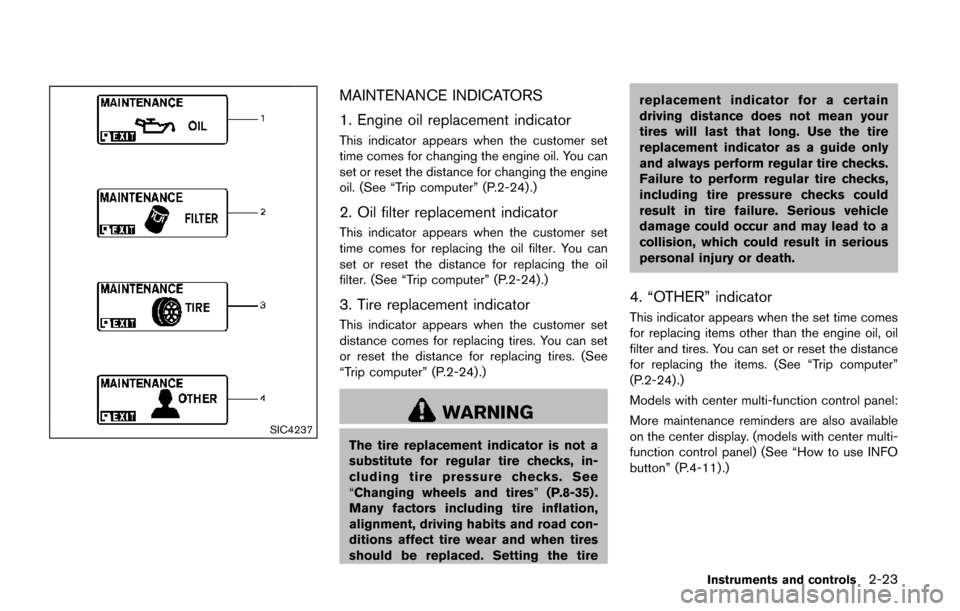
MAINTENANCE INDICATORS
1. Engine oil replacement indicator
This indicator appears when the customer set
time comes for changing the engine oil. You can
set or reset the distance for changing the engine
oil. (See “Trip computer” (P.2-24) .)
2. Oil filter replacement indicator
This indicator appears when the customer set
time comes for replacing the oil filter. You can
set or reset the distance for replacing the oil
filter. (See “Trip computer” (P.2-24).)
3. Tire replacement indicator
This indicator appears when the customer set
distance comes for replacing tires. You can set
or reset the distance for replacing tires. (See
“Trip computer” (P.2-24) .)
WARNING
The tire replacement indicator is not a
substitute for regular tire checks, in-
cluding tire pressure checks. See
“Changing wheels and tires”(P.8-35) .
Many factors including tire inflation,
alignment, driving habits and road con-
ditions affect tire wear and when tires
should be replaced. Setting the tire replacement indicator for a certain
driving distance does not mean your
tires will last that long. Use the tire
replacement indicator as a guide only
and always perform regular tire checks.
Failure to perform regular tire checks,
including tire pressure checks could
result in tire failure. Serious vehicle
damage could occur and may lead to a
collision, which could result in serious
personal injury or death.
4. “OTHER” indicator
This indicator appears when the set time comes
for replacing items other than the engine oil, oil
filter and tires. You can set or reset the distance
for replacing the items. (See “Trip computer”
(P.2-24) .)
Models with center multi-function control panel:
More maintenance reminders are also available
on the center display. (models with center multi-
function control panel) (See “How to use INFO
button” (P.4-11).)
Instruments and controls2-23
Page 112 of 520
SIC3674
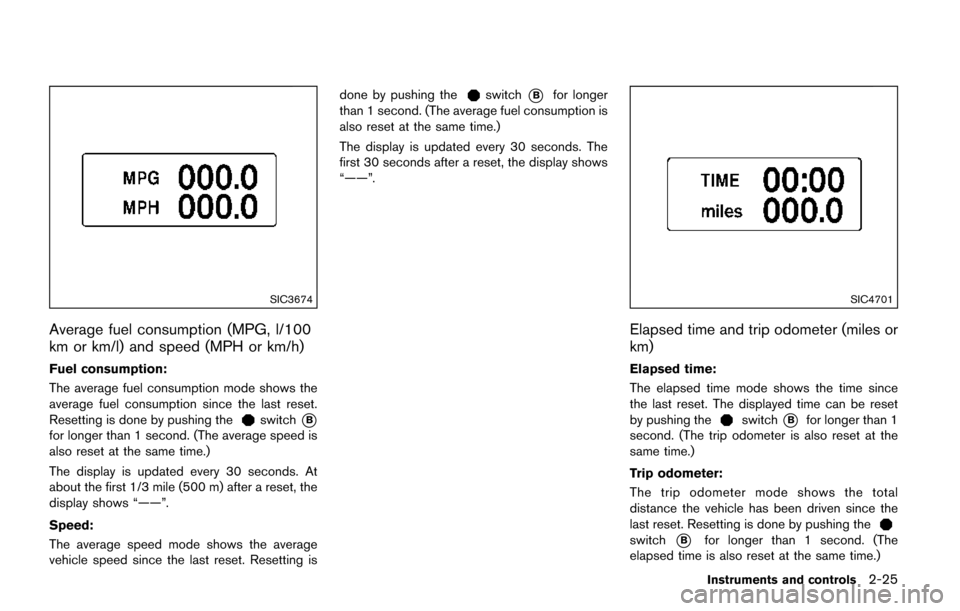
Average fuel consumption (MPG, l/100
km or km/l) and speed (MPH or km/h)
Fuel consumption:
The average fuel consumption mode shows the
average fuel consumption since the last reset.
Resetting is done by pushing the
switch*B
for longer than 1 second. (The average speed is
also reset at the same time.)
The display is updated every 30 seconds. At
about the first 1/3 mile (500 m) after a reset, the
display shows “——”.
Speed:
The average speed mode shows the average
vehicle speed since the last reset. Resetting isdone by pushing the
switch*Bfor longer
than 1 second. (The average fuel consumption is
also reset at the same time.)
The display is updated every 30 seconds. The
first 30 seconds after a reset, the display shows
“——”.
SIC4701
Elapsed time and trip odometer (miles or
km)
Elapsed time:
The elapsed time mode shows the time since
the last reset. The displayed time can be reset
by pushing the
switch*Bfor longer than 1
second. (The trip odometer is also reset at the
same time.)
Trip odometer:
The trip odometer mode shows the total
distance the vehicle has been driven since the
last reset. Resetting is done by pushing the
switch*Bfor longer than 1 second. (The
elapsed time is also reset at the same time.)
Instruments and controls2-25
Page 114 of 520
SIC3678
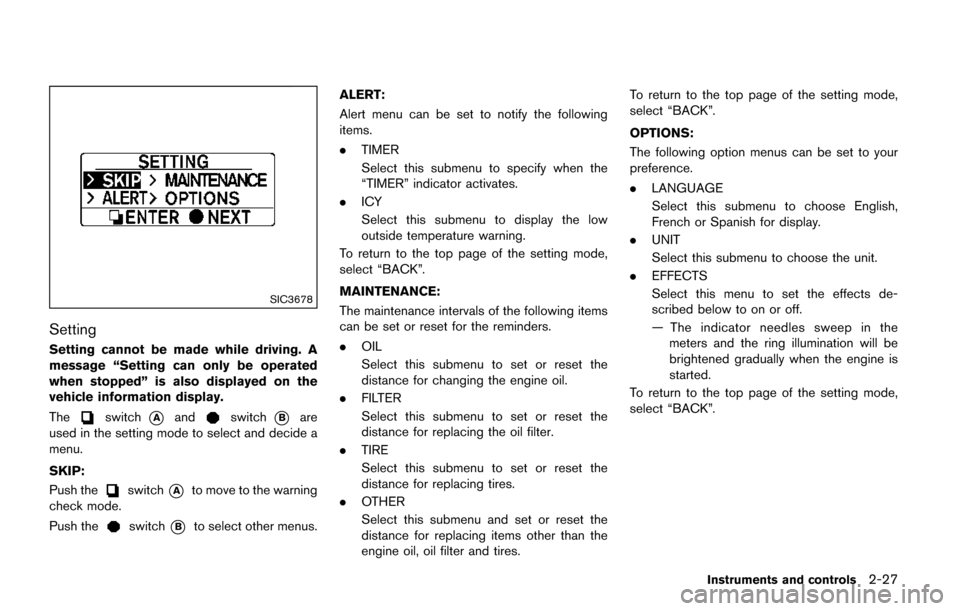
Setting
Setting cannot be made while driving. A
message “Setting can only be operated
when stopped” is also displayed on the
vehicle information display.
The
switch*Aandswitch*Bare
used in the setting mode to select and decide a
menu.
SKIP:
Push the
switch*Ato move to the warning
check mode.
Push the
switch*Bto select other menus. ALERT:
Alert menu can be set to notify the following
items.
.
TIMER
Select this submenu to specify when the
“TIMER” indicator activates.
. ICY
Select this submenu to display the low
outside temperature warning.
To return to the top page of the setting mode,
select “BACK”.
MAINTENANCE:
The maintenance intervals of the following items
can be set or reset for the reminders.
. OIL
Select this submenu to set or reset the
distance for changing the engine oil.
. FILTER
Select this submenu to set or reset the
distance for replacing the oil filter.
. TIRE
Select this submenu to set or reset the
distance for replacing tires.
. OTHER
Select this submenu and set or reset the
distance for replacing items other than the
engine oil, oil filter and tires. To return to the top page of the setting mode,
select “BACK”.
OPTIONS:
The following option menus can be set to your
preference.
.
LANGUAGE
Select this submenu to choose English,
French or Spanish for display.
. UNIT
Select this submenu to choose the unit.
. EFFECTS
Select this menu to set the effects de-
scribed below to on or off.
— The indicator needles sweep in the
meters and the ring illumination will be
brightened gradually when the engine is
started.
To return to the top page of the setting mode,
select “BACK”.
Instruments and controls2-27