wiper NISSAN QUEST 2017 RE52 / 4.G Owners Manual
[x] Cancel search | Manufacturer: NISSAN, Model Year: 2017, Model line: QUEST, Model: NISSAN QUEST 2017 RE52 / 4.GPages: 520, PDF Size: 2.5 MB
Page 12 of 520
JVO0058X
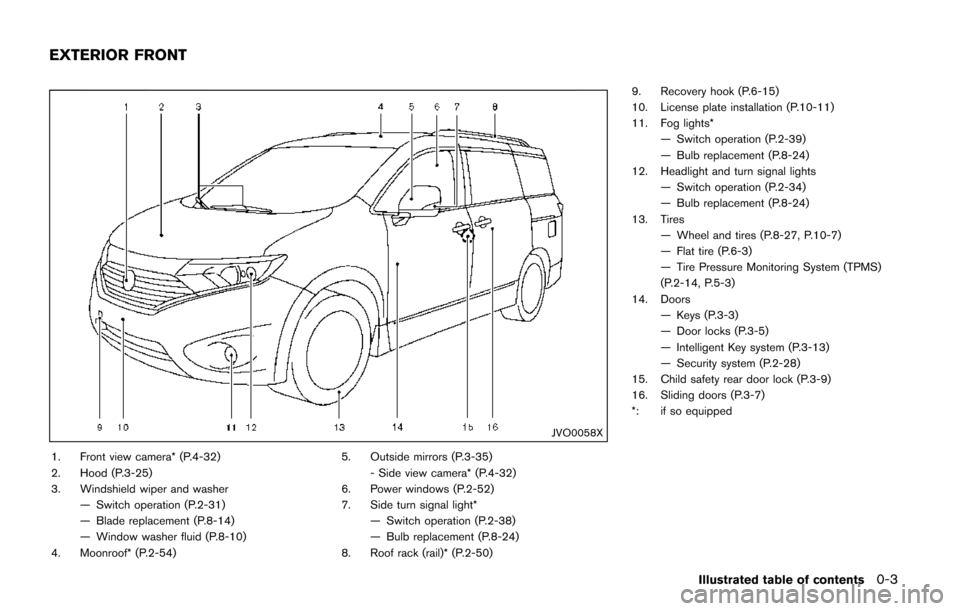
1. Front view camera* (P.4-32)
2. Hood (P.3-25)
3. Windshield wiper and washer— Switch operation (P.2-31)
— Blade replacement (P.8-14)
— Window washer fluid (P.8-10)
4. Moonroof* (P.2-54) 5. Outside mirrors (P.3-35)
- Side view camera* (P.4-32)
6. Power windows (P.2-52)
7. Side turn signal light*
— Switch operation (P.2-38)
— Bulb replacement (P.8-24)
8. Roof rack (rail)* (P.2-50) 9. Recovery hook (P.6-15)
10. License plate installation (P.10-11)
11. Fog lights*
— Switch operation (P.2-39)
— Bulb replacement (P.8-24)
12. Headlight and turn signal lights — Switch operation (P.2-34)
— Bulb replacement (P.8-24)
13. Tires — Wheel and tires (P.8-27, P.10-7)
— Flat tire (P.6-3)
— Tire Pressure Monitoring System (TPMS)
(P.2-14, P.5-3)
14. Doors — Keys (P.3-3)
— Door locks (P.3-5)
— Intelligent Key system (P.3-13)
— Security system (P.2-28)
15. Child safety rear door lock (P.3-9)
16. Sliding doors (P.3-7)
*: if so equipped
Illustrated table of contents0-3
EXTERIOR FRONT
Page 13 of 520
0-4Illustrated table of contents
SSI0822
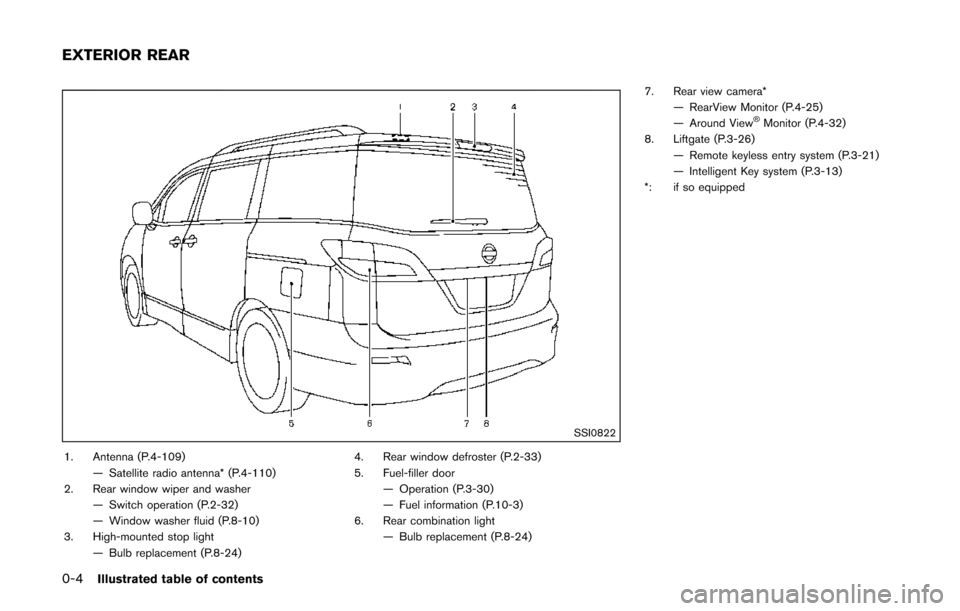
1. Antenna (P.4-109)— Satellite radio antenna* (P.4-110)
2. Rear window wiper and washer
— Switch operation (P.2-32)
— Window washer fluid (P.8-10)
3. High-mounted stop light — Bulb replacement (P.8-24) 4. Rear window defroster (P.2-33)
5. Fuel-filler door
— Operation (P.3-30)
— Fuel information (P.10-3)
6. Rear combination light — Bulb replacement (P.8-24) 7. Rear view camera*
— RearView Monitor (P.4-25)
— Around View
ŠMonitor (P.4-32)
8. Liftgate (P.3-26) — Remote keyless entry system (P.3-21)
— Intelligent Key system (P.3-13)
*: if so equipped
EXTERIOR REAR
Page 15 of 520
0-6Illustrated table of contents
SSI0825
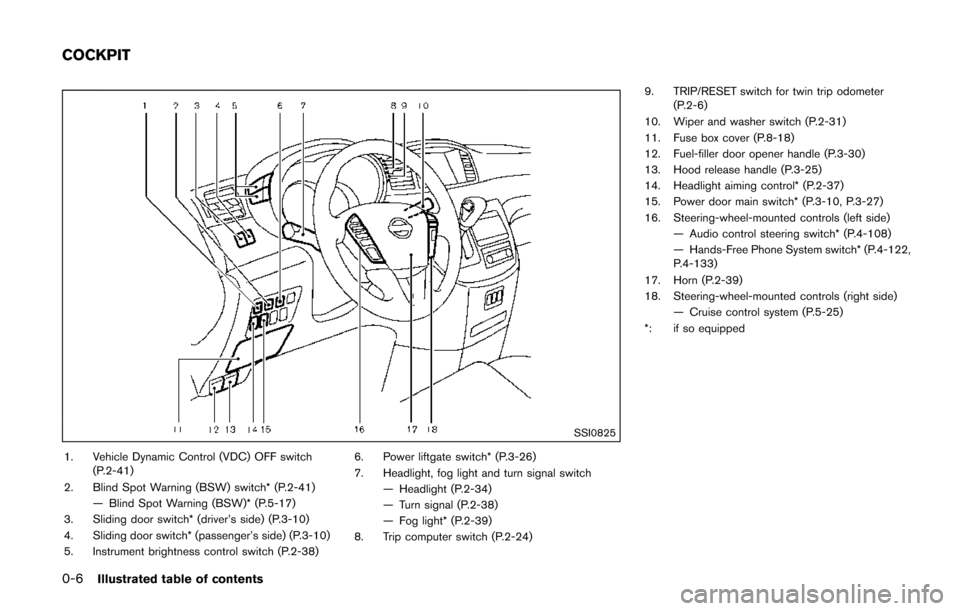
1. Vehicle Dynamic Control (VDC) OFF switch(P.2-41)
2. Blind Spot Warning (BSW) switch* (P.2-41) — Blind Spot Warning (BSW)* (P.5-17)
3. Sliding door switch* (driver’s side) (P.3-10)
4. Sliding door switch* (passenger’s side) (P.3-10)
5. Instrument brightness control switch (P.2-38) 6. Power liftgate switch* (P.3-26)
7. Headlight, fog light and turn signal switch
— Headlight (P.2-34)
— Turn signal (P.2-38)
— Fog light* (P.2-39)
8. Trip computer switch (P.2-24) 9. TRIP/RESET switch for twin trip odometer
(P.2-6)
10. Wiper and washer switch (P.2-31)
11. Fuse box cover (P.8-18)
12. Fuel-filler door opener handle (P.3-30)
13. Hood release handle (P.3-25)
14. Headlight aiming control* (P.2-37)
15. Power door main switch* (P.3-10, P.3-27)
16. Steering-wheel-mounted controls (left side) — Audio control steering switch* (P.4-108)
— Hands-Free Phone System switch* (P.4-122,
P.4-133)
17. Horn (P.2-39)
18. Steering-wheel-mounted controls (right side) — Cruise control system (P.5-25)
*: if so equipped
COCKPIT
Page 88 of 520

2 Instruments and controls
Cockpit ........................................................................\
................ 2-3
Instrument panel ........................................................................\
2-4
Meters and gauges ................................................................... 2-5Meter/ring illumination and needle sweep .................... 2-5
Speedometer and odometer ............................................ 2-6
Tachometer ........................................................................\
... 2-7
Engine coolant temperature gauge ................................ 2-7
Fuel gauge ........................................................................\
.... 2-8
Compass (if so equipped) ...................................................... 2-8 Zone variation change procedure ................................ 2-10
Warning lights, indicator lights and
audible reminders ................................................................... 2-11 Checking lights ................................................................. 2-12
Warning lights ................................................................... 2-12
Indicator lights ................................................................... 2-16
Audible reminders ............................................................ 2-18
Vehicle information display .................................................. 2-19 Operational indicators ..................................................... 2-21
Maintenance indicators ................................................... 2-23
Trip computer .................................................................... 2-24
Security systems .................................................................... 2-28 Vehicle security system .................................................. 2-28
NISSAN vehicle immobilizer system ........................... 2-30
Wiper and washer switch .................................................... 2-31 Rear window wiper and washer switch ..................... 2-32 Rear window and outside mirror defroster switch ....... 2-33
Headlight and turn signal switch ....................................... 2-33
Xenon headlights (if so equipped) ............................ 2-33
Headlight switch ............................................................ 2-34
Turn signal switch .......................................................... 2-38
Fog light switch (if so equipped) .............................. 2-39
Horn ........................................................................\
.................. 2-39
Heated seats (if so equipped) ........................................... 2-39
Blind Spot Warning (BSW) switch (if so equipped) ..... 2-41
Vehicle Dynamic Control (VDC) OFF switch ................. 2-41
Power outlet ........................................................................\
.... 2-42
Storage ........................................................................\
............ 2-44 Cup holders ..................................................................... 2-44
Sunglasses holder ......................................................... 2-46
Glove box ........................................................................\
. 2-47
Instrument lower box (if so equipped) ..................... 2-47
Console box .................................................................... 2-47
Cargo floor box ............................................................... 2-48
Hooks ........................................................................\
........ 2-49
Roof rack (if so equipped) .......................................... 2-50
Coat hooks ...................................................................... 2-51
Sunshade (if so equipped) ................................................. 2-51
Windows ........................................................................\
......... 2-52
Power windows .............................................................. 2-52
Page 90 of 520
SSI0825
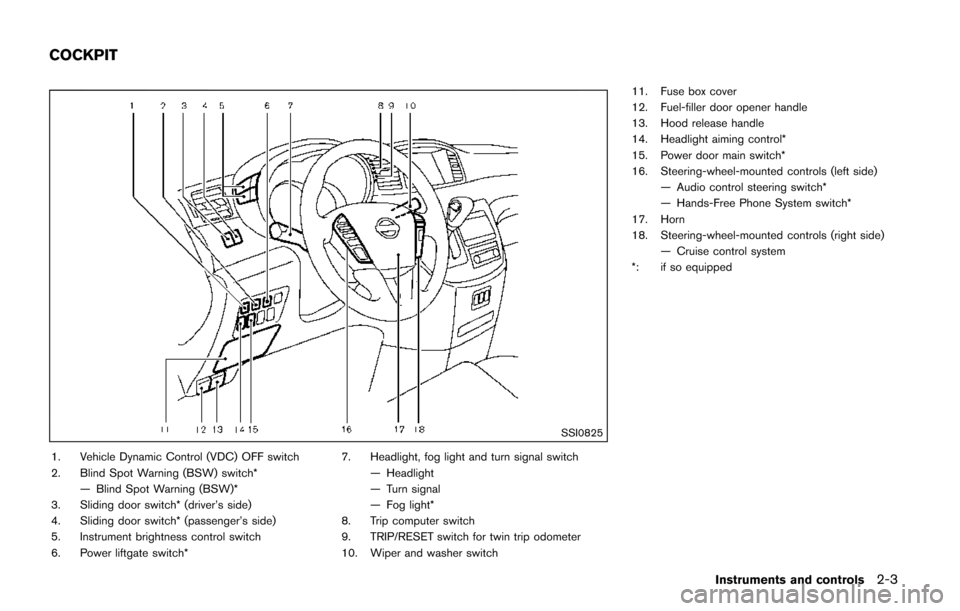
1. Vehicle Dynamic Control (VDC) OFF switch
2. Blind Spot Warning (BSW) switch*— Blind Spot Warning (BSW)*
3. Sliding door switch* (driver’s side)
4. Sliding door switch* (passenger’s side)
5. Instrument brightness control switch
6. Power liftgate switch* 7. Headlight, fog light and turn signal switch
— Headlight
— Turn signal
— Fog light*
8. Trip computer switch
9. TRIP/RESET switch for twin trip odometer
10. Wiper and washer switch 11. Fuse box cover
12. Fuel-filler door opener handle
13. Hood release handle
14. Headlight aiming control*
15. Power door main switch*
16. Steering-wheel-mounted controls (left side)
— Audio control steering switch*
— Hands-Free Phone System switch*
17. Horn
18. Steering-wheel-mounted controls (right side) — Cruise control system
*: if so equipped
Instruments and controls2-3
COCKPIT
Page 118 of 520
soon as possible. Please bring all regis-
tered keys that you have. It is recom-
mended you visit a NISSAN dealer for
this service.
WARNING
In freezing temperatures the washer
solution may freeze on the windshield
and obscure your vision which may lead
to an accident. Warm windshield with
the defroster before you wash the
windshield.
CAUTION
.Do not operate the washer continu-
ously for more than 30 seconds.
. Do not operate the washer if the
reservoir tank is empty.
. Do not fill the window washer
reservoir tank with washer fluid
concentrates at full strength. Some
methyl alcohol based washer fluid
concentrates may permanently stain
the grille if spilled while filling the
window washer reservoir tank.
. Pre-mix washer fluid concentrates
with water to the manufacturer’s
recommended levels before pouring
the fluid into the window washer reservoir tank. Do not use the
window washer reservoir tank to
mix the washer fluid concentrate
and water.
Instruments and controls2-31
WIPER AND WASHER SWITCH
Page 119 of 520
2-32Instruments and controls
SIC3664
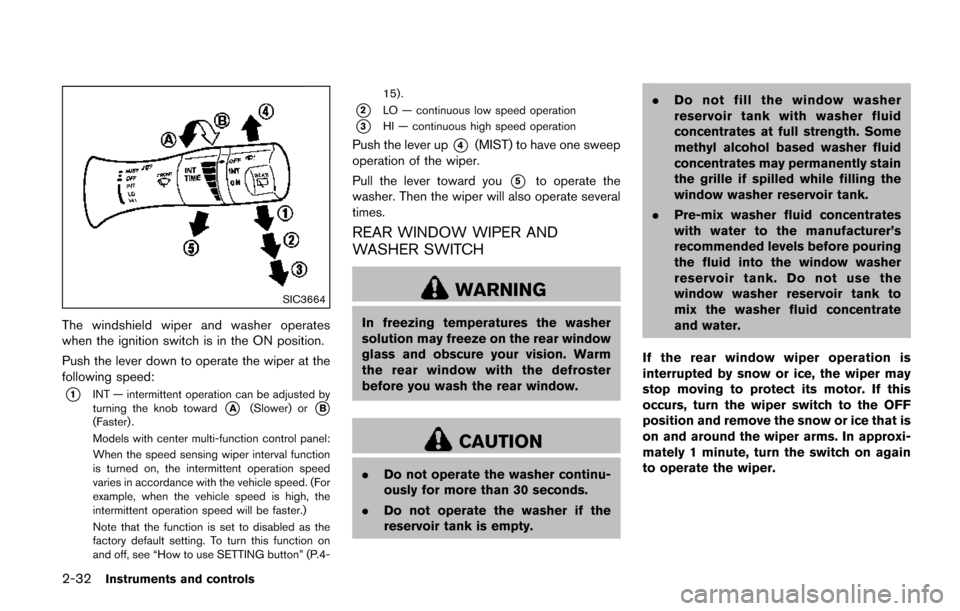
The windshield wiper and washer operates
when the ignition switch is in the ON position.
Push the lever down to operate the wiper at the
following speed:
*1INT — intermittent operation can be adjusted by
turning the knob toward*A(Slower) or*B(Faster) .
Models with center multi-function control panel:
When the speed sensing wiper interval function
is turned on, the intermittent operation speed
varies in accordance with the vehicle speed. (For
example, when the vehicle speed is high, the
intermittent operation speed will be faster.)
Note that the function is set to disabled as the
factory default setting. To turn this function on
and off, see “How to use SETTING button” (P.4-15) .
*2LO — continuous low speed operation
*3HI — continuous high speed operation
Push the lever up*4(MIST) to have one sweep
operation of the wiper.
Pull the lever toward you
*5to operate the
washer. Then the wiper will also operate several
times.
REAR WINDOW WIPER AND
WASHER SWITCH
WARNING
In freezing temperatures the washer
solution may freeze on the rear window
glass and obscure your vision. Warm
the rear window with the defroster
before you wash the rear window.
CAUTION
. Do not operate the washer continu-
ously for more than 30 seconds.
. Do not operate the washer if the
reservoir tank is empty. .
Do not fill the window washer
reservoir tank with washer fluid
concentrates at full strength. Some
methyl alcohol based washer fluid
concentrates may permanently stain
the grille if spilled while filling the
window washer reservoir tank.
. Pre-mix washer fluid concentrates
with water to the manufacturer’s
recommended levels before pouring
the fluid into the window washer
reservoir tank. Do not use the
window washer reservoir tank to
mix the washer fluid concentrate
and water.
If the rear window wiper operation is
interrupted by snow or ice, the wiper may
stop moving to protect its motor. If this
occurs, turn the wiper switch to the OFF
position and remove the snow or ice that is
on and around the wiper arms. In approxi-
mately 1 minute, turn the switch on again
to operate the wiper.
Page 120 of 520
SIC3666
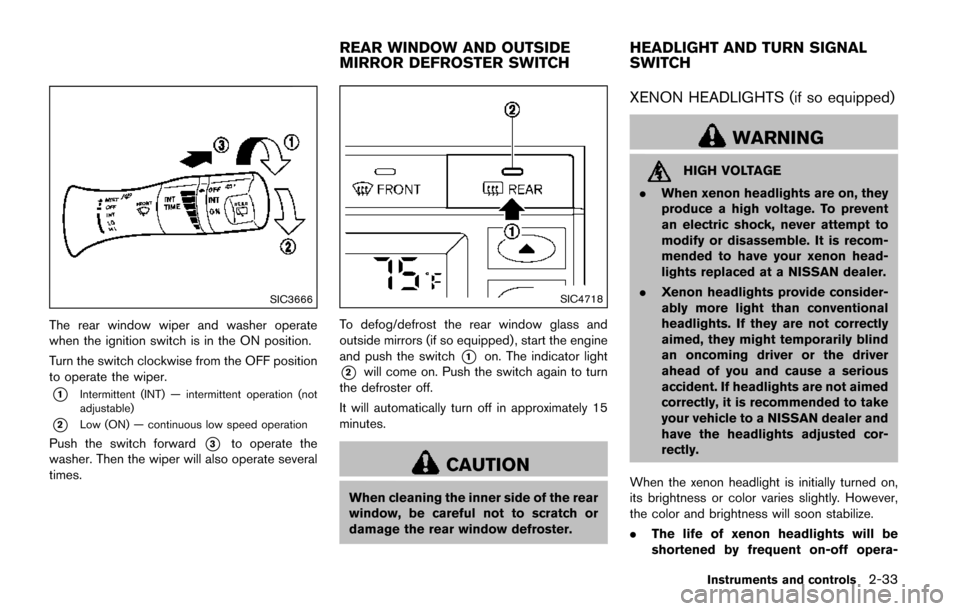
The rear window wiper and washer operate
when the ignition switch is in the ON position.
Turn the switch clockwise from the OFF position
to operate the wiper.
*1Intermittent (INT) — intermittent operation (not
adjustable)
*2Low (ON) — continuous low speed operation
Push the switch forward*3to operate the
washer. Then the wiper will also operate several
times.
SIC4718
To defog/defrost the rear window glass and
outside mirrors (if so equipped) , start the engine
and push the switch
*1on. The indicator light
*2will come on. Push the switch again to turn
the defroster off.
It will automatically turn off in approximately 15
minutes.
CAUTION
When cleaning the inner side of the rear
window, be careful not to scratch or
damage the rear window defroster.
XENON HEADLIGHTS (if so equipped)
WARNING
HIGH VOLTAGE
. When xenon headlights are on, they
produce a high voltage. To prevent
an electric shock, never attempt to
modify or disassemble. It is recom-
mended to have your xenon head-
lights replaced at a NISSAN dealer.
. Xenon headlights provide consider-
ably more light than conventional
headlights. If they are not correctly
aimed, they might temporarily blind
an oncoming driver or the driver
ahead of you and cause a serious
accident. If headlights are not aimed
correctly, it is recommended to take
your vehicle to a NISSAN dealer and
have the headlights adjusted cor-
rectly.
When the xenon headlight is initially turned on,
its brightness or color varies slightly. However,
the color and brightness will soon stabilize.
. The life of xenon headlights will be
shortened by frequent on-off opera-
Instruments and controls2-33
REAR WINDOW AND OUTSIDE
MIRROR DEFROSTER SWITCH HEADLIGHT AND TURN SIGNAL
SWITCH
Page 122 of 520
headlights when it is light.
The headlights will also be turned on automa-
tically at twilight or in rainy weather (when the
windshield wiper is operated continuously) (if so
equipped) .
If the ignition switch is pushed to the OFF
position and one of the doors is opened and this
condition is continued, the headlights remain on
for a specified period of time.
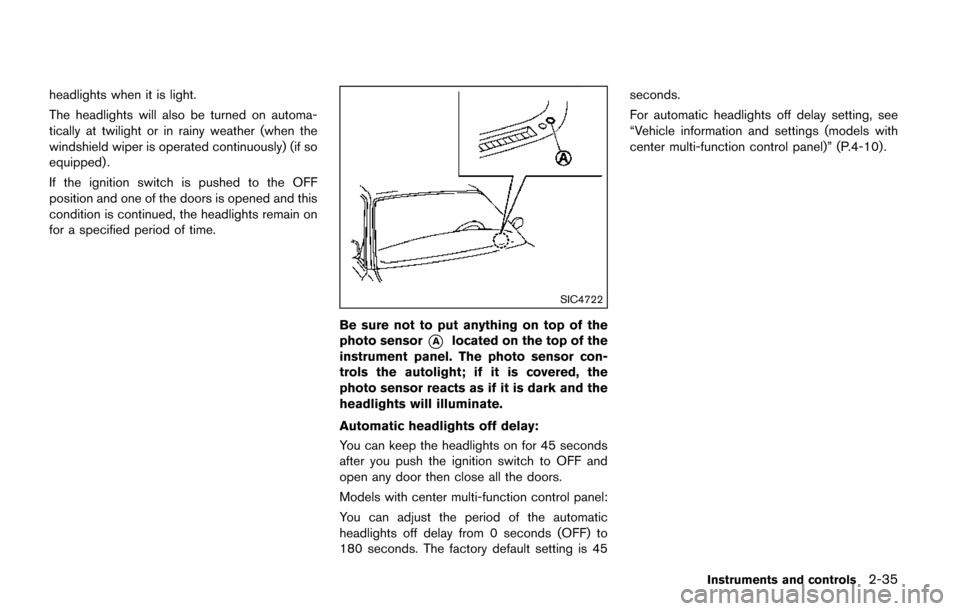
SIC4722
Be sure not to put anything on top of the
photo sensor
*Alocated on the top of the
instrument panel. The photo sensor con-
trols the autolight; if it is covered, the
photo sensor reacts as if it is dark and the
headlights will illuminate.
Automatic headlights off delay:
You can keep the headlights on for 45 seconds
after you push the ignition switch to OFF and
open any door then close all the doors.
Models with center multi-function control panel:
You can adjust the period of the automatic
headlights off delay from 0 seconds (OFF) to
180 seconds. The factory default setting is 45 seconds.
For automatic headlights off delay setting, see
“Vehicle information and settings (models with
center multi-function control panel)” (P.4-10).
Instruments and controls2-35
Page 209 of 520
4-20Monitor, heater, air conditioner, audio, phone and voice recognition systems
When any mode button is pushed with the
screen off, the screen turns on for further
operation. The screen will turn off automatically
5 seconds after the operation is finished.
To turn on the screen, set this item to the ON
position, or push and hold the “
OFF”
button.
. Brightness/Contrast/Background Color
To adjust the brightness and contrast of the
screen, select the “Brightness” or “Contrast”
key.
Then, you can adjust the brightness and the
contrast using the multi-function controller.
For information on the “Background Color” key,
refer to the separate Navigation System Own-
er’s Manual.
Color Theme:
Choose the theme color of the menu screen.
SAA2488
Models with navigation system
JVH0182MModels without navigation system
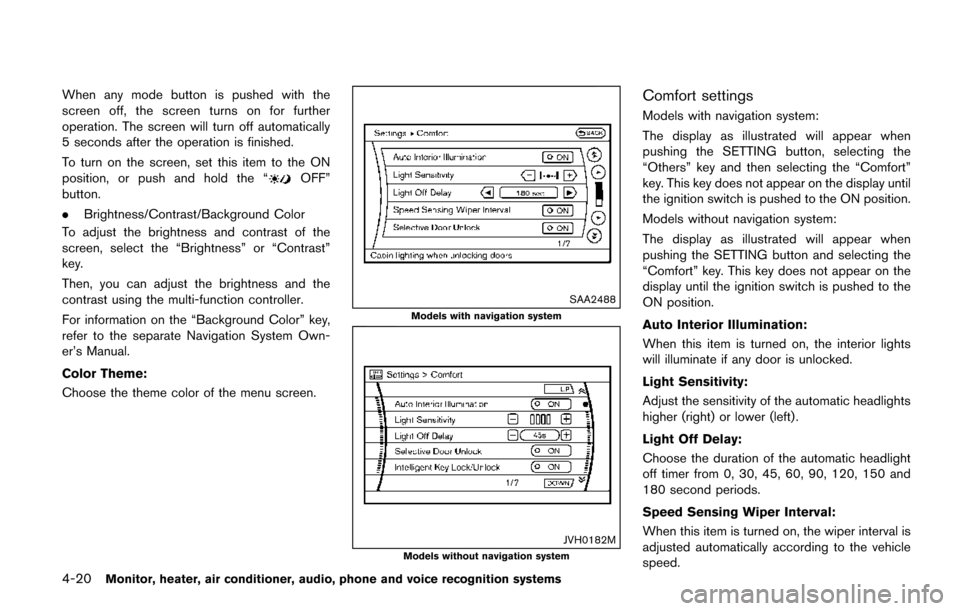
Comfort settings
Models with navigation system:
The display as illustrated will appear when
pushing the SETTING button, selecting the
“Others” key and then selecting the “Comfort”
key. This key does not appear on the display until
the ignition switch is pushed to the ON position.
Models without navigation system:
The display as illustrated will appear when
pushing the SETTING button and selecting the
“Comfort” key. This key does not appear on the
display until the ignition switch is pushed to the
ON position.
Auto Interior Illumination:
When this item is turned on, the interior lights
will illuminate if any door is unlocked.
Light Sensitivity:
Adjust the sensitivity of the automatic headlights
higher (right) or lower (left) .
Light Off Delay:
Choose the duration of the automatic headlight
off timer from 0, 30, 45, 60, 90, 120, 150 and
180 second periods.
Speed Sensing Wiper Interval:
When this item is turned on, the wiper interval is
adjusted automatically according to the vehicle
speed.