display NISSAN ROGUE 2008 1.G Owner's Manual
[x] Cancel search | Manufacturer: NISSAN, Model Year: 2008, Model line: ROGUE, Model: NISSAN ROGUE 2008 1.GPages: 309, PDF Size: 4.38 MB
Page 159 of 309
Black plate (161,1)
Model "S35-D" EDITED: 2007/ 12/ 19
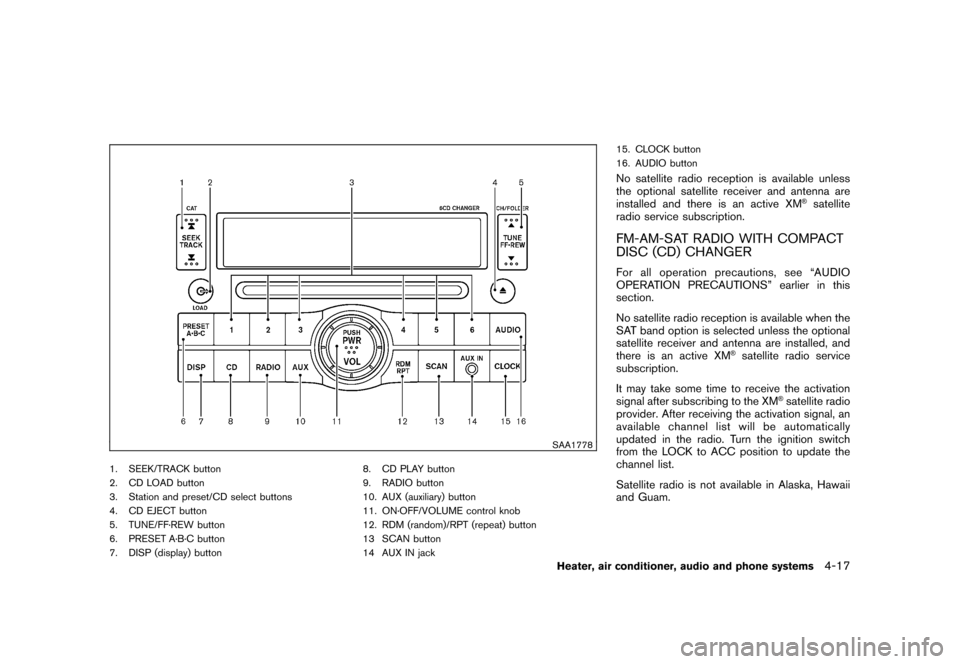
SAA1778
1. SEEK/TRACK button
2. CD LOAD button
3. Station and preset/CD select buttons
4. CD EJECT button
5. TUNE/FF·REW button
6. PRESET A·B·C button
7. DISP (display) button8. CD PLAY button
9. RADIO button
10. AUX (auxiliary) button
11. ON·OFF/VOLUME control knob
12. RDM (random)/RPT (repeat) button
13 SCAN button
14 AUX IN jack15. CLOCK button
16. AUDIO button
No satellite radio reception is available unless
the optional satellite receiver and antenna are
installed and there is an active XM
®satellite
radio service subscription.
FM-AM-SAT RADIO WITH COMPACT
DISC (CD) CHANGERFor all operation precautions, see “AUDIO
OPERATION PRECAUTIONS” earlier in this
section.
No satellite radio reception is available when the
SAT band option is selected unless the optional
satellite receiver and antenna are installed, and
there is an active XM
®satellite radio service
subscription.
It may take some time to receive the activation
signal after subscribing to the XM
®satellite radio
provider. After receiving the activation signal, an
available channel list will be automatically
updated in the radio. Turn the ignition switch
from the LOCK to ACC position to update the
channel list.
Satellite radio is not available in Alaska, Hawaii
and Guam.
Heater, air conditioner, audio and phone systems
4-17
Page 160 of 309
Black plate (162,1)
Model "S35-D" EDITED: 2007/ 12/ 19
Audio main operationHead unit:
The radio has an FM diversity reception system,
which employs two antennas printed on the rear
window. This system automatically switches to
the antenna which is receiving less interference.
The auto loudness circuit enhances the low and
high frequency ranges automatically in both
radio reception and CD playback.
ON·OFF/Volume control:
Turn the ignition switch to the ACC or ON
position, and then push the ON·OFF/VOLUME
control knob while the system is off to call up the
mode (radio, CD or AUX) which was playing
immediately before the system was turned off.
While the system is on, pushing the ON·OFF/
VOLUME control knob turns the system off.
Turn the ON·OFF/VOLUME control knob to
adjust the volume.
AUDIO button:
Push the AUDIO button to change the selecting
mode as follows.
BASS?TREBLE?FADER?BALANCE?
SSV?BEEP?off
Push the TUNE (
,
) or SEEK (
,
) button to adjust Bass and Treble to the
desired level. Use the TUNE or SEEK button
also to adjust Fader or Balance modes. Fader
adjusts the sound level between the front and
rear speakers and Balance adjusts the sound
between the right and left speakers.
To turn the beep sound off or on, push the TUNE
button until the desired mode is displayed. This
turns on or off the beep sound when audio
buttons are pushed.
To change the Speed Sensitive Volume (SSV)
mode to OFF, LOW, MID or HIGH, push the
TUNE button until the desired mode is dis-
played.
Once you have adjusted the sound quality to the
desired level, push the AUDIO button repeatedly
until the radio or CD display reappears. Other-
wise, the radio or CD display will automatically
reappear after about 10 seconds.CLOCK button:
Push the CLOCK button to turn on or off the
CLOCK display.
See “CLOCK” in the “2. Instruments and
controls” section for the detailed clock adjust-
ment operation.
DISPLAY CHANGE:
This button will work during FM or satellite radio
(if so equipped) and CD operation. Find the
detailed function in the description of each item.
Radio operation
RADIO (FM/AM/SAT) band select:
Pushing the RADIO button will change the band
as follows:
(Without satellite radio)
AM?FM?AM
(With satellite radio)
AM?FM?SAT (XM)?AM
When the RADIO button is pushed while the
ignition switch is in the ACC or ON position, the
radio will come on at the station last played.
The last station/channel played will also come
on when the ON·OFF/VOL control knob is
pushed to ON.
The satellite radio mode will be skipped unless
an optional satellite receiver and antenna are
installed and an XM
®satellite radio service
subscription is active. Satellite radio is not
available in Alaska, Hawaii and Guam.
If a compact disc is playing when the RADIO
4-18
Heater, air conditioner, audio and phone systems
Page 161 of 309
Black plate (163,1)
Model "S35-D" EDITED: 2007/ 12/ 19
button is pushed, the compact disc will auto-
matically be turned off and the last radio station
played will turn on.
The FM stereo indicator ST will glow during FM
stereo reception. When the stereo broadcast
signal is weak, the radio will automatically
change from stereo to monaural reception.
TUNE (Tuning):
Push the TUNE button
or
for manual
tuning. To move quickly through the channels,
push and hold the TUNE button.
SEEK tuning:
.For AM and FM radio
Push the SEEK button
or
to tune
from low to high or high to low frequencies
and to stop at the next broadcasting station.
.For satellite radio
Push the SEEK button
or
to tune
to the first channel of the next or previous
category.
SCAN tuning:
Push the SCAN button to tune from low to high
frequencies and stops at each broadcasting
station for 5 seconds. Pushing the button againduring this 5 seconds period will stop SCAN
tuning and the radio will remain tuned to that
station.
If the SCAN tuning button is not pushed within 5
seconds, SCAN tuning moves to the next
station.
PRESET select:
Push the PRESET A·B·C button to go to the next
PRESET. After choosing from the PRESET A, B
or C, you can select the desired channel by
pushing the station preset buttons
to
.
to
Station memory operations:
18 stations/channels can be set for PRESET A,
B and C. The PRESET A, B and C function
allows you to store a combination of FM, AM and
SAT (if so equipped) stations for easy access.
1. Push the PRESET A·B·C button to change
between storage banks.
2. Tune to the desired station using the SEEK,
SCAN or TUNE button.
3. Push and hold any of the desired station
preset buttons (1-6) until a beep sound is
heard. (The radio mutes when the select
button is pushed.)
4. The channel indicator will then come on and
the sound will resume. Memorizing is nowcomplete.
5. Other buttons can be set in the same
manner.
If the battery cable is disconnected, or if the fuse
opens, the radio memory will be erased. In that
case, reset the desired stations.
Radio Data System (RDS):
RDS stands for Radio Data System, and is a
data information service transmitted by some
radio stations on the FM band (not AM band)
and/or SAT encoded within a regular radio
broadcast. Currently, most RDS stations are in
large cities, but many stations are now con-
sidering broadcasting RDS data.
RDS can display:
.Station call sign, such as “WHFR 98.3”.
.Station name, such as “The Groove”.
.Music or programming type such as “Clas-
sical”, “Country” or “Rock”.
.Traffic reports about delays or construction.
If the station broadcasts RDS information, the
RDS icon is displayed.
RADIO DISPLAY CHANGE:
When the DISP button is pushed for less than
Heater, air conditioner, audio and phone systems
4-19
Page 162 of 309
Black plate (164,1)
Model "S35-D" EDITED: 2007/ 12/ 19
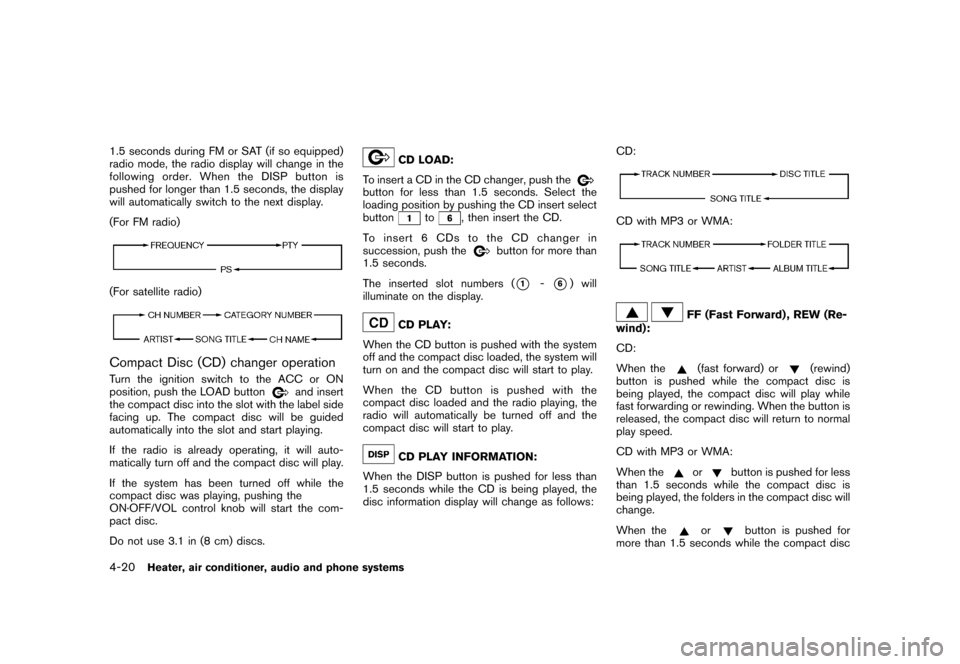
1.5 seconds during FM or SAT (if so equipped)
radio mode, the radio display will change in the
following order. When the DISP button is
pushed for longer than 1.5 seconds, the display
will automatically switch to the next display.
(For FM radio)(For satellite radio)Compact Disc (CD) changer operationTurn the ignition switch to the ACC or ON
position, push the LOAD button
and insert
the compact disc into the slot with the label side
facing up. The compact disc will be guided
automatically into the slot and start playing.
If the radio is already operating, it will auto-
matically turn off and the compact disc will play.
If the system has been turned off while the
compact disc was playing, pushing the
ON·OFF/VOL control knob will start the com-
pact disc.
Do not use 3.1 in (8 cm) discs.
CD LOAD:
To insert a CD in the CD changer, push the
button for less than 1.5 seconds. Select the
loading position by pushing the CD insert select
button
to
, then insert the CD.
To insert 6 CDs to the CD changer in
succession, push the
button for more than
1.5 seconds.
The inserted slot numbers (
*1
-*6) will
illuminate on the display.
CD PLAY:
When the CD button is pushed with the system
off and the compact disc loaded, the system will
turn on and the compact disc will start to play.
When the CD button is pushed with the
compact disc loaded and the radio playing, the
radio will automatically be turned off and the
compact disc will start to play.CD PLAY INFORMATION:
When the DISP button is pushed for less than
1.5 seconds while the CD is being played, the
disc information display will change as follows:CD:
CD with MP3 or WMA:
FF (Fast Forward) , REW (Re-
wind):
CD:
When the(fast forward) or
(rewind)
button is pushed while the compact disc is
being played, the compact disc will play while
fast forwarding or rewinding. When the button is
released, the compact disc will return to normal
play speed.
CD with MP3 or WMA:
When the
or
button is pushed for less
than 1.5 seconds while the compact disc is
being played, the folders in the compact disc will
change.
When the
or
button is pushed for
more than 1.5 seconds while the compact disc
4-20
Heater, air conditioner, audio and phone systems
Page 163 of 309
Black plate (165,1)
Model "S35-D" EDITED: 2007/ 12/ 19
is being played, the compact disc will play while
forwarding or rewinding. When the button is
released, the compact disc will return to the
normal play speed.
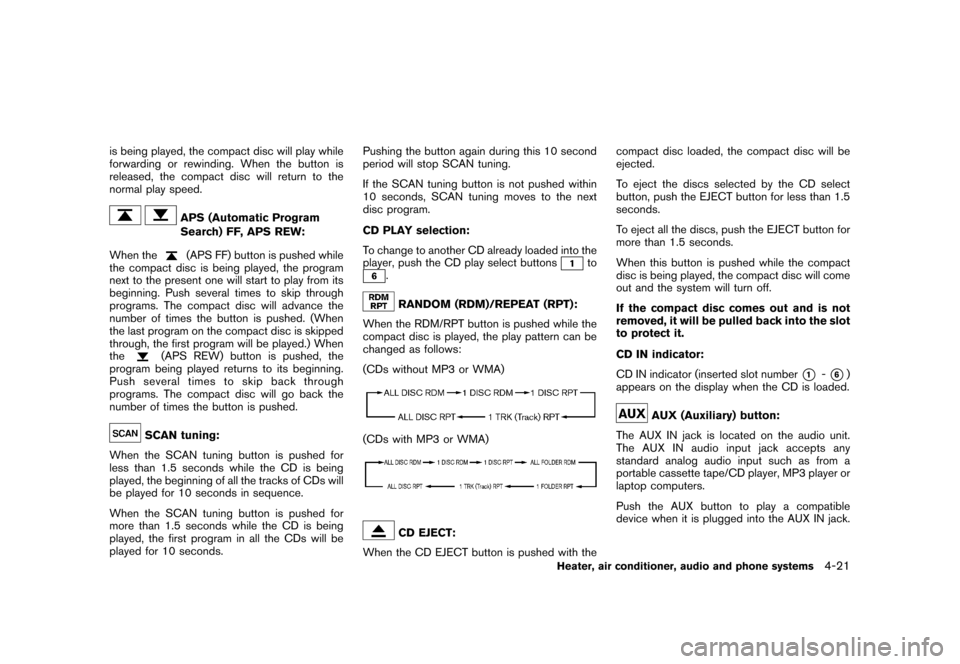
APS (Automatic Program
Search) FF, APS REW:
When the(APS FF) button is pushed while
the compact disc is being played, the program
next to the present one will start to play from its
beginning. Push several times to skip through
programs. The compact disc will advance the
number of times the button is pushed. (When
the last program on the compact disc is skipped
through, the first program will be played.) When
the
(APS REW) button is pushed, the
program being played returns to its beginning.
Push several times to skip back through
programs. The compact disc will go back the
number of times the button is pushed.
SCAN tuning:
When the SCAN tuning button is pushed for
less than 1.5 seconds while the CD is being
played, the beginning of all the tracks of CDs will
be played for 10 seconds in sequence.
When the SCAN tuning button is pushed for
more than 1.5 seconds while the CD is being
played, the first program in all the CDs will be
played for 10 seconds.Pushing the button again during this 10 second
period will stop SCAN tuning.
If the SCAN tuning button is not pushed within
10 seconds, SCAN tuning moves to the next
disc program.
CD PLAY selection:
To change to another CD already loaded into the
player, push the CD play select buttons
to
.RANDOM (RDM)/REPEAT (RPT):
When the RDM/RPT button is pushed while the
compact disc is played, the play pattern can be
changed as follows:
(CDs without MP3 or WMA)
(CDs with MP3 or WMA)
CD EJECT:
When the CD EJECT button is pushed with thecompact disc loaded, the compact disc will be
ejected.
To eject the discs selected by the CD select
button, push the EJECT button for less than 1.5
seconds.
To eject all the discs, push the EJECT button for
more than 1.5 seconds.
When this button is pushed while the compact
disc is being played, the compact disc will come
out and the system will turn off.
If the compact disc comes out and is not
removed, it will be pulled back into the slot
to protect it.
CD IN indicator:
CD IN indicator (inserted slot number
*1
-*6)
appears on the display when the CD is loaded.
AUX (Auxiliary) button:
The AUX IN jack is located on the audio unit.
The AUX IN audio input jack accepts any
standard analog audio input such as from a
portable cassette tape/CD player, MP3 player or
laptop computers.
Push the AUX button to play a compatible
device when it is plugged into the AUX IN jack.
Heater, air conditioner, audio and phone systems
4-21
Page 194 of 309
Black plate (198,1)
Model "S35-D" EDITED: 2007/ 12/ 19
the R (Reverse) position.The brake pedal
must be depressed and the selector lever
button pushed in to move the selector
lever from P (Park) , N (Neutral) or any
driving position to R (Reverse) .
N (Neutral):
Neither forward nor reverse gear is engaged.
The engine can be started in this position. You
may shift to N (Neutral) and restart a stalled
engine while the vehicle is moving.
D (Drive):
Use this position for all normal forward driving.
L (Low) (if so equipped):
Use this position for maximum engine braking on
steep downhill gradients/climbing steep slopes
and whenever approaching sharp bends. Do not
use the L position in any other circumstances.
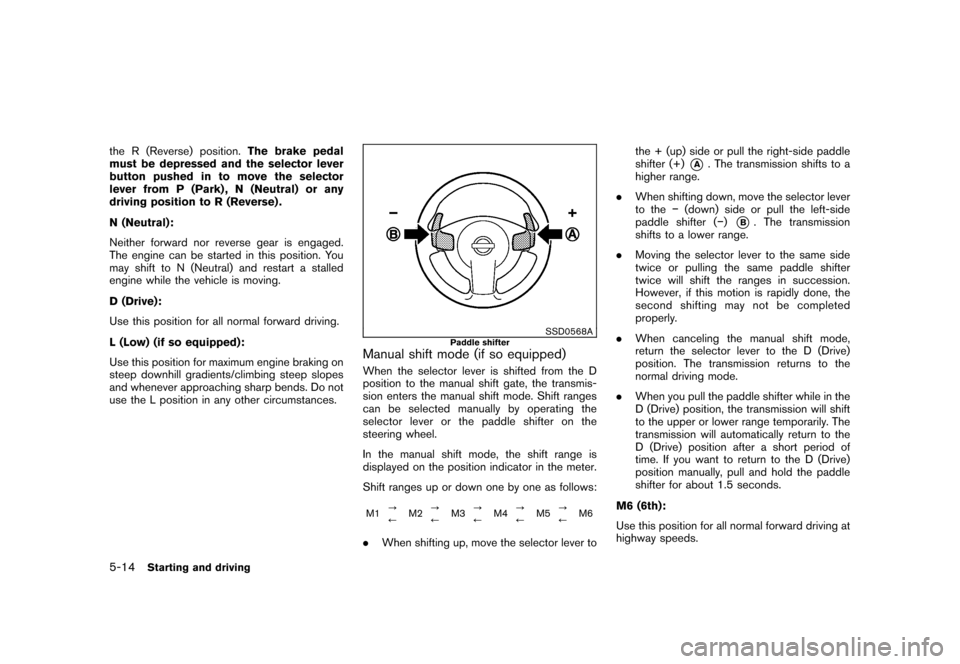
SSD0568A
Paddle shifter
Manual shift mode (if so equipped)When the selector lever is shifted from the D
position to the manual shift gate, the transmis-
sion enters the manual shift mode. Shift ranges
can be selected manually by operating the
selector lever or the paddle shifter on the
steering wheel.
In the manual shift mode, the shift range is
displayed on the position indicator in the meter.
Shift ranges up or down one by one as follows:M1?
/M2?
/M3?
/M4?
/M5?
/M6.When shifting up, move the selector lever tothe + (up) side or pull the right-side paddle
shifter (+)
*A
. The transmission shifts to a
higher range.
.When shifting down, move the selector lever
to the(down) side or pull the left-side
paddle shifter ()
*B. The transmission
shifts to a lower range.
.Moving the selector lever to the same side
twice or pulling the same paddle shifter
twice will shift the ranges in succession.
However, if this motion is rapidly done, the
second shifting may not be completed
properly.
.When canceling the manual shift mode,
return the selector lever to the D (Drive)
position. The transmission returns to the
normal driving mode.
.When you pull the paddle shifter while in the
D (Drive) position, the transmission will shift
to the upper or lower range temporarily. The
transmission will automatically return to the
D (Drive) position after a short period of
time. If you want to return to the D (Drive)
position manually, pull and hold the paddle
shifter for about 1.5 seconds.
M6 (6th):
Use this position for all normal forward driving at
highway speeds.
5-14
Starting and driving
Page 305 of 309
Black plate (4,1)
10-4
Lift gate lock................................... 3-20
Power door lock................................. 3-4
Low fuel warning light............................. 2-14
Low tire pressure warning light................... 2-14
Low tire pressure warning system (See tire
pressure monitoring system (TPMS)).............. 5-3
Luggage floor box................................. 2-36
Luggage hooks..................................... 2-38
M
Maintenance
Battery.......................................... 8-13
General maintenance............................ 8-2
Inside the vehicle................................ 8-3
Maintenance precautions........................ 8-5
Maintenance requirements...................... 8-2
Outside the vehicle.............................. 8-2
Seat belt maintenance......................... 1-19
Malfunction indicator light (MIL).................. 2-17
Manual front seat adjustment....................... 1-3
Map lights .......................................... 2-44
Mechanical key (Intelligent Key system)............ 3-3
Meter, Trip computer................................ 2-7
Meters and gauges.................................. 2-3
Meters and gauges, Instrument brightness
control.............................................. 2-28
Mirror
Inside mirror.................................... 3-24
Outside mirrors................................ 3-25
Moonroof........................................... 2-42
N
New vehicle break-in.............................. 5-20NISSAN Vehicle Immobilizer System............. 2-20
O
Odometer............................................. 2-4
Oil
Capacities and recommended fuel/
lubricants......................................... 9-2
Changing engine oil and filter................... 8-9
Checking engine oil level........................ 8-8
Engine oil......................................... 8-8
Engine oil viscosity.............................. 9-5
Outside air temperature display.................... 2-6
Outside mirrors.................................... 3-25
Overdrive OFF switch............................. 5-15
Overheat, If your vehicle overheats............... 6-11
Owner’s Manual/Service Manual order
information.......................................... 9-28
P
Panic alarm......................................... 3-17
Parking
Brake break-in.................................. 5-26
Parking brake operation....................... 5-17
Parking on hills................................. 5-24
Phone
Bluetooth
®Hands-Free Phone System...... 4-25
Car phone or CB radio........................ 4-24
Power
Electric power steering system............... 5-25
Front seat adjustment........................... 1-4
Power door lock ................................. 3-4
Power outlet.................................... 2-32
Power windows................................ 2-40Precautions
Audio operation.................................. 4-6
Braking precautions........................... 5-25
Child restraints................................. 1-19
Cruise control.................................. 5-18
Driving safety..................................... 5-6
Maintenance...................................... 8-5
On-pavement and off-road driving............. 5-5
Seat belt usage .................................. 1-9
Supplemental restraint system................ 1-38
When starting and driving....................... 5-2
Push starting....................................... 6-10
R
Radio................................................. 4-6
Car phone or CB radio........................ 4-24
FM-AM radio with Compact Disc (CD)
changer......................................... 4-17
FM-AM radio with Compact Disc (CD)
player........................................... 4-13
Steering wheel audio controls ................ 4-23
Readiness for inspection/maintenance (I/M)
test.................................................. 9-26
Rear center seat belt .............................. 1-16
Rear door lock, Child safety rear door lock........ 3-5
Rear power point .................................. 2-32
Rear seats............................................ 1-6
Rear window and outside mirror defroster
switch............................................... 2-24
Rear window wiper and washer switch.......... 2-23
Recorders, Event data............................. 9-27
Registering your vehicle in another country........ 9-8
Remote keyless entry system....................... 3-6
Reporting safety defects (US only)............... 9-26
Model "S35-D" EDITED: 2007/ 12/ 25
Page 306 of 309
Black plate (5,1)
Rollover............................................... 5-5
Roof
Moonroof....................................... 2-43
Roof rack ....................................... 2-39
S
Safety
Child seat belts................................ 1-11
Reporting safety defects (US only)........... 9-26
Towing safety.................................. 9-20
Seat adjustment
Folding front passenger’s seat.................. 1-5
Front manual seat adjustment................... 1-3
Front power seat adjustment................... 1-4
Front seats....................................... 1-3
Seat belt(s)
Child safety..................................... 1-11
Infants........................................... 1-11
Injured persons................................. 1-12
Larger children................................. 1-12
Precautions on seat belt usage................. 1-9
Pregnant women............................... 1-12
Rear center seat belt.......................... 1-16
Seat belt cleaning............................... 7-5
Seat belt extenders............................ 1-18
Seat belt hooks................................ 1-15
Seat belt maintenance......................... 1-19
Seat belt warning light........................ 2-15
Seat belts........................................ 1-9
Seat belts with pretensioners................. 1-50
Shoulder belt height adjustment.............. 1-15
Small children.................................. 1-12
Three-point type............................... 1-13Seat(s)
Heated seats................................... 2-30
Seats.............................................. 1-2
Security system (NISSAN Vehicle Immobilizer
System) , Engine start.............................. 2-20
Security system, Vehicle security system........ 2-19
Selector lever, Shift lock release................. 5-16
Servicing air conditioner............................. 4-5
Shift lock release, Transmission.................. 5-16
Shifting
CVT (Continuously Variable Transmission) . . . 5-12
Shoulder belt height adjustment.................. 1-15
Spare tire...................................... 8-39, 9-7
Spark plugs........................................ 8-15
Speedometer......................................... 2-4
Starting
Before starting the engine.................... 5-11
Jump starting..................................... 6-9
Precautions when starting and driving......... 5-2
Push starting................................... 6-10
Starting the engine............................ 5-11
Status light, Front passenger air bag............ 1-45
Steering
Electric power steering system............... 5-25
Steering lock................................... 5-10
Steering wheel switch for audio controls.... 4-23
Tilting steering wheel.......................... 3-23
Storage............................................. 2-33
Sun visors.......................................... 3-23
Sunglasses holder................................. 2-34
Supplemental air bag warning labels............. 1-51
Supplemental air bag warning light....... 1-51, 2-16
Supplemental restraint system.................... 1-38Precautions on supplemental restraint
system.......................................... 1-38
Switch
Audio control steering wheel switch......... 4-23
Fog light switch................................ 2-29
Hazard warning flasher switch................ 2-29
Headlight aiming control...................... 2-27
Headlight switch............................... 2-26
Ignition switch.................................... 5-8
Overdrive OFF switch......................... 5-15
Power door lock switch......................... 3-5
Rear window and outside mirror defroster
switch........................................... 2-24
Turn signal switch.............................. 2-28
Vehicle dynamic control (VDC) off switch . . . 2-31
T
Tachometer........................................... 2-5
Temperature display................................. 2-6
Temperature gauge, Engine coolant
temperature gauge................................... 2-5
Theft (NISSAN Vehicle Immobilizer System) ,
Engine start ........................................ 2-20
Three-way catalyst................................... 5-2
Tilting steering wheel.............................. 3-23
Tire pressure, Low tire pressure warning
light................................................. 2-14
Tires
Flat tire............................................ 6-2
Low tire pressure warning system.............. 5-3
Tire and Loading information label........... 8-31
Tire and Loading Information label........... 9-10
Tire chains...................................... 8-36
Tire dressing..................................... 7-3
10-5
Model "S35-D" EDITED: 2007/ 12/ 25