warning NISSAN ROGUE 2008 1.G Manual PDF
[x] Cancel search | Manufacturer: NISSAN, Model Year: 2008, Model line: ROGUE, Model: NISSAN ROGUE 2008 1.GPages: 309, PDF Size: 4.38 MB
Page 123 of 309
Black plate (125,1)
Model "S35-D" EDITED: 2007/ 12/ 19
5. The hazard indicator flashes twice and the
horn chirps once.
.When the LOCK
button is pushed with
all doors locked, the hazard indicator flashes
twice and the horn chirps once as a
reminder that the doors are already locked.
.Operate the door handles to confirm that the
doors have been securely locked.
Unlocking doors1. Push the UNLOCK
button on the
keyfob once.
.The driver’s door unlocks.
.The hazard indicator flashes once if all
doors are completely closed.
.The interior light illuminates and the light
timer activates for 15 seconds when the
switch is in the DOOR position.
2. Push the UNLOCK
button again within
5 seconds.
.All the doors and the lift gate unlock.
.The hazard indicator flashes once if all
doors are completely closed.
All doors will be locked automatically unless one
of the following operations is performed within 1
minute of pushing the UNLOCK
button..Any door or lift gate is opened.
.The ignition switch is turned to the ON
position.
The interior light can be turned off without
waiting for 15 seconds by turning the ignition
switch to the ON position or by locking the
doors with the keyfob.
Using the panic alarmIf you are near your vehicle and feel threatened,
you may activate the alarm to call attention by
pushing and holding the PANIC
button on
the keyfob forlonger than 1 second(with the
key removed from the ignition switch) .
The theft warning alarm and headlights will stay
on for 25 seconds.
The panic alarm stops when:
.It has run for 25 seconds, or
.The LOCK
button or the UNLOCK
button is pushed, or
.The PANIC
button is pushed on the
keyfob for longer than 1 second.
Pre-driving checks and adjustments
3-7
Page 124 of 309
Black plate (126,1)
Model "S35-D" EDITED: 2007/ 12/ 19
SPA1260
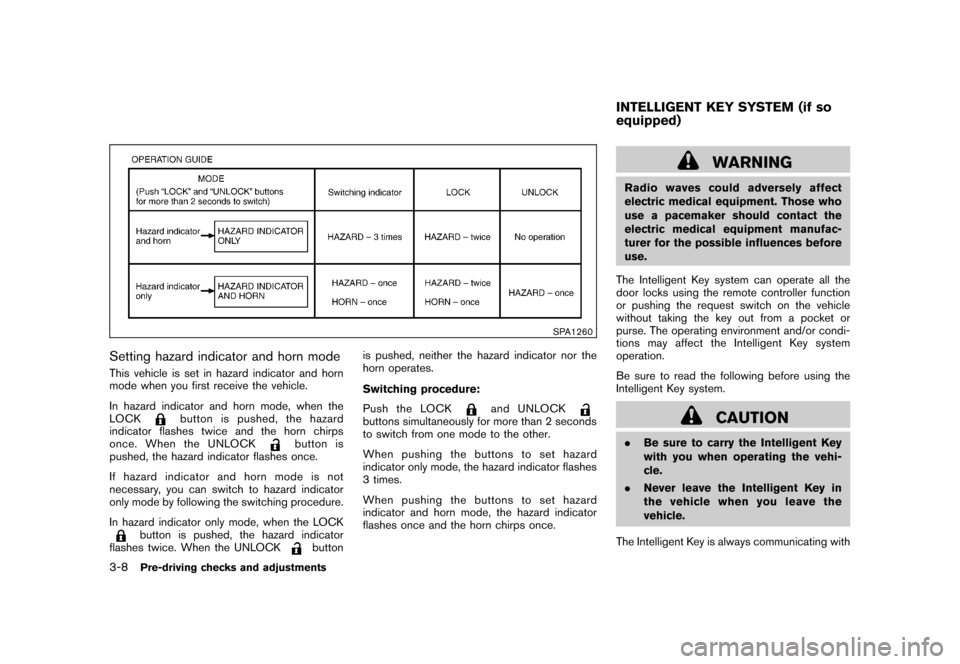
Setting hazard indicator and horn modeThis vehicle is set in hazard indicator and horn
mode when you first receive the vehicle.
In hazard indicator and horn mode, when the
LOCK
button is pushed, the hazard
indicator flashes twice and the horn chirps
once. When the UNLOCK
button is
pushed, the hazard indicator flashes once.
If hazard indicator and horn mode is not
necessary, you can switch to hazard indicator
only mode by following the switching procedure.
In hazard indicator only mode, when the LOCK
button is pushed, the hazard indicator
flashes twice. When the UNLOCK
buttonis pushed, neither the hazard indicator nor the
horn operates.
Switching procedure:
Push the LOCK
and UNLOCK
buttons simultaneously for more than 2 seconds
to switch from one mode to the other.
When pushing the buttons to set hazard
indicator only mode, the hazard indicator flashes
3 times.
When pushing the buttons to set hazard
indicator and horn mode, the hazard indicator
flashes once and the horn chirps once.
WARNING
Radio waves could adversely affect
electric medical equipment. Those who
use a pacemaker should contact the
electric medical equipment manufac-
turer for the possible influences before
use.
The Intelligent Key system can operate all the
door locks using the remote controller function
or pushing the request switch on the vehicle
without taking the key out from a pocket or
purse. The operating environment and/or condi-
tions may affect the Intelligent Key system
operation.
Be sure to read the following before using the
Intelligent Key system.
CAUTION
.Be sure to carry the Intelligent Key
with you when operating the vehi-
cle.
.Never leave the Intelligent Key in
the vehicle when you leave the
vehicle.
The Intelligent Key is always communicating withINTELLIGENT KEY SYSTEM (if so
equipped)
3-8
Pre-driving checks and adjustments
Page 129 of 309
Black plate (131,1)
Model "S35-D" EDITED: 2007/ 12/ 19
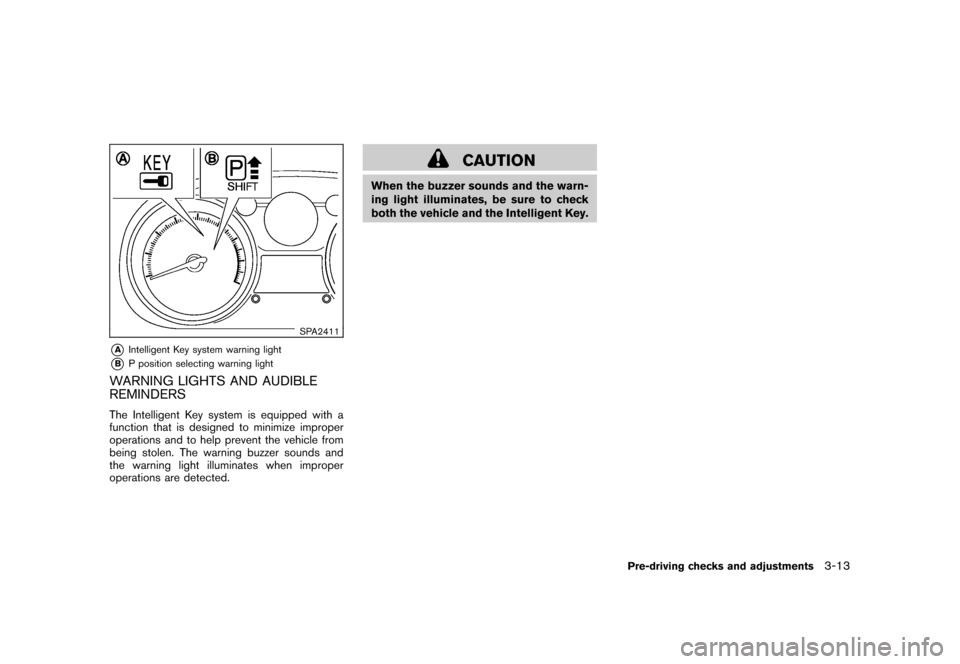
SPA2411
*A
Intelligent Key system warning light
*B
P position selecting warning light
WARNING LIGHTS AND AUDIBLE
REMINDERSThe Intelligent Key system is equipped with a
function that is designed to minimize improper
operations and to help prevent the vehicle from
being stolen. The warning buzzer sounds and
the warning light illuminates when improper
operations are detected.
CAUTION
When the buzzer sounds and the warn-
ing light illuminates, be sure to check
both the vehicle and the Intelligent Key.
Pre-driving checks and adjustments
3-13
Page 130 of 309
Black plate (132,1)
Model "S35-D" EDITED: 2007/ 12/ 19
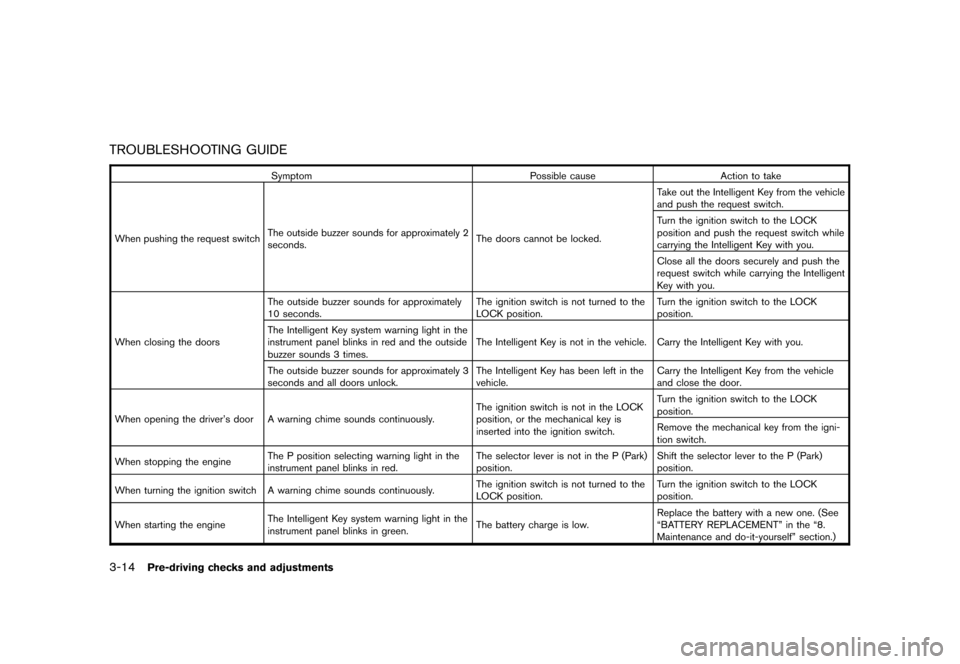
TROUBLESHOOTING GUIDE
Symptom Possible cause Action to take
When pushing the request switchThe outside buzzer sounds for approximately 2
seconds.The doors cannot be locked.Take out the Intelligent Key from the vehicle
and push the request switch.
Turn the ignition switch to the LOCK
position and push the request switch while
carrying the Intelligent Key with you.
Close all the doors securely and push the
request switch while carrying the Intelligent
Key with you.
When closing the doorsThe outside buzzer sounds for approximately
10 seconds.The ignition switch is not turned to the
LOCK position.Turn the ignition switch to the LOCK
position.
The Intelligent Key system warning light in the
instrument panel blinks in red and the outside
buzzer sounds 3 times.The Intelligent Key is not in the vehicle. Carry the Intelligent Key with you.
The outside buzzer sounds for approximately 3
seconds and all doors unlock.The Intelligent Key has been left in the
vehicle.Carry the Intelligent Key from the vehicle
and close the door.
When opening the driver’s door A warning chime sounds continuously.The ignition switch is not in the LOCK
position, or the mechanical key is
inserted into the ignition switch.Turn the ignition switch to the LOCK
position.
Remove the mechanical key from the igni-
tion switch.
When stopping the engineThe P position selecting warning light in the
instrument panel blinks in red.The selector lever is not in the P (Park)
position.Shift the selector lever to the P (Park)
position.
When turning the ignition switch A warning chime sounds continuously.The ignition switch is not turned to the
LOCK position.Turn the ignition switch to the LOCK
position.
When starting the engineThe Intelligent Key system warning light in the
instrument panel blinks in green.The battery charge is low.Replace the battery with a new one. (See
“BATTERY REPLACEMENT” in the “8.
Maintenance and do-it-yourself” section.)
3-14
Pre-driving checks and adjustments
Page 131 of 309
Black plate (133,1)
Model "S35-D" EDITED: 2007/ 12/ 19
Symptom Possible cause Action to take
When pushing the ignition switchThe Intelligent Key system warning light in the
instrument panel illuminates in red.The Intelligent Key is not in the vehicle.If the key warning light illuminates in red
even while you are carrying the Intelligent
Key, the battery is completely discharged.
Replace the battery with a new one. (See
“BATTERY REPLACEMENT” in the “8.
Maintenance and do-it-yourself” section.)
Pre-driving checks and adjustments
3-15
Page 133 of 309
Black plate (135,1)
Model "S35-D" EDITED: 2007/ 12/ 19
.Opening any doors.
.Pushing the ignition switch.
.Inserting the mechanical key into the ignition
switch.
During this 1-minute time period, if the UNLOCK
button is pushed, all doors will be locked
automatically after another 1 minute.
Using panic alarmIf you are near your vehicle and feel threatened,
you may activate the alarm to call attention as
follows:
1. Push the PANIC
button
*3
on the
Intelligent Key formore than 1 second.
2. The theft warning alarm and headlights will
stay on for 25 seconds.
3. The panic alarm stops when:
.It has run for 25 seconds, or
.Any of the buttons on the Intelligent Key
is pushed. (Note: Panic button must be
pushed for more than 1 second.)
Setting hazard indicator and horn modeThis vehicle is set in hazard indicator and horn
mode when you first receive the vehicle.
In hazard indicator and horn mode, when the
LOCK
button
*1
is pushed, the hazardindicator flashes twice and the horn chirps once.
When the UNLOCK
button
*2
is pushed,
the hazard indicator flashes once.
If horns are not necessary, the system can be
switched to the hazard indicator mode.
In hazard indicator mode, when the LOCK
button is pushed, the hazard indicator flashes
twice. When the UNLOCK
button is
pushed, neither the hazard indicator nor the
horn operates.
Pre-driving checks and adjustments
3-17
Page 135 of 309

Black plate (137,1)
Model "S35-D" EDITED: 2007/ 12/ 19
WARNING
.Make sure the hood is completely
closed and latched before driving.
Failure to do so could cause the
hood to fly open and result in an
accident.
.If you see steam or smoke coming
from the engine compartment, to
avoid injury do not open the hood.
SPA2412
When opening the hood:
1. Pull the hood release handle
*1
located
below the instrument panel; the hood will
then spring up slightly.
2. Pull the lever
*2
up at the front of the hood
with your fingertips.
3. Raise the hood.
4. Remove the support rod from the hood and
insert it into the slot
*3.
Hold the coated part
*A
when removing or
resetting the support rod. Avoid direct
contact with the metal parts, as they may
be hot immediately after the engine hasbeen stopped.
When closing the hood:
1. Return the support rod to its original
position.
2. Slowly move the hood down to latch the
lock.
3. Push the hood down to lock the hood
securely into place.
HOOD
Pre-driving checks and adjustments
3-19
Page 136 of 309
Black plate (138,1)
Model "S35-D" EDITED: 2007/ 12/ 19
WARNING
.Always be sure the lift gate has
been closed securely to prevent it
from opening while driving.
.Do not drive with the lift gate open.
This could allow dangerous exhaust
gases to be drawn into the vehicle.
See “EXHAUST GAS (carbon mon-
oxide)” in the “5. Starting and driv-
ing” section of this manual.
.Make sure that all passengers have
their hands, etc. inside the vehicle
before closing the lift gate.
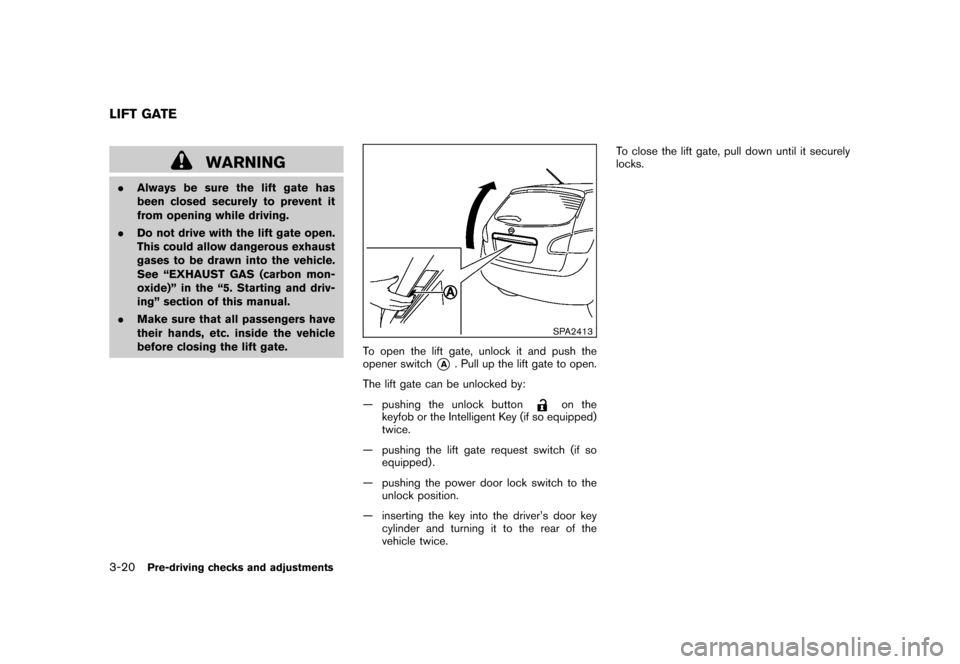
SPA2413
To open the lift gate, unlock it and push the
opener switch
*A
. Pull up the lift gate to open.
The lift gate can be unlocked by:
— pushing the unlock button
on the
keyfob or the Intelligent Key (if so equipped)
twice.
— pushing the lift gate request switch (if so
equipped) .
— pushing the power door lock switch to the
unlock position.
— inserting the key into the driver’s door key
cylinder and turning it to the rear of the
vehicle twice.To close the lift gate, pull down until it securely
locks.
LIFT GATE3-20
Pre-driving checks and adjustments
Page 137 of 309
Black plate (139,1)
Model "S35-D" EDITED: 2007/ 12/ 19
SPA2414
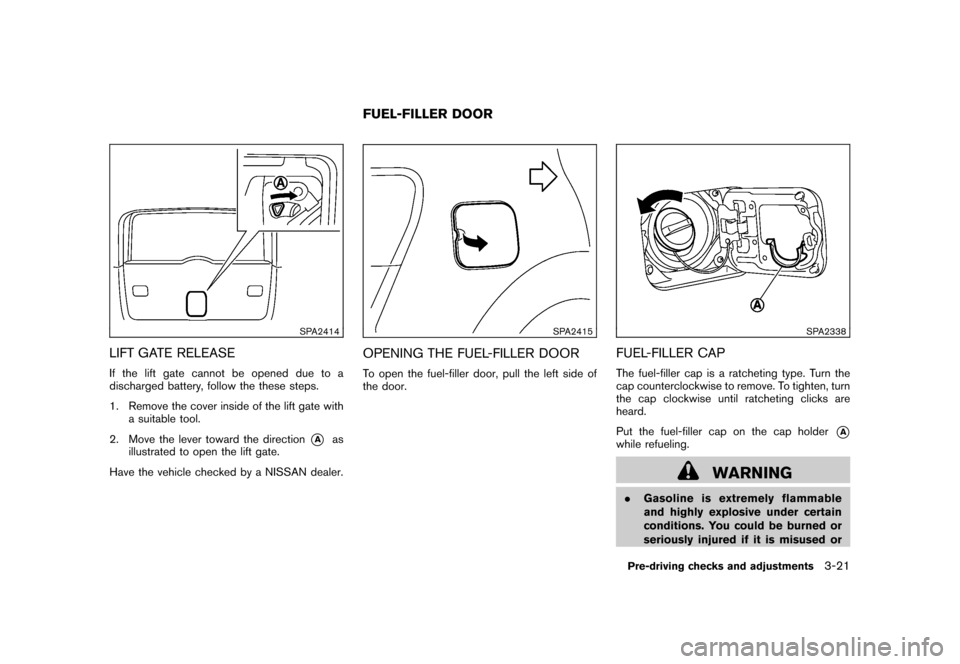
LIFT GATE RELEASEIf the lift gate cannot be opened due to a
discharged battery, follow the these steps.
1. Remove the cover inside of the lift gate with
a suitable tool.
2. Move the lever toward the direction
*A
as
illustrated to open the lift gate.
Have the vehicle checked by a NISSAN dealer.
SPA2415
OPENING THE FUEL-FILLER DOORTo open the fuel-filler door, pull the left side of
the door.
SPA2338
FUEL-FILLER CAPThe fuel-filler cap is a ratcheting type. Turn the
cap counterclockwise to remove. To tighten, turn
the cap clockwise until ratcheting clicks are
heard.
Put the fuel-filler cap on the cap holder
*A
while refueling.
WARNING
.Gasoline is extremely flammable
and highly explosive under certain
conditions. You could be burned or
seriously injured if it is misused or
FUEL-FILLER DOOR
Pre-driving checks and adjustments
3-21
Page 139 of 309
Black plate (141,1)
Model "S35-D" EDITED: 2007/ 12/ 19
WARNING
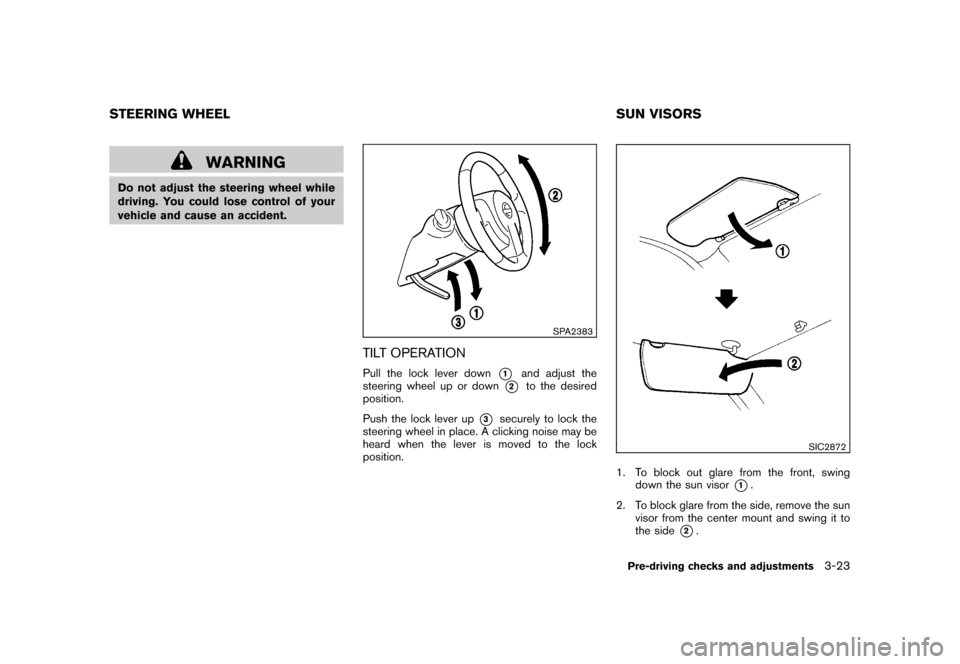
Do not adjust the steering wheel while
driving. You could lose control of your
vehicle and cause an accident.
SPA2383
TILT OPERATIONPull the lock lever down
*1
and adjust the
steering wheel up or down
*2
to the desired
position.
Push the lock lever up
*3
securely to lock the
steering wheel in place. A clicking noise may be
heard when the lever is moved to the lock
position.
SIC2872
1. To block out glare from the front, swing
down the sun visor
*1.
2. To block glare from the side, remove the sun
visor from the center mount and swing it to
the side
*2.
STEERING WHEEL SUN VISORS
Pre-driving checks and adjustments
3-23