air condition NISSAN ROGUE 2009 Owner´s Manual
[x] Cancel search | Manufacturer: NISSAN, Model Year: 2009, Model line: ROGUE, Model: NISSAN ROGUE 2009Pages: 316, PDF Size: 4.26 MB
Page 84 of 316
Black plate (82,1)
Model "S35-D" EDITED: 2008/ 7/ 24
not activate the warning light for the front
passenger.
See “SEAT BELTS” in the “1. Safety — Seats,
seat belts and supplemental restraint system”
section for precautions on seat belt usage.
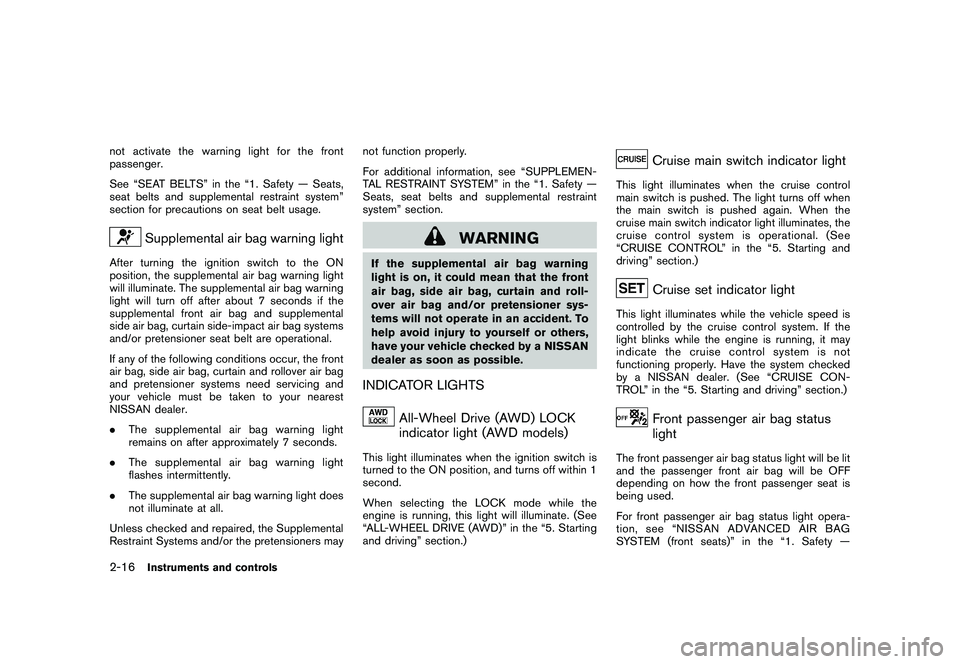
Supplemental air bag warning light
After turning the ignition switch to the ON
position, the supplemental air bag warning light
will illuminate. The supplemental air bag warning
light will turn off after about 7 seconds if the
supplemental front air bag and supplemental
side air bag, curtain side-impact air bag systems
and/or pretensioner seat belt are operational.
If any of the following conditions occur, the front
air bag, side air bag, curtain and rollover air bag
and pretensioner systems need servicing and
your vehicle must be taken to your nearest
NISSAN dealer.
.The supplemental air bag warning light
remains on after approximately 7 seconds.
.The supplemental air bag warning light
flashes intermittently.
.The supplemental air bag warning light does
not illuminate at all.
Unless checked and repaired, the Supplemental
Restraint Systems and/or the pretensioners maynot function properly.
For additional information, see “SUPPLEMEN-
TAL RESTRAINT SYSTEM” in the “1. Safety —
Seats, seat belts and supplemental restraint
system” section.
WARNING
If the supplemental air bag warning
light is on, it could mean that the front
air bag, side air bag, curtain and roll-
over air bag and/or pretensioner sys-
tems will not operate in an accident. To
help avoid injury to yourself or others,
have your vehicle checked by a NISSAN
dealer as soon as possible.INDICATOR LIGHTS
All-Wheel Drive (AWD) LOCK
indicator light (AWD models)
This light illuminates when the ignition switch is
turned to the ON position, and turns off within 1
second.
When selecting the LOCK mode while the
engine is running, this light will illuminate. (See
“ALL-WHEEL DRIVE (AWD)” in the “5. Starting
and driving” section.)
Cruise main switch indicator light
This light illuminates when the cruise control
main switch is pushed. The light turns off when
the main switch is pushed again. When the
cruise main switch indicator light illuminates, the
cruise control system is operational. (See
“CRUISE CONTROL” in the “5. Starting and
driving” section.)
Cruise set indicator light
This light illuminates while the vehicle speed is
controlled by the cruise control system. If the
light blinks while the engine is running, it may
indicate the cruise control system is not
functioning properly. Have the system checked
by a NISSAN dealer. (See “CRUISE CON-
TROL” in the “5. Starting and driving” section.)
Front passenger air bag status
light
The front passenger air bag status light will be lit
and the passenger front air bag will be OFF
depending on how the front passenger seat is
being used.
For front passenger air bag status light opera-
tion,see“NISSANADVANCEDAIRBAG
SYSTEM (front seats)” in the “1. Safety —
2-16
Instruments and controls
Page 100 of 316
Black plate (98,1)
Model "S35-D" EDITED: 2008/ 7/ 24
the clock set mode.
The display will return to the regular clock
display after 10 seconds.
If the power supply is disconnected, the
clock will not indicate the correct time.
Readjust the time.
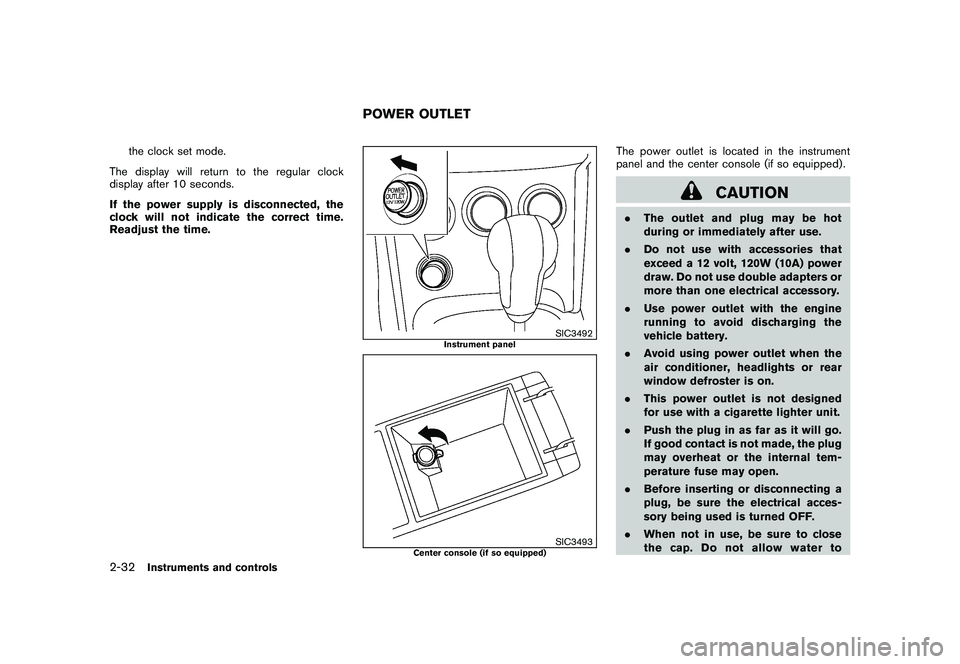
SIC3492
Instrument panel
SIC3493
Center console (if so equipped)
The power outlet is located in the instrument
panel and the center console (if so equipped) .
CAUTION
.The outlet and plug may be hot
during or immediately after use.
.Do not use with accessories that
exceed a 12 volt, 120W (10A) power
draw. Do not use double adapters or
more than one electrical accessory.
.Use power outlet with the engine
running to avoid discharging the
vehicle battery.
.Avoid using power outlet when the
air conditioner, headlights or rear
window defroster is on.
.This power outlet is not designed
for use with a cigarette lighter unit.
.Push the plug in as far as it will go.
If good contact is not made, the plug
may overheat or the internal tem-
perature fuse may open.
.Before inserting or disconnecting a
plug, be sure the electrical acces-
sory being used is turned OFF.
.When not in use, be sure to close
the cap. Do not allow water to
POWER OUTLET
2-32
Instruments and controls
Page 134 of 316
Black plate (132,1)
Model "S35-D" EDITED: 2008/ 7/ 24
HOW TO USE REMOTE KEYLESS
ENTRY FUNCTION
WARNING
.Radio waves could adversely affect
electric medical equipment. Those
who use a pacemaker should con-
tact the electric medical equipment
manufacturer for the possible influ-
ences before use.
.The Intelligent Key transmits radio
waves when the buttons are
pushed. The FAA advises that the
radio waves may affect aircraft na-
vigation and communication sys-
tems. Do not operate the
Intelligent Key while on an airplane.
Makesurethebuttonsarenot
operated unintentionally when the
unit is stored during a flight.
CAUTION
.Do not allow the Intelligent Key,
which contains electrical compo-
nents, to come into contact with
water or salt water. This could affect
the system function..Do not drop the Intelligent Key.
.Do not strike the Intelligent Key
sharply against another object.
.Do not change or modify the Intel-
ligent Key.
.Wetting may damage the Intelligent
Key. If the Intelligent Key gets wet,
immediately wipe until it is comple-
tely dry.
.Do not place the Intelligent Key for
an extended period in an area where
temperatures exceed 1408F (608C) .
.Do not attach the Intelligent Key
with a key holder that contains a
magnet.
.Do not place the Intelligent Key near
equipment that produces a mag-
netic field, such as a TV, audio
equipment, personal computers or
cellular phone.
The remote keyless entry function can operate
all door locks using the remote keyless entry
function of the Intelligent Key. The remote
keyless entry function can operate at a distance
of approximately 33 ft (10 m) from the vehicle.
(The operating distance depends upon the
conditions around the vehicle.)The remote keyless entry function will not
operate:
.When the Intelligent Key is not within the
operational range.
.When the doors are open or not closed
securely.
.When the Intelligent Key battery is dis-
charged.
The remote keyless entry function can also
operate the vehicle alarm.3-16
Pre-driving checks and adjustments
Page 147 of 316
Black plate (13,1)
4 Heater, air conditioner, audio and phone
systems
Model "S35-D" EDITED: 2008/ 6/ 3
Ventilators........................................................ 4-2
Heater and air conditioner.................................... 4-2
Manual air conditioner..................................... 4-3
In-cabin microfilter.......................................... 4-5
Servicing air conditioner.................................. 4-5
Audio system.................................................... 4-6
Audio operation precautions............................. 4-6
FM-AM radio with Compact Disc (CD) player..... 4-13
FM-AM-SAT radio with Compact Disc (CD)
changer..................................................... 4-17CD care and cleaning................................... 4-22
Steering wheel switch for audio control
(if so equipped)........................................... 4-23
Antenna..................................................... 4-24
Car phone or CB radio...................................... 4-24
Bluetooth
®Hands-Free Phone System with
NISSAN voice recognition (if so equipped)............ 4-25
Using system.............................................. 4-27
Speaker Adaptation (SA) mode....................... 4-36
Troubleshooting guide................................... 4-39
Page 148 of 316
Black plate (146,1)
Model "S35-D" EDITED: 2008/ 7/ 24
SAA1775
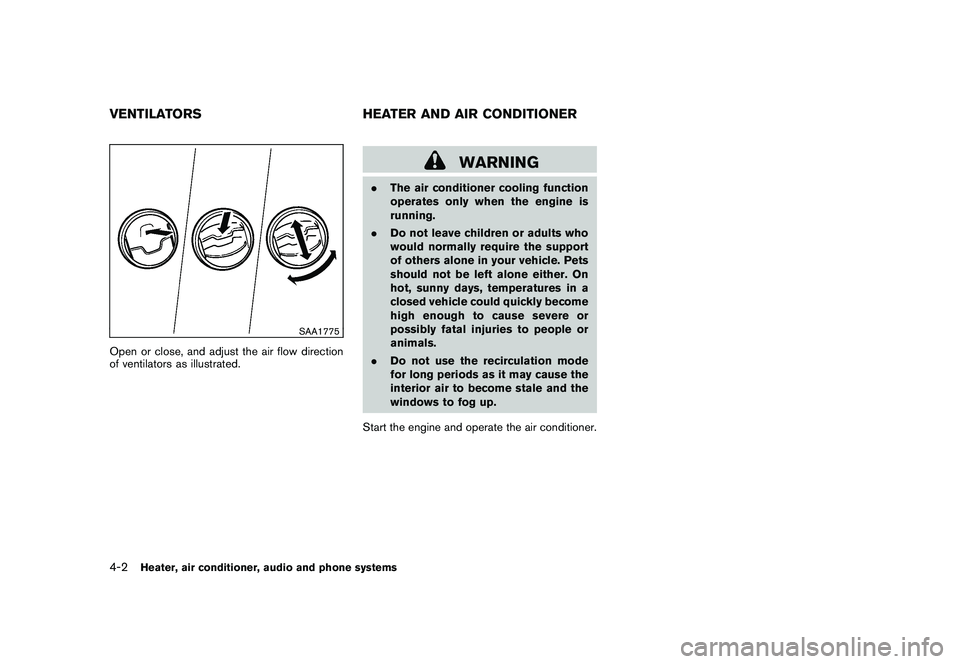
Open or close, and adjust the air flow direction
of ventilators as illustrated.
WARNING
.The air conditioner cooling function
operates only when the engine is
running.
.Do not leave children or adults who
would normally require the support
of others alone in your vehicle. Pets
should not be left alone either. On
hot, sunny days, temperatures in a
closed vehicle could quickly become
high enough to cause severe or
possibly fatal injuries to people or
animals.
.Do not use the recirculation mode
for long periods as it may cause the
interior air to become stale and the
windows to fog up.
Start the engine and operate the air conditioner.
VENTILATORS HEATER AND AIR CONDITIONER4-2
Heater, air conditioner, audio and phone systems
Page 149 of 316
Black plate (147,1)
Model "S35-D" EDITED: 2008/ 7/ 24
SAA1776
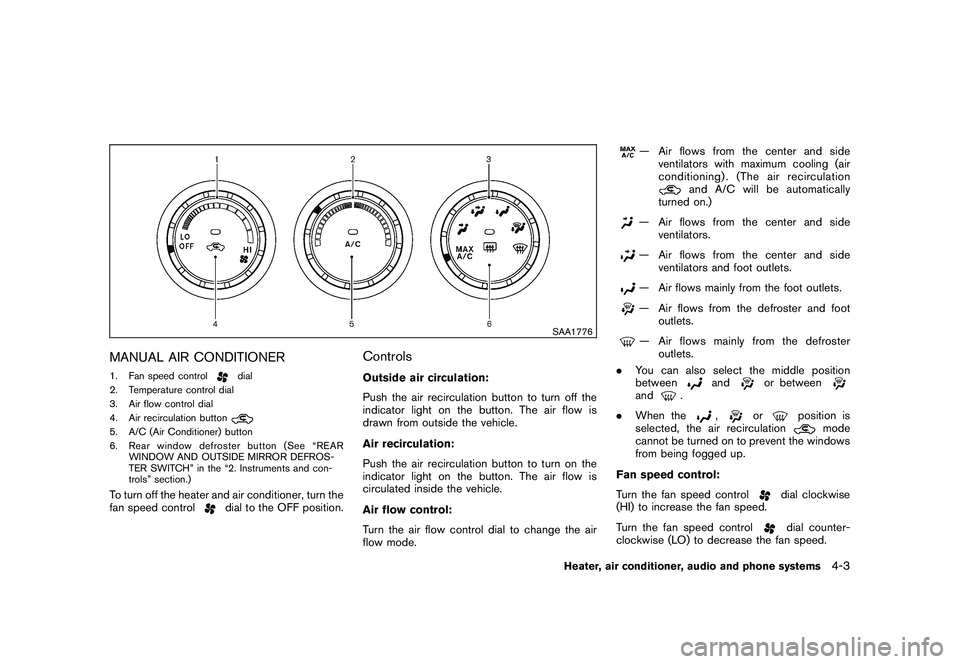
MANUAL AIR CONDITIONER1. Fan speed control
dial
2. Temperature control dial
3. Air flow control dial
4. Air recirculation button
5. A/C (Air Conditioner) button
6. Rear window defroster button (See “REAR
WINDOW AND OUTSIDE MIRROR DEFROS-
TER SWITCH” in the “2. Instruments and con-
trols” section.)To turn off the heater and air conditioner, turn the
fan speed control
dial to the OFF position.
ControlsOutside air circulation:
Push the air recirculation button to turn off the
indicator light on the button. The air flow is
drawn from outside the vehicle.
Air recirculation:
Push the air recirculation button to turn on the
indicator light on the button. The air flow is
circulated inside the vehicle.
Air flow control:
Turn the air flow control dial to change the air
flow mode.
— Air flows from the center and side
ventilators with maximum cooling (air
conditioning) . (The air recirculation
and A/C will be automatically
turned on.)
— Air flows from the center and side
ventilators.— Air flows from the center and side
ventilators and foot outlets.— Air flows mainly from the foot outlets.— Air flows from the defroster and foot
outlets.— Air flows mainly from the defroster
outlets.
.You can also select the middle position
between
and
or between
and
.
.When the
,
or
position is
selected, the air recirculation
mode
cannot be turned on to prevent the windows
from being fogged up.
Fan speed control:
Turn the fan speed control
dial clockwise
(HI) to increase the fan speed.
Turn the fan speed controldial counter-
clockwise (LO) to decrease the fan speed.
Heater, air conditioner, audio and phone systems
4-3
Page 150 of 316
Black plate (148,1)
Model "S35-D" EDITED: 2008/ 7/ 24
A/C (Air Conditioner) operation:
Push the A/C button to turn on or off the air
conditioner. When the air conditioner is on, the
A/C indicator light on the button illuminates.
Temperature control:
Turn the temperature control dial to set the
desired temperature. Turn the dial between the
middle and the right position to select the hot
temperature. Turn the dial between the middle
and the left position to select the cool tempera-
ture.Heater operationHeating:
This mode is used to direct heated air to the foot
outlets.
1. Push the air recirculation button
to the
OFF position. (The indicator light turns off.)
2. Turn the air flow control dial to the
position.
3. Turn the fan speed control
dial to the
desired position.
4. Turn the temperature control dial to the
desired position between the middle and the
hot (right) position.Ventilation:
This mode directs outside air to the side and
center ventilators.
1. Push the air recirculation button
to the
OFF position. (The indicator light turns off.)
2. Turn the air flow control dial to the
position.
3. Turn the fan speed control
dial to the
desired position.
4. Turn the temperature control dial to the
desired position.
Defrosting or defogging:
This mode directs the air to the defroster outlets
to defrost/defog the windows.
1. Turn the air flow control dial to the
position.
2. Turn the fan speed control
dial to the
desired position.
3. Turn the temperature control dial to the
desired position between the middle and the
hot (right) position.
.To remove frost from the outside surface of
the windshield quickly, turn the temperature
control dial to the maximum hot position and
the fan speed control
dial to maximum
(HI) position..If it is difficult to defog the windshield, turn
the A/C button on.
Bi-level heating:
This mode directs cool air from the side and
center vents and warm air from the foot outlets.
When the temperature control dial is turned to
the maximum hot or cool position, the air
between the ventilators and the foot outlets is
the same temperature.
1. Push the air recirculation button
to the
OFF position. (The indicator light turns off.)
2. Turn the air flow control dial to the
position.
3. Turn the fan speed control
dial to the
desired position.
4. Turn the temperature control dial to the
desired position.
Heating and defogging:
This mode heats the interior and defogs the
windows.
1. Turn the air flow control dial to the
position.
2. Turn the fan speed control
dial to the
desired position.
3. Turn the temperature control dial to the
desired position.
4-4
Heater, air conditioner, audio and phone systems
Page 151 of 316
Black plate (149,1)
Model "S35-D" EDITED: 2008/ 7/ 24
Air conditioner operationThe air conditioner system should be operated
for approximately 10 minutes at least once a
month. This helps prevent damage to the air
conditioner system due to the lack of lubrication.
Cooling:
This mode is used to cool and dehumidify the air.
1. Push the air recirculation button
to the
OFF position. (The indicator light turns off.)
2. Turn the air flow control dial to the
position.
3. Turn the fan speed control
dial to the
desired position.
4. Push the A/C button on. (The A/C indicator
light will illuminate.)
5. Turn the temperature control dial to the
desired position between the middle and the
cool (left) position.
.For quick cooling when the outside tem-
perature is high, push the air recirculation
button
to the ON position. Be sure to
push the air recirculation button to the OFF
position for normal cooling.
.A visible mist may be seen coming from the
ventilators in hot, humid conditions as the air
is cooled rapidly. This does not indicate amalfunction.
Dehumidified heating:
This mode is used to heat and dehumidify the
air.
1. Push the air recirculation button
to the
OFF position. (The indicator light turns off.)
2. Turn the air flow control dial to the
position.
3. Turn the fan speed control
dial to the
desired position.
4. Push the A/C button on. (The A/C indicator
light will illuminate.)
5. Turn the temperature control dial to the
desired position between the middle and the
hot (right) position.
Dehumidified defogging:
This mode is used to defog the windows and
dehumidify the air.
1. Turn the air flow control dial to the
position.
2. Turn the fan speed control
dial to the
desired position.
3. Push the A/C button on. (The A/C indicator
light will illuminate.)4. Turn the temperature control dial to the
desired position.
IN-CABIN MICROFILTERThe air conditioning system is equipped with an
in-cabin microfilter which collects dirt, pollen,
dust, etc. To make sure the air conditioner heats,
defogs, and ventilates efficiently, replace the
filter according to the specified maintenance log
shown in the NISSAN Service and Maintenance
Guide. To replace the filter, contact a NISSAN
dealer.
The filter should be replaced if the air flow
decreases significantly or if windows fog
up easily when operating the heater or air
conditioning system.SERVICING AIR CONDITIONERThe air conditioner system in your NISSAN is
charged with a refrigerant designed with the
environment in mind.This refrigerant will not
harm the earth’s ozone layer.Special char-
ging equipment and lubricant are required when
servicing your NISSAN air conditioner. Using
improper refrigerants or lubricants will cause
severe damage to your air conditioner system.
(See “CAPACITIES AND RECOMMENDED
FUEL/LUBRICANTS” in the “9. Technical and
consumer information” section for air conditioner
system refrigerant and lubricant recommenda-
tions.)
Heater, air conditioner, audio and phone systems
4-5
Page 152 of 316
Black plate (150,1)
Model "S35-D" EDITED: 2008/ 7/ 24
A NISSAN dealer will be able to service your
environmentally friendly air conditioner system.
WARNING
The system contains refrigerant under
high pressure. To avoid personal injury,
any air conditioner service should be
done only by an experienced technician
with the proper equipment.
AUDIO OPERATION PRECAUTIONS
RadioTurn the ignition switch to the ACC or ON
position and push the PWR (power/VOL (vo-
lume) control to turn on the radio. If you listen to
the radio with the engine not running, the ignition
switch should be turned to the ACC position.
Radio reception is affected by station signal
strength, distance from radio transmitter, build-
ings, bridges, mountains and other external
influences. Intermittent changes in reception
quality normally are caused by these external
influences.
Using a cellular phone in or near the
vehicle may influence radio reception
quality.
Radio reception:
Your NISSAN radio system is equipped with
state-of-the-art electronic circuits to enhance
radio reception. These circuits are designed to
extend reception range, and to enhance the
quality of that reception.
However there are some general characteristics
of both FM and AM radio signals that can affect
radio reception quality in a moving vehicle, even
when the finest equipment is used. These
characteristics are completely normal in a given
reception area, and do not indicate any mal-function in your NISSAN radio system.
Reception conditions will constantly change
because of vehicle movement. Buildings, terrain,
signal distance and interference from other
vehicles can work against ideal reception.
Described below are some of the factors that
can affect your radio reception.
Some cellular phones or other devices may
cause interference or a buzzing noise to come
from the audio system speakers. Storing the
device in a different location may reduce or
eliminate the noise.AUDIO SYSTEM
4-6
Heater, air conditioner, audio and phone systems
Page 153 of 316
Black plate (151,1)
Model "S35-D" EDITED: 2008/ 7/ 24
SAA0306
FM radio reception:
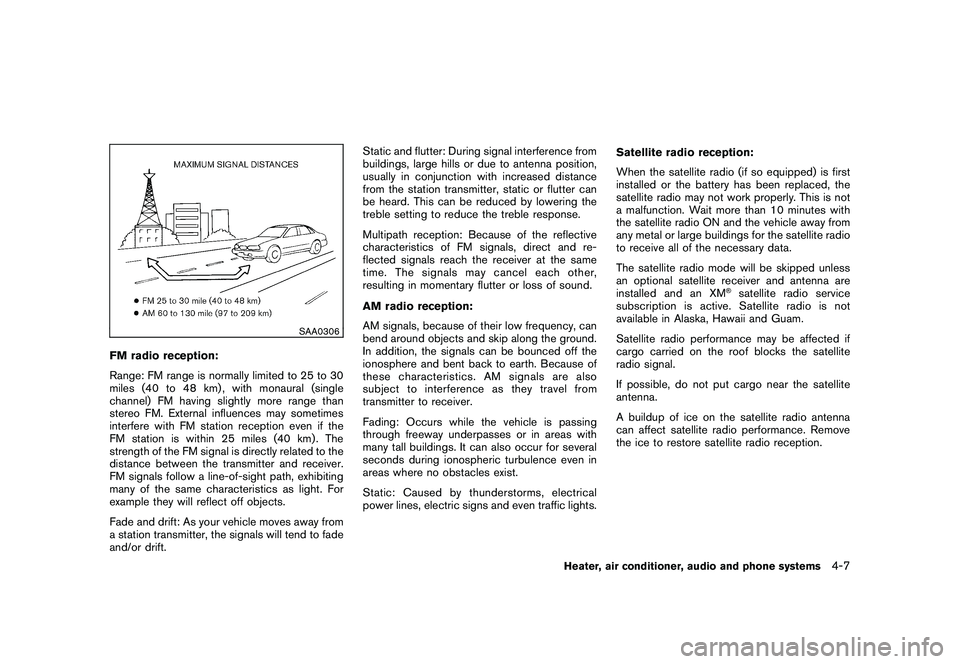
Range: FM range is normally limited to 25 to 30
miles (40 to 48 km) , with monaural (single
channel) FM having slightly more range than
stereo FM. External influences may sometimes
interfere with FM station reception even if the
FM station is within 25 miles (40 km). The
strength of the FM signal is directly related to the
distance between the transmitter and receiver.
FM signals follow a line-of-sight path, exhibiting
many of the same characteristics as light. For
example they will reflect off objects.
Fade and drift: As your vehicle moves away from
a station transmitter, the signals will tend to fade
and/or drift.Static and flutter: During signal interference from
buildings, large hills or due to antenna position,
usually in conjunction with increased distance
from the station transmitter, static or flutter can
be heard. This can be reduced by lowering the
treble setting to reduce the treble response.
Multipath reception: Because of the reflective
characteristics of FM signals, direct and re-
flected signals reach the receiver at the same
time. The signals may cancel each other,
resulting in momentary flutter or loss of sound.
AM radio reception:
AM signals, because of their low frequency, can
bend around objects and skip along the ground.
In addition, the signals can be bounced off the
ionosphere and bent back to earth. Because of
these characteristics. AM signals are also
subject to interference as they travel from
transmitter to receiver.
Fading: Occurs while the vehicle is passing
through freeway underpasses or in areas with
many tall buildings. It can also occur for several
seconds during ionospheric turbulence even in
areas where no obstacles exist.
Static: Caused by thunderstorms, electrical
power lines, electric signs and even traffic lights.Satellite radio reception:
When the satellite radio (if so equipped) is first
installed or the battery has been replaced, the
satellite radio may not work properly. This is not
a malfunction. Wait more than 10 minutes with
the satellite radio ON and the vehicle away from
any metal or large buildings for the satellite radio
to receive all of the necessary data.
The satellite radio mode will be skipped unless
an optional satellite receiver and antenna are
installed and an XM
®satellite radio service
subscription is active. Satellite radio is not
available in Alaska, Hawaii and Guam.
Satellite radio performance may be affected if
cargo carried on the roof blocks the satellite
radio signal.
If possible, do not put cargo near the satellite
antenna.
A buildup of ice on the satellite radio antenna
can affect satellite radio performance. Remove
the ice to restore satellite radio reception.
Heater, air conditioner, audio and phone systems
4-7