lock NISSAN ROGUE 2009 Owner´s Manual
[x] Cancel search | Manufacturer: NISSAN, Model Year: 2009, Model line: ROGUE, Model: NISSAN ROGUE 2009Pages: 316, PDF Size: 4.26 MB
Page 197 of 316
Black plate (195,1)
Model "S35-D" EDITED: 2008/ 7/ 24
CONTINUOUSLY VARIABLE TRANS-
MISSION (CVT)The ignition lock is designed so that the ignition
switch cannot be turned to the LOCK position
until the selector lever is moved to the P (Park)
position.
.When turning the ignition switch to the
LOCK position, make sure that the selector
lever is in the P (Park) position.
.When removing the key from the ignition
switch (if it is inserted) , make sure that the
selector lever is in the P (Park) position.
When the ignition switch cannot be turned to
the LOCK position:
1. Move the selector lever to the P (Park)
position.
2. Turn the ignition switch slightly in the ON
direction.
3. TurntheignitionswitchtotheLOCK
position.
4. Remove the key, if it is inserted in the ignition
switch.
If the ignition switch is turned to the LOCK
position, the selector lever cannot be moved
from the P (Park) position. The selector lever can
be moved if the ignition switch is in the ON
position with the foot brake pedal depressed.The OFF position
*1
is between the LOCK and
ACC positions, although it is not marked on the
ignition switch.
STEERING LOCK
To lock steering wheel1. Turn the ignition switch to the LOCK
position.
2. Remove the key, if it is inserted in the ignition
switch.
3. Turn the steering wheel 1/6 of a turn
clockwise from the straight up position.To unlock steering wheel1. Insert the key into the ignition switch, if
necessary.
2. Gently turn the ignition switch while rotating
the steering wheel slightly right and left.KEY POSITIONS
LOCK (0)Except for the Intelligent Key equipped
model:
The key can only be removed from the ignition
switch at this position.
The steering lock can only be locked at this
position.For the Intelligent Key equipped model:
PUSH OFF -
The steering lock can only be locked at this
position.
PUSH ON -
The ignition switch will be unlocked while
carrying the Intelligent Key.
OFF (1)The engine is turned off with the steering wheel
unlocked.ACC (2)The electrical accessory power activates without
the engine turned on.ON (3)The ignition system and the electrical accessory
power activate without the engine turned on.START (4)The engine starter activates and the engine will
start. The ignition switch, when released, will
automatically turn to the ON position.
CAUTION
As soon as the engine has started,
release the ignition switch immediately.
Starting and driving
5-11
Page 198 of 316
Black plate (196,1)
Model "S35-D" EDITED: 2008/ 7/ 24
.Make sure the area around the vehicle is
clear.
.Check fluid levels such as engine oil, cool-
ant, brake fluid, and window washer fluid as
frequently as possible, or at least whenever
you refuel.
.Check that all windows and lights are clean.
.Visually inspect tires for their appearance
and condition. Also check tires for proper
inflation.
.Lock all doors.
.Position seat and adjust head restraints.
.Adjust inside and outside mirrors.
.Fasten seat belts and ask all passengers to
do likewise.
.Check the operation of warning lights when
the ignition key is turned to the ON position.
(See “WARNING/INDICATOR LIGHTS
AND AUDIBLE REMINDERS” in the “2.
Instruments and controls” section.)1. Apply the parking brake.
2. Move the selector lever to the P (Park) or N
(Neutral) position. (P is recommended.)
The starter is designed so that it does not
operate unless the selector lever is in either
of the above positions.
3. Crank the enginewith your foot off the
accelerator pedalby turning the ignition
switch to START. Release the switch when
the engine starts. If the engine starts, but
fails to run, repeat the above procedure.
.If the engine is very hard to start in
extremely cold weather or when restart-
ing, depress the accelerator pedal a little
(approximately 1/3 to the floor) and hold
it and then crank the engine. Release the
accelerator pedal when the engine
starts.
.If the engine is very hard to start
because it is flooded, depress the
accelerator pedal all the way to the floor
and hold it. Crank the engine for 5 - 6
seconds. After cranking the engine,
release the accelerator pedal. Crank
the enginewith your foot off the
accelerator pedalby turning the igni-
tion switch to START. Release the
ignition switch when the engine starts.
If the engine starts, but fails to run,repeat the above procedure.
CAUTION
Do not operate the starter for more
than 15 seconds at a time. If the engine
does not start, turn the ignition switch
off and wait 10 seconds before cranking
again, otherwise the starter could be
damaged.
4.Warm-up
Allow the engine to idle for at least 30
seconds after starting. Do not race the
engine while warming it up. Drive at
moderate speed for a short distance first,
especially in cold weather. In cold weather,
keep the engine running for a minimum of 2 -
3 minutes before shutting it off. Starting and
stopping the engine over a short period of
time may make the vehicle more difficult to
start.
BEFORE STARTING THE ENGINE STARTING THE ENGINE5-12
Starting and driving
Page 199 of 316
Black plate (197,1)
Model "S35-D" EDITED: 2008/ 7/ 24
CONTINUOUSLY VARIABLE TRANS-
MISSION (CVT)The Continuously Variable Transmission (CVT)
in your vehicle is electronically controlled to
produce maximum power and smooth operation.
The recommended operating procedures for this
transmission are shown on the following pages.
Follow these procedures for maximum vehicle
performance and driving enjoyment.
Engine power may be automatically re-
duced to protect the CVT if the engine
speed increases quickly when driving on
slippery roads or while being tested on
some dynamometers.Starting the vehicle1. After starting the engine, fully depress the
foot brake pedal before moving the selector
lever out of the P (Park) position.
This CVT is designed so that the foot
brake pedal must be depressed before
shifting from P (Park) to any driving
position while the ignition switch is in
the ON position.
The selector lever cannot be moved out
of the P (Park) position and into any of
the other positions if the ignition
switch is turned to the LOCK, OFF or
ACC position or if the key is removed.2. Keep the foot brake pedal depressed, push
the selector lever button and move the
selector lever to a driving position.
3. Release the parking brake and foot brake
pedal, and then gradually start the vehicle in
motion.
WARNING
.Do not depress the accelerator
pedal while shifting from P (Park)
or N (Neutral) to R (Reverse) , D
(Drive) , L (Low) or manual shift
mode. Always depress the brake
pedal until shifting is completed.
Failure to do so could cause you to
lose control and have an accident.
.Cold engine idle speed is high, so
use caution when shifting into a
forward or reverse gear before the
engine has warmed up.
.Never shift to P (Park) or R (Re-
verse) while vehicle is moving. Fail-
ure to do so could cause you to lose
control and have an accident.
CAUTION
.When stopping the vehicle on an
uphill grade, do not hold the vehicle
by depressing the accelerator pedal.
The foot brake should be used for
this purpose.
.Do not downshift abruptly on slip-
pery roads. This may cause a loss of
control.
DRIVING THE VEHICLE
Starting and driving
5-13
Page 200 of 316
Black plate (198,1)
Model "S35-D" EDITED: 2008/ 7/ 24
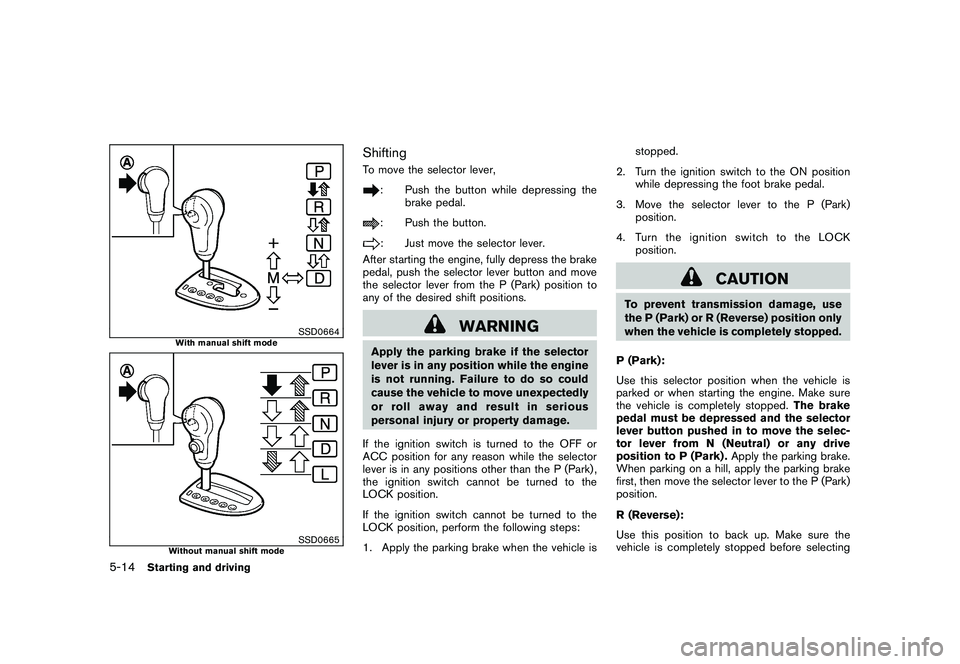
SSD0664
With manual shift mode
SSD0665
Without manual shift mode
ShiftingTo move the selector lever,
: Push the button while depressing the
brake pedal.: Push the button.: Just move the selector lever.
After starting the engine, fully depress the brake
pedal, push the selector lever button and move
the selector lever from the P (Park) position to
any of the desired shift positions.
WARNING
Apply the parking brake if the selector
lever is in any position while the engine
is not running. Failure to do so could
cause the vehicle to move unexpectedly
or roll away and result in serious
personal injury or property damage.
If the ignition switch is turned to the OFF or
ACC position for any reason while the selector
lever is in any positions other than the P (Park) ,
the ignition switch cannot be turned to the
LOCK position.
If the ignition switch cannot be turned to the
LOCK position, perform the following steps:
1. Apply the parking brake when the vehicle isstopped.
2. Turn the ignition switch to the ON position
while depressing the foot brake pedal.
3. Move the selector lever to the P (Park)
position.
4. Turn the ignition switch to the LOCK
position.
CAUTION
To prevent transmission damage, use
the P (Park) or R (Reverse) position only
when the vehicle is completely stopped.
P (Park):
Use this selector position when the vehicle is
parked or when starting the engine. Make sure
the vehicle is completely stopped.The brake
pedal must be depressed and the selector
lever button pushed in to move the selec-
tor lever from N (Neutral) or any drive
position to P (Park) .Apply the parking brake.
When parking on a hill, apply the parking brake
first, then move the selector lever to the P (Park)
position.
R (Reverse):
Use this position to back up. Make sure the
vehicle is completely stopped before selecting
5-14
Starting and driving
Page 203 of 316
Black plate (201,1)
Model "S35-D" EDITED: 2008/ 7/ 24
Accelerator downshift
— In D position —For passing or hill climbing, fully depress the
accelerator pedal to the floor. This shifts the
transmission down into a lower gear, depending
on the vehicle speed.High fluid temperature protection modeThis transmission has a high fluid temperature
protection mode. If the fluid temperature be-
comes too high (for example, when climbing
steep grades in high temperature with heavy
loads, such as when towing a trailer) , engine
power and, under some conditions, vehicle
speed will be decreased automatically to reduce
the chance of transmission damage. Vehicle
speed can be controlled with the accelerator
pedal, but the engine and vehicle speed may be
limited.Fail-safeIf the vehicle is driven under extreme
conditions, such as excessive wheel spin-
ning and subsequent hard braking, the
fail-safe system may be activated. The MIL
may illuminate to indicate the fail-safe
mode is activated. (See “Malfunction In-
dicator Light (MIL)” in the “2. Instruments
and controls” section.) This will occur even
if all electrical circuits are functioning
properly. In this case, turn the ignition
switch to the OFF position and wait for 10seconds. Then turn the switch back to the
ON position. The vehicle should return to
its normal operating condition. If it does
not return to its normal operating condi-
tion, have a NISSAN dealer check the
transmission and repair if necessary.
WARNING
When the high fluid temperature pro-
tection mode or fail-safe operation
occurs, vehicle speed may be gradually
reduced. The reduced speed may be
lower than other traffic, which could
increase the chance of a collision. Be
especially careful when driving. If ne-
cessary, pull to the side of the road at a
safe place and allow the transmission
to return to normal operation, or have it
repaired if necessary.
SSD0667
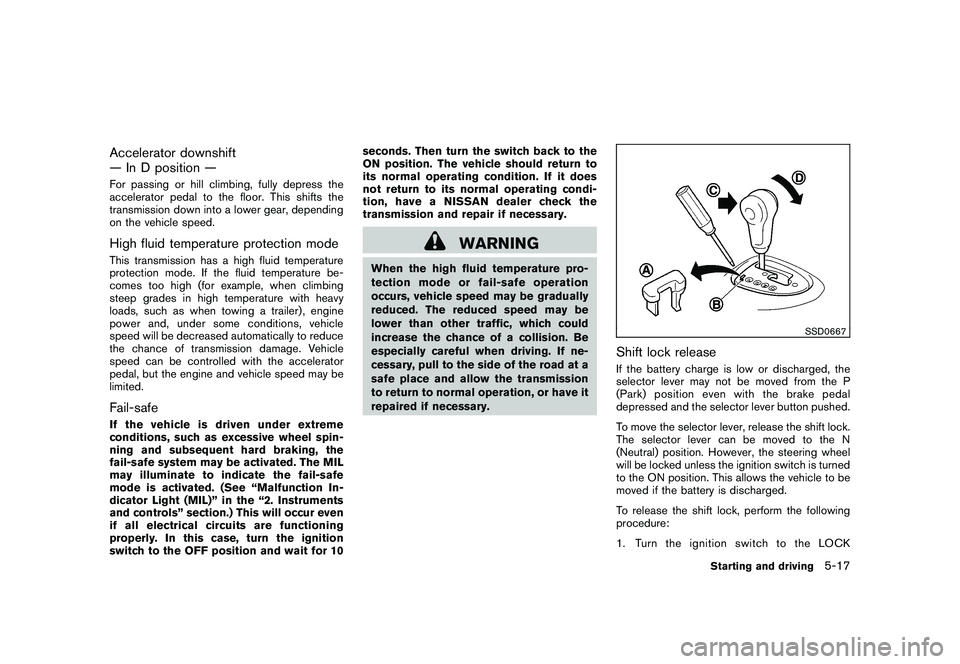
Shift lock releaseIf the battery charge is low or discharged, the
selector lever may not be moved from the P
(Park) position even with the brake pedal
depressed and the selector lever button pushed.
To move the selector lever, release the shift lock.
The selector lever can be moved to the N
(Neutral) position. However, the steering wheel
will be locked unless the ignition switch is turned
to the ON position. This allows the vehicle to be
moved if the battery is discharged.
To release the shift lock, perform the following
procedure:
1. Turn the ignition switch to the LOCK
Starting and driving
5-17
Page 204 of 316
Black plate (202,1)
Model "S35-D" EDITED: 2008/ 7/ 24
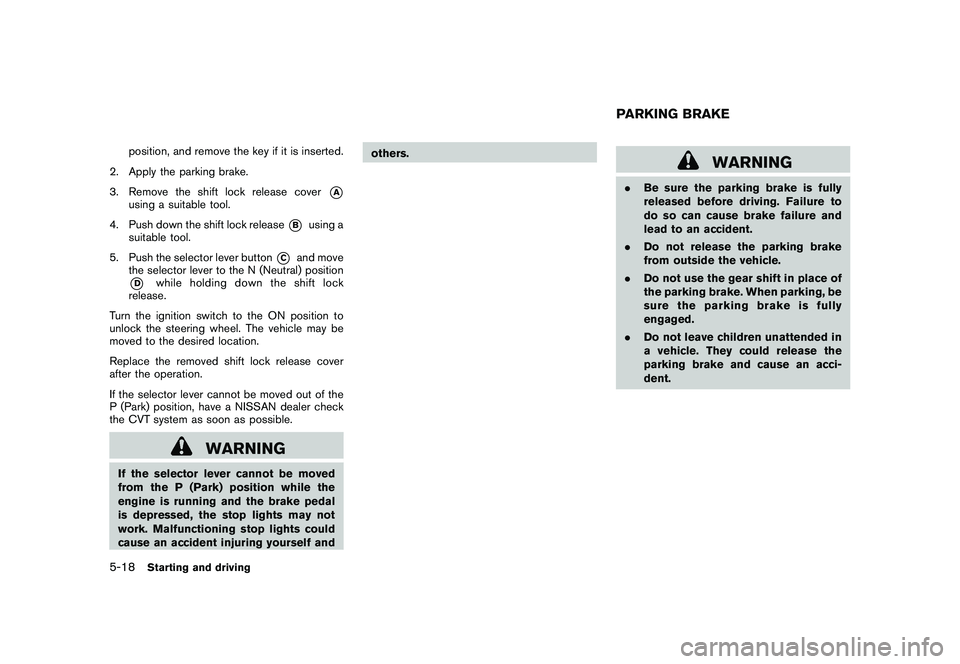
position, and remove the key if it is inserted.
2. Apply the parking brake.
3. Remove the shift lock release cover
*A
using a suitable tool.
4. Push down the shift lock release
*B
using a
suitable tool.
5. Push the selector lever button
*C
and move
the selector lever to the N (Neutral) position
*D
while holding down the shift lock
release.
Turn the ignition switch to the ON position to
unlock the steering wheel. The vehicle may be
moved to the desired location.
Replace the removed shift lock release cover
after the operation.
If the selector lever cannot be moved out of the
P (Park) position, have a NISSAN dealer check
the CVT system as soon as possible.
WARNING
If the selector lever cannot be moved
from the P (Park) position while the
engine is running and the brake pedal
is depressed, the stop lights may not
work. Malfunctioning stop lights could
cause an accident injuring yourself andothers.
WARNING
.Be sure the parking brake is fully
released before driving. Failure to
do so can cause brake failure and
lead to an accident.
.Do not release the parking brake
from outside the vehicle.
.Do not use the gear shift in place of
the parking brake. When parking, be
sure the parking brake is fully
engaged.
.Do not leave children unattended in
a vehicle. They could release the
parking brake and cause an acci-
dent.PARKING BRAKE
5-18
Starting and driving
Page 208 of 316
Black plate (206,1)
Model "S35-D" EDITED: 2008/ 7/ 24
.Use the recommended viscosity engine oil.
(See “ENGINE OIL AND OIL FILTER
RECOMMENDATION” in the “9. Technical
and consumer information” section.)
WARNING
.For AWD equipped vehicles, do not
attempt to raise two wheels off the
ground and shift the transmission to
any drive or reverse position with
the engine running. Doing so may
result in drivetrain damage or un-
expected vehicle movement which
could result in serious vehicle da-
mage or personal injury.
.Do not attempt to test an AWD
equipped vehicle on a 2-wheel dy-
namometer (such as the dynam-
ometers used by some states for
emissions testing) or similar equip-
ment even if the other two wheels
are raised off the ground. Make sure
that you inform the test facility
personnel that your vehicle is
equipped with AWD before it is
placed on a dynamometer. Using
the wrong test equipment may re-
sult in drivetrain damage or unex-
pected vehicle movement which
could result in serious vehicle da-
mage or personal injury.
SSD0418
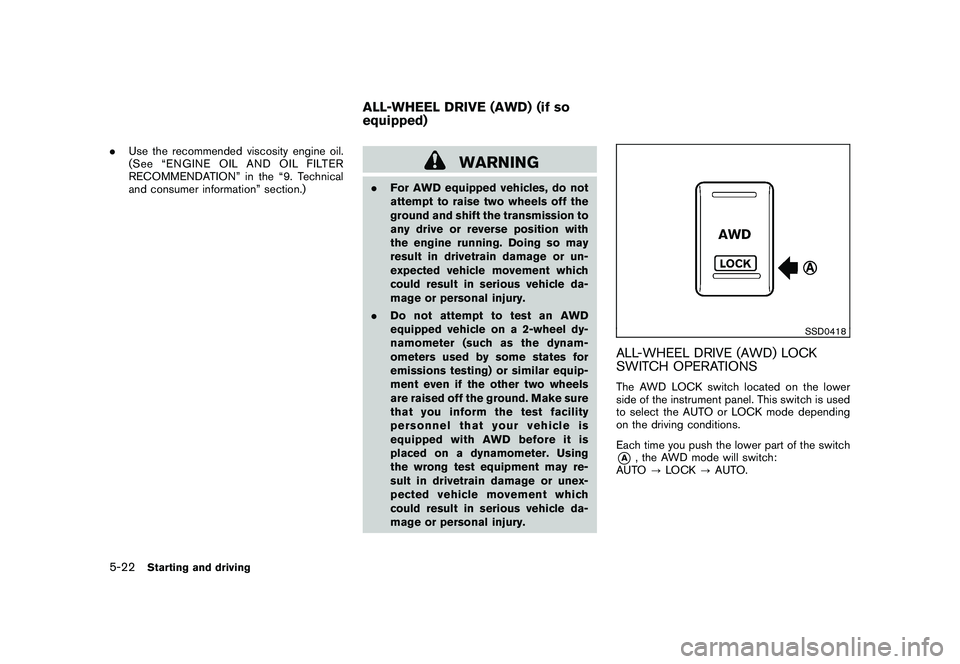
ALL-WHEEL DRIVE (AWD) LOCK
SWITCH OPERATIONSThe AWD LOCK switch located on the lower
side of the instrument panel. This switch is used
to select the AUTO or LOCK mode depending
on the driving conditions.
Each time you push the lower part of the switch*A
, the AWD mode will switch:
AUTO?LOCK?AUTO.
ALL-WHEEL DRIVE (AWD) (if so
equipped)
5-22
Starting and driving
Page 209 of 316
Black plate (207,1)
Model "S35-D" EDITED: 2008/ 7/ 24
LOCK modeThe AWD LOCK indicator light
will
illuminate.
AUTO modeThe AWD LOCK indicator light will turn off.AWD
modeWheel drivenAWD
LOCK
indica-
tor lightUse condi-
tions
AUTODistribution of tor-
que to the front and
rear wheels changes
automatically, de-
pending on road
conditions encoun-
tered
[100:0]↔[50:50].
This results in im-
proved driving stabi-
lity.*1Turns
off.For driving
on paved
or slippery
roads
LOCKAll-Wheel Drive
(AWD)*2, *3AWD
LOCK
For driving
on rough
roads
*1: When the rotation difference between the
front and rear wheels is large, the AWD
mode may change from AUTO to LOCK for
a while, however, this is not a malfunction.*2: LOCK mode will change to AUTO mode
automatically when the vehicle has been
driven at a high speed. The AWD LOCK
indicator light turns off.
*3: LOCK mode will automatically be cancelled
when the ignition switch is turned to the OFF
position.
.If the AWD LOCK switch is operated while
accelerating or decelerating, or if the ignition
switch is turned off, you may feel a jolt. This
is normal.
.The oil temperature of power train parts will
increase if the vehicle is continuously
operated under conditions where the differ-
ence in rotation between the front and rear
wheels is large (wheel slip) , such as when
driving the vehicle on rough roads through
sand, mud or freeing a stuck vehicle. In
these cases, the AWD warning light blinks
rapidly and the AWD mode changes to
2WD to protect the powertrain parts. If you
stop driving with the engine idling and wait
until the warning light stops blinking, the
AWD returns to the AUTO mode.
WARNING
.When driving straight, shift the AWD
LOCK switch to AUTO. Do not oper-
ate the AWD LOCK switch when
making a turn or backing up.
.Do not operate the AWD LOCK
switch with the front wheel spin-
ning.
.Engine idling speed is high while
warming up the engine. Be espe-
cially careful when starting or driv-
ing on slippery surfaces.
.When turning the vehicle in LOCK
mode on paved roads, you may feel
a braking effect. This is a normal
condition of the AWD model.
Starting and driving
5-23
Page 210 of 316
Black plate (208,1)
Model "S35-D" EDITED: 2008/ 7/ 24
SSD0336B
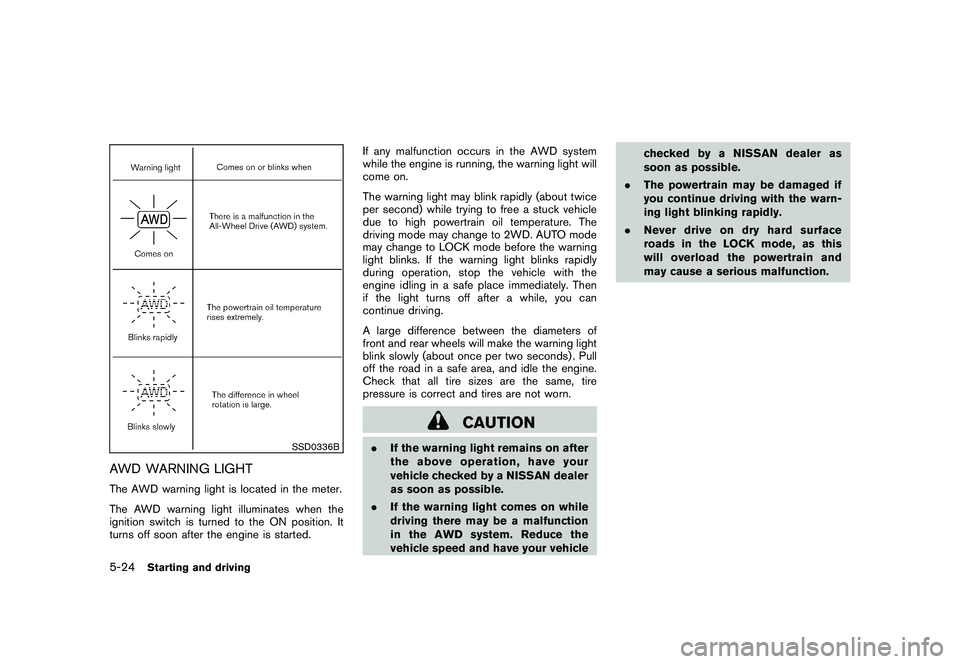
AWD WARNING LIGHTThe AWD warning light is located in the meter.
The AWD warning light illuminates when the
ignition switch is turned to the ON position. It
turns off soon after the engine is started.If any malfunction occurs in the AWD system
while the engine is running, the warning light will
come on.
The warning light may blink rapidly (about twice
per second) while trying to free a stuck vehicle
due to high powertrain oil temperature. The
driving mode may change to 2WD. AUTO mode
may change to LOCK mode before the warning
light blinks. If the warning light blinks rapidly
during operation, stop the vehicle with the
engine idling in a safe place immediately. Then
if the light turns off after a while, you can
continue driving.
A large difference between the diameters of
front and rear wheels will make the warning light
blink slowly (about once per two seconds) . Pull
off the road in a safe area, and idle the engine.
Check that all tire sizes are the same, tire
pressure is correct and tires are not worn.
CAUTION
.If the warning light remains on after
the above operation, have your
vehicle checked by a NISSAN dealer
as soon as possible.
.If the warning light comes on while
driving there may be a malfunction
in the AWD system. Reduce the
vehicle speed and have your vehiclechecked by a NISSAN dealer as
soon as possible.
.The powertrain may be damaged if
you continue driving with the warn-
ing light blinking rapidly.
.Never drive on dry hard surface
roads in the LOCK mode, as this
will overload the powertrain and
may cause a serious malfunction.
5-24
Starting and driving
Page 211 of 316
Black plate (209,1)
Model "S35-D" EDITED: 2008/ 7/ 24
SSD0488
WARNING
.Do not stop or park the vehicle over
flammable materials such as dry
grass, waste paper or rags. They
may ignite and cause a fire.
.Safe parking procedures require
that both the parking brake be set
and the transmission placed into P
(Park) . Failure to do so could cause
the vehicle to move unexpectedly or
roll away and result in an accident.
Make sure the selector lever has
been pushed as far forward as it cango and cannot be moved without
depressing the foot brake pedal.
.Never leave the engine running
while the vehicle is unattended.
.Do not leave children unattended
inside the vehicle. They could un-
knowingly activate switches or con-
trols. Unattended children could
become involved in serious acci-
dents.
1. Firmly apply the parking brake.
2. Move the selector lever to the P (Park)
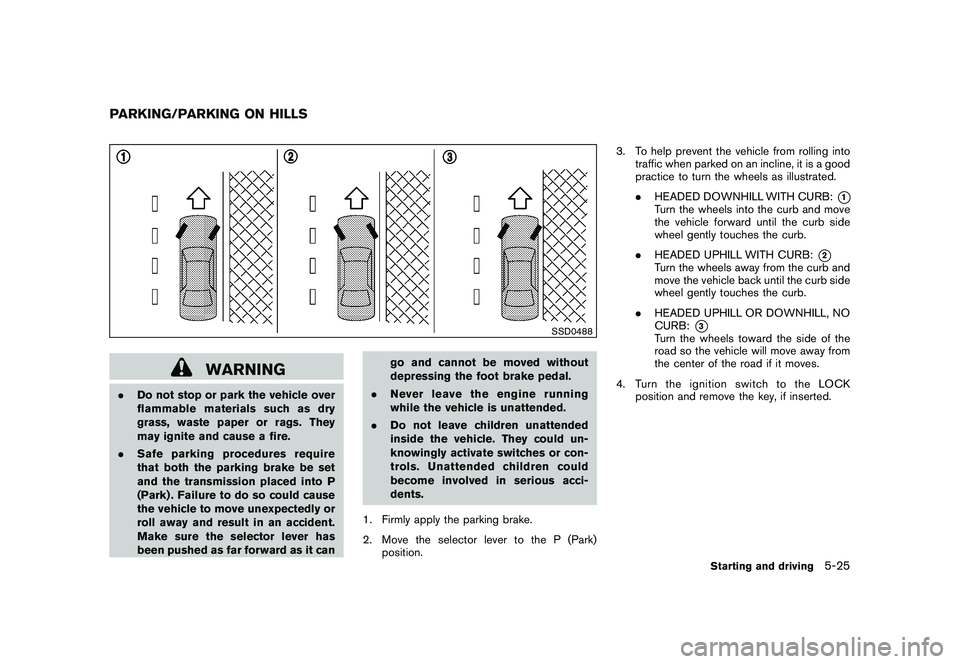
position.3. To help prevent the vehicle from rolling into
traffic when parked on an incline, it is a good
practice to turn the wheels as illustrated.
.HEADED DOWNHILL WITH CURB:
*1
Turn the wheels into the curb and move
the vehicle forward until the curb side
wheel gently touches the curb.
.HEADED UPHILL WITH CURB:
*2
Turn the wheels away from the curb and
move the vehicle back until the curb side
wheel gently touches the curb.
.HEADED UPHILL OR DOWNHILL, NO
CURB:
*3
Turn the wheels toward the side of the
road so the vehicle will move away from
the center of the road if it moves.
4. Turn the ignition switch to the LOCK
position and remove the key, if inserted.
PARKING/PARKING ON HILLS
Starting and driving
5-25