turn signal NISSAN ROGUE 2009 Owner´s Manual
[x] Cancel search | Manufacturer: NISSAN, Model Year: 2009, Model line: ROGUE, Model: NISSAN ROGUE 2009Pages: 316, PDF Size: 4.26 MB
Page 8 of 316
Black plate (5,1)
Model "S35-D" EDITED: 2008/ 7/ 24
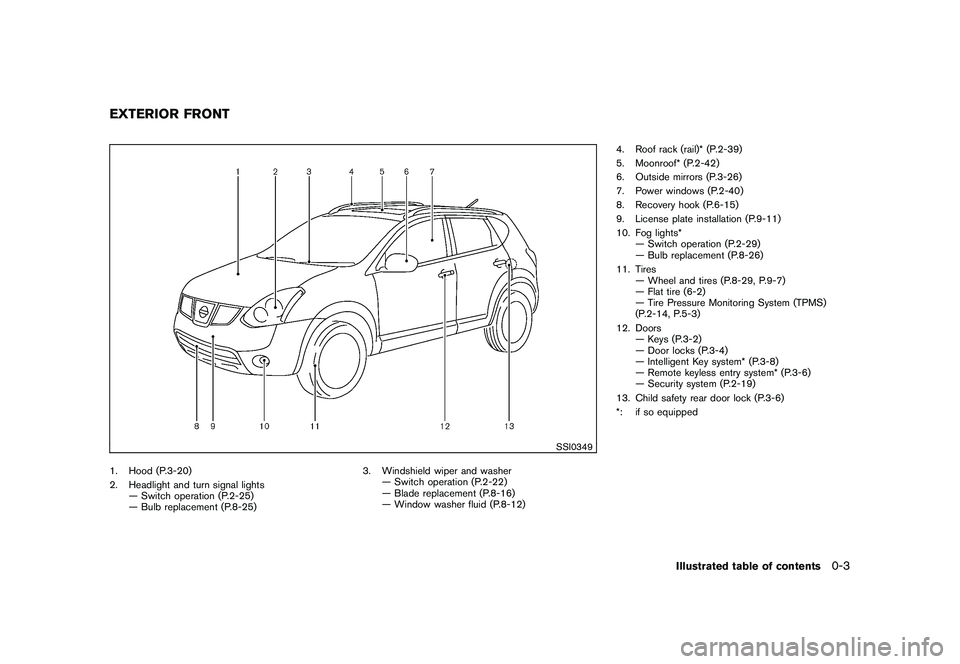
SSI0349
1. Hood (P.3-20)
2. Headlight and turn signal lights
— Switch operation (P.2-25)
— Bulb replacement (P.8-25)3. Windshield wiper and washer
— Switch operation (P.2-22)
— Blade replacement (P.8-16)
— Window washer fluid (P.8-12)4. Roof rack (rail)* (P.2-39)
5. Moonroof* (P.2-42)
6. Outside mirrors (P.3-26)
7. Power windows (P.2-40)
8. Recovery hook (P.6-15)
9. License plate installation (P.9-11)
10. Fog lights*
— Switch operation (P.2-29)
— Bulb replacement (P.8-26)
11. Tires
— Wheel and tires (P.8-29, P.9-7)
— Flat tire (6-2)
— Tire Pressure Monitoring System (TPMS)
(P.2-14, P.5-3)
12. Doors
— Keys (P.3-2)
— Door locks (P.3-4)
— Intelligent Key system* (P.3-8)
— Remote keyless entry system* (P.3-6)
— Security system (P.2-19)
13. Child safety rear door lock (P.3-6)
*: if so equippedEXTERIOR FRONT
Illustrated table of contents
0-3
Page 11 of 316

Black plate (8,1)
Model "S35-D" EDITED: 2008/ 7/ 24
SIC3470
1. Side ventilator (P.4-2)
2. Headlight, fog light* and turn signal switch
(P.2-25)
3. Paddle shifter* (P.5-15)4. Steering-wheel-mounted controls (left side)*
— Audio control* (P.4-23)
— Bluetooth
®Hands-Free Phone System control*
(P.4-25)
5. Steering wheel
— Horn (P.2-30)
— Driver supplemental air bag (P.1-38)
— Electric power steering system (P.5-26)6. Meters and gauges (P.2-3)
7. Steering-wheel-mounted controls (right side)
— Cruise control switches (P.5-19)
8. Wiper and washer switch (P.2-22)
9. Center ventilator (P.4-2)
10. Hazard warning flasher switch (P.2-29)
11. Audio system (P.4-6)
— Clock (P.2-31)
12. Front passenger supplemental air bag (P.1-38)
13. Outside remote mirror control switch (P.3-26)
14. Headlight aiming control* (P.2-27)
15. All-Wheel Drive (AWD) LOCK switch* (P.5-22)
16. Fuse box cover (P.8-20)
17. Vehicle Dynamic Control (VDC) OFF switch
(P.2-31, 5-28)
18. Hood release handle (P.3-20)
19. Tilting steering wheel lever (P.3-24)
20. Parking brake (P.5-18)
21. Ignition switch (P.5-9)
22. Heated seat switch* (P.2-30)
23. Power outlet (P.2-32)
24. Heater/air conditioner control (P.4-2)
25. Selector lever (P.5-13)
26. Front passenger air bag status light (P.1-45)
27. Rear window and outside mirror* defroster switch
(P.2-24)
28. Glove box (P.2-35)
*: if so equipped
INSTRUMENT PANEL0-6
Illustrated table of contents
Page 68 of 316
Black plate (7,1)
2 Instruments and controls
Model "S35-D" EDITED: 2008/ 6/ 3
Instrument panel................................................ 2-2
Meters and gauges............................................. 2-3
Speedometer and odometer............................. 2-4
Tachometer................................................... 2-5
Engine coolant temperature gauge..................... 2-5
Fuel gauge................................................... 2-6
Vehicle information display................................ 2-6
Outside air temperature (if so equipped).............. 2-6
Continuously Variable Transmission (CVT)
position indicator............................................ 2-7
Trip computer (if so equipped).......................... 2-7
Compass (if so equipped).................................... 2-8
Zone variation change procedure....................... 2-9
Warning/indicator lights and audible reminders....... 2-11
Checking bulbs........................................... 2-11
Warning lights............................................. 2-12
Indicator lights............................................. 2-16
Audible reminders........................................ 2-18
Security systems.............................................. 2-19
Vehicle security system.................................. 2-19
NISSAN Vehicle Immobilizer System................. 2-20
Windshield wiper and washer switch.................... 2-22
Rear window wiper and washer switch.................. 2-23
Rear window and outside mirror defroster switch..... 2-24
Headlight and turn signal switch.......................... 2-25
Xenon headlights (if so equipped).................... 2-25Headlight switch.......................................... 2-26
Turn signal switch........................................ 2-28
Fog light switch (if so equipped)...................... 2-29
Hazard warning flasher switch............................. 2-29
Horn............................................................. 2-30
Heated seats (if so equipped)............................. 2-30
Vehicle Dynamic Control (VDC) OFF switch........... 2-31
Clock............................................................ 2-31
Adjusting the time........................................ 2-31
Power outlet................................................... 2-32
Storage......................................................... 2-33
Cup holders................................................ 2-33
Sunglasses holder........................................ 2-34
Glove box.................................................. 2-35
Console box............................................... 2-35
Luggage floor box (if so equipped)................... 2-36
Luggage side box......................................... 2-36
Cargo cover (if so equipped).......................... 2-37
Luggage hooks (if so equipped)...................... 2-38
Coat hooks (if so equipped)........................... 2-38
Utility hook................................................. 2-39
Roof rack (if so equipped).............................. 2-39
Windows....................................................... 2-40
Power windows........................................... 2-40
Moonroof (if so equipped).................................. 2-42
Automatic moonroof...................................... 2-42
Page 70 of 316

Black plate (68,1)
Model "S35-D" EDITED: 2008/ 7/ 24
SIC3470
1. Side ventilator
2. Headlight, fog light (if so equipped) and turn
signal switch
3. Paddle shifter (if so equipped)
4. Steering-wheel-mounted controls (left side)
— Audio control
— Bluetooth
®Hands-Free Phone system control5. Steering wheel
— Horn
— Driver supplemental air bag
6. Meters and gauges
7. Steering-wheel-mounted controls (right side)
— Cruise control switches
8. Wiper and washer switch9. Center ventilator
10. Hazard warning flasher switch
11. Audio system
— Clock
12. Front passenger supplemental air bag
13. Outside remote mirror control switch
14. Headlight aiming control (if so equipped)
15. All-Wheel Drive (AWD) LOCK switch (if so
equipped)
16. Fuse box cover
17. Vehicle Dynamic Control (VDC) OFF switch
18. Hood release handle
19. Tilting steering wheel lever
20. Parking brake
21. Ignition switch
22. Heated seat switch (if so equipped)
23. Power outlet
24. Heater/air conditioner control
25. Selector lever
26. Front passenger air bag status light
27. Rear window and outside mirror (if so equipped)
defroster switch
28. Glove box
INSTRUMENT PANEL2-2
Instruments and controls
Page 79 of 316
Black plate (77,1)
Model "S35-D" EDITED: 2008/ 7/ 24
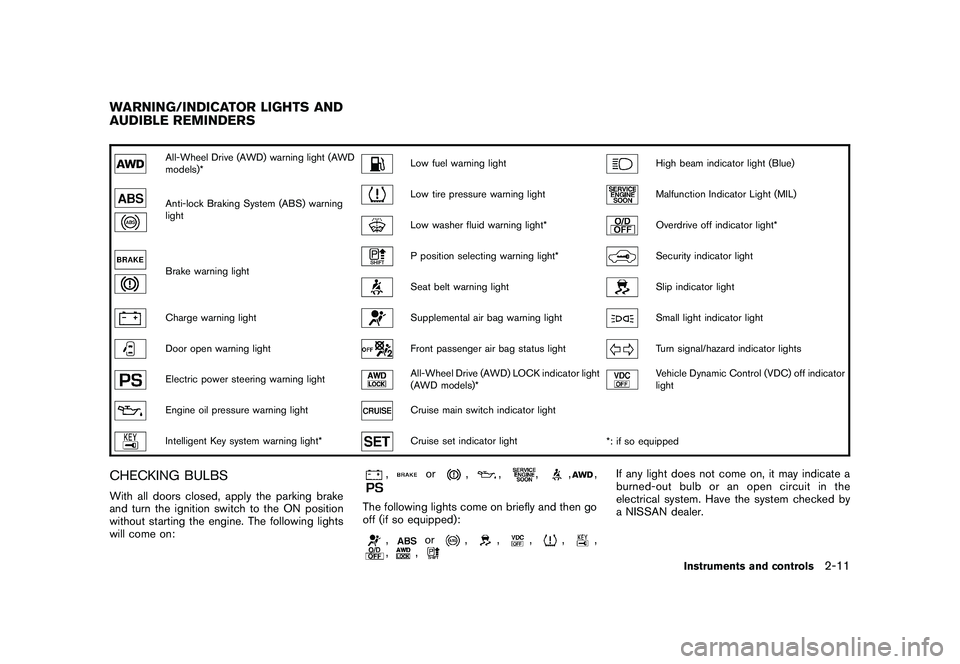
All-Wheel Drive (AWD) warning light (AWD
models)*
Low fuel warning light
High beam indicator light (Blue)
Anti-lock Braking System (ABS) warning
light
Low tire pressure warning light
Malfunction Indicator Light (MIL)
Low washer fluid warning light*
Overdrive off indicator light*
Brake warning light
P position selecting warning light*
Security indicator light
Seat belt warning light
Slip indicator light
Charge warning light
Supplemental air bag warning light
Small light indicator light
Door open warning light
Front passenger air bag status light
Turn signal/hazard indicator lights
Electric power steering warning light
All-Wheel Drive (AWD) LOCK indicator light
(AWD models)*
Vehicle Dynamic Control (VDC) off indicator
light
Engine oil pressure warning light
Cruise main switch indicator light
Intelligent Key system warning light*
Cruise set indicator light
*: if so equipped
CHECKING BULBSWith all doors closed, apply the parking brake
and turn the ignition switch to the ON position
without starting the engine. The following lights
will come on:
,
or
,
,
,
,
,
The following lights come on briefly and then go
off (if so equipped):
,
or
,
,
,
,
,
,
,
If any light does not come on, it may indicate a
burned-out bulb or an open circuit in the
electrical system. Have the system checked by
a NISSAN dealer.
WARNING/INDICATOR LIGHTS AND
AUDIBLE REMINDERS
Instruments and controls
2-11
Page 86 of 316
Black plate (84,1)
Model "S35-D" EDITED: 2008/ 7/ 24
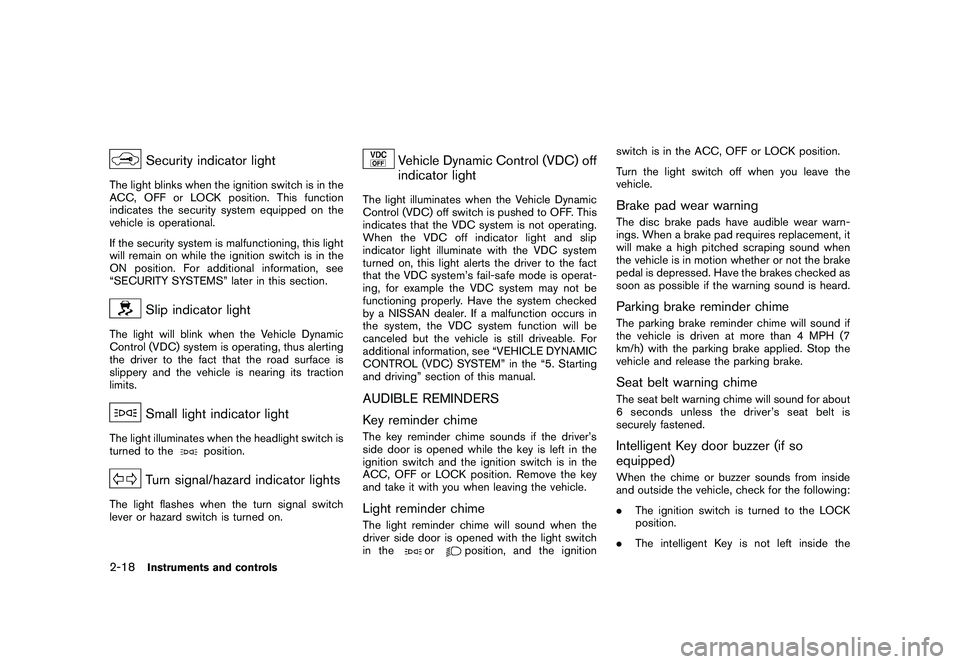
Security indicator light
The light blinks when the ignition switch is in the
ACC, OFF or LOCK position. This function
indicates the security system equipped on the
vehicle is operational.
If the security system is malfunctioning, this light
will remain on while the ignition switch is in the
ON position. For additional information, see
“SECURITY SYSTEMS” later in this section.
Slip indicator light
The light will blink when the Vehicle Dynamic
Control (VDC) system is operating, thus alerting
the driver to the fact that the road surface is
slippery and the vehicle is nearing its traction
limits.
Small light indicator light
The light illuminates when the headlight switch is
turned to the
position.
Turn signal/hazard indicator lights
The light flashes when the turn signal switch
lever or hazard switch is turned on.
Vehicle Dynamic Control (VDC) off
indicator light
The light illuminates when the Vehicle Dynamic
Control (VDC) off switch is pushed to OFF. This
indicates that the VDC system is not operating.
When the VDC off indicator light and slip
indicator light illuminate with the VDC system
turned on, this light alerts the driver to the fact
that the VDC system’s fail-safe mode is operat-
ing, for example the VDC system may not be
functioning properly. Have the system checked
by a NISSAN dealer. If a malfunction occurs in
the system, the VDC system function will be
canceled but the vehicle is still driveable. For
additional information, see “VEHICLE DYNAMIC
CONTROL (VDC) SYSTEM” in the “5. Starting
and driving” section of this manual.AUDIBLE REMINDERS
Key reminder chimeThe key reminder chime sounds if the driver’s
side door is opened while the key is left in the
ignition switch and the ignition switch is in the
ACC, OFF or LOCK position. Remove the key
and take it with you when leaving the vehicle.Light reminder chimeThe light reminder chime will sound when the
driver side door is opened with the light switch
in the
or
position, and the ignitionswitch is in the ACC, OFF or LOCK position.
Turn the light switch off when you leave the
vehicle.
Brake pad wear warningThe disc brake pads have audible wear warn-
ings. When a brake pad requires replacement, it
will make a high pitched scraping sound when
the vehicle is in motion whether or not the brake
pedal is depressed. Have the brakes checked as
soon as possible if the warning sound is heard.Parking brake reminder chimeThe parking brake reminder chime will sound if
the vehicle is driven at more than 4 MPH (7
km/h) with the parking brake applied. Stop the
vehicle and release the parking brake.Seat belt warning chimeThe seat belt warning chime will sound for about
6 seconds unless the driver’s seat belt is
securely fastened.Intelligent Key door buzzer (if so
equipped)When the chime or buzzer sounds from inside
and outside the vehicle, check for the following:
.The ignition switch is turned to the LOCK
position.
.The intelligent Key is not left inside the
2-18
Instruments and controls
Page 93 of 316
Black plate (91,1)
Model "S35-D" EDITED: 2008/ 7/ 24
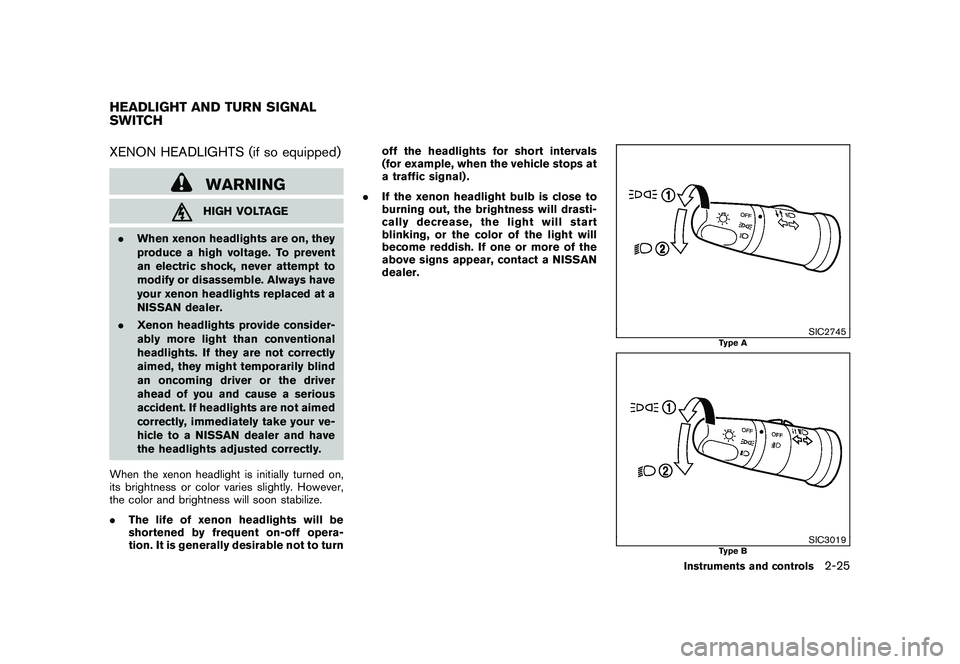
XENON HEADLIGHTS (if so equipped)
WARNINGHIGH VOLTAGE
.When xenon headlights are on, they
produce a high voltage. To prevent
an electric shock, never attempt to
modify or disassemble. Always have
your xenon headlights replaced at a
NISSAN dealer.
.Xenon headlights provide consider-
ably more light than conventional
headlights. If they are not correctly
aimed, they might temporarily blind
an oncoming driver or the driver
ahead of you and cause a serious
accident. If headlights are not aimed
correctly, immediately take your ve-
hicle to a NISSAN dealer and have
the headlights adjusted correctly.
When the xenon headlight is initially turned on,
its brightness or color varies slightly. However,
the color and brightness will soon stabilize.
.The life of xenon headlights will be
shortened by frequent on-off opera-
tion. It is generally desirable not to turnoff the headlights for short intervals
(for example, when the vehicle stops at
a traffic signal) .
.If the xenon headlight bulb is close to
burning out, the brightness will drasti-
cally decrease, the light will start
blinking, or the color of the light will
become reddish. If one or more of the
above signs appear, contact a NISSAN
dealer.
SIC2745
Type A
SIC3019
Type B
HEADLIGHT AND TURN SIGNAL
SWITCH
Instruments and controls
2-25
Page 96 of 316

Black plate (94,1)
Model "S35-D" EDITED: 2008/ 7/ 24
SIC3958SIC3959
Instrument brightness controlThe instrument brightness control operates
when the headlight switch is in the
or
position.
Turn the control
*A
to adjust the brightness of
the instrument panel lights. The brightness
indicator
*B
will be shown briefly in the vehicle
information display when the control is turned.
When the brightness level reaches the maximum
or minimum, a beep will sound.
SIC3488
TURN SIGNAL SWITCH*1
Turn signal
Move the lever up or down to signal the turning
direction. When the turn is completed, the turn
signals cancel automatically.*2
Lane change signal
To indicate a lane change, move the lever up or
down to the point where lights begin flashing.
2-28
Instruments and controls
Page 97 of 316
Black plate (95,1)
Model "S35-D" EDITED: 2008/ 7/ 24
SIC3020
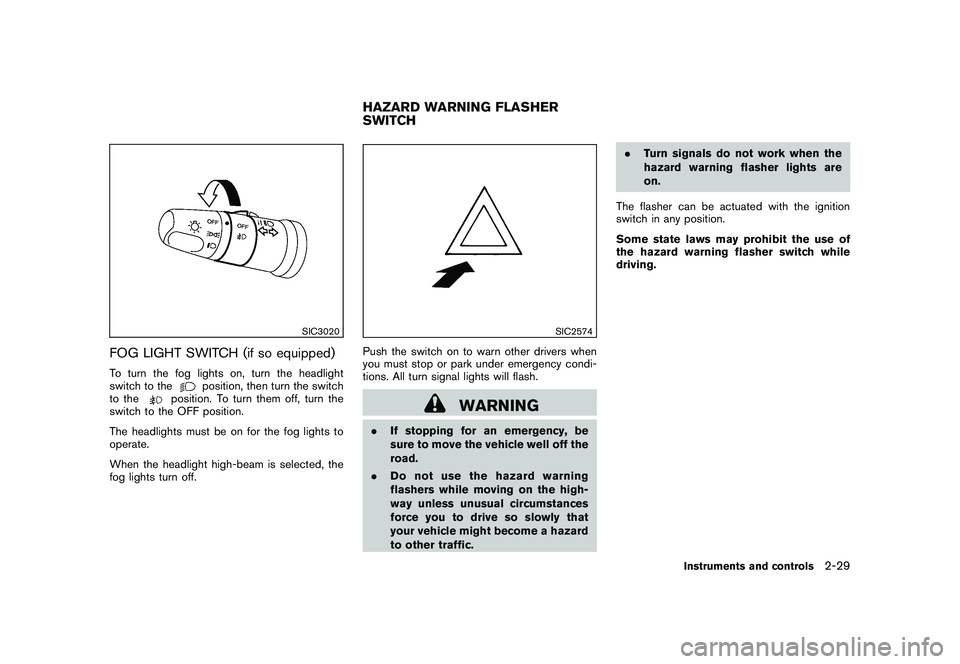
FOG LIGHT SWITCH (if so equipped)To turn the fog lights on, turn the headlight
switch to the
position, then turn the switch
to the
position. To turn them off, turn the
switch to the OFF position.
The headlights must be on for the fog lights to
operate.
When the headlight high-beam is selected, the
fog lights turn off.
SIC2574
Push the switch on to warn other drivers when
you must stop or park under emergency condi-
tions. All turn signal lights will flash.
WARNING
.If stopping for an emergency, be
sure to move the vehicle well off the
road.
.Do not use the hazard warning
flashers while moving on the high-
way unless unusual circumstances
force you to drive so slowly that
your vehicle might become a hazard
to other traffic..Turn signals do not work when the
hazard warning flasher lights are
on.
The flasher can be actuated with the ignition
switch in any position.
Some state laws may prohibit the use of
the hazard warning flasher switch while
driving.HAZARD WARNING FLASHER
SWITCH
Instruments and controls
2-29
Page 116 of 316
Black plate (114,1)
Model "S35-D" EDITED: 2008/ 7/ 24
SIC3182
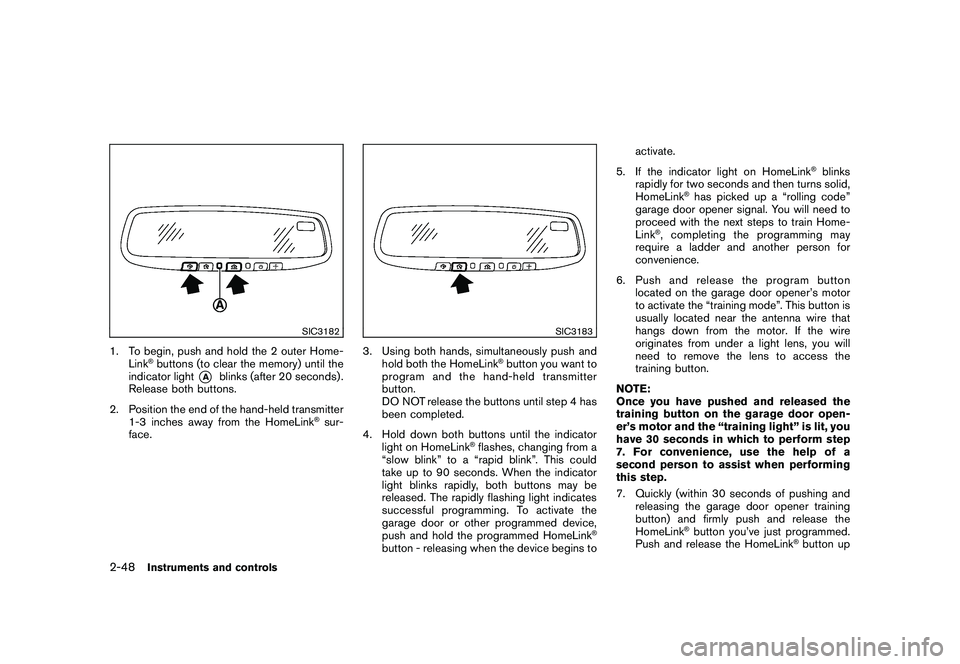
1. To begin, push and hold the 2 outer Home-
Link
®buttons (to clear the memory) until the
indicator light
*A
blinks (after 20 seconds) .
Release both buttons.
2. Position the end of the hand-held transmitter
1-3 inches away from the HomeLink
®sur-
face.
SIC3183
3. Using both hands, simultaneously push and
hold both the HomeLink
®button you want to
program and the hand-held transmitter
button.
DO NOT release the buttons until step 4 has
been completed.
4. Hold down both buttons until the indicator
light on HomeLink
®flashes, changing from a
“slow blink” to a “rapid blink”. This could
take up to 90 seconds. When the indicator
light blinks rapidly, both buttons may be
released. The rapidly flashing light indicates
successful programming. To activate the
garage door or other programmed device,
push and hold the programmed HomeLink
®
button - releasing when the device begins toactivate.
5. If the indicator light on HomeLink
®blinks
rapidly for two seconds and then turns solid,
HomeLink
®has picked up a “rolling code”
garage door opener signal. You will need to
proceed with the next steps to train Home-
Link
®, completing the programming may
require a ladder and another person for
convenience.
6. Push and release the program button
located on the garage door opener’s motor
to activate the “training mode”. This button is
usually located near the antenna wire that
hangs down from the motor. If the wire
originates from under a light lens, you will
need to remove the lens to access the
training button.
NOTE:
Once you have pushed and released the
training button on the garage door open-
er’s motor and the “training light” is lit, you
have 30 seconds in which to perform step
7. For convenience, use the help of a
second person to assist when performing
this step.
7. Quickly (within 30 seconds of pushing and
releasing the garage door opener training
button) and firmly push and release the
HomeLink
®button you’ve just programmed.
Push and release the HomeLink
®button up
2-48
Instruments and controls