warning NISSAN ROGUE 2010 Owner´s Manual
[x] Cancel search | Manufacturer: NISSAN, Model Year: 2010, Model line: ROGUE, Model: NISSAN ROGUE 2010Pages: 328, PDF Size: 2.84 MB
Page 139 of 328
Black plate (137,1)
Model "S35-D" EDITED: 2009/ 9/ 4
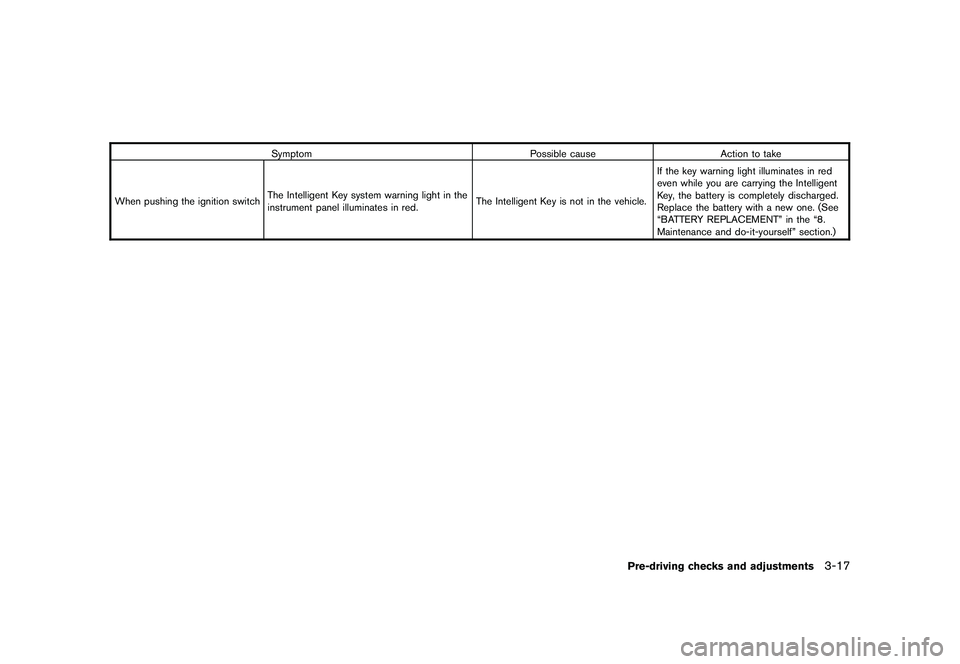
SymptomPossible causeAction to take
When pushing the ignition switch The Intelligent Key system warning light in the
instrument panel illuminates in red. The Intelligent Key is not in the vehicle.If the key warning light illuminates in red
even while you are carrying the Intelligent
Key, the battery is completely discharged.
Replace the battery with a new one. (See
“BATTERY REPLACEMENT” in the “8.
Maintenance and do-it-yourself” section.)
Pre-driving checks and adjustments
3-17
Page 140 of 328
Black plate (138,1)
Model "S35-D" EDITED: 2009/ 9/ 4
HOW TO USE REMOTE KEYLESS
ENTRY FUNCTION
WARNING
.Radio waves could adversely affect
electric medical equipment. Those
who use a pacemaker should con-
tact the electric medical equipment
manufacturer for the possible influ-
ences before use.
. The Intelligent Key transmits radio
waves when the buttons are
pushed. The FAA advises that the
radio waves may affect aircraft na-
vigation and communication sys-
tems. Do not operate the
Intelligent Key while on an airplane.
Makesurethebuttonsarenot
operated unintentionally when the
unit is stored during a flight.
CAUTION
.Do not allow the Intelligent Key,
which contains electrical compo-
nents, to come into contact with
water or salt water. This could affect
the system function. .
Do not drop the Intelligent Key.
. Do not strike the Intelligent Key
sharply against another object.
. Do not change or modify the Intel-
ligent Key.
. Wetting may damage the Intelligent
Key. If the Intelligent Key gets wet,
immediately wipe until it is comple-
tely dry.
. Do not place the Intelligent Key for
an extended period in an area where
temperatures exceed 140 8F (60 8C) .
. Do not attach the Intelligent Key
with a key holder that contains a
magnet.
. Do not place the Intelligent Key near
equipment that produces a mag-
netic field, such as a TV, audio
equipment, personal computers or
cellular phone.
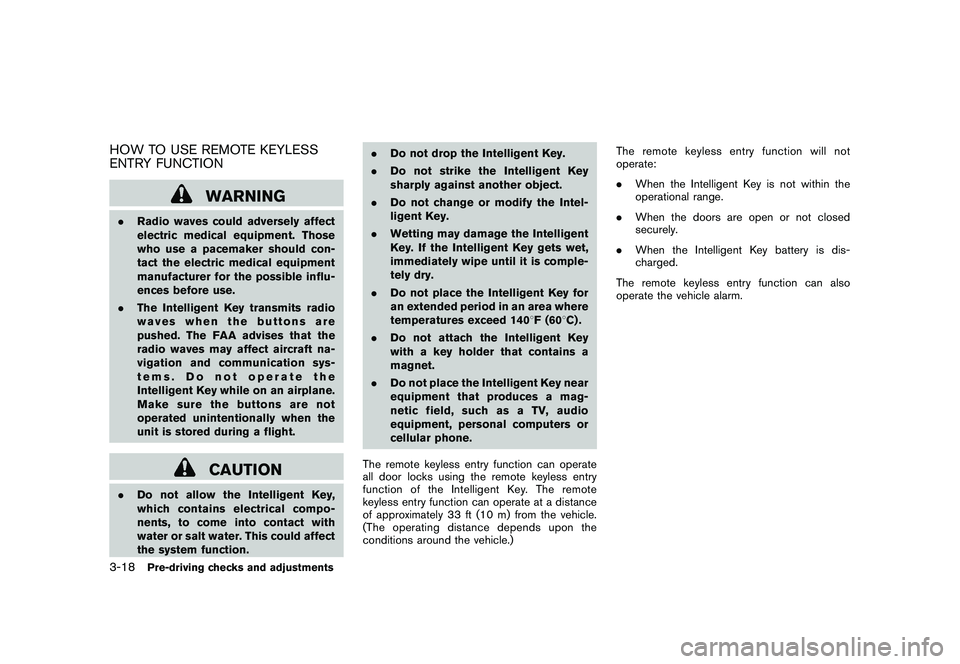
The remote keyless entry function can operate
all door locks using the remote keyless entry
function of the Intelligent Key. The remote
keyless entry function can operate at a distance
of approximately 33 ft (10 m) from the vehicle.
(The operating distance depends upon the
conditions around the vehicle.) The remote keyless entry function will not
operate:
.
When the Intelligent Key is not within the
operational range.
. When the doors are open or not closed
securely.
. When the Intelligent Key battery is dis-
charged.
The remote keyless entry function can also
operate the vehicle alarm.3-18
Pre-driving checks and adjustments
Page 141 of 328
Black plate (139,1)
Model "S35-D" EDITED: 2009/ 9/ 4
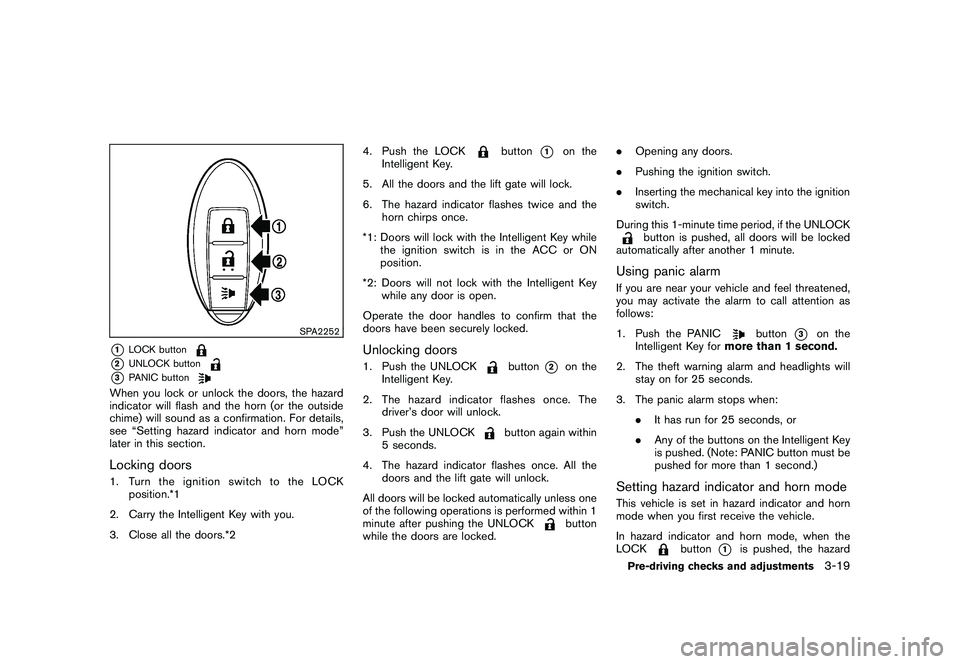
SPA2252
*1
LOCK button
*2
UNLOCK button
*3
PANIC button
When you lock or unlock the doors, the hazard
indicator will flash and the horn (or the outside
chime) will sound as a confirmation. For details,
see “Setting hazard indicator and horn mode”
later in this section.Locking doors1. TurntheignitionswitchtotheLOCKposition.*1
2. Carry the Intelligent Key with you.
3. Close all the doors.*2 4. Push the LOCK
button
*1
on the
Intelligent Key.
5. All the doors and the lift gate will lock.
6. The hazard indicator flashes twice and the horn chirps once.
*1: Doors will lock with the Intelligent Key while the ignition switch is in the ACC or ON
position.
*2: Doors will not lock with the Intelligent Key while any door is open.
Operate the door handles to confirm that the
doors have been securely locked.
Unlocking doors1. Push the UNLOCK
button
*2
on the
Intelligent Key.
2. The hazard indicator flashes once. The driver’s door will unlock.
3. Push the UNLOCK
button again within
5 seconds.
4. The hazard indicator flashes once. All the doors and the lift gate will unlock.
All doors will be locked automatically unless one
of the following operations is performed within 1
minute after pushing the UNLOCK
button
while the doors are locked. .
Opening any doors.
. Pushing the ignition switch.
. Inserting the mechanical key into the ignition
switch.
During this 1-minute time period, if the UNLOCK
button is pushed, all doors will be locked
automatically after another 1 minute.
Using panic alarmIf you are near your vehicle and feel threatened,
you may activate the alarm to call attention as
follows:
1. Push the PANIC
button
*3
on the
Intelligent Key for more than 1 second.
2. The theft warning alarm and headlights will stay on for 25 seconds.
3. The panic alarm stops when: .It has run for 25 seconds, or
. Any of the buttons on the Intelligent Key
is pushed. (Note: PANIC button must be
pushed for more than 1 second.)
Setting hazard indicator and horn modeThis vehicle is set in hazard indicator and horn
mode when you first receive the vehicle.
In hazard indicator and horn mode, when the
LOCK
button
*1
is pushed, the hazard
Pre-driving checks and adjustments
3-19
Page 144 of 328
Black plate (142,1)
Model "S35-D" EDITED: 2009/ 9/ 4
WARNING
.Make sure the hood is completely
closed and latched before driving.
Failure to do so could cause the
hood to fly open and result in an
accident.
. If you see steam or smoke coming
from the engine compartment, to
avoid injury do not open the hood.
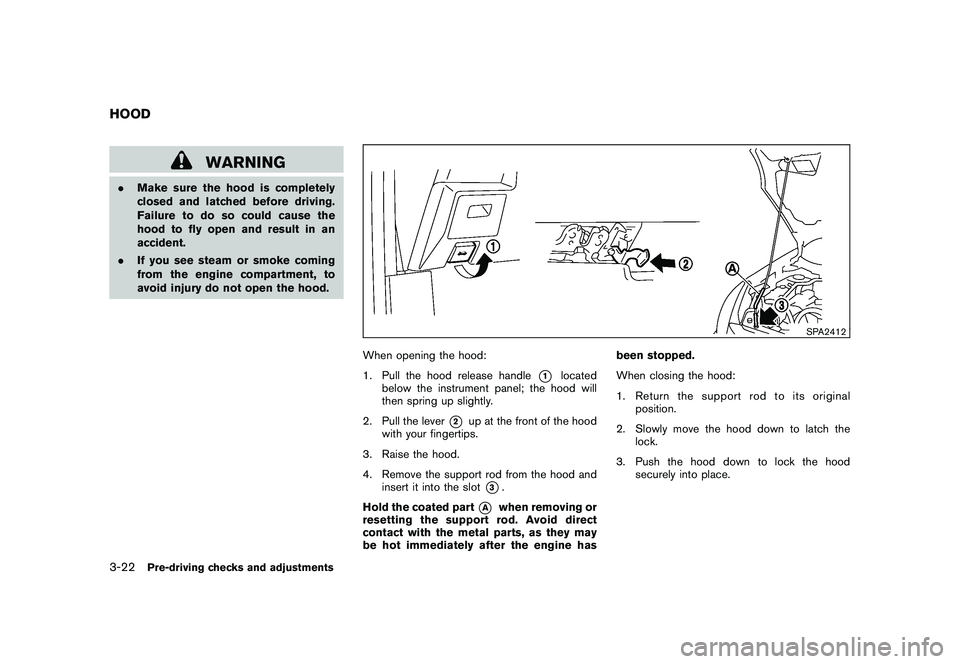
SPA2412
When opening the hood:
1. Pull the hood release handle
*1
located
below the instrument panel; the hood will
then spring up slightly.
2. Pull the lever
*2
up at the front of the hood
with your fingertips.
3. Raise the hood.
4. Remove the support rod from the hood and insert it into the slot
*3.
Hold the coated part
*A
when removing or
resetting the support rod. Avoid direct
contact with the metal parts, as they may
be hot immediately after the engine has been stopped.
When closing the hood:
1. Return the support rod to its original
position.
2. Slowly move the hood down to latch the lock.
3. Push the hood down to lock the hood securely into place.
HOOD3-22
Pre-driving checks and adjustments
Page 145 of 328
Black plate (143,1)
Model "S35-D" EDITED: 2009/ 9/ 4
WARNING
.Always be sure the lift gate has
been closed securely to prevent it
from opening while driving.
. Do not drive with the lift gate open.
This could allow dangerous exhaust
gases to be drawn into the vehicle.
See “EXHAUST GAS (carbon mon-
oxide)” in the “5. Starting and driv-
ing” section of this manual.
. Make sure that all passengers have
their hands, etc. inside the vehicle
before closing the lift gate.
SPA2413
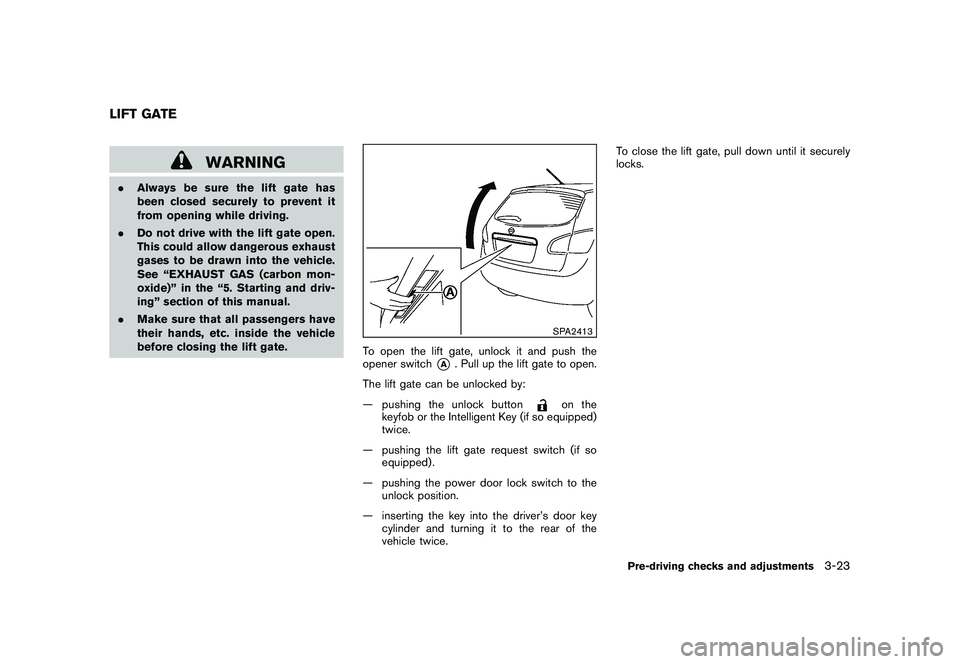
To open the lift gate, unlock it and push the
opener switch
*A
. Pull up the lift gate to open.
The lift gate can be unlocked by:
— pushing the unlock button
on the
keyfob or the Intelligent Key (if so equipped)
twice.
— pushing the lift gate request switch (if so equipped) .
— pushing the power door lock switch to the unlock position.
— inserting the key into the driver’s door key cylinder and turning it to the rear of the
vehicle twice. To close the lift gate, pull down until it securely
locks.
LIFT GATE
Pre-driving checks and adjustments
3-23
Page 147 of 328
Black plate (145,1)
Model "S35-D" EDITED: 2009/ 9/ 4
SPA2714
CAUTION
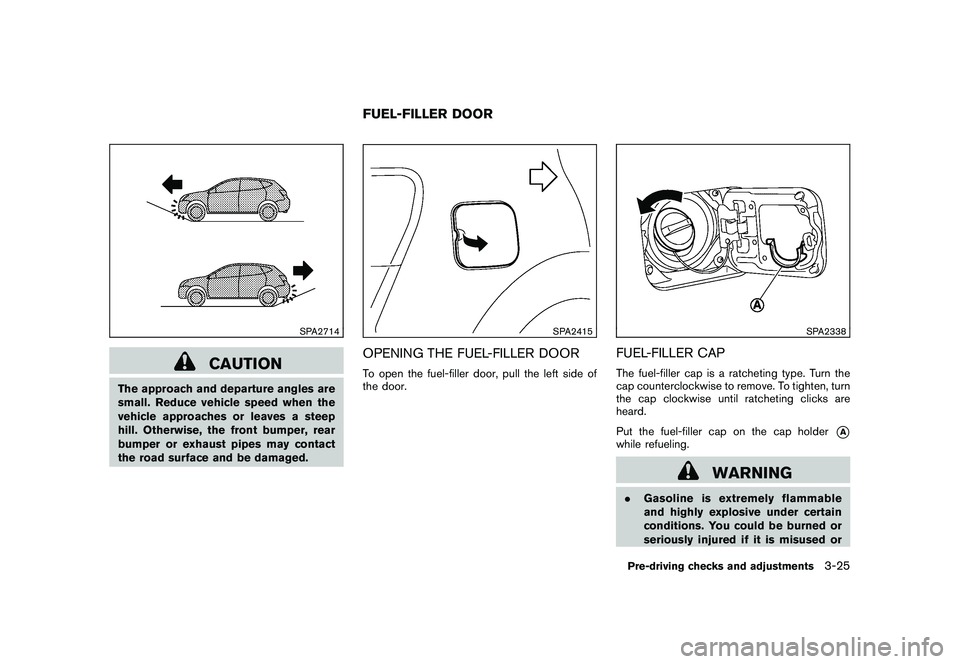
The approach and departure angles are
small. Reduce vehicle speed when the
vehicle approaches or leaves a steep
hill. Otherwise, the front bumper, rear
bumper or exhaust pipes may contact
the road surface and be damaged.
SPA2415
OPENING THE FUEL-FILLER DOORTo open the fuel-filler door, pull the left side of
the door.
SPA2338
FUEL-FILLER CAPThe fuel-filler cap is a ratcheting type. Turn the
cap counterclockwise to remove. To tighten, turn
the cap clockwise until ratcheting clicks are
heard.
Put the fuel-filler cap on the cap holder
*A
while refueling.
WARNING
.Gasoline is extremely flammable
and highly explosive under certain
conditions. You could be burned or
seriously injured if it is misused or
FUEL-FILLER DOOR
Pre-driving checks and adjustments
3-25
Page 149 of 328
Black plate (147,1)
Model "S35-D" EDITED: 2009/ 9/ 4
WARNING
Do not adjust the steering wheel while
driving. You could lose control of your
vehicle and cause an accident.
SPA2383
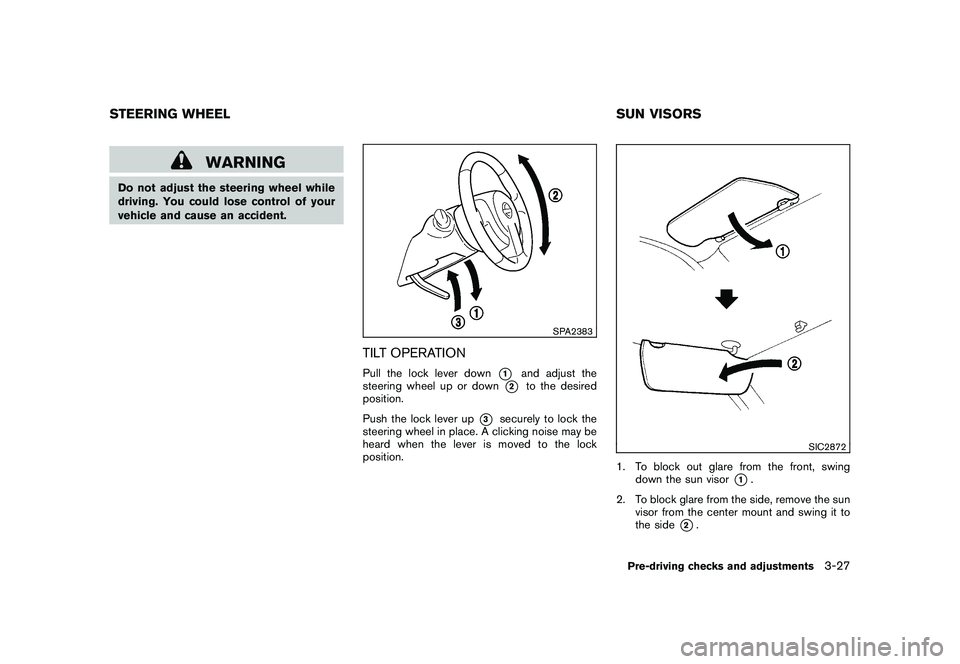
TILT OPERATIONPull the lock lever down
*1
and adjust the
steering wheel up or down
*2
to the desired
position.
Push the lock lever up
*3
securely to lock the
steering wheel in place. A clicking noise may be
heard when the lever is moved to the lock
position.
SIC2872
1. To block out glare from the front, swing down the sun visor
*1.
2. To block glare from the side, remove the sun visor from the center mount and swing it to
the side
*2.
STEERING WHEEL SUN VISORS
Pre-driving checks and adjustments
3-27
Page 150 of 328
Black plate (148,1)
Model "S35-D" EDITED: 2009/ 9/ 4
SPA1792
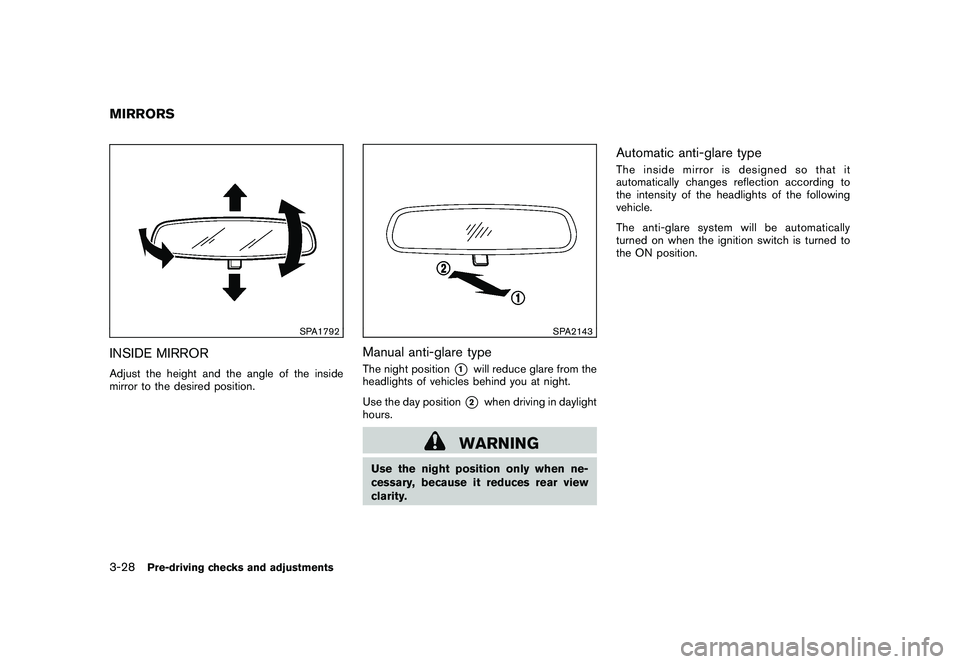
INSIDE MIRRORAdjust the height and the angle of the inside
mirror to the desired position.
SPA2143
Manual anti-glare typeThe night position
*1
will reduce glare from the
headlights of vehicles behind you at night.
Use the day position*2
when driving in daylight
hours.
WARNING
Use the night position only when ne-
cessary, because it reduces rear view
clarity.
Automatic anti-glare typeThe inside mirror is designed so that it
automatically changes reflection according to
the intensity of the headlights of the following
vehicle.
The anti-glare system will be automatically
turned on when the ignition switch is turned to
the ON position.
MIRRORS3-28
Pre-driving checks and adjustments
Page 152 of 328
Black plate (150,1)
Model "S35-D" EDITED: 2009/ 9/ 4
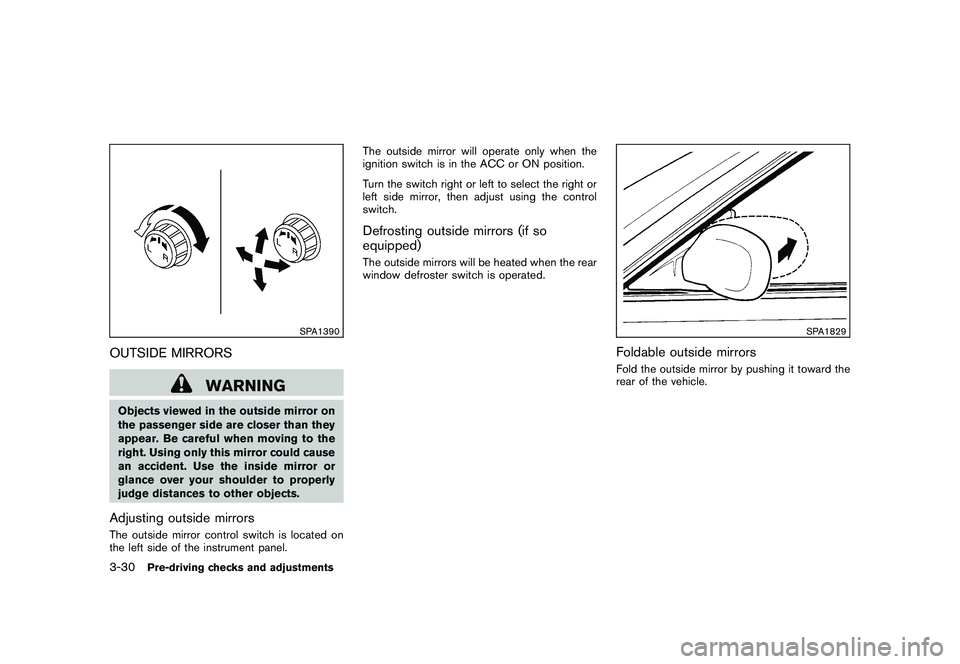
SPA1390
OUTSIDE MIRRORS
WARNING
Objects viewed in the outside mirror on
the passenger side are closer than they
appear. Be careful when moving to the
right. Using only this mirror could cause
an accident. Use the inside mirror or
glance over your shoulder to properly
judge distances to other objects.Adjusting outside mirrorsThe outside mirror control switch is located on
the left side of the instrument panel.The outside mirror will operate only when the
ignition switch is in the ACC or ON position.
Turn the switch right or left to select the right or
left side mirror, then adjust using the control
switch.
Defrosting outside mirrors (if so
equipped)The outside mirrors will be heated when the rear
window defroster switch is operated.
SPA1829
Foldable outside mirrorsFold the outside mirror by pushing it toward the
rear of the vehicle.
3-30
Pre-driving checks and adjustments
Page 154 of 328
Black plate (154,1)
Model "S35-D" EDITED: 2009/ 9/ 4
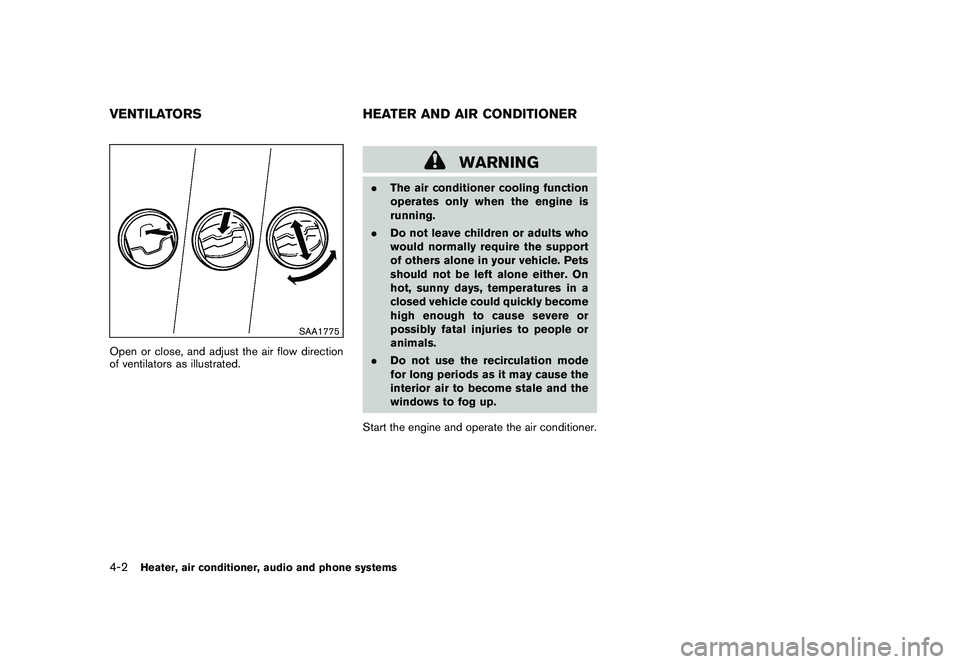
SAA1775
Open or close, and adjust the air flow direction
of ventilators as illustrated.
WARNING
.The air conditioner cooling function
operates only when the engine is
running.
. Do not leave children or adults who
would normally require the support
of others alone in your vehicle. Pets
should not be left alone either. On
hot, sunny days, temperatures in a
closed vehicle could quickly become
high enough to cause severe or
possibly fatal injuries to people or
animals.
. Do not use the recirculation mode
for long periods as it may cause the
interior air to become stale and the
windows to fog up.
Start the engine and operate the air conditioner.
VENTILATORS HEATER AND AIR CONDITIONER4-2
Heater, air conditioner, audio and phone systems