fuel NISSAN ROGUE 2014 2.G User Guide
[x] Cancel search | Manufacturer: NISSAN, Model Year: 2014, Model line: ROGUE, Model: NISSAN ROGUE 2014 2.GPages: 442, PDF Size: 5.19 MB
Page 102 of 442
NISSAN Intelligent Key® door buzzer
The Intelligent Key door buzzer sounds if the
Intelligent Key is left inside the vehicle when
locking the doors. When the buzzer sounds, be
sure to check both the vehicle and the Intelligent
Key. See “NISSAN Intelligent Key®” in the “Pre-
driving checks and adjustments” section.The vehicle information display is located to the
left of the speedometer. It displays such items as:● Vehicle settings
● Trip computer information
● Drive system warnings and settings (if so
equipped)
● Cruise control system information
●
NISSAN Intelligent Key® operation information
● Chassis Control
● Indicators and warnings (if so equipped)
● Tire Pressure information
HOW TO USE THE VEHICLE
INFORMATION DISPLAY
The vehicle information display can be changed
using the buttons
and ENTER located on
the steering wheel.
1.
— navigate through the items in ve-
hicle information
ENTER — change or select an item in the
vehicle information display
2.
— select/enter the Vehicle informa-
tion menu items or to change from one dis-
play screen to the next (i.e. trip, TPMS, Fuel
economy)
LIC2630LIC2671
VEHICLE INFORMATION DISPLAY
Instruments and controls2-17
Page 103 of 442
3.— go back to the previous menu
The ENTER and
buttons also control audio
and control panel functions. For additional infor-
mation see, “Steering wheel switch for audio
control” in “Monitor, climate, audio, phone and
voice recognition systems” section.
STARTUP DISPLAY
When the vehicle in placed in the ON or ACC (if
so equipped) position the screens that display in
the vehicle information include:
● Active system status (if so equipped)
● Trip computer
● Tire pressure information
● Fuel economy
● Warnings
● Outside air temperature
● Odometer/Twin Trip Odometer
Warnings will only display if there are any pres-
ent, for more information on warnings and indica-
tors see, “Vehicle information display warnings
and indicators” in this section.
To control what items display in the vehicle infor-
mation display, see “Main menu selection” in this
section.
SETTINGS
The setting mode allows you to change the infor-
mation displayed in the vehicle information display:
● Driver Assistance
● Clock
● Meter Settings
● Vehicle Settings
● Maintenance
● Alarm
● Unit
● Language
● Factory Reset
Driver Assistance
To change the status, warnings or turn on or off
any of the systems/warnings displayed in the
“Driver Assistance” menu:
Use the
button to select and the ENTER
button to change a menu item:
● Driving Aids (if so equipped)
– Forward (FCW) On/Off
– Lane (LDW) On/Off
– Blind Spot (BSW) On/Off ●
Parking Aids (if so equipped)
– Moving Object On/Off
● Chassis Control
– Trace Control – See “Active Trace Con- trol” in “Starting and Operating” for more
information.
– Engine Brake – See “Active Engine Brake” in “Starting and Operating” for
more information.
To change the status, warnings or turn on or off
any of the systems/warnings displayed in the
“Driver Assistance” menu:
Use the
button to select and the ENTER
button to change a menu item:
● Driving Aids (if so equipped)
– Forward (FCW) On/Off
– Lane (LDW) On/Off
– Blind Spot (BSW) On/Off
● Parking Aids (if so equipped)
– Moving Object On/Off
2-18Instruments and controls
Page 104 of 442
●Chassis Control
– Trace Control – refer to “Active Trace Control” in “Starting and Operating” for
more information.
– Engine Brake – refer to “Active Engine Brake” in “Starting and Operating” for
more information.
Clock
To set the clock, see “Monitor, climate, audio,
phone and voice recognition” in this manual or
the separate Navigation Owner’s Manual.
Meter Settings
The meter settings allows the customer to
choose from the various meter selections.
The meter settings can be changed using
the
,, and the ENTER buttons.
Main Menu Selection
The items that display can be enabled/disabled
when the ignition switch is placed in the ON
position. To change the items that display.
Use the
button to select and the ENTER
button to change a menu item:
● Trip Computer – See “Trip Computer” in this
section. ●
Range
● Average Speed
● Fuel Economy
● Navigation (if so equipped)
● Audio/Satellite Radio (if so equipped)
● Driving Aids (if so equipped)
● Tire Pressures
● Warning Confirmation
Body Color
The color of the vehicle that displays in the ve-
hicle information display when the ignition switch
is placed in the ON position can be changed.
ECO Drive Report
The following information can be
enabled/disabled to display in the vehicle infor-
mation display when the ignition switch is placed
in the ON position.
From the “Main Menu Selection” select “ECO
Drive Report” to display the information when the
ignition switch is placed in the ON position. ●
Select “Display” then “On” or “Off” to display
the information when the ignition switch is
placed in the ON position. The ECO Drive
Report is displayed when the ignition switch
is in the OFF position.
Welcome Effects
The welcome screen display can be turned
ON/OFF to display when the ignition switch is
placed in the ACC (if so equipped) or ON posi-
tion. To enable/disable the welcome screen:
1. Press the
button.
2. Use the
buttons to select “Settings”,
and press ENTER.
3. Select “Welcome Effects” using the
buttons and press ENTER to turn this func-
tion ON or OFF.
Instruments and controls2-19
Page 105 of 442
Trip Computer
The trip computer can be enabled/disabled to
display in the vehicle information display when
the ignition switch is placed in the ON position.From the “Main Menu Selection” select “Trip
Computer” to display in the vehicle information
display when the ignition is placed in the ON
position.
1. Current fuel consumption and average
fuel consumption (MPG, l (liter) /100km or
km/l)
LIC2667
2-20Instruments and controls
Page 106 of 442
Current fuel consumption:
The current fuel consumption mode shows the
current fuel consumption.
Average fuel consumption:
The average fuel consumption mode shows the
average fuel consumption since the last reset.
Resetting is done by pushing the
button
for longer than one second.
The display is updated every 30 seconds. At
about the first 1/3 mile (500 m) after a reset, the
display shows “_ _”.
2. Average speed (MPH or km/h)
The average speed mode shows the average
vehicle speed since the last reset. Resetting is
done by pushing the
button for longer than
one second.
The display is updated every 30 seconds. At
about the first 1/3 mile (500 m) after a reset, the
display shows “_ _”.
3. Elapsed time and trip odometer (mile or
km)
Elapsed time:
The elapsed time mode shows the time since the
last reset. Resetting is done by pushing the
button for longer than one second.
(The trip odometer is also reset at same time.)
Trip odometer:
The trip odometer mode shows the total distance
the vehicle has been driven since the last reset.
Resetting is done by pushing the
button
for longer than one second. (The elapsed time is
also reset at same time.)
4. Distance to empty (dte – mile or km)
The distance to empty (dte) mode provides you
with an estimation of the distance that can be
driven before refueling. The dte is constantly be-
ing calculated, based on the amount of fuel in the
fuel tank and the actual fuel consumption.
The display is updated approximately every
30 seconds.
The dte mode includes a low range warning
feature. If the fuel level is low, the warning is
displayed on the screen.
When the fuel level drops even lower, the dte
display wil change to “_ _”.
● If the amount of fuel added is small, the
display just before the ignition switch is
pushed to the OFF position may continue to
be displayed. ●
When driving uphill or rounding curves, the
fuel in the tank shifts, which may momentarily
change the display.
5. Navigation (if so equipped)
When the route guidance is set in the navigation
system, this item shows the navigation route in-
formation.
6. Audio
The audio mode shows the status of audio infor-
mation.
7. Driving aids (if so equipped)
The driving aids mode shows the operating con-
dition for the following systems. ● Lane Departure Warning (LDW)
● Blind Spot Warning (BSW)
● Forward Collision Warning (FCW)
See “Blind Spot Warning (BSW)/Lane Depar-
ture Warning (LDW)” and “Forward Collision
Warning (FCW)” in “Starting and Driving” for
more information.
8. Tire pressure
The tire pressure mode shows the pressure of all
four tires while the vehicle is driven. The axle
between the tires will also display the recom-
mended tire pressure.
Instruments and controls2-21
Page 112 of 442
VEHICLE INFORMATION DISPLAY
WARNINGS AND INDICATORS
1. Engine start operation
2. No Key Detected
3. Shift to Park
4. Key battery low
5. Engine start operation for Intelligent Key sys-tem (if I-Key battery level is low)
6. Key ID Incorrect
7. Release parking brake
8. Low Fuel
9. Low Washer Fluid
10. Door/Liftgate Open
11. I-Key System Error: See Owner’s Manual
12. Loose Fuel Cap
13. Tire Pressure Low – Add Air
14. Flat Tire – Visit Dealer
15. Low Oil Pressure Stop Vehicle
16. AWD Error: See Owner’s Manual
17. AWD High Temp. Stop Vehicle 18. AWD Tire Size Incorrect See Owner’s
Manual
19. Battery Voltage Low Charge Battery
20. Shipping Mode On Push Storage Fuse
21. Power will turn off to save the battery
22. Power turned off to save the battery
23. Reminder: Turn OFF headlights
24. Timer Alert – Time for a driver break?
25. Low Outside Temperature
26. Chassis Control System Error: See Owner’s Manual
27. Cruise Control
28. Transmission Shift Position Indicator
29. CVT Error See Owner’s Manual
30. Malfunction See Owner’s Manual
Engine start operation
This indicator appears when the shift lever is in
the P (Park) position.
This indicator means that the engine will start by
pushing the ignition switch with the brake pedal
depressed. You can start the engine in any posi-
tion of the ignition switch. No Key Detected
This warning appears when the Intelligent Key is
left outside the vehicle with the ignition switch in
the ON position. Make sure the Intelligent Key is
inside the vehicle.
Shift to Park
This warning illuminates when the ignition switch
is in the ACC (if so equipped) or OFF position
and the shift lever is in any position other than P
(Park) position. Also, a chime sounds when the
ignition switch is in the OFF position.
If this warning illuminates, move the shift lever to
the P (Park) position or start the engine.
For additional information about Intelligent Key,
see “NISSAN Intelligent Key®” in the “Pre-
driving checks and adjustments” section.
Key Battery Low
This indicator illuminates when the Intelligent Key
battery is running out of power.
If this indicator illuminates, replace the battery
with a new one. See “Battery replacement” in the
“Maintenance and do-it-yourself” section.
Instruments and controls2-27
Page 113 of 442
Engine start operation for Intelligent Key
system (if I-Key battery is low)
This indicator appears when the battery of the
Intelligent Key is low and when the Intelligent Key
system and the vehicle are not communicating
normally.
If this appears, touch the ignition switch with the
Intelligent Key while depressing the brake pedal.
For more information, see “NISSAN Intelligent
Key® battery discharge” in the “Starting and
driving” section.
Key ID Incorrect
This warning appears when the ignition switch is
placed from the OFF position and the Intelligent
Key is not recognized by the system. You cannot
start the engine with an unregistered key.
See “NISSAN Intelligent Key®” in “Pre-driving
checks and adjustments” for more information.
Release Parking Brake
This warning illuminates in the message area of
the vehicle information display when the parking
brake is set and the vehicle is driven.
Low Fuel
This warning illuminates when the fuel level in the
fuel tank is getting low. Refuel as soon as it is
convenient, preferably before the fuel gaugereaches 0 (Empty) .
There will be a small re-
serve of fuel in the tank when the fuel
gauge needle reaches 0 (Empty) .
Low Washer Fluid
This warning illuminates when the windshield-
washer fluid is at a low level. Add windshield-
washer fluid as necessary. See “Windshield-
washer fluid” in the “Maintenance and do-it-
yourself” section of this manual.
Door Open
This warning illuminates when a door has been
opened when the engine is running.
I-Key System Error
After the ignition switch is pushed to the ON
position, this light comes on for about 2 seconds
and then turns off.
The I-Key System Error message warns of a
malfunction with the Intelligent Key system. If the
light comes on while the engine is stopped, it may
be impossible to start the engine.
If the light comes on while the engine is running,
you can drive the vehicle. However in these
cases, contact a NISSAN dealer for repair as
soon as possible. Loose Fuel Cap
This warning appears when the fuel-filler cap is
not tightened correctly after the vehicle has been
refueled. See “Fuel-filler cap” in the “Pre-driving
checks and adjustments” section of this manual.
Tire Pressure Low - Add Air warning
This warning appears when the low tire pressure
warning light in the meter illuminates and low tire
pressure is detected. If this warning appears,
stop the vehicle and adjust the tire pressures of
all 4 tires to the recommended COLD tire pres-
sure shown on the Tire and Loading Information
label. See “Low tire pressure warning light” in this
section and “Tire Pressure Monitoring System
(TPMS)” in the “Starting and driving” section.
Flat Tire – Visit dealer
This warning appears when the low tire pressure
warning light in the meter illuminates and one or
more flat tires are detected while driving. A chime
also sounds for approximately 10 seconds.
Low Oil Pressure Stop Vehicle
This warning appears in message area of the
vehicle information display if low oil pressure is
detected. This gauge is not designed to indicate
low oil level.
The low oil pressure warning is
not designed to indicate a low oil level. Use
2-28Instruments and controls
Page 125 of 442
The vehicle should be driven with the Vehicle
Dynamic Control (VDC) system on for most driv-
ing conditions.
If the vehicle is stuck in mud or snow, the VDC
system reduces the engine output to reduce
wheel spin. The engine speed will be reduced
even if the accelerator is depressed to the floor. If
maximum engine power is needed to free a stuck
vehicle, turn the VDC system off.
To turn off the VDC system, push the VDC OFF
switch. The
indicator will come on.
Push the VDC OFF switch again or restart the
engine to turn on the system. For additional infor-
mation, refer to “Vehicle Dynamic Control (VDC)
system” in the “Starting and driving” section. The all-wheel drive (AWD) lock switch is located
on the instrument panel. The AWD LOCK indica-
tor light will illuminate when the switch is turned
on. Refer to “Warning/Indicator lights and au-
dible reminders” in this section for more informa-
tion.
Each time you push the switch, the AWD mode
will switch: AUTO
→LOCK→AUTO. Adjusts the engine and transmission points to
enhance performance. Press the SPORT button
on the instrument panel to activate. “SPORT”
appears in the speedometer for 2 seconds.
NOTE:
In the SPORT mode, fuel economy may be
reduced.
LIC2315LIC2645LIC2417
VEHICLE DYNAMIC CONTROL (VDC)
OFF SWITCH
ALL-WHEEL DRIVE (AWD) LOCK
SWITCH (if so equipped)SPORT MODE SWITCH (if so
equipped)
2-40Instruments and controls
Page 148 of 442
3 Pre-driving checks and adjustments
Keys .............................................3-2Remote keyless entry (if so equipped) ............3-2
NISSAN Intelligent Key® (if so equipped) .........3-3
NISSAN Vehicle Immobilizer System keys .........3-4
Doors ............................................3-5
Locking with key ................................3-5
Opening and closing windows ...................3-5
Locking with inside lock knob ....................3-6
Locking with power door lock switch .............3-6
Automatic door locks ...........................3-6
Child safety rear door lock .......................3-7
Remote keyless entry system (if so equipped) .........3-7
How to use remote keyless entry system ..........3-8
NISSAN Intelligent Key® (if so equipped) ...........3-11
Operating range ............................... 3-12
Door locks/unlocks precaution ..................3-13
NISSAN Intelligent Key® Operation .............3-14
How to use the remote keyless entry
function ...................................... 3-17
Warning signals ............................... 3-20
Troubleshooting guide ......................... 3-20Hood
........................................... 3-22
Liftgate .......................................... 3-23
Operating the manual liftgate
(if so equipped) ............................... 3-23
Operating the power liftgate (if so equipped) .....3-23
Power liftgate main switch ......................3-26
Liftgate release ................................ 3-26
Liftgate position setting ........................ 3-27
Fuel-filler door ................................... 3-27
Opener operation .............................. 3-27
Fuel-filler cap ................................. 3-27
Tilt/telescopic steering ............................ 3-29
Manual operation .............................. 3-30
Sun visors ....................................... 3-30
Vanity mirrors ................................. 3-31
Card holder (driver’s side only) ..................3-31
Mirrors .......................................... 3-31
Rearview mirror (if so equipped) .................3-31
Automatic anti-glare rearview mirror
(if so equipped) ............................... 3-32
Outside
mirrors ............................... 3-33
Page 174 of 442
NOTE:
If you had to open the liftgate using this
lever, have your vehicle checked by a
NISSAN dealer as soon as possible.
LIFTGATE POSITION SETTING
The liftgate can be set to open to a specific height
by performing the following:1. Open the liftgate using the request switch or the Intelligent Key.
2. Pull the liftgate down to the desired position and hold the liftgate (the liftgate will have
some resistance when being manually ad-
justed) .
3. While holding the liftgate in position, press and hold the liftgate switch
located
on the liftgate for approximately 5 seconds
or until 3 beeps are heard.
The liftgate will open to the selected position
setting. To change the position of the liftgate,
repeat steps 1-3 for setting the position of the
liftgate.
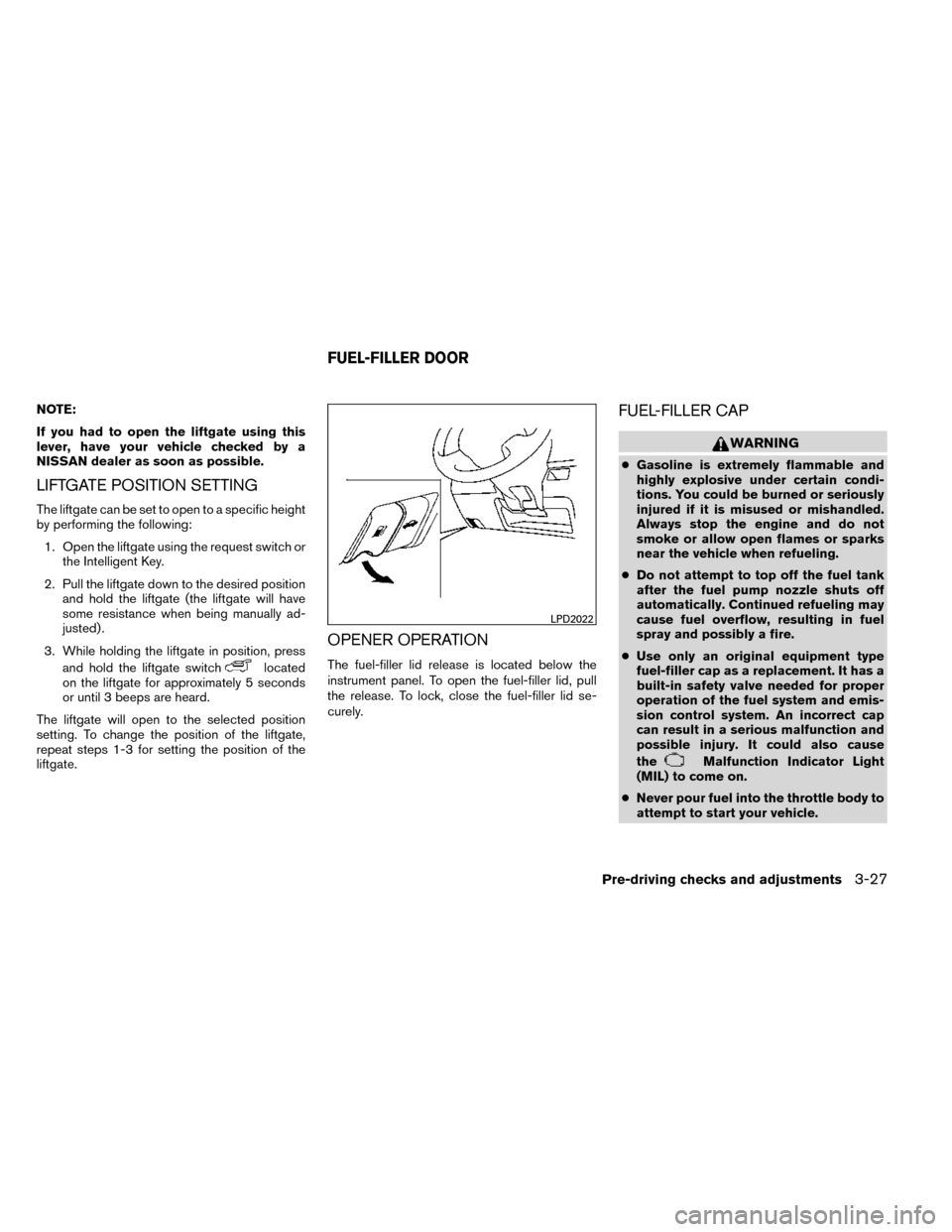
OPENER OPERATION
The fuel-filler lid release is located below the
instrument panel. To open the fuel-filler lid, pull
the release. To lock, close the fuel-filler lid se-
curely.
FUEL-FILLER CAP
WARNING
● Gasoline is extremely flammable and
highly explosive under certain condi-
tions. You could be burned or seriously
injured if it is misused or mishandled.
Always stop the engine and do not
smoke or allow open flames or sparks
near the vehicle when refueling.
● Do not attempt to top off the fuel tank
after the fuel pump nozzle shuts off
automatically. Continued refueling may
cause fuel overflow, resulting in fuel
spray and possibly a fire.
● Use only an original equipment type
fuel-filler cap as a replacement. It has a
built-in safety valve needed for proper
operation of the fuel system and emis-
sion control system. An incorrect cap
can result in a serious malfunction and
possible injury. It could also cause
the
Malfunction Indicator Light
(MIL) to come on.
● Never pour fuel into the throttle body to
attempt to start your vehicle.
LPD2022
FUEL-FILLER DOOR
Pre-driving checks and adjustments3-27