wheel NISSAN ROGUE 2014 2.G User Guide
[x] Cancel search | Manufacturer: NISSAN, Model Year: 2014, Model line: ROGUE, Model: NISSAN ROGUE 2014 2.GPages: 442, PDF Size: 5.19 MB
Page 69 of 442
In a side impact, the curtain air bags are designed
to inflate on the side where the vehicle is im-
pacted. In a rollover, curtain air bags on both
sides are designed to inflate and remain inflated
for a short time.
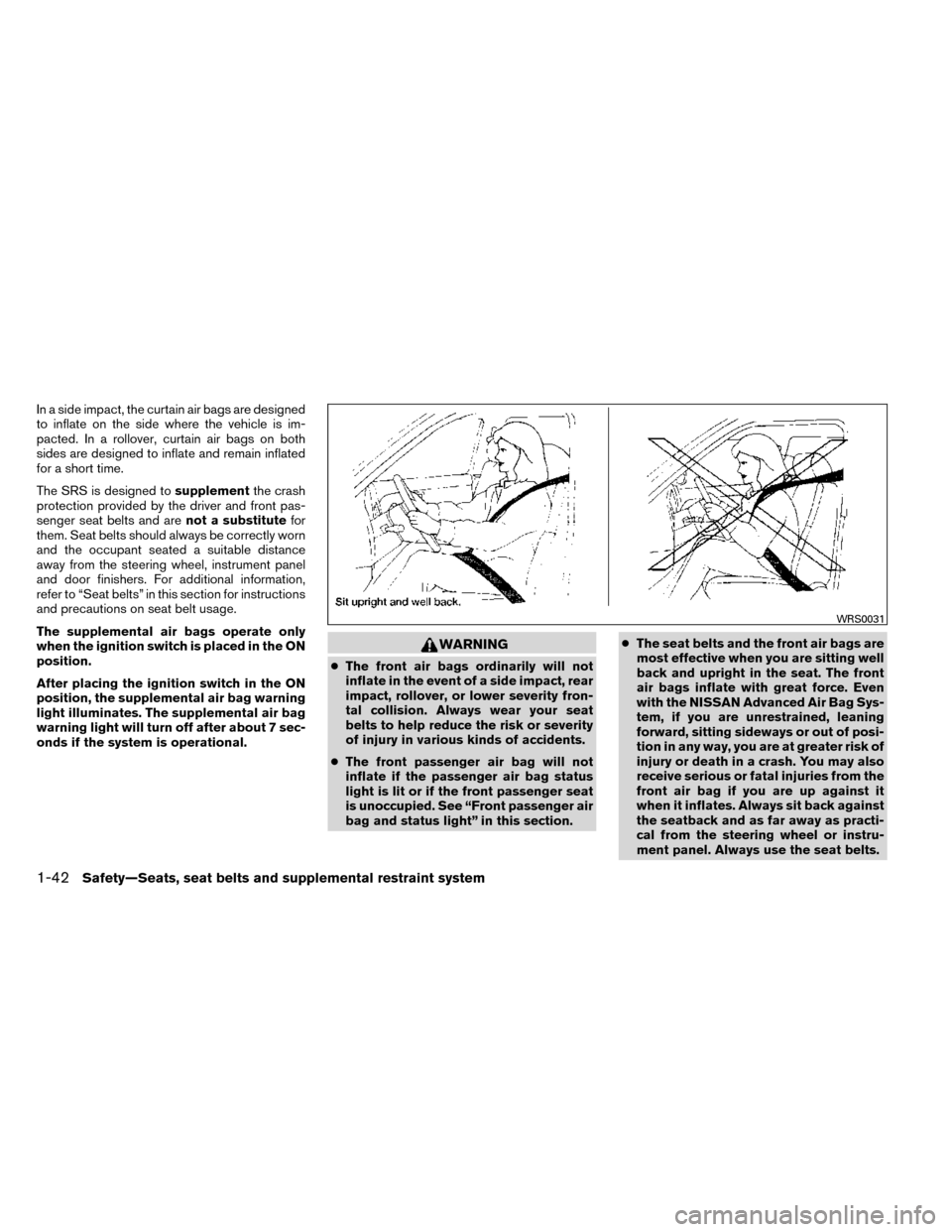
The SRS is designed tosupplementthe crash
protection provided by the driver and front pas-
senger seat belts and are not a substitutefor
them. Seat belts should always be correctly worn
and the occupant seated a suitable distance
away from the steering wheel, instrument panel
and door finishers. For additional information,
refer to “Seat belts” in this section for instructions
and precautions on seat belt usage.
The supplemental air bags operate only
when the ignition switch is placed in the ON
position.
After placing the ignition switch in the ON
position, the supplemental air bag warning
light illuminates. The supplemental air bag
warning light will turn off after about 7 sec-
onds if the system is operational.
WARNING
● The front air bags ordinarily will not
inflate in the event of a side impact, rear
impact, rollover, or lower severity fron-
tal collision. Always wear your seat
belts to help reduce the risk or severity
of injury in various kinds of accidents.
● The front passenger air bag will not
inflate if the passenger air bag status
light is lit or if the front passenger seat
is unoccupied. See “Front passenger air
bag and status light” in this section. ●
The seat belts and the front air bags are
most effective when you are sitting well
back and upright in the seat. The front
air bags inflate with great force. Even
with the NISSAN Advanced Air Bag Sys-
tem, if you are unrestrained, leaning
forward, sitting sideways or out of posi-
tion in any way, you are at greater risk of
injury or death in a crash. You may also
receive serious or fatal injuries from the
front air bag if you are up against it
when it inflates. Always sit back against
the seatback and as far away as practi-
cal from the steering wheel or instru-
ment panel. Always use the seat belts.
WRS0031
1-42Safety—Seats, seat belts and supplemental restraint system
Page 70 of 442
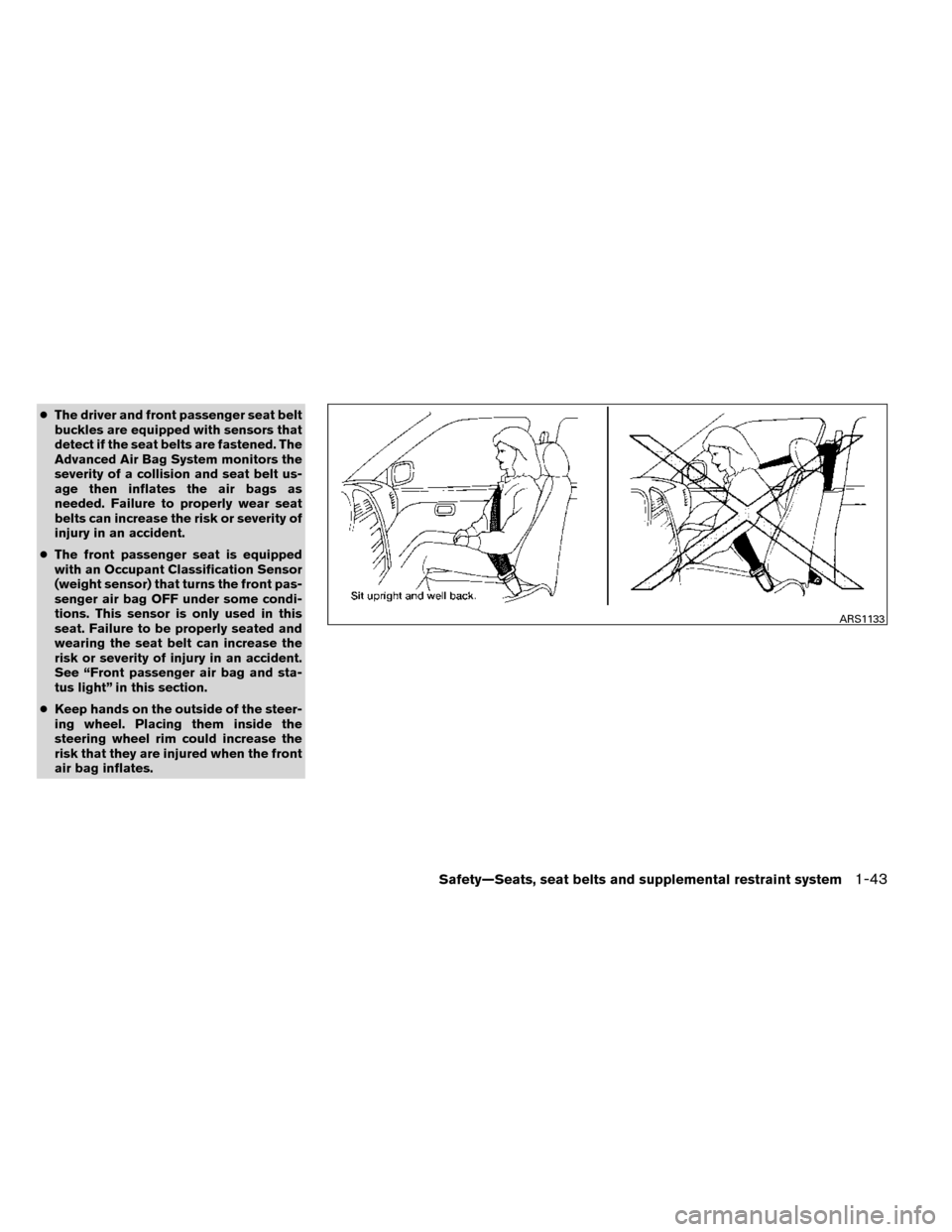
●The driver and front passenger seat belt
buckles are equipped with sensors that
detect if the seat belts are fastened. The
Advanced Air Bag System monitors the
severity of a collision and seat belt us-
age then inflates the air bags as
needed. Failure to properly wear seat
belts can increase the risk or severity of
injury in an accident.
● The front passenger seat is equipped
with an Occupant Classification Sensor
(weight sensor) that turns the front pas-
senger air bag OFF under some condi-
tions. This sensor is only used in this
seat. Failure to be properly seated and
wearing the seat belt can increase the
risk or severity of injury in an accident.
See “Front passenger air bag and sta-
tus light” in this section.
● Keep hands on the outside of the steer-
ing wheel. Placing them inside the
steering wheel rim could increase the
risk that they are injured when the front
air bag inflates.
ARS1133
Safety—Seats, seat belts and supplemental restraint system1-43
Page 76 of 442
●Do not place heavy loads heavier than
2.2 lb (1 kg) on the seatback, head
restraint/headrest or in the seatback
pocket.
● Do not store luggage behind the seat
that can press into the seatback.
● Do not position the front passenger
seat so it contacts the 2nd row. If the
front seat does contact the 2nd row, the
air bag system may determine a sensor
malfunction has occurred and the front
passenger air bag status light may illu-
minate and the supplemental air bag
warning light may flash.
● If a forward-facing child restraint is in-
stalled in the front passenger seat, do
not position the front passenger seat so
the child restraint contacts the instru-
ment panel. If the child restraint does
contact the instrument panel, the sys-
tem may determine the seat is occupied
and the passenger air bag may deploy
in a collision. Also the front passenger
air bag status light may not illuminate.
See “Child restraints” in this section for
information about installing and using
child restraints. ●
Confirm the operating condition with
the front passenger air bag status light.
● If you notice that the front passenger air
bag status light is not operating as de-
scribed in this section, please take your
vehicle to your NISSAN dealer to check
the occupant classification system.
● Until you have confirmed with your
dealer that your passenger seat occu-
pant classification system is working
properly, position the occupants in the
rear seating positions.
This vehicle is equipped with the NISSAN Ad-
vanced Air Bag System for the driver and front
passenger seats. This system is designed to
meet certification requirements under U.S. regu-
lations. It is also permitted in Canada. All of the
information, cautions and warnings in this
manual must be followed.
The driver supplemental front-impact air bag is
located in the center of the steering wheel. The
passenger supplemental front-impact air bag is
mounted in the dashboard above the glove box.
The front air bags are designed to inflate in higher
severity frontal collisions, although they may in-
flate if the forces in another type of collision are
similar to those of a higher severity frontal impact.
They may not inflate in certain frontal collisions. Vehicle damage (or lack of it) is not always an
indication of proper front air bag system opera-
tion.
The NISSAN Advanced Air Bag System has dual
stage inflators. It also monitors information from
the crash zone sensor and the Air bag Control
Unit (ACU) . Inflator operation is based on the
severity of a collision and seat belt usage for the
driver. For the front passenger, the occupant
classification sensor is also monitored. Based on
information from the sensor, only one front air bag
may inflate in a crash, depending on the crash
severity. Additionally, the front passenger air bag
may be automatically turned OFF under some
conditions, depending on the weight detected on
the passenger seat and how the seat belt is used.
If the front passenger air bag is OFF, the passen-
ger air bag status light will be illuminated (if the
seat is unoccupied, the light will not be illumi-
nated, but the air bag will be off) . For additional
information, refer to “Front passenger air bag and
status light” in this section for further details. One
front air bag inflating does not indicate improper
performance of the system.
If you have any questions about your air bag
system, please contact NISSAN or your NISSAN
dealer. If you are considering modification of your
vehicle due to a disability, you may also contact
NISSAN. Contact information is contained in the
front of this Owner’s Manual.
Safety—Seats, seat belts and supplemental restraint system1-49
Page 77 of 442
When a front air bag inflates, a fairly loud noise
may be heard, followed by the release of smoke.
This smoke is not harmful and does not indicate a
fire. Care should be taken to not inhale it, as it may
cause irritation and choking. Those with a history
of a breathing condition should get fresh air
promptly.
Front air bags, along with the use of seat belts,
help to cushion the impact force on the face and
chest of the front occupants. They can help save
lives and reduce serious injuries. However, an
inflating front air bag may cause facial abrasions
or other injuries. Front air bags do not provide
restraint to the lower body.
Even with NISSAN advanced air bags, seat belts
should be correctly worn and the driver and pas-
senger seated upright as far as practical away
from the steering wheel or instrument panel. The
front air bags inflate quickly in order to help
protect the front occupants. Because of this, the
force of the front air bag inflating can increase the
risk of injury if the occupant is too close to, or is
against, the front air bag module during inflation.
The front air bags deflate quickly after a collision.
The front air bags operate only when the
ignition switch is placed in the ON position.After placing the ignition switch in the ON
position, the supplemental air bag warning
light illuminates. The supplemental air bag
warning light will turn off after about 7 sec-
onds if the system is operational.
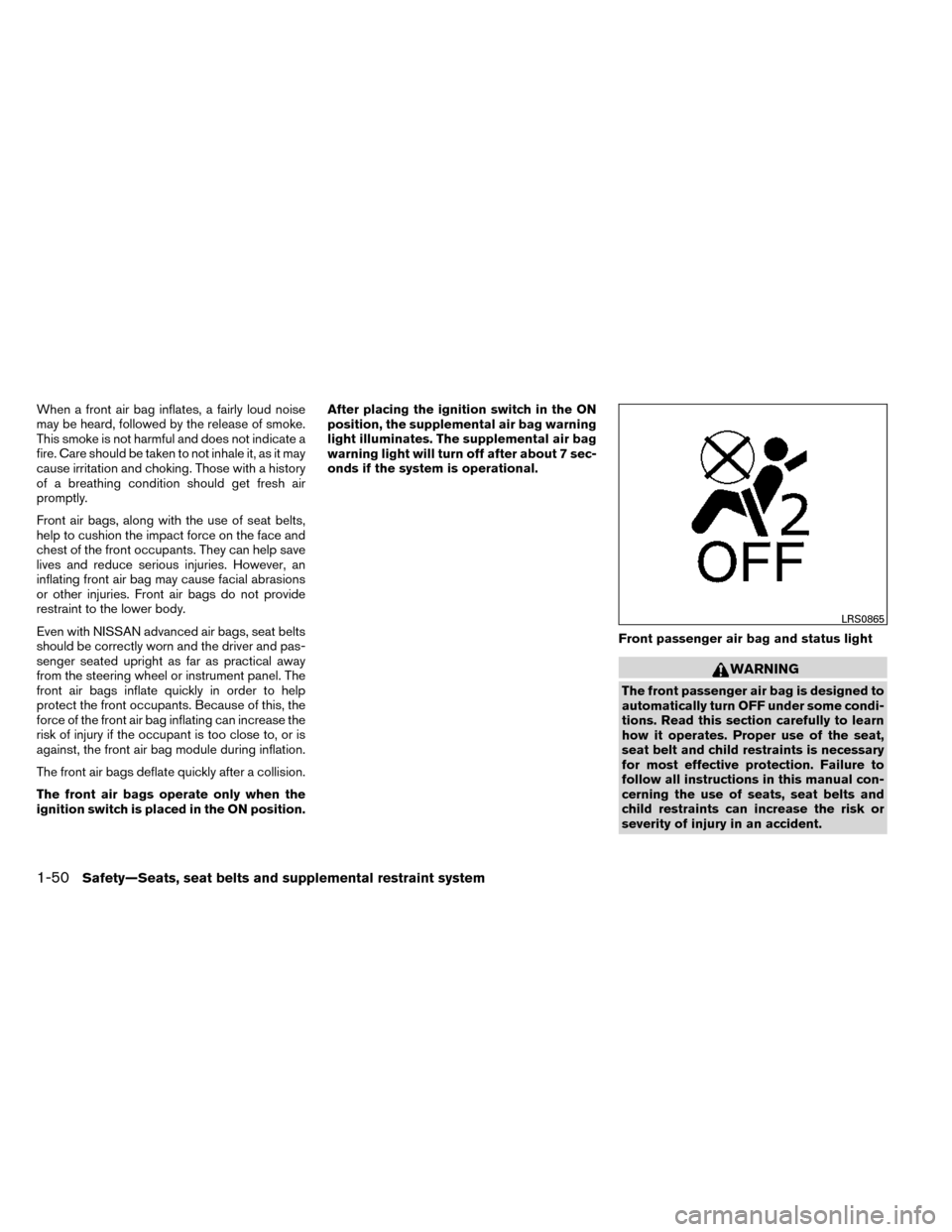
Front passenger air bag and status light
WARNING
The front passenger air bag is designed to
automatically turn OFF under some condi-
tions. Read this section carefully to learn
how it operates. Proper use of the seat,
seat belt and child restraints is necessary
for most effective protection. Failure to
follow all instructions in this manual con-
cerning the use of seats, seat belts and
child restraints can increase the risk or
severity of injury in an accident.
LRS0865
1-50Safety—Seats, seat belts and supplemental restraint system
Page 79 of 442
Using the passenger air bag status light, you can
monitor when the front passenger air bag is au-
tomatically turned OFF with the seat occupied.
The light will not illuminate when the front pas-
senger seat is unoccupied.
If an adult occupant is in the seat but the passen-
ger air bag status light is illuminated (indicating
that the air bag is OFF) , it could be that the
person is a small adult, or is not sitting on the seat
properly or not using the seat belt properly.
If a child restraint must be used in the front seat,
the passenger air bag status light may or may not
be illuminated, depending on the size of the child
and the type of child restraint being used. If the air
bag status light is not illuminated (indicating that
the air bag might inflate in a crash) , it could be
that the child restraint or seat belt is not being
used properly. Make sure that the child restraint is
installed properly, the seat belt is used properly
and the occupant is positioned properly. If the air
bag status light is not illuminated, reposition the
occupant or child restraint in a rear seat.
If the passenger air bag status light will not illu-
minate even though you believe that the child
restraint, the seat belts and the occupant are
properly positioned, the system may be sensing
an unoccupied seat (in which case the air bag is
OFF) . Your NISSAN dealer can check that the
system is OFF by using a special tool. However,until you have confirmed with your dealer that
your air bag is working properly, reposition the
occupant or child restraint in a rear seat.
The air bag system and passenger air bag status
light will take a few seconds to register a change
in the passenger seat status. For example, if a
large adult who is sitting in the front passenger
seat exits the vehicle, the passenger air bag
status light will go from OFF to ON for a few
seconds and then to OFF. This is normal system
operation and does not indicate a malfunction.
If a malfunction occurs in the front passenger air
bag system, the supplemental air bag warning
light
, located in the meter and gauges area
of the instrument panel, will blink. Have the sys-
tem checked by a NISSAN dealer.
Other supplemental front-impact air bag
precautions
WARNING
● Do not place any objects on the steering
wheel pad or on the instrument panel.
Also, do not place any objects between
any occupant and the steering wheel or
instrument panel. Such objects may be-
come dangerous projectiles and cause
injury if the front air bags inflate. ●
Immediately after inflation, several
front air bag system components will be
hot. Do not touch them; you may se-
verely burn yourself.
● No unauthorized changes should be
made to any components or wiring of
the supplemental air bag system. This is
to prevent accidental inflation of the
supplemental air bag or damage to the
supplemental air bag system.
● Do not make unauthorized changes to
your vehicle’s electrical system, sus-
pension system or front end structure.
This could affect proper operation of
the front air bag system.
● Tampering with the front air bag system
may result in serious personal injury.
Tampering includes changes to the
steering wheel and the instrument
panel assembly by placing material
over the steering wheel pad and above
the instrument panel or by installing
additional trim material around the air
bag system.
● Removing or modifying the front pas-
senger seat may affect the function of
the air bag and result in serious per-
sonal injury.
1-52Safety—Seats, seat belts and supplemental restraint system
Page 85 of 442
2 Instruments and controls
Instrument panel...................................2-2
Meters and gauges ................................2-3
Speedometer and odometer . . ...................2-4
Tachometer ....................................2-4
Engine coolant temperature gauge ...............2-5
Fuel gauge ....................................2-5
Compass display (if so equipped) ...................2-6
Compass display ...............................2-6
Warning/indicator lights and audible reminders .......2-9
Checking bulbs ................................2-9
Warning lights .................................2-9
Indicator lights ................................ 2-14
Audible reminders ............................. 2-16
Vehicle Information Display ........................2-17
How to use the vehicle information display .......2-17
Startup display ................................ 2-18
Settings ...................................... 2-18
Vehicle information display warnings and
indicators ..................................... 2-27
Security systems ................................. 2-30
Vehicle security system ......................... 2-30
NISSAN vehicle immobilizer system .............2-31
Windshield wiper and washer switch ...............2-32Switch operation
.............................. 2-33
Rear window wiper and washer switch ..............2-33
Rear window and outside mirror (if so equipped)
defroster switch .................................. 2-34
Headlight and turn signal switch ....................2-35
Headlight control switch ........................ 2-35
Daytime running light system ....................2-37
Instrument brightness control ...................2-37
Turn signal switch ............................. 2-38
Fog light switch (if so equipped) ................2-38
Horn ............................................ 2-38
Heated seats (if so equipped) ......................2-39
Vehicle Dynamic Control (VDC) off switch ...........2-40
All-wheel drive (AWD) lock switch (if so equipped) . . . 2-40
SPORT mode switch (if so equipped) ...............2-40
Hill descent control (HDC) switch (if so equipped) . . . 2-41
Warning systems switch (if so equipped) ............2-42
Power outlets .................................... 2-42
12v
outlets ................................... 2-42
Storage ......................................... 2-44
Seatback pockets ............................. 2-44
Sunglasses holder ............................. 2-44
Cup holders . . . ............................... 2-45
Page 88 of 442
20. Vehicle Dynamic Control (VDC) OFFswitch (P. 2-40)
Sport mode switch (P. 2-40)
Power liftgate switch (if so equipped)
(P.3-23)
Power liftgate main switch
(if so equipped) (P. 3-26)
Warning systems switch
(if so equipped) (P.2-42)
All-Wheel Drive (AWD) lock switch
(if so equipped) (P.2-40)
Hill descent control switch
(if so equipped) (P.2-41)
21. Instrument brightness control
(P. 2-37)/Twin trip odometer reset
switch (P. 2-4)
*: Refer to the separate Navigation System Own-
er’s Manual (if so equipped) .
See the page number indicated in paren-
theses for operating details.
1. Tachometer
2. Warning/indicator lights
3. Vehicle Information Display/Odometer/Twin trip odometer
4. Speedometer
5. Fuel gauge 6. Engine coolant temperature gauge
LIC2627
METERS AND GAUGES
Instruments and controls2-3
Page 94 of 442
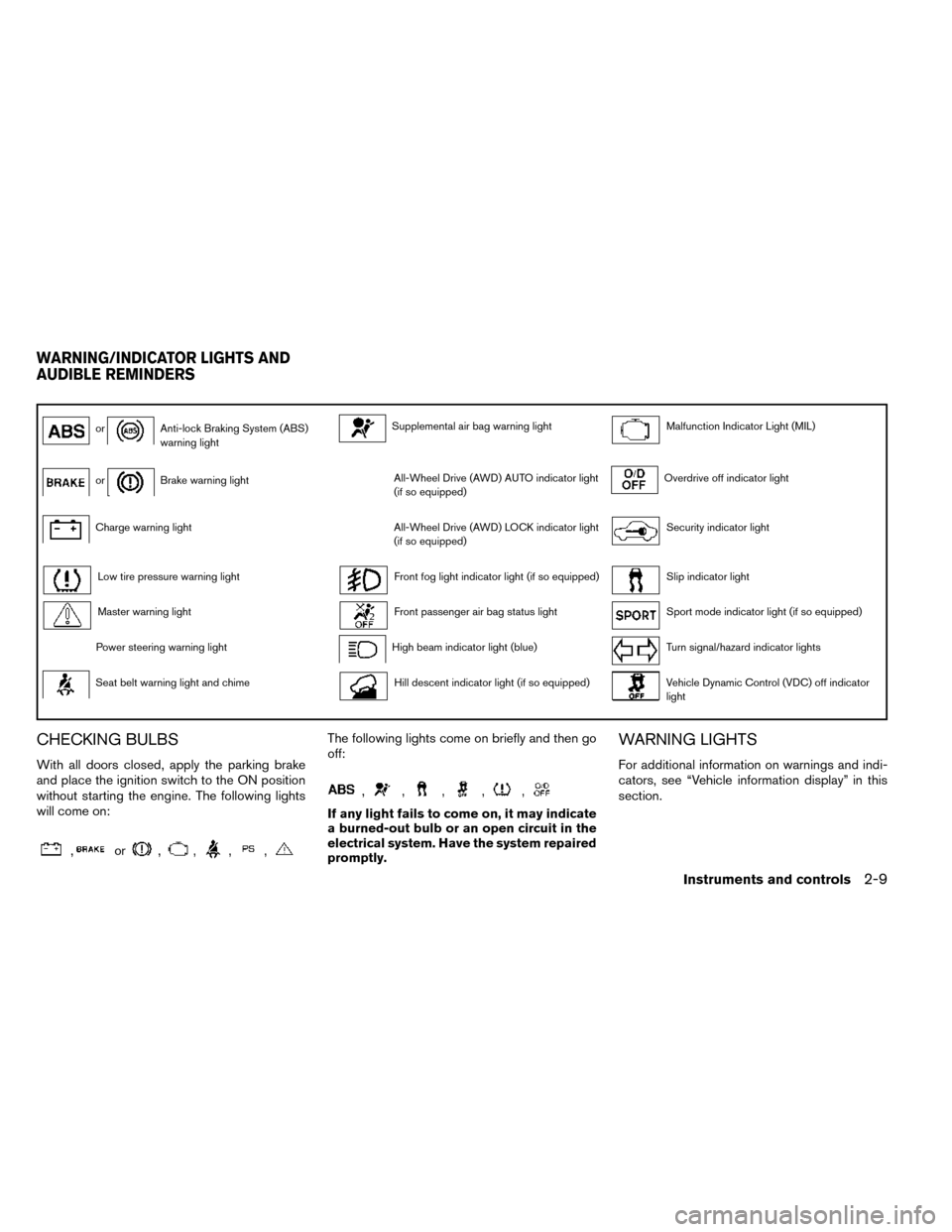
orAnti-lock Braking System (ABS)
warning lightSupplemental air bag warning lightMalfunction Indicator Light (MIL)
orBrake warning lightAll-Wheel Drive (AWD) AUTO indicator light
(if so equipped)Overdrive off indicator light
Charge warning lightAll-Wheel Drive (AWD) LOCK indicator light
(if so equipped)Security indicator light
Low tire pressure warning lightFront fog light indicator light (if so equipped)Slip indicator light
Master warning lightFront passenger air bag status lightSport mode indicator light (if so equipped)
Power steering warning lightHigh beam indicator light (blue)Turn signal/hazard indicator lights
Seat belt warning light and chimeHill descent indicator light (if so equipped)Vehicle Dynamic Control (VDC) off indicator
light
CHECKING BULBS
With all doors closed, apply the parking brake
and place the ignition switch to the ON position
without starting the engine. The following lights
will come on:
,or,,,,
The following lights come on briefly and then go
off:
,,,,,
If any light fails to come on, it may indicate
a burned-out bulb or an open circuit in the
electrical system. Have the system repaired
promptly.
WARNING LIGHTS
For additional information on warnings and indi-
cators, see “Vehicle information display” in this
section.
WARNING/INDICATOR LIGHTS AND
AUDIBLE REMINDERS
Instruments and controls2-9
Page 97 of 442
●If the light illuminates while driving,
avoid sudden steering maneuvers or
abrupt braking, reduce vehicle speed,
pull off the road to a safe location and
stop the vehicle as soon as possible.
Driving with under-inflated tires may per-
manently damage the tires and increase
the likelihood of tire failure. Serious ve-
hicle damage could occur and may lead
to an accident and could result in serious
personal injury. Check the tire pressure
for all four tires. Adjust the tire pressure
to the recommended COLD tire pressure
shown on the Tire and Loading Informa-
tion label located in the driver’s door
opening to turn the low tire pressure
warning light OFF. If the light still illumi-
nates while driving after adjusting the
tire pressure, a tire may be flat. If you
have a flat tire, replace it with a spare tire
as soon as possible.
● When a spare tire is mounted or a wheel
is replaced tire pressure will not be in-
dicated, the TPMS will not function and
the low tire pressure warning light will
flash for approximately 1 minute. The
light will remain on after 1 minute. Con-
tact your NISSAN dealer as soon as
possible for tire replacement and/or
system resetting. ●
Replacing tires with those not originally
specified by NISSAN could affect the
proper operation of the TPMS.
CAUTION
● The TPMS is not a substitute for the
regular tire pressure check. Be sure to
check the tire pressure regularly.
● If the vehicle is being driven at speeds
of less than 16 MPH (25 km/h), the
TPMS may not operate correctly.
● Be sure to install the specified size of
tires to the 4 wheels correctly.
Master warning light
When the ignition is in the ON position, the
master warning light illuminates if any of the fol-
lowing are displayed on the vehicle information
display.
● All-Wheel Drive (AWD) Tire Size Incorrect
See Owner’s Manual
● All-Wheel Drive (AWD) High Temp. Stop
vehicle
● All-Wheel Drive (AWD) Error See Owner’s
Manual
● No key warning ●
Low fuel warning
● Low windshield-washer fluid warning
● Parking brake release warning
● Door/liftgate open warning
● Loose fuel cap
If the All-Wheel Drive (AWD) system malfunc-
tions, or the diameter of the front and the rear
wheels are different, the master warning light will
illuminate. (See “All-Wheel Drive (AWD)” in the
“Starting and Driving” section.) ● If the warning light comes on while driving
there may be a malfunction in the AWD
system. Reduce the vehicle speed and have
your vehicle checked by a NISSAN dealer as
soon as possible.
CAUTION
● If the master warning light was illumi-
nated while driving:
—AWD High Temp Stop vehicle
Pull off the road in a safe area and idle the
engine. The driving mode will change to
2WD to prevent the AWD system from
malfunctioning. If the warning light turns
off, you can drive again.
2-12Instruments and controls
Page 99 of 442
WARNING
If the supplemental air bag warning light
is on, it could mean that the front air bag,
side air bag, curtain air bag and/or preten-
sioner systems will not operate in an acci-
dent. To help avoid injury to yourself or
others, have your vehicle checked by a
NISSAN dealer as soon as possible.
INDICATOR LIGHTS
For additional information on warnings and indi-
cators, see “Vehicle information display” in this
section.
All-Wheel Drive (AWD) AUTOindicator light (if so equipped)
When the ignition switch is in the “ON” position,
the All-Wheel Drive (AWD) AUTO indicator light
illuminates.
If the master warning light comes on during op-
eration, have your vehicle checked by a NISSAN
dealer as soon as possible.
All-Wheel Drive (AWD) LOCKindicator light (if so equipped)
When the ignition switch is in the “ON” position,
the All-Wheel Drive (AWD) LOCK indicator light
illuminates and then turns off. When selecting AWD LOCK mode while the
engine is running, the AWD LOCK indicator light
illuminates.
CAUTION
Do not drive on dry hard surface roads in
the LOCK mode.
Front fog light indicator light (if
so equipped)
The front fog light indicator light illuminates when
the front fog lights are ON. For additional infor-
mation, refer to “Fog light switch” in this section.
Front passenger air bag statuslight
The front passenger air bag status light will be lit
and the passenger front air bag will be OFF
depending on how the front passenger seat is
being used.
For front passenger air bag status light operation,
see “Front passenger air bag and status light” in
the “Safety — Seats, seat belts and supplemental
restraint system” section of this manual.
High beam indicator light(blue)
This blue light comes on when the headlight high
beams are on and goes out when the low beams
are selected.
The high beam indicator light also comes on
when the passing signal is activated.
Hill descent control system onindicator light (if so equipped)
When the ignition switch is placed in the ON
position, this light comes on briefly and then turns
off.
The light comes on when the hill descent control
system is activated.
If the hill descent control switch is on and the
indicator light blinks, the system is not engaged.
If the indicator light does not come on when the
hill descent switch is on, the system may not be
functioning properly. Have the system checked
by a NISSAN dealer.
For additional information, refer to “Hill descent
control (HDC) switch” in this section and “Hill
descent control (HDC) system” in the “Starting
and driving” section of this manual.
2-14Instruments and controls