brake NISSAN ROGUE 2017 2.G Owners Manual
[x] Cancel search | Manufacturer: NISSAN, Model Year: 2017, Model line: ROGUE, Model: NISSAN ROGUE 2017 2.GPages: 547, PDF Size: 6.47 MB
Page 17 of 547
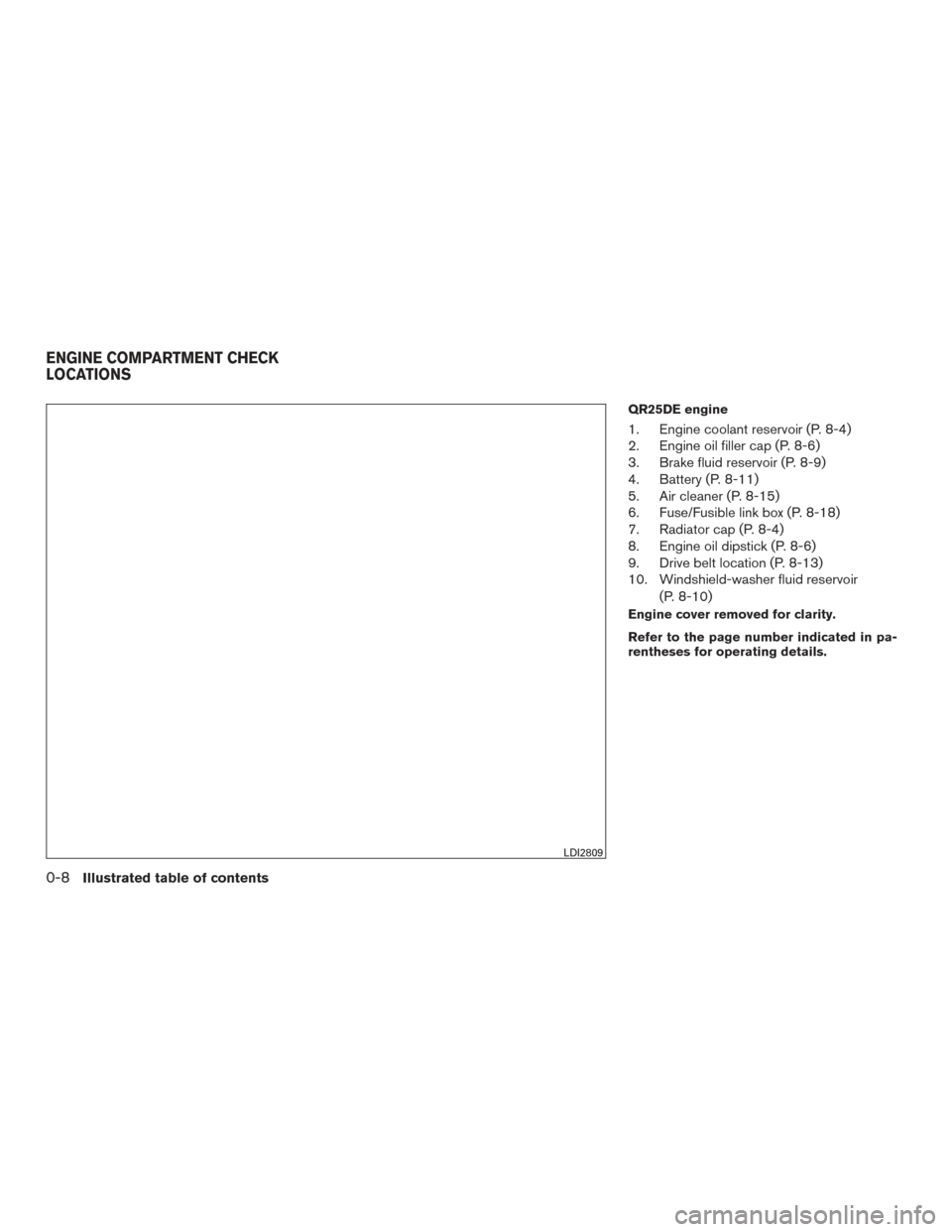
QR25DE engine
1. Engine coolant reservoir (P. 8-4)
2. Engine oil filler cap (P. 8-6)
3. Brake fluid reservoir (P. 8-9)
4. Battery (P. 8-11)
5. Air cleaner (P. 8-15)
6. Fuse/Fusible link box (P. 8-18)
7. Radiator cap (P. 8-4)
8. Engine oil dipstick (P. 8-6)
9. Drive belt location (P. 8-13)
10. Windshield-washer fluid reservoir(P. 8-10)
Engine cover removed for clarity.
Refer to the page number indicated in pa-
rentheses for operating details.
LDI2809
ENGINE COMPARTMENT CHECK
LOCATIONS
0-8Illustrated table of contents
Page 18 of 547
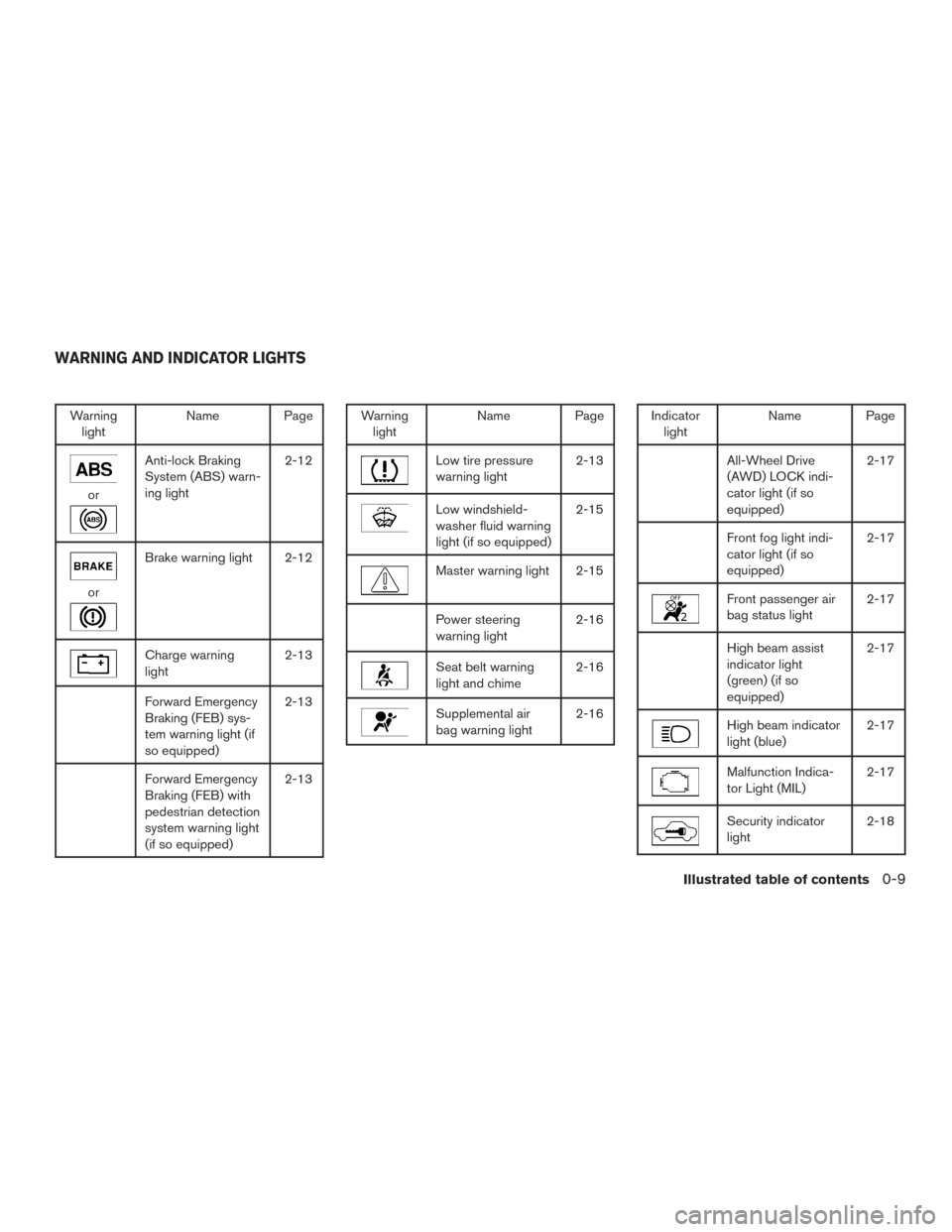
Warninglight Name Page
or
Anti-lock Braking
System (ABS) warn-
ing light 2-12
or
Brake warning light 2-12
Charge warning
light
2-13
Forward Emergency
Braking (FEB) sys-
tem warning light (if
so equipped)2-13
Forward Emergency
Braking (FEB) with
pedestrian detection
system warning light
(if so equipped)2-13
Warning
light Name Page
Low tire pressure
warning light 2-13
Low windshield-
washer fluid warning
light (if so equipped)2-15
Master warning light 2-15
Power steering
warning light
2-16
Seat belt warning
light and chime2-16
Supplemental air
bag warning light2-16
Indicator
light Name Page
All-Wheel Drive
(AWD) LOCK indi-
cator light (if so
equipped) 2-17
Front fog light indi-
cator light (if so
equipped)
2-17
Front passenger air
bag status light
2-17
High beam assist
indicator light
(green) (if so
equipped)2-17
High beam indicator
light (blue)
2-17
Malfunction Indica-
tor Light (MIL)2-17
Security indicator
light2-18
WARNING AND INDICATOR LIGHTS
Illustrated table of contents0-9
Page 96 of 547
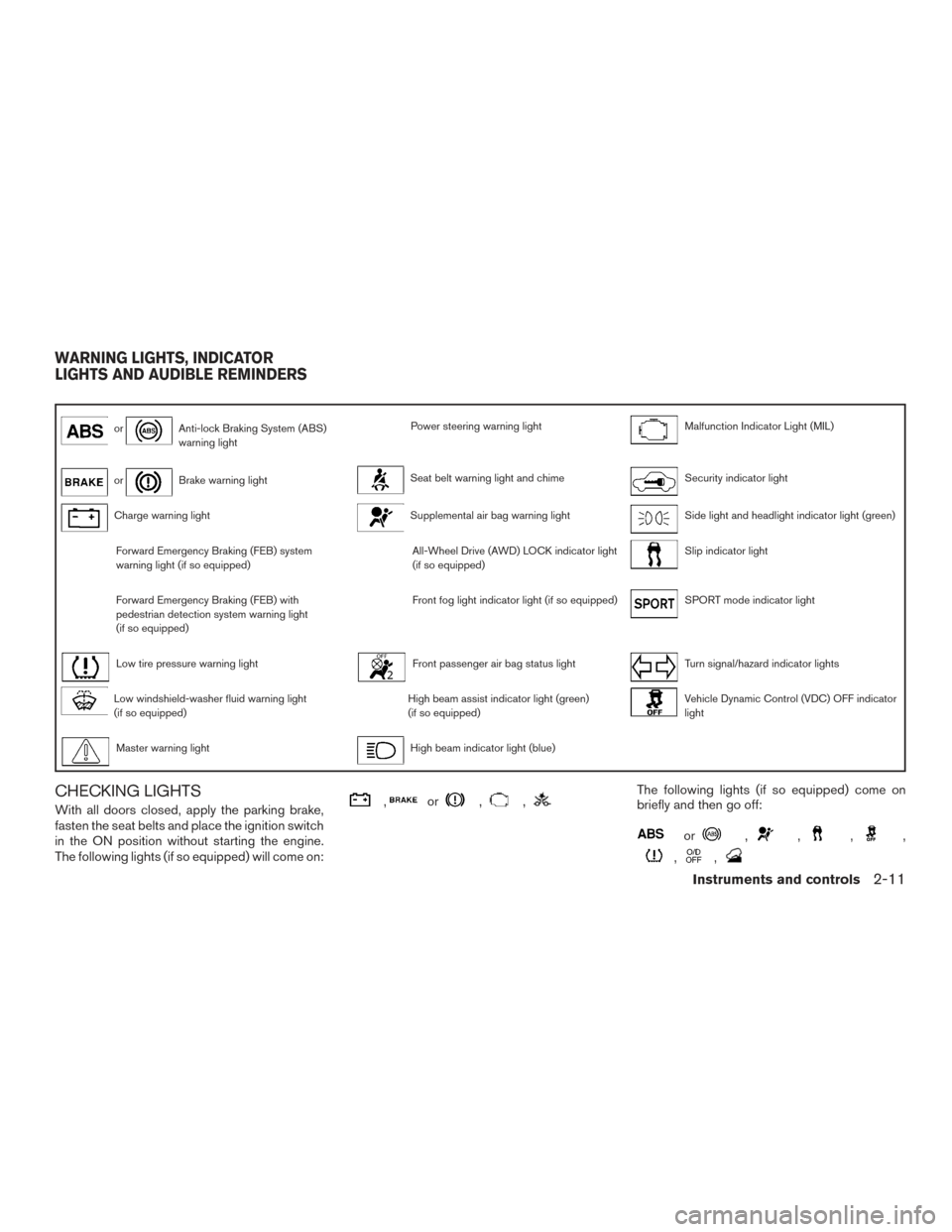
orAnti-lock Braking System (ABS)
warning lightPower steering warning lightMalfunction Indicator Light (MIL)
orBrake warning lightSeat belt warning light and chimeSecurity indicator light
Charge warning lightSupplemental air bag warning lightSide light and headlight indicator light (green)
Forward Emergency Braking (FEB) system
warning light (if so equipped)All-Wheel Drive (AWD) LOCK indicator light
(if so equipped)Slip indicator light
Forward Emergency Braking (FEB) with
pedestrian detection system warning light
(if so equipped)Front fog light indicator light (if so equipped)SPORT mode indicator light
Low tire pressure warning lightFront passenger air bag status lightTurn signal/hazard indicator lights
Low windshield-washer fluid warning light
(if so equipped)High beam assist indicator light (green)
(if so equipped)Vehicle Dynamic Control (VDC) OFF indicator
light
Master warning lightHigh beam indicator light (blue)
CHECKING LIGHTS
With all doors closed, apply the parking brake,
fasten the seat belts and place the ignition switch
in the ON position without starting the engine.
The following lights (if so equipped) will come on:,or,,The following lights (if so equipped) come on
briefly and then go off:
or,,,,
,,
WARNING LIGHTS, INDICATOR
LIGHTS AND AUDIBLE REMINDERS
Instruments and controls2-11
Page 97 of 547
If any light fails to come on or operate in a way
other than described, it may indicate a burned-
out bulb and/or a system malfunction. Have the
system checked. It is recommended that you visit
a NISSAN dealer for this service.
Some indicators and warnings are also displayed
on the vehicle information display between the
speedometer and tachometer. For additional in-
formation, refer to “Vehicle information display” in
this section.
WARNING LIGHTS
For additional information, refer to “Vehicle infor-
mation display” in this section.
orAnti-lock BrakingSystem (ABS)
warning light
When the ignition switch is placed in the ON
position, the ABS warning light illuminates and
then turns off. This indicates the ABS is opera-
tional.
If the ABS warning light illuminates while the
engine is running or while driving, it may indicate
the ABS is not functioning properly. Have the
system checked. It is recommended that you visit
a NISSAN dealer for this service. If an ABS malfunction occurs, the anti-lock func-
tion is turned off. The brake system then operates
normally but without anti-lock assistance. For
additional information, refer to “Brake system” in
the “Starting and driving” section of this manual.
orBrake warning light
This light functions for both the parking brake and
the foot brake systems.
Low brake fluid warning light
When the ignition switch is placed in the ON
position, the light warns of a low brake fluid level.
If the light comes on while the engine is running,
with the parking brake not applied, stop the ve-
hicle and perform the following:
1. Check the brake fluid level. Add brake fluid as necessary. For additional information, re-
fer to “Brake fluid” in the “Do-it-yourself”
section of this manual.
2. If the brake fluid level is correct, have the warning system checked. It is recommended
that you visit a NISSAN dealer for this ser-
vice.
WARNING
●Your brake system may not be working
properly if the warning light is on. Driv-
ing could be dangerous. If you judge it
to be safe, drive carefully to the nearest
service station for repairs. Otherwise,
have your vehicle towed because driv-
ing it could be dangerous.
● Pressing the brake pedal with the en-
gine stopped and/or a low brake fluid
level may increase your stopping dis-
tance and braking will require greater
pedal effort as well as pedal travel.
● If the brake fluid level is below the
MINIMUM or MIN mark on the brake
fluid reservoir, do not drive until the
brake system has been checked. It is
recommended that you visit a NISSAN
dealer for this service.
Anti-lock Braking System (ABS) warning
indicator
When the parking brake is released and the
brake fluid level is sufficient, if both the brake
warning light and the ABS warning light illumi-
nate, it may indicate the ABS is not functioning
properly. Have the brake system checked and, if
necessary, repaired. It is recommended that you
visit a NISSAN dealer for this service. Avoid
2-12Instruments and controls
Page 100 of 547
●Since the spare tire is not equipped with
the TPMS, when a spare tire is mounted
or a wheel is replaced, the TPMS will
not function and the low tire pressure
warning light will flash for approxi-
mately 1 minute. The light will remain
on after 1 minute. Have your tires re-
placed and/or TPMS system reset as
soon as possible. It is recommended
that you visit a NISSAN dealer for these
services.
● Replacing tires with those not originally
specified by NISSAN could affect the
proper operation of the TPMS.
CAUTION
● The TPMS is not a substitute for the
regular tire pressure check. Be sure to
check the tire pressure regularly.
● If the vehicle is being driven at speeds
of less than 16 mph (25 km/h), the
TPMS may not operate correctly.
● Be sure to install the specified size of
tires to the four wheels correctly.
Low windshield-washer fluid
warning light (if so equipped)
This light comes on when the windshield-washer
fluid is at a low level. Add windshield-washer fluid
as necessary. For additional information, refer to
“Windshield-washer fluid” in the “Do-it-yourself”
section of this manual.
Master warning light
When the ignition is in the ON position, the
master warning light illuminates if any of the fol-
lowing are displayed on the vehicle information
display.
● All-Wheel Drive (AWD) Tire Size Incorrect
See Owner’s Manual
● All-Wheel Drive (AWD) High Temp. Stop
vehicle
● All-Wheel Drive (AWD) Error See Owner’s
Manual
● No key warning
● Low fuel warning
● Low windshield-washer fluid warning
● Parking brake release warning
● Door/liftgate open warning
● Loose fuel cap warning If the All-Wheel Drive (AWD) system malfunc-
tions, or the diameter of the front and the rear
wheels are different, the master warning light will
illuminate. For additional information, refer to “All-
Wheel Drive (AWD)” in the “Starting and driving”
section of this manual.
● If the warning light comes on while driving
there may be a malfunction in the AWD
system. Reduce the vehicle speed and have
your vehicle checked as soon as possible. It
is recommended that you visit a NISSAN
dealer for this service.
CAUTION
● If the master warning light was illumi-
nated while driving:
—AWD High Temp Stop vehicle
Pull off the road in a safe area and idle the
engine. The driving mode will change to
2WD to prevent the AWD system from
malfunctioning. If the warning light turns
off, you can drive again.
—Tire Size Incorrect See Owner’s Manual
Pull off the road in a safe area and idle the
engine. Check that all tire sizes are the
same, tire pressure is correct and tires are
not worn.
Instruments and controls2-15
Page 104 of 547
SPORT mode indicator light
This light illuminates and then turns off when the
ignition switch is placed in the ON position, and
when the SPORT mode is selected.
For additional information, refer to “Continuously
Variable Transmission (CVT)” in the “Starting and
driving” section of this manual.
Turn signal/hazard indicatorlights
The appropriate light flashes when the turn signal
switch is activated.
Both lights flash when the hazard switch is turned
on.
Vehicle Dynamic Control(VDC) OFF indicator light
This indicator light comes on when the VDC OFF
switch is pushed to off. This indicates the VDC
system has been turned off.
Push the VDC OFF switch again or restart the
engine and the system will operate normally. For
additional information, refer to “Vehicle Dynamic
Control (VDC) system” in the “Starting and driv-
ing” section of this manual.
The VDC indicator light also comes on when you
place the ignition switch in the ON position. The light will turn off after about 2 seconds if the
system is operational. If the light stays on or
comes on along with the
indicator light
while you are driving, have the VDC system
checked. It is recommended that you visit a
NISSAN dealer for this service.
While the VDC system is operating, you might
feel a slight vibration or hear the system working
when starting the vehicle or accelerating, but this
is normal.
AUDIBLE REMINDERS
Brake pad wear warning
The disc brake pads have audible wear warnings.
When a disc brake pad requires replacement, it
makes a high pitched scraping sound when the
vehicle is in motion, whether or not the brake
pedal is depressed. Have the brakes checked as
soon as possible if the warning sound is heard.
Key reminder chime
A chime sounds if the driver’s door is opened
while the ignition switch is placed in the OFF
position or placed in the OFF or LOCK position
with the key left in the vehicle. Make sure the
ignition switch is placed in the LOCK position,
and take the key with you when leaving the ve-
hicle.
Light reminder chime
With the ignition switch placed in the OFF posi-
tion, a chime sounds when the driver’s door is
opened if the headlights or parking lights are on.
Turn the headlight control switch off before leav-
ing the vehicle.
NISSAN Intelligent Key® door buzzer
(if so equipped)
The Intelligent Key door buzzer sounds if any one
of the following improper operations is found.
● The Intelligent Key is left inside the vehicle
when locking the doors.
● Any doors are not closed securely when
locking the doors.
When the buzzer sounds, be sure to check both
the vehicle and the Intelligent Key. For additional
information, refer to “NISSAN Intelligent Key®” in
the “Pre-driving checks and adjustments” section
of this manual.
Instruments and controls2-19
Page 107 of 547
Driver Assistance
The driver assistance menu allows the user to change the settings for driving, parking, and braking aids.
Menu itemResult
Driving Aids (if so equipped) Displays available driving aids
Lane Displays available lane options
Warning Allows user to turn the Lane Departure Warning (LDW) warning on or off. For additional information, refer to “Lane Departure
Warning (LDW)” in the “Starting and driving” section of this manual.
Assist Allows user to turn the Lane Departure Prevention (LDP) feature on or off. For additional information, refer to “Lane Departure
Prevention (LDP)” in the “Starting and driving” section of this manual.
Blind Spot Displays available blind spot options
Warning Allows user to turn Blind Spot Warning (BSW) on or off. For additional information, refer to “Blind Spot Warning (BSW)” in the
“Starting and driving” section of this manual.
Emergency Brake Allows user to turn the emergency brake feature on or off. For additional information, refer to “Forward Emergency Braking
(FEB)” in the “Starting and driving” section of this manual.
Parking Aids (if so equipped) Displays available parking aids
Moving Object Allows user to turn the Moving Object Detection (MOD) feature on or off. For additional information, refer to “Around View®
Monitor” in the “Monitor, climate, audio, phone and voice recognition systems” section of this manual.
Cross Traffic Allows user to turn the Rear Cross Traffic Alert (RCTA) feature on or off
Front Sensor Allows user to turn the front sensor on or off
Rear Sensor Allows user to turn the rear sensor on or off
Display Allows user to turn the display on or off
Volume Allows user to select sensor volume (High, Mid. or Low)
Range Allows user to select the sensor range (Far, Mid. or Near)
Chassis Control Displays available chassis controls options
Trace Control Allows user to turn the trace control feature on or off. For additional information, refer to “Active trace control” in the “Starting and
driving” section of this manual.
Engine Brake Allows user to turn the engine brake feature on or off. For additional information, refer to “Active engine brake” in the “Starting
and driving” section of this manual.
2-22Instruments and controls
Page 115 of 547
VEHICLE INFORMATION DISPLAY
WARNINGS AND INDICATORS
1. Engine start operation
2. No Key Detected (if so equipped)
3. Shift to Park
4. Key Battery Low (if so equipped)
5. Engine start operation for Intelligent Key sys-tem (if I-Key battery level is low) (if so
equipped)
6. Key ID incorrect (if so equipped)
7. Release Parking Brake
8. Low Fuel
9. Low Washer Fluid (if so equipped)
10. Door/liftgate Open
11. Key System Error: See Owner’s Manual (if so equipped)
12. Loose Fuel Cap
13. Tire Pressure Low — Add Air
14. Flat Tire — Visit dealer (if so equipped)
15. Low Oil Pressure Stop Vehicle
16. AWD Error: See Owner’s Manual (if so equipped) 17. AWD High Temp. Stop vehicle (if so
equipped)
18. Tire Size Incorrect: See Owner’s Manual (if so equipped)
19. Battery Voltage Low Charge Battery
20. Shipping Mode On Push Storage Fuse
21. Power will turn off to save the battery
22. Power turned off to save the battery
23. Reminder: Turn OFF Headlights
24. Headlight System Error: See Owner’s Manual (if so equipped)
25. Timer Alert — Time for a driver break?
26. Chassis Control System Error: See Owner’s Manual
27. Cruise control indicator (if so equipped)
28. Intelligent Cruise Control (ICC) indicators (if so equipped)
29. Transmission Shift Position Indicator
30. CVT Error: See Owner’s Manual
31. Malfunction: See Owner’s Manual
32. ECO mode indicator
33. Unavailable: High Cabin Temp (if so equipped) 34. Unavailable: Road is slippery (if so
equipped)
35. Unavailable: VDC OFF (if so equipped)
36. Unavailable: Front Radar Obstruction (if so equipped)
37. Side Radar Obstruction (if so equipped)
Engine start operation
This indicator appears when the shift lever is in
the P (Park) position.
This indicator means that the engine will start by
pushing the ignition switch with the brake pedal
depressed. You can start the engine from any
position of the ignition switch.
No Key Detected (if so equipped)
This warning appears when the Intelligent Key is
left outside the vehicle with the ignition switch in
the ON position. Make sure the Intelligent Key is
inside the vehicle.
For additional information about the Intelligent
Key, refer to “NISSAN Intelligent Key®” in the
“Pre-driving checks and adjustments” section of
this manual.
Shift to Park
This warning illuminates when the ignition switch
is in the OFF position and the shift lever is not in
2-30Instruments and controls
Page 116 of 547
the P (Park) position. Also, a chime sounds when
the ignition switch is in the OFF position.
If this warning illuminates, move the shift lever to
the P (Park) position and start the engine.
Key Battery Low (if so equipped)
This indicator illuminates when the Intelligent Key
battery is running out of power.
If this indicator illuminates, replace the battery
with a new one. For additional information, refer
to “Battery replacement” in the “Do-it-yourself”
section of this manual.
Engine start operation for Intelligent Key
system (if I-Key battery level is low) (if so
equipped)
This indicator appears when the battery of the
Intelligent Key is low and when the Intelligent Key
system and the vehicle are not communicating
normally.
If this appears, touch the ignition switch with the
Intelligent Key while depressing the brake pedal.
For additional information, refer to “NISSAN In-
telligent Key® battery discharge” in the “Starting
and driving” section of this manual.
Key ID incorrect (if so equipped)
This warning appears when the ignition switch is
placed from the OFF position and the IntelligentKey is not recognized by the system. You cannot
start the engine with an unregistered key.
For additional information, refer to “NISSAN In-
telligent Key®” in the “Pre-driving checks and
adjustments” section of this manual.
Release Parking Brake
This warning illuminates in the message area of
the vehicle information display when the parking
brake is set and the vehicle is driven.
Low Fuel
This warning illuminates when the fuel level in the
fuel tank is getting low. Refuel as soon as it is
convenient, preferably before the fuel gauge
reaches 0 (Empty) .
There will be a small re-
serve of fuel in the tank when the fuel
gauge needle reaches 0 (Empty) .
Low Washer Fluid (if so equipped)
This warning illuminates when the windshield-
washer fluid is at a low level. Add windshield-
washer fluid as necessary. For additional informa-
tion, refer to “Windshield-washer fluid” in the
“Do-it-yourself” section of this manual.
Door/liftgate Open
This warning illuminates when a door has been
opened when the engine is running. Key System Error: See Owner’s Manual (if
so equipped)
After the ignition switch is pushed to the ON
position, this light comes on for about 2 seconds
and then turns off.
The Key System Error message warns of a mal-
function with the Intelligent Key system. If the light
comes on while the engine is stopped, it may be
impossible to start the engine.
If the light comes on while the engine is running,
you can drive the vehicle. However in these
cases, contact a NISSAN dealer for repair as
soon as possible.
Loose Fuel Cap
This warning appears when the fuel-filler cap is
not tightened correctly after the vehicle has been
refueled. For additional information, refer to
“Fuel-filler cap” in the “Pre-driving checks and
adjustments” section of this manual.
Tire Pressure Low - Add Air
This warning appears when the low tire pressure
warning light in the meter illuminates and low tire
pressure is detected. The warning appears each
time the ignition switch is placed in the ON
position as long as the low tire pressure warning
light remains illuminated. If this warning appears,
stop the vehicle and adjust the tire pressures of
Instruments and controls2-31
Page 118 of 547
Chassis Control System Error: See Own-
er’s Manual
This warning appears if the Integrated Dynamics-
control Module detects an error in the Active
Trace Control, Active Engine Brake, or the Active
Ride Control systems. Have the system checked.
It is recommended that you visit a NISSAN dealer
for this service. For additional information, refer to
“Chassis control” in the “Starting and driving”
section of this manual.
Cruise control indicator (if so equipped)
This indicator shows the cruise control system
status.
For additional information, refer to “Cruise con-
trol” in the “Starting and driving” section of this
manual.
Intelligent Cruise Control (ICC) indicators
(if so equipped)
These indicators show the Intelligent Cruise
Control (ICC) system status. The status is shown
by color. For additional information, refer to “In-
telligent Cruise Control (ICC)” in the “Starting
and driving” section of this manual.
Transmission Shift Position Indicator
This indicator shows the transmission shift posi-
tion.CVT Error: See Owner’s Manual
This warning illuminates when there is a problem
with the CVT system. If this warning comes on,
have the system checked. It is recommended that
you visit a NISSAN dealer for this service.
Malfunction: See Owner’s Manual
This warning appears when the Forward Emer-
gency Braking (FEB) system is not functioning
properly.
ECO mode indicator
This indicator shows when the ECO mode is
engaged.
For additional information, refer to “ECO mode
switch” in the “Starting and driving” section of this
manual.
Unavailable: High Cabin Temp. (if so
equipped)
This message appears when the camera detects
an interior temperature of more than approxi-
mately 104°F (40°C) . For additional information,
refer to “Lane Departure Warning (LDW)” in the
“Starting and driving” section of this manual.
Unavailable: Road is slippery (if so
equipped)
This message appears when the Lane Departure
Prevention (LDP) system becomes unavailablebecause the road is slippery. For additional infor-
mation, refer to “Lane Departure Prevention
(LDP)” in the “Starting and driving” section of this
manual.
Unavailable: VDC OFF (if so equipped)
This message appears when the Lane Departure
Prevention (LDP) system becomes unavailable
because the VDC is turned off. For additional
information, refer to “Lane Departure Prevention
(LDP)” in the “Starting and driving” section of this
manual.
Unavailable: Front Radar Obstruction (if
so equipped)
This message appears when the Intelligent
Cruise Control (ICC) system become unavailable
because the front radar is obstructed. For addi-
tional information, refer to “Intelligent Cruise
Control (ICC)” in the “Starting and driving” sec-
tion of this manual.
Side Radar Obstruction (if so equipped)
This message appears when the Blind Spot
Warning (BSW)/Rear Cross Traffic Alert (RCTA)
systems become unavailable because a radar
blockage is detected. For additional information,
refer to “Blind Spot Warning (BSW)” or “Rear
Cross Traffic Alert (RCTA)” in the “Starting and
driving” section of this manual.
Instruments and controls2-33