alarm NISSAN ROGUE 2017 Owner´s Manual
[x] Cancel search | Manufacturer: NISSAN, Model Year: 2017, Model line: ROGUE, Model: NISSAN ROGUE 2017Pages: 554, PDF Size: 6.44 MB
Page 179 of 554
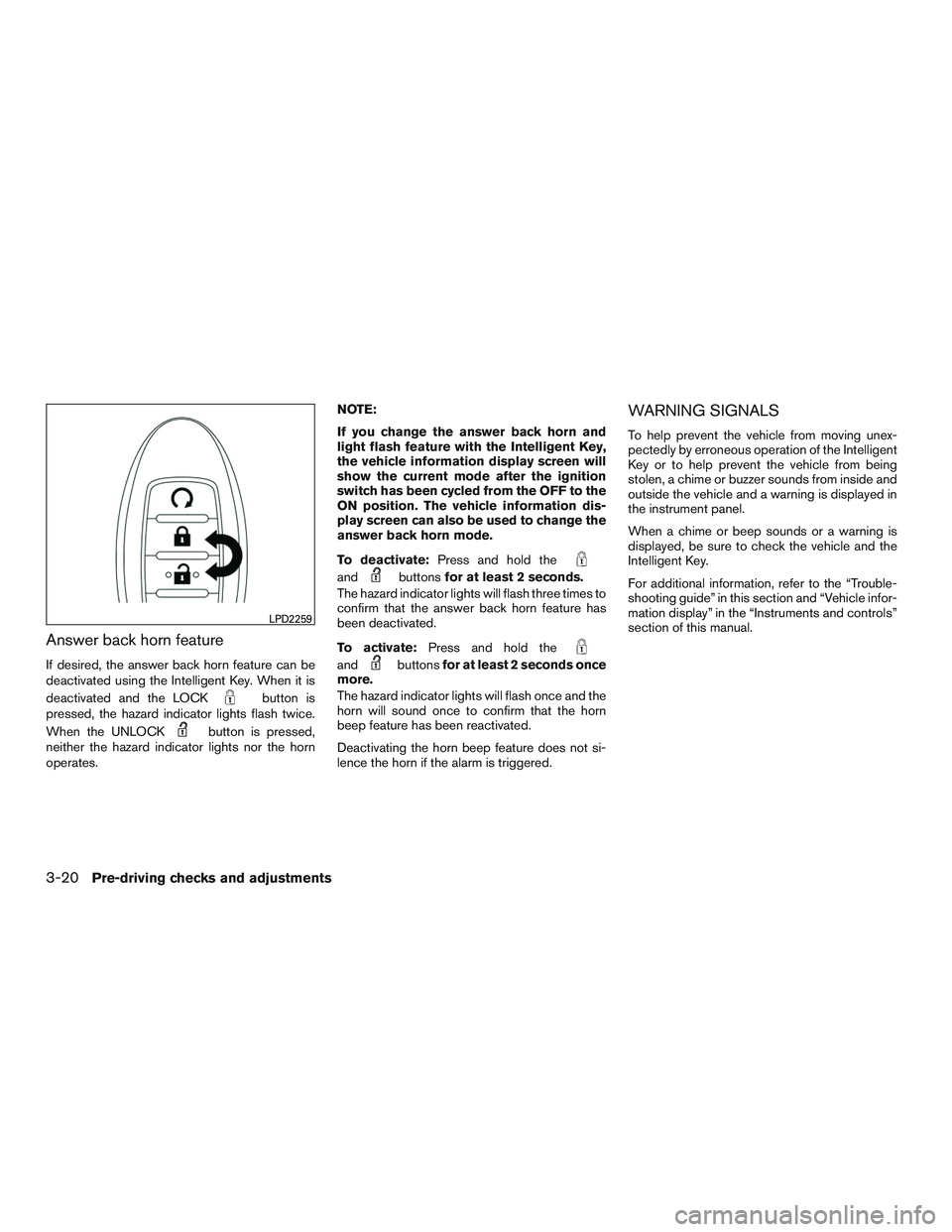
Answer back horn feature
If desired, the answer back horn feature can be
deactivated using the Intelligent Key. When it is
deactivated and the LOCK
button is
pressed, the hazard indicator lights flash twice.
When the UNLOCK
button is pressed,
neither the hazard indicator lights nor the horn
operates. NOTE:
If you change the answer back horn and
light flash feature with the Intelligent Key,
the vehicle information display screen will
show the current mode after the ignition
switch has been cycled from the OFF to the
ON position. The vehicle information dis-
play screen can also be used to change the
answer back horn mode.
To deactivate:
Press and hold the
andbuttonsfor at least 2 seconds.
The hazard indicator lights will flash three times to
confirm that the answer back horn feature has
been deactivated.
To activate: Press and hold the
andbuttonsfor at least 2 seconds once
more.
The hazard indicator lights will flash once and the
horn will sound once to confirm that the horn
beep feature has been reactivated.
Deactivating the horn beep feature does not si-
lence the horn if the alarm is triggered.
WARNING SIGNALS
To help prevent the vehicle from moving unex-
pectedly by erroneous operation of the Intelligent
Key or to help prevent the vehicle from being
stolen, a chime or buzzer sounds from inside and
outside the vehicle and a warning is displayed in
the instrument panel.
When a chime or beep sounds or a warning is
displayed, be sure to check the vehicle and the
Intelligent Key.
For additional information, refer to the “Trouble-
shooting guide” in this section and “Vehicle infor-
mation display” in the “Instruments and controls”
section of this manual.
LPD2259
3-20Pre-driving checks and adjustments
Page 184 of 554
●The alarm sounds due to illegal entry into the
vehicle.
● The ignition switch is pushed without an
Intelligent Key in the vehicle.
● The ignition switch is pushed with an Intelli-
gent Key in the vehicle but the brake pedal is
not depressed.
CONDITIONS THE REMOTE START
WILL NOT WORK
The remote start will not operate if any of the
following conditions are present:
● “Remote Engine Start” is turned off in the
“Locking” section of the Vehicle Settings
menu.
● The ignition switch is placed in the ON po-
sition.
● The hood is not securely closed.
● The hazard warning lights are on.
● The engine is still running. The engine must
be completely stopped. Wait at least 6 sec-
onds if the engine goes from running to off.
This is not applicable when extending en-
gine run time. ●
The remote start button
is not pressed
and held for at least 2 seconds.
● The remote start button
is not pressed
and held within 5 seconds of pressing the
lock button.
● The brake is pressed.
● The doors are not closed and locked.
● The liftgate is open.
● The Intelligent Key warning message ap-
pears in the vehicle information display.
● The alarm sounds due to illegal entry into the
vehicle.
● Two remote vehicle starts, or a single remote
start with an extension, have already been
used.
● The vehicle is not in P (Park) .
● There is a detected registered key already
inside of the vehicle.
● The remote start function has been switched
to the OFF position in Vehicle Settings of the
vehicle information display. For additional
information, refer to “Vehicle information dis-
play” in the “Instruments and controls” sec-
tion of this manual. The remote engine start may display a warning or
indicator in the vehicle information display. For
additional information, refer to “Vehicle informa-
tion display” in the “Instruments and controls”
section of this manual.
Pre-driving checks and adjustments3-25
Page 538 of 554
11 Index
2nd row bench seat adjustment.........1-6
A
Aiming control, headlights ...........2-44
Air bag (See supplemental restraint
system) .....................1-46
Air bag system Front (See supplemental front impact air bag
system) ...................1-53
Airbagwarninglabels.............1-63
Airbagwarninglight...........1-64,2-16
Air bag warning light, supplemental . .1-64, 2-16
Air cleaner housing filter ............8-14
Air conditioner Air conditioner operation ......4-35,4-41
Air conditioner specification label ....10-11
Air conditioner system refrigerant and
oil recommendations ............10-6
Air conditioner system refrigerant
recommendations ..............10-6
Heater and air conditioner
controls................4-33,4-41
Servicing air conditioner ..........4-43
Airflowcharts..................4-37
Alarm system
(See vehicle security system) .........2-34
All-Wheel Drive .................5-99
Anchor point locations .............1-30
Antenna .....................4-77
Antifreeze ...................5-112
Anti-lock brake warning light ..........2-12Anti-lock Braking System (ABS)
.......5-104
Apps .......................4-77
Armrests .....................1-6
AroundView®Monitor.............4-17
Audible reminders ...............2-19
Audio system ..................4-44
AMradioreception.............4-44
Bluetooth®audio..........4-73,4-74
Bluetooth® streaming audio ....4-73,4-74
Compact disc (CD) player .....4-55,4-62
FM/AM/SAT radio with compact disc (CD)
player.................4-52,4-57
FMradioreception.............4-44
iPod® Player .............4-68,4-70
iPod® player operation .......4-68,4-70
Radio ....................4-44
USB interface ............4-64,4-66
USB (Universal Serial Bus) Connection
Port..................4-64,4-66
Autolight switch .................2-40
Automatic Automatic drive positioner .....3-41,3-43
Automatic power window switch .....2-63
Automatic anti-glare inside mirror .......3-39
Automatic door locks ..............3-7
Automatic drive positioner .......3-41,3-43
AUXjack ....................4-64
AWD.......................5-99
B
Battery .................5- 112, 8-10Charge warning light
............2-13
Battery replacement ..............8-21
Keyfob ...................8-21
NISSAN Intelligent Key® ......8-23,8-24
Before starting the engine ...........5-18
Belt (See drive belt) ..............8-13
Blind Spot Warning (BSW) warning
system......................5-38
Bluetooth® audio ............4-73,4-74
Bluetooth® hands-free phone
system..................4-82,4-95
Bluetooth® streaming audio with Navigation
System .....................4-74
Boosterseats..................1-43
Brake Anti-lock Braking System (ABS) .....5-104
Brake fluid ..................8-9
Brakelight(Seestoplight).........8-27
Brake system ...............5-103
Brakewarninglight.............2-12
Brakewearindicators........2-19,8-17
Parking brake operation ..........5-25
Self-adjusting brakes ............8-17
Brake assist ..................5-105
Brake fluid ....................8-9
Brakes ......................8-17
Brake
system .................5-103
Break-inschedule ...............5-97
Brightness/contrast button ...........4-10
Brightness control Instrument panel ..............2-45
Bulb check/instrument panel ..........2-12
Bulbreplacement................8-27