fog light NISSAN ROGUE 2017 Owner´s Manual
[x] Cancel search | Manufacturer: NISSAN, Model Year: 2017, Model line: ROGUE, Model: NISSAN ROGUE 2017Pages: 554, PDF Size: 6.44 MB
Page 239 of 554
Cooling
This mode is used to cool and dehumidify the air.1. Press the
air flow control button.
2. Turn the
fan control dial to the desired
position.
3. Press the
button.
4. Turn the temperature control dial to the de- sired position.
● For quick cooling, press the MAX A/C but-
ton. When the MAX A/C button is pressed, it
will activate the
mode. The amount of
air coming through the vents is the highest it
can go when in MAX A/C mode regardless
of the position of the
fan control dial.
Dehumidified heating
This mode is used to heat and dehumidify the air.
1. Press the
button to the OFF position.
2. Press the
air flow control button.
3. Turn the
fan control dial to the desired
position.
4. Press the A/C button. The indicator light comes on. 5. Turn the temperature control dial to the de-
sired position.
Dehumidified defogging
This mode is used to defog the windows and
dehumidify the air.
1. Press the
front defrost button.
2. Turn the
fan control dial to the desired
position.
● When the
orare selected, the
air conditioner automatically turns on if the
outside temperature is more than 36°F
(2°C) . This dehumidifies the air which helps
defog the windshield. The
mode au-
tomatically turns off, allowing outside air to
be drawn into the passenger compartment
to further improve the defogging perfor-
mance.
● The air conditioner is always on in
ormode, regardless of whether the
indicator light is on or off.
3. Turn the temperature control dial to the de- sired position.
Operating tips
●Keep the windows and moonroof (if so
equipped) closed while the air conditioner is
in operation.
● After parking in the sun, drive for 2 or 3 min-
utes with the windows open to vent hot air
from the passenger compartment. Then,
close the windows. This allows the air con-
ditioner to cool the interior more quickly.
● The air conditioning system should be
operated for approximately 10 minutes
at least once a month. This helps pre-
vent damage to the system due to lack
of lubrication.
● A visible mist may be seen coming from the
ventilators in hot, humid conditions as the air
is cooled rapidly. This does not indicate a
malfunction.
● If the engine coolant temperature
gauge indicates engine coolant tem-
perature over the normal range, turn
the air conditioner off. For additional
information, refer to “If your vehicle
overheats” in the “In case of emer-
gency” section of this manual.
4-36Monitor, climate, audio, phone and voice recognition systems
Page 244 of 554
NOTE:● Odors from inside and outside the vehicle
can build up in the air conditioner unit. Odor
can enter the passenger compartment
through the vents.
● When parking, set the heater and air condi-
tioner controls to turn off air recirculation to
allow fresh air into the passenger compart-
ment. This should help reduce odors inside
the vehicle.
AUTOMATIC OPERATION
Cooling and/or dehumidified heating
(AUTO)
This mode may be used all year round as the
system automatically works to keep a constant
temperature. Air flow distribution and fan speed
are also controlled automatically.
1. Press the AUTO button on. The indicator on the button will illuminate.
2. Turn the temperature control dial to the left or right to set the desired temperature.
● The temperature of the passenger compart-
ment will be maintained automatically. Air
flow distribution and fan speed are also con-
trolled automatically. ●
A visible mist may be seen coming from the
vents in hot, humid conditions as the air is
cooled rapidly. This does not indicate a mal-
function.
3. You can individually set driver’s and front passenger’s side temperature using each
temperature control dial. When the DUAL
button or passenger’s side temperature dial
is turned, the DUAL indicator will come on.
To turn off the passenger’s side temperature
control, press the DUAL button.
Heating (A/C OFF)
The air conditioner does not activate. When you
need to heat only, use this mode.
1. Press the AUTO button.
2. Turn the temperature control dial to set the desired temperature.
● The temperature of the passenger compart-
ment will be maintained automatically. Air
flow distribution and fan speed are also con-
trolled automatically.
● Do not set the temperature lower than the
outside air temperature. Otherwise, the sys-
tem may not work properly.
● Not recommended if windows fog up.
Dehumidified defrosting or defogging
1. Press thefront defroster button on.
The indicator light on the button will come
on.
2. Turn the temperature control dial to set the maximum temperature to aid in defrosting or
defogging.
● To quickly remove ice from the outside of the
windows, use the fan speed control dial to
set the fan speed to maximum.
● As soon as possible after the windshield is
clean, press the AUTO button to return to
the automatic mode.
● When the
front defroster button is
pressed, the air conditioner will automati-
cally be turned on at outside temperatures
above 36°F (2°C) . The air recirculate mode
automatically turns off, allowing outside air
to be drawn into the passenger compart-
ment to further improve the defogging per-
formance. When the air recirculate mode
automatically turns off, the air fresh mode will
automatically turn on.
Monitor, climate, audio, phone and voice recognition systems4-41
Page 341 of 554
LDW SYSTEM LIMITATIONS
WARNING
Listed below are the system limitations for
the LDW system. Failure to follow the
warnings and instructions for proper use
of the LDW system could result in serious
injury or death.
●The system will not operate at speeds
below approximately 37 mph (60 km/h)
or if it cannot detect lane markers.
● Excessive noise will interfere with the
warning chime sound, and the chime
may not be heard.
● Do not use the LDW system under the
following conditions as it may not func-
tion properly:
– During bad weather (rain, fog, snow, etc.) .
– When driving on slippery roads, such as on ice or snow.
– When driving on winding or uneven roads.
– When there is a lane closure due to road repairs.
– When driving in a makeshift or tem- porary lane. – When driving on roads where the
lane width is too narrow.
– When driving without normal tire conditions (for example, tire wear,
low tire pressure, installation of
spare tire, tire chains, nonstandard
wheels) .
– When the vehicle is equipped with non-original brake parts or suspen-
sion parts.
– When you are towing a trailer or other vehicle.
The system may not function properly un-
der the following conditions: –
On roads where there are multiple par-
allel lane markers; lane markers that
are faded or not painted clearly; yellow
painted lane markers; non-standard
lane markers; or lane markers covered
with water, dirt, snow, etc.
– On roads where the discontinued lane markers are still detectable.
– On roads where there are sharp curves. – On roads where there are sharply
contrasting objects, such as shad-
ows, snow, water, wheel ruts, seams
or lines remaining after road repairs.
(The LDW system could detect these
items as lane markers.)
– On roads where the traveling lane merges or separates.
–
When the vehicle’s traveling direction
does not align with the lane marker.
– When traveling close to the vehicle in front of you, which obstructs the lane
camera unit detection range.
– When rain, snow, dirt or object ad- heres to the windshield in front of the
lane camera unit.
– When the headlights are not bright due to dirt on the lens or if the aiming
is not adjusted properly.
– When strong light enters the lane camera unit. (For example, the light
directly shines on the front of the
vehicle at sunrise or sunset.)
– When a sudden change in brightness occurs. (For example, when the ve-
hicle enters or exits a tunnel or under
a bridge.)
5-30Starting and driving
Page 381 of 554
NOTE:
The approach warning chime may sound
and the system display may blink when the
ICC sensor detects objects on the side of
the vehicle or on the side of the road. This
may cause the ICC system to decelerate or
accelerate the vehicle. The ICC sensor may
detect these objects when the vehicle is
driven on winding roads, narrow roads, hilly
roads, or when entering or exiting a curve.
In these cases you will have to manually
control the proper distance ahead of your
vehicle.
Also, the sensor sensitivity can be affected by
vehicle operation (steering maneuver or driving
position in the lane) or traffic or vehicle condition
(for example, if a vehicle is being driven with some
damage) .
Automatic cancellation
A chime sounds under the following conditions
and the control is automatically canceled:● When the vehicle ahead is not detected and
your vehicle is traveling below the speed of
15 mph (24 km/h)
● When the system judges the vehicle is at a
standstill ●
When the shift lever is not in the D (Drive)
position or Manual mode
● When the parking brake system is applied
● When the VDC system is turned off
● When ABS or VDC operates
● When distance measurement becomes im-
paired due to adhesion of dirt or obstruction
to the sensor
● When a wheel slips
● When the radar signal is temporarily inter-
rupted
VEHICLE-TO-VEHICLE DISTANCE
CONTROL MODE LIMITATIONS
WARNING
Listed below are the system limitations for
the ICC system. Failure to operate the
vehicle in accordance with these system
limitations could result in serious injury or
death.
● The ICC system is primarily intended for
use on straight, dry, open roads with
light traffic. It is not advisable to use the
ICC system in city traffic or congested
areas. ●
The ICC system will not adapt automati-
cally to road conditions. This system
should be used in evenly flowing traffic.
Do not use the system on roads with
sharp curves, or on icy roads, in heavy
rain or in fog.
● As there is a performance limit to the
distance control function, never rely
solely on the ICC system. This system
does not correct careless, inattentive or
absentminded driving, or overcome
poor visibility in rain, fog, or other bad
weather. Decelerate the vehicle speed
by depressing the brake pedal, depend-
ing on the distance to the vehicle ahead
and the surrounding circumstances in
order to maintain a safe distance be-
tween vehicles.
● If the vehicle ahead comes to a stop, the
vehicle decelerates to a standstill
within the limitations of the system. The
system will cancel once it judges that
the vehicle has come to a standstill and
sound a warning chime. To prevent the
vehicle from moving, the driver must
depress the brake pedal.
5-70Starting and driving
Page 403 of 554
FEB WITH PEDESTRIAN
DETECTION SYSTEM LIMITATIONS
WARNING
Listed below are the system limitations for
the FEB with pedestrian detection system.
Failure to operate the vehicle in accor-
dance with these system limitations could
result in serious injury or death.
●The FEB with pedestrian detection sys-
tem cannot detect all vehicles or pedes-
trians under all conditions.
● The FEB with pedestrian detection sys-
tem does not detect the following
objects:
– Small pedestrians (including small children) , animals and cyclists.
– Pedestrians in wheelchairs or using mobile transport such as scooters,
child-operated toys, or skateboards.
– Pedestrians who are seated or other- wise not in a full upright standing or
walking position.
– Oncoming vehicles
– Crossing vehicles
– Obstacles on the roadside ●
The FEB with pedestrian detection sys-
tem has some performance limitations.
– If a stationary vehicle is in the vehi- cle’s path, the FEB with pedestrian
detection system will not function
when the vehicle is driven at speeds
over approximately 50 mph
(80 km/h).
– For pedestrian detection, the FEB with pedestrian detection system will
not function when the vehicle is
driven at speeds over approximately
37 mph (60 km/h) or below approxi-
mately 6 mph (10km/h) .
● The FEB with pedestrian detection sys-
tem will not function for pedestrians in
darkness or in tunnels, even if there is
street lighting in the area.
● The FEB with pedestrian detection sys-
tem may not function if the vehicle
ahead is narrow (for example, a
motorcycle) .
● The FEB with pedestrian detection sys-
tem may not function if speed differ-
ence between the two vehicles is too
small. ●
The radar sensor FEB with pedestrian
detection system may not function
properly or detect a vehicle ahead in the
following conditions:
o Poor visibility (conditions such as rain, snow, fog, dust storms, sand-
storms, and road spray from other
vehicles)
o Driving on a steep downhill slope or roads with sharp curves.
o Driving on a bumpy road surface, such as an uneven dirt road.
o If dirt, ice, snow or other material is covering the radar sensor area.
o Interference by other radar sources.
o The camera area of windshield is fogged up, or covered with dirt, water
drops, ice, snow, etc.
o Strong light (for example, sunlight or high beams from oncoming vehicles)
enters the front camera. Strong light
causes the area around the pedes-
trian to be cast in a shadow, making
it difficult to see.
5-92Starting and driving
Page 450 of 554
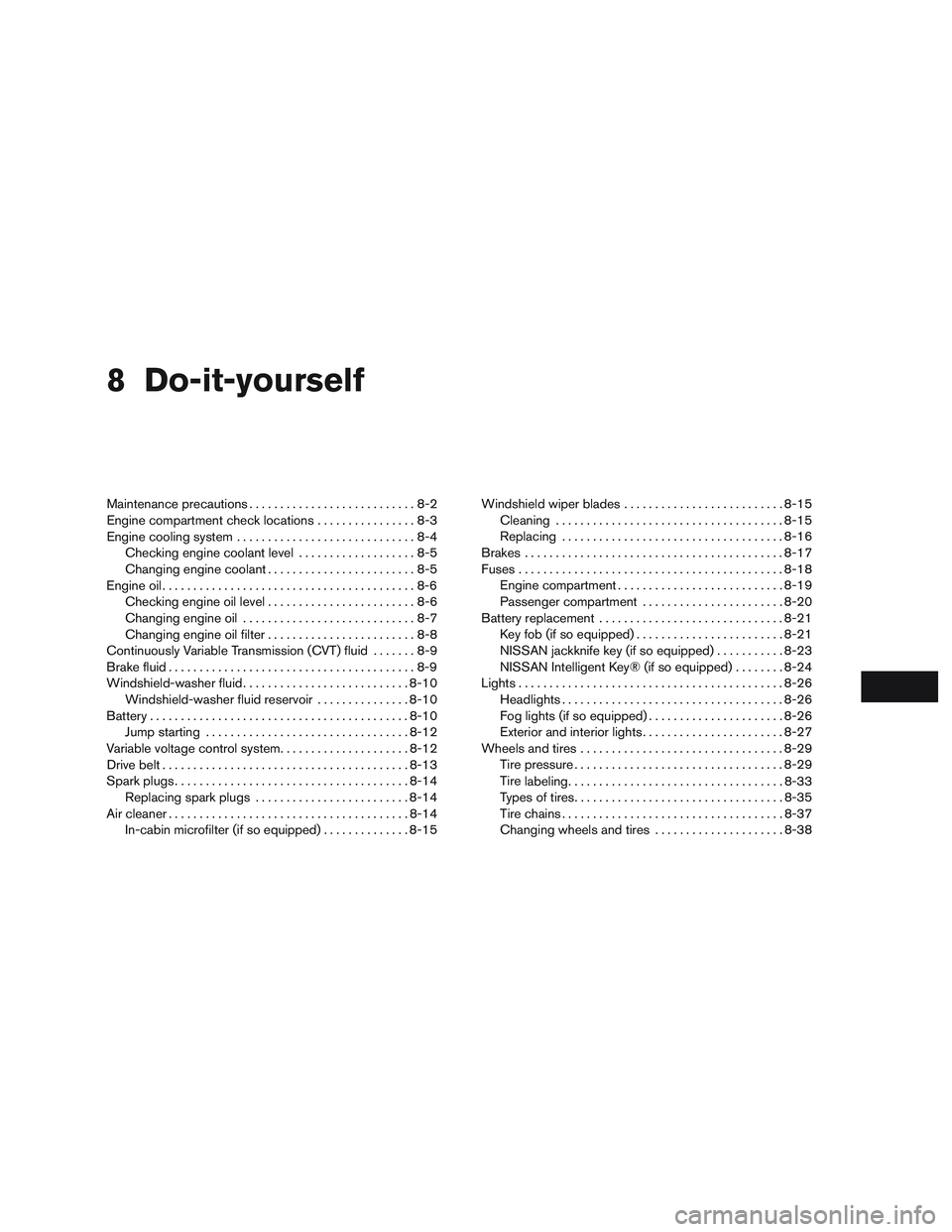
8 Do-it-yourself
Maintenance precautions...........................8-2
Engine compartment check locations ................8-3
Engine cooling system .............................8-4
Checking engine coolant level ...................8-5
Changing engine coolant ........................8-5
Engine oil .........................................8-6
Checking engine oil level ........................8-6
Changing engine oil ............................8-7
Changing engine oil filter ........................8-8
Continuously Variable Transmission (CVT) fluid .......8-9
Brake fluid ........................................8-9
Windshield-washer fluid ........................... 8-10
Windshield-washer fluid reservoir ...............8-10
Battery .......................................... 8-10
Jump starting ................................. 8-12
Variable voltage control system .....................8-12
Drive belt ........................................ 8-13
Spark plugs ...................................... 8-14
Replacing spark plugs ......................... 8-14
Air cleaner ....................................... 8-14
In-cabin microfilter (if so equipped) ..............8-15Windshield wiper blades
.......................... 8-15
Cleaning ..................................... 8-15
Replacing .................................... 8-16
Brakes .......................................... 8-17
Fuses ........................................... 8-18
Engine compartment ........................... 8-19
Passenger compartment .......................8-20
Battery replacement .............................. 8-21
Key fob (if so equipped) ........................ 8-21
NISSAN jackknife key (if so equipped) ...........8-23
NISSAN Intelligent Key® (if so equipped) ........8-24
Lights ........................................... 8-26
Headlights .................................... 8-26
Fog lights (if so equipped) ......................8-26
Exterior and interior lights .......................8-27
Wheels and tires ................................. 8-29
Tire pressure .................................. 8-29
Tire
labeling ................................... 8-33
Types of tires .................................. 8-35
Tire chains .................................... 8-37
Changing wheels and tires .....................8-38
Page 475 of 554
HEADLIGHTS
For additional information on headlight bulb re-
placement, refer to the instructions outlined in
this section.
Replacing the halogen headlight bulb
(if so equipped)
The headlight is a semi-sealed beam type which
uses a replaceable headlight (halogen) bulb.
They can be replaced from inside the engine
compartment without removing the headlight as-
sembly.
If headlight bulb replacement is required, it is
recommended that you visit a NISSAN dealer for
this service.
CAUTION
●Aiming is not necessary after replacing
the bulb. When aiming adjustment is
necessary, it is recommended that you
visit a NISSAN dealer for this service.
● Do not leave the headlight assembly
open without a bulb installed for a long
period of time. Dust, moisture, smoke,
etc. entering the headlight body may
affect bulb performance. Remove the
bulb from the headlight assembly just
before a replacement bulb is installed. ●
Only touch the base when handling the
bulb. Never touch the glass envelope.
Touching the glass could significantly
affect bulb life and/or headlight
performance.
● High pressure halogen gas is sealed
inside the halogen bulb. The bulb may
break if the glass envelope is scratched
or the bulb is dropped.
● Use the same number and wattage as
shown in the chart.
Fog may temporarily form inside the lens of the
exterior lights in the rain or in a car wash. A
temperature difference between the inside and
the outside of the lens causes the fog. This is not
a malfunction. If large drops of water collect
inside the lens, it is recommended that you visit a
NISSAN dealer for servicing.
Replacing the LED headlight bulb (if
so equipped)
If LED headlight bulb replacement is required, it is
recommended that you visit a NISSAN dealer for
this service.
FOG LIGHTS (if so equipped)
For additional information on fog light bulb re-
placement, refer to the instructions outlined in
this section.
Replacing the fog light bulb
If bulb replacement is required, it is recom-
mended that you visit a NISSAN dealer for this
service.
CAUTION
● High pressure halogen gas is sealed
inside the halogen bulb. The bulb may
break if the glass envelope is scratched
or the bulb is dropped.
● When handling the bulb, do not touch
the glass envelope.
● Use the same number and wattage as
originally installed as shown in the
chart.
● Do not leave the bulb out of the fog light
for a long period of time as dust, mois-
ture and smoke may enter the fog light
body and affect the performance of the
fog light.
LIGHTS
8-26Do-it-yourself
Page 476 of 554
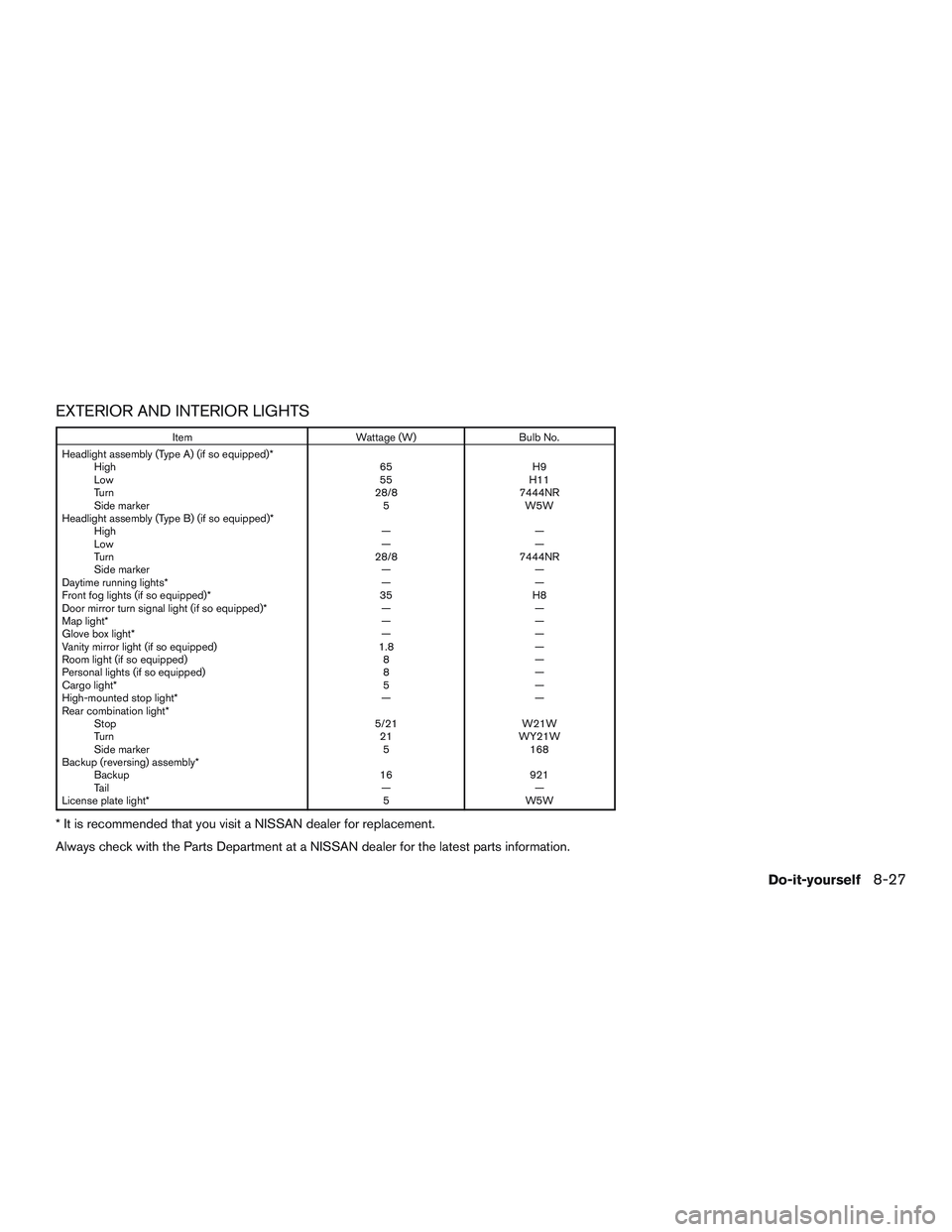
EXTERIOR AND INTERIOR LIGHTS
ItemWattage (W)Bulb No.
Headlight assembly (Type A) (if so equipped)* High 65H9
Low 55H11
Turn 28/87444NR
Side marker 5W5W
Headlight assembly (Type B) (if so equipped)* High ——
Low ——
Turn 28/87444NR
Side marker ——
Daytime running lights* ——
Front fog lights (if so equipped)* 35H8
Door mirror turn signal light (if so equipped)* ——
Map light* ——
Glove box light* ——
Vanity mirror light (if so equipped) 1.8—
Room light (if so equipped) 8—
Personal lights (if so equipped) 8—
Cargo light* 5—
High-mounted stop light* ——
Rear combination light* Stop 5/21W21W
Turn 21WY21W
Side marker 5168
Backup (reversing) assembly* Backup 16921
Ta i l ——
License plate light* 5W5W
* It is recommended that you visit a NISSAN dealer for replacement.
Always check with the Parts Department at a NISSAN dealer for the latest parts information.
Do-it-yourself8-27
Page 477 of 554
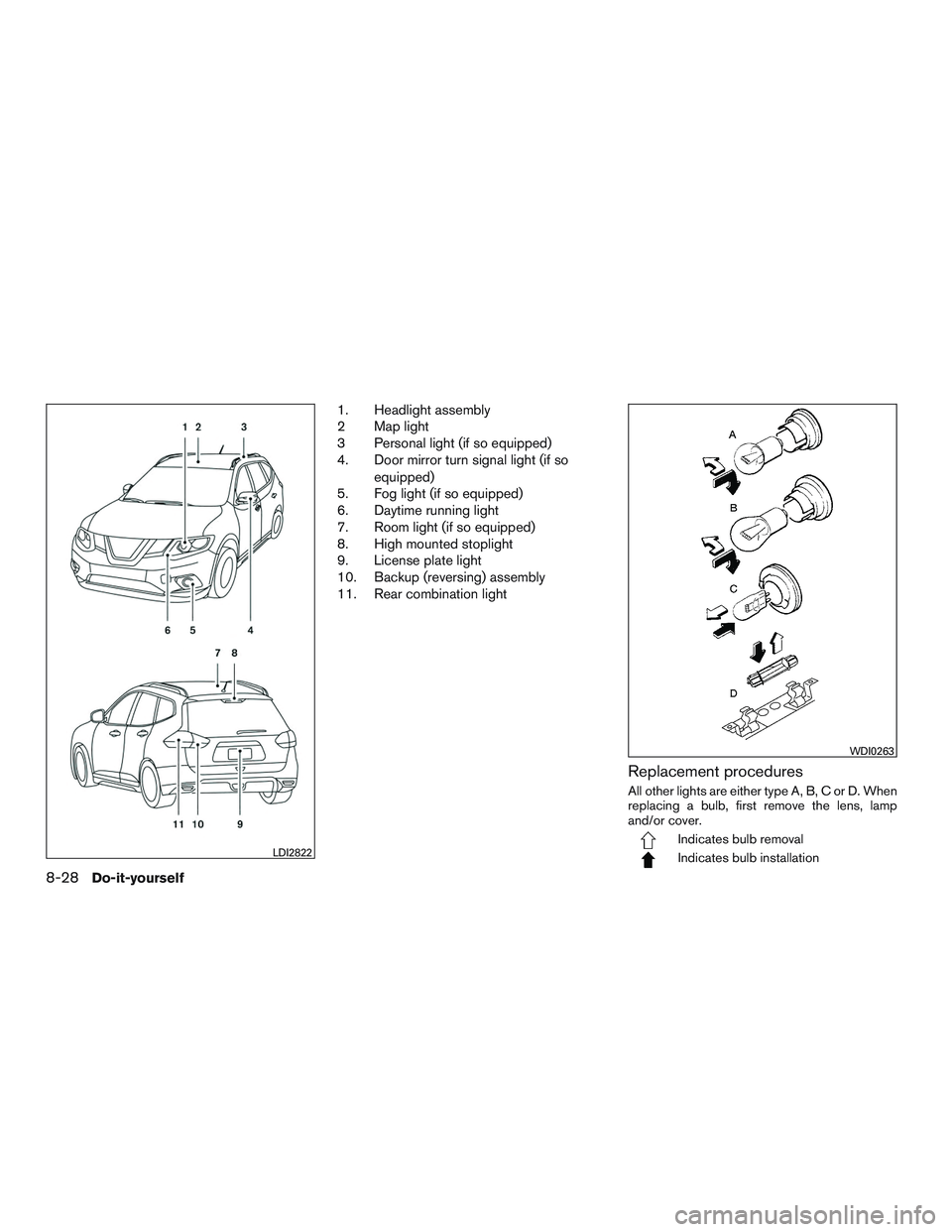
1. Headlight assembly
2 Map light
3 Personal light (if so equipped)
4. Door mirror turn signal light (if soequipped)
5. Fog light (if so equipped)
6. Daytime running light
7. Room light (if so equipped)
8. High mounted stoplight
9. License plate light
10. Backup (reversing) assembly
11. Rear combination light
Replacement procedures
All other lights are either type A, B, C or D. When
replacing a bulb, first remove the lens, lamp
and/or cover.
Indicates bulb removal
Indicates bulb installationLDI2822
WDI0263
8-28Do-it-yourself
Page 540 of 554
Enterbutton....................4-4
Event Data recorders.............10-28
Exhaust gas (Carbon monoxide) .........5-4
Explanation of maintenance items ........9-2
Explanation of scheduled maintenance items . .9-5
Extendedstorageswitch ............2-53
Eyeglass case ..................2-55
F
Flashers (See hazard warning flasher switch) . .6-2
Flat tire .......................6-3
Floor mat positioning aid .............7-5
Fluid Brake fluid ...................8-9
Capacities and recommended
fuel/lubricants ................10-2
Continuously Variable Transmission (CVT)
fluid.......................8-9
Engine coolant .................8-4
Engine oil ...................8-6
Windshield-washerfluid...........8-10
F.M.V.S.S. certification label ..........10-10
Foglightswitch .................2-46
Forward Emergency Braking (FEB) .......2-13
Forward Emergency Braking (FEB) with Pedestrian
Detection system ................5-88
Front air bag system
(See supplemental restraint system) ......1-53
Front power seat adjustment ...........1-4
Frontseats.....................1-2
Fuel Capacities and recommended
fuel/lubricants ................10-2
Fuel economy ................5-99 Fuel-filler door and cap
...........3-35
Fuel gauge ...................2-7
Fuel octane rating ..............10-4
Fuel recommendation ............10-3
Loose fuel cap warning ...........2-31
Fuel efficient driving tips .............5-97
Fuel-filler door ...............3-34,3-34
Fuelgauge.....................2-7
Fuses.......................8-18
Fusiblelinks ...................8-19
G
Garage door opener, HomeLink® Universal
Transceiver ......2-69,2-70,2-71,2-72,2-72
Gascap .....................3-35
Gauge Engine coolant temperature gauge .....2-6
Fuel gauge ...................2-7
Odometer ...................2-5
Speedometer .................2-4
Tachometer ..................2-6
Trip odometer .................2-5
General maintenance ...............9-2
Glovebox.....................2-54
H
Hands-free phone system,
Bluetooth®................4-82,4-95
Hazard warning flasher switch ..........6-2
Headlight aiming control ............2-44
Headlight and turn signal switch ........2-39
Headlight control switch ............2-39 Headlights....................8-26
Headlights, aiming control
............2-44
Head restraints ..................1-10
Heated seats ...................2-47
Heated steering wheel switch .........2-48
Heater Heater and air conditioner
controls ................4-33,4-41
Heater operation ...........4-34,4-42
Hill start assist system .............5-111
HomeLink® Universal
T
ransceiver......2-69,2-70,2-71,2-72,2-72
Hood.......................3-26
Hook Luggage hook ................2-59
Horn .......................2-47
I
Ignition switch ..................5-13
Ignition Switch Push-Button Ignition Switch ........5-14
Immobilizer system .........2-35,5-14,5-17
Important vehicle information label ......10-10
In-cabin microfilter ................8-15
Increasing fuel economy .............5-99
Indicator lights and audible reminders
(See warning/indicator lights and audible
reminders).................2-12,2-17
Information display ................2-20
Inside automatic anti-glare mirror ........3-39
Instrument brightness control ..........2-45
Instrumentpanel...............0-6,2-2
Instrument panel dimmer switch ........2-45
Intelligent Cruise Control (ICC) .........5-58
11-3