power steering NISSAN ROGUE 2017 Owner´s Manual
[x] Cancel search | Manufacturer: NISSAN, Model Year: 2017, Model line: ROGUE, Model: NISSAN ROGUE 2017Pages: 554, PDF Size: 6.44 MB
Page 16 of 554
15. Cruise control main/set switches(if so equipped) (P. 5-56)
Intelligent Cruise Control (ICC)
switches (if so equipped) (P. 5-58)
Bluetooth® Hands-Free Phone System
(P. 4-82, 4-95)
16. Driver supplemental air bag (P. 1-46) Horn (P. 2-47)
17. Tilt and telescopic steering (P. 3-37)
18. Control panel and vehicle information
display switches (P. 2-20)
19. Hood release (P. 3-26) Fuel door release (P. 3-34)
20. Vehicle Dynamic Control (VDC) OFF
switch (P. 2-50)
SPORT mode switch (P. 5-26)
ECO mode switch (P. 5-26)
Power liftgate switch (if so equipped)
(P. 3-27)
Power liftgate main switch
(if so equipped) (P. 3-27)
All-Wheel Drive (AWD) lock switch
(if so equipped) (P. 2-50)
Warning systems switch
(if so equipped) (P. 2-49)
Heated steering wheel switch
(if so equipped) (P. 2-48) 21. Instrument brightness control (P. 2-39)
Twin trip odometer reset switch (P. 2-4)
*: Refer to the separate Navigation System Own-
er’s Manual (if so equipped) .
Refer to the page number indicated in pa-
rentheses for operating details.
Illustrated table of contents0-7
Page 18 of 554
Warninglight Name Page
or
Anti-lock Braking
System (ABS) warn-
ing light 2-12
or
Brake warning light 2-12
Charge warning
light
2-13
Forward Emergency
Braking (FEB) sys-
tem warning light (if
so equipped)2-13
Forward Emergency
Braking (FEB) with
pedestrian detection
system warning light
(if so equipped)2-13
Warning
light Name Page
Low tire pressure
warning light 2-13
Low windshield-
washer fluid warning
light (if so equipped)2-15
Master warning light 2-15
Power steering
warning light
2-16
Seat belt warning
light and chime2-16
Supplemental air
bag warning light2-16
Indicator
light Name Page
All-Wheel Drive
(AWD) LOCK indi-
cator light (if so
equipped) 2-17
Front fog light indi-
cator light (if so
equipped)
2-17
Front passenger air
bag status light
2-17
High beam assist
indicator light
(green) (if so
equipped)2-17
High beam indicator
light (blue)
2-17
Malfunction Indica-
tor Light (MIL)2-17
Security indicator
light2-18
WARNING AND INDICATOR LIGHTS
Illustrated table of contents0-9
Page 85 of 554
2 Instruments and controls
Instrument panel...................................2-2
Meters and gauges ................................2-4
Speedometer and odometer .....................2-4
Tachometer ....................................2-6
Engine coolant temperature gauge ...............2-6
Fuel gauge ....................................2-7
Compass (if so equipped) ..........................2-7
Compass display ...............................2-8
Warning lights, indicator lights and audible
reminders ........................................ 2-11
Checking lights ............................... 2-12
Warning lights ................................ 2-12
Indicator lights ................................ 2-17
Audible reminders ............................. 2-19
Vehicle information display ......................... 2-20
How to use the vehicle information display .......2-20
Startup display ................................ 2-20
Resetting the drive computer ...................2-21
Settings ...................................... 2-21
Vehicle information display warnings and
indicators ..................................... 2-30
Security systems ................................. 2-34
Vehicle security system ......................... 2-34NISSAN Vehicle Immobilizer System
.............2-35
Wiper and washer switch ......................... 2-36
Switch operation .............................. 2-36
Rear switch operation .......................... 2-38
Rear window and outside mirror (if so equipped)
defroster switch .................................. 2-39
Headlight and turn signal switch ....................2-39
Headlight control switch ........................ 2-39
Daytime Running Light (DRL) system
(Type A) (if so equipped) .......................2-44
LED Daytime Running Light (DRL) system
(Type B) (if so equipped) .......................2-45
Instrument brightness control ...................2-45
Turn signal switch ............................. 2-46
Fog light switch (if so equipped) ................2-46
Horn ............................................ 2-47
Heated seat switches (if so equipped) ..............2-47
Heated
steering wheel switch (if so equipped) .......2-48
Warning systems switch (if so equipped) ............2-49
Vehicle Dynamic Control (VDC) OFF switch .........2-50
All-wheel drive (AWD) lock switch (if so equipped) . . . 2-50
E-call (SOS) switch (if so equipped) ................2-51
Power outlets .................................... 2-51
12v outlets ................................... 2-51
Page 88 of 554
15. Cruise control main/set switches(if so equipped) (P. 5-56)
Intelligent Cruise Control (ICC)
switches (if so equipped) (P. 5-58)
Bluetooth® Hands-Free Phone System
(P. 4-82, 4-95)
16. Driver supplemental air bag (P. 1-46) Horn (P. 2-47)
17. Tilt and telescopic steering (P. 3-37)
18. Control panel and vehicle information
display switches (P. 2-20)
19. Hood release (P. 3-26) Fuel door release (P. 3-34)
20. Vehicle Dynamic Control (VDC) OFF
switch (P. 2-50)
SPORT mode switch (P. 5-26)
ECO mode switch (P. 5-26)
Power liftgate switch (if so equipped)
(P. 3-27)
Power liftgate main switch
(if so equipped) (P. 3-27)
All-Wheel Drive (AWD) lock switch
(if so equipped) (P. 2-50)
Warning systems switch
(if so equipped) (P. 2-49)
Heated steering wheel switch
(if so equipped) (P. 2-48) 21. Instrument brightness control (P. 2-39)
Twin trip odometer reset switch (P. 2-4)
*: Refer to the separate Navigation System Own-
er’s Manual (if so equipped) .
Refer to the page number indicated in pa-
rentheses for operating details.
Instruments and controls2-3
Page 96 of 554
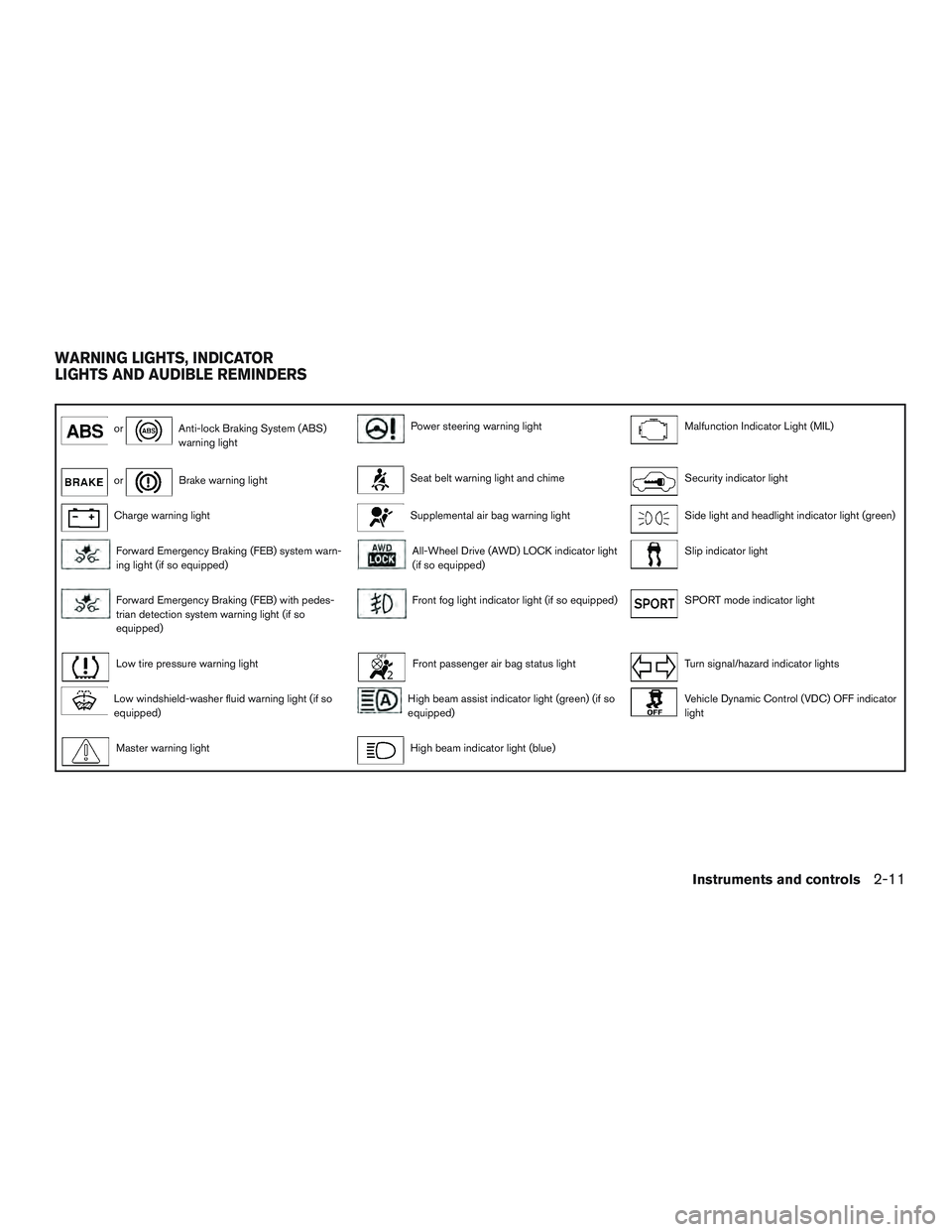
orAnti-lock Braking System (ABS)
warning lightPower steering warning lightMalfunction Indicator Light (MIL)
orBrake warning lightSeat belt warning light and chimeSecurity indicator light
Charge warning lightSupplemental air bag warning lightSide light and headlight indicator light (green)
Forward Emergency Braking (FEB) system warn-
ing light (if so equipped)All-Wheel Drive (AWD) LOCK indicator light
(if so equipped)Slip indicator light
Forward Emergency Braking (FEB) with pedes-
trian detection system warning light (if so
equipped)Front fog light indicator light (if so equipped)SPORT mode indicator light
Low tire pressure warning lightFront passenger air bag status lightTurn signal/hazard indicator lights
Low windshield-washer fluid warning light (if so
equipped)High beam assist indicator light (green) (if so
equipped)Vehicle Dynamic Control (VDC) OFF indicator
light
Master warning lightHigh beam indicator light (blue)
WARNING LIGHTS, INDICATOR
LIGHTS AND AUDIBLE REMINDERS
Instruments and controls2-11
Page 101 of 554
●If the warning light is still on after the
above operations, have your vehicle
checked as soon as possible. It is rec-
ommended that you visit a NISSAN
dealer for this service.
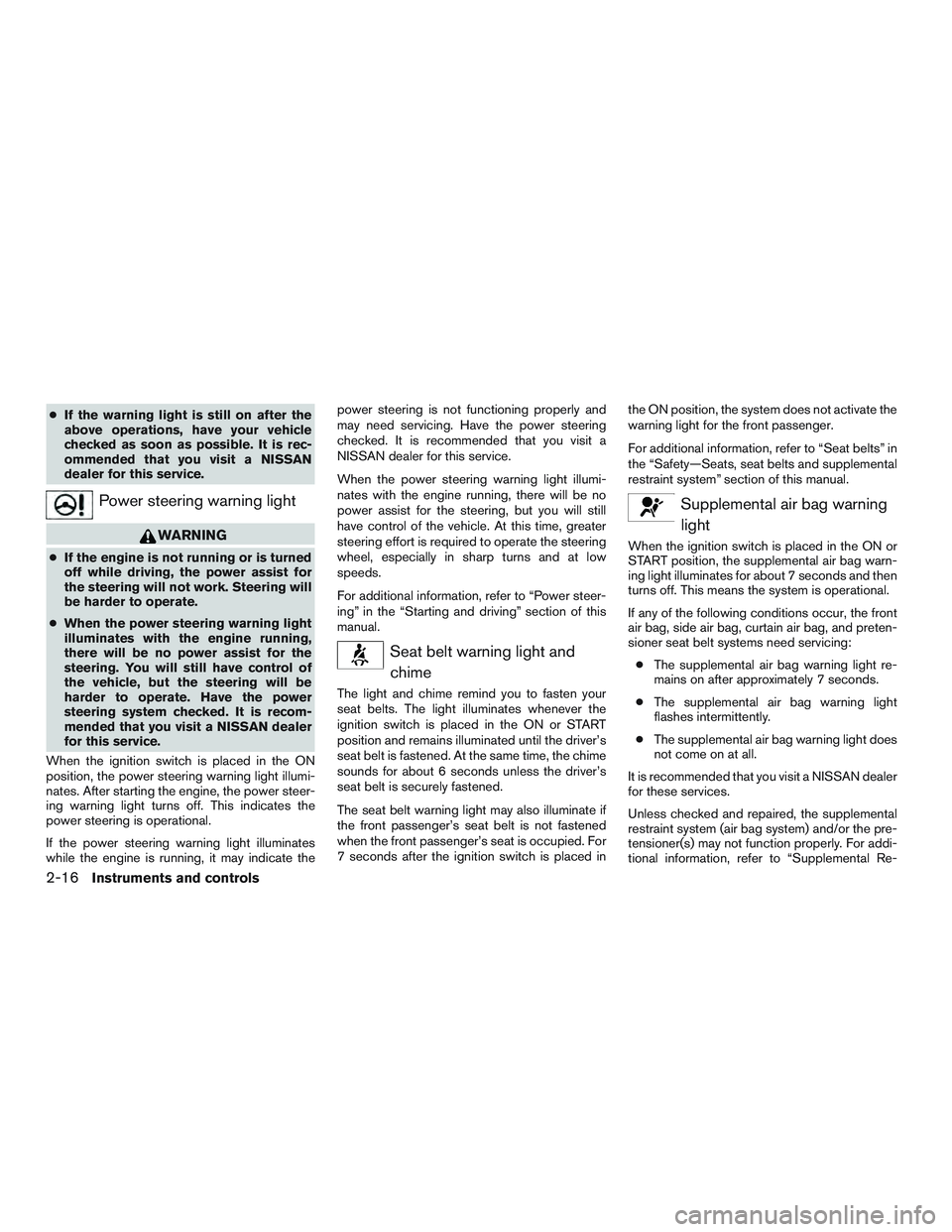
Power steering warning light
WARNING
● If the engine is not running or is turned
off while driving, the power assist for
the steering will not work. Steering will
be harder to operate.
● When the power steering warning light
illuminates with the engine running,
there will be no power assist for the
steering. You will still have control of
the vehicle, but the steering will be
harder to operate. Have the power
steering system checked. It is recom-
mended that you visit a NISSAN dealer
for this service.
When the ignition switch is placed in the ON
position, the power steering warning light illumi-
nates. After starting the engine, the power steer-
ing warning light turns off. This indicates the
power steering is operational.
If the power steering warning light illuminates
while the engine is running, it may indicate the power steering is not functioning properly and
may need servicing. Have the power steering
checked. It is recommended that you visit a
NISSAN dealer for this service.
When the power steering warning light illumi-
nates with the engine running, there will be no
power assist for the steering, but you will still
have control of the vehicle. At this time, greater
steering effort is required to operate the steering
wheel, especially in sharp turns and at low
speeds.
For additional information, refer to “Power steer-
ing” in the “Starting and driving” section of this
manual.
Seat belt warning light and
chime
The light and chime remind you to fasten your
seat belts. The light illuminates whenever the
ignition switch is placed in the ON or START
position and remains illuminated until the driver’s
seat belt is fastened. At the same time, the chime
sounds for about 6 seconds unless the driver’s
seat belt is securely fastened.
The seat belt warning light may also illuminate if
the front passenger’s seat belt is not fastened
when the front passenger’s seat is occupied. For
7 seconds after the ignition switch is placed in the ON position, the system does not activate the
warning light for the front passenger.
For additional information, refer to “Seat belts” in
the “Safety—Seats, seat belts and supplemental
restraint system” section of this manual.
Supplemental air bag warning
light
When the ignition switch is placed in the ON or
START position, the supplemental air bag warn-
ing light illuminates for about 7 seconds and then
turns off. This means the system is operational.
If any of the following conditions occur, the front
air bag, side air bag, curtain air bag, and preten-
sioner seat belt systems need servicing:
● The supplemental air bag warning light re-
mains on after approximately 7 seconds.
● The supplemental air bag warning light
flashes intermittently.
● The supplemental air bag warning light does
not come on at all.
It is recommended that you visit a NISSAN dealer
for these services.
Unless checked and repaired, the supplemental
restraint system (air bag system) and/or the pre-
tensioner(s) may not function properly. For addi-
tional information, refer to “Supplemental Re-
2-16Instruments and controls
Page 159 of 554
3 Pre-driving checks and adjustments
Keys .............................................3-2Remote keyless entry (if so equipped) ............3-2
NISSAN Intelligent Key® (if so equipped) .........3-3
NISSAN Vehicle Immobilizer System keys .........3-4
Doors ............................................3-5
Locking with key ................................3-5
Locking with inside lock knob ....................3-6
Locking with power door lock switch . . . ..........3-6
Automatic door locks ...........................3-7
Child safety rear door lock .......................3-7
Remote keyless entry system (if so equipped) .........3-7
How to use remote keyless entry system ..........3-8
NISSAN Intelligent Key® (if so equipped) ...........3-11
Operating range ............................... 3-12
Door locks/unlocks precaution ..................3-13
NISSAN Intelligent Key® Operation .............3-14
How to use the remote keyless entry
function ...................................... 3-17
Warning signals ............................... 3-20
Troubleshooting guide ......................... 3-21
Remote Engine Start (if so equipped) ...............3-23
Remote engine start operating range . . . .........3-23
Remote starting the vehicle .....................3-24Extending engine run time
......................3-24
Canceling a remote start .......................3-24
Conditions the remote start will not work .........3-25
Hood ........................................... 3-26
Liftgate .......................................... 3-27
Operating the manual liftgate
(if so equipped) ............................... 3-27
Operating the power liftgate (if so equipped) .....3-28
Motion-Activated Liftgate (if so equipped) ........3-31
Power liftgate main switch ......................3-33
Liftgate release ................................ 3-33
Liftgate position setting ........................ 3-34
Fuel-filler door ................................... 3-34
Opener operation .............................. 3-34
Fuel-filler cap ................................. 3-35
Steering wheel ................................... 3-37
Manual operation .............................. 3-37
Sun
visors ....................................... 3-38
Vanity mirrors ................................. 3-38
Card holder (driver’s side only) ..................3-39
Mirrors .......................................... 3-39
Manual anti-glare rearview mirror
(if so equipped) ............................... 3-39
Page 202 of 554
NOTE:
If a NEW memory position is stored in the
linked memory switch, then the key fob will
link the NEW position and overwrites the
previous position.
ENTRY/EXIT FUNCTION
This system is designed so that the driver’s seat
will automatically move when the shift lever is in
the P (Park) position. This allows the driver to get
into and out of the driver’s seat more easily.
The driver’s seat will slide backward:● When the driver’s door is opened with the
ignition switch placed in the OFF position.
● When the ignition switch is changed from
ON to OFF with the driver’s door open.
The driver’s seat will return to the previous posi-
tion: ● When the ignition switch is turned to ON
while the shift lever is in the P (Park) position.
The entry/exit function can be adjusted or can-
celed through the vehicle settings in the vehicle
information display by performing the following: ● Switch the Exit Seat Slide from ON to OFF.
SYSTEM OPERATION
The automatic drive positioner system will not
work or will stop operating under the following
conditions:
● When the vehicle speed is above 0 mph
(0 km/h) or 4 mph (7km/h) for some limited
functions such as linking a key fob to the
meter when the power source is turned on
from off or during the Exit function.
● When any of the memory switches are
pushed while the automatic drive positioner
is operating.
● When the adjusting switch for the driver’s
seat and steering column is turned on while
the automatic drive positioner is operating.
● When the seat has already been moved to
the memorized position.
● When no seat position is stored in the
memory switch.
● When the shift lever is moved from P (Park)
to any other position.
Pre-driving checks and adjustments3-43
Page 314 of 554
System temporarily unavailable..................5-94
System malfunction ............................ 5-95
System maintenance ........................... 5-95
Break-in schedule ................................ 5-97
Fuel efficient driving tips ........................... 5-97
Increasing fuel economy ........................... 5-99
All-Wheel Drive (AWD) (if so equipped) .............5-99
AWD Lock Switch Operations .................5-100
Parking/parking on hills ........................... 5-102
Power steering . . ................................ 5-103
Brake system ................................... 5-103
Brake precautions ............................ 5-103
Anti-lock Braking System (ABS) ................5-104
Brake assist ................................. 5-105
Vehicle Dynamic Control (VDC) system ............5-105 Brake force distribution
....................... 5-107
Chassis Control ................................. 5-108
Active Trace Control .......................... 5-108
Active Engine Brake .......................... 5-109
Active Ride Control ........................... 5-110
Hill start assist system ........................... 5-111
Cold weather driving ............................. 5-112
Freeing a frozen door lock .....................5-112
Antifreeze .................................... 5-112
Battery ...................................... 5-112
Draining of coolant water ......................5-112
Tire equipment . . ............................. 5-113
Special winter equipment ......................5-113
Driving on snow or ice ........................ 5-113
Page 414 of 554
WARNING
●If the engine is not running or is turned
off while driving, the power assist for
the steering will not work. Steering will
be harder to operate.
● When the power steering warning light
illuminates with the engine running,
there will be no power assist for the
steering. You will still have control of
the vehicle, but the steering will be
much harder to operate. Have the power
steering system checked. It is recom-
mended that you visit a NISSAN dealer
for this service.
The power steering system is designed to pro-
vide power assistance while driving to operate
the steering wheel with light force.
When the steering wheel is operated repeatedly
or continuously while parking or driving at a very
low speed, the power assist for the steering
wheel will be reduced. This is to prevent over-
heating of the power steering system and protect
it from getting damaged. While the power assist
is reduced, steering wheel operation will become
heavy. If the steering wheel operation is still per-
formed, the power steering may stop and the
power steering warning light will illuminate. In a
safe location, stop the engine and push the igni- tion switch to the OFF position. The temperature
of the power steering system will go down after a
period of time and the power assist level will
return to normal after starting the engine. The
power steering warning light will go off. Avoid
repeating such steering wheel operations that
could cause the power steering system to over-
heat.
You may hear a noise from the front of the vehicle
when the steering wheel is operated. This is a
normal operational noise and is not a malfunction.
If the power steering warning light illuminates
while the engine is running, it may indicate the
power steering system is not functioning properly
and may need servicing. Have the power steering
system checked. It is recommended that you visit
a NISSAN dealer for this service.
When the power steering warning light illumi-
nates with the engine running, the power assist
for the steering will cease operation but you will
still have control of the vehicle. At this time,
greater steering efforts are required to operate
the steering wheel, especially in sharp turns and
at low speeds.
The brake system has two separate hydraulic
circuits. If one circuit malfunctions, you will still
have braking at two wheels.
BRAKE PRECAUTIONS
Vacuum assisted brakes
The brake booster aids braking by using engine
vacuum. If the engine stops, you can stop the
vehicle by depressing the brake pedal. However,
greater foot pressure on the brake pedal will be
required to stop the vehicle and stopping dis-
tance will be longer.
Using the brakes
Avoid resting your foot on the brake pedal while
driving. This will overheat the brakes, wear out the
brake pads faster, and reduce gas mileage.
To help reduce brake wear and to prevent the
brakes from overheating, reduce speed and
downshift to a lower gear before going down a
slope or long grade. Overheated brakes may
reduce braking performance and could result in
loss of vehicle control.
POWER STEERING
BRAKE SYSTEM
Starting and driving5-103