engine NISSAN ROGUE 2018 Owner´s Manual
[x] Cancel search | Manufacturer: NISSAN, Model Year: 2018, Model line: ROGUE, Model: NISSAN ROGUE 2018Pages: 547, PDF Size: 6.42 MB
Page 248 of 547
Operating tips
Clear snow and ice from the wiper blades
and air inlet in front of the windshield.
This improves heater operation.
AIR CONDITIONER OPERATION
Start the engine, turn thefan control
dial to the desired position, and press
the
button to activate the air condi-
tioner. When the air conditioner is on, cool-
ing and dehumidif ying functions are
added to the heater operation.
The air conditioner cooling function op-
erates only when the engine is running.
Cooling
This mode is used to cool and dehumidif y
the air.
1. Press the
air flow control button.
2. Turn the
fan control dial to the
desired position.
3. Press the
button.
4. Turn the temperature control dial to the desired position. ∙ For quick cooling, press the MAX A/C
button. When the MAX A/C button is
pressed, it will activate the
mode.
The amount of air coming through the
vents is the highest it can go when in
MAX A/C mode regardless of the posi-
tion of the
fan control dial.
Dehumidified heating
This mode is used to heat and dehumidif y
the air.
1. Press the
button to the OFF posi-
tion.
2. Press the
air flow control button.
3. Turn the
fan control dial to the
desired position.
4. Press the A/C button. The indicator light comes on.
5. Turn the temperature control dial to the desired position.
Dehumidified defogging
This mode is used to defog the windows
and dehumidif y the air.
1. Press the
front defrost button. 2. Turn the
fan control dial to the de-
sired position.
∙ When the
orare selected,
the air conditioner automatically turns
on if the outside temperature is more
than 36°F (2°C). This dehumidifies the air
which helps defog the windshield.
The
mode automatically turns off,
allowing outside air to be drawn into the
passenger compartment to further im-
prove the defogging performance.
∙ The air conditioner is always on in
ormode, regardless of whether
the indicator light is on or off.
3. Turn the temperature control dial to the desired position.
Operating tips
∙ Keep the windows and moonroof (if soequipped) closed while the air condi-
tioner is in operation.
∙ Af ter parking in the sun, drive for two or three minutes with the windows open
to vent hot air from the passenger
compartment. Then, close the win-
dows. This allows the air conditioner to
cool the interior more quickly.
4-32Monitor, climate, audio, phone and voice recognition systems
Page 249 of 547
∙The air conditioning system should
be operated for approximately
10 minutes at least once a month.
This helps prevent damage to the
system due to lack of lubrication.
∙ A visible mist may be seen coming from the ventilators in hot, humid conditions
as the air is cooled rapidly. This does not
indicate a malfunction.
∙ If the engine coolant temperature
gauge indicates engine coolant tem-
perature over the normal range, turn
the air conditioner off. For additional
information, refer to “If your vehicle
overheats” in the “In case of emer-
gency ” section of this manual.
∙ If the engine coolant temperature be- comes too high,
will be activated
and the indicator light will come on au-
tomatically.
∙ When the ignition is OFF, button charac- ters will not illuminate.
AIR FLOW CHARTS
The following charts show the button and
dial positions for MAXIMUM AND QUICK
heating, cooling or defrosting. The air re-
circulation indicator should always be in
the OFF position for heating and defrost-
ing.
Monitor, climate, audio, phone and voice recognition systems4-33
Page 253 of 547
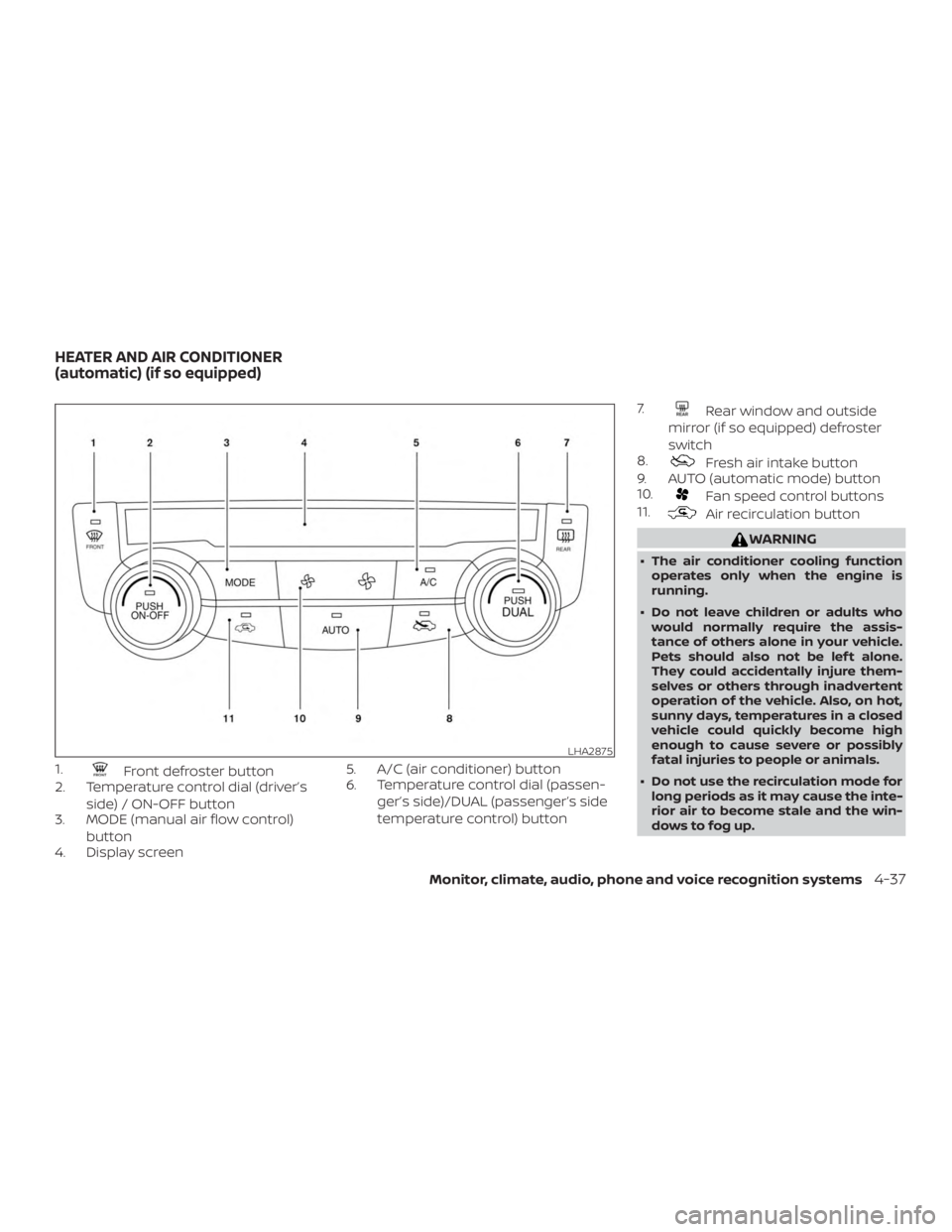
1.Front defroster button
2. Temperature control dial (driver’s
side) / ON-OFF button
3. MODE (manual air flow control)
button
4. Display screen 5. A/C (air conditioner) button
6. Temperature control dial (passen-
ger’s side)/DUAL (passenger’s side
temperature control) button 7.
Rear window and outside
mirror (if so equipped) defroster
switch
8.
Fresh air intake button
9. AUTO (automatic mode) button
10.
Fan speed control buttons
11.
Air recirculation button
WARNING
∙ The air conditioner cooling function
operates only when the engine is
running.
∙ Do not leave children or adults who would normally require the assis-
tance of others alone in your vehicle.
Pets should also not be lef t alone.
They could accidentally injure them-
selves or others through inadvertent
operation of the vehicle. Also, on hot,
sunny days, temperatures in a closed
vehicle could quickly become high
enough to cause severe or possibly
fatal injuries to people or animals.
∙ Do not use the recirculation mode for long periods as it may cause the inte-
rior air to become stale and the win-
dows to fog up.
LHA2875
HEATER AND AIR CONDITIONER
(automatic) (if so equipped)
Monitor, climate, audio, phone and voice recognition systems4-37
Page 255 of 547
Remote Engine Start with
Intelligent Climate Control (if so
equipped)
Vehicles equipped with automatic climate
controls and Remote Engine Start function
may go into automatic heating or cooling
mode when Remote Engine Start is acti-
vated depending on outside and cabin
temperatures. During this period, the cli-
mate control display and buttons will be
inoperable until the ignition switch is
turned on. In Remote Engine Start defrost-
ing mode, the rear window defroster and
heated steering wheel (if so equipped) may
be activated automatically.
Voice Recognition logic (if so
equipped)
When the climate control system is on, the
fan speed may be automatically lowered
so that commands are more easily recog-
nized. Fan speed can be adjusted using
the
fan speed control buttons, if de-
sired.
MANUAL OPERATION
Fan speed control
Press thefan speed control buttons
to manually control the fan speed.
Press the AUTO button to return to auto-
matic control of the fan speed.
Temperature control dial
The temperature control dial allows you to
adjust the temperature of the outlet air. To
lower the temperature, turn the dial to the
lef t. To increase the temperature, turn the
dial to the right. Temperature can be ad-
justed on the driver’s and passenger’s side.
Air recirculation
Press theair recirculation button to
recirculate interior air inside the vehicle.
The indicator light on the
button will
come on.
The air recirculation cannot be activated
when the air conditioner is in the
front defrosting mode.
When the outside temperature exceeds 70°F
(21°C), the air conditioning system may de-
fault to air recirculation mode automatically
to reduce overall power consumption. To exit
air recirculation mode, select the fresh air
intake button to enter fresh air mode.
Fresh air intake
Press thefresh air intake button to
draw outside air into the passenger com-
partment.
Automatic intake air control
In the AUTO mode, the intake air will be
controlled automatically. When the outside
temperature exceeds 70°F (21°C), the air
conditioning system may default to air re-
circulation mode automatically to reduce
overall power consumption. To exit air re-
circulation mode, select the fresh air intake
button to enter fresh air mode.
To manually control the intake air, press
the
air recirculation button
or
fresh air intake button. To return to
the automatic control mode if
the
fresh air indicator is illuminated,
press and hold the
fresh air intake
button for about 2 seconds. The fresh air
indicator and air recirculation indicator
lights will flash twice, and then the intake air
will be controlled automatically. To return
to the automatic control mode if
the
air recirculation icon is illumi-
nated, press and hold the
air recircu-
lation button for about 2 seconds.
The
air recirculation indicator
Monitor, climate, audio, phone and voice recognition systems4-39
Page 256 of 547
andfresh air intake indicator lights
will flash twice and the intake air will be
controlled automatically.
Air conditioner button
Start the engine, press thefan control
buttons to the desired position and press
the
button to turn on the air condi-
tioner. To turn off the air conditioner, press
the
button again.
The air conditioner cooling function op-
erates only when the engine is running.
Air flow control
Pressing the MODE button manually con-
trols air flow and selects the air outlet:
— Air flows mainly from center and side vents.
— Air flows mainly from centerand side vents and foot
outlets.
— Air flows mainly from foot out-lets and partly from defroster.
— Air flows mainly from defrosterand foot outlets.
To turn system off
Press the ON-OFF button.
Rear window and outside mirror
(if so equipped) defroster switch
For additional information, refer to “Rear
window and outside mirror (if so equipped)
defroster switch” in the “Instruments and
controls” section of this manual.
OPERATING TIPS
The sunload sensor, located on the top and
center of the instrument panel, helps the
system maintain a constant temperature.
Do not put anything on or around this sen-
sor.
LHA2949
4-40Monitor, climate, audio, phone and voice recognition systems
Page 257 of 547
∙ When the climate system is in auto-matic operation and the engine coolant
temperature and outside air tempera-
ture are low, the air flow outlet may de-
fault to defroster mode for a maximum
of 2 minutes 30 seconds. This is not a
malfunction. Af ter the engine coolant
temperature warms up, the air flow out-
let will return to foot mode and opera-
tion will continue normally.
∙ When the outside and interior cabin temperatures are moderate to high, the
intake setting may default to turn off air
recirculation to allow fresh air into the
passenger compartment. You may no-
tice air flow from the foot mode, bi-level
mode, or side demist vent outlets for a
maximum of 15 seconds. This may oc-
cur when previous climate setting was
system off. This is not a malfunction.
Af ter the initial warm air is expelled, the
intake will return to automatic control,
air flow outlet will return to previous set-
tings, and operation will continue nor-
mally. To exit, press any climate control
button. ∙ Keep the moonroof (if so equipped)
closed while the air conditioner is in op-
eration.
∙ If you feel that the air flow mode you have selected and the outlets the air is
coming out do not match, select
the
mode.
∙ When you change the air flow mode, you may feel air flow from the feet vents
for just a moment. This is not a mal-
function. The air conditioner system in your NISSAN
vehicle is charged with a refrigerant de-
signed with the environment in mind.
This refrigerant does not harm the
earth’s ozone layer.
Special charging equipment and lubricant
is required when servicing your NISSAN air
conditioner. Using improper refrigerants or
lubricants will cause severe damage to
your air conditioner system. For additional
information, refer to “Air conditioner sys-
tem refrigerant and oil recommendations”
in the “Technical and consumer informa-
tion” section of this manual.
It is recommended that you visit a NISSAN
dealer to service your “environmentally
friendly” air conditioner system.
WARNING
The air conditioner system contains re-
frigerant under high pressure. To avoid
personal injury, any air conditioner ser-
vice should be done only by an experi-
enced technician with proper
equipment.
SERVICING AIR CONDITIONER
Monitor, climate, audio, phone and voice recognition systems4-41
Page 258 of 547
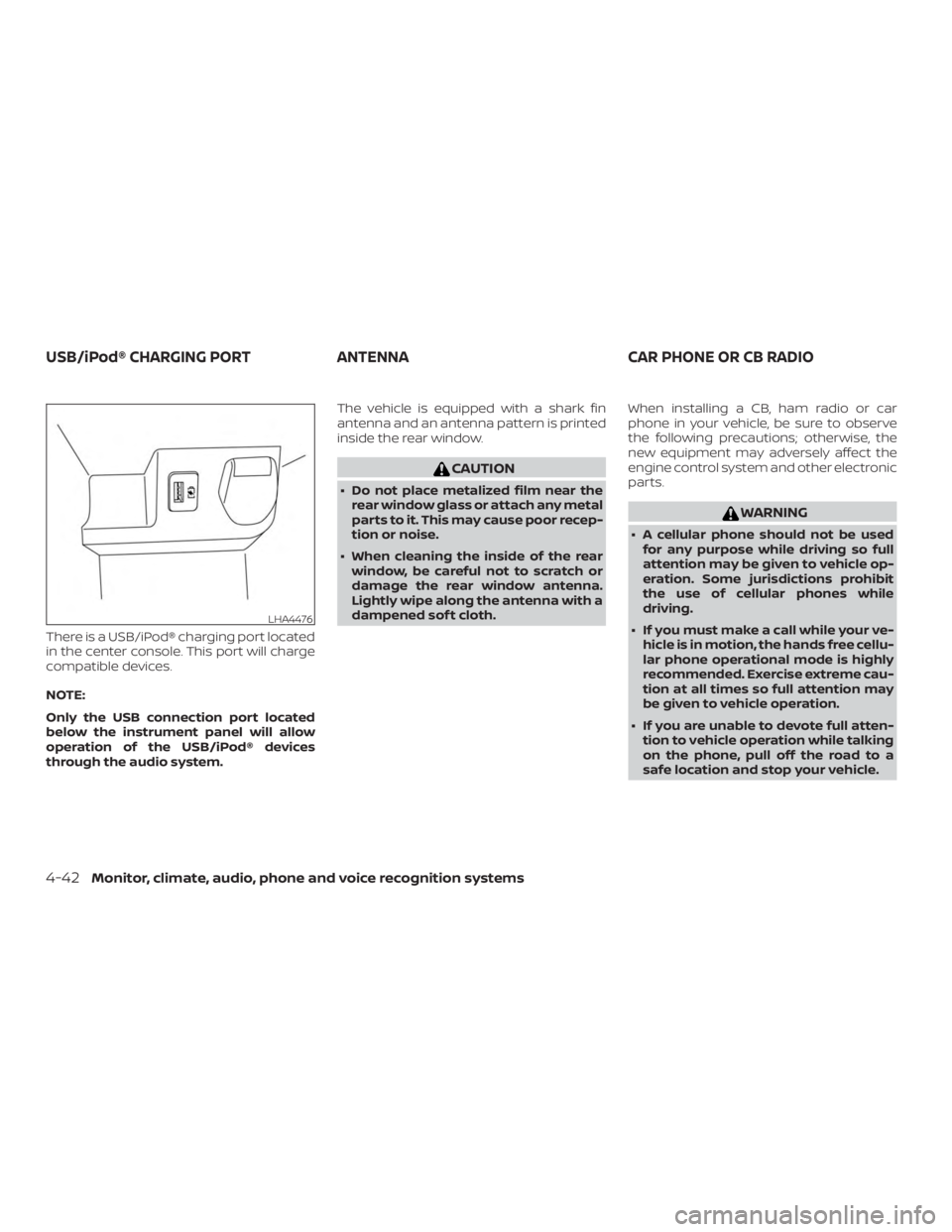
There is a USB/iPod® charging port located
in the center console. This port will charge
compatible devices.
NOTE:
Only the USB connection port located
below the instrument panel will allow
operation of the USB/iPod® devices
through the audio system.The vehicle is equipped with a shark fin
antenna and an antenna pattern is printed
inside the rear window.
CAUTION
∙ Do not place metalized film near the
rear window glass or attach any metal
parts to it. This may cause poor recep-
tion or noise.
∙ When cleaning the inside of the rear window, be careful not to scratch or
damage the rear window antenna.
Lightly wipe along the antenna with a
dampened sof t cloth. When installing a CB, ham radio or car
phone in your vehicle, be sure to observe
the following precautions; otherwise, the
new equipment may adversely affect the
engine control system and other electronic
parts.
WARNING
∙ A cellular phone should not be used
for any purpose while driving so full
attention may be given to vehicle op-
eration. Some jurisdictions prohibit
the use of cellular phones while
driving.
∙ If you must make a call while your ve- hicle is in motion, the hands free cellu-
lar phone operational mode is highly
recommended. Exercise extreme cau-
tion at all times so full attention may
be given to vehicle operation.
∙ If you are unable to devote full atten- tion to vehicle operation while talking
on the phone, pull off the road to a
safe location and stop your vehicle.
LHA4476
USB/iPod® CHARGING PORT ANTENNACAR PHONE OR CB RADIO
4-42Monitor, climate, audio, phone and voice recognition systems
Page 260 of 547
5 Starting and driving
Precautions when starting and driving..........5-4
Exhaust gas (carbon monoxide) ..............5-4
Three-way catalyst ...........................5-5
Tire Pressure Monitoring System
(TPMS)........................................5-5
On-pavement and off-road driving
precautions ..................................5-9
Avoiding collision and rollover ................5-9
Off-roadrecovery ............................5-9
Rapid air pressure loss ......................5-10
Drinking alcohol/drugs and driving ...........5-11
Driving safety precautions ....................5-11
Ignition switch (if so equipped) ..................5-13
Continuously Variable Transmission .........5-13
Key positions ................................ 5-14
NISSAN Vehicle Immobilizer System .........5-14
Push-button ignition switch (if so equipped) ....5-15
Operating range ............................. 5-16
Push-button ignition switch positions .......5-16
Emergency engine shut off ..................5-17
NISSAN Intelligent Key® battery
discharge (if so equipped) ...................5-17
NISSAN Vehicle Immobilizer System .........5-18
Before starting the engine ......................5-18Starting the engine (models without NISSAN
Intelligent Key® system)
........................5-19
Starting the engine (models with NISSAN
Intelligent Key® system) ........................5-20
Remote Engine Start (if so equipped) ........5-21
Driving the vehicle .............................. 5-21
Continuously Variable Transmission
(CVT) ........................................ 5-21
Parking brake .................................. 5-27
Pedal type ................................... 5-27
Switch type (models with electronic
parking brake system) .......................5-27
Automatic brake hold (if so equipped) ..........5-30
How to activate/deactivate the
automatic brake hold function ..............5-31
How to use the automatic brake hold
function ..................................... 5-32
SPORT mode switch ............................ 5-33
ECO mode switch .............................. 5-33
Lane Departure Warning (LDW)
(if
so equipped) ................................. 5-34
LDW system operation ......................5-35
How to enable/disable the LDW system .....5-36
LDW system limitations ......................5-37
Page 262 of 547
How to enable/disable the Steering
Assist...................................... 5-101
Intelligent Cruise Control (ICC)
(for vehicles with ProPILOT Assist) ...........5-102
Steering Assist ............................. 5-112
Conventional (fixed speed) cruise
control mode ............................... 5-119
Automatic Emergency Braking (AEB)
(if so equipped) ................................ 5-123
AEB system operation ......................5-124
Turning the AEB system on/off .............5-126
AEB system limitations .....................5-127
System temporarily unavailable ............5-128
System malfunction ........................ 5-129
System maintenance ....................... 5-129
Automatic Emergency Braking (AEB) with
Pedestrian Detection (if so equipped) ..........5-131
AEB with Pedestrian Detection system
operation ................................... 5-132
Turning the AEB with Pedestrian
Detection system ON/OFF .................5-134
AEB with Pedestrian Detection system
limitations .................................. 5-135
System temporarily unavailable ............5-137 System malfunction
........................ 5-138
System maintenance ....................... 5-138
Break-in schedule ............................. 5-140
Fuel efficient driving tips .......................5-140
Increasing fuel economy ......................5-142
All-Wheel Drive (AWD) (if so equipped) ..........5-142
All-Wheel Drive (AWD) Lock Switch
Operations ................................. 5-143
Parking/parking on hills .......................5-145
Power steering ................................ 5-146
Brake system .................................. 5-147
Brake precautions .......................... 5-147
Anti-lock Braking System (ABS) .............5-148
Brake Assist ................................ 5-149
Vehicle Dynamic Control (VDC) system ........5-149
Brake force distribution .....................5-151
Chassis
Control ............................... 5-152
Intelligent Trace Control (I-TC) ...............5-152
Intelligent Engine Brake (I-EB) ...............5-153
Active Ride Control (ARC) ...................5-154
Hill start assist system ......................... 5-155
Cold weather driving .......................... 5-156
Freeing a frozen door lock ..................5-156
Page 264 of 547
WARNING
∙ Do not leave children or adults whowould normally require the assis-
tance of others alone in your vehicle.
Pets should also not be lef t alone.
They could accidentally injure them-
selves or others through inadvertent
operation of the vehicle. Also, on hot,
sunny days, temperatures in a closed
vehicle could quickly become high
enough to cause severe or possibly
fatal injuries to people or animals.
∙ Properly secure all cargo with ropes or straps to help prevent it from sliding
or shif ting. Do not place cargo higher
than the seatbacks. In a sudden stop
or collision, unsecured cargo could
cause personal injury.
∙ To avoid raising the center of gravity excessively, do not exceed the rated
capacity of the roof rack (if so
equipped) and evenly distribute the
load.
EXHAUST GAS (carbon monoxide)
WARNING
∙ Do not breathe exhaust gases; theycontain colorless and odorless carbon
monoxide. Carbon monoxide is dan-
gerous. It can cause unconsciousness
or death.
∙ If you suspect that exhaust fumes are entering the vehicle, drive with all
windows fully open, and have the ve-
hicle inspected immediately.
∙ Do not run the engine in closed spaces such as a garage.
∙ Do not park the vehicle with the en- gine running for any extended length
of time.
∙ Keep the rear vent windows, lif tgates, doors and trunk lids (if so equipped)
closed while driving, otherwise ex-
haust gases could be drawn into the
passenger compartment. If you must
drive with one of these open, follow
these precautions:
1. Open all the windows. 2. Set the
air recirculation but-
ton to off and the fan control dial to
high to circulate the air.
∙ If electrical wiring or other cable con- nections must pass to a trailer
through the seal on the lif tgate or the
body, follow the manufacturer’s rec-
ommendation to prevent carbon
monoxide entry into the vehicle.
∙ The exhaust system and body should be inspected by a qualified mechanic
whenever:
a. The vehicle is raised for service.
b. You suspect that exhaust fumes are entering into the passenger
compartment.
c. You notice a change in the sound of the exhaust system.
d. You have had an accident involving damage to the exhaust system,
underbody, or rear of the vehicle.
PRECAUTIONS WHEN STARTING AND
DRIVING
5-4Starting and driving