door NISSAN ROGUE 2019 Owner´s Manual
[x] Cancel search | Manufacturer: NISSAN, Model Year: 2019, Model line: ROGUE, Model: NISSAN ROGUE 2019Pages: 564, PDF Size: 6.97 MB
Page 89 of 564
Vehicle Dynamic Control (VDC) OFF switch......2-58
All-Wheel Drive (AWD) LOCK switch
(if so equipped) ................................. 2-58
Rear Door Alert ................................. 2-59
E-call (SOS) button (if so equipped) .............2-60
Power outlets .................................. 2-60
12v outlets ................................... 2-60
Extended storage switch .......................2-62
Storage ........................................ 2-63
Front-door pockets .......................... 2-63
Seatback pockets ........................... 2-63
Glovebox.................................... 2-64
Console box ................................. 2-64
Overhead sunglasses storage ...............2-65
Cup holders ................................. 2-65
Divide-N-Hide® adjustable floor ..............2-67
Luggage hooks (if so equipped) .............2-68
Cargo cover (if so equipped) .................2-68
Roof rack (if so equipped) ....................2-70
Windows ....................................... 2-71Power windows
............................. 2-71
Power moonroof (if so equipped) ...............2-73
Interior lights ................................... 2-75
Console light ................................ 2-76
Map lights ................................... 2-76
Personal lights (if so equipped) ..............2-77
Room light (if so equipped) ..................2-77
Luggage compartment light ................2-78
HomeLink® Universal Transceiver
(if so equipped) ................................. 2-78
Programming HomeLink® ...................2-79
Programming HomeLink® for Canadian
customers and gate openers ................2-81
Operating the HomeLink® Universal
Transceiver .................................. 2-81
Programming trouble-diagnosis ............2-81
Clearing the programmed information ......2-82
Reprogramming a single HomeLink®
b
utton....................................... 2-82
If your vehicle is stolen .......................2-82
Page 91 of 564
15. Cruise control switches(if so equipped) (P. 5-65)
Intelligent Cruise Control (ICC)
switches (if so equipped) (P. 5-67)
Bluetooth® Hands-Free Phone
System*
ProPILOT Assist switch
(if so equipped) (P. 5-91)
16. Driver supplemental air bag
(P. 1-46)
Horn (P. 2-55)
17. Tilt and telescopic steering (P. 3-38)
18. Control panel and vehicle informa-
tion display switches (P. 2-22)
19. Hood release (P. 3-27)
20. Fuel door release (P. 3-36) SPORT mode switch (P. 5-34)
ECO mode switch (P. 5-34)
Power lif tgate switch (if so
equipped) (P. 3-28)
All-Wheel Drive (AWD) LOCK switch
(if so equipped) (P. 2-58)
Steering Assist switch (for vehicles
with ProPILOT Assist)
(if so equipped) (P. 2-57)
Vehicle Dynamic Control (VDC) OFF
switch (P. 2-58) Dynamic driver assistance switch
(for vehicles without ProPILOT
Assist) (if so equipped) (P. 2-57)
Heated steering wheel switch
(if so equipped) (P. 2-56)
21. Instrument brightness control
(P. 2-48)
Twin trip odometer reset switch
(P. 2-5)
*: Refer to the separate NissanConnect®
Owner’s Manual.
Refer to the page number indicated in
parentheses for operating details.
Instruments and controls2-3
Page 95 of 564
FUEL GAUGE
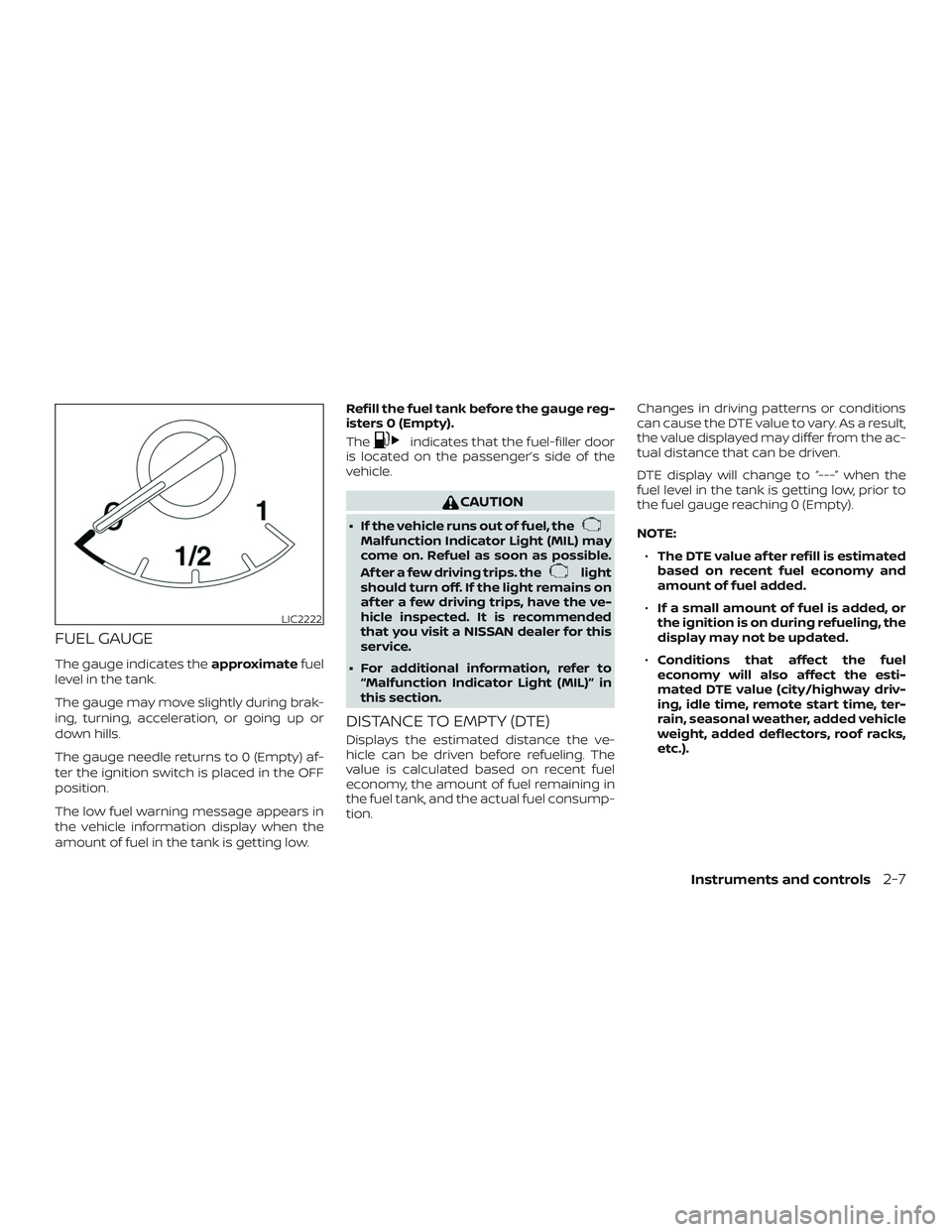
The gauge indicates theapproximatefuel
level in the tank.
The gauge may move slightly during brak-
ing, turning, acceleration, or going up or
down hills.
The gauge needle returns to 0 (Empty) af-
ter the ignition switch is placed in the OFF
position.
The low fuel warning message appears in
the vehicle information display when the
amount of fuel in the tank is getting low. Refill the fuel tank before the gauge reg-
isters 0 (Empty).
The
indicates that the fuel-filler door
is located on the passenger’s side of the
vehicle.
CAUTION
∙ If the vehicle runs out of fuel, theMalfunction Indicator Light (MIL) may
come on. Refuel as soon as possible.
Af ter a few driving trips. the
light
should turn off. If the light remains on
af ter a few driving trips, have the ve-
hicle inspected. It is recommended
that you visit a NISSAN dealer for this
service.
∙ For additional information, refer to “Malfunction Indicator Light (MIL)” in
this section.
DISTANCE TO EMPTY (DTE)
Displays the estimated distance the ve-
hicle can be driven before refueling. The
value is calculated based on recent fuel
economy, the amount of fuel remaining in
the fuel tank, and the actual fuel consump-
tion. Changes in driving patterns or conditions
can cause the DTE value to vary. As a result,
the value displayed may differ from the ac-
tual distance that can be driven.
DTE display will change to “---” when the
fuel level in the tank is getting low, prior to
the fuel gauge reaching 0 (Empty).
NOTE:
∙ The DTE value af ter refill is estimated
based on recent fuel economy and
amount of fuel added.
∙ If a small amount of fuel is added, or
the ignition is on during refueling, the
display may not be updated.
∙ Conditions that affect the fuel
economy will also affect the esti-
mated DTE value (city/highway driv-
ing, idle time, remote start time, ter-
rain, seasonal weather, added vehicle
weight, added deflectors, roof racks,
etc.).
LIC2222
Instruments and controls2-7
Page 100 of 564
CHECKING LIGHTS
With all doors closed, apply the parking
brake, fasten the seat belts and place the
ignition switch in the ON position without
starting the engine. The following lights (if
so equipped) will come on:
PARK or
(red),,,,
The following lights (if so equipped) come
on briefly and then go off:
or(red),or,
,,,
If any light fails to come on or operate in a
way other than described, it may indicate a
burned-out bulb and/or a system mal-
function. Have the system checked. It is
recommended that you visit a NISSAN
dealer for this service.
Some indicators and warnings are also dis-
played on the vehicle information display
between the speedometer and tachom-
eter. For additional information, refer to “Ve-
hicle information display” in this section.
WARNING LIGHTS
For additional information, refer to “Vehicle
information display” in this section.
orAnti-lock BrakingSystem (ABS)
warning light
When the ignition switch is placed in the ON
position, the ABS warning light illuminates
and then turns off. This indicates the ABS is
operational.
If the ABS warning light illuminates while
the engine is running or while driving, it
may indicate the ABS is not functioning
properly. Have the system checked. It is
recommended that you visit a NISSAN
dealer for this service.
If an ABS malfunction occurs, the anti-lock
function is turned off. The brake system
then operates normally but without anti-
lock assistance. For additional information,
refer to “Brake system” in the “Starting and
driving” section of this manual.
Automatic EmergencyBraking (AEB) system
warning light (if so
equipped)
This light comes on when the ignition
switch is placed in the ON position. It turns
off af ter the engine is started.
This light illuminates when the AEB system
is set to OFF on the vehicle information
display.
If the light illuminates when the AEB sys-
tem is on, it may indicate that the system is
unavailable. For additional information, re-
fer to “Automatic Emergency Braking (AEB)”
in the “Starting and driving” section of this
manual.
Automatic EmergencyBraking (AEB) with
Pedestrian Detection
system warning light (if so
equipped)
This light comes on when the ignition
switch is placed in the ON position. It turns
off af ter the engine is started.
2-12Instruments and controls
Page 102 of 564
orElectronic parkingbrake warning
light (yellow) (if so
equipped)
The electronic parking brake system warn-
ing light functions for the electronic park-
ing brake system. If the warning light illumi-
nates, it may indicate the electronic
parking brake system is not functioning
properly. Have the system checked. It is
recommended that you visit a NISSAN
dealer for this service.
For additional information, refer to “Parking
brake” in the “Starting and driving” section
of this manual.
Low tire pressure warninglight
Your vehicle is equipped with a Tire Pres-
sure Monitoring System (TPMS) that moni-
tors the tire pressure of all tires except the
spare.
The low tire pressure warning light warns
of low tire pressure or indicates that the
TPMS is not functioning properly. Af ter the ignition switch is placed in the ON
position, this light illuminates for about
1 second and turns off.
Low tire pressure warning
If the vehicle is being driven with low tire
pressure, the warning light will illumi-
nate. A “Tire Pressure Low - Add Air”
warning also appears in the vehicle in-
formation display.
When the low tire pressure warning light
illuminates, you should stop and adjust
the tire pressure of all four tires to the
recommended COLD tire pressure shown
on the Tire and Loading Information la-
bel located in the driver’s door opening.
The low tire pressure warning light does
not automatically turn off when the tire
pressure is adjusted. Af ter the tire is in-
flated to the recommended pressure,
the vehicle must be driven at speeds
above 16 mph (25 km/h) to activate the
TPMS and turn off the low tire pressure
warning light. Use a tire pressure gauge
to check the tire pressure.
The “Tire Pressure Low - Add Air” warning
appears each time the ignition switch is
placed in the ON position as long as the low
tire pressure warning light remains illumi-
nated.
For additional information, refer to “Vehicle
information display” in this section and
“Tire Pressure Monitoring System (TPMS)” in
the “Starting and driving” section and in the
“In case of emergency” section of this
manual.
TPMS malfunction
If the TPMS is not functioning properly, the
low tire pressure warning light will flash for
approximately 1 minute when the ignition
switch is placed in the ON position. The
light will remain on af ter 1 minute. Have the
system checked. It is recommended that
you visit a NISSAN dealer for this service.
The "Tire Pressure Low — Add Air" warning
does not appear if the low tire pressure
warning light illuminates to indicate a
TPMS malfunction.
For additional information, refer to “Tire
Pressure Monitoring System (TPMS)” in the
“Starting and driving” section and “Tire
pressure” in the “Do-it-yourself ” section of
this manual.
2-14Instruments and controls
Page 103 of 564
WARNING
∙ Radio waves could adversely affectelectric medical equipment. Those
who use a pacemaker should contact
the electric medical equipment
manufacturer for the possible influ-
ences before use.
∙ If the light does not illuminate with the ignition switch placed in the ON
position, have the vehicle checked as
soon as possible. It is recommended
that you visit a NISSAN dealer for this
service. ∙ If the light illuminates while driving,
avoid sudden steering maneuvers or
abrupt braking, reduce vehicle speed,
pull off the road to a safe location and
stop the vehicle as soon as possible.
Driving with under-inflated tires may
permanently damage the tires and in-
crease the likelihood of tire failure. Se-
rious vehicle damage could occur and
may lead to an accident and could re-
sult in serious personal injury or
death. Check the tire pressure for all
four tires. Adjust the tire pressure to
the recommended COLD tire pressure
shown on the Tire and Loading Infor-
mation label located in the driver’s
door opening to turn the low tire pres-
sure warning light off. If the light still
illuminates while driving af ter adjust-
ing the tire pressure, a tire may be flat
or the TPMS may be malfunctioning. If
you have a flat tire, replace it with a
spare tire as soon as possible. If no tire
is flat and all tires are properly in-
flated, have the vehicle checked. It is
recommended that you visit a NISSAN
dealer for this service. ∙ When replacing a wheel without the
TPMS such as the spare tire, the TPMS
will not function and the low tire pres-
sure warning light will flash for ap-
proximately 1 minute. The light will re-
main on af ter 1 minute. Have your
tires replaced and/or TPMS system
reset as soon as possible. It is recom-
mended that you visit a NISSAN dealer
for these services.
∙ Replacing tires with those not origi- nally specified by NISSAN could affect
the proper operation of the TPMS.
CAUTION
∙ The TPMS is not a substitute for theregular tire pressure check. Be sure to
check the tire pressure regularly.
∙ If the vehicle is being driven at speeds of less than 16 mph (25 km/h), the
TPMS may not operate correctly.
∙ Be sure to install the specified size of tires to the four wheels correctly.
Instruments and controls2-15
Page 104 of 564
Master warning light
When the ignition is in the ON position, the
master warning light illuminates if any of
the following are displayed on the vehicle
information display.∙ All-Wheel Drive (AWD) Tire Size Incorrect See Owner’s Manual
∙ All-Wheel Drive (AWD) High Temp. Stop vehicle
∙ All-Wheel Drive (AWD) Error See Owner’s Manual
∙ No key warning
∙ Low fuel warning
∙ Low windshield-washer fluid warning
∙ Parking brake release warning
∙ Door/lif tgate open warning
∙ Loose fuel cap warning
If the All-Wheel Drive (AWD) system mal-
functions, or the diameter of the front and
the rear wheels are different, the master
warning light will illuminate. For additional
information, refer to “All-Wheel Drive (AWD)”
in the “Starting and driving” section of this
manual. ∙ If the warning light comes on while driv-
ing there may be a malfunction in the
AWD system. Reduce the vehicle speed
and have your vehicle checked as soon
as possible. It is recommended that you
visit a NISSAN dealer for this service.
CAUTION
∙ If the master warning light was illumi-nated while driving:
—AWD High Temp Stop vehicle
Pull off the road in a safe area and idle
the engine. The driving mode will
change to 2WD to prevent the AWD sys-
tem from malfunctioning. If the warn-
ing light turns off, you can drive again.
—Tire Size Incorrect See Owner’s
Manual
Pull off the road in a safe area and idle
the engine. Check that all tire sizes are
the same, tire pressure is correct and
tires are not worn.
∙ If the warning light is still on af ter the above operations, have your vehicle
checked as soon as possible. It is rec-
ommended that you visit a NISSAN
dealer for this service.
Power steering warning
light
WARNING
∙ If the engine is not running or is turned off while driving, the power as-
sist for the steering will not work.
Steering will be harder to operate.
∙ When the power steering warning light illuminates with the engine run-
ning, there will be no power assist for
the steering. You will still have control
of the vehicle, but the steering will be
harder to operate. Have the power
steering system checked. It is recom-
mended that you visit a NISSAN dealer
for this service.
When the ignition switch is placed in the ON
position, the power steering warning light
illuminates. Af ter starting the engine, the
power steering warning light turns off. This
indicates the power steering is operational.
If the power steering warning light illumi-
nates while the engine is running, it may indi-
cate the power steering is not functioning
properly and may need servicing. Have the
power steering checked. It is recommended
that you visit a NISSAN dealer for this service.
2-16Instruments and controls
Page 109 of 564
AUDIBLE REMINDERS
Brake pad wear warning
The disc brake pads have audible wear
warnings. When a disc brake pad requires
replacement, it makes a high pitched
scraping sound when the vehicle is in mo-
tion, whether or not the brake pedal is de-
pressed. Have the brakes checked as soon
as possible if the warning sound is heard.
Key reminder chime
A chime sounds if the driver’s door is
opened while the ignition switch is placed
in the OFF position or placed in the OFF or
LOCK position with the key lef t in the ve-
hicle. Make sure the ignition switch is
placed in the LOCK position, and take the
key with you when leaving the vehicle.
Light reminder chime
With the ignition switch placed in the OFF
position, a chime sounds when the driver’s
door is opened if the headlights or parking
lights are on.
Turn the headlight control switch off before
leaving the vehicle.
NISSAN Intelligent Key® door
buzzer (if so equipped)
The Intelligent Key door buzzer sounds if
any one of the following improper opera-
tions is found.∙ The Intelligent Key is lef t inside the ve- hicle when locking the doors.
∙ Any doors are not closed securely when locking the doors.
When the buzzer sounds, be sure to check
both the vehicle and the Intelligent Key. For
additional information, refer to “NISSAN In-
telligent Key®” in the “Pre-driving checks
and adjustments” section of this manual.
Driving aid chimes (if so equipped)
An audible alert/chime may be heard if any
of the following systems are active: ∙ Automatic Emergency Braking (AEB)
∙ Automatic Emergency Braking (AEB) with Pedestrian Detection
∙ Blind Spot Warning (BSW)/Rear Cross Traffic Alert (RCTA)
∙ Intelligent Cruise Control (ICC)
∙ Intelligent Lane Intervention (I-LI) ∙ Lane Departure Warning (LDW)
∙ ProPILOT Assist
∙ Rear Automatic Braking (RAB)
∙ Rear Sonar System (RSS)
For additional information, refer to the
“Starting and driving” section of this
manual.
Instruments and controls2-21
Page 115 of 564
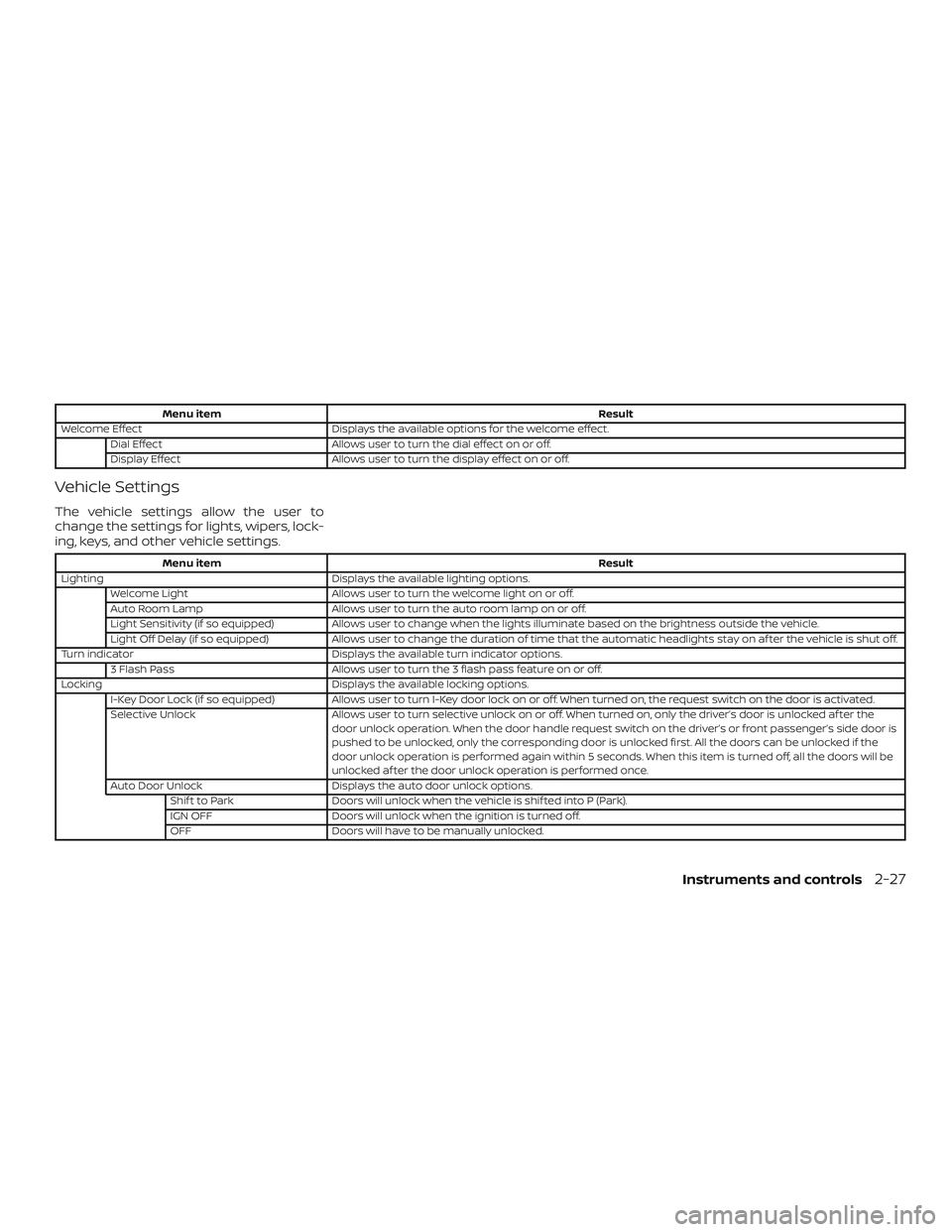
Menu itemResult
Welcome Effect Displays the available options for the welcome effect.
Dial Effect Allows user to turn the dial effect on or off.
Display Effect Allows user to turn the display effect on or off.
Vehicle Settings
The vehicle settings allow the user to
change the settings for lights, wipers, lock-
ing, keys, and other vehicle settings.
Menu item Result
Lighting Displays the available lighting options.
Welcome Light Allows user to turn the welcome light on or off.
Auto Room Lamp Allows user to turn the auto room lamp on or off.
Light Sensitivity (if so equipped) Allows user to change when the lights illuminate based on the brightness outside the vehicle.
Light Off Delay (if so equipped) Allows user to change the duration of time that the automatic headlights stay on af ter the vehicle is shut off.
Turn indicator Displays the available turn indicator options.
3 Flash Pass Allows user to turn the 3 flash pass feature on or off.
Locking Displays the available locking options.
I-Key Door Lock (if so equipped) Allows user to turn I-Key door lock on or off. When turned on, the request switch on the door is activated.
Selective Unlock Allows user to turn selective unlock on or off. When turned on, only the driver’s door is unlocked af ter the
door unlock operation. When the door handle request switch on the driver’s or front passenger’s side door is
pushed to be unlocked, only the corresponding door is unlocked first. All the doors can be unlocked if the
door unlock operation is performed again within 5 seconds. When this item is turned off, all the doors will be
unlocked af ter the door unlock operation is performed once.
Auto Door Unlock Displays the auto door unlock options.
Shif t to Park Doors will unlock when the vehicle is shif ted into P (Park).
IGN OFF Doors will unlock when the ignition is turned off.
OFF Doors will have to be manually unlocked.
Instruments and controls2-27
Page 116 of 564
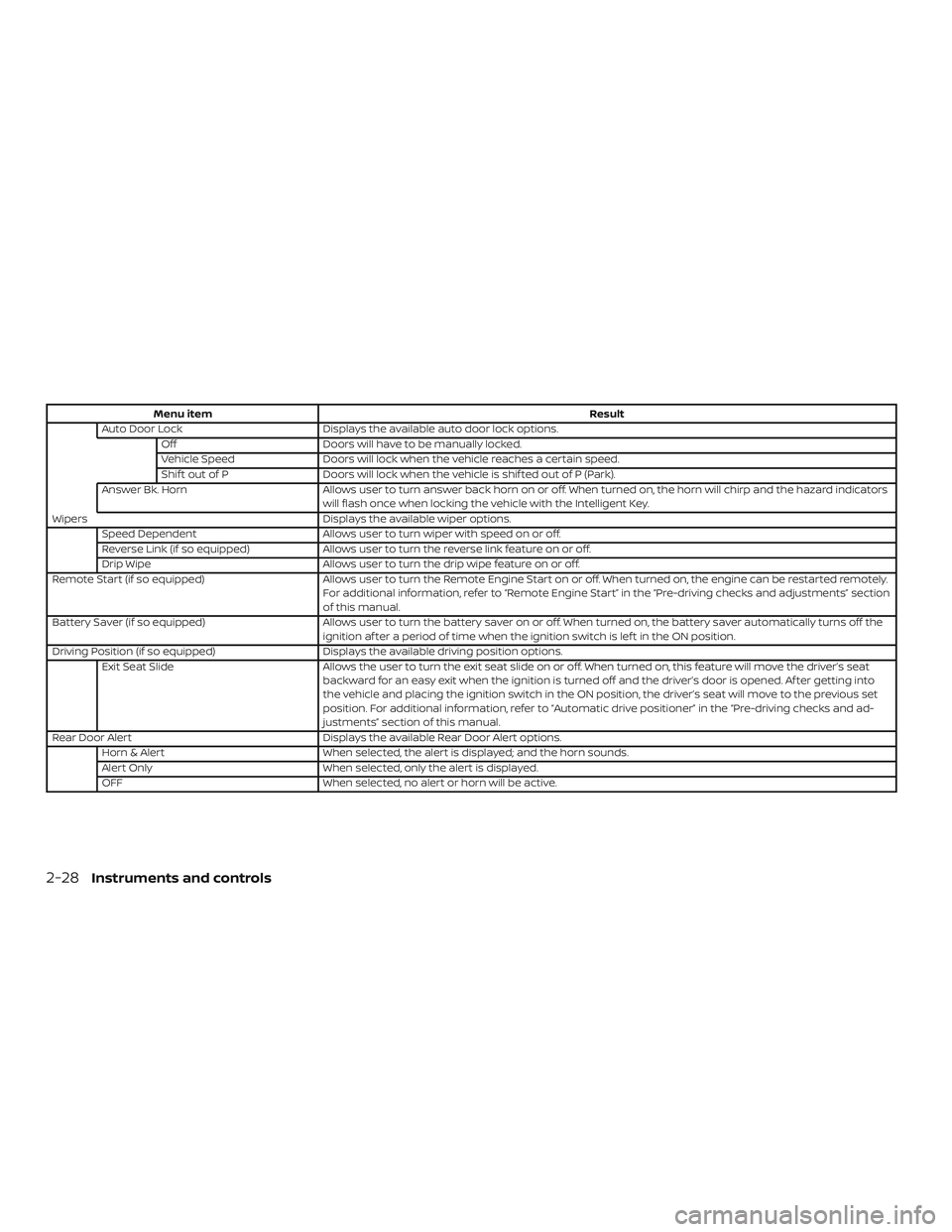
Menu itemResult
Auto Door Lock Displays the available auto door lock options.
Off Doors will have to be manually locked.
Vehicle Speed Doors will lock when the vehicle reaches a certain speed.
Shif t out of P Doors will lock when the vehicle is shif ted out of P (Park).
Answer Bk. Horn Allows user to turn answer back horn on or off. When turned on, the horn will chirp and the hazard indicators
will flash once when locking the vehicle with the Intelligent Key.
Wipers Displays the available wiper options.
Speed Dependent Allows user to turn wiper with speed on or off.
Reverse Link (if so equipped) Allows user to turn the reverse link feature on or off.
Drip Wipe Allows user to turn the drip wipe feature on or off.
Remote Start (if so equipped) Allows user to turn the Remote Engine Start on or off. When turned on, the engine can be restarted remotely.
For additional information, refer to “Remote Engine Start” in the “Pre-driving checks and adjustments” section
of this manual.
Battery Saver (if so equipped) Allows user to turn the battery saver on or off. When turned on, the battery saver automatically turns off the
ignition af ter a period of time when the ignition switch is lef t in the ON position.
Driving Position (if so equipped) Displays the available driving position options.
Exit Seat Slide Allows the user to turn the exit seat slide on or off. When turned on, this feature will move the driver’s seat
backward for an easy exit when the ignition is turned off and the driver’s door is opened. Af ter getting into
the vehicle and placing the ignition switch in the ON position, the driver’s seat will move to the previous set
position. For additional information, refer to “Automatic drive positioner” in the “Pre-driving checks and ad-
justments” section of this manual.
Rear Door Alert Displays the available Rear Door Alert options.
Horn & Alert When selected, the alert is displayed; and the horn sounds.
Alert Only When selected, only the alert is displayed.
OFF When selected, no alert or horn will be active.
2-28Instruments and controls