vehicle display settings NISSAN ROGUE 2020 Owner´s Manual
[x] Cancel search | Manufacturer: NISSAN, Model Year: 2020, Model line: ROGUE, Model: NISSAN ROGUE 2020Pages: 567, PDF Size: 6.63 MB
Page 390 of 567
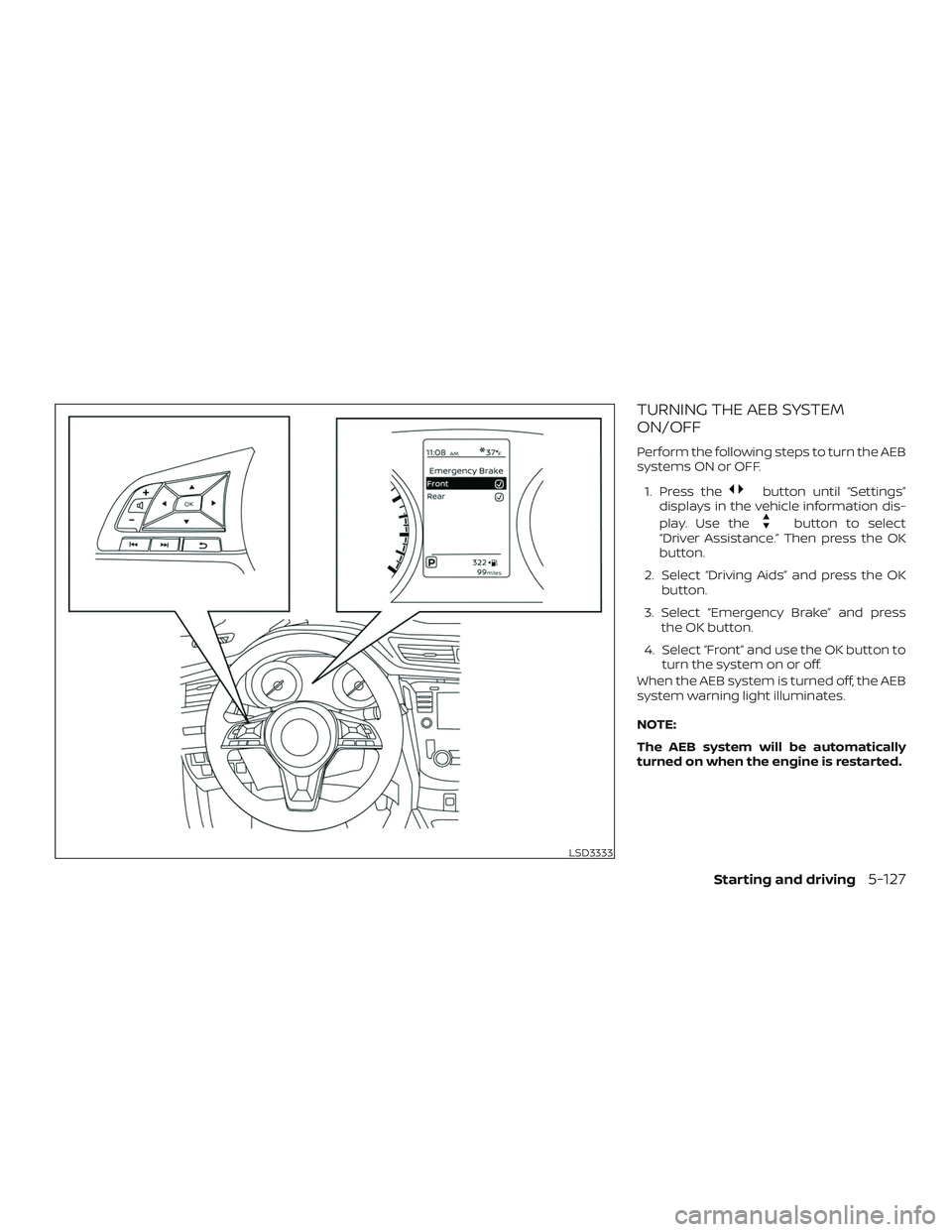
TURNING THE AEB SYSTEM
ON/OFF
Perform the following steps to turn the AEB
systems ON or OFF.1. Press the
button until “Settings”
displays in the vehicle information dis-
play. Use the
button to select
“Driver Assistance.” Then press the OK
button.
2. Select “Driving Aids” and press the OK button.
3. Select “Emergency Brake” and press the OK button.
4. Select “Front” and use the OK button to turn the system on or off.
When the AEB system is turned off, the AEB
system warning light illuminates.
NOTE:
The AEB system will be automatically
turned on when the engine is restarted.
LSD3333
Starting and driving5-127
Page 398 of 567
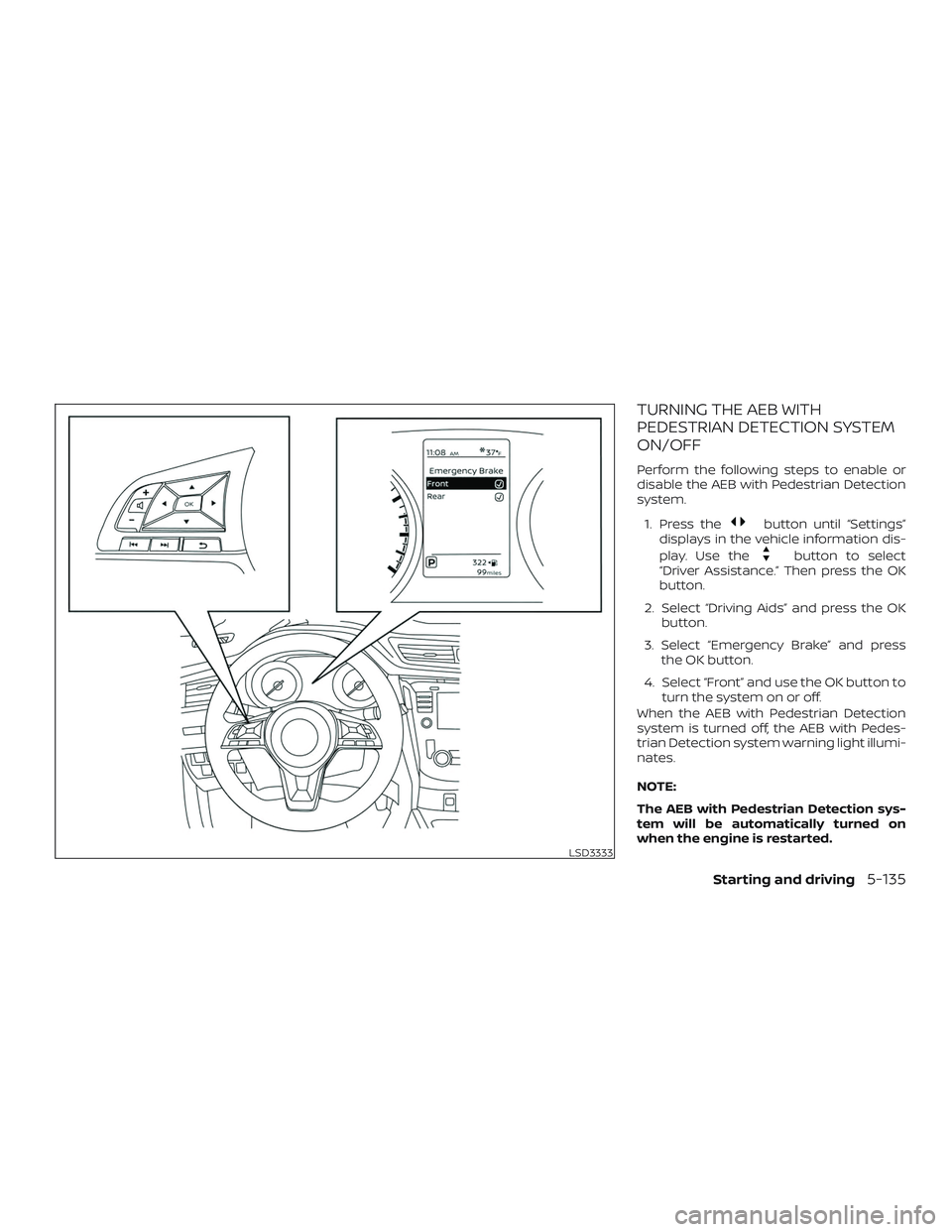
TURNING THE AEB WITH
PEDESTRIAN DETECTION SYSTEM
ON/OFF
Perform the following steps to enable or
disable the AEB with Pedestrian Detection
system.1. Press the
button until “Settings”
displays in the vehicle information dis-
play. Use the
button to select
“Driver Assistance.” Then press the OK
button.
2. Select “Driving Aids” and press the OK button.
3. Select “Emergency Brake” and press the OK button.
4. Select “Front” and use the OK button to turn the system on or off.
When the AEB with Pedestrian Detection
system is turned off, the AEB with Pedes-
trian Detection system warning light illumi-
nates.
NOTE:
The AEB with Pedestrian Detection sys-
tem will be automatically turned on
when the engine is restarted.
LSD3333
Starting and driving5-135
Page 406 of 567
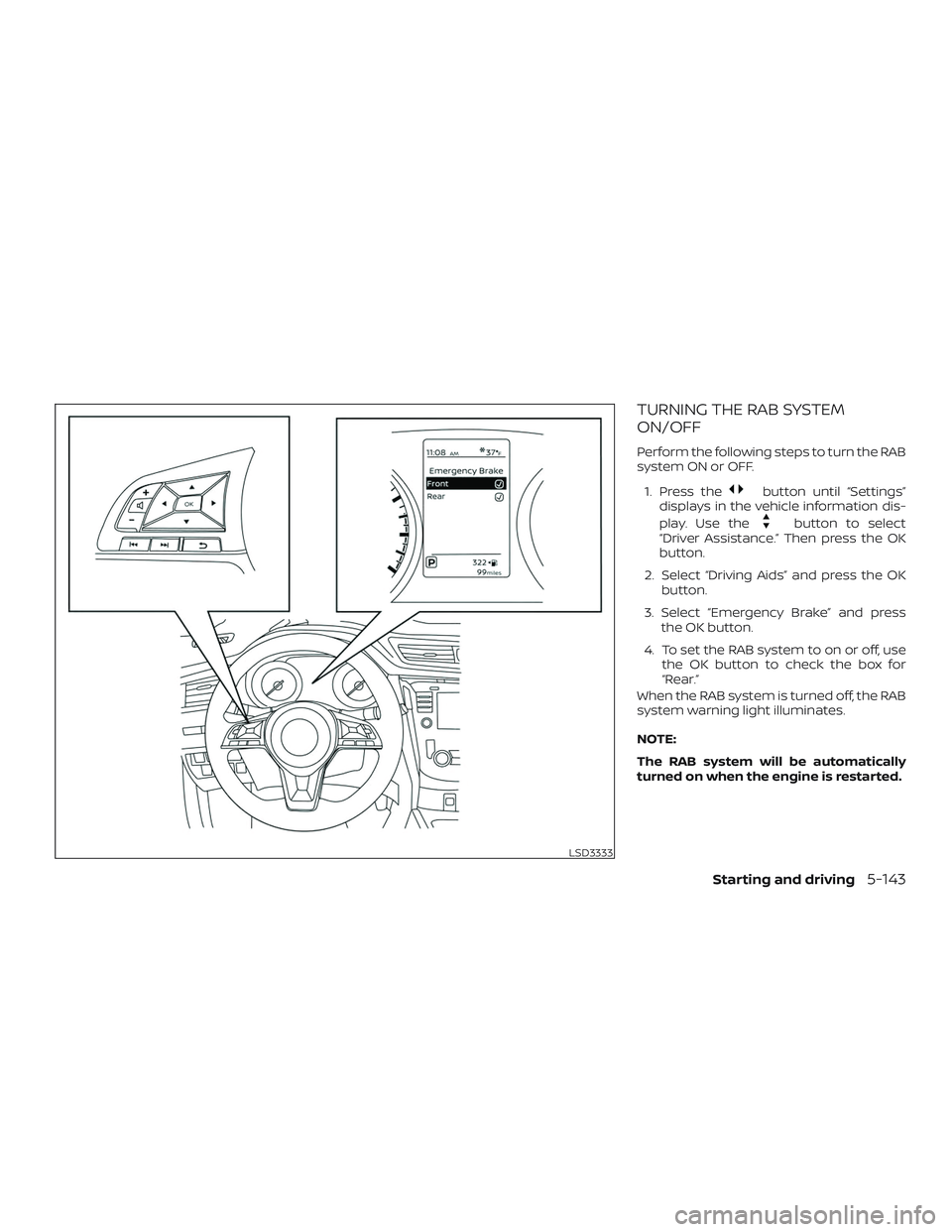
TURNING THE RAB SYSTEM
ON/OFF
Perform the following steps to turn the RAB
system ON or OFF.1. Press the
button until “Settings”
displays in the vehicle information dis-
play. Use the
button to select
“Driver Assistance.” Then press the OK
button.
2. Select “Driving Aids” and press the OK button.
3. Select “Emergency Brake” and press the OK button.
4. To set the RAB system to on or off, use the OK button to check the box for
“Rear.”
When the RAB system is turned off, the RAB
system warning light illuminates.
NOTE:
The RAB system will be automatically
turned on when the engine is restarted.
LSD3333
Starting and driving5-143
Page 421 of 567
∙ When driving on extremely inclinedsurfaces such as higher banked cor-
ners, the VDC system may not operate
properly and the
indicator light
may flash or both the
andindicator lights may illuminate. Do not
drive on these types of roads.
∙ When driving on an unstable surface such as a turntable, ferry, elevator or
ramp, the
indicator light may
flash or both the
andindi-
cator lights may illuminate. This is not
a malfunction. Restart the engine af-
ter driving onto a stable surface.
∙ If wheels or tires other than the NISSAN recommended ones are used,
the VDC system may not operate
properly and the
indicator light
may flash or both the
andindicator lights may illuminate.
∙ The VDC system is not a substitute for winter tires or tire chains on a snow
covered road. The chassis control is an electric control
module that includes the following func-
tions:
∙ Intelligent Trace Control
∙ Intelligent Engine Brake
∙ Active Ride Control
INTELLIGENT TRACE CONTROL
(I-TC)
This system senses driving based on the
driver’s steering and acceleration/braking
patterns, and controls brake pressure at
individual wheels to aid tracing at corners
and help smooth vehicle response.
The I-TC can be set to on (enabled) or off
(disabled) through the vehicle information
display “Settings” page. For additional infor-
mation, refer to “Vehicle information dis-
play” in the “Instruments and controls” sec-
tion of this manual.
When the Vehicle Dynamic Control (VDC)
OFF switch is used to turn off the VDC sys-
tem, the I-TC is also turned off.
CHASSIS CONTROL
5-158Starting and driving
Page 422 of 567

When the I-TC is operated and the “Chassis
Control” mode is selected in the vehicle in-
formation display, the I-TC graphics are
shown in the vehicle information display.
For additional information, refer to “Vehicle
information display” in the “Instruments
and controls” section of this manual.
If the “Chassis Control System Error: See
Owner’s Manual” warning message ap-
pears in the vehicle information display, it
may indicate that the I-TC is not function-
ing properly. Have the system checked as
soon as possible. It is recommended that
you visit a NISSAN dealer for this service.WARNING
The I-TC may not be effective depend-
ing on the driving condition. Always
drive carefully and attentively.
When the I-TC is operating, you may feel a
pulsation in the brake pedal and hear a
noise. This is normal and indicates that the
I-TC is operating properly.
Even if the I-TC is turned off, some functions
will remain on to assist the driver (for ex-
ample, avoidance scenes).
INTELLIGENT ENGINE BRAKE (I-EB)
The I-EB function adds subtle deceleration
by controlling Continuously Variable Trans-
mission (CVT) gear ratio, depending on the
cornering condition calculated from driv-
er’s steering input and plural sensors. This
benefit is for easier traceability and less
workload of adjusting speed with braking
at corners.
The I-EB also enhances braking feel by
adding subtle deceleration with CVT gear
ratio control according to driver’s brake
pedal operation
The I-EB can be set to on (enabled) or off
(disabled) through the vehicle information
display “Settings” page. For additional infor-
mation, refer to “Vehicle information dis-
play” in the “Instruments and controls” sec-
tion of this manual.
LSD2185
Starting and driving5-159
Page 428 of 567

HOW TO ENABLE/DISABLE THE
SONAR SYSTEM
The system is automatically activated
when the ignition is in the ON position and
the shif t lever is in the R (Reverse) position.
Perform the following steps to enable or
disable the sonar system:1. Press the
button until “Settings”
displays in the vehicle information dis-
play. Use the
button to select
“Driver Assistance.” Then press the OK
button.
2. Select “Parking Aids” and press the OK button.
3. Select “Rear Sensor” and press the OK button to turn the system on or off.
– Select “Display” to display the park- ing sensor in the vehicle information
display when the sonar system acti-
vates.
– Select “Range” to change the sonar system distance to “Far,” “Mid,” or
“Near.”
LSD3336
Starting and driving5-165