key NISSAN ROGUE 2021 Owner´s Manual
[x] Cancel search | Manufacturer: NISSAN, Model Year: 2021, Model line: ROGUE, Model: NISSAN ROGUE 2021Pages: 556, PDF Size: 2.7 MB
Page 157 of 556
remove them before wireless charging.
Turn off the vibration function of the
smartphone before wireless charging.
NOTE:
.Only a Qi compatible smartphone
can be used.
. The smartphone may be warmed
during charging process and the
charging may stop by the protection
function of the wireless charger. This
is not a malfunction. If this occurs,
restart charging after the smart-
phone cooled down. The indicator
will blink in orange then turn off.
. The wireless charging process may
be stopped by the status of the
smartphone (battery temperature,
etc.).
. If a radio noise interference occurs
during charging process, put the
smartphone onto the center (“Qi”
logo) position of the wireless char-
ger.
. The wireless charging process will
stop during process of searching the
Intelligent Key.
. The wireless charging process will
not be started when a USB (Univer-
sal Serial Bus) cable is connected to
the smartphone. The indicator may
illuminate in orange or blink if the
smartphone is put on the wireless charger with a USB cable connected.
However, charging is not performed.
. Depending on the type of the smart-
phone, the indicator may remain
illuminated in orange even when
the charging process has been com-
pleted.
FCC ID: BEJWC500MNM
IC: 2703H-WC500MNM
This device complies with part 15 of the
FCC Rules and RSS-Gen of IC Rules.
Operation is subject to the following
two conditions:
(1) This device may not cause harmful
interference, and
(2) This device must accept any inter-
ference received, including interference
that may cause undesired operation.
Changes or modifications not expressly
approved by the party responsible for
compliance could void the user’s
authority to operate the equipment.
RF Radiation Exposure Statement: This
equipment complies with FCC RF Radia-
tion exposure limits set forth for an
uncontrolled environment.
This device and its antenna must not be
co-located or operating in conjunction
with any other antenna or transmitter. This equipment should be installed and
operated with a minimum distance of
15cm between the radiator and your
body.
ISED Compliance Statement
This device complies with RSS-Gen of IC
Rules
Operation is subject to the following
two conditions:
(1) This device may not cause harmful
interference, and
(2) This device must accept any inter-
ference received, including interference
that may cause undesired operation.
Changes or modifications made to this
device, not expressly approved by LG
Vehicle Components Company, will void
the user’s authority to operate the
equipment.
ISED RF Radiation Exposure Statement:
This equipment complies with ISED RF
Radiation exposure limits set forth for
an uncontrolled environment. This de-
vice and its antenna must not be co-
located or operating in conjunction with
any other antenna or transmitter. This
equipment should be installed to oper-
ate with a minimum distance of 15cm
between the radiator and the end-
user’s body and arms.
Instruments and controls2-69
Page 172 of 556
2-84Instruments and controls
Auto-reverse function
WARNING
There are some small distances just
before the closed position which
cannot be detected. Make sure that
all passengers have their hands, etc.
inside the vehicle before closing the
moonroof and sunshade.
The auto-reverse function enables the
moonroof and sunshade to automatically
reverse when something is caught in the
moonroof and sunshade as it is closing.
When the control unit detects an obsta-
cle, the moonroof and sunshade will open
immediately.
Depending on the environment or driving
conditions, the auto-reverse function
may activate if an impact or load similar
to something being caught in the moon-
roof and sunshade occurs.
If the auto-reverse function activates
consecutively or the battery is dis-
charged, the moonroof and sunshade
may not close properly. In this case, push
and hold the switch to the CLOSE position
to close the moonroof.
If the moonroof does not operate
If the moonroof and sunshade do not
operate properly, perform the following
procedure to initialize the operation sys-
tem.
1. If the moonroof and sunshade are open, close them fully by repeatedly
pushing the moonroof switch to the
CLOSE
andposition.
2. Push and hold the moonroof switch to the CLOSE
position for 10 seconds.
3. After the moonroof and sunshade move slightly to the closed position
and then move back a little, release
the moonroof switch.
4. Push and hold the moonroof switch to the CLOSE
position, and the glass
and shade will move.
5. Release the moonroof switch. Then the moonroof and sunshade will fully
open and then fully close.
6. Check if the moonroof switch oper- ates normally.
WARNING
The driver is always responsible for
operating the moonroof properly,
including the operation by all pas-
sengers. Failure to follow the warn- ings and instructions for proper use
of the moonroof could result in
serious injury or death.
.
Do not allow children to operate
the moonroof. Improper opera-
tion by children may cause an
accident. If children or others get
caught in the moonroof, it could
cause serious injury.
. To help avoid risk of injury or
death through unintended opera-
tion of the moonroof, place the
ignition switch in the OFF position
when leaving the vehicle, and do
not leave children and the Intelli-
gent Key inside the vehicle.
. Do not activate the auto-reverse
function intentionally. If hands or
face, etc. get caught in the moon-
roof, it could cause serious injury.
CAUTION
.Do not place objects (such as
newspapers, handkerchiefs, etc.)
on the sunshade when it is ex-
tending or retracting causing im-
proper operation or damage to
the sunshade.
Page 177 of 556

3 Pre-driving checks and adjustments
Keys ........................................................................\
................................. 3-3Intelligent Key ........................................................................\
... 3-3
Doors ........................................................................\
.............................. 3-5
Locking with key .................................................................... 3-5
Locking with inside lock knob ..................................... 3-6
Locking with power door lock switch ................... 3-6
Automatic door locks ......................................................... 3-7
Child safety rear door lock ............................................. 3-7
Intelligent Key system .............................................................. 3-7 Intelligent Key operating range (models with
request switch) ........................................................................\
3-9
Door locks/unlocks precaution (models with
request switch) ..................................................................... 3-10
Intelligent Key operation (models with
request switch) ..................................................................... 3-11
Battery saver system ....................................................... 3-12
Warning lights and audible reminders .............. 3-12
Troubleshooting guide ................................................... 3-13
How to use remote keyless entry function ...... 3-15
Remote engine start (if so equipped) ....................... 3-19
Remote engine start operating range ............... 3-20
Remote starting the engine ....................................... 3-20
Extending engine run time ......................................... 3-20
Canceling a remote engine start ........................... 3-21
Conditions the remote engine start will
not work ........................................................................\
............. 3-21 Hood ........................................................................\
............................ 3-22
Liftgate ........................................................................\
...................... 3-23
Operating manual liftgate (if
so equipped) ........................................................................\
. 3-23
Operating power liftgate (if so equipped) ...... 3-24
Motion-activated liftgate (if
so equipped) ........................................................................\
. 3-26
Garage mode system (if so equipped) ............ 3-27
Auto closure (if so equipped) .................................. 3-28
liftgate release lever ....................................................... 3-28
Fuel-filler door ........................................................................\
..... 3-29 Opening the fuel-filler door ...................................... 3-29
How to refuel ....................................................................... 3-29
When refueling from a portable
fuel container ...................................................................... 3-30
Tilt/telescopic steering ........................................................ 3-31
Tilt and telescopic operation .................................. 3-31
Sun visors ........................................................................\
................ 3-32
Rear sunshade (if so equipped) .................................... 3-32
Mirrors ........................................................................\
...................... 3-33
Inside mirror ........................................................................\
. 3-33
Outside mirrors .................................................................. 3-34
Vanity mirror ........................................................................\
3-36
Memory seat (if so equipped) ......................................... 3-36 Memory storage function .......................................... 3-36
Page 179 of 556
SPA2406Type A (if so equipped)
JVP0177XType B (if so equipped)
JVP0155XType C (if so equipped)1. Intelligent Key (2 sets)
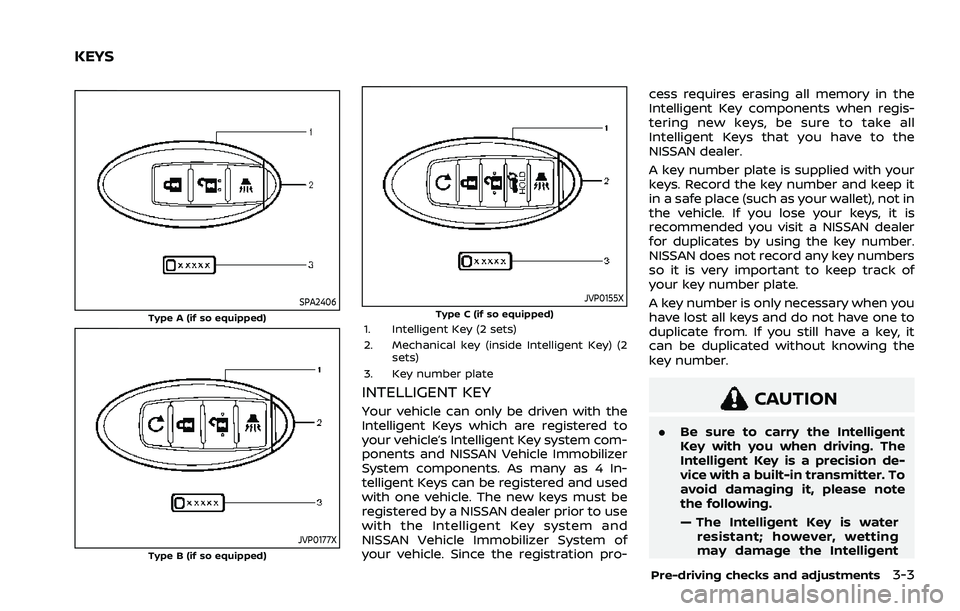
2. Mechanical key (inside Intelligent Key) (2sets)
3. Key number plate
INTELLIGENT KEY
Your vehicle can only be driven with the
Intelligent Keys which are registered to
your vehicle’s Intelligent Key system com-
ponents and NISSAN Vehicle Immobilizer
System components. As many as 4 In-
telligent Keys can be registered and used
with one vehicle. The new keys must be
registered by a NISSAN dealer prior to use
with the Intelligent Key system and
NISSAN Vehicle Immobilizer System of
your vehicle. Since the registration pro- cess requires erasing all memory in the
Intelligent Key components when regis-
tering new keys, be sure to take all
Intelligent Keys that you have to the
NISSAN dealer.
A key number plate is supplied with your
keys. Record the key number and keep it
in a safe place (such as your wallet), not in
the vehicle. If you lose your keys, it is
recommended you visit a NISSAN dealer
for duplicates by using the key number.
NISSAN does not record any key numbers
so it is very important to keep track of
your key number plate.
A key number is only necessary when you
have lost all keys and do not have one to
duplicate from. If you still have a key, it
can be duplicated without knowing the
key number.CAUTION
.
Be sure to carry the Intelligent
Key with you when driving. The
Intelligent Key is a precision de-
vice with a built-in transmitter. To
avoid damaging it, please note
the following.
— The Intelligent Key is water
resistant; however, wetting
may damage the Intelligent
Pre-driving checks and adjustments3-3
KEYS
Page 180 of 556
3-4Pre-driving checks and adjustments
Key. If the Intelligent Key gets
wet, immediately wipe until it
is completely dry.
— Do not bend, drop or strike it against another object.
— If the outside temperature is below 14°F (-10°C) degrees, the
battery of the Intelligent Key
may not function properly.
— Do not place the Intelligent Key for an extended period in
a place where temperatures
exceed 140°F (60°C).
— Do not change or modify the Intelligent Key.
— Do not use a magnet key holder.
— Do not place the Intelligent Key near an electric appliance
such as a television set, per-
sonal computer or cellular
phone.
— Do not allow the Intelligent Key to come into contact with
water or salt water, and do
not wash it in a washing
machine. This could affect
the system function. If an Intelligent Key is lost or stolen,
NISSAN recommends erasing the ID code
of that Intelligent Key. This will prevent
the Intelligent Key from unauthorized use
to unlock the vehicle. For information
regarding the erasing procedure, it is
recommended you visit a NISSAN dealer.
SPA2033
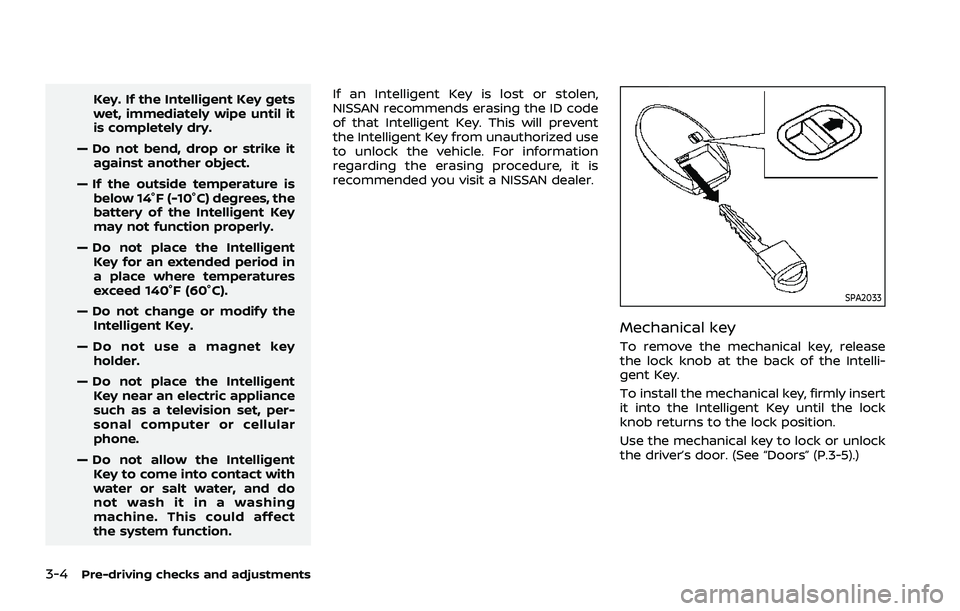
Mechanical key
To remove the mechanical key, release
the lock knob at the back of the Intelli-
gent Key.
To install the mechanical key, firmly insert
it into the Intelligent Key until the lock
knob returns to the lock position.
Use the mechanical key to lock or unlock
the driver’s door. (See “Doors” (P.3-5).)
Page 181 of 556
CAUTION
Always carry the mechanical key
installed in the Intelligent Key.
WARNING
.Always have the doors locked
while driving. Along with the use
of seat belts, this provides great-
er safety in the event of an
accident by helping to prevent
persons from being thrown from
the vehicle. This also helps keep
children and others from unin-
tentionally opening the doors,
and will help keep out intruders.
. Before opening any door, always
look for and avoid oncoming
traffic.
. To help avoid risk of injury or
death through unintended opera-
tion of the vehicle and or its
systems, including entrapment
in windows or inadvertent door
lock activation, do not leave chil-
dren, people who require the
assistance of others or pets un-
attended in your vehicle. Addi-
tionally, the temperature inside a
closed vehicle on a warm day can
quickly become high enough to
cause a significant risk of injury
or death to people and pets.
WAD0251X
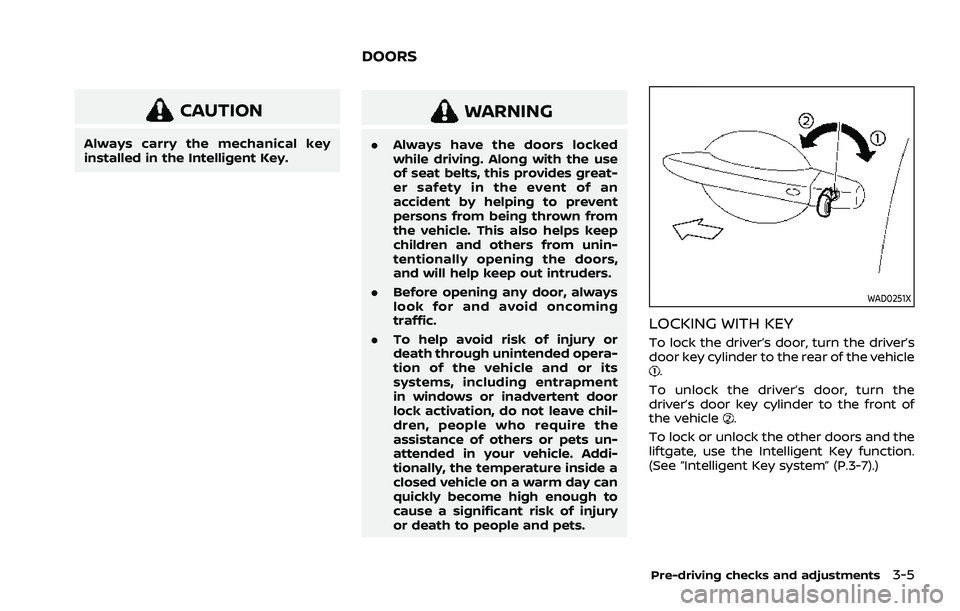
LOCKING WITH KEY
To lock the driver’s door, turn the driver’s
door key cylinder to the rear of the vehicle
.
To unlock the driver’s door, turn the
driver’s door key cylinder to the front of
the vehicle
.
To lock or unlock the other doors and the
liftgate, use the Intelligent Key function.
(See “Intelligent Key system” (P.3-7).)
Pre-driving checks and adjustments3-5
DOORS
Page 182 of 556
3-6Pre-driving checks and adjustments
SPA2726Example
LOCKING WITH INSIDE LOCK KNOB
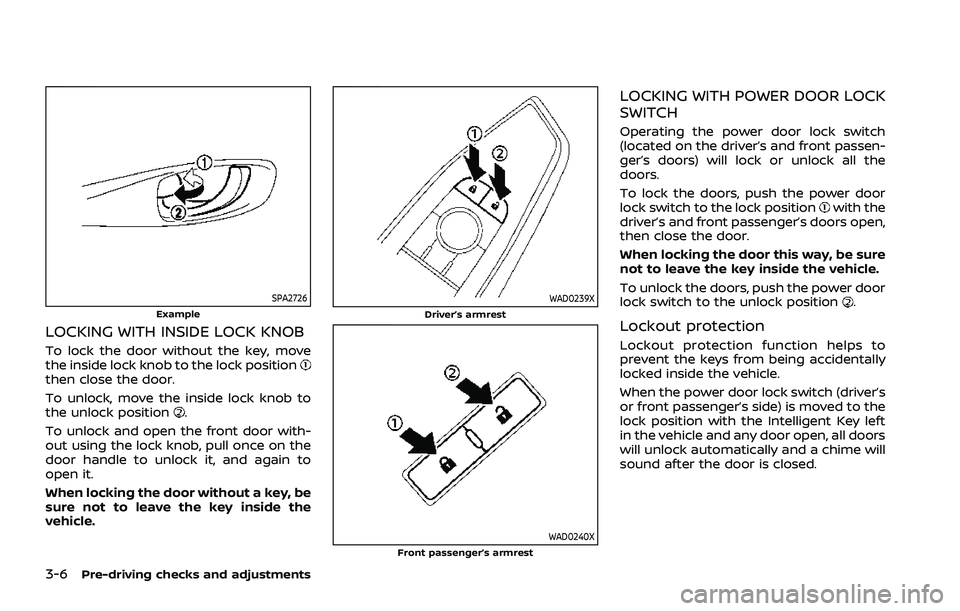
To lock the door without the key, move
the inside lock knob to the lock position
then close the door.
To unlock, move the inside lock knob to
the unlock position
.
To unlock and open the front door with-
out using the lock knob, pull once on the
door handle to unlock it, and again to
open it.
When locking the door without a key, be
sure not to leave the key inside the
vehicle.
WAD0239XDriver’s armrest
WAD0240XFront passenger’s armrest
LOCKING WITH POWER DOOR LOCK
SWITCH
Operating the power door lock switch
(located on the driver’s and front passen-
ger’s doors) will lock or unlock all the
doors.
To lock the doors, push the power door
lock switch to the lock position
with the
driver’s and front passenger’s doors open,
then close the door.
When locking the door this way, be sure
not to leave the key inside the vehicle.
To unlock the doors, push the power door
lock switch to the unlock position
.
Lockout protection
Lockout protection function helps to
prevent the keys from being accidentally
locked inside the vehicle.
When the power door lock switch (driver’s
or front passenger’s side) is moved to the
lock position with the Intelligent Key left
in the vehicle and any door open, all doors
will unlock automatically and a chime will
sound after the door is closed.
Page 183 of 556
AUTOMATIC DOOR LOCKS
.All doors lock automatically when the
vehicle speed reaches 15 MPH (24
km/h).
. All doors unlock automatically when
the ignition switch is placed in the OFF
position or when the shift position is
placed in the P (Park) position, if
selected.
NOTE:
The Automatic door unlock feature can
be changed using the "Vehicle Settings"
menu on the vehicle information dis-
play. (See “Vehicle Settings” (P.2-27).)
WAD0021X
CHILD SAFETY REAR DOOR LOCK
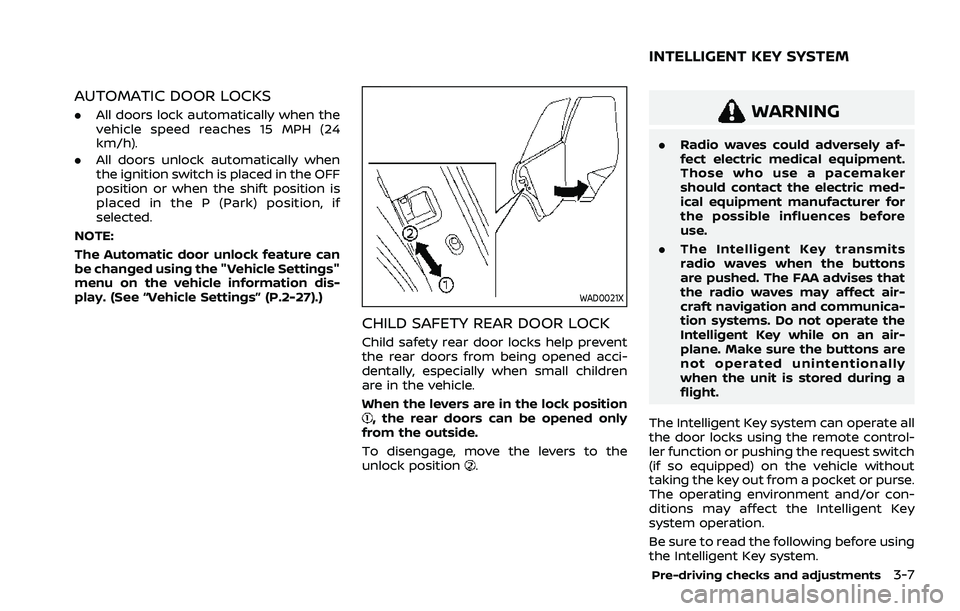
Child safety rear door locks help prevent
the rear doors from being opened acci-
dentally, especially when small children
are in the vehicle.
When the levers are in the lock position
, the rear doors can be opened only
from the outside.
To disengage, move the levers to the
unlock position
.
WARNING
. Radio waves could adversely af-
fect electric medical equipment.
Those who use a pacemaker
should contact the electric med-
ical equipment manufacturer for
the possible influences before
use.
. The Intelligent Key transmits
radio waves when the buttons
are pushed. The FAA advises that
the radio waves may affect air-
craft navigation and communica-
tion systems. Do not operate the
Intelligent Key while on an air-
plane. Make sure the buttons are
not operated unintentionally
when the unit is stored during a
flight.
The Intelligent Key system can operate all
the door locks using the remote control-
ler function or pushing the request switch
(if so equipped) on the vehicle without
taking the key out from a pocket or purse.
The operating environment and/or con-
ditions may affect the Intelligent Key
system operation.
Be sure to read the following before using
the Intelligent Key system.
Pre-driving checks and adjustments3-7
INTELLIGENT KEY SYSTEM
Page 184 of 556
3-8Pre-driving checks and adjustments
CAUTION
.Be sure to carry the Intelligent
Key with you when operating the
vehicle.
. Never leave the Intelligent Key in
the vehicle when you leave the
vehicle.
The Intelligent Key is always communi-
cating with the vehicle as it receives radio
waves. The Intelligent Key system trans-
mits weak radio waves. Environmental
conditions may interfere with the opera-
tion of the Intelligent Key system under
the following operating conditions.
. When operating near a location where
strong radio waves are transmitted,
such as a TV tower, power station and
broadcasting station.
. When in possession of wireless equip-
ment, such as a cellular phone, trans-
ceiver, and CB radio.
. When the Intelligent Key is in contact
with or covered by metallic materials.
. When any type of radio wave remote
control is used nearby.
. When the Intelligent Key is placed near
an electric appliance such as a perso-
nal computer. .
When the vehicle is parked near a
parking meter.
In such cases, correct the operating
conditions before using the Intelligent
Key function or use the mechanical key.
Although the life of the battery varies
depending on the operating conditions,
the battery’s life is approximately 2 years.
If the battery is discharged, replace it with
a new one.
When the Intelligent Key battery is low, an
indicator illuminates in the vehicle infor-
mation display. (See “4. Key Battery Low
warning” (P.2-34).)
Since the Intelligent Key is continuously
receiving radio waves, if the key is left
near equipment which transmits strong
radio waves, such as signals from a TV
and personal computer, the battery life
may become shorter.
For information regarding replacement of
a battery, see “Intelligent Key battery
replacement” (P.8-20).
As many as 4 Intelligent Keys can be
registered and used with one vehicle. For
information about the purchase and use
of additional Intelligent Keys, it is recom-
mended that you contact a NISSAN deal-
er.
CAUTION
. Do not allow the Intelligent Key,
which contains electrical compo-
nents, to come into contact with
water or salt water. This could
affect the system function.
. Do not drop the Intelligent Key.
. Do not strike the Intelligent Key
sharply against another object.
. Do not change or modify the
Intelligent Key.
. Wetting may damage the Intelli-
gent Key. If the Intelligent Key
gets wet, immediately wipe until
it is completely dry.
. If the outside temperature is be-
low 14°F (−10°C) degrees, the bat-
tery of the Intelligent Key may not
function properly.
. Do not place the Intelligent Key
for an extended period in an area
where temperatures exceed
140°F (60°C).
. Do not attach the Intelligent Key
with a key holder that contains a
magnet.
. Do not place the Intelligent Key
near equipment that produces a
Page 185 of 556
magnetic field, such as a TV,
audio equipment, personal com-
puters, cellular phone or wireless
charger.
If an Intelligent Key is lost or stolen,
NISSAN recommends erasing the ID code
of that Intelligent Key from the vehicle.
This may prevent the unauthorized use of
the Intelligent Key to operate the vehicle.
For information regarding the erasing
procedure, it is recommended that you
contact a NISSAN dealer.
For models with request switch: The
Intelligent Key function can be disabled.
For information about disabling the In-
telligent Key function, it is recommended
that you contact a NISSAN dealer.
WAD0230X
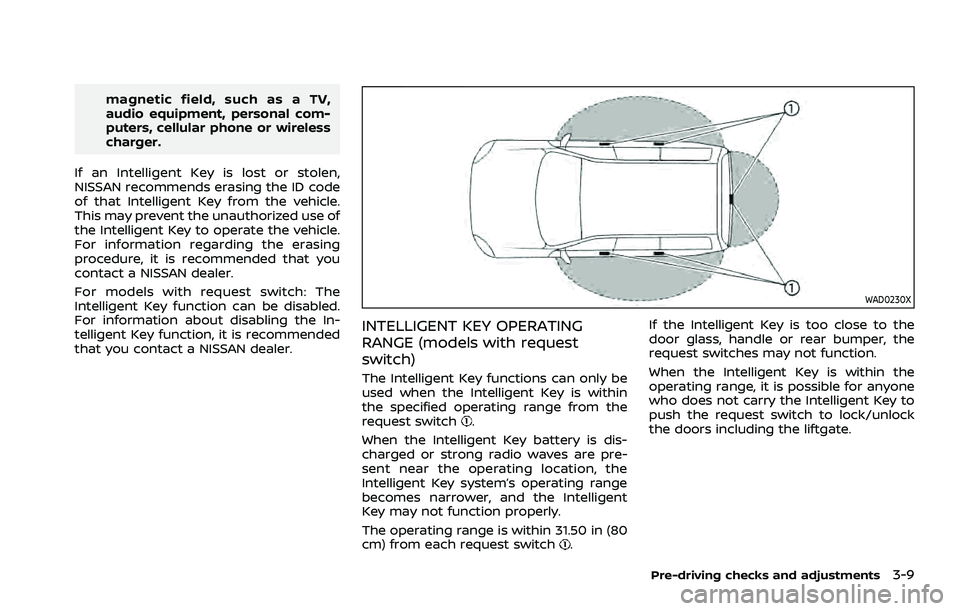
INTELLIGENT KEY OPERATING
RANGE (models with request
switch)
The Intelligent Key functions can only be
used when the Intelligent Key is within
the specified operating range from the
request switch
.
When the Intelligent Key battery is dis-
charged or strong radio waves are pre-
sent near the operating location, the
Intelligent Key system’s operating range
becomes narrower, and the Intelligent
Key may not function properly.
The operating range is within 31.50 in (80
cm) from each request switch
. If the Intelligent Key is too close to the
door glass, handle or rear bumper, the
request switches may not function.
When the Intelligent Key is within the
operating range, it is possible for anyone
who does not carry the Intelligent Key to
push the request switch to lock/unlock
the doors including the liftgate.
Pre-driving checks and adjustments3-9