parking brake NISSAN ROGUE 2021 Owner´s Manual
[x] Cancel search | Manufacturer: NISSAN, Model Year: 2021, Model line: ROGUE, Model: NISSAN ROGUE 2021Pages: 556, PDF Size: 2.7 MB
Page 231 of 556
WAE0546X
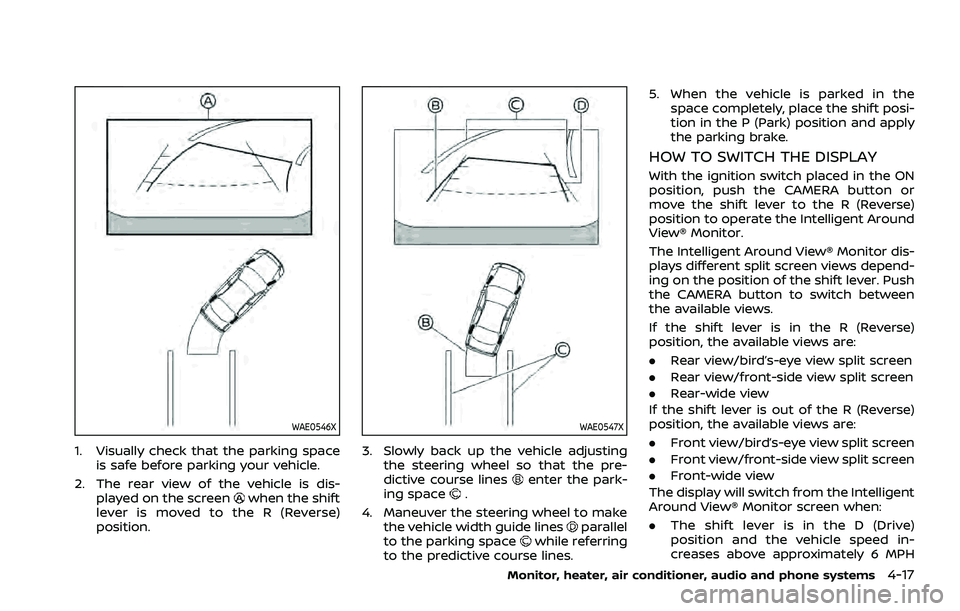
1. Visually check that the parking spaceis safe before parking your vehicle.
2. The rear view of the vehicle is dis- played on the screen
when the shift
lever is moved to the R (Reverse)
position.
WAE0547X
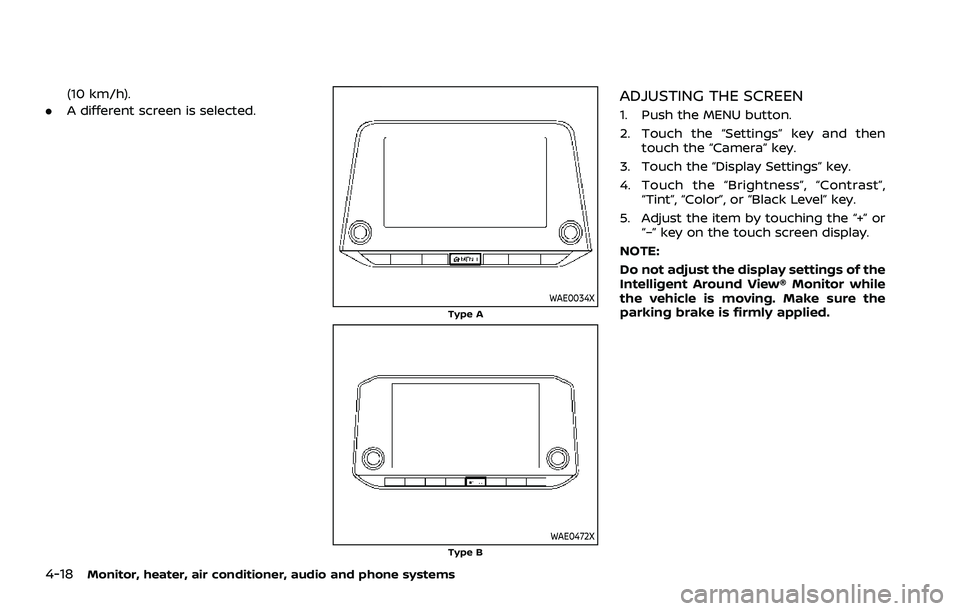
3. Slowly back up the vehicle adjusting the steering wheel so that the pre-
dictive course lines
enter the park-
ing space.
4. Maneuver the steering wheel to make the vehicle width guide lines
parallel
to the parking spacewhile referring
to the predictive course lines. 5. When the vehicle is parked in the
space completely, place the shift posi-
tion in the P (Park) position and apply
the parking brake.
HOW TO SWITCH THE DISPLAY
With the ignition switch placed in the ON
position, push the CAMERA button or
move the shift lever to the R (Reverse)
position to operate the Intelligent Around
View® Monitor.
The Intelligent Around View® Monitor dis-
plays different split screen views depend-
ing on the position of the shift lever. Push
the CAMERA button to switch between
the available views.
If the shift lever is in the R (Reverse)
position, the available views are:
.Rear view/bird’s-eye view split screen
. Rear view/front-side view split screen
. Rear-wide view
If the shift lever is out of the R (Reverse)
position, the available views are:
. Front view/bird’s-eye view split screen
. Front view/front-side view split screen
. Front-wide view
The display will switch from the Intelligent
Around View® Monitor screen when:
. The shift lever is in the D (Drive)
position and the vehicle speed in-
creases above approximately 6 MPH
Monitor, heater, air conditioner, audio and phone systems4-17
Page 232 of 556
4-18Monitor, heater, air conditioner, audio and phone systems
(10 km/h).
. A different screen is selected.
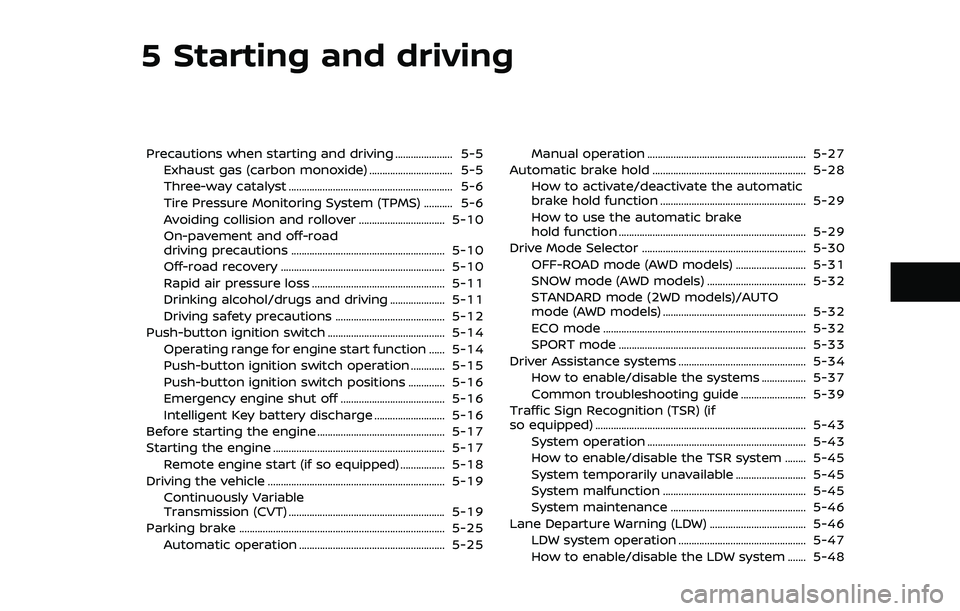
WAE0034XType A
WAE0472XType B
ADJUSTING THE SCREEN
1. Push the MENU button.
2. Touch the “Settings” key and then
touch the “Camera” key.
3. Touch the “Display Settings” key.
4. Touch the “Brightness”, “Contrast”, “Tint”, “Color”, or “Black Level” key.
5. Adjust the item by touching the “+” or “–” key on the touch screen display.
NOTE:
Do not adjust the display settings of the
Intelligent Around View® Monitor while
the vehicle is moving. Make sure the
parking brake is firmly applied.
Page 255 of 556
5 Starting and driving
Precautions when starting and driving ...................... 5-5Exhaust gas (carbon monoxide) ................................ 5-5
Three-way catalyst ............................................................... 5-6
Tire Pressure Monitoring System (TPMS) ........... 5-6
Avoiding collision and rollover ................................. 5-10
On-pavement and off-road
driving precautions ........................................................... 5-10
Off-road recovery ............................................................... 5-10
Rapid air pressure loss ................................................... 5-11
Drinking alcohol/drugs and driving ..................... 5-11
Driving safety precautions .......................................... 5-12
Push-button ignition switch ............................................. 5-14 Operating range for engine start function ...... 5-14
Push-button ignition switch operation ............. 5-15
Push-button ignition switch positions .............. 5-16
Emergency engine shut off ........................................ 5-16
Intelligent Key battery discharge ........................... 5-16
Before starting the engine ................................................. 5-17
Starting the engine .................................................................. 5-17 Remote engine start (if so equipped) ................. 5-18
Driving the vehicle .................................................................... 5-19 Continuously Variable
Transmission (CVT) ............................................................ 5-19
Parking brake ........................................................................\
....... 5-25 Automatic operation ........................................................ 5-25 Manual operation ............................................................. 5-27
Automatic brake hold ........................................................... 5-28 How to activate/deactivate the automatic
brake hold function ........................................................ 5-29
How to use the automatic brake
hold function ........................................................................\
5-29
Drive Mode Selector ............................................................... 5-30 OFF-ROAD mode (AWD models) ........................... 5-31
SNOW mode (AWD models) ...................................... 5-32
STANDARD mode (2WD models)/AUTO
mode (AWD models) ....................................................... 5-32
ECO mode ........................................................................\
...... 5-32
SPORT mode ........................................................................\
5-33
Driver Assistance systems ................................................. 5-34 How to enable/disable the systems ................. 5-37
Common troubleshooting guide ......................... 5-39
Traffic Sign Recognition (TSR) (if
so equipped) ........................................................................\
......... 5-43 System operation ............................................................. 5-43
How to enable/disable the TSR system ........ 5-45
System temporarily unavailable ........................... 5-45
System malfunction ....................................................... 5-45
System maintenance .................................................... 5-46
Lane Departure Warning (LDW) ..................................... 5-46 LDW system operation ................................................. 5-47
How to enable/disable the LDW system ....... 5-48
Page 257 of 556
Turning the AEB with pedestrian detection
system ON/OFF ................................................................ 5-125
AEB with pedestrian detection
system limitations .......................................................... 5-126
System temporarily unavailable ......................... 5-129
System malfunction ...................................................... 5-130
System maintenance ................................................... 5-130
Intelligent Forward Collision
Warning (I-FCW) ....................................................................... 5-132 I-FCW system operation ............................................ 5-134
Turning the I-FCW system ON/OFF ................. 5-135
I-FCW system limitations .......................................... 5-137
System temporarily unavailable ......................... 5-139
System malfunction ...................................................... 5-139
System maintenance ................................................... 5-139
Intelligent Driver Alertness (I-DA) .............................. 5-141 I-DA system operation ................................................ 5-141
How to enable/disable the I-DA system ...... 5-142
I-DA system limitations .............................................. 5-142
System malfunction ...................................................... 5-143
Rear Automatic Braking (RAB) .................................... 5-143
RAB system operation ................................................ 5-145
Turning the RAB system ON/OFF ...................... 5-145
RAB system limitations .............................................. 5-146
System malfunction ...................................................... 5-147
System maintenance ................................................... 5-148
Break-in schedule ................................................................. 5-149
Fuel Efficient Driving Tips ................................................ 5-149
Increasing fuel economy ................................................. 5-150 Intelligent 4x4 (if so equipped) .................................. 5-151
Parking/parking on hills .................................................. 5-153
Electric power steering .................................................... 5-154
Brake system ........................................................................\
... 5-155
Braking precautions ................................................... 5-155
Brake assist ........................................................................\
....... 5-156 Brake assist ....................................................................... 5-156
Anti-lock Braking System (ABS) ........................ 5-156
Vehicle Dynamic Control (VDC) system .............. 5-157 How to turn off the VDC system ..................... 5-158
Brake Force Distribution ......................................... 5-159
Chassis control ....................................................................... 5-160 Intelligent Trace Control ......................................... 5-160
Active Ride Control ..................................................... 5-160
Hill Start Assist system ..................................................... 5-161
Sonar system (if so equipped) ................................... 5-162 System operation ......................................................... 5-163
How to enable/disable the
sonar system ................................................................... 5-165
Sonar system limitations ....................................... 5-166
System temporarily unavailable ....................... 5-167
System maintenance ................................................ 5-167
Rear Sonar System (RSS) (if so equipped) ........ 5-168 System operation ......................................................... 5-168
How to enable/disable the RSS ........................ 5-170
RSS limitations ................................................................ 5-170
System temporarily unavailable ....................... 5-171
System maintenance ................................................ 5-172
Page 263 of 556
Model: TIS-10DL
IC: 7812D-TIS10DL
Body Control Module (BCM)
Model: 40406556
IC: 7812D-5235RXDP
Continental
This device complies with Industry Ca-
nada licence-exempt RSS standard(s).
Operation is subject to the following
two conditions: (1) this device may not
cause interference, and (2) this device
must accept any interference, including
interference that may cause undesired
operation of the device.
TPMS with Easy Fill Tire Alert
WARNING
After rotating the tires, do not use
the Easy-Fill Tire Alert to adjust the
tire pressure. Instead use a gauge to
adjust the tires to the correct pres-
sure in accordance with Tire and
Loading Information label.
When adding air to an under-inflated tire,
the TPMS with Easy Fill Tire Alert provides
visual and audible signals outside the vehicle to help you inflate the tires to
the recommended COLD tire pressure.
Vehicle set-up:
1. Park the vehicle in a safe and level place.
2. Apply the parking brake and push the park button to shift to the P (Park)
position.
3. Place the ignition switch in the ON position. Do not start the engine.
Operation:
1. Add air to the tire.
2. After a few seconds, the hazard in- dicators will start flashing.
3. When the designated pressure is reached, the horn beeps once and
the hazard indicators stop flashing.
4. Perform the above steps for each tire.
. If the tire is over-inflated more than
approximately 4 psi (30 kPa), the horn
beeps and the hazard indicators flash
3 times. To correct the pressure, push
the core of the valve stem on the tire
briefly to release pressure. When the
pressure reaches the designated
pressure, the horn beeps once.
. If the hazard indicator does not flash
within approximately 15 seconds after
starting to inflate the tire, it indicates that the TPMS with Easy Fill Tire Alert
is not operating.
. The TPMS will not activate the Easy Fill
Tire Alert under the following condi-
tions:
— If there is interference from an
external device or transmitter
— The air pressure from the inflation device such as those using a power
socket is not sufficient to inflate the
tire
— If an electrical equipment is being used in or near the vehicle
— There is a malfunction in the TPMS system
— There is a malfunction in the horn or hazard indicators
. If the TPMS with Easy Fill Tire Alert
does not operate due to TPMS inter-
ference, move the vehicle about 3 ft
(1m) backward or forward and try
again.
If the TPMS with Easy Fill Tire Alert is not
working, use a tire pressure gauge.
Starting and driving5-9
Page 267 of 556
.Before operating the vehicle, en-
sure that the driver and all pas-
sengers have their seat belts
fastened.
. Always drive with the floor mats
in place as the floor may became
hot.
. Lower your speed when encoun-
tering strong crosswinds. With a
higher center of gravity, your
vehicle is more affected by strong
side winds. Slower speeds ensure
better vehicle control.
. Do not drive beyond the perfor-
mance capability of the tires,
even with AWD engaged.
. For AWD equipped vehicles, do
not attempt to raise two wheels
off the ground and shift the
transmission to any drive or re-
verse position with the engine
running. Doing so may result in
drivetrain damage or unexpected
vehicle movement which could
result in serious vehicle damage
or personal injury.
. Do not attempt to test an AWD
equipped vehicle on a 2-wheel
dynamometer (such as the dy-
namometers used by some
states for emissions testing), or similar equipment even if the
other two wheels are raised off
the ground. Make sure you inform
test facility personnel that your
vehicle is equipped with AWD
before it is placed on a dynam-
ometer. Using the wrong test
equipment may result in drive-
train damage or unexpected ve-
hicle movement which could
result in serious vehicle damage
or personal injury.
. When a wheel is off the ground
due to an unlevel surface, do not
spin the wheel excessively (AWD
model).
. Accelerating quickly, sharp steer-
ing maneuvers or sudden braking
may cause loss of control.
. If at all possible, avoid sharp
turning maneuvers, particularly
at high speeds. Your vehicle has
a higher center of gravity than a
conventional passenger car. The
vehicle is not designed for cor-
nering at the same speeds as
conventional passenger cars.
Failure to operate this vehicle
correctly could result in loss of
control and/or a rollover acci-
dent. .
Always use tires of the same type,
size, brand, construction (bias,
bias-belted or radial), and tread
pattern on all four wheels. Install
traction devices on the front
wheels when driving on slippery
roads and drive carefully.
. Be sure to check the brakes im-
mediately after driving in mud or
water. See “Brake system” (P.5-
155) for wet brakes.
. Avoid parking your vehicle on
steep hills. If you get out of the
vehicle and it rolls forward, back-
ward or sideways, you could be
injured.
. Whenever you drive off-road
through sand, mud or water as
deep as the wheel hub, more
frequent maintenance may be
required. See the maintenance
schedule shown in the “9. Main-
tenance and schedules” section.
. Spinning the front wheels on
slippery surfaces may cause the
AWD warning message to display
and the AWD system to automa-
tically switch from the AWD mode
to the 2WD mode. This could
reduce traction. Be especially
careful when towing a trailer
Starting and driving5-13
Page 271 of 556
onds after the chime sounds. The
engine will start.
After step 3 is performed, when the
ignition switch is pushed without depres-
sing the brake pedal, the ignition switch
position will change to ON.
NOTE:
. When the ignition switch is pushed
to the ON position or the engine is
started by the above procedures, the
“Key Battery Low” warning appears
(on the vehicle information display)
even if the Intelligent Key is inside
the vehicle. This is not a malfunction.
To turn off the warning, touch the
ignition switch with the Intelligent
Key again.
. If the “Key Battery Low” warning
appears, replace the battery as soon
as possible. (See “Intelligent Key
battery replacement” (P.8-20).) .
Make sure the area around the vehicle
is clear.
. Check fluid levels such as engine oil,
coolant, brake fluid, and window
washer fluid as frequently as possible,
or at least whenever you refuel.
. Check that all windows and lights are
clean.
. Visually inspect tires for their appear-
ance and condition. Also check tires
for proper inflation.
. Lock all doors.
. Position seat and adjust head re-
straints/headrests.
. Adjust inside and outside mirrors.
. Fasten seat belts and ask all passen-
gers to do likewise.
. Check the operation of warning lights
when the ignition switch is placed in
the ON position. (See “Warning lights,
indicator lights and audible remin-
ders” (P.2-13).) 1. Apply the parking brake.
2. Confirm that the vehicle is in the P
(Park) position.
The Intelligent Key must be carried
when operating the ignition switch.
3. Push the ignition switch to the ON position. Depress the brake pedal and
push the ignition switch to start the
engine.
To start the engine immediately, push
and release the ignition switch while
depressing the brake pedal with the
ignition switch in any position.
.If the engine is very hard to start inextremely cold weather or when
restarting, depress the accelerator
pedal a little (approximately 1/3 to
the floor) and while holding, crank
the engine. Release the accelerator
pedal when the engine starts.
.If the engine is very hard to startbecause it is flooded, depress the
accelerator pedal all the way to the
floor and hold it. Push the ignition
switch to the ON position to start
cranking the engine. After 5 or 6
seconds, stop cranking by pushing
the ignition switch to OFF. After
cranking the engine, release the
accelerator pedal. Crank the engine
with your foot off the accelerator
pedal by depressing the brake
Starting and driving5-17
BEFORE STARTING THE ENGINE STARTING THE ENGINE
Page 273 of 556
CONTINUOUSLY VARIABLE TRANS-
MISSION (CVT)
The CVT in your vehicle is electronically
controlled to produce maximum power
and smooth operation.
The recommended operating procedures
for this transmission are shown on the
following pages. Follow these procedures
for maximum vehicle performance and
driving enjoyment.
Engine power may be automatically
reduced to protect the CVT if the engine
speed increases quickly when driving
on slippery roads or while being tested
on some dynamometers.
WARNING
.Do not depress the accelerator
pedal while shifting from P (Park)
or N (Neutral) to R (Reverse), D
(Drive), or M (Manual shift mode).
Always depress the brake pedal
until shifting is completed. Failure
to do so could cause you to lose
control and have an accident.
. Cold engine idle speed is high, so
use caution when shifting into a
forward or reverse gear before
the engine has warmed up. .
Do not downshift abruptly on
slippery roads. This may cause a
loss of control.
. Never shift to either the P (Park)
or R (Reverse) position while the
vehicle is moving forward and P
(Park) or D (Drive) position while
the vehicle is reversing. This could
cause an accident or damage the
transmission.
. Except in an emergency, do not
shift to the N (Neutral) position
while driving. Coasting with the
transmission in the N (Neutral)
position may cause serious da-
mage to the transmission.CAUTION
.To avoid possible damage to your
vehicle, when stopping the vehi-
cle on an uphill grade, do not hold
the vehicle by depressing the
accelerator pedal. The foot brake
should be used for this purpose.
. Do not hang items on the shift
lever. This may cause an accident
due to a sudden start.
Starting the vehicle
1. After starting the engine, fully depress
the foot brake pedal before attempt-
ing to place the shift position out of
the P (Park) position. This CVT is
designed so that the foot brake
pedal must be depressed before
shifting from P (Park) to any driving
position while the ignition switch is
in the ON position. The shift position
cannot be placed out of the P (Park)
position and into any of the other
positions if the ignition switch is
placed in the OFF position.
2. Keep the foot brake pedal depressed and move the shift lever into a driving
position.
3. Release the parking brake, the foot brake pedal, and then gradually start
the vehicle in motion.
CAUTION
.DEPRESS THE FOOT BRAKE PEDAL
- Shifting the shift lever to D
(Drive), R (Reverse) or M (Manual
shift mode) without depressing
the foot brake pedal causes the
vehicle to move slowly when the
engine is running. Make sure the
foot brake pedal is depressed
Starting and driving5-19
DRIVING THE VEHICLE
Page 274 of 556
5-20Starting and driving
fully and the vehicle is stopped
before shifting the shift lever.
. MAKE SURE OF THE SHIFT LEVER
POSITION - Make sure the shift
position is in the desired position
on the vehicle information dis-
play. D (Drive) and M (Manual shift
mode) are used to move forward
and R (Reverse) to back up.
. WARM UP THE ENGINE - Due to the
higher idle speeds when the en-
gine is cold, extra caution must
be exercised when shifting the
shift lever into the driving posi-
tion immediately after starting
the engine.
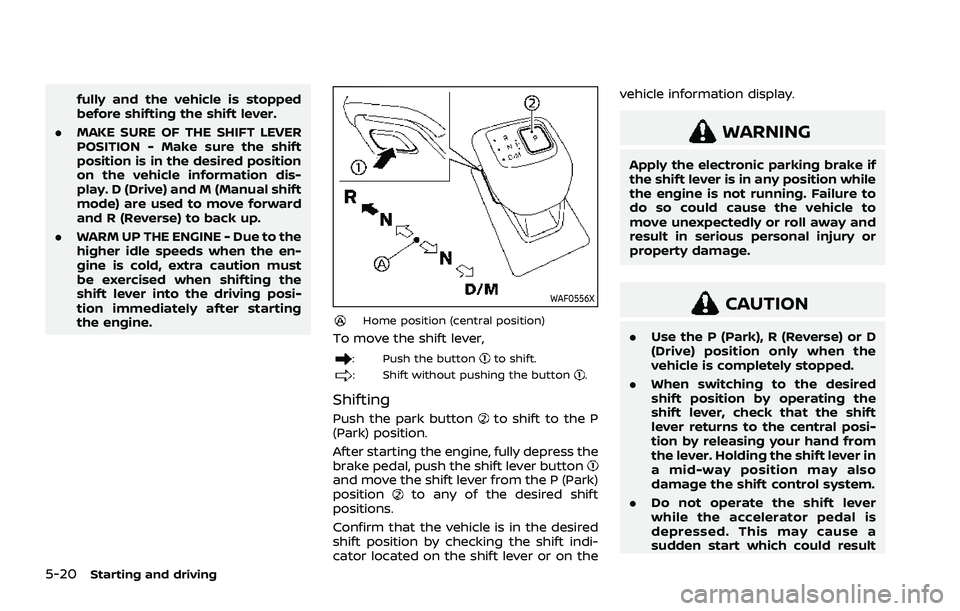
WAF0556X
Home position (central position)
To move the shift lever,
: Push the buttonto shift.
: Shift without pushing the button.
Shifting
Push the park buttonto shift to the P
(Park) position.
After starting the engine, fully depress the
brake pedal, push the shift lever button
and move the shift lever from the P (Park)
positionto any of the desired shift
positions.
Confirm that the vehicle is in the desired
shift position by checking the shift indi-
cator located on the shift lever or on the vehicle information display.
WARNING
Apply the electronic parking brake if
the shift lever is in any position while
the engine is not running. Failure to
do so could cause the vehicle to
move unexpectedly or roll away and
result in serious personal injury or
property damage.
CAUTION
.
Use the P (Park), R (Reverse) or D
(Drive) position only when the
vehicle is completely stopped.
. When switching to the desired
shift position by operating the
shift lever, check that the shift
lever returns to the central posi-
tion by releasing your hand from
the lever. Holding the shift lever in
a mid-way position may also
damage the shift control system.
. Do not operate the shift lever
while the accelerator pedal is
depressed. This may cause a
sudden start which could result
Page 275 of 556
in an accident.
. The following operations are not
allowed because excessive force
would be applied to the transmis-
sion and this may result in da-
mage to the vehicle:
— Moving the shift lever to the R
(Reverse) position when driv-
ing forward
— Moving the shift lever to the D (Drive) position when rever-
sing
If these operations are at-
tempted, a chime sounds and
the vehicle shifts to the N (Neu-
tral) position.
P (Park):
CAUTION
. To prevent transmission damage,
use the P (Park) position only
when the vehicle is completely
stopped.
. Do not slide the shift lever while
pushing the park button. This
may damage the shift control
system. Use this position when the vehicle is
parked or starting the engine. Always
make sure that the vehicle is completely
stopped before pushing the park button
to engage the P (Park) position. For
maximum safety, the brake pedal must
be depressed before engaging the P
(Park) position. Use this position together
with the electronic parking brake. When
parking on a hill, first depress the brake
pedal, apply the electronic parking brake
and then engage the P (Park) position.
The parking lock should not be used as a
brake when parking. In order to secure
the vehicle, always apply the electronic
parking brake in addition to the parking
lock.
In the event of a malfunction of the
vehicle’s electronics, the transmission
may lock in the P (Park) position. Have
the vehicle’s electronics checked immedi-
ately. It is recommended that you visit a
NISSAN dealer for this service.
The P (Park) position is automatically
engaged if:
.
You switch off the ignition switch
. You unfasten the driver’s seat belt and
open the driver side door when the
vehicle is stationary or driving at very
low speed and the transmission is in
the D (Drive) position, the R (Reverse)
position or the N position unless the Neutral hold mode is engaged.
CAUTION
To avoid CVT malfunction, it is re-
commended that you manually
place the shift position in the P (Park)
position under the above conditions.
R (Reverse):
CAUTION
To prevent transmission damage,
use the R (Reverse) position only
when the vehicle is completely
stopped.
Use the R (Reverse) position to back up.
Make sure the vehicle is completely
stopped before selecting the R (Reverse)
position. The brake pedal must be de-
pressed and the shift lever button
pushed to move the shift lever from
the home position to R (Reverse). If the
vehicle is placed in the R (Reverse)
position while the vehicle is moving
forward, the chime will sound and the
vehicle will switch into the N (Neutral)
position.
Starting and driving5-21