phone NISSAN ROGUE 2021 Owner´s Manual
[x] Cancel search | Manufacturer: NISSAN, Model Year: 2021, Model line: ROGUE, Model: NISSAN ROGUE 2021Pages: 556, PDF Size: 2.7 MB
Page 251 of 556
temperature control” (P.4-37).)
To turn the system off
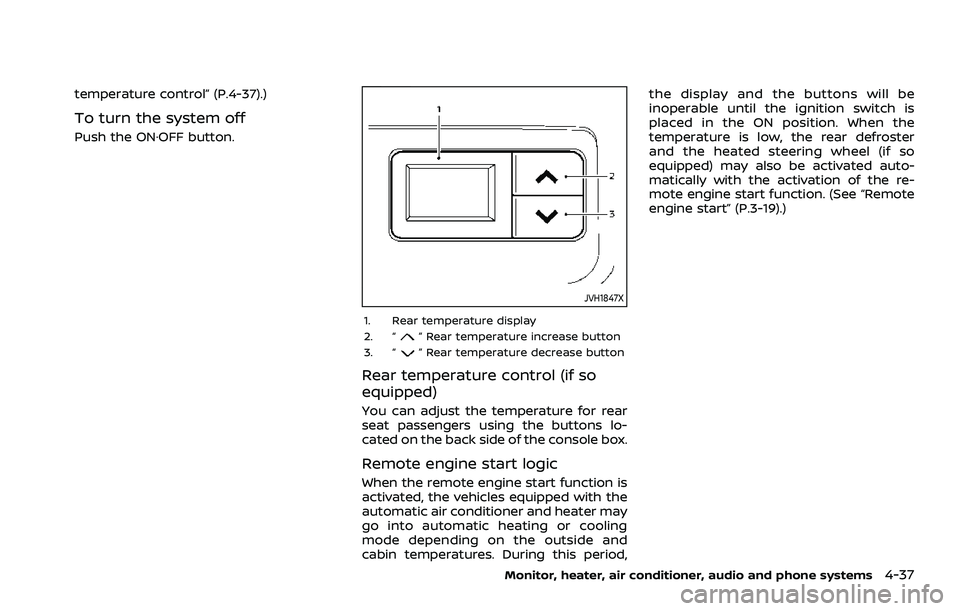
Push the ON·OFF button.
JVH1847X
1. Rear temperature display
2. “” Rear temperature increase button
3. “” Rear temperature decrease button
Rear temperature control (if so
equipped)
You can adjust the temperature for rear
seat passengers using the buttons lo-
cated on the back side of the console box.
Remote engine start logic
When the remote engine start function is
activated, the vehicles equipped with the
automatic air conditioner and heater may
go into automatic heating or cooling
mode depending on the outside and
cabin temperatures. During this period, the display and the buttons will be
inoperable until the ignition switch is
placed in the ON position. When the
temperature is low, the rear defroster
and the heated steering wheel (if so
equipped) may also be activated auto-
matically with the activation of the re-
mote engine start function. (See “Remote
engine start” (P.3-19).)
Monitor, heater, air conditioner, audio and phone systems4-37
Page 252 of 556
4-38Monitor, heater, air conditioner, audio and phone systems
OPERATING TIPS (for automatic air
conditioner)
When the engine coolant temperature
and outside air temperature are low, the
air flow from the foot outlets may be
limited when in the automatic mode.
However, this is not a malfunction. After
the coolant temperature warms up, air
flow from the foot outlets will operate
normally.
For rear temperature control (if so
equipped):
.The purpose of the rear temperature
control is to vary the temperature of
the rear airflow.
. The amount of airflow to the rear
ventilators is primarily controlled by
the front passenger’s blower and
mode settings.
. The amount of airflow to the rear
ventilators is also affected by the rear
temperature setting. Higher rear tem-
perature settings have lower airflow
amounts than cooler temperature
settings. This condition ensures better
comfort to the head and face area,
while primary heating for the rear
passenger seats is provided through
the foot outlets.
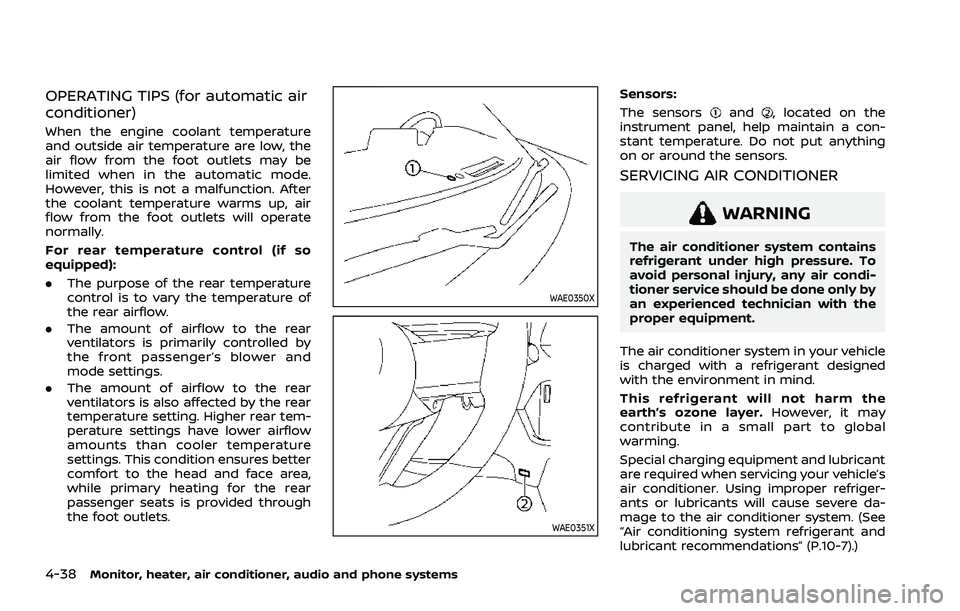
WAE0350X
WAE0351X
Sensors:
The sensors
and, located on the
instrument panel, help maintain a con-
stant temperature. Do not put anything
on or around the sensors.
SERVICING AIR CONDITIONER
WARNING
The air conditioner system contains
refrigerant under high pressure. To
avoid personal injury, any air condi-
tioner service should be done only by
an experienced technician with the
proper equipment.
The air conditioner system in your vehicle
is charged with a refrigerant designed
with the environment in mind.
This refrigerant will not harm the
earth’s ozone layer. However, it may
contribute in a small part to global
warming.
Special charging equipment and lubricant
are required when servicing your vehicle’s
air conditioner. Using improper refriger-
ants or lubricants will cause severe da-
mage to the air conditioner system. (See
“Air conditioning system refrigerant and
lubricant recommendations” (P.10-7).)
Page 253 of 556
A NISSAN dealer will be able to service
your environmentally friendly air condi-
tioner system.
In-cabin microfilter
The air conditioner system is equipped
with an in-cabin microfilter. To make sure
the air conditioner heats, defogs, and
ventilates efficiently, replace the filter
according the specified maintenance in-
tervals listed in the "9. Maintenance and
schedules" section. It is recommended to
visit a NISSAN dealer to replace the filter.
The filter should be replaced if the air flow
decreases significantly or if windows fog
up easily when operating the heater or air
conditioner.
SHARK FIN ANTENNA
The shark fin antenna is located on the
rear part of the vehicle roof.
The radio performance may be affected if
cargo carried on the roof blocks the radio
signal. If possible, do not put cargo near
the shark fin antenna.
A build up of ice on the shark fin antenna
can affect radio performance. Remove
the ice to restore radio reception.When installing a car phone or a CB radio
in your vehicle, be sure to observe the
following precautions, otherwise the new
equipment may adversely affect the elec-
tronic control modules and electronic
control system harness.
WARNING
.
A cellular phone should not be
used for any purpose while driv-
ing so full attention may be given
to vehicle operation. Some juris-
dictions prohibit the use of cellu-
lar phones while driving.
. If you must make a call while your
vehicle is in motion, the hands-
free cellular phone operational
mode (if so equipped) is highly
recommended. Exercise extreme
caution at all times so full atten-
tion may be given to vehicle
operation.
. If a conversation in a moving
vehicle requires you to take
notes, pull off the road to a safe
location and stop your vehicle
before doing so.
Monitor, heater, air conditioner, audio and phone systems4-39
ANTENNA CAR PHONE OR CB RADIO
Page 254 of 556
4-40Monitor, heater, air conditioner, audio and phone systems
CAUTION
.Keep the antenna as far away as
possible from the electronic con-
trol modules.
. Keep the antenna wire more than
8 in (20 cm) away from the
electronic control system har-
ness. Do not route the antenna
wire next to any harness.
. Adjust the antenna standing-
wave ratio as recommended by
the manufacturer.
. Connect the ground wire from the
CB radio chassis to the body.
. For details, it is recommended
you visit a NISSAN dealer.
Page 270 of 556
5-16Starting and driving
3. Push the ignition switch again to theOFF position.
The shift position can be shifted from
the P (Park) position if the ignition
switch is in the ON position and the
brake pedal is depressed.
PUSH-BUTTON IGNITION SWITCH
POSITIONS
ON (Normal operating position)
The ignition system and the electrical
accessory power activate at this position
without the engine turned on.
The ON position has a battery saver
feature that will place the ignition switch
in the OFF position, if the vehicle is not
running, after some time under the fol-
lowing conditions:
. all doors are closed.
. vehicle is in P (Park) position.
OFF position
The engine is turned off in this position.
Auto ACC position
With the vehicle in the P (Park) position,
the Intelligent Key with you and the
ignition placed from ON to OFF, the radio
can still be used for a period of time, or
until the driver’s door is opened. After a
period of time, functions such as radio,
navigation (if so equipped), and Blue-
tooth® Hands-Free Phone System may
be restarted by turning on the audio
system (see the separate NissanConnect®
Owner’s Manual), or by pushing the UN-
LOCK button on the Intelligent Key for up
to a total of 30 minutes.
EMERGENCY ENGINE SHUT OFF
To shut off the engine in an emergency
situation while driving or when the In-
telligent Key battery is discharged, per-
form the following procedure:
.Rapidly push the push-button ignition
switch 3 consecutive times in less
than 1.5 seconds, or
. Push and hold the push-button igni-
tion switch for more than 2 seconds.
After engine shut-off, open the door to
return to the normal condition.
JVS0404X
INTELLIGENT KEY BATTERY DIS-
CHARGE
If the battery of the Intelligent Key is
discharged, or environmental conditions
interfere with the Intelligent Key opera-
tion, start the engine according to the
following procedure:
1. Push the park button to shift to the P (Park) position.
2. Firmly apply the foot brake.
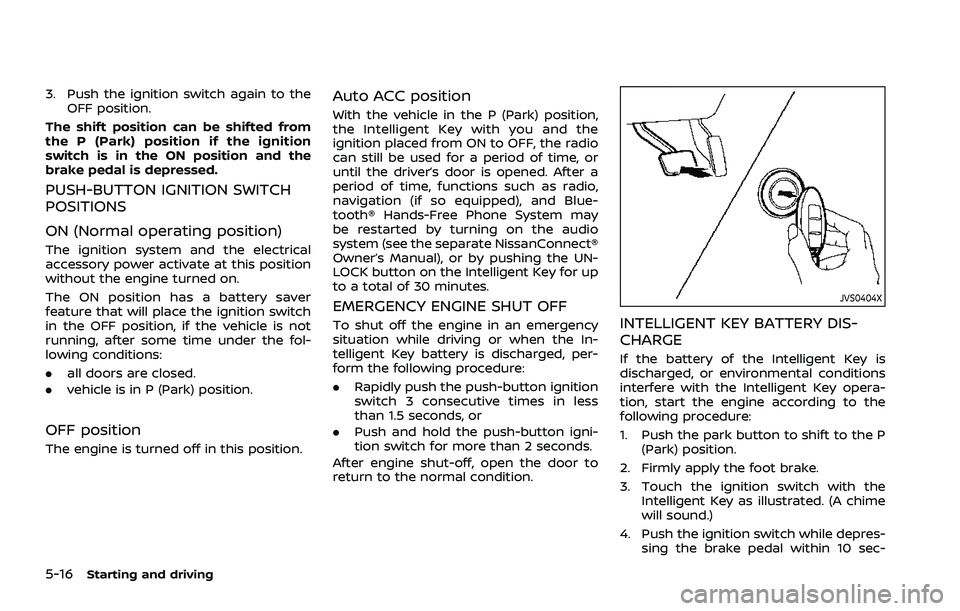
3. Touch the ignition switch with the Intelligent Key as illustrated. (A chime
will sound.)
4. Push the ignition switch while depres- sing the brake pedal within 10 sec-
Page 272 of 556
5-18Starting and driving
pedal and pushing the push-button
ignition switch to start the engine.
If the engine starts, but fails to run,
repeat the above procedure.
CAUTION
Do not operate the starter for more
than 15 seconds at a time. If the
engine does not start, push the
ignition switch to OFF and wait 10
seconds before cranking again,
otherwise the starter could be da-
maged.
4. Warm-up
Allow the engine to idle for at least 30
seconds after starting. Do not race the
engine while warming it up. Drive at
moderate speed for a short distance
first, especially in cold weather. In cold
weather, keep the engine running for
a minimum of 2 - 3 minutes before
shutting it off. Starting and stopping
the engine over a short period of time
may make the vehicle more difficult to
start.
When the engine is racing with no load
and cold, the engine speed is limited
to about 4,500 rpm. 5. To stop the engine, push the park
button to shift to the P (Park) position,
and push the ignition switch to the
OFF position.
NOTE:
Care should be taken to avoid situations
that can lead to potential battery dis-
charge and potential no-start condi-
tions such as:
1. Installation or extended use of elec-
tronic accessories that consume
battery power when the engine is
not running (Phone chargers, GPS,
DVD players, etc.)
2. Vehicle is not driven regularly and/
or only driven short distances.
In these cases, the battery may need to
be charged to maintain battery health.
REMOTE ENGINE START (if so
equipped)
Vehicles started with the remote engine
start function require the ignition switch
to be placed in the ON position before the
shift position can be shifted from the P
(Park) position. To place the ignition
switch in the ON position, perform the
following steps:
1. Make sure that the Intelligent Key is carried with you. 2. Depress the brake pedal.
3. Push the ignition switch once to the
ON position.
For additional information about the
remote engine start function, see “Re-
mote engine start” (P.3-19).
Page 466 of 556
8-12Do-it-yourself
.If the battery is labeled “do not open” it
is maintenance free and battery fluid
should not be checked. It is recom-
mended that you visit a NISSAN dealer
or a qualified specialist workshop to
confirm the battery’s performance.
. Keep the battery surface clean and
dry. Clean the battery with a solution
of baking soda and water.
. Make certain the terminal connec-
tions are clean and securely tightened.
. If the vehicle is not to be used for 30
days or longer, disconnect the nega-
tive 7battery terminal cable to pre-
vent discharging it.
NOTE:
Care should be taken to avoid situations
that can lead to potential battery dis-
charge and potential no-start condi-
tions such as:
1. Installation or extended use of elec-
tronic accessories that consume
battery power when the engine is
not running (Phone chargers, GPS,
DVD players, etc.).
2. Vehicle is not driven regularly and/
or only driven short distances.
In these cases, the battery may need to
be charged to maintain battery health.
WARNING
. Do not expose the battery to
flames or electrical sparks. Hy-
drogen gas generated by the
battery is explosive. Do not allow
battery fluid to contact your skin,
eyes, fabrics or painted surfaces.
After touching a battery or bat-
tery cap, do not touch or rub your
eyes. Thoroughly wash your
hands. If the acid contacts your
eyes, skin or clothing, immedi-
ately flush with water for at least
15 minutes and seek medical
attention.
. When working on or near a bat-
tery, always wear suitable eye
protection and remove all jew-
elry.
. Battery posts, terminals and re-
lated accessories contain lead
and lead compounds. Wash
hands after handling.
. Keep the battery out of the reach
of children.
. Do not tip the battery.
WAI0200X
NOTE:
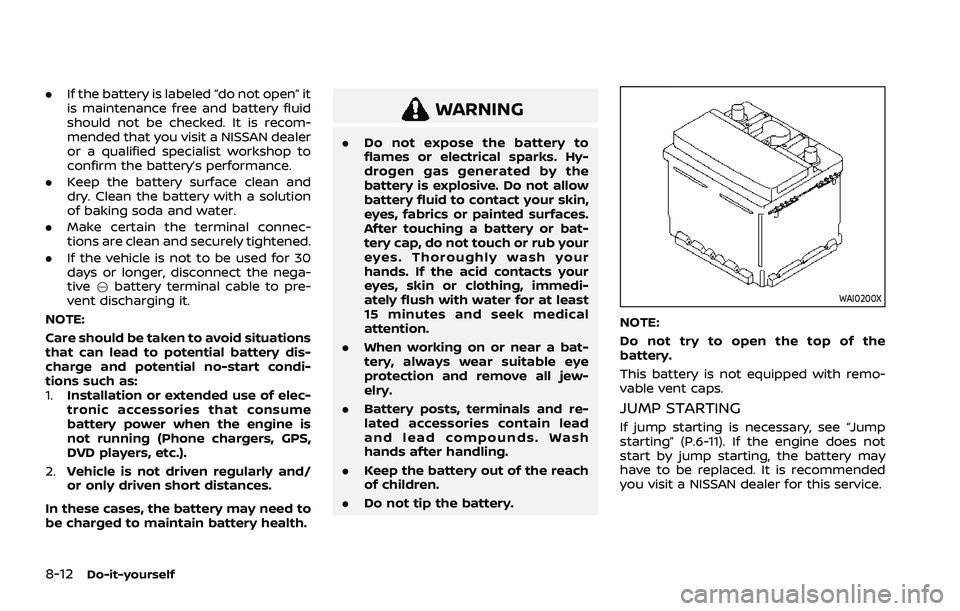
Do not try to open the top of the
battery.
This battery is not equipped with remo-
vable vent caps.
JUMP STARTING
If jump starting is necessary, see “Jump
starting” (P.6-11). If the engine does not
start by jump starting, the battery may
have to be replaced. It is recommended
you visit a NISSAN dealer for this service.
Page 496 of 556
9-4Maintenance and schedules
Seats:Check seat position controls such
as seat adjusters, seatback recliners, etc.
to ensure they operate smoothly and that
all latches lock securely in every position.
Check that the head restraints/headrests
move up and down smoothly and that
the locks (if so equipped) hold securely in
all latched positions.
Steering wheel: Check for changes in the
steering conditions, such as excessive
free play, hard steering or strange noises.
Warning lights and chimes: Make sure
that all warning lights and chimes are
operating properly.
Windshield defroster: Check that the air
comes out of the defroster outlets prop-
erly and in sufficient quantity when oper-
ating the heater or air conditioner.
Windshield wiper and washer*: Check
that the wipers and washers operate
properly and that the wipers do not
streak.
Under the hood and vehicle
The maintenance items listed here should
be checked periodically (for example,
each time you check the engine oil or
refuel).
Battery*: This vehicle is equipped with a
sealed maintenance free battery. It is
recommended that you visit a NISSAN dealer for service.
NOTE:
Care should be taken to avoid situations
that can lead to potential battery dis-
charge and potential no-start condi-
tions such as:
1.
Installation or extended use of elec-
tronic accessories that consume
battery power when the engine is
not running (Phone chargers, GPS,
DVD players, etc.)
2. Vehicle is not driven regularly and/
or only driven short distances.
In these cases, the battery may need to
be charged to maintain battery health.
Brake fluid level*: Make sure that the
brake fluid level is between the MAX and
MIN lines on the reservoir.
Engine coolant level*: Check the coolant
level when the engine is cold.
Engine drive belt*: Make sure that the
drive belt is not frayed, worn, cracked or
oily.
Engine oil level*: Check the level after
parking the vehicle on a level surface and
turning off the engine. Wait more than 10
minutes for the oil to drain back into the
oil pan.
Exhaust system: Make sure there are no
loose supports, cracks or holes. If the sound of the exhaust seems unusual or
there is a smell of exhaust fumes, im-
mediately have the exhaust system in-
spected. It is recommended you visit a
NISSAN dealer for this service. (See “Pre-
cautions when starting and driving” (P.5-
5) for exhaust gas (carbon monoxide).)
Fluid leaks:
Check under the vehicle for
fuel, oil, water or other fluid leaks after the
vehicle has been parked for a while. Water
dripping from the air conditioner after use
is normal. If you should notice any leaks
or if gasoline fumes are evident, check for
the cause and have it corrected immedi-
ately.
Radiator and hoses: Check the front of
the radiator and clean off any dirt, insects,
leaves, etc., that may have accumulated.
Make sure the hoses have no cracks,
deformation, rot or loose connections.
Underbody: The underbody is frequently
exposed to corrosive substances such as
those used on icy roads or to control
dust. It is very important to remove these
substances, otherwise rust will form on
the floor pan, frame, fuel lines and around
the exhaust system. At the end of winter,
the underbody should be thoroughly
flushed with plain water, being careful to
clean those areas where mud and dirt
may accumulate. For additional informa-
tion, see “Cleaning exterior” (P.7-2).
Page 543 of 556
.Vehicle information including distance
to vehicle ahead and lateral position
. Information on the operation of the
ProPILOT Assist and other crash
avoidance features
. ProPILOT Assist malfunction diagnosis
information
. External images from the multi-sen-
sing front camera (Available only
when the SRS air bag or AEB with
pedestrian detection system is acti-
vated)
The ProPILOT Assist does not record
conversations, sounds or images of the
inside of the vehicle.
To read this supplemental data, special
equipment is required and access to the
vehicle or the recording unit is needed.
This supplemental data will only be ac-
cessed with the consent of the vehicle
owner or lessee or as otherwise required
or permitted by law. If downloaded,
NISSAN and third parties entrusted by
NISSAN may use the data recorded for the
purpose of improving NISSAN’s vehicle
safety performance.
NISSAN and third parties entrusted by
NISSAN will not disclose/provide the re-
corded data to a third party except:
. With the consent of the vehicle owner
or with the consent of the lessee .
In response to an official request from
law enforcement, court order, govern-
mental agency, or other legally en-
forceable request
. For research purposes after the data
is modified such that it is no longer
tied to a specific vehicle or vehicle
owner (anonymized)Genuine NISSAN Service Manuals for this
model year and prior can be purchased. A
genuine NISSAN Service Manual is the
best source of service and repair informa-
tion for your vehicle. This manual is the
same one used by the factory trained
technicians working at a NISSAN dealer.
Genuine NISSAN Owner’s Manuals can
also be purchased.
In the USA:
For current pricing and availability of
genuine NISSAN Service Manuals con-
tact:
www.nissan-techinfo.com
For current pricing and availability of
genuine NISSAN Owner’s Manuals con-
tact:
1-800-247-5321
In Canada:
To purchase a copy of a genuine NISSAN
Service Manual or Owner’s Manual for this
model year and prior please contact a
NISSAN dealer. For the phone number
and location of a NISSAN dealer in your
area call the NISSAN Information Center
at 1-800-387-0122 and a bilingual NISSAN
representative will assist you.
Technical and consumer information10-31
OWNER’S MANUAL/SERVICE
MANUAL ORDER INFORMATION
Page 547 of 556
11 Index
A
ABS (Anti-lock Braking System) .................... 5-156
Active Ride Control ................................................. 5-160
Adjustable luggage floor ....................................... 2-72
Advanced Air Bag System .................................... 1-52
Air bag systemAdvanced Air Bag System ............................. 1-52
Driver and front passengersupplemental knee air bag system...... 1-61
Front and rear seat-mounted
side-impact supplemental air
bag system................................................................ 1-63
Front central seat-mounted
side-impact supplemental air
bag system................................................................ 1-63
Front passenger air bag and
status light................................................................. 1-54
Roof-mounted curtain side-impact
supplemental air bag system..................... 1-63
Air bag warning labels ............................................ 1-66
Air bag warning light................................. 1-66, 2-16
Air cleaner housing filter ....................................... 8-15
Air conditioner Air conditioner operation............................... 4-27
Air conditioner service...................................... 4-38
Air conditioner specification label....... 10-11
Air conditioning system refrigerant
and lubricant recommendations............. 4-38
Air conditioning system refrigerant
and oil recommendations ............................. 10-7
Alarm, How to stop alarm (see vehicle
security system)............................................................ 2-51
Alcohol, drugs and driving ................................... 5-11
Alert Rear Door Alert....................................................... 2-65 All-Wheel Drive (AWD) (See
Intelligent 4x4)............................................................ 5-151
Antenna........................................................................\
....... 4-39
Anti-lock Braking System (ABS) .................... 5-156
Anti-lock Braking System (ABS)
warning light ................................................................... 2-17
Appearance care
Exterior appearance care ................................. 7-2
Interior appearance care................................... 7-4
Armrest ........................................................................\
............ 1-9
Audible reminders....................................................... 2-22
AUTO mode...................................................................... 5-32
Automatic Door locks...................................................................... 3-7
Automatic air conditioner
and heater ......................................................... 4-32, 4-35
Automatic brake hold .............................................. 5-28
Automatic Emergency Braking (AEB)
system OFF warning light .................................... 2-17
Automatic Emergency Braking (AEB)
with pedestrian detection system.............. 5-122
Automatic moonroof and sunshade ........... 2-83
Average fuel consumption................................... 2-44
Average speed ............................................................... 2-44
Avoiding collision and rollover.......................... 5-10
AWD (See Intelligent 4x4)................................... 5-151
B
Battery........................................................................\
.......... 8-11 Battery replacement, Intelligent Key ..... 8-20
Battery saver system......................................... 2-61
Variable voltage control system .............. 8-13
Before starting the engine................................... 5-17
Blind Spot Warning (BSW) ..................................... 5-57
Booster seats.................................................................. 1-42 Brake
Anti-lock Braking System (ABS) ............ 5-156
Brake fluid ..................................................................... 8-9
Brake system ....................................................... 5-155
Electronic parking brake system
warning light ............................................................ 2-18
Parking brake .......................................................... 5-25
Warning light............................................................ 2-14
Break-in schedule .................................................... 5-149
Brightness control Instrument panel .................................................. 2-11
Bulb check/instrument panel............................ 2-14
Bulb replacement ........................................................ 8-22
C
Capacities and
recommended fluids/lubricants...................... 10-3
Car phone or CB radio ............................................ 4-39
Card holder....................................................................... 2-77
Cargo cover ..................................................................... 2-77
Cargo light ........................................................................\
2-87
Catalytic converter, Three way catalyst ....... 5-6
Charger USB (Universal Serial Bus)
charging connector............................................ 2-67
Wireless charger .................................................... 2-68
Chassis control........................................................... 5-160
Child restraints .............................................................. 1-23 Booster seats........................................................... 1-42
LATCH system ......................................................... 1-25
Precautions on child restraints................. 1-23
Child safety....................................................................... 1-20
Child safety rear door lock ...................................... 3-7