Wiper NISSAN ROGUE 2023 User Guide
[x] Cancel search | Manufacturer: NISSAN, Model Year: 2023, Model line: ROGUE, Model: NISSAN ROGUE 2023Pages: 508, PDF Size: 2.44 MB
Page 132 of 508
2-50Instruments and controls
WARNING
In freezing temperatures the washer
solution may freeze on the rear
window glass and obscure your vi-
sion. Warm the rear window with the
defroster before you wash the rear
window.
CAUTION
.Do not operate the washer con-
tinuously for more than 30 sec-
onds.
. Do not operate the washer if the
reservoir tank is empty.
. Do not fill the window washer
reservoir tank with washer fluid
concentrates at full strength.
Some methyl alcohol based
washer fluid concentrates may
permanently stain the grille if
spilled while filling the window
washer reservoir tank.
. Pre-mix washer fluid concen-
trates with water to the manu-
facturer’s recommended levels
before pouring the fluid into the
window washer reservoir tank. Do not use the window washer re-
servoir tank to mix the washer
fluid concentrate and water.
If the rear window wiper operation is
interrupted by snow or ice, the wiper
may stop moving to protect its motor. If
this occurs, turn the wiper switch to the
OFF position and remove the snow or
ice that is on and around the wiper
arms. In approximately 1 minute, turn
the switch on again to operate the
wiper.JVI0867X
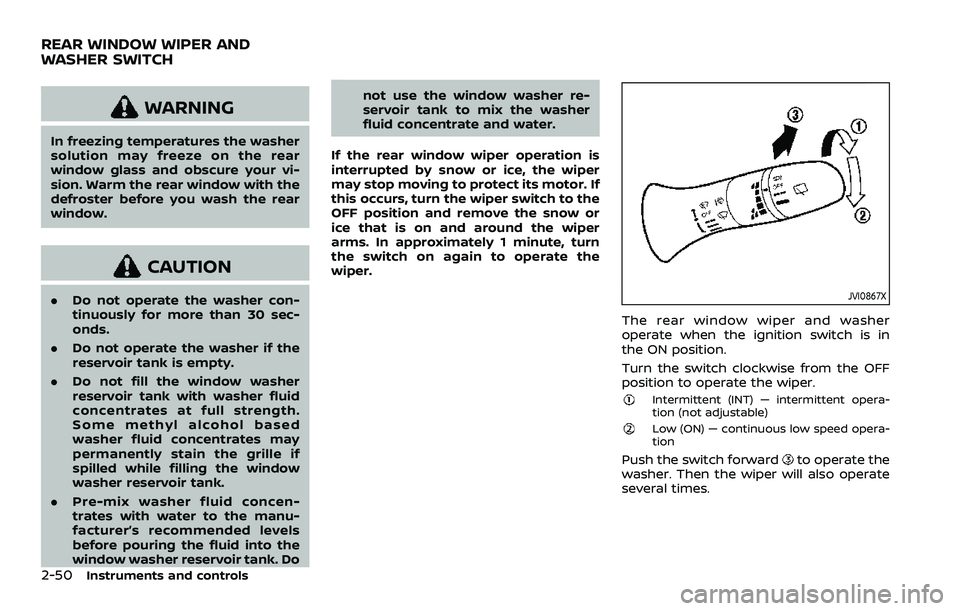
The rear window wiper and washer
operate when the ignition switch is in
the ON position.
Turn the switch clockwise from the OFF
position to operate the wiper.
Intermittent (INT) — intermittent opera-
tion (not adjustable)
Low (ON) — continuous low speed opera-
tion
Push the switch forwardto operate the
washer. Then the wiper will also operate
several times.
REAR WINDOW WIPER AND
WASHER SWITCH
Page 133 of 508
Reverse Link feature:
When the windshield wiper switch is on,
moving the shift lever to the R (Reverse)
position will operate the rear window
wiper.
NOTE:
The Reverse Link feature may be dis-
abled. For additional information, refer
to “Vehicle information display” (P.2-19).
Wiper drip wipe system:
The wiper will also operate once about 3
seconds after the washer and wiper are
operated. This operation is to wipe
washer fluid that has dripped on the
windshield.
JVI0852XType A
JVI0853X
Type B
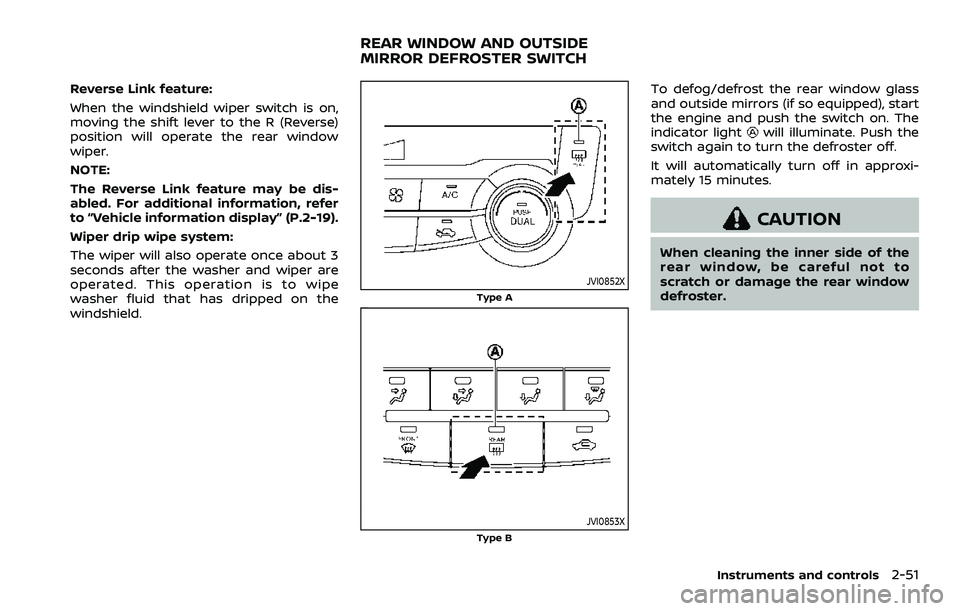
To defog/defrost the rear window glass
and outside mirrors (if so equipped), start
the engine and push the switch on. The
indicator light
will illuminate. Push the
switch again to turn the defroster off.
It will automatically turn off in approxi-
mately 15 minutes.
CAUTION
When cleaning the inner side of the
rear window, be careful not to
scratch or damage the rear window
defroster.
Instruments and controls2-51
REAR WINDOW AND OUTSIDE
MIRROR DEFROSTER SWITCH
Page 135 of 508
To turn the Intelligent Auto Headlight
system off, turn the switch to the OFF,
orposition.
The Intelligent Auto Headlight system can
turn on the headlights automatically
when it is dark and turn off the headlights
when it is light.
The headlights will also be turned on
automatically at twilight or in rainy
weather (when the windshield wiper is
operated continuously).
If the ignition switch is placed in the OFF
position and one of the doors is opened
and this condition is continued, the head-
lights remain on for 5 minutes.
WAC0412X
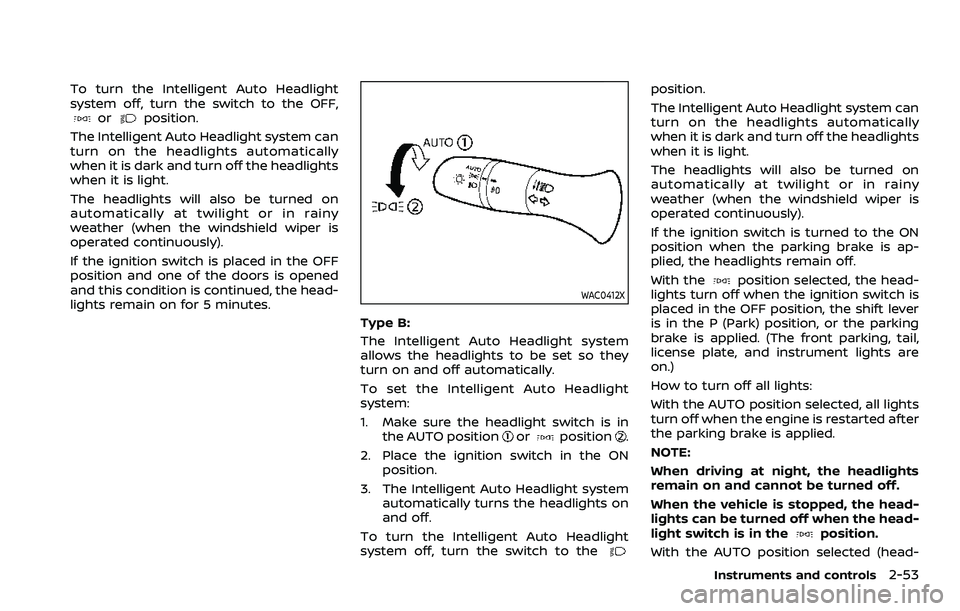
Type B:
The Intelligent Auto Headlight system
allows the headlights to be set so they
turn on and off automatically.
To set the Intelligent Auto Headlight
system:
1. Make sure the headlight switch is in the AUTO position
orposition.
2. Place the ignition switch in the ON position.
3. The Intelligent Auto Headlight system automatically turns the headlights on
and off.
To turn the Intelligent Auto Headlight
system off, turn the switch to the
position.
The Intelligent Auto Headlight system can
turn on the headlights automatically
when it is dark and turn off the headlights
when it is light.
The headlights will also be turned on
automatically at twilight or in rainy
weather (when the windshield wiper is
operated continuously).
If the ignition switch is turned to the ON
position when the parking brake is ap-
plied, the headlights remain off.
With the
position selected, the head-
lights turn off when the ignition switch is
placed in the OFF position, the shift lever
is in the P (Park) position, or the parking
brake is applied. (The front parking, tail,
license plate, and instrument lights are
on.)
How to turn off all lights:
With the AUTO position selected, all lights
turn off when the engine is restarted after
the parking brake is applied.
NOTE:
When driving at night, the headlights
remain on and cannot be turned off.
When the vehicle is stopped, the head-
lights can be turned off when the head-
light switch is in the
position.
With the AUTO position selected (head-
Instruments and controls2-53
Page 235 of 508
the side and center ventilators and to the
front and rear floor outlets.
1. Push the air recirculation
button.
(The indicator light will turn off.)
2. Push the
button. (The indicator
light will turn on.)
3. Turn the fan speed control
dial to
the desired position.
4. Turn the temperature control dial to the desired position.
Heating and defogging:
This mode heats the interior and defogs
the windows.
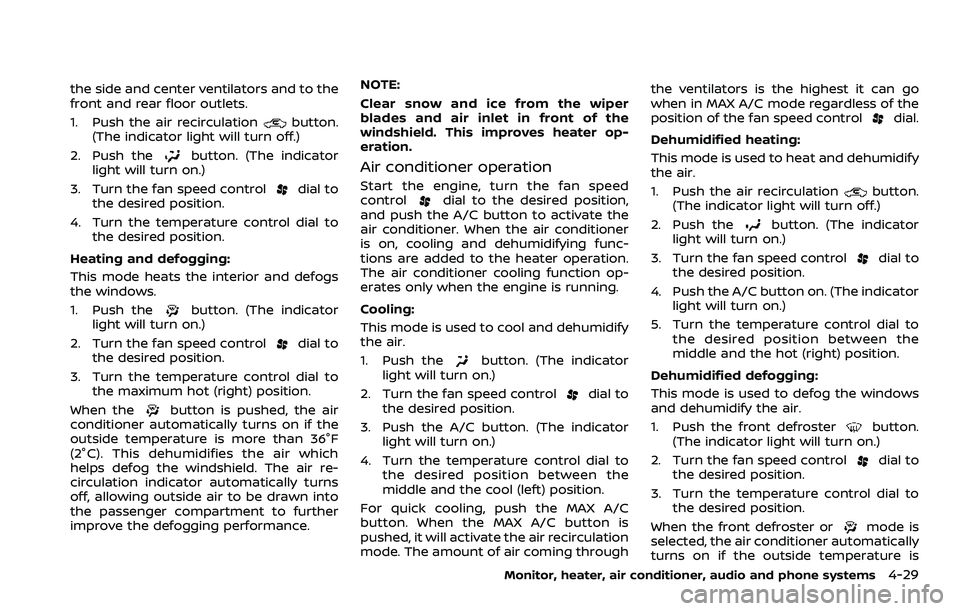
1. Push the
button. (The indicator
light will turn on.)
2. Turn the fan speed control
dial to
the desired position.
3. Turn the temperature control dial to the maximum hot (right) position.
When the
button is pushed, the air
conditioner automatically turns on if the
outside temperature is more than 36°F
(2°C). This dehumidifies the air which
helps defog the windshield. The air re-
circulation indicator automatically turns
off, allowing outside air to be drawn into
the passenger compartment to further
improve the defogging performance. NOTE:
Clear snow and ice from the wiper
blades and air inlet in front of the
windshield. This improves heater op-
eration.
Air conditioner operation
Start the engine, turn the fan speed
controldial to the desired position,
and push the A/C button to activate the
air conditioner. When the air conditioner
is on, cooling and dehumidifying func-
tions are added to the heater operation.
The air conditioner cooling function op-
erates only when the engine is running.
Cooling:
This mode is used to cool and dehumidify
the air.
1. Push the
button. (The indicator
light will turn on.)
2. Turn the fan speed control
dial to
the desired position.
3. Push the A/C button. (The indicator light will turn on.)
4. Turn the temperature control dial to the desired position between the
middle and the cool (left) position.
For quick cooling, push the MAX A/C
button. When the MAX A/C button is
pushed, it will activate the air recirculation
mode. The amount of air coming through the ventilators is the highest it can go
when in MAX A/C mode regardless of the
position of the fan speed control
dial.
Dehumidified heating:
This mode is used to heat and dehumidify
the air.
1. Push the air recirculation
button.
(The indicator light will turn off.)
2. Push the
button. (The indicator
light will turn on.)
3. Turn the fan speed control
dial to
the desired position.
4. Push the A/C button on. (The indicator light will turn on.)
5. Turn the temperature control dial to the desired position between the
middle and the hot (right) position.
Dehumidified defogging:
This mode is used to defog the windows
and dehumidify the air.
1. Push the front defroster
button.
(The indicator light will turn on.)
2. Turn the fan speed control
dial to
the desired position.
3. Turn the temperature control dial to the desired position.
When the front defroster or
mode is
selected, the air conditioner automatically
turns on if the outside temperature is
Monitor, heater, air conditioner, audio and phone systems4-29
Page 325 of 508
.The steering assist is intended for
use on well-developed freeways
or highways with gentle (moder-
ate) curves. To avoid risk of an
accident,do not use this system
on local or non-highway roads.
. The steering assist only steers
the vehicle to maintain its posi-
tion in the center of a lane. The
vehicle will not steer to avoid
objects in the road in front of
the vehicle or to avoid a vehicle
moving into your lane.
. It is the driver’s responsibility to
stay alert, drive safely, keep the
vehicle in the traveling lane, and
be in control of the vehicle at all
times. Never take your hands off
the steering wheel when driving.
Always keep your hands on the
steering wheel and drive your
vehicle safely.
. Always drive carefully and atten-
tively when using the steering
assist. Read and understand the
Owner’s Manual thoroughly be-
fore using the steering assist. To
avoid serious injury or death, do
not rely on the system to prevent
accidents or to control the vehi-
cle’s speed in emergency situa-
tions. Do not use the steering assist except in appropriate road
and traffic conditions.
Steering assist operation
The steering assist controls the steering
system to help keep your vehicle near the
center of the lane when driving. The
steering assist is combined with the
Intelligent Cruise Control (ICC) system.
For additional information, see “Intelligent
Cruise Control (ICC)” (P.5-75).
The steering assist can be activated when
the following conditions are met:
.
The ICC system is activated.
. Lane markers on both sides are clearly
detected.
. A vehicle ahead is detected (when the
vehicle is driven at speeds under 37
MPH (60 km/h)).
. The driver grips the steering wheel.
. The vehicle is driven at the center of
the lane.
. The turn signals are not operated.
. The windshield wiper is not operated
in the high speed operation (the
steering assist function is disabled
after the wiper operates for approxi-
mately 10 seconds).
WAF0062X
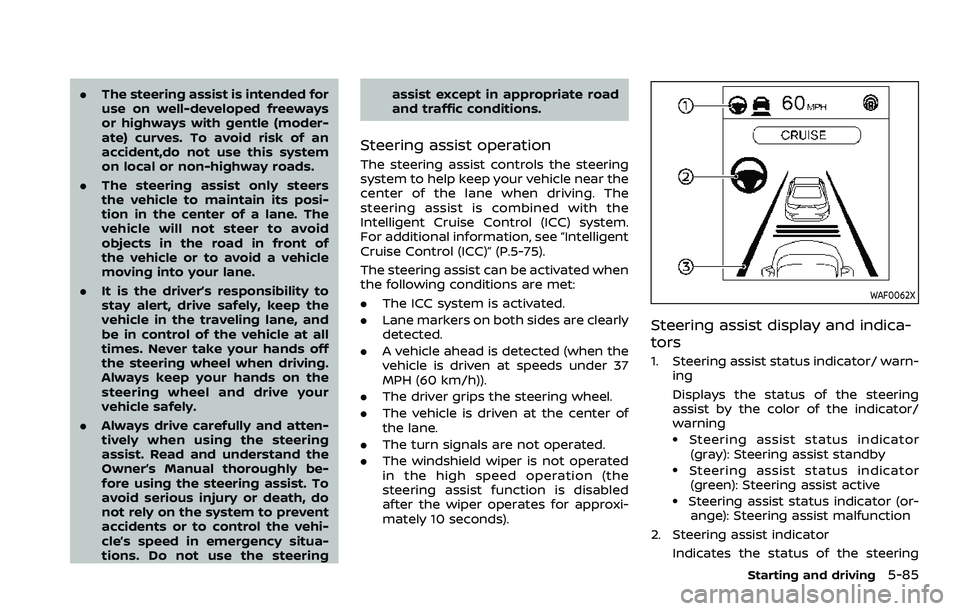
Steering assist display and indica-
tors
1. Steering assist status indicator/ warn-
ing
Displays the status of the steering
assist by the color of the indicator/
warning
.Steering assist status indicator
(gray): Steering assist standby
.Steering assist status indicator(green): Steering assist active
.Steering assist status indicator (or- ange): Steering assist malfunction
2. Steering assist indicator Indicates the status of the steering
Starting and driving5-85
Page 329 of 508
tions (for example, tire wear,
abnormal tire pressure, instal-
lation of a spare tire (if so
equipped), tire chains, non-
standard wheels)
— When the vehicle is equipped with non-original brake or
suspension parts
— When an object such as a sticker or cargo obstructs the
camera
— When excessively heavy bag- gage is loaded in the rear seat
or luggage area of your vehi-
cle
— When the vehicle load capa- city is exceeded
. Excessive noise will interfere with
the warning chime sound, and
the beep may not be heard.
. For the ProPILOT assist system to
operate properly, the windshield
in front of the camera must be
clean. Replace worn wiper blades.
The correct size wiper blades
must be used to help make sure
the windshield is kept clean. Only
use Genuine NISSAN wiper blades,
or equivalent wiper blades, that
are specifically designed for use on your vehicle model and model
year. It is recommended that you
visit your NISSAN dealer for the
correct parts for your vehicle.
Steering Assist temporary standby
Automatic standby due to driving op-
eration:
When the driver activates the turn signal,
the Steering Assist is temporarily placed
in a standby mode. (The Steering Assist
restarts automatically when the operat-
ing conditions are met again.)
Automatic standby:
In the following cases, a warning mes-
sage is displayed along with the chime,
and the Steering Assist is placed in a
temporary standby mode. (The Steering
Assist restarts automatically when the
operating conditions are met again.)
.
When lane markers on both sides are
no longer detected
. When a vehicle ahead is no longer
detected under approximately 37 MPH
(60 km/h)
Steering assist cancel
Under the following conditions, the steer-
ing assist cancels, and the steering assist
status indicator and the steering assist
indicator turn off:
. When unusual lane markers appear in
the traveling lane or when the lane
marker cannot be correctly detected
for some time due to certain condi-
tions (for example, a snow rut, the
reflection of light on a rainy day, the
presence of several unclear lane mar-
kers)
. When the windshield wiper operates
in the high speed operation (the
steering assist is disabled when the
wiper operates for more than approxi-
mately 10 seconds)
Action to take:
Turn the ICC system off using the CANCEL
switch. When the conditions listed above
are no longer present, turn the ICC
system on again.
Steering assist malfunction
When the system malfunctions, it turns
off automatically. The steering assist
status warning (orange) illuminates. A
chime may sound depending on the
situation.
Starting and driving5-89
Page 382 of 508
5-142Starting and driving
TIRE EQUIPMENT
SUMMER tires have a tread designed to
provide superior performance on dry
pavement. However, the performance of
these tires will be substantially reduced in
snowy and icy conditions. If you operate
your vehicle on snowy or icy roads,
NISSAN recommends the use of MUD &
SNOW or ALL SEASON tires on all four
wheels. It is recommended you consult a
NISSAN dealer for the tire type, size, speed
rating and availability information.
For additional traction on icy roads,
studded tires may be used. However,
some U.S. states and Canadian provinces
prohibit their use. Check local, state and
provincial laws before installing studded
tires.
Skid and traction capabilities of
studded snow tires, on wet or dry
surfaces, may be poorer than that of
non-studded snow tires.
Tire chains may be used. For details, see
“Tire chains” (P.8-36) of this manual.
All-Wheel Drive (AWD) model
If you install snow tires, they must also be
the same size, brand, construction and
tread pattern on all four wheels.
SPECIAL WINTER EQUIPMENT
It is recommended that the following
items be carried in the vehicle during
winter:
.A scraper and stiff-bristled brush to
remove ice and snow from the win-
dows and wiper blades.
. A sturdy, flat board to be placed under
the jack to give it firm support.
. A shovel to dig the vehicle out of
snow-drifts.
. Extra window washer fluid to refill the
reservoir tank.
DRIVING ON SNOW OR ICE
WARNING
. Wet ice (32°F, 0°C and freezing
rain), very cold snow or ice can be
slick and very hard to drive on.
The vehicle will have much less
traction or “grip” under these
conditions. Try to avoid driving
on wet ice until the road is salted
or sanded. .
Whatever the condition, drive
with caution. Accelerate and slow
down with care. If accelerating or
downshifting too fast, the drive
wheels will lose even more trac-
tion.
. Allow more stopping distance
under these conditions. Braking
should be started sooner than on
dry pavement.
. Allow greater following distances
on slippery roads.
. Watch for slippery spots (glare
ice). These may appear on an
otherwise clear road in shaded
areas. If a patch of ice is seen
ahead, brake before reaching it.
Try not to brake while on the ice,
and avoid any sudden steering
maneuvers.
. Do not use cruise control on
slippery roads.
. Snow can trap dangerous ex-
haust gases under your vehicle.
Keep snow clear of the exhaust
pipe and from around your vehi-
cle.
Page 413 of 508
8 Do-it-yourself
Maintenance precautions ...................................................... 8-2
Engine compartment check locations ........................ 8-3MR20DD engine model ..................................................... 8-4
Engine cooling system ............................................................. 8-4 Checking engine coolant level .................................... 8-5
Changing engine coolant ................................................ 8-6
Engine oil ........................................................................\
..................... 8-6 Checking engine oil level ................................................. 8-6
Changing engine oil and filter ..................................... 8-6
Continuously Variable Transmission
(CVT) fluid ........................................................................\
.................... 8-9
Brake and clutch (if so equipped) fluid ....................... 8-9
Window washer fluid .............................................................. 8-10
Battery ........................................................................\
........................ 8-11 Jump starting ........................................................................\
. 8-12
Variable voltage control system ................................... 8-13
Drive belt ........................................................................\
.................. 8-13
Spark plugs ........................................................................\
............. 8-14 Replacing spark plugs ..................................................... 8-14
Air cleaner ........................................................................\
............... 8-15
Air duct removal .................................................................. 8-15
Air cleaner filter replacement ................................... 8-15 Windshield wiper blades ..................................................... 8-16
Cleaning ........................................................................\
........... 8-16
Replacing ........................................................................\
........ 8-16
Rear window wiper blade .................................................. 8-17
Brakes ........................................................................\
........................ 8-17 Self-adjusting brakes ..................................................... 8-17
Brake pad wear warning ............................................ 8-17
Fuses ........................................................................\
........................... 8-18 Engine compartment .................................................... 8-18
Passenger compartment ........................................... 8-20
Key fob battery replacement .......................................... 8-21
Intelligent Key battery replacement .......................... 8-23
Lights ........................................................................\
.......................... 8-25 Headlights ........................................................................\
...... 8-25
Exterior and interior lights ........................................ 8-27
Wheels and tires ........................................................................\
8-29
Tire pressure ........................................................................\
8-29
Tire labeling ........................................................................\
.. 8-33
Types of tires ....................................................................... 8-35
Tire chains ........................................................................\
...... 8-36
Changing wheels and tires ...................................... 8-37
Page 428 of 508
8-16Do-it-yourself
CLEANING
If your windshield is not clear after using
the windshield washer or if a wiper blade
chatters when running, wax or other
material may be on the blade or wind-
shield.
Clean the outside of the windshield with a
washer solution or a mild detergent. Your
windshield is clean if beads do not form
when rinsing with clear water.
Clean each blade by wiping it with a cloth
soaked in a washer solution or a mild
detergent. Then rinse the blade with clear
water. If your windshield is still not clear
after cleaning the blades and using the
wiper, replace the blades.
CAUTION
Worn windshield wiper blades can
damage the windshield and impair
driver vision.
SDI2359
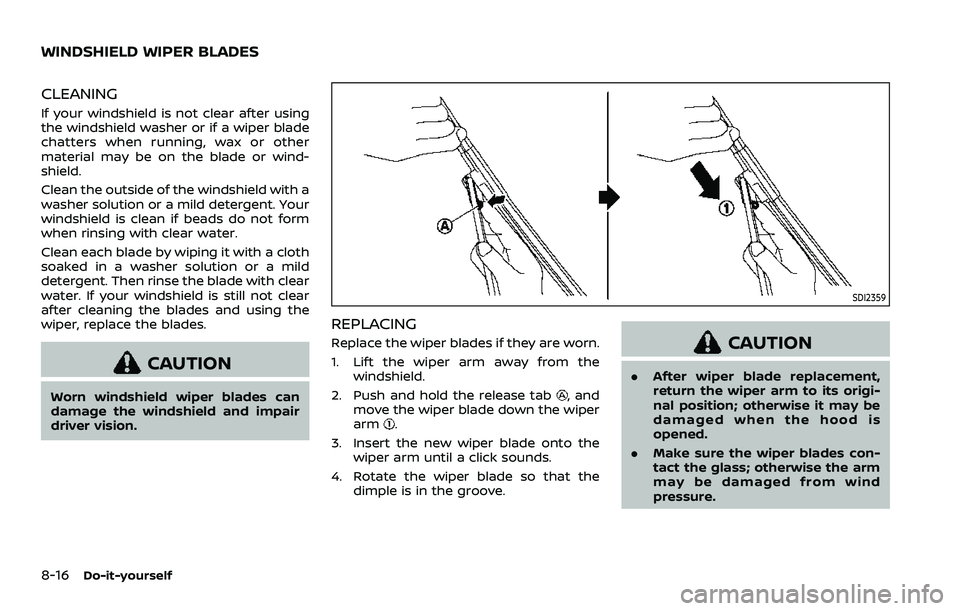
REPLACING
Replace the wiper blades if they are worn.
1. Lift the wiper arm away from thewindshield.
2. Push and hold the release tab
, and
move the wiper blade down the wiper
arm
.
3. Insert the new wiper blade onto the wiper arm until a click sounds.
4. Rotate the wiper blade so that the dimple is in the groove.
CAUTION
.After wiper blade replacement,
return the wiper arm to its origi-
nal position; otherwise it may be
damaged when the hood is
opened.
. Make sure the wiper blades con-
tact the glass; otherwise the arm
may be damaged from wind
pressure.
WINDSHIELD WIPER BLADES
Page 429 of 508
SDI2693
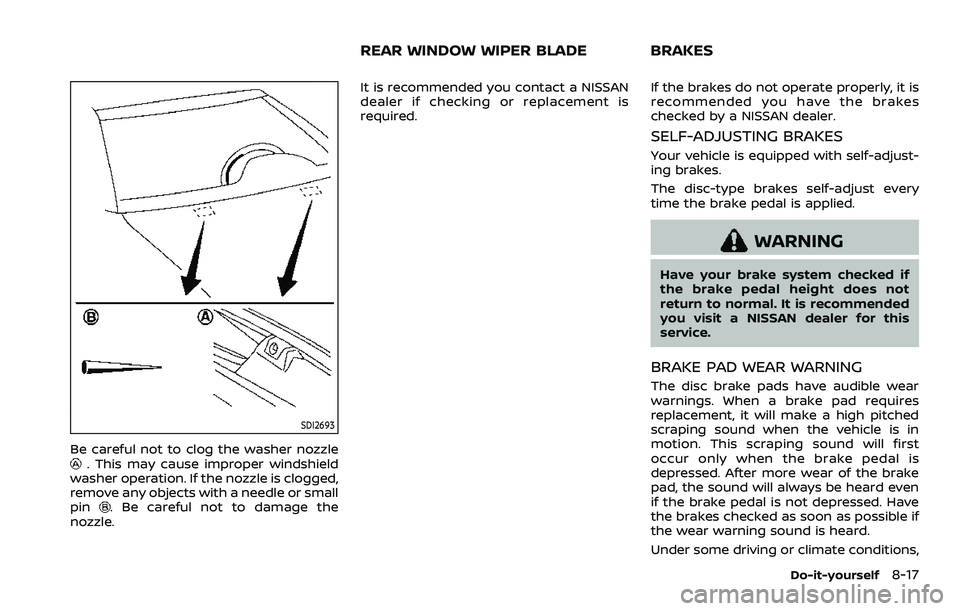
Be careful not to clog the washer nozzle. This may cause improper windshield
washer operation. If the nozzle is clogged,
remove any objects with a needle or small
pin
. Be careful not to damage the
nozzle. It is recommended you contact a NISSAN
dealer if checking or replacement is
required.
If the brakes do not operate properly, it is
recommended you have the brakes
checked by a NISSAN dealer.
SELF-ADJUSTING BRAKES
Your vehicle is equipped with self-adjust-
ing brakes.
The disc-type brakes self-adjust every
time the brake pedal is applied.
WARNING
Have your brake system checked if
the brake pedal height does not
return to normal. It is recommended
you visit a NISSAN dealer for this
service.
BRAKE PAD WEAR WARNING
The disc brake pads have audible wear
warnings. When a brake pad requires
replacement, it will make a high pitched
scraping sound when the vehicle is in
motion. This scraping sound will first
occur only when the brake pedal is
depressed. After more wear of the brake
pad, the sound will always be heard even
if the brake pedal is not depressed. Have
the brakes checked as soon as possible if
the wear warning sound is heard.
Under some driving or climate conditions,
Do-it-yourself8-17
REAR WINDOW WIPER BLADE BRAKES